TermCanvas app icon # TermCanvas **Your terminals, on an infinite canvas.** [![GitHub release](https://img.shields.io/github/v/release/blueberrycongee/termcanvas)](https://github.com/blueberrycongee/termcanvas/releases) [![Downloads](https://img.shields.io/github/downloads/blueberrycongee/termcanvas/total?label=downloads)](https://github.com/blueberrycongee/termcanvas/releases) [![License: MIT](https://img.shields.io/badge/License-MIT-blue.svg)](LICENSE) [![Platform](https://img.shields.io/badge/platform-macOS%20%7C%20Linux%20%7C%20Windows-lightgrey)]() [![Website](https://img.shields.io/badge/website-termcanvas-e8b840)](https://website-ten-mu-37.vercel.app) [**termcanvas.dev →**](https://website-ten-mu-37.vercel.app)


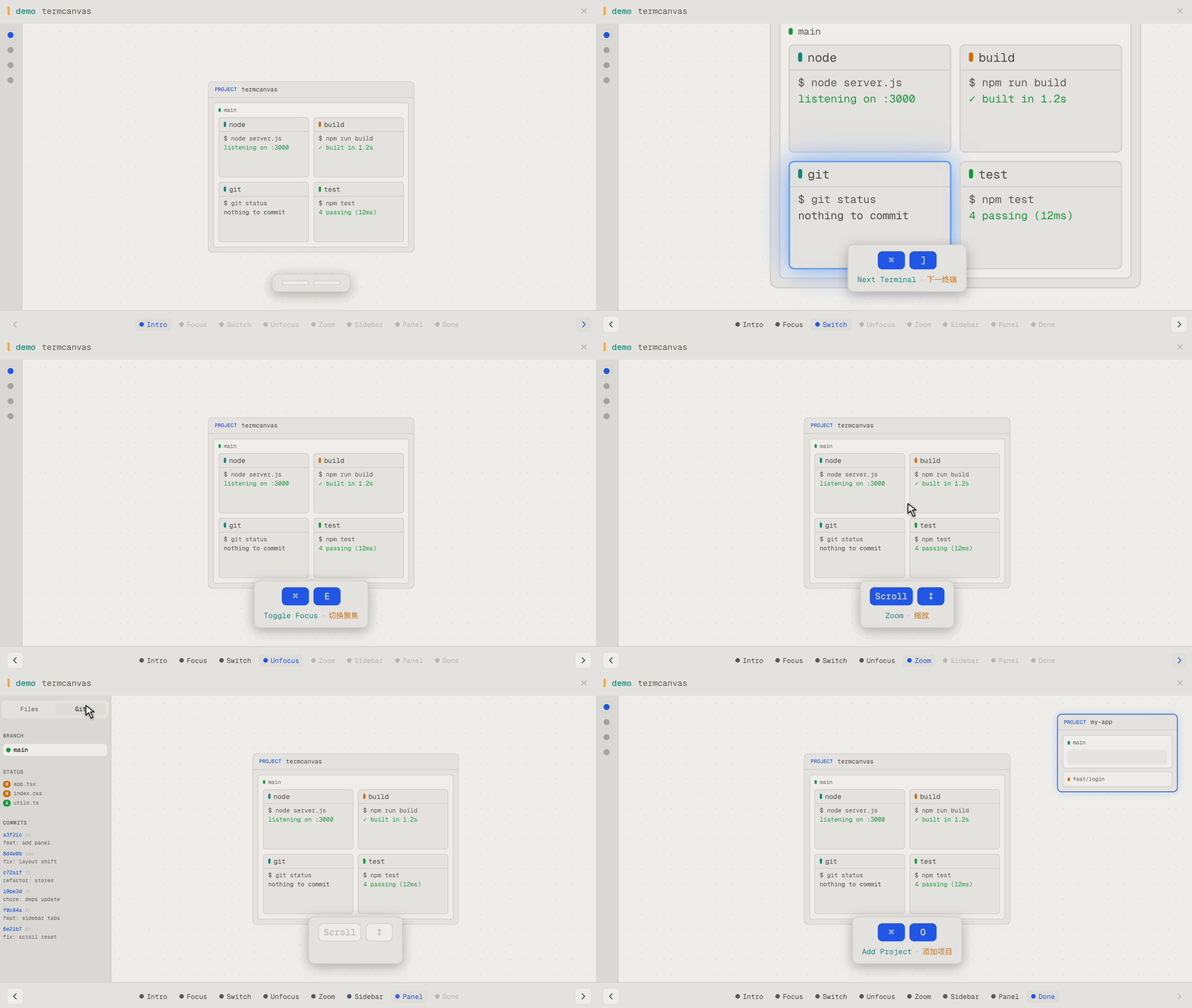
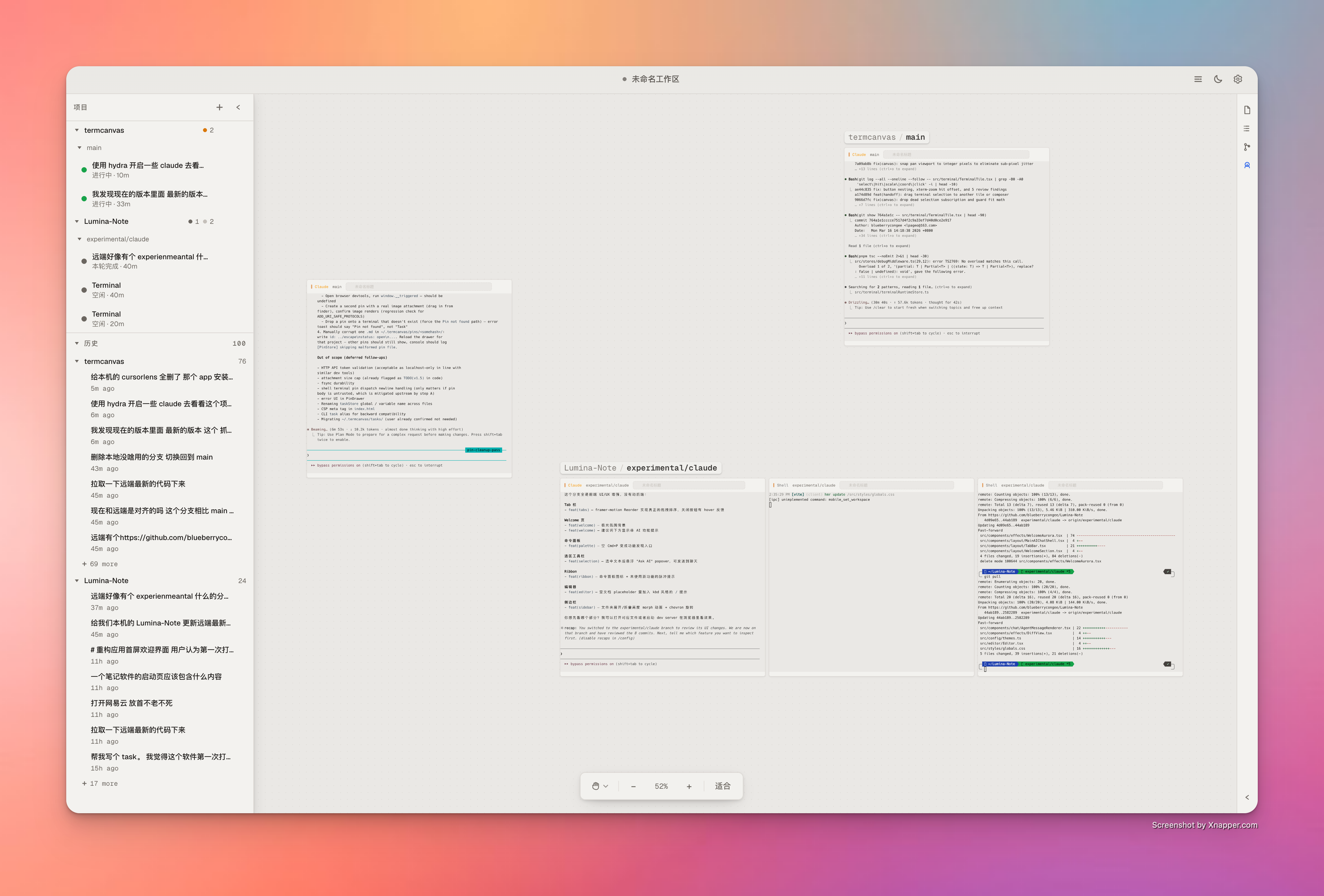
TermCanvas in action — canvas navigation, focus, zoom, and panel switching
TermCanvas — multiple AI agents arranged on an infinite canvas

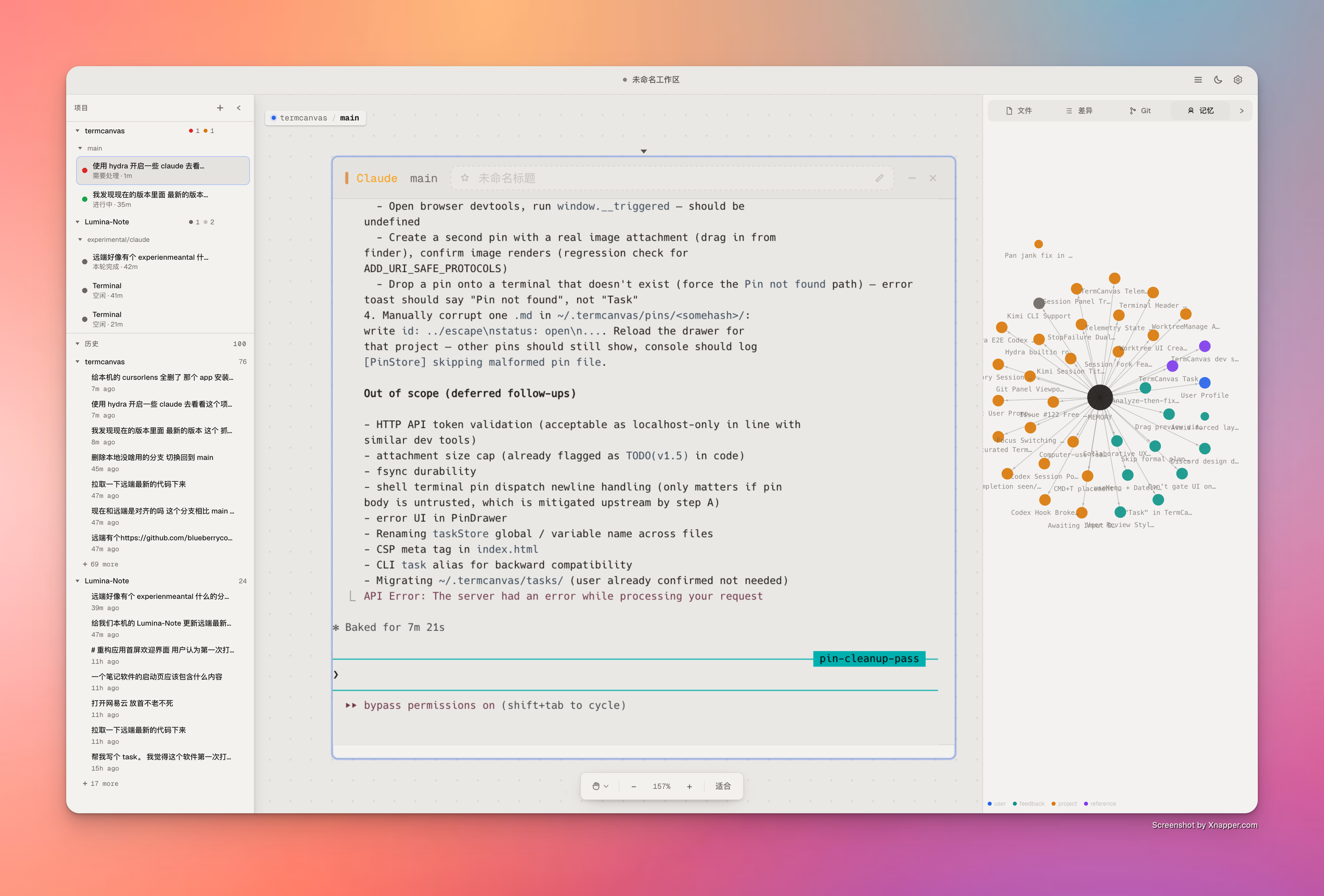
TermCanvas Hub — knowledge graph view with sessions sidebar

TermCanvas spreads all your terminals across an infinite spatial canvas — no more tabs, no more split panes. Drag them around, zoom in to focus, zoom out to see the big picture. It organizes everything in a **Project → Worktree → Terminal** hierarchy that mirrors how you actually use git. Add a project, and TermCanvas auto-detects its worktrees. Create a new worktree from the terminal, and it appears on the canvas instantly.

中文文档 →

> **New to TermCanvas?** Read the full [**User Guide**](./docs/user-guide.md) — every interaction explained, every keyboard shortcut, plus the non-obvious tricks (⌘E focus chain, drag-to-stash, session replay, etc.). --- ## Quick Start **Download** — grab the latest build from [GitHub Releases](https://github.com/blueberrycongee/termcanvas/releases). > [!IMPORTANT] > **Apple Silicon (M-series) Macs — pick the file with `arm64` in its name** > Files **with** `arm64` in the filename (e.g. `TermCanvas-X.Y.Z-arm64.dmg`, `TermCanvas-X.Y.Z-arm64-mac.zip`) are native Apple Silicon builds. Files **without** `arm64` are Intel (x64) builds — they'll still launch on M-series Macs via Rosetta 2, but you'll see noticeable lag when panning/zooming the canvas. > > To verify after install: open **Activity Monitor**, find TermCanvas, and check the **Kind** column — it should say **Apple**, not **Intel**. If it says Intel, delete the app and redownload the `arm64` variant. > [!WARNING] > **macOS note for unsigned builds** > If macOS says TermCanvas is damaged or blocks launch because the app is unsigned, clear the quarantine attribute and try again: > > ```bash > xattr -cr /Applications/TermCanvas.app > ``` > > If you installed the app somewhere else, replace the path with the actual app location. **Build from source:** This workspace uses `pnpm`, and `pnpm-lock.yaml` is the canonical lockfile. ```bash git clone https://github.com/blueberrycongee/termcanvas.git cd termcanvas pnpm install pnpm dev ``` **Install CLI tools** — after launching the app, go to Settings → General → Command line interface and click Register. This adds `termcanvas` and `hydra` to your PATH. Registration also installs TermCanvas skills and lifecycle hooks for Claude/Codex. For Codex 0.129.0 and newer, TermCanvas writes the required hook trust state in `~/.codex/config.toml` so the generated hooks are reviewed/trusted and continue to emit terminal lifecycle and telemetry events. --- ## Features ### Canvas Infinite canvas — pan, zoom, and arrange terminals freely. Three-layer hierarchy: projects contain worktrees, worktrees contain terminals. New worktrees appear automatically as you create them. Double-click a terminal title bar to zoom-to-fit. Drag to reorder. Box-select multiple terminals. Draw and annotate freely on the canvas itself with the Free Canvas tool — sketches, callouts, and grouping lines live alongside your terminals. Save your entire layout to a `.termcanvas` file. ### AI Coding Agents First-class support for **Claude Code**, **Codex**, **Kimi**, **Gemini**, and **OpenCode**. - **Glance at any tile to know what it's doing** — a coloured status dot tells you whether the agent is thinking, awaiting input, idle, or done - **Pick up where you left off** — close and reopen an agent terminal without losing the conversation - **Review changes in place** — inline diff cards let you read an agent's edits without leaving the canvas ### Sessions Panel Every past Claude / Codex conversation in your projects, organised as projects → worktrees → sessions. Click any row to replay it, or jump straight to the running terminal. Worktrees show their live git status so you can tell at a glance what's clean. ### Git Commit history, diff viewer, and live git status — built into the sidebar so you never need to leave the canvas to check what changed. ### Terminals Shell, lazygit, and tmux terminals live alongside AI agents on the same canvas. Star the ones you keep coming back to (F) and cycle through just those with ] / [ — use G to choose whether you're cycling all terminals, just starred, or whole worktrees. Custom titles, per-agent CLI override, and your preferred terminal size is remembered after the first manual resize. ### Usage Tracking Track how much you're spending on Claude and Codex — across all projects, broken down by model, with quota meters for the 5-hour and 7-day rate limits. Sign in to keep usage in sync across devices. ### Settings Downloadable monospace fonts · dark / light theme · rebindable keyboard shortcuts · adjustable contrast for accessibility · English and Chinese · in-app auto-update. --- ## CLI Both CLIs are bundled with the app. Register them from Settings to use in any terminal. ### termcanvas
Full command reference ``` Usage: termcanvas [args] Groups: project add | list | remove | rescan worktree list | create | remove terminal create | list | status | output | destroy | set-title workflow Lead-driven Hydra workflow over HTTP (init / dispatch / watch …) telemetry get | events computer-use status | enable | setup | disable | stop | list-apps | open-app | get-app-state | click | type | press-key | scroll | drag pin add | list | show | update | rm diff [--summary] state dump full canvas state as JSON Common shapes: project add worktree create --repo --branch [--from ] terminal create --worktree --type [--prompt ] [--parent-terminal ] [--auto-approve] terminal output [--lines N] # default 50 telemetry get --terminal telemetry get --workflow --repo pin add --title [--body ] [--link ] [--link-type ] Flags: --json Machine-readable output for any command ```
```bash termcanvas project add ~/my-repo termcanvas terminal create --worktree ~/my-repo --type claude --prompt "Audit the auth flow and fix the root cause" termcanvas terminal status termcanvas telemetry get --terminal termcanvas diff ~/my-repo --summary ``` For Claude/Codex task automation, start a fresh terminal with `termcanvas terminal create --prompt "..."`. `termcanvas terminal input` is not a supported dispatch path.
Hydra icon ### hydra

Hydra is TermCanvas's terminal orchestration toolkit for Lead-driven workflows and isolated direct workers. It coordinates **git worktrees**, **assignment/run file contracts**, and the **telemetry truth layer** without taking control away from the agent sessions themselves. Hydra is now **Lead-driven**. One main terminal owns the workbench, reads the codebase, and decides what to do at each decision point. Worker terminals stay autonomous. Workbench state lives under repo-local `.hydra/workbenches/`, and the authoritative contract is on disk: `inputs/intent.md`, `dispatches//intent.md`, `report.md`, `result.json`, and `ledger.jsonl`. Terminal prose is advisory only; validated `result.json` is the machine gate. Role-driven workflows currently target **Claude/Codex** through the Hydra role registry. If you only need one isolated worker without a Lead-driven DAG, use `hydra spawn` instead. This design is inspired by [Anthropic's harness design research](https://www.anthropic.com/engineering/harness-design-long-running-apps) on long-running agent orchestration, adapted for terminal-based agents where each process is naturally isolated. For the theoretical foundations behind this approach, see [Harness Design from a Distribution Perspective](harness-design-essay.md). #### Getting started Run `hydra init-repo` in your project (or click **Enable Hydra** in the worktree header) to sync the Hydra instructions into `CLAUDE.md` / `AGENTS.md`. Then either talk to your main agent, or drive the workflow yourself: > *Write a PRD or describe your requirements clearly, then tell the agent:* > > *"Read the Hydra skill. I want you to choose the right mode and autonomously complete this task based on the PRD in `docs/prd/auth-redesign.md`."* The main agent should classify the task and pick the lightest fitting path: - **Stay in current agent** — simple or local tasks, no orchestration overhead - **`hydra spawn`** — a direct isolated worker when the task is clear and self-contained - **`hydra init` + `dispatch` + `watch`** — Lead-driven workflow for ambiguous, risky, parallel, or multi-step work ```bash hydra init-repo hydra init --intent "Add OAuth login" --repo . hydra dispatch --workbench --dispatch dev --role dev \ --intent "Implement OAuth login and the tests that cover it" --repo . hydra watch --workbench --repo . hydra dispatch --workbench --dispatch review --role reviewer \ --intent "Independent review of the OAuth change" \ --depends-on dev --repo . hydra watch --workbench --repo . hydra complete --workbench --repo . ``` Role files choose the CLI / model / reasoning profile. The caller chooses the `role`; Hydra resolves the terminal from that role definition.
Full command reference ``` Usage: hydra [options] Lead-driven workbench: init Create a workbench context dispatch Dispatch a unit of work into a workbench watch Wait until a decision point is reached redispatch Re-run an eligible/reset dispatch approve Mark a dispatch output as approved reset Reset a dispatch (and downstream by default) for rework ask Ask a completed dispatch a follow-up question via session resume merge Merge completed parallel dispatch branches complete Mark a workbench as completed fail Mark a workbench as failed Inspection: status Show structured workbench + assignment state ledger Show workbench event log list List direct spawned agents (pass --workbenches for workbenches) list-roles Show available role definitions Housekeeping: spawn Create one direct isolated worker terminal cleanup Clean up workbench state or direct spawned workers init-repo Sync Hydra instructions into CLAUDE.md and AGENTS.md ```
Example commands ```bash # Repo setup hydra init-repo # Start a Lead-driven workbench hydra init --intent "fix the login bug" --repo . # Dispatch a unit of work and wait for the decision point hydra dispatch --workbench --dispatch dev --role dev \ --intent "Fix the login bug and add regression coverage" --repo . hydra watch --workbench --repo . # Ask a completed dispatch a follow-up question without re-running it hydra ask --workbench --dispatch dev \ --message "Why did you change the session validation path?" --repo . # Send a dispatch back for rework hydra reset --workbench --dispatch dev \ --feedback "The fix regressed the refresh-token path. Rework it." --repo . hydra redispatch --workbench --dispatch dev --repo . # Direct isolated worker hydra spawn --task "investigate the flaky CI failure" --repo . # Inspection hydra status --workbench --repo . hydra ledger --workbench --repo . hydra list --workbenches --repo . hydra list-roles --repo . # Cleanup hydra cleanup --workbench --repo . --force hydra cleanup --force ```
Lead-driven workbenches advance through validated `result.json` evidence inside `.hydra/workbenches/`. The telemetry truth layer provides real-time `turn_state`, `last_meaningful_progress_at`, `derived_status`, and session attachment data — used by both the UI and Hydra's watch / retry / health-check paths. **Typical workflow:** write a PRD → run `hydra init-repo` once → let the Lead choose direct work vs `spawn` vs `init/dispatch/watch` → monitor via `hydra watch` or the canvas UI → read `report.md` before approving / resetting / completing. See [Hydra Orchestration Guide](docs/hydra-orchestration.md) for the control-plane details, and the [Hydra Panoramic Flowchart](docs/hydra-panorama-flow.md) for the updated state / file model. --- ## Find your way around A short map of where each major feature lives. Every shortcut here is rebindable in **Settings → Shortcuts** (Windows/Linux uses Alt in place of ). **Discovery — when you don't know where something is** | Shortcut | Surface | What it's for | |---|---|---| | P | Command Palette | Run any in-app action by name (toggle a panel, open settings, switch theme, etc.) | | K | Global Search | Files, terminals, sessions, git branches/commits, memory — fuzzy across the canvas | | J | Hub | Right-anchored command center: live terminals, recent activity, waypoints, pinned items | | / | Status Digest | Quiet floating chip with the 3–5 most relevant signals across the canvas | **Canvas navigation** | Shortcut | Action | |---|---| | E | Toggle focus — zoom into focused terminal / out to fit | | 0 · 1 · = · - | Zoom: fit · 100% · in · out | | ] / [ | Next / previous terminal (or worktree / starred — see G) | | G | Cycle focus level (terminal → worktree → starred) | | F | Star / unstar the focused terminal | | 19 · 19 | Save / recall a spatial waypoint (per project, 9 slots) | | \` | Pan to whichever terminal had output most recently (cycles on rapid re-press) | | V · H · Space(hold) | Select tool · Hand tool · Temporary pan | **Multi-canvas** | Shortcut | Action | |---|---| | ] / [ | Next / previous canvas (each canvas owns its viewport, projects, waypoints) | | N | Open Canvas Manager (rename, reorder, switch) | **Terminals** | Shortcut | Action | |---|---| | T · D | New / close terminal in the focused worktree | | ; | Open composer (or inline-rename the focused terminal title) | **Panels & overlays** | Shortcut | Action | |---|---| | / | Toggle right panel (Files / Diff / Git / Memory) | | U | Usage dashboard (cost & quotas) | | H | Sessions overlay | | T | Snapshot history (browse and restore canvas states, with diff) | | A | Activity heatmap on the canvas | **Workspace** | Shortcut | Action | |---|---| | O | Add project | | S · S | Save / save-as a `.termcanvas` workspace file | | , | Settings | ---
DesktopElectron
FrontendReact · TypeScript
Terminalxterm.js (WebGL) · node-pty
StateZustand
StylingTailwind CSS · Geist
Auth & syncSupabase
BuildVite · esbuild

**Acknowledgements** — [lazygit](https://github.com/jesseduffield/lazygit) is integrated as a built-in terminal type for visual git management on the canvas. --- ## Roadmap TermCanvas is evolving from a local desktop tool into a **cloud-native AI development platform**. Here's what's coming: ### Cloud Runtime Move task execution from your local machine to the cloud. Spin up AI agents on remote runtimes — your tasks run in managed environments with full git, toolchain, and dependency support, while your canvas remains the single pane of glass. - **Hosted agent execution** — delegate Claude, Codex, and other agent tasks to cloud workers with on-demand compute - **Persistent remote sessions** — close your laptop, come back later, your agents are still working - **Parallel cloud workers** — scale out Hydra workflows across multiple cloud instances instead of local terminals ### Automated Vibe Pipeline End-to-end automation from idea to shipped code, powered by cloud runtime: - **Intent → Plan → Implement → Review → Merge** — a fully automated pipeline where you describe what you want and the system handles the rest - **Continuous vibe loop** — agents plan, implement, self-review, and iterate autonomously until the result meets acceptance criteria - **Pipeline-as-code** — define reusable workflow templates for common tasks (bug triage, feature implementation, migration, refactoring) - **Human-in-the-loop checkpoints** — configurable approval gates at any stage for when you want to stay in control ### Vision The goal is simple: **you describe intent, TermCanvas handles the rest.** Your canvas becomes a mission control for autonomous AI development — monitor progress, review results, intervene when needed, and let the cloud do the heavy lifting. --- **Contributing** — fork, branch, and open a PR. Licensed under [MIT](LICENSE).
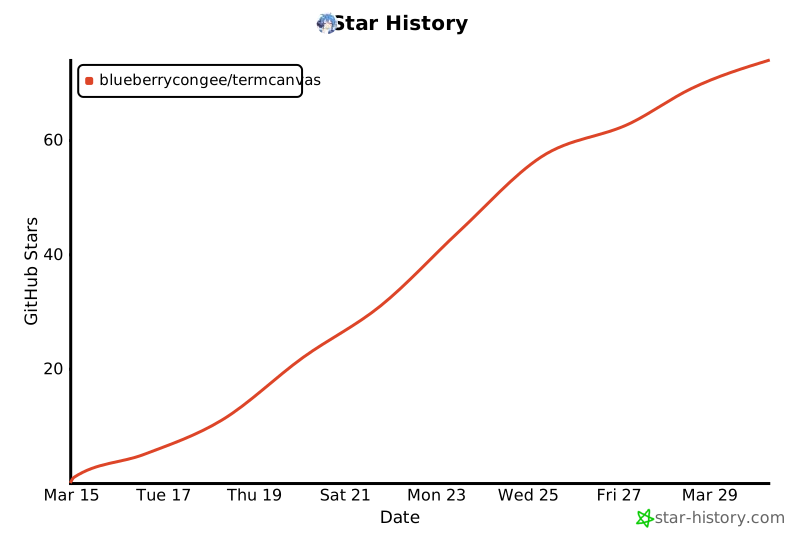
QQ Group [![Star History Chart](https://api.star-history.com/svg?repos=blueberrycongee/termcanvas&type=Date)](https://star-history.com/#blueberrycongee/termcanvas&Date)