# ggc
[](https://github.com/bmf-san/ggc/releases)
[](https://goreportcard.com/report/github.com/bmf-san/ggc)
[](https://codecov.io/gh/bmf-san/ggc)
[](https://github.com/bmf-san/ggc/blob/main/LICENSE)
[](https://pkg.go.dev/github.com/bmf-san/ggc)
[](https://sourcegraph.com/github.com/bmf-san/ggc?badge)
[](https://github.com/bmf-san/ggc/actions/workflows/ci.yml)
[](https://github.com/bmf-san/ggc/actions/workflows/github-code-scanning/codeql)
[](https://github.com/bmf-san/ggc/actions/workflows/dependabot/dependabot-updates)
[](https://scorecard.dev/viewer/?uri=github.com/bmf-san/ggc)
[](https://github.com/avelino/awesome-go)
Scriptable Git shortcuts with a searchable workflow builder.
📖 **Full documentation:** https://bmf-san.github.io/ggc/
 This logo was created by [gopherize.me](https://gopherize.me/gopher/d654ddf2b81c2b4123684f93071af0cf559eb0b5).
## Demo
Click any GIF to view full size.
| Interactive & Workflow mode | CLI workflow | Branch management |
| --- | --- | --- |
| [
This logo was created by [gopherize.me](https://gopherize.me/gopher/d654ddf2b81c2b4123684f93071af0cf559eb0b5).
## Demo
Click any GIF to view full size.
| Interactive & Workflow mode | CLI workflow | Branch management |
| --- | --- | --- |
| [ ](docs/demos/generated/interactive-overview.gif) | [
 ](docs/demos/generated/cli-workflow.gif) | [
 ](docs/demos/generated/branch-management.gif) |
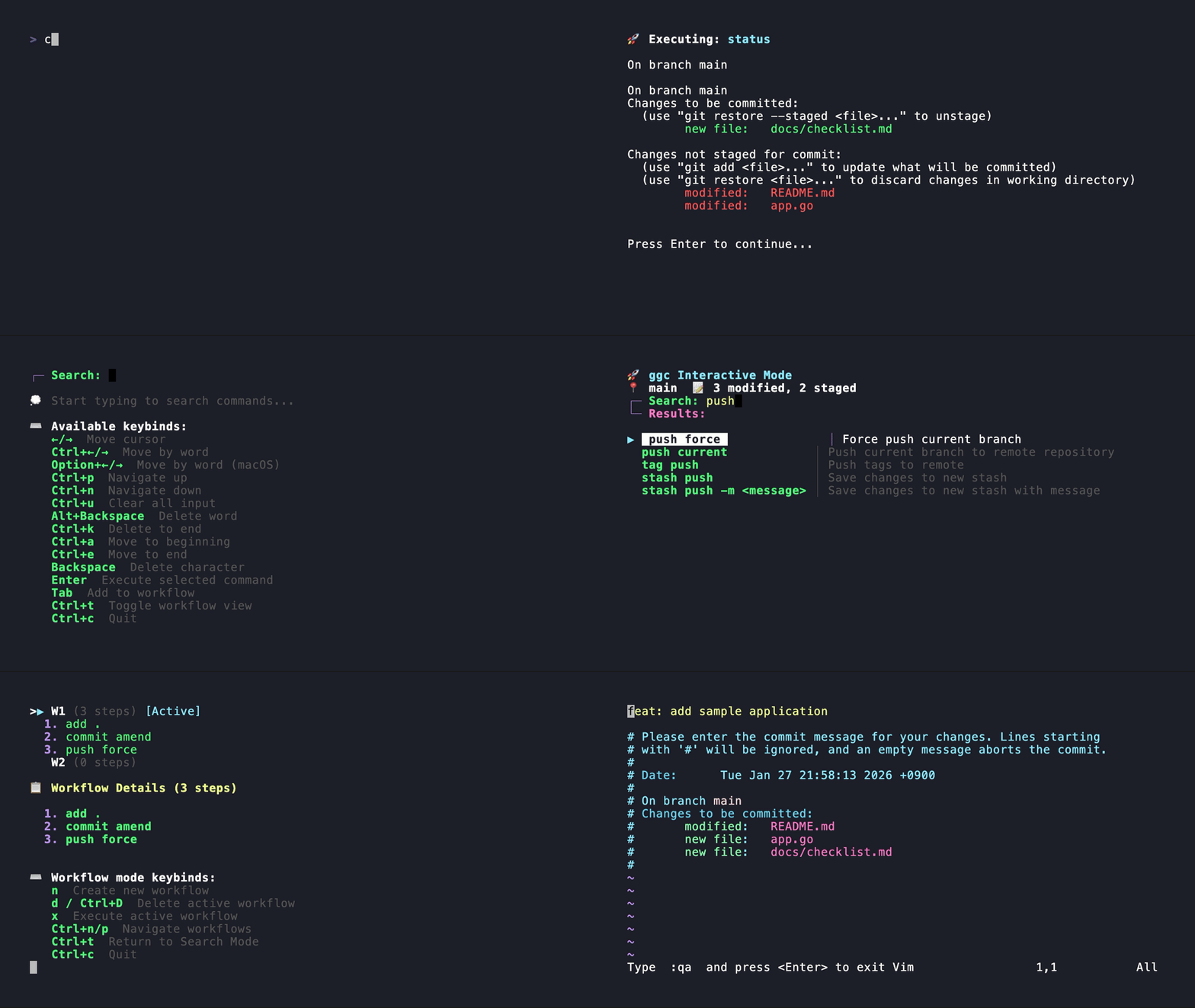
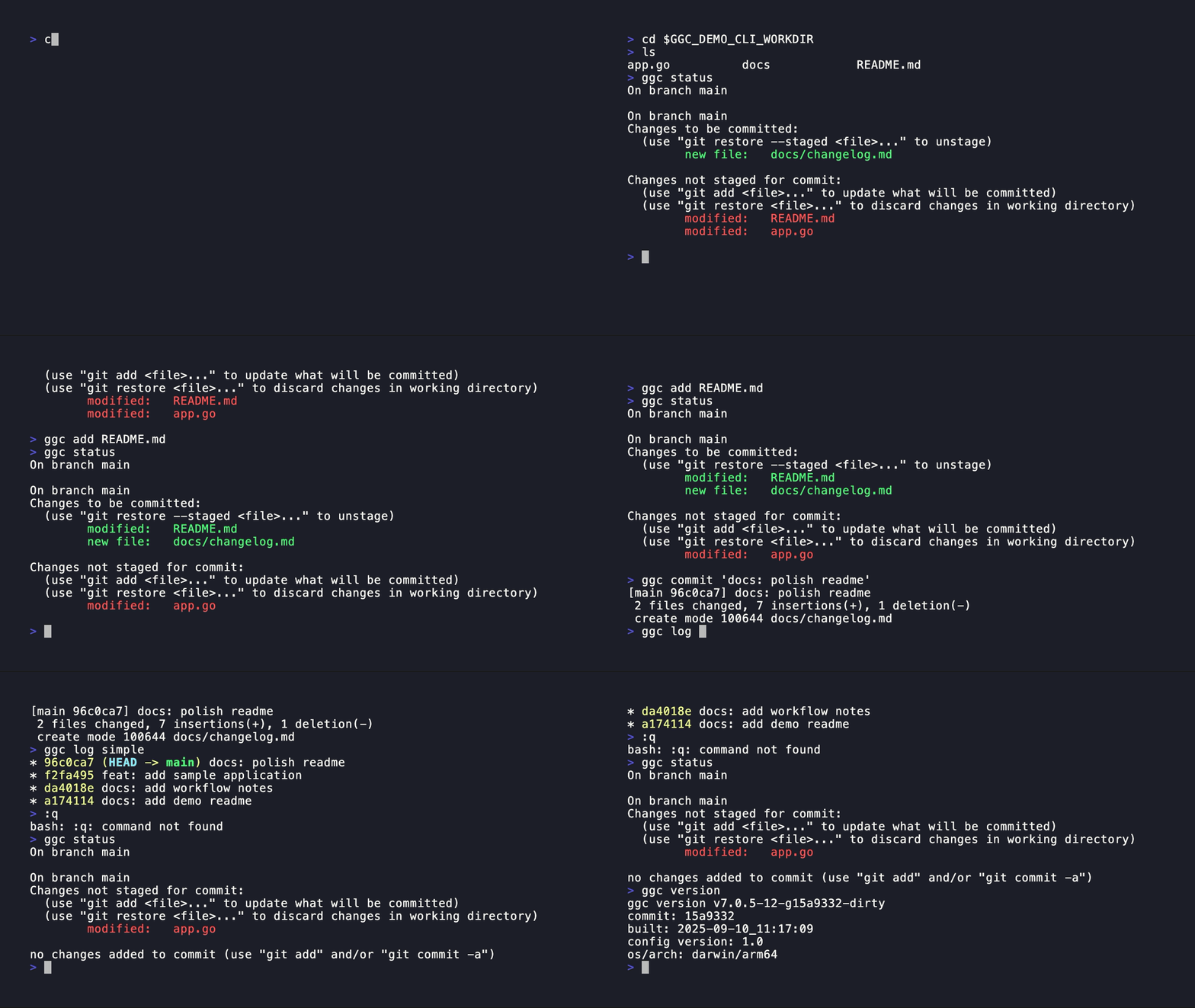
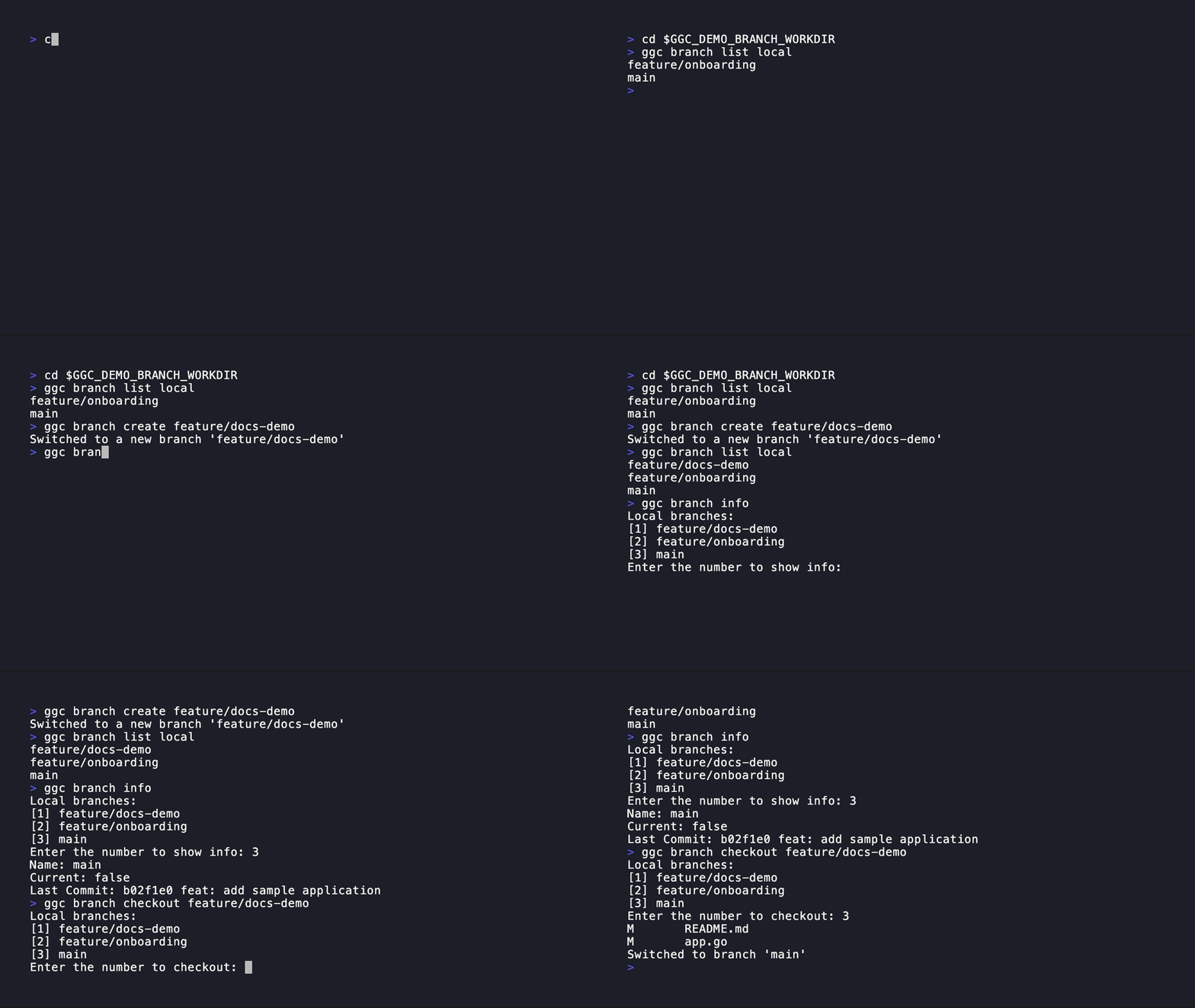
| Fuzzy-search every `ggc` command, then press Tab to queue them into a workflow and Ctrl+T to run the pipeline. | Traditional one-shot commands: `ggc status`, `ggc add`, `ggc commit ""`, `ggc log simple`. | Create and switch branches with plain verbs; interactive pickers appear when arguments are omitted. |
## Overview
ggc gives you short, scriptable Git shortcuts and a searchable workflow builder. Run `ggc ` directly for one-shot commands, drop them into shell scripts, or type `ggc` on its own to open a fuzzy picker where you can search every command, queue several into a workflow, and run them as a pipeline.
Supported: macOS (amd64 / arm64 / universal), Linux (amd64 / arm64), Windows (amd64). Requires Git and Go 1.25+ to build.
### Why ggc instead of raw git, lazygit, tig, or gitui?
Git already has great TUIs and helpers — ggc fills a different niche. It is the only one of these that is **both scriptable on the command line and searchable as an interactive workflow builder**:
- **Compose multi-step workflows, then run or reuse them.** Search commands in the fuzzy picker, press Tab to queue `add` → `commit` → `push`, and Ctrl+T to run the pipeline. lazygit/gitui drive one action at a time; tig is read-focused.
- **Same tool in scripts and in CI.** `ggc commit "fix: parser"` or `ggc branch checkout main` work non-interactively, so the shortcuts you learn interactively drop straight into shell scripts and pipelines. The TUI tools are interactive-only.
- **Memorable verbs over flag soup.** `ggc rebase interactive`, `ggc stash pop`, `ggc clean interactive` replace hard-to-remember `git` flag combinations, while still falling back to raw `git` for anything ggc doesn't cover.
- **Review workflows before running them.** Queue commands in the workflow builder and see the full step list in the workflow view before you execute the pipeline.
### Destructive operations
Many ggc subcommands wrap destructive Git actions. Know how each behaves before relying on it:
- **`clean` asks first.** Interactive `clean` shows the files it will remove and prompts for confirmation (`Delete these files? (y/n)`) before deleting.
- **Other destructive commands run immediately.** `branch delete`, `tag` deletion, and `stash drop`/`stash clear` execute right away without a separate confirmation step — treat them like the underlying `git` commands.
- **`reset` is a shortcut, not a passthrough.** Bare `ggc reset` performs a hard reset to the upstream branch and cleans the working tree (`reset --hard` + `clean`); `ggc reset hard ` and `ggc reset soft ` map to the corresponding `git reset`. These discard changes without prompting.
- **Review workflows before executing.** The workflow view lists every queued step so you can inspect (and rebuild) a pipeline before running it.
See the [interactive mode & workflows guide](https://bmf-san.github.io/ggc/guide/interactive/) for details.
Full documentation lives at ****:
- [Why ggc? + feature highlights](https://bmf-san.github.io/ggc/#why-ggc)
- [Quick start](https://bmf-san.github.io/ggc/guide/quickstart/)
- [Command reference](https://bmf-san.github.io/ggc/guide/commands/) — auto-generated from the registry
- [Recipes](https://bmf-san.github.io/ggc/guide/recipes/) — task-oriented walkthroughs
- [Interactive mode & workflows](https://bmf-san.github.io/ggc/guide/interactive/)
- [Configuration, aliases, keybindings](https://bmf-san.github.io/ggc/guide/config/)
- [Troubleshooting](https://bmf-san.github.io/ggc/guide/troubleshooting/)
## Install
```bash
# quick install (macOS / Linux)
curl -sSL https://raw.githubusercontent.com/bmf-san/ggc/main/install.sh | bash
# or Homebrew
brew install ggc
# or Go
go install github.com/bmf-san/ggc/v8@latest
```
Windows binaries, pre-built archives, and source builds are covered in the [installation guide](https://bmf-san.github.io/ggc/guide/install/). After installing, run `ggc doctor` to verify.
## References
- [ggc documentation site](https://bmf-san.github.io/ggc/) - Full user guide, install notes, configuration reference, and troubleshooting
- [Git Documentation](https://git-scm.com/docs) - Complete Git reference documentation
- [Git Tutorial](https://git-scm.com/docs/gittutorial) - Official Git tutorial for beginners
- [Git User Manual](https://git-scm.com/docs/user-manual) - Comprehensive Git user guide
## Contributing
See [CONTRIBUTING.md](CONTRIBUTING.md) and [CODE_OF_CONDUCT.md](CODE_OF_CONDUCT.md) for details.
## Sponsor
If you’d like to support my work, please consider sponsoring me!
[GitHub Sponsors – bmf-san](https://github.com/sponsors/bmf-san)
Or simply giving ⭐ on GitHub is greatly appreciated—it keeps me motivated to maintain and improve the project! :D
## Stargazers
[](https://github.com/bmf-san/ggc/stargazers)
## Forkers
[](https://github.com/bmf-san/ggc/network/members)
## License
This project is licensed under the MIT License - see the [LICENSE.md](LICENSE.md) file for details.
](docs/demos/generated/branch-management.gif) |
| Fuzzy-search every `ggc` command, then press Tab to queue them into a workflow and Ctrl+T to run the pipeline. | Traditional one-shot commands: `ggc status`, `ggc add`, `ggc commit ""`, `ggc log simple`. | Create and switch branches with plain verbs; interactive pickers appear when arguments are omitted. |
## Overview
ggc gives you short, scriptable Git shortcuts and a searchable workflow builder. Run `ggc ` directly for one-shot commands, drop them into shell scripts, or type `ggc` on its own to open a fuzzy picker where you can search every command, queue several into a workflow, and run them as a pipeline.
Supported: macOS (amd64 / arm64 / universal), Linux (amd64 / arm64), Windows (amd64). Requires Git and Go 1.25+ to build.
### Why ggc instead of raw git, lazygit, tig, or gitui?
Git already has great TUIs and helpers — ggc fills a different niche. It is the only one of these that is **both scriptable on the command line and searchable as an interactive workflow builder**:
- **Compose multi-step workflows, then run or reuse them.** Search commands in the fuzzy picker, press Tab to queue `add` → `commit` → `push`, and Ctrl+T to run the pipeline. lazygit/gitui drive one action at a time; tig is read-focused.
- **Same tool in scripts and in CI.** `ggc commit "fix: parser"` or `ggc branch checkout main` work non-interactively, so the shortcuts you learn interactively drop straight into shell scripts and pipelines. The TUI tools are interactive-only.
- **Memorable verbs over flag soup.** `ggc rebase interactive`, `ggc stash pop`, `ggc clean interactive` replace hard-to-remember `git` flag combinations, while still falling back to raw `git` for anything ggc doesn't cover.
- **Review workflows before running them.** Queue commands in the workflow builder and see the full step list in the workflow view before you execute the pipeline.
### Destructive operations
Many ggc subcommands wrap destructive Git actions. Know how each behaves before relying on it:
- **`clean` asks first.** Interactive `clean` shows the files it will remove and prompts for confirmation (`Delete these files? (y/n)`) before deleting.
- **Other destructive commands run immediately.** `branch delete`, `tag` deletion, and `stash drop`/`stash clear` execute right away without a separate confirmation step — treat them like the underlying `git` commands.
- **`reset` is a shortcut, not a passthrough.** Bare `ggc reset` performs a hard reset to the upstream branch and cleans the working tree (`reset --hard` + `clean`); `ggc reset hard ` and `ggc reset soft ` map to the corresponding `git reset`. These discard changes without prompting.
- **Review workflows before executing.** The workflow view lists every queued step so you can inspect (and rebuild) a pipeline before running it.
See the [interactive mode & workflows guide](https://bmf-san.github.io/ggc/guide/interactive/) for details.
Full documentation lives at ****:
- [Why ggc? + feature highlights](https://bmf-san.github.io/ggc/#why-ggc)
- [Quick start](https://bmf-san.github.io/ggc/guide/quickstart/)
- [Command reference](https://bmf-san.github.io/ggc/guide/commands/) — auto-generated from the registry
- [Recipes](https://bmf-san.github.io/ggc/guide/recipes/) — task-oriented walkthroughs
- [Interactive mode & workflows](https://bmf-san.github.io/ggc/guide/interactive/)
- [Configuration, aliases, keybindings](https://bmf-san.github.io/ggc/guide/config/)
- [Troubleshooting](https://bmf-san.github.io/ggc/guide/troubleshooting/)
## Install
```bash
# quick install (macOS / Linux)
curl -sSL https://raw.githubusercontent.com/bmf-san/ggc/main/install.sh | bash
# or Homebrew
brew install ggc
# or Go
go install github.com/bmf-san/ggc/v8@latest
```
Windows binaries, pre-built archives, and source builds are covered in the [installation guide](https://bmf-san.github.io/ggc/guide/install/). After installing, run `ggc doctor` to verify.
## References
- [ggc documentation site](https://bmf-san.github.io/ggc/) - Full user guide, install notes, configuration reference, and troubleshooting
- [Git Documentation](https://git-scm.com/docs) - Complete Git reference documentation
- [Git Tutorial](https://git-scm.com/docs/gittutorial) - Official Git tutorial for beginners
- [Git User Manual](https://git-scm.com/docs/user-manual) - Comprehensive Git user guide
## Contributing
See [CONTRIBUTING.md](CONTRIBUTING.md) and [CODE_OF_CONDUCT.md](CODE_OF_CONDUCT.md) for details.
## Sponsor
If you’d like to support my work, please consider sponsoring me!
[GitHub Sponsors – bmf-san](https://github.com/sponsors/bmf-san)
Or simply giving ⭐ on GitHub is greatly appreciated—it keeps me motivated to maintain and improve the project! :D
## Stargazers
[](https://github.com/bmf-san/ggc/stargazers)
## Forkers
[](https://github.com/bmf-san/ggc/network/members)
## License
This project is licensed under the MIT License - see the [LICENSE.md](LICENSE.md) file for details.