# Booley
**The open-source Agentic Development Environment (ADE) for RTL design and verification**
[](https://github.com/boldaxolotl/Booley/actions/workflows/test.yml)
[](https://pypi.org/project/booley-rtl/)
[](https://opensource.org/licenses/Apache-2.0)
[](https://www.python.org/downloads/)
Booley combines the speed of agentic workflows with strict, deterministic EDA
checks and thorough reviews by engineers and LLMs. Agents get every tool
hardware design needs, safely sandboxed. You get a control panel to orchestrate
them and metrics you can trust.
**Website:** [booley.dev](https://booley.dev/) for the full feature tour, videos, and blog.
## What it does
The [Features page](https://booley.dev/docs/features/) is the complete feature reference.
### Agents equipped for hardware work
A general-purpose coding agent knows little about EDA tools, so Booley gives it
one short command per job: simulate, synthesize, lint, build for FPGA. The same
commands work whichever EDA tool runs underneath, such as Verilator or Icarus
Verilog for simulation.
It also gets tools for checking its own work. Waveform queries let it ask
questions about real simulation traces ("when did `data_o` equal `0xDEADBEEF`?")
instead of guessing from the RTL. Mutation testing plants small bugs in the RTL
and counts how many the testbench catches, which shows whether the tests would
notice a real bug.
For a second opinion, the agent can call an independent reviewer that didn't
write the code. Reviewers follow guides written by hardware engineers, covering
common RTL bugs, style rules and typical optimization opportunities. Each review
looks for one kind of problem, so nothing gets skimmed.
### Run many agents, stay in control
Agents work best when they don't stop to ask permission, and Booley makes that
safe. Each agent runs in a container that sees only your project, with internet
access limited to the LLM provider. You can leave it running unattended; it
can't touch the rest of your machine. The same container gives everyone on the
team identical tool versions.
Run several agents at once. Booley creates and manages a separate git worktree
and branch for each one, so they work independently and never overwrite each
other. A built-in scheduler learns how much memory each simulation or synthesis
run needs and starts as many together as your machine can hold, so small runs
don't wait behind big ones and nothing runs out of memory.
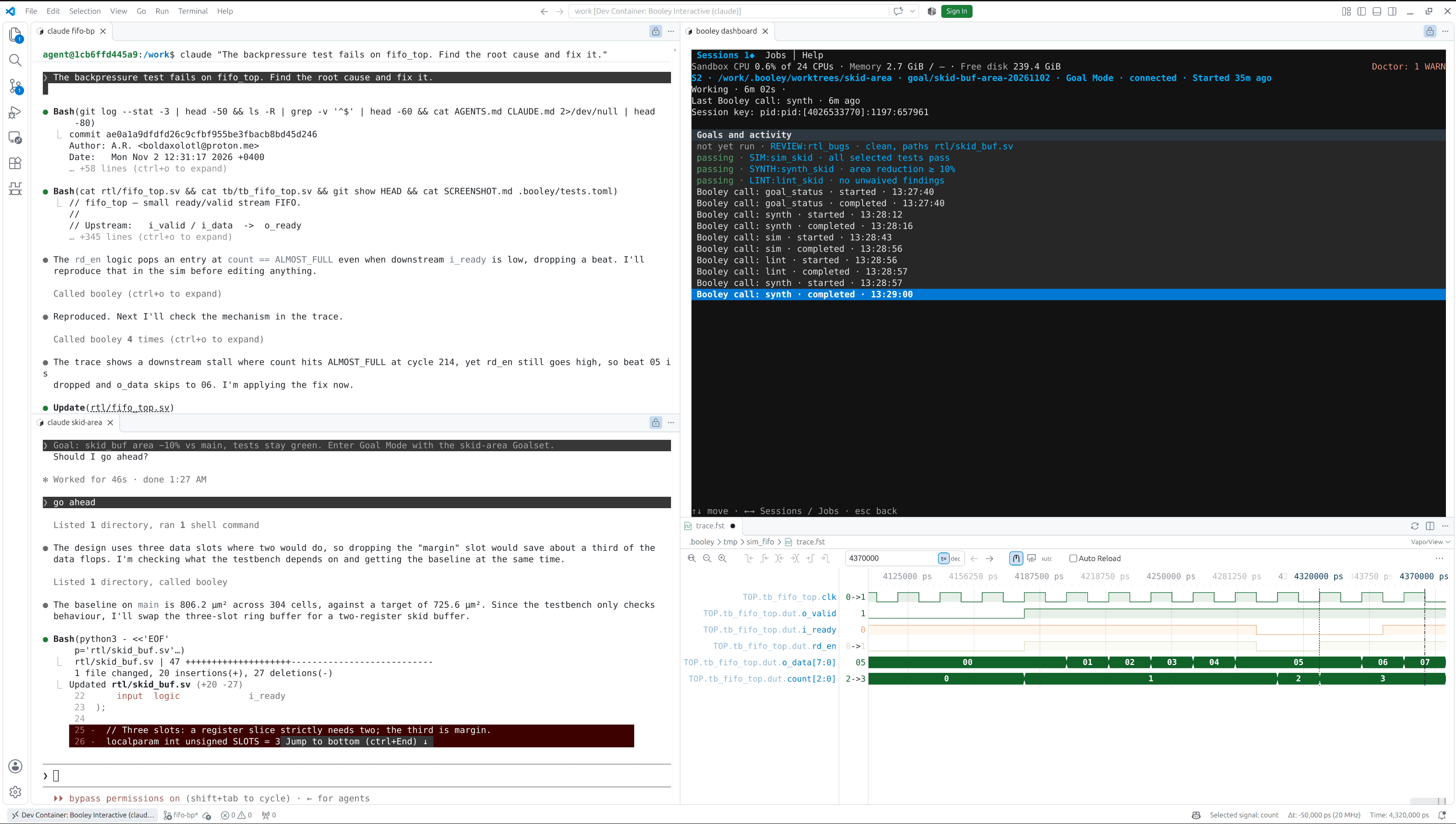
Everything sits in one VS Code window: agent chats, RTL, terminals, waveforms,
and a dashboard showing what every agent is doing.
### Results you can trust
Normally the result of a task reaches you second-hand: a project-specific script
runs the EDA tool, then the agent reads the log and tells you what it found.
Each hand-off can go wrong.
Booley comes with built-in, tested recipes for each supported EDA tool, built on
the open-source FuseSoC. They launch the run and read the numbers out of the
tool's reports, the same way on every project. Nobody writes a script for your
repo, and no agent interprets a log.
Set limits for your design, such as area, timing, coverage or mutation score. An
agent works far better against a bound it can check than against "make it
smaller". Booley measures every finished commit against all of them, so a change
that cuts area but halves Fmax fails instead of slipping through, and the
recorded numbers show how the design moved over time.
## Quick Start
Three ways in, ordered by how much you want to invest:
1. **[Watch](#watch).** See an engineer drive Booley on a demo project, start to finish. Zero setup.
2. **[Demo](#demo).** Open the demo free in your browser, or clone it, then type your first request to the agent.
3. **[Your own project](#your-own-project).** Full integration on your own RTL.
### Watch
Two videos on the [Videos page](https://booley.dev/videos/) show an engineer driving Booley on a demo project end to end, so you can see the workflow before touching anything.
### Demo
Try the demo in browser VS Code with one click. It is free, needs no install,
and works on macOS too:
[](https://codespaces.new/boldaxolotl/booley-prj-picorv32?quickstart=1)
The Codespace fits in GitHub's free monthly Codespaces allowance, and the
agent runs GPT-6 Luna on us after a quick GitHub sign-in. Connect your own
Claude or ChatGPT account if you want a smarter model. The first launch takes
3-4 minutes while the container image builds. [How the free demo works](https://booley.dev/demo/).
Or **[follow the demo repository's README](https://github.com/boldaxolotl/booley-prj-picorv32#readme)** to run the demo locally, after you [install Booley](#installation).
### Your own project
Follow the [Setup guide](https://booley.dev/docs/setup/) to integrate Booley with your own RTL project, after you [install Booley](#installation).
## Installation
Booley runs on Windows and Linux (macOS is not supported) for SystemVerilog
or Verilog designs. It needs Python 3.11+, Git, Docker, VS Code, and a Claude
Code or Codex CLI. With
[pipx installed](https://pipx.pypa.io/latest/how-to/install-pipx.html):
```bash
pipx install booley-rtl
booley bootstrap
```
The [Install guide](https://booley.dev/docs/install/) has the full
requirements, upgrade steps, and what `booley bootstrap` does.
**Next:** [try the demo](#demo) or [set up your own project](#your-own-project).
## Supported EDA Tools
Current integrations:
- **Simulate / elaborate** — Verilator, Icarus Verilog; cocotb testbenches supported
- **Lint** — Verilator, Verible
- **ASIC synthesis** (PPA estimate, not tape-out) — logical Yosys or physical Yosys + OpenROAD
- **Waveform debug** — `bwave` (+ VaporView GUI in VS Code)
- **FPGA implementation** — AMD Vivado
- **Coming soon** — Synopsys VCS, Cadence Xcelium
For exact versions, provisioning, trace support, and platform constraints, see
**[Supported EDA tools](https://booley.dev/docs/supported-eda-tools/)**.
Support for additional commercial EDA tools is coming soon; see the
[roadmap](https://github.com/boldaxolotl/Booley/blob/main/docs/internals/ROADMAP.md#commercial-eda-tools).
## Documentation
- [Features](https://booley.dev/docs/features/)
- [Architecture](https://booley.dev/docs/architecture/)
- [Setup](https://booley.dev/docs/setup/)
- [Usage](https://booley.dev/docs/usage/)
- [Metric-Driven Development](https://booley.dev/docs/metric-driven-development/)
- [Flow reference](https://booley.dev/docs/flow-reference/)
- [Supported EDA tools](https://booley.dev/docs/supported-eda-tools/)
- [Limitations](https://booley.dev/#limitations)
- [How Booley is built](https://booley.dev/#how-it-is-built)
## Contributing
Booley is still early, so the most useful contribution is trying it and reporting what works, what doesn't, and what you want next. Tell **`/booley-feedback`** in your Developer Agent chat; it gathers and redacts any needed evidence. Opinions need no reproduction, and nothing leaves your machine until you approve the exact text ([feedback guide](https://booley.dev/docs/usage/#when-booley-itself-misbehaves), [configuration](https://booley.dev/docs/config/#feedback-feedback)).
Code and documentation contributions are welcome; see [CONTRIBUTING.md](https://github.com/boldaxolotl/Booley/blob/main/docs/internals/CONTRIBUTING.md). Please keep feedback technical and specific; broader debates about AI's effects on society or employment are outside the project's scope.
For suspected vulnerabilities, follow the private reporting process in [SECURITY.md](https://github.com/boldaxolotl/Booley/blob/main/SECURITY.md) instead of opening a public issue.
## Acknowledgments
Booley stands on a lot of other people's work. Thank you to:
- **The authors of [Edalize](https://github.com/olofk/edalize) and [FuseSoC](https://github.com/olofk/fusesoc)**, and especially their lead maintainer, Olof Kindgren, for the framework that makes Booley's whole idea of a simple, unified CLI-over-EDA interface possible.
- **The author of [vcdvcd](https://github.com/cirosantilli/vcdvcd), Ciro Santilli**, for the VCD-parsing work that seeded the `bwave` idea.
- **The author of [wavepeek](https://github.com/kleverhq/wavepeek)**, another neat waveform-to-CLI EDA tool, for the clean top-level CLI interface that inspired `bwave`'s top-level CLI (the internals started well before wavepeek and are quite different).
- **The author of [VaporView](https://github.com/Lramseyer/vaporview), Lloyd Ramseyer**, for the excellent VS Code waveform viewer that `bwave gui` drives for scoped waveform inspection right in VS Code.
- **The authors of [Yosys](https://github.com/YosysHQ/yosys), [Verilator](https://github.com/verilator/verilator), [Icarus Verilog](https://github.com/steveicarus/iverilog), [Verible](https://github.com/chipsalliance/verible), and [sv2v](https://github.com/zachjs/sv2v)**, for the excellent open-source EDA tools that make Booley possible at all.
- **[Matt Pocock](https://www.aihero.dev/)**, for his great agentic software engineering techniques, which shaped how Booley's agents are built and driven.
## License
Apache 2.0. See [LICENSE](https://github.com/boldaxolotl/Booley/blob/main/LICENSE) for details.