Make your web interface drivable by AI: turn buttons, links, and form fields into tools an agent can call.
OwlLayer AI is an open-source TypeScript Agentic UI SDK for building interfaces where actions are explicit, contextual, and always owned by your application: buttons, links, form fields, and components become tools the AI agent can call to operate the interface, and the agent lives inside your app, so your users simply talk to it.
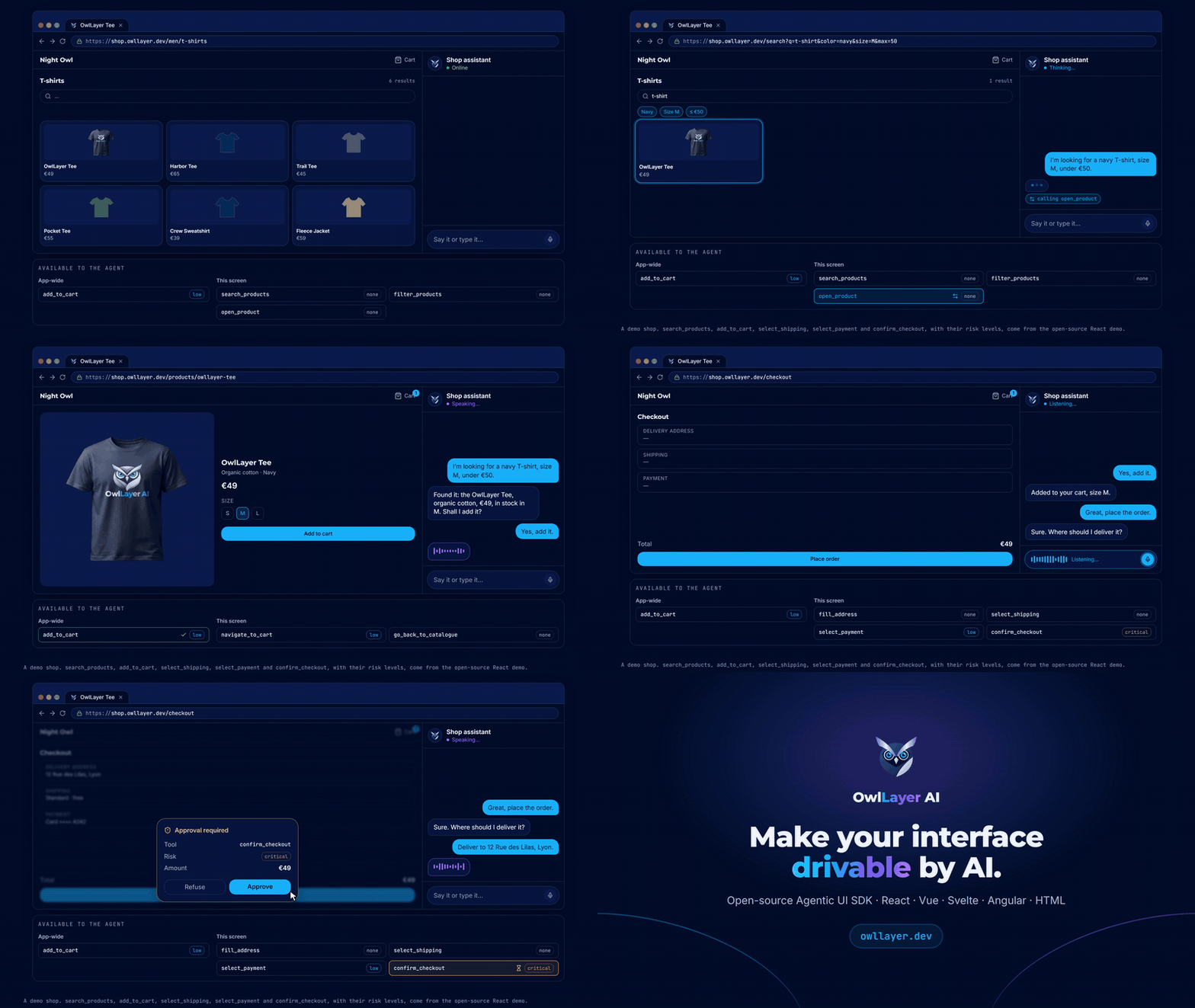
The user just says it. The agent built into the shop searches, filters, opens the product and checks out with the tools each screen declares.
---
## Table of contents
- [Table of contents](#table-of-contents)
- [1. Why OwlLayer AI](#1-why-owllayer-ai)
- [1.1 OwlLayer AI and MCP](#11-owllayer-ai-and-mcp)
- [2. The OwlLayer AI model](#2-the-owllayer-ai-model)
- [2.1 Neural-DOM Binding](#21-neural-dom-binding)
- [2.2 Tools](#22-tools)
- [3. Framework support](#3-framework-support)
- [4. Models, realtime, and voice](#4-models-realtime-and-voice)
- [5. Connect your app](#5-connect-your-app)
- [6. Declare a capability where it belongs](#6-declare-a-capability-where-it-belongs)
- [6.1 In script](#61-in-script)
- [6.2 Declarative components](#62-declarative-components)
- [6.3 HTML attributes](#63-html-attributes)
- [7. Publish context without exposing the whole app](#7-publish-context-without-exposing-the-whole-app)
- [7.1 In script (React)](#71-in-script-react)
- [7.2 Browser SDK (imperative)](#72-browser-sdk-imperative)
- [8. Interaction lifecycle and protocol](#8-interaction-lifecycle-and-protocol)
- [9. Security by construction](#9-security-by-construction)
- [10. Repository development and contributing](#10-repository-development-and-contributing)
- [10.1 Repository layout](#101-repository-layout)
- [10.2 Contributor workflow](#102-contributor-workflow)
- [11. Project status](#11-project-status)
- [12. License](#12-license)
## 1. Why OwlLayer AI
Most AI integrations in web applications can describe a product, but they cannot safely operate it. OwlLayer AI gives an agent a **bounded, live view of what it is allowed to do** in the interface that the user is currently using.
It is not a DOM scraper, a generated replacement UI, or a chatbot bolted onto an application. Your components, business rules, and existing workflows remain the source of truth.
With OwlLayer AI, an agent can:
- understand the allow-listed context you decide to share;
- discover only the actions available on the active screen;
- invoke application-owned handlers with validated input;
- request human approval before sensitive work;
- return results to the conversation without bypassing your domain logic.
This makes OwlLayer AI useful for guided commerce, product operations, support flows, enterprise dashboards, and voice experiences where an AI must be helpful without becoming an unrestricted automation layer.
### 1.1 OwlLayer AI and MCP
The **Model Context Protocol (MCP)** is a standard for exposing tools **on the server side**: an MCP server declares functions (`query_database`, `create_ticket`, …) that an AI agent such as Codex or Claude Code can call.
OwlLayer AI works **on the interface side**: it turns the elements of your web app (buttons, links, form fields, components) into tools, and puts the agent **inside the app**. Your users chat with it directly in your product; they do not install or configure any agent tool.
| | MCP | OwlLayer AI |
| --- | --- | --- |
| **Tools come from** | Functions declared in a backend MCP server | Buttons, forms, and components of your UI (plus server tools if you need them) |
| **Who uses them** | An agent in the user's own AI client (Codex, Claude Code, …) | The agent embedded in your app, used by your end users in text or voice |
| **What the agent knows** | What each tool returns | The current screen, through the context you choose to share |
| **When a tool exists** | As long as the server exposes it | Only while its component is on screen |
| **Human approval** | Depends on the client | Built in for `high` and `critical` actions |
## 2. The OwlLayer AI model
The model is built around five concepts, deliberately independent of any UI framework or backend implementation.
| Concept | What it means | Details |
| --- | --- | --- |
| **Neural-DOM Binding** | The principle: the page exposes its defined actions and what it can do, and the model reasons about those intentions without being given control of the DOM. | [2.1](#21-neural-dom-binding) |
| **Tools** | The actions the agent can call. The interface registers them when they appear on screen, unregisters them when they disappear, and your code executes them. | [2.2](#22-tools), [6](#6-declare-a-capability-where-it-belongs) |
| **Shadow Context** | A compact, allow-listed representation of relevant UI state. It gives the agent product awareness without exposing the DOM, internal stores, or arbitrary data. | [7](#7-publish-context-without-exposing-the-whole-app) |
| **Policy-controlled execution** | Every tool has an explicit contract. Risky operations can pause for Human-in-the-Loop approval before any handler runs. | [9](#9-security-by-construction) |
| **AITP** | The Agent-to-Interface Transfer Protocol synchronizes context, capabilities, messages, calls, approvals, and results across the runtime boundary. | [8](#8-interaction-lifecycle-and-protocol) |
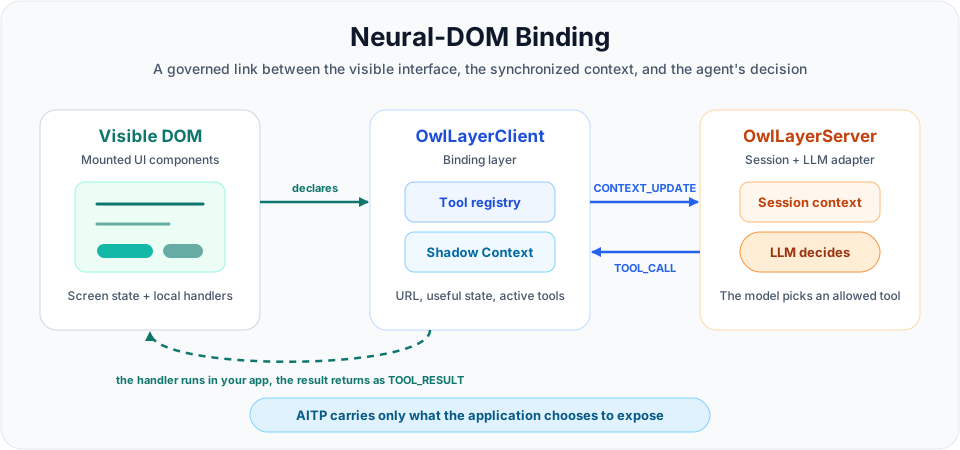
### 2.1 Neural-DOM Binding
**Neural-DOM Binding is the connection between a living page and an LLM brain.**
- **Neural** is the reasoning network: Gemini, GPT, Claude, or another language model that understands intent and decides what to do.
- **DOM** is the living product interface: the current page, its visible state, its available actions, and its rules.
- **Binding** is the governed link that lets the model understand and act on the page through explicit contracts.
OwlLayer AI turns the page into a semantic surface, readable by an AI agent. Instead of making an agent hunt for a button, click it, and guess what changed, the application tells the model: *these are the intentions that exist on this page, this is the context, and these are the rules for executing them.*
It is not browser automation, and it is not a framework virtual DOM. The agent receives a named, typed, policy-governed intention such as `add_to_cart`, `get_order`, or `approve_refund`.
| Imperative UI automation | Neural-DOM Binding |
| --- | --- |
| Find a button, click it, wait for the screen, then infer whether it worked. | Request a declared intention with validated input; the application executes its own handler and returns a structured result. |
| Fragile when layout, labels, or navigation change. | Stable across UI changes because the capability contract is explicit. |
| May bypass product permissions and domain rules. | Keeps permissions, Human-in-the-Loop approval, transactions, and business logic in the application. |
### 2.2 Tools
A tool is an action the agent can call: a name, a description the model reads, an input schema, a risk level, and a handler in your application code. The binding is declarative and lifecycle-aware, and three parts of the runtime manage it:
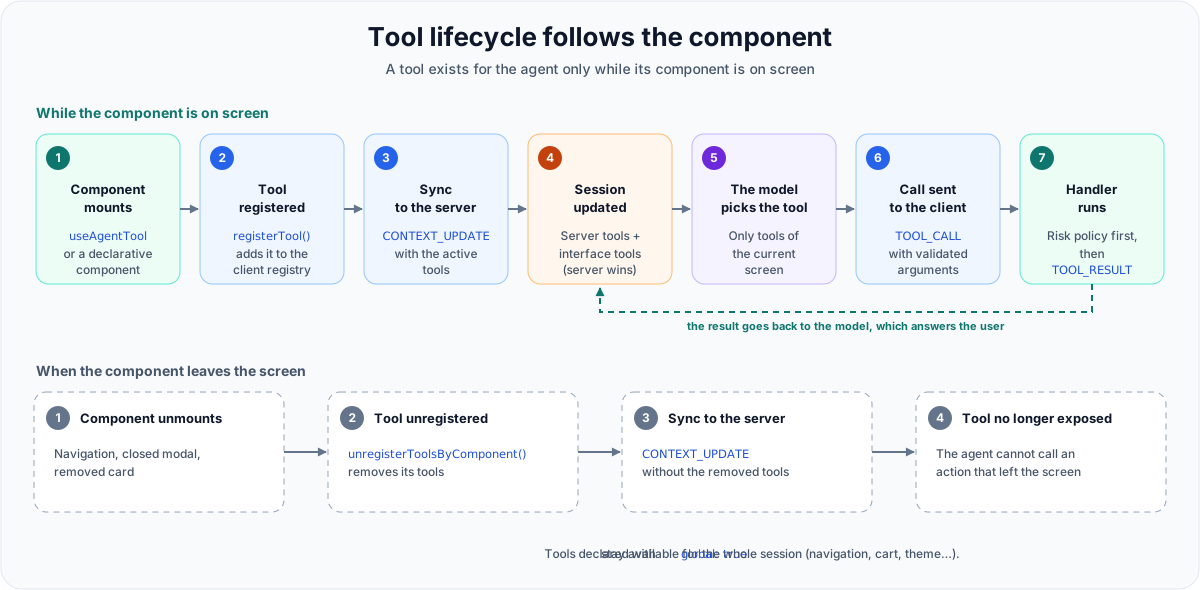
- **Registration:** a component registers its tools when it appears on screen (`useAgentTool`, declarative components, `OwlLayer.registerTool()`, or `data-owllayer-tool` attributes). The client sends the updated list to the server.
- **Unregistration:** when the component disappears, its tools are removed, so navigation changes what the agent can do. Tools declared with `global: true` stay available for the whole session.
- **Execution:** when the agent calls a tool, the executor finds it, applies the risk policy, waits for the handler to finish, and returns a structured result. If the tool navigated to another page, it first waits for the tools of that page, so the agent continues with the tools of the new screen. On the server, the tool router runs server-side tools itself and forwards interface tools to the client.
The same model applies to every integration. [Section 6](#6-declare-a-capability-where-it-belongs) shows how to declare a tool.
## 3. Framework support
Pick the integration style that matches your product.
| Integration | Best for | Guide |
| --- | --- | --- |
| | React and Next.js share the same integration model: hooks, providers, and components; in Next.js, used from client components. | [React guide](https://borisbob91.github.io/owllayer/react-sdk.html) |
| | Vue and Nuxt.js share the same integration model: plugin, composables, and components; in Nuxt, used from client components. | [Vue guide](https://borisbob91.github.io/owllayer/vue-sdk.html) |
| | Stores, actions, and Svelte-native components | [Svelte guide](https://borisbob91.github.io/owllayer/svelte-sdk.html) |
| | Providers, services, signals, directives, and widgets | [Angular guide](https://borisbob91.github.io/owllayer/angular-sdk.html) |
| | HTML, multi-page applications, server-rendered pages, and progressive adoption | [Browser guide](https://borisbob91.github.io/owllayer/vanilla-browser.html) |
| | Voice shopping on an existing Shopify storefront (experimental) | [Shopify plugin](./packages/shopify/README.md) |
| | Voice shopping on an existing WooCommerce store (experimental) | [WooCommerce plugin](./packages/woocommerce/README.md) |
| | Cross-platform mobile runtime | [Flutter SDK](https://github.com/borisbob91/owllayer-flutter) |
| | Native iOS surface | [Swift SDK](https://github.com/borisbob91/owllayer-swift) |
| | Kotlin Multiplatform surface | [Kotlin SDK](https://github.com/borisbob91/owllayer-kotlin) |
Each guide covers installation, runtime setup, components, and framework-specific API details. Start from the maintained entry points:
- [Getting started](https://borisbob91.github.io/owllayer/quick-start.html)
- [Widget and embedded UI](https://borisbob91.github.io/owllayer/chat-widget.html)
- [Text and voice experiences](https://borisbob91.github.io/owllayer/livekit.html)
- [Server orchestration](https://borisbob91.github.io/owllayer/server-setup.html)
- [Plugin model](https://borisbob91.github.io/owllayer/plugins-system.html)
On native mobile the equivalent is a compact, screen-scoped context: `ScreenContext`. The same rule applies: expose only the relevant UI state and the active tools, and keep execution inside the application owner.
## 4. Models, realtime, and voice
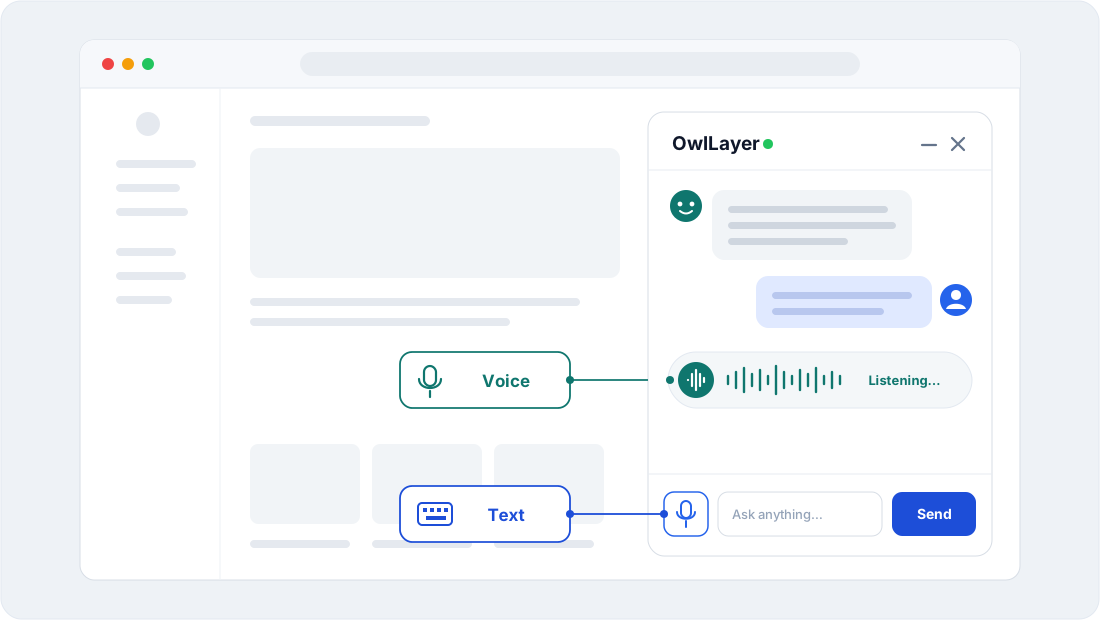
OwlLayer AI separates agent reasoning, low-latency conversation, and speech services so each product can choose the right interaction model.
| Category | Current support | What it enables |
| --- | --- | --- |
| **LLM and tool calling** | | Text conversations, structured tool calls, and provider-specific model selection. |
| **Native realtime models** | | Persistent bidirectional audio, live transcriptions, barge-in, and tools during a voice turn. |
| **Speech-to-text** | | Audio transcription for voice experiences that use a text-model pipeline. |
| **Text-to-speech** | | Configurable speech synthesis and voice selection. |
| **Voice runtime** | | Rooms, tokens, agent-session bridging, Gemini realtime, and tool execution routed back through the OwlLayer AI Runtime. |
| **Deepgram voice** | | Three voice modes with one key: batch speech (Nova + Aura), streaming turn-aware speech with any text model (Flux + Aura), or the Deepgram Voice Agent as the realtime model. |
The runtime keeps the same capability and approval model whether a turn is text-based, uses a STT/LLM/TTS pipeline, or runs on a native realtime audio model. See the [server documentation](https://borisbob91.github.io/owllayer/server-setup.html) and [voice guide](https://borisbob91.github.io/owllayer/livekit.html) for integration details.
## 5. Connect your app
Every package is published on npm. Install the server and the SDK of your front end:
```bash
npm install @owllayer/server @owllayer/adapter-google # server
npm install @owllayer/react @owllayer/core zod # front end (or vue, svelte, angular, browser)
```
The server connects the model, the sessions, and the approval policy. Model keys stay on the server; the browser only holds the public `pk_…` key.
```ts
import { OwlLayerServer } from '@owllayer/server';
import { GoogleAdapter } from '@owllayer/adapter-google';
const server = new OwlLayerServer({
llm: new GoogleAdapter({ model: 'gemini-2.0-flash', apiKey: process.env.GOOGLE_API_KEY! }),
port: 3001,
path: '/owllayer',
});
server.addApiKey('pk_live_your_public_api_key');
server.listen();
```
On the client, the runtime is established once, at the application root. It opens the live connection and makes agent context and tool registration available to every component below it.
```tsx
import React from 'react';
import { OwlLayerProvider } from '@owllayer/react';
import MainLayout from './MainLayout';
export default function App() {
return (
);
}
```
## 6. Declare a capability where it belongs
A capability, or **tool**, is an action the agent can call. It is declared next to the UI it belongs to, with a description the model reads, the input schema it accepts, and the risk level that governs it. The handler is your existing application code. (Information the agent should know without acting, such as what the page shows or what the user is trying to do, is **context**, covered in [section 7](#7-publish-context-without-exposing-the-whole-app).) There are two ways to declare it: in script, for dynamic or schema-driven tools, or with declarative components for standalone elements. The examples use React; the other SDKs follow the same model.
### 6.1 In script
```tsx
import React from 'react';
import { useAgentTool } from '@owllayer/react';
import { z } from 'zod';
const addToCartSchema = z.object({
productId: z.string(),
qty: z.number().min(1).default(1),
});
export function ProductCatalog({ products }) {
// One tool for the entire list: the LLM selects the right product via productId.
// Listing all products in the description gives the model full awareness.
// Creating one tool per product would flood the registry with near-identical entries.
useAgentTool(
{
name: 'add_to_cart',
description: `Add a product to the cart. Available: ${
products.map((p) => `${p.id} — ${p.name} $${p.price}`).join('; ')
}`,
schema: addToCartSchema,
risk: 'low',
},
async ({ productId, qty }) => {
const product = products.find((p) => p.id === productId);
await apiAddToCart(productId, qty);
return {
success: true,
message: `${qty}× "${product?.name ?? productId}" added to cart.`,
};
},
);
return (
{products.map((p) => (
{p.name} —
))}
);
}
```
Because the tool is registered on mount and released on unmount, the capability surface follows the screen the user is on. Navigating to checkout exposes a different surface: the agent never acts on a stale global command list.
The handler must return (or `await`) all the asynchronous work its result depends on: the result is sent to the agent only when the handler has finished. See the [tools guide](https://borisbob91.github.io/owllayer/tools-guide.html) for good practices and anti-patterns.
Without a framework, the same declaration is imperative:
```ts
import { OwlLayer } from '@owllayer/browser';
await OwlLayer.init({ apiKey: 'pk_live_your_public_api_key', endpoint: 'wss://your-server.example.com/owllayer' });
OwlLayer.registerTool('track_order', {
description: "Show the delivery status of one of the user's orders",
parameters: {
type: 'object',
properties: { orderId: { type: 'string', description: 'Order number, e.g. A-1042' } },
required: ['orderId'],
},
risk: 'none',
handler: async ({ orderId }) => fetchOrderStatus(String(orderId)),
});
```
### 6.2 Declarative components
For standalone elements, each framework SDK exposes two co-location components. `` renders its own `









 | React and Next.js share the same integration model: hooks, providers, and components; in Next.js, used from client components. | [React guide](https://borisbob91.github.io/owllayer/react-sdk.html) |
|

 | Vue and Nuxt.js share the same integration model: plugin, composables, and components; in Nuxt, used from client components. | [Vue guide](https://borisbob91.github.io/owllayer/vue-sdk.html) |
|
 | Stores, actions, and Svelte-native components | [Svelte guide](https://borisbob91.github.io/owllayer/svelte-sdk.html) |
|
 | Providers, services, signals, directives, and widgets | [Angular guide](https://borisbob91.github.io/owllayer/angular-sdk.html) |
|
 | HTML, multi-page applications, server-rendered pages, and progressive adoption | [Browser guide](https://borisbob91.github.io/owllayer/vanilla-browser.html) |
|
 | Voice shopping on an existing Shopify storefront (experimental) | [Shopify plugin](./packages/shopify/README.md) |
|
 | Voice shopping on an existing WooCommerce store (experimental) | [WooCommerce plugin](./packages/woocommerce/README.md) |
|
 | Cross-platform mobile runtime | [Flutter SDK](https://github.com/borisbob91/owllayer-flutter) |
|
 | Native iOS surface | [Swift SDK](https://github.com/borisbob91/owllayer-swift) |
|
 | Kotlin Multiplatform surface | [Kotlin SDK](https://github.com/borisbob91/owllayer-kotlin) |
Each guide covers installation, runtime setup, components, and framework-specific API details. Start from the maintained entry points:
- [Getting started](https://borisbob91.github.io/owllayer/quick-start.html)
- [Widget and embedded UI](https://borisbob91.github.io/owllayer/chat-widget.html)
- [Text and voice experiences](https://borisbob91.github.io/owllayer/livekit.html)
- [Server orchestration](https://borisbob91.github.io/owllayer/server-setup.html)
- [Plugin model](https://borisbob91.github.io/owllayer/plugins-system.html)
On native mobile the equivalent is a compact, screen-scoped context: `ScreenContext`. The same rule applies: expose only the relevant UI state and the active tools, and keep execution inside the application owner.
## 4. Models, realtime, and voice
OwlLayer AI separates agent reasoning, low-latency conversation, and speech services so each product can choose the right interaction model.


 | Text conversations, structured tool calls, and provider-specific model selection. |
| **Native realtime models** |

 | Persistent bidirectional audio, live transcriptions, barge-in, and tools during a voice turn. |
| **Speech-to-text** |


 | Audio transcription for voice experiences that use a text-model pipeline. |
| **Text-to-speech** |


 | Configurable speech synthesis and voice selection. |
| **Voice runtime** |
 | Rooms, tokens, agent-session bridging, Gemini realtime, and tool execution routed back through the OwlLayer AI Runtime. |
| **Deepgram voice** |
 | Three voice modes with one key: batch speech (Nova + Aura), streaming turn-aware speech with any text model (Flux + Aura), or the Deepgram Voice Agent as the realtime model. |
The runtime keeps the same capability and approval model whether a turn is text-based, uses a STT/LLM/TTS pipeline, or runs on a native realtime audio model. See the [server documentation](https://borisbob91.github.io/owllayer/server-setup.html) and [voice guide](https://borisbob91.github.io/owllayer/livekit.html) for integration details.
## 5. Connect your app
Every package is published on npm. Install the server and the SDK of your front end:
```bash
npm install @owllayer/server @owllayer/adapter-google # server
npm install @owllayer/react @owllayer/core zod # front end (or vue, svelte, angular, browser)
```
The server connects the model, the sessions, and the approval policy. Model keys stay on the server; the browser only holds the public `pk_…` key.
```ts
import { OwlLayerServer } from '@owllayer/server';
import { GoogleAdapter } from '@owllayer/adapter-google';
const server = new OwlLayerServer({
llm: new GoogleAdapter({ model: 'gemini-2.0-flash', apiKey: process.env.GOOGLE_API_KEY! }),
port: 3001,
path: '/owllayer',
});
server.addApiKey('pk_live_your_public_api_key');
server.listen();
```
On the client, the runtime is established once, at the application root. It opens the live connection and makes agent context and tool registration available to every component below it.
```tsx
import React from 'react';
import { OwlLayerProvider } from '@owllayer/react';
import MainLayout from './MainLayout';
export default function App() {
return (