

Comprehensive Test Platform

 > **Note:** The hosted Remote MCP server (`mcp.browserstack.com`) is now fully stateless over Streamable HTTP — any Streamable-HTTP client (Claude, Cursor, VS Code, ChatGPT) connects with no configuration change.
#### Note : Ensure you are using Node version >= `20.9`
- Check your node version using `node --version`. Recommended version: `v22.15.0` (LTS)
- To Upgrade Node :
- 1. On macOS `(Homebrew) - brew update && brew upgrade node or if using (nvm) - nvm install 22.15.0 && nvm use 22.15.0 && nvm alias default 22.15.0`
- 2. On Windows `(nvm-windows) : nvm install 22.15.0 && nvm use 22.15.0`
- 👉 Or directly download the Node.js LTS Installer
.
## 💡 Usage Examples
### 📱 Manual App Testing
Test mobile apps on real devices across the latest OS versions. Reproduce bugs and debug crashes without setup hassles.
Below are some sample prompts to use your mobile apps on BrowserStack's extensive cloud of real devices
```bash
# Open app on specific device
"open my app on a iPhone 15 Pro Max"
# Debug app crashes
"My app crashed on Android 14 device, can you help me debug?"
```
- Unlike emulators, test your app's real-world performance on actual devices. With advanced [App-Profiling features](https://www.browserstack.com/docs/app-live/app-performance-testing), you can debug crashes and performance issues in real-time.
- Access all major devices and OS versions from our [device grid](https://www.browserstack.com/list-of-browsers-and-platforms/app_live), We have strict SLAs to provision our global datacenters with newly released devices on [launch day](https://www.browserstack.com/blog/browserstack-launches-iphone-15-on-day-0-behind-the-scenes/).
### 🌐 Manual Web Testing
Similar to the app testing, you can use the following prompts to test your **websites** on BrowserStack's extensive cloud of real browsers and devices. Don't have Edge browser installed on your machine ? We've got you covered!
```bash
# Test your websites
"open my website hosted on localhost:3001 on Edge"
"open browserstack.com on latest version of Chrome"
```
- Test websites across different browsers and devices. We support [every major browser](https://www.browserstack.com/list-of-browsers-and-platforms/live) across every major OS.
- Seamlessly test websites hosted locally on your machine, no need to deploy to a remote server!
### 🧪 Automated Testing (Playwright, Selenium, A11y and more..)
Auto-analyze, diagnose, and even fix broken test scripts right in your IDE or LLM. Instantly fetch logs, identify root causes, and apply context-aware fixes. No more debugging loops.
Below are few example prompts to run/debug/fix your automated tests on BrowserStack's [Test Platform](https://www.browserstack.com/test-platform).
> **Note:** When fetching Root Cause Analysis (RCA) for a test, the server returns the suggested fix as a proposal only. It never applies code changes automatically — your assistant must present the suggestion and wait for your explicit approval before editing any files.
```bash
#Port test suite to BrowserStack
"Setup test suite to run on BrowserStack infra"
#Run tests on BrowserStack
“Run my tests on BrowserStack”
#AI powered debugging of test failures
"My App Automate tests have failed, can you help me fix the new failures?"
```
- Fix test failures reported by your CI/CD pipeline by utilising our industry leading [Test Observability](https://www.browserstack.com/docs/test-observability) features. Find more info [here](https://www.browserstack.com/docs/test-observability/features/smart-tags).
- Run tests written in Jest, Playwright, Selenium, and more on BrowserStack's [Test Platform](https://www.browserstack.com/test-platform)
### 🌐 Accessibility
Catch accessibility issues early with automated, local a11y scans. Get one-click, AI-suggested fixes. No docs hunting, no CI surprises. Ensure WCAG and ADA compliance with our Accessibility Testing tool
```bash
#Scan accessibility issues while development
"Scan & help fix accessibility issues for my website running locally on localhost:3000"
#Scan accessibility issues on production site
“Run accessibility scan & identify issues on my website - www.bstackdemo.com”
```
### 📋 Test Management
Create and manage test cases, create test plans and trigger test runs using natural language. Below are a few example prompts to utilise capabilities of BrowserStack's [Test Management](https://www.browserstack.com/test-management) with MCP server.
```bash
# Create project & folder structure
"create new Test management project named My Demo Project with two sub folders - Login & Checkout"
# Add test cases
"add invalid login test case in Test Management project named My Demo Project"
# List added test cases
"list high priority Login test cases from Test Management project - My Demo Project"
# Create test run
"create a test run for Login tests from Test Management project - My Demo Project"
# Update test results
"update test results as passed for Login tests test run from My Demo Project"
```
### ⚡ Load Testing
Run and analyse load tests at scale without leaving your IDE or chat — find tests, start and stop runs, read reports and AI Insights, compare runs, and check your VU-hours. Works with API (JMeter, k6, Gatling, Locust), browser (Playwright, Selenium, WebdriverIO, Nightwatch) and hybrid load tests on BrowserStack's [Load Testing](https://www.browserstack.com/load-testing). These go through the [core tools](#-core-tools).
```bash
# Find a test
"find my load test called checkout-api"
# Run it
"run checkout-api for 5 minutes with 100 virtual users"
# Check on it
"is my checkout-api run finished yet?"
# Read the results
"what was the p95 response time and error rate of the last checkout-api run?"
# Compare two runs of the same test
"did the latest checkout-api run regress compared with the previous one?"
# Check quota before a big run
"how many VU-hours do I have left, and what would a 30-minute run with 500 VUs cost?"
```
### 🧪 Access BrowserStack AI agents
Generate test cases from PRDs, convert manual tests to low-code automation, and auto-heal flaky scripts powered by BrowserStack’s AI agents, seamlessly integrated into your workflow. Below are few example prompts to access Browserstack AI agents
```bash
#Test case generator agent
"With Browserstack AI, create relevant test cases for my PRD located at /usr/file/location"
#Low code authoring agent
“With Browserstack AI, automate my manual test case X, added in Test Management”
#Self healing agent
“Help fix flaky tests in my test script with Browserstack AI self healing”
```
## 🛠️ Installation
### 📋 Prerequisites for MCP Setup
- Node.js version >= `20.9` (see the note under [One Click MCP Setup](#️-one-click-mcp-setup) above).
- A BrowserStack account (steps below).
To install with one click, use the **Install in VS Code** / **Install in Cursor** buttons under [One Click MCP Setup](#️-one-click-mcp-setup) at the top of this page.
### **Alternate ways to Setup MCP server**
1. **Create a BrowserStack Account**
- Sign up for [BrowserStack](https://www.browserstack.com/users/sign_up) if you don't have an account already.
- ℹ️ If you have an open-source project, we'll be able to provide you with a [free plan](https://www.browserstack.com/open-source).
- Once you have an account (and purchased appropriate plan), note down your `username` and `access_key` from [Account Settings](https://www.browserstack.com/accounts/profile/details).
2. **Install the MCP Server**
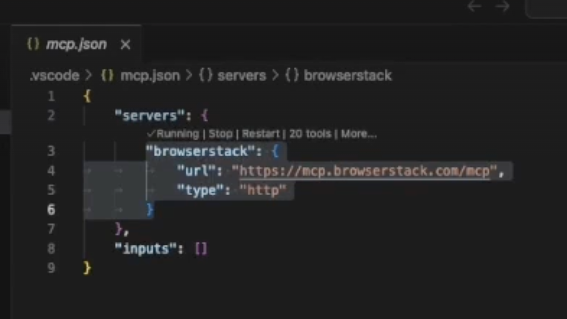
- VSCode (Copilot - Agent Mode): `.vscode/mcp.json`:
- Locate or Create the Configuration File:
In the root directory of your project, look for a folder named .vscode. This folder is usually hidden so you will need to find it as mentioned in the expand.
- If this folder doesn't exist, create it.
- Inside the .vscode folder, create a new file named mcp.json
- Add the Configuration: Open the mcp.json file and then add the following JSON content.
- Replace the username and
> **Note:** The hosted Remote MCP server (`mcp.browserstack.com`) is now fully stateless over Streamable HTTP — any Streamable-HTTP client (Claude, Cursor, VS Code, ChatGPT) connects with no configuration change.
#### Note : Ensure you are using Node version >= `20.9`
- Check your node version using `node --version`. Recommended version: `v22.15.0` (LTS)
- To Upgrade Node :
- 1. On macOS `(Homebrew) - brew update && brew upgrade node or if using (nvm) - nvm install 22.15.0 && nvm use 22.15.0 && nvm alias default 22.15.0`
- 2. On Windows `(nvm-windows) : nvm install 22.15.0 && nvm use 22.15.0`
- 👉 Or directly download the Node.js LTS Installer
.
## 💡 Usage Examples
### 📱 Manual App Testing
Test mobile apps on real devices across the latest OS versions. Reproduce bugs and debug crashes without setup hassles.
Below are some sample prompts to use your mobile apps on BrowserStack's extensive cloud of real devices
```bash
# Open app on specific device
"open my app on a iPhone 15 Pro Max"
# Debug app crashes
"My app crashed on Android 14 device, can you help me debug?"
```
- Unlike emulators, test your app's real-world performance on actual devices. With advanced [App-Profiling features](https://www.browserstack.com/docs/app-live/app-performance-testing), you can debug crashes and performance issues in real-time.
- Access all major devices and OS versions from our [device grid](https://www.browserstack.com/list-of-browsers-and-platforms/app_live), We have strict SLAs to provision our global datacenters with newly released devices on [launch day](https://www.browserstack.com/blog/browserstack-launches-iphone-15-on-day-0-behind-the-scenes/).
### 🌐 Manual Web Testing
Similar to the app testing, you can use the following prompts to test your **websites** on BrowserStack's extensive cloud of real browsers and devices. Don't have Edge browser installed on your machine ? We've got you covered!
```bash
# Test your websites
"open my website hosted on localhost:3001 on Edge"
"open browserstack.com on latest version of Chrome"
```
- Test websites across different browsers and devices. We support [every major browser](https://www.browserstack.com/list-of-browsers-and-platforms/live) across every major OS.
- Seamlessly test websites hosted locally on your machine, no need to deploy to a remote server!
### 🧪 Automated Testing (Playwright, Selenium, A11y and more..)
Auto-analyze, diagnose, and even fix broken test scripts right in your IDE or LLM. Instantly fetch logs, identify root causes, and apply context-aware fixes. No more debugging loops.
Below are few example prompts to run/debug/fix your automated tests on BrowserStack's [Test Platform](https://www.browserstack.com/test-platform).
> **Note:** When fetching Root Cause Analysis (RCA) for a test, the server returns the suggested fix as a proposal only. It never applies code changes automatically — your assistant must present the suggestion and wait for your explicit approval before editing any files.
```bash
#Port test suite to BrowserStack
"Setup test suite to run on BrowserStack infra"
#Run tests on BrowserStack
“Run my tests on BrowserStack”
#AI powered debugging of test failures
"My App Automate tests have failed, can you help me fix the new failures?"
```
- Fix test failures reported by your CI/CD pipeline by utilising our industry leading [Test Observability](https://www.browserstack.com/docs/test-observability) features. Find more info [here](https://www.browserstack.com/docs/test-observability/features/smart-tags).
- Run tests written in Jest, Playwright, Selenium, and more on BrowserStack's [Test Platform](https://www.browserstack.com/test-platform)
### 🌐 Accessibility
Catch accessibility issues early with automated, local a11y scans. Get one-click, AI-suggested fixes. No docs hunting, no CI surprises. Ensure WCAG and ADA compliance with our Accessibility Testing tool
```bash
#Scan accessibility issues while development
"Scan & help fix accessibility issues for my website running locally on localhost:3000"
#Scan accessibility issues on production site
“Run accessibility scan & identify issues on my website - www.bstackdemo.com”
```
### 📋 Test Management
Create and manage test cases, create test plans and trigger test runs using natural language. Below are a few example prompts to utilise capabilities of BrowserStack's [Test Management](https://www.browserstack.com/test-management) with MCP server.
```bash
# Create project & folder structure
"create new Test management project named My Demo Project with two sub folders - Login & Checkout"
# Add test cases
"add invalid login test case in Test Management project named My Demo Project"
# List added test cases
"list high priority Login test cases from Test Management project - My Demo Project"
# Create test run
"create a test run for Login tests from Test Management project - My Demo Project"
# Update test results
"update test results as passed for Login tests test run from My Demo Project"
```
### ⚡ Load Testing
Run and analyse load tests at scale without leaving your IDE or chat — find tests, start and stop runs, read reports and AI Insights, compare runs, and check your VU-hours. Works with API (JMeter, k6, Gatling, Locust), browser (Playwright, Selenium, WebdriverIO, Nightwatch) and hybrid load tests on BrowserStack's [Load Testing](https://www.browserstack.com/load-testing). These go through the [core tools](#-core-tools).
```bash
# Find a test
"find my load test called checkout-api"
# Run it
"run checkout-api for 5 minutes with 100 virtual users"
# Check on it
"is my checkout-api run finished yet?"
# Read the results
"what was the p95 response time and error rate of the last checkout-api run?"
# Compare two runs of the same test
"did the latest checkout-api run regress compared with the previous one?"
# Check quota before a big run
"how many VU-hours do I have left, and what would a 30-minute run with 500 VUs cost?"
```
### 🧪 Access BrowserStack AI agents
Generate test cases from PRDs, convert manual tests to low-code automation, and auto-heal flaky scripts powered by BrowserStack’s AI agents, seamlessly integrated into your workflow. Below are few example prompts to access Browserstack AI agents
```bash
#Test case generator agent
"With Browserstack AI, create relevant test cases for my PRD located at /usr/file/location"
#Low code authoring agent
“With Browserstack AI, automate my manual test case X, added in Test Management”
#Self healing agent
“Help fix flaky tests in my test script with Browserstack AI self healing”
```
## 🛠️ Installation
### 📋 Prerequisites for MCP Setup
- Node.js version >= `20.9` (see the note under [One Click MCP Setup](#️-one-click-mcp-setup) above).
- A BrowserStack account (steps below).
To install with one click, use the **Install in VS Code** / **Install in Cursor** buttons under [One Click MCP Setup](#️-one-click-mcp-setup) at the top of this page.
### **Alternate ways to Setup MCP server**
1. **Create a BrowserStack Account**
- Sign up for [BrowserStack](https://www.browserstack.com/users/sign_up) if you don't have an account already.
- ℹ️ If you have an open-source project, we'll be able to provide you with a [free plan](https://www.browserstack.com/open-source).
- Once you have an account (and purchased appropriate plan), note down your `username` and `access_key` from [Account Settings](https://www.browserstack.com/accounts/profile/details).
2. **Install the MCP Server**
- VSCode (Copilot - Agent Mode): `.vscode/mcp.json`:
- Locate or Create the Configuration File:
In the root directory of your project, look for a folder named .vscode. This folder is usually hidden so you will need to find it as mentioned in the expand.
- If this folder doesn't exist, create it.
- Inside the .vscode folder, create a new file named mcp.json
- Add the Configuration: Open the mcp.json file and then add the following JSON content.
- Replace the username and