# Omazel — How It Works and How to Use It
This is the full reference. For ready-to-paste rules, see
[EXAMPLES.md](EXAMPLES.md); for a quick overview, the [README](../README.md).
- [Getting started](#getting-started)
- [Two ways to edit rules](#two-ways-to-edit-rules)
- [Anatomy of a rule](#anatomy-of-a-rule)
- [Conditions reference](#conditions-reference)
- [Actions reference](#actions-reference)
- [Patterns and tokens](#patterns-and-tokens)
- [Rule order and `continue`](#rule-order-and-continue)
- [Testing safely with dry run](#testing-safely-with-dry-run)
- [How the engine works](#how-the-engine-works)
- [Scripting the engine](#scripting-the-engine)
- [Widget settings](#widget-settings)
- [Troubleshooting](#troubleshooting)
## Getting started
```bash
omarchy plugin add https://github.com/bscott/Omazel.git --enable
```
Place the **Omazel** widget in your bar (Omarchy bar settings, category
*System*), click the broom glyph, and either:
- **Build rules visually** — the built-in editor walks you through folders,
conditions, and actions with dropdowns and validation, or
- **Create starter rules** — copies a commented example file to
`~/.config/omazel/rules.toml` and you take it from there in your `$EDITOR`.
Nothing is required out of the box: flat folders are live-watched by a
built-in Qt directory watcher, and the rules file hot-reloads natively.
Installing `inotify-tools` (`sudo pacman -S inotify-tools`) upgrades
watching to inotify — sharper file events, and the only way to live-watch
`recursive = true` folders (without it, recursive folders are covered by
the periodic sweep alone). Everything else is needed only by the rules you
write, and the widget popup warns when a rule wants a tool that is missing:
| Tool | Needed for |
|------|-----------|
| `inotifywait` | preferred watcher; required for recursive folders |
| `age` | `encrypt` action |
| `tailscale` | `upload via = "taildrop"` |
| `rclone` | `upload` to Dropbox, Proton Drive, or any rclone remote |
| `zip` / `unzip` / `7z` / `unrar` | `compress` / `extract` actions |
| `file` | `mime` conditions |
| `getfattr` (package `attr`) | `source` conditions |
| `xdg-open` | `open` action |
## Two ways to edit rules
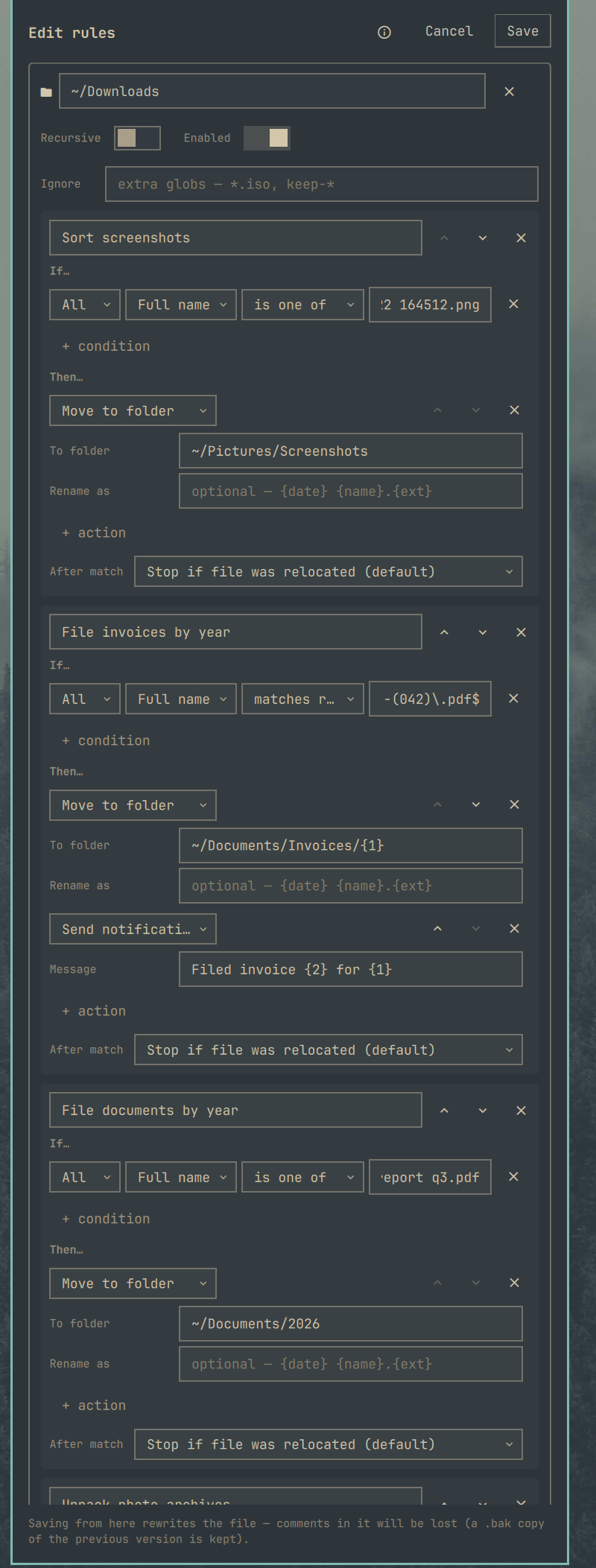 **Visual editor** — click the broom, then **Edit rules**. Add watched
folders, stack conditions, pick actions from dropdowns that show exactly the
inputs each action takes, and reorder rules with the arrows. Save validates
everything through the same compiler the engine loads with, so mistakes show
up as messages in the editor instead of a broken config. The previous
version of the file is kept as `rules.toml.bak`.
**Text editor** — the pencil button opens `~/.config/omazel/rules.toml` in
your `$EDITOR`, or just edit the file any way you like. Omazel watches its
own rules file and reloads on save, no restart needed.
The two round-trip: a hand-written file opened in the visual editor keeps
its structure. The one thing a visual-editor save drops is comments (it
warns first).
## Anatomy of a rule
```toml
[[folder]] # one block per watched directory
path = "~/Downloads"
recursive = false # optional: watch subdirectories too
enabled = true # optional: false keeps the config, stops watching
ignore = ["*.iso", "keep-*"] # optional: extra globs to skip
[[folder.rule]] # rules run top-down per folder
name = "Sort screenshots"
all = [ # every condition must hold
{ field = "name", contains = "screenshot" },
{ field = "kind", is = "image" },
]
any = [] # optional: at least one must hold
none = [] # optional: none may hold
actions = [ # run in order when the rule matches
{ do = "move", to = "~/Pictures/Screenshots" },
]
```
A rule with no conditions matches every file — useful as a deliberate
catch-all at the bottom of a folder's rule list.
## Conditions reference
Each condition is a table naming a `field` and exactly one operator key.
### Text fields
| Field | What it sees |
|-------|--------------|
| `name` | basename without extension (`Report Final`) |
| `fullname` | basename with extension (`Report Final.pdf`) |
| `extension` | lowercase, without the dot (`pdf`) |
| `path` | the absolute path |
| `kind` | `image`, `video`, `audio`, `document`, `archive`, `code`, `other` (by extension) |
| `mime` | real content type via `file --mime-type` (`application/pdf`) — sees through wrong extensions |
| `source` | the URL the file was downloaded from — Chromium, Firefox, and wget record it in the `user.xdg.origin.url` extended attribute |
Operators: `is`, `is_not`, `contains`, `not_contains`, `starts_with`,
`ends_with`, `matches` (regular expression), `in` / `not_in` (array of
values). All text matching ignores case.
### Numeric fields
| Field | What it measures | Value format |
|-------|------------------|--------------|
| `size` | file size | `"500 KB"`, `"10 MB"`, `"1.5gb"`, or bare bytes |
| `age` | time since last modification | `"45s"`, `"90m"`, `"12h"`, `"14d"`, `"2w"` — a bare number means days |
| `created` | time since the file was created (birth time; falls back to mtime on filesystems without it) | same as `age` |
Operators: `gt`, `lt`, `gte`, `lte`, `is`, `is_not`.
### Probe fields
| Field | What it checks | Operators |
|-------|----------------|-----------|
| `contents` | text inside the file, via grep (case-insensitive) | `contains`, `not_contains`, `matches` |
| `script` | any command you write — the file path is passed as `$1` and `$OMAZEL_FILE`; 30s timeout | `passes` (exit 0), `fails` (non-zero) |
```toml
all = [
{ field = "contents", contains = "Account Statement" },
{ field = "script", passes = "pdfinfo \"$1\" | grep -q Encrypted" },
]
```
`mime`, `source`, `created`, `contents`, and `script` need a small per-file
probe. Probes only gather what a folder's rules actually use, identical
checks across rules run once, and results are cached by path + size + mtime,
so the periodic sweep re-probes only files that changed. A probe that cannot
run counts as *no match*, even under a negated operator — a broken pattern
can never fire a rule.
### Files that are never matched
Hidden files, files inside hidden directories (judged relative to the
watched folder — deliberately watching `~/.config/something` works), and
in-progress downloads (`*.part`, `*.crdownload`, `*.tmp`, and friends) are
always skipped, before any rule runs.
## Actions reference
| Action | Parameters | Notes |
|--------|-----------|-------|
| `move` | `to` (dir, patterns ok), `as` (optional rename pattern) | collision-safe: `report (2).pdf` |
| `copy` | `to`, `as` | same collision handling |
| `rename` | `pattern` | keeps the original extension if the pattern produces none |
| `sort` | `into` (subfolder pattern, relative to the watched folder) | a move under the hood |
| `trash` | — | `gio trash`, recoverable |
| `delete` | — | permanent — prefer `trash` |
| `open` | — | `xdg-open` with the default application |
| `extract` | `to` (optional), `delete_archive` (bool) | zip / tar.* / 7z / rar / gz; always into a subfolder so a tarbomb can't scatter |
| `compress` | `to` (optional), `name` (optional pattern) | zip |
| `notify` | `message` (optional pattern) | desktop notification |
| `run` | `command` | file passed as `$1` and `$OMAZEL_FILE`; 10-minute timeout |
| `encrypt` | `recipient` or `recipients_file`, `identity`, `delete_original` (bool), `verify` (bool, default true) | see below |
| `upload` | `via` = `taildrop` (+`device`) / `dropbox` / `protondrive` / `rclone` (+`remote`, `path`) | see below |
### Encryption safety
`encrypt` runs [age](https://age-encryption.org) and never removes the
plaintext lightly. With `delete_original = true`, Omazel decrypts the fresh
ciphertext using your `identity` file and compares SHA-256 checksums — only
a byte-identical round trip authorizes removal (to the trash, so even that
is recoverable). Asking for deletion without an identity to verify against
is rejected at load time unless you explicitly opt out with `verify = false`.
### Uploads
- `via = "taildrop"` — `tailscale file cp` to the named `device`.
- `via = "dropbox"` / `"protondrive"` — rclone, defaulting the remote name
to `dropbox:` / `protondrive:`; override with `remote`.
- `via = "rclone"` — any remote from `rclone listremotes` (S3, Drive, B2,
SFTP, …); `remote` is required, `path` optional.
When an earlier action in the same rule relocated the file (say
`encrypt` with `delete_original`), later actions automatically target the
new path — encrypt-then-upload ships the `.age` file, not the vanished
plaintext.
## Patterns and tokens
Anywhere a destination, name, or message accepts a pattern:
| Token | Expands to |
|-------|-----------|
| `{name}` / `{fullname}` / `{ext}` | file name parts |
| `{folder}` | basename of the file's directory |
| `{date}` / `{year}` / `{month}` / `{day}` / `{time}` | from the file's own modification time |
| `{1}` … `{9}`, `{0}` | capture groups from the rule's `matches` condition (original casing preserved; `{0}` is the whole match) |
```toml
all = [{ field = "name", matches = "^Invoice-(\\d{4})-(\\d+)" }]
actions = [{ do = "move", to = "~/Documents/Invoices/{1}", as = "{2} {name}" }]
```
## Rule order and `continue`
Rules run top-down. By default, once a rule *relocates* the file (move,
rename, sort, trash, delete, extract with `delete_archive`, encrypt with
`delete_original`), later rules are skipped; non-relocating rules
(copy, notify, …) fall through. Per rule you can override:
```toml
continue = true # keep matching later rules even after relocating
continue = false # stop after this rule matches, no matter what
```
In the visual editor this is the **After match** dropdown.
## Testing safely with dry run
Flip **Dry run** in the widget popup (or `omarchy-shell omazel dryRunToggle`).
Rules evaluate exactly as normal and the activity feed shows
"Would have: …" entries with the computed destinations — but nothing is
touched. Recommended before trusting any new destructive rule, especially
age-based expiry.
Also useful: the **sweep** button evaluates everything already sitting in
your watched folders right now, so you don't have to wait for a new file to
see rules fire.
## How the engine works
- **Watcher** — one `inotifywait` per folder reacts the moment a file
finishes arriving (`close_write` / `moved_to`). Without inotify-tools, a
built-in Qt directory watcher covers flat folders instead — it reacts to
files appearing, disappearing, or changing size, leaving quiet in-place
rewrites to the sweep. Either way, new files get a settle delay (default
3s) before being judged, so nothing is evaluated half-written.
- **Sweep** — a periodic re-scan (default 5 minutes) fires age-based rules
(files don't emit events by getting older) and catches anything that
arrived while the shell was off.
- **Cooldown** — the same rule won't act on the same file more than once per
minute (configurable), so the overlapping watcher/sweep paths never
double-run and a failing action can't retry in a tight loop.
- **Loop protection** — files Omazel itself just produced are ignored
briefly, so a rule can't chew on its own output.
- **Activity log** — every action (including dry runs and failures) is
appended to `~/.local/state/omazel/activity.log` and shown in the popup.
## Scripting the engine
```bash
omarchy-shell omazel status # JSON engine state
omarchy-shell omazel pause # also: resume, toggle
omarchy-shell omazel dryRunToggle # also: dryRunOn, dryRunOff
omarchy-shell omazel sweep # evaluate everything now
omarchy-shell omazel reload # re-read the rules file
omarchy-shell omazel show # open the widget popup
omarchy-shell omazel editor # open the visual rule editor
```
Hyprland binding example:
```ini
bindd = SUPER SHIFT, O, Toggle Omazel, exec, omarchy-shell omazel toggle
```
## Widget settings
All in the Omarchy bar settings for the widget:
| Setting | Default | Meaning |
|---------|---------|---------|
| Rules file | `~/.config/omazel/rules.toml` | where rules live |
| Sweep interval | 300s | 0 disables the periodic sweep |
| Settle delay | 3s | quiet time before a fresh file is judged |
| Rule cooldown | 60s | min. gap before the same rule re-fires on the same file |
| Start paused | off | come up paused after every shell restart |
| Show action count | on | session action count next to the bar glyph |
| Activity rows | 8 | entries shown in the popup feed |
| Update check | 6h | how often to check the plugin's git remote; 0 disables |
## Troubleshooting
- **Rules don't fire** — check the popup: paused state, rule problems
(each broken rule is listed by name; the rest keep working), and
missing-tool warnings. Then flip dry run on and hit sweep — the feed shows
what would happen.
- **A rule fires on the wrong files** — dry run + sweep is the fastest way
to audit; the feed names the rule for every entry.
- **`source` conditions never match** — the xattr only exists on downloads
saved by browsers/wget onto a filesystem with xattr support, and file
managers may strip it on copy. Check with
`getfattr -n user.xdg.origin.url `.
- **History** — `~/.local/state/omazel/activity.log` is a plain TSV of
everything Omazel ever did: `epoch, status, action, rule, file, dest,
message`.
- **Engine state** — `omarchy-shell omazel status`; shell-level errors land
in `journalctl --user` under `omarchy-shell`.
**Visual editor** — click the broom, then **Edit rules**. Add watched
folders, stack conditions, pick actions from dropdowns that show exactly the
inputs each action takes, and reorder rules with the arrows. Save validates
everything through the same compiler the engine loads with, so mistakes show
up as messages in the editor instead of a broken config. The previous
version of the file is kept as `rules.toml.bak`.
**Text editor** — the pencil button opens `~/.config/omazel/rules.toml` in
your `$EDITOR`, or just edit the file any way you like. Omazel watches its
own rules file and reloads on save, no restart needed.
The two round-trip: a hand-written file opened in the visual editor keeps
its structure. The one thing a visual-editor save drops is comments (it
warns first).
## Anatomy of a rule
```toml
[[folder]] # one block per watched directory
path = "~/Downloads"
recursive = false # optional: watch subdirectories too
enabled = true # optional: false keeps the config, stops watching
ignore = ["*.iso", "keep-*"] # optional: extra globs to skip
[[folder.rule]] # rules run top-down per folder
name = "Sort screenshots"
all = [ # every condition must hold
{ field = "name", contains = "screenshot" },
{ field = "kind", is = "image" },
]
any = [] # optional: at least one must hold
none = [] # optional: none may hold
actions = [ # run in order when the rule matches
{ do = "move", to = "~/Pictures/Screenshots" },
]
```
A rule with no conditions matches every file — useful as a deliberate
catch-all at the bottom of a folder's rule list.
## Conditions reference
Each condition is a table naming a `field` and exactly one operator key.
### Text fields
| Field | What it sees |
|-------|--------------|
| `name` | basename without extension (`Report Final`) |
| `fullname` | basename with extension (`Report Final.pdf`) |
| `extension` | lowercase, without the dot (`pdf`) |
| `path` | the absolute path |
| `kind` | `image`, `video`, `audio`, `document`, `archive`, `code`, `other` (by extension) |
| `mime` | real content type via `file --mime-type` (`application/pdf`) — sees through wrong extensions |
| `source` | the URL the file was downloaded from — Chromium, Firefox, and wget record it in the `user.xdg.origin.url` extended attribute |
Operators: `is`, `is_not`, `contains`, `not_contains`, `starts_with`,
`ends_with`, `matches` (regular expression), `in` / `not_in` (array of
values). All text matching ignores case.
### Numeric fields
| Field | What it measures | Value format |
|-------|------------------|--------------|
| `size` | file size | `"500 KB"`, `"10 MB"`, `"1.5gb"`, or bare bytes |
| `age` | time since last modification | `"45s"`, `"90m"`, `"12h"`, `"14d"`, `"2w"` — a bare number means days |
| `created` | time since the file was created (birth time; falls back to mtime on filesystems without it) | same as `age` |
Operators: `gt`, `lt`, `gte`, `lte`, `is`, `is_not`.
### Probe fields
| Field | What it checks | Operators |
|-------|----------------|-----------|
| `contents` | text inside the file, via grep (case-insensitive) | `contains`, `not_contains`, `matches` |
| `script` | any command you write — the file path is passed as `$1` and `$OMAZEL_FILE`; 30s timeout | `passes` (exit 0), `fails` (non-zero) |
```toml
all = [
{ field = "contents", contains = "Account Statement" },
{ field = "script", passes = "pdfinfo \"$1\" | grep -q Encrypted" },
]
```
`mime`, `source`, `created`, `contents`, and `script` need a small per-file
probe. Probes only gather what a folder's rules actually use, identical
checks across rules run once, and results are cached by path + size + mtime,
so the periodic sweep re-probes only files that changed. A probe that cannot
run counts as *no match*, even under a negated operator — a broken pattern
can never fire a rule.
### Files that are never matched
Hidden files, files inside hidden directories (judged relative to the
watched folder — deliberately watching `~/.config/something` works), and
in-progress downloads (`*.part`, `*.crdownload`, `*.tmp`, and friends) are
always skipped, before any rule runs.
## Actions reference
| Action | Parameters | Notes |
|--------|-----------|-------|
| `move` | `to` (dir, patterns ok), `as` (optional rename pattern) | collision-safe: `report (2).pdf` |
| `copy` | `to`, `as` | same collision handling |
| `rename` | `pattern` | keeps the original extension if the pattern produces none |
| `sort` | `into` (subfolder pattern, relative to the watched folder) | a move under the hood |
| `trash` | — | `gio trash`, recoverable |
| `delete` | — | permanent — prefer `trash` |
| `open` | — | `xdg-open` with the default application |
| `extract` | `to` (optional), `delete_archive` (bool) | zip / tar.* / 7z / rar / gz; always into a subfolder so a tarbomb can't scatter |
| `compress` | `to` (optional), `name` (optional pattern) | zip |
| `notify` | `message` (optional pattern) | desktop notification |
| `run` | `command` | file passed as `$1` and `$OMAZEL_FILE`; 10-minute timeout |
| `encrypt` | `recipient` or `recipients_file`, `identity`, `delete_original` (bool), `verify` (bool, default true) | see below |
| `upload` | `via` = `taildrop` (+`device`) / `dropbox` / `protondrive` / `rclone` (+`remote`, `path`) | see below |
### Encryption safety
`encrypt` runs [age](https://age-encryption.org) and never removes the
plaintext lightly. With `delete_original = true`, Omazel decrypts the fresh
ciphertext using your `identity` file and compares SHA-256 checksums — only
a byte-identical round trip authorizes removal (to the trash, so even that
is recoverable). Asking for deletion without an identity to verify against
is rejected at load time unless you explicitly opt out with `verify = false`.
### Uploads
- `via = "taildrop"` — `tailscale file cp` to the named `device`.
- `via = "dropbox"` / `"protondrive"` — rclone, defaulting the remote name
to `dropbox:` / `protondrive:`; override with `remote`.
- `via = "rclone"` — any remote from `rclone listremotes` (S3, Drive, B2,
SFTP, …); `remote` is required, `path` optional.
When an earlier action in the same rule relocated the file (say
`encrypt` with `delete_original`), later actions automatically target the
new path — encrypt-then-upload ships the `.age` file, not the vanished
plaintext.
## Patterns and tokens
Anywhere a destination, name, or message accepts a pattern:
| Token | Expands to |
|-------|-----------|
| `{name}` / `{fullname}` / `{ext}` | file name parts |
| `{folder}` | basename of the file's directory |
| `{date}` / `{year}` / `{month}` / `{day}` / `{time}` | from the file's own modification time |
| `{1}` … `{9}`, `{0}` | capture groups from the rule's `matches` condition (original casing preserved; `{0}` is the whole match) |
```toml
all = [{ field = "name", matches = "^Invoice-(\\d{4})-(\\d+)" }]
actions = [{ do = "move", to = "~/Documents/Invoices/{1}", as = "{2} {name}" }]
```
## Rule order and `continue`
Rules run top-down. By default, once a rule *relocates* the file (move,
rename, sort, trash, delete, extract with `delete_archive`, encrypt with
`delete_original`), later rules are skipped; non-relocating rules
(copy, notify, …) fall through. Per rule you can override:
```toml
continue = true # keep matching later rules even after relocating
continue = false # stop after this rule matches, no matter what
```
In the visual editor this is the **After match** dropdown.
## Testing safely with dry run
Flip **Dry run** in the widget popup (or `omarchy-shell omazel dryRunToggle`).
Rules evaluate exactly as normal and the activity feed shows
"Would have: …" entries with the computed destinations — but nothing is
touched. Recommended before trusting any new destructive rule, especially
age-based expiry.
Also useful: the **sweep** button evaluates everything already sitting in
your watched folders right now, so you don't have to wait for a new file to
see rules fire.
## How the engine works
- **Watcher** — one `inotifywait` per folder reacts the moment a file
finishes arriving (`close_write` / `moved_to`). Without inotify-tools, a
built-in Qt directory watcher covers flat folders instead — it reacts to
files appearing, disappearing, or changing size, leaving quiet in-place
rewrites to the sweep. Either way, new files get a settle delay (default
3s) before being judged, so nothing is evaluated half-written.
- **Sweep** — a periodic re-scan (default 5 minutes) fires age-based rules
(files don't emit events by getting older) and catches anything that
arrived while the shell was off.
- **Cooldown** — the same rule won't act on the same file more than once per
minute (configurable), so the overlapping watcher/sweep paths never
double-run and a failing action can't retry in a tight loop.
- **Loop protection** — files Omazel itself just produced are ignored
briefly, so a rule can't chew on its own output.
- **Activity log** — every action (including dry runs and failures) is
appended to `~/.local/state/omazel/activity.log` and shown in the popup.
## Scripting the engine
```bash
omarchy-shell omazel status # JSON engine state
omarchy-shell omazel pause # also: resume, toggle
omarchy-shell omazel dryRunToggle # also: dryRunOn, dryRunOff
omarchy-shell omazel sweep # evaluate everything now
omarchy-shell omazel reload # re-read the rules file
omarchy-shell omazel show # open the widget popup
omarchy-shell omazel editor # open the visual rule editor
```
Hyprland binding example:
```ini
bindd = SUPER SHIFT, O, Toggle Omazel, exec, omarchy-shell omazel toggle
```
## Widget settings
All in the Omarchy bar settings for the widget:
| Setting | Default | Meaning |
|---------|---------|---------|
| Rules file | `~/.config/omazel/rules.toml` | where rules live |
| Sweep interval | 300s | 0 disables the periodic sweep |
| Settle delay | 3s | quiet time before a fresh file is judged |
| Rule cooldown | 60s | min. gap before the same rule re-fires on the same file |
| Start paused | off | come up paused after every shell restart |
| Show action count | on | session action count next to the bar glyph |
| Activity rows | 8 | entries shown in the popup feed |
| Update check | 6h | how often to check the plugin's git remote; 0 disables |
## Troubleshooting
- **Rules don't fire** — check the popup: paused state, rule problems
(each broken rule is listed by name; the rest keep working), and
missing-tool warnings. Then flip dry run on and hit sweep — the feed shows
what would happen.
- **A rule fires on the wrong files** — dry run + sweep is the fastest way
to audit; the feed names the rule for every entry.
- **`source` conditions never match** — the xattr only exists on downloads
saved by browsers/wget onto a filesystem with xattr support, and file
managers may strip it on copy. Check with
`getfattr -n user.xdg.origin.url `.
- **History** — `~/.local/state/omazel/activity.log` is a plain TSV of
everything Omazel ever did: `epoch, status, action, rule, file, dest,
message`.
- **Engine state** — `omarchy-shell omazel status`; shell-level errors land
in `journalctl --user` under `omarchy-shell`.