# wpm plugin
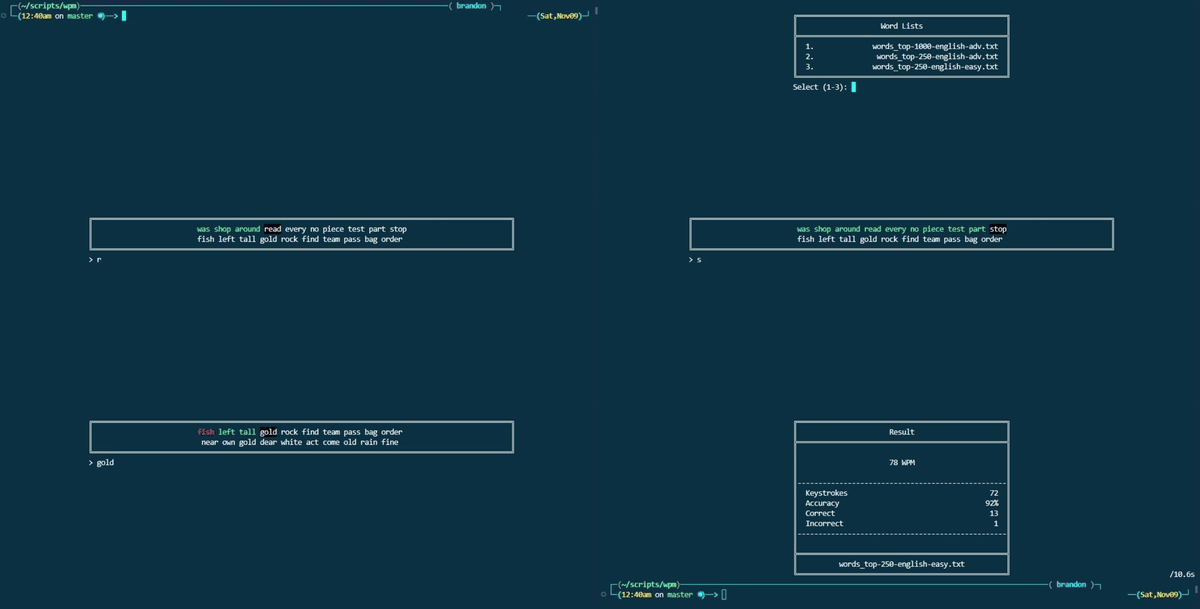
This [oh-my-zsh](https://github.com/ohmyzsh/ohmyzsh) plugin lets you test your typing speed in a terminal, track WPM, accuracy, and more. Results are saved in a handy JSON format for easy tracking.
 ## Setup
### oh-my-zsh
Place the `wpm` folder in `.oh-my-zsh/custom/plugins`.
Add `wpm` to the `plugins` array in your `.zshrc` file:
```
plugins=(... wpm)
```
Make sure `ZSH_CUSTOM` is set:
```
ZSH_CUSTOM="$HOME/.oh-my-zsh/custom"
```
### Required Packages
```
sudo apt install jq>=1.7
```
## Usage
### Functions
Start a speed test:
```
wpm_test
```
You can set a timer if you want (default is 60):
```
wpm_test -d
```
Specify a word list file to use (otherwise the file selection menu appears):
```
wpm_test -f
```
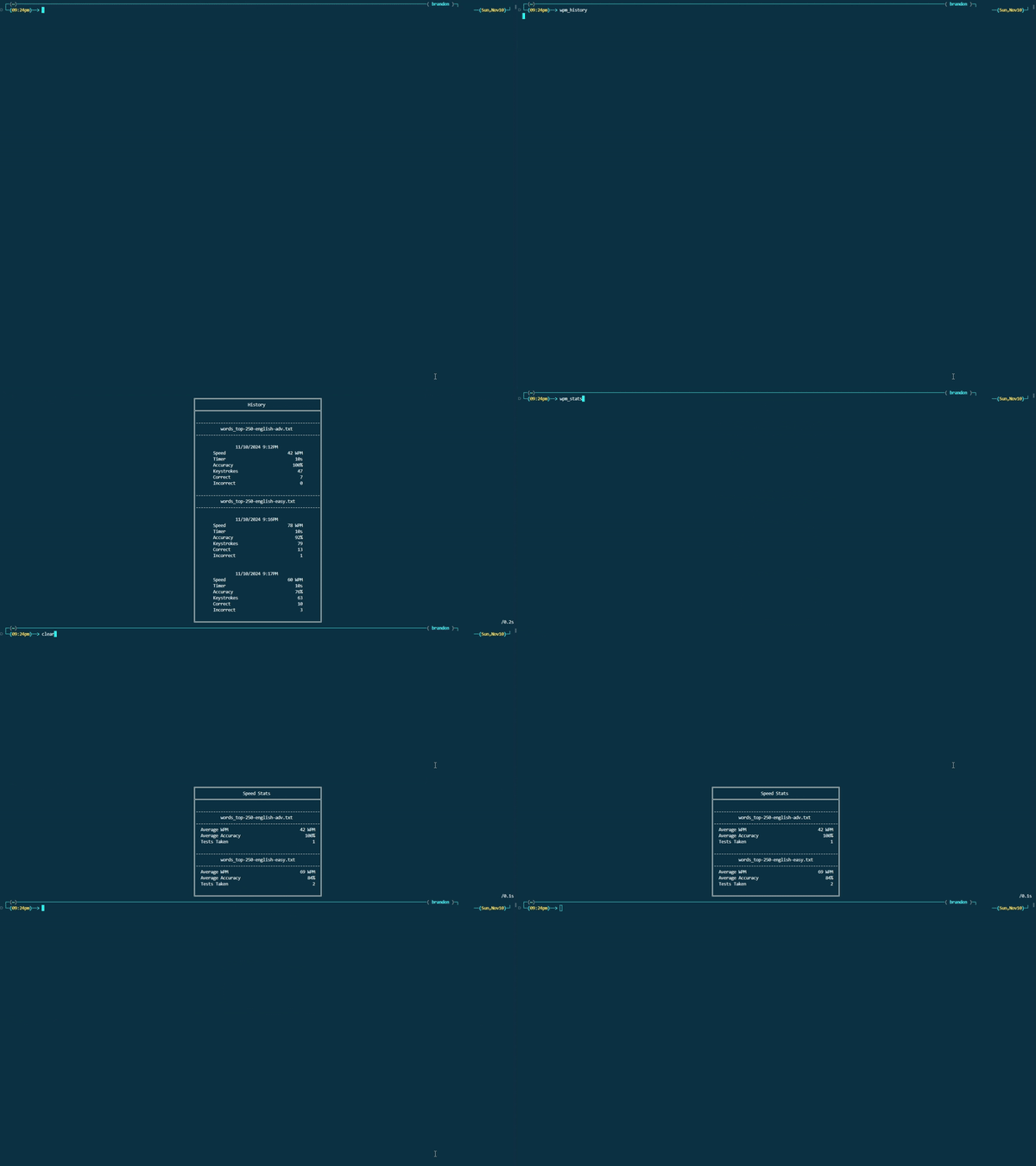
View speed test result history:
```
wpm_history
```
View average stats for every speed test:
```
wpm_stats
```
## Setup
### oh-my-zsh
Place the `wpm` folder in `.oh-my-zsh/custom/plugins`.
Add `wpm` to the `plugins` array in your `.zshrc` file:
```
plugins=(... wpm)
```
Make sure `ZSH_CUSTOM` is set:
```
ZSH_CUSTOM="$HOME/.oh-my-zsh/custom"
```
### Required Packages
```
sudo apt install jq>=1.7
```
## Usage
### Functions
Start a speed test:
```
wpm_test
```
You can set a timer if you want (default is 60):
```
wpm_test -d
```
Specify a word list file to use (otherwise the file selection menu appears):
```
wpm_test -f
```
View speed test result history:
```
wpm_history
```
View average stats for every speed test:
```
wpm_stats
```
 ### Data
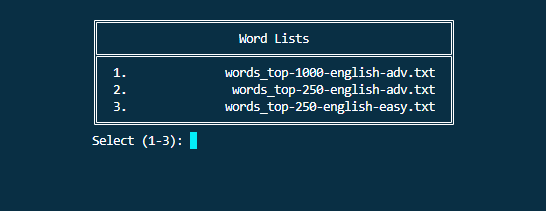
Select a word list txt file to use. Feel free to add your own lists in `wpm/lists/`.
### Data
Select a word list txt file to use. Feel free to add your own lists in `wpm/lists/`.
 Test results are stored in `wpm/stats/stats.json` and are organized via file name.
```
{
"words_top-250-english-adv.txt": {
"average": {
"wpm": 42,
"accuracy": 100,
"tests taken": 1
},
"results": [
{
"date": "11/10/2024 9:12PM",
"wpm": 42,
"test duration": 10,
"keystrokes": 47,
"accuracy": 100,
"correct": 7,
"incorrect": 0
}
]
},
"words_top-250-english-easy.txt": {
"average": {
"wpm": 69,
"accuracy": 84,
"tests taken": 2
},
"results": [
{
"date": "11/10/2024 9:16PM",
"wpm": 78,
"test duration": 10,
"keystrokes": 79,
"accuracy": 92,
"correct": 13,
"incorrect": 1
},
{
"date": "11/10/2024 9:17PM",
"wpm": 60,
"test duration": 10,
"keystrokes": 63,
"accuracy": 76,
"correct": 10,
"incorrect": 3
}
]
}
}
```
## Configuration
Add as many txt word lists you want in `wpm/lists/`. Words must be on their own line.
Test results are stored in `wpm/stats/stats.json` and are organized via file name.
```
{
"words_top-250-english-adv.txt": {
"average": {
"wpm": 42,
"accuracy": 100,
"tests taken": 1
},
"results": [
{
"date": "11/10/2024 9:12PM",
"wpm": 42,
"test duration": 10,
"keystrokes": 47,
"accuracy": 100,
"correct": 7,
"incorrect": 0
}
]
},
"words_top-250-english-easy.txt": {
"average": {
"wpm": 69,
"accuracy": 84,
"tests taken": 2
},
"results": [
{
"date": "11/10/2024 9:16PM",
"wpm": 78,
"test duration": 10,
"keystrokes": 79,
"accuracy": 92,
"correct": 13,
"incorrect": 1
},
{
"date": "11/10/2024 9:17PM",
"wpm": 60,
"test duration": 10,
"keystrokes": 63,
"accuracy": 76,
"correct": 10,
"incorrect": 3
}
]
}
}
```
## Configuration
Add as many txt word lists you want in `wpm/lists/`. Words must be on their own line.