
# [Morning Star](https://github.com/btspoony/mstar-harness)
Harness Workflow Engine · Agent Plugin
English / [中文](README_CN.md)
GitHub ·
Issues
[](https://github.com/btspoony/mstar-harness/actions/workflows/ci.yml)
[](LICENSE)
[](https://github.com/btspoony/mstar-harness/releases) [](INSTALL.md#prerequisites)
[](https://github.com/btspoony/mstar-harness/commits/main)
[](https://dshfind.com/zh/plugins/btspoony/mstar-harness?ref=badge)
[](https://www.greptile.com/?utm_source=oss_badge&utm_medium=readme&utm_campaign=greptile_for_open_source)
[](https://www.npmjs.com/package/@mstar-harness/cli)
[](https://www.npmjs.com/package/@mstar-harness/dsh)
[](https://www.npmjs.com/package/@mstar-harness/omp)
[](https://www.npmjs.com/package/@mstar-harness/opencode)
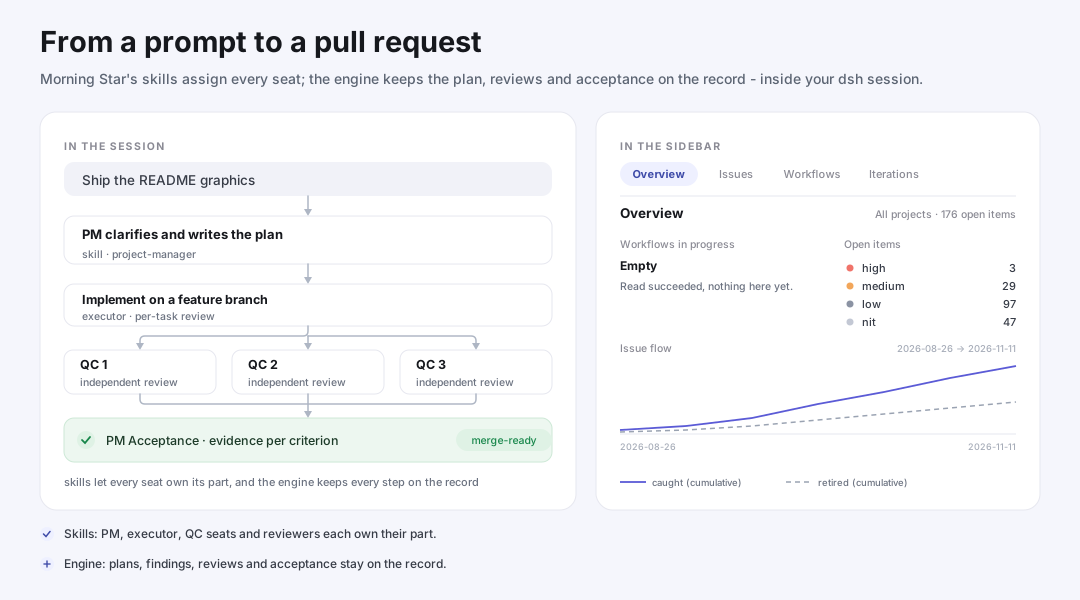
Morning Star brings a delivery process to the AI coding tools you already use — dsh, omp, OpenCode, Cursor, Kimi Code, ZCode, and Codex. You describe what you want; a `project-manager` agent clarifies the request, keeps a plan, and carries the work from requirements through implementation, review, and acceptance to a pull request. Requirements, architecture, implementation, review, acceptance, and audits each go to a role that owns that part.
**Why use it**
- **From request to pull request** — describe the work once; the PM keeps the plan, brings in the right specialists, and drives everything to a pull request. If work stops partway, the plan records where it left off so the work can resume later.
- **Specialists instead of one long prompt** — a PM orchestrates; separate roles own requirements, architecture, implementation, QC, acceptance, audits, and ops, each with a narrow brief.
- **A trail you can audit** — plans, findings, review reports, and decisions are recorded under the harness directory in your repo, not just in the chat.
## Install
Every host installs two ways: this CLI's `init` flow, or the host's own plugin manager — the native command installs the plugin only. Options, path layout, and host notes: [`INSTALL.md`](INSTALL.md).
- **dsh (DeepSeek Harness)** — needs the `dsh` CLI on `PATH`
- CLI: `npx @mstar-harness/cli init --target dsh`
- Native: `dsh plugin --profile web add @mstar-harness/dsh`
- **omp** — needs the `omp` CLI installed
- CLI: `npx @mstar-harness/cli init --target omp`
- Native: `omp plugin install @mstar-harness/omp`
- **OpenCode**
- CLI: `npx @mstar-harness/cli init --target opencode`
- Native: `@mstar-harness/opencode` for OpenCode 1.x, `@mstar-harness/opencode-v2` for OpenCode 2.x — add it to the plugin list in [`opencode.json`](INSTALL.md#opencode), then restart OpenCode
- **Cursor** — needs `git`
- CLI: `npx @mstar-harness/cli init --target cursor`
- Native: `git clone https://github.com/btspoony/mstar-harness.git ~/.cursor/plugins/local/morning-star-harness`, then **Developer: Reload Window**
- **Kimi Code** — no CLI target
- Native: `/plugins install https://github.com/btspoony/mstar-harness`, then `/plugins reload`
- **ZCode**
- CLI: `npx @mstar-harness/cli init --target zcode`
- Native: add `https://github.com/btspoony/mstar-harness` as a ZCode plugin marketplace, then install **morning-star-harness**
- **Codex** — needs the `codex` CLI
- CLI: `npx @mstar-harness/cli init --target codex`
- Native: `codex plugin marketplace add btspoony/mstar-harness --ref main`, then `codex plugin add morning-star-harness@mstar-repo`
## Use
Enter the PM once per session, then describe the work in your own words; the PM runs the process in that session.
| Host | Enter PM |
|------|----------|
| dsh | `pm` skill |
| omp | `/skill:pm` |
| OpenCode | `Project Manager` agent, or `/pm` |
| Cursor | `/pm` |
| Kimi Code | auto-loads in a session, or `/skill:pm` |
| ZCode | `/morning-star-harness:pm` |
| Codex | `/pm` |
### Single task (no iteration)
Give the PM a concrete request — for example, *"Add rate limiting to the public API and cover it with tests."* The PM clarifies the gaps, writes a plan, runs the work on a feature branch, and drives it through implement → independent QC review → acceptance → done. Confirmed problems that are not fixed in this round are captured as issues instead of being dropped. You review the result and merge.
### Iteration
| Command | When |
|---------|------|
| `/iteration-start [direction] [pause]` | Phase 1: an interactive direction lock (grill-me) that produces the iteration's compass and plans, then continues automatically through execution, close, pull request, and merge-ready. `pause` stops after Phase 1; continue with `/iteration-drive`. |
| `/iteration-drive` | Resume or advance an already locked iteration. Takes no arguments. |
| `/iteration-loop [direction] [scale]` | The same lifecycle end to end without the interactive phase. `scale` (`S` / `M` / `L` / `XL`) caps how many plans the iteration takes on. |
An iteration ends only after its post-merge close: a closed phase, an open pull request, or a merged pull request is not completion by itself. Command spelling differs per host — some hosts require a plugin prefix, and Codex installs the command skills at project scope only; argument forms and per-host details are in [`docs/commands.md`](docs/commands.md).
### Audit, review & verification
| Command | When |
|---------|------|
| `/codebase-audit [keywords]` | Read-only survey that produces prioritized, ready-to-execute improvement plans; narrow it with a category focus (`bug`, `security`, `perf`, `tech-debt`, …). |
| `/amazing-pr-review [pr\|branch] [quick\|default\|deep]` | Pre-merge review of a PR or branch at three strengths, ending in one verdict — `ship it`, `needs fixes`, or `blocked` from the finding tally on a settled run (completed without a stop, every required domain opened, the resolved diff basis readable and complete), or the single derived `incomplete` on exactly three conditions — the run stopped before synthesis, a required domain seat never opened, or the resolved diff basis could not be read. A wall-clock overrun is not one of them: a fully covered run past its budget publishes its tally-derived verdict and declares the overrun as a note. |
| `/amazing-test-audit [scope] [quick\|deep] [campaign]` | Read-only audit of the test surface → plans to delete, repair, consolidate, or relocate tests. |
| `/amazing-e2e-check [environment] [scenarios]` | Runs browser, device, or installed-deployment scenarios you explicitly asked for, in a separate workflow. |
The audit commands read and report; they do not edit your code. Two boundaries to know: `/amazing-pr-review` posts its findings to GitHub as a comment review when you give it a pull-request number — it never approves, requests changes, or merges — and `/amazing-e2e-check` runs only when you ask for it, with steps that touch a real environment requiring explicit authorization.
## Workflow

The main path shows a **development** delivery. Every plan gets plan-level QC — three independent seats by default — and multi-task plans add per-task review. Hotfix/inline review keeps its lighter seat rules. **PM Acceptance** is the sole acceptance route for every scope: each required criterion maps to relevant evidence and an honest result; QC approval alone is not test proof. PM may fill a named gap with a short bounded acceptance check, not implementation, test authoring, long suites or ops. Unfixed confirmed problems remain tracked issues.
**Scope notes.** An iteration locks its direction with you first, then runs the per-plan cycle for every plan it takes on and closes out once before its pull request; without an iteration, the cycle runs for a single plan. A verification or report-only deliverable — an audit, for example — ends at its agreed completion, with no pull request or merge. On the development path, a plan is complete only with its evidence: plan completion, merge-ready, and merged are three different facts, and only a verified merge, followed by the post-merge close, ends the delivery. Merging is a separate authorization with one recorded source: under `owner-gated` you approve it or merge yourself; under `reviewed-auto` the recorded policy supplies it only through a settled, posted `ship it` report at the current PR head; under `reviewed-bot` only through the attached bot's newest passing review on that head — not the mere existence of a review. An iteration that never recorded a policy returns to Phase 1 instead of falling back to any of them. Branch cleanup stays a separate, explicit step.
The engine checks the mechanically checkable parts of this process — workflow state transitions, branch and worktree alignment, dispatch preconditions, plan and issue bookkeeping. These checks are advisory by default: they report problems, and a project or iteration can opt into blocking enforcement with `enforcement: hard`; whether a violation can actually block depends on the host. Process state (plans, workflow records, findings, review reports) lives in the harness directory, `.mstar/` by default, which the scaffold's canonical `.gitignore` snippet ignores — the installer does not touch `.gitignore`.
## Dashboard
A read-only page on `127.0.0.1`, for this machine only, that brings project progress, open issues, and the roadmap into one view for the repository you start it from. It has Issues, Workflows, Iterations, and Roadmap; on Issues you can search and filter, open an issue's recorded history, and read the issue flow — a cumulative trend of issues captured versus retired. Nothing on the page writes; changes go through the CLI.
```text
mstar-harness dashboard
```
The command prints a one-line JSON result. Open `data.url` (`http://127.0.0.1:` plus the port it actually bound) and press Ctrl-C to stop. `--port` and `--project