# How do specifications work?
A **Specification** is designed to be easy for humans to understand.
However, **Specifications** are also highly structured so that computer software may automatically and accurately check information requirements with no ambiguity.
Every **Specification** has three main parts:
1. **Description**: a description of the rationale for the **Specification** and instructions of how to achieve it.
This part is designed for humans to read and understand why information is being requested.
This field is also used to describe the rationale for the various applicability facets, and how they serve to identify the relevant data contracts on an asset as a whole, rather than individually. Conversely, the `description` data on each requirement facet should help the user understand the purpose of the individual piece of information required.
1. **Applicability**: Identifies the subset of the model that we are intending to specify.
There are many different types of objects in IFC models, but each **Specification** only applies to a subset.
The subset can be identified via the available facets like entity (e.g. walls, windows), classification (e.g. Uniclass EF_25_10_25 External walls), and others.
1. **Requirements**: what information is required for subset identified in the applicability, such as required properties or materials.
For example, the **Specification** of "_all walls must have a fire rating property_" is structured like so:
1. **Description**: wall fire ratings are critical for building code compliance
1. **Applicability**: this specification applies to all wall objects
1. **Requirements**: the aforementioned wall objects must have a fire rating property
## How specifications can describe information
**Applicability** and **Requirements** are described using a collection **Facets**. A **Facet** describes information that a single entity (e.g. wall, door, etc) in your model may have.
A **Facet** describes its information precisely using fixed **Facet Parameters** so that computers can understand exactly what information you are after.
When a **Facet** is used in the **Applicability** section, it describes the information that we use to identify the relevant parts of the model.
When a **Facet** is used in the **Requirements** section, it describes the information constraints that the model parts must fulfill to comply with the **Specification**.
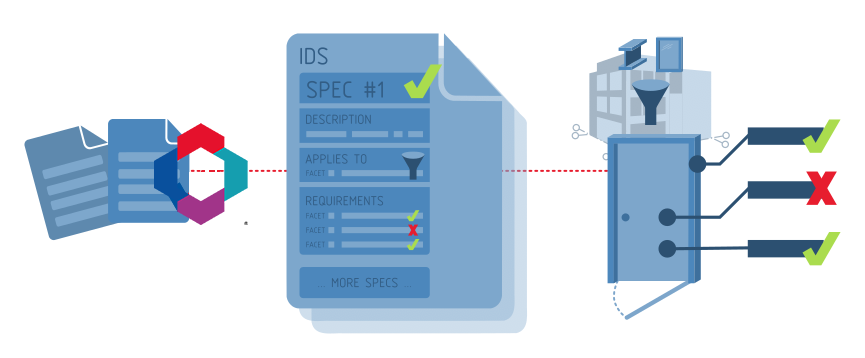
There are six different **Facets** of information:
| Facet Type | Facet Parameters | Example applicability | Example requirement |
| ------------------ | ----------------------------------------- | -------------------------------------------------------------------------------------------------------- | -------------------------------------------------------------------------------------- |
| **Entity** | **IFC Class** and **Predefined Type** | Applies to "IfcWall" with predefined type of "SHEAR" | Must be an "IfcWall" with a predefined type of "SHEAR" |
| **Attribute** | **Name** and **Value** | Applies to elements with the attribute "Name" having the value "W01" | Must have the attribute "Name" with the value "W01" |
| **Classification** | **System** and **Value** | Applies to elements classified under "Uniclass 2015" as "EF_25_10_25" | Must have a "Uniclass 2015" classification reference of "EF_25_10_25" |
| **Property** | **Property Set**, **Name**, and **Value** | Applies to elements with a property set of "Pset_WallCommon" with a "LoadBearing" property set to "TRUE" | Must have a "Pset_WallCommon" property set with a "LoadBearing" property set to "TRUE" |
| **Material** | **Value** | Applies to "concrete" elements | Must have a "concrete" material |
| **Parts** | **Entity** and **Relationship** | Applies to elements that are "contained in" an "IfcSpace" | Must be "contained in" an "IfcSpace" |
You can combine multiple **Facets** together in either the **Applicability** or **Requirements** section to describe a wide variety of **Specifications**.
Some **Facets** may have optional **Facet Parameters**.
For example, if you want to specify that a property should exist, but not the exact value, you may omit the value parameter of the **Property Facet**.
You may also specify a list of valid values, or a range of numbers, or text pattern for some **Facet Parameters**. These are known as **Complex Restrictions**.
For example, you would use a **Complex Restriction** to specify that a fire rating property must choose from either the value "0HR", "1HR", or "2HR" only.
Here are a few examples to wet your appetite:
| Intent | Applicability | Requirements |
| ----------------------------------------------------------------------------------- | -------------------------------------------------------------------------------------------------------------------------------------------------------------------------- | ---------------------------------------------------------------------------------------------------------------------------------------------------------------------------------------------------------------------------------------------- |
| External load bearing walls need to have a fire rating property for code compliance | - **Entity Facet** (**IFC Class** is IfcWall)
- **Property Facet** (**Property Set** is Pset_WallCommon, **Name** is LoadBearing, **Value** is TRUE)
| - **Property Facet** (**Property Set** is Pset_WallCommon, **Name** is FireRating)
|
| Bedrooms should have a minimum area of 10m2 | - **Entity Facet** (**IFC Class** is IfcSpace)
- **Attribute Facet** (**Description** must contain the text "BEDROOM")
| - **Property Facet** (**Property Set** is Qto_SpaceBaseQuantities, **Name** is NetFloorArea, **Value** is >= 10)
|
| All brick wall types must be classified and follow the approved naming convention | - **Entity Facet** (**IFC Class** is IfcWallType)
- **Material Facet** (**Value** is brick)
| - **Classification Facet** (**System** is Uniclass 2015, **Value** must start with EF_25_10)
- **Attribute Facet** (**Name** is Name, **Value** must be the letters "WT" followed by 2 numbers, such as WT01, WT02, etc)
|
To see the full capabilities of what each information each **Facet** can specify, see the sections below for more detail.
## Cardinality
### Cardinality of the applicability entity
Each **Specification** defines that a subset of the model matching the applicability criteria is **Required**, **Optional**, or **Prohibited**.
Given an example like the following:
```txt
applicability = Type = walls
Property = IsExternal
requirement = Property = FireRating
```
the following interpretation applies:
| minOccurs | maxOccurs | Interpretation | Meaning |
| --------- | --------- | -------------- | ---------------------------------------------------------------------------------------------------------------------------------- |
| 1 | unbounded | **required** | At least one wall with the IsExternal property _must_ be found in the IFC model, each such wall must have the fire rating property |
| 0 | unbounded | **optional** | Walls with IsExternal property _are optional_ in the model, if any such wall is present, they must all have fire rating property |
| 0 | 0 | **prohibited** | No wall with IsExternal property should be found in the model, requirements are ignored in the verification of models |
### Cardinality of requirements
Individual requirement facets may also specify whether they are **Required**, **Optional**, or **Prohibited**.
Given the example like the following property:
```txt
Requirement 1: Property
propetySet: ePset_SpaceOMA
property: TravelDirection
datatype: IFCLABEL
```
the following interpretation applies:
| Type | Meaning | Success criteria |
| -------------- | ------------------------------------------------------------------------------------- | --------------------------------------------------------------------------------------------------------- |
| **required** | A matching property is required in the model | Matching entities have a ePset_SpaceOMA/TravelDirection property of type IFCLABEL and non null value |
| **prohibited** | A matching property cannot be present in the model | Matching entities don't have a property TravelDirection in the ePset_SpaceOMA property set |
| **optional** | Expectations of a propertySet/property and value constrains are defined, but optional | Matching entities either don't have the property, or if they do, it is of the expected datatype and value |
As a complete example, you might have a **Required** specification that applies to wall entities, that are **Prohibited** from being load-bearing, if you wanted your model to not contain any load-bearing walls.
## IFC schema support
Each **Specification** defines the IFC schema(s) that it applies to. The supported IFC schemas are:
- IFC4X3_ADD2
- IFC4
- IFC2X3
IDS assumes that the provided IFC model only contains valid data. If the model has syntax errors or IFC schema validation errors, then the model may not be able to be verified.
It is the responsibility of the IFC authoring software to ensure that the produced IFCs are valid.
## Limitations
The first version of IDS targets basic information and relationships in IFC that are common to all disciplines.
More advanced information requirements are currently out of scope for IDS.
For example, geometry checks, checks that rely on calculated or dynamic values, checks that reference data outside the IFC model, or use domain specific IFC relationships are not possible.
Here are some types of advanced requirements that you will need other tools to help audit:
- There must be no clashes between structural beams and pipes
- All walls need to be 3m away from the site boundary
- The total area of all office spaces must be more than 300m2
- The names of all door types must be unique
- All pumps need to have a nominated supplier and manufacturer
- All air handling units must have sensors assigned with trigger events
- Saturday and sunday must be a holiday in all work schedules
- All models shall load in under 3 minutes by major software vendors
- Associated drawings in the model must match the latest revisions in the CDE
- All rebar should be modeled as parametric swept disks
- The model must match the as-built state of construction