> **Note: This framework, introduced in the paper "PaperBanana", has been renamed to PaperVizAgent.**
> **Fork note:** This fork keeps the original Google Research implementation and paper attribution, but extends the runtime to work with local CLI agents and mixed backends. In practice, it can use `codex` as the main reasoning / code-generation brain, route text or multimodal reasoning through Claude-compatible or Ollama-compatible backends, and use OpenRouter-routed image models for final diagram rendering. For local experimentation, you can keep working inputs in `assets/`, for example a `.md` file with the full paper or one section, and `.csv` / `.json` files with plot data.
### Fork Contributions
- Mixed backend routing per agent: local CLI agents, Ollama-compatible models, and OpenRouter image backends.
- Practical local inputs for non-benchmark runs: `.md` for paper text or sections, `.csv` / `.json` for plot data.
- Automatic artifact persistence for reproducibility and cost control: generated runs now preserve JSON outputs, per-sample traces, and exported intermediate / final images under `results/`.
This repository is the official implementation for **PaperVizAgent** (widely known as **PaperBanana**), a reference-driven multi-agent framework for automated academic illustration generation. Acting like a creative team of specialized agents, it transforms raw scientific content into publication-quality diagrams and plots through an orchestrated pipeline of **Retriever, Planner, Stylist, Visualizer, and Critic** agents. The framework leverages in-context learning from reference examples and iterative refinement to produce aesthetically pleasing and semantically accurate scientific illustrations.
Here are some example diagrams and plots generated by PaperVizAgent (PaperBanana):
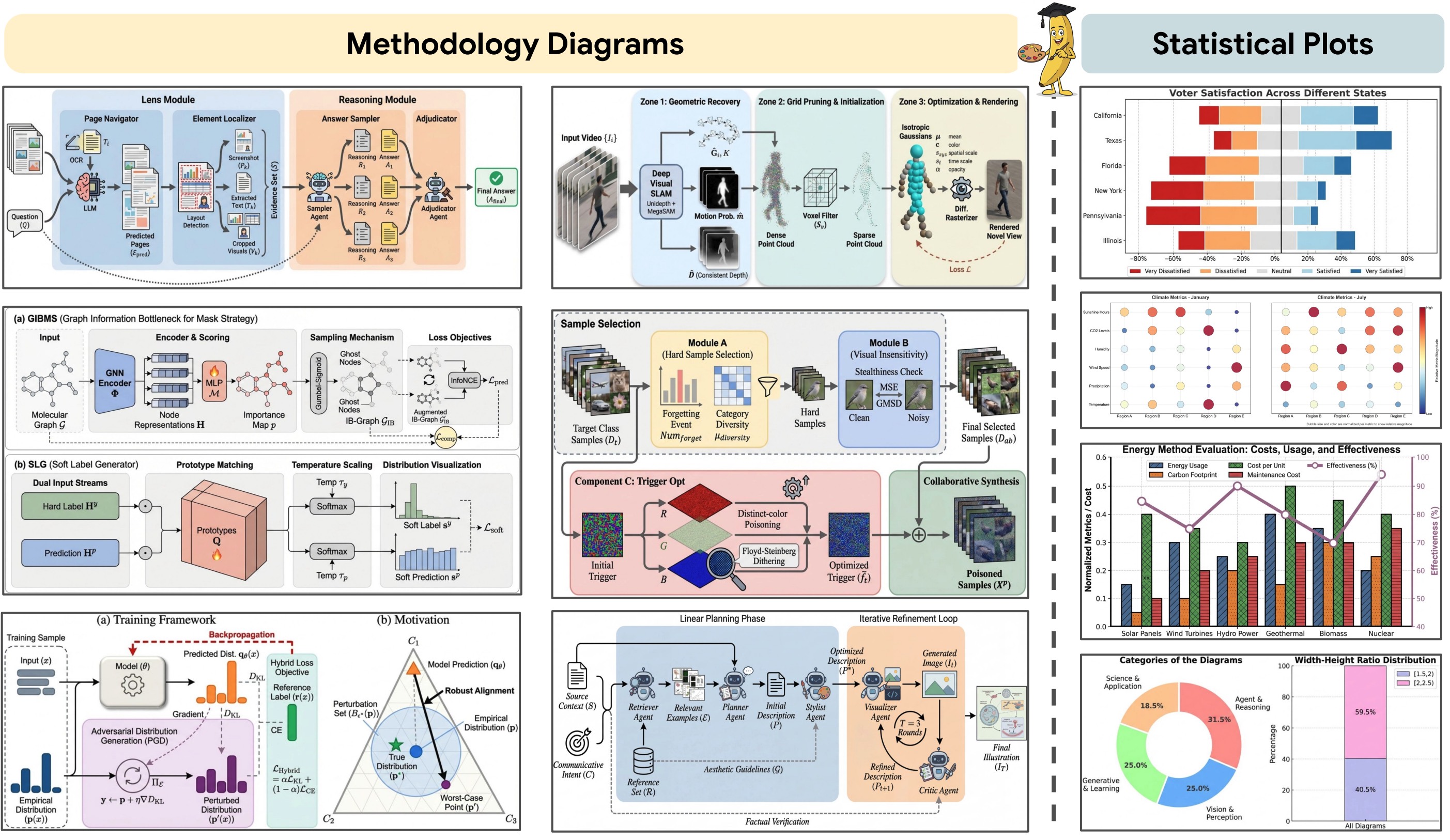
## Overview of PaperBanana / PaperVizAgent
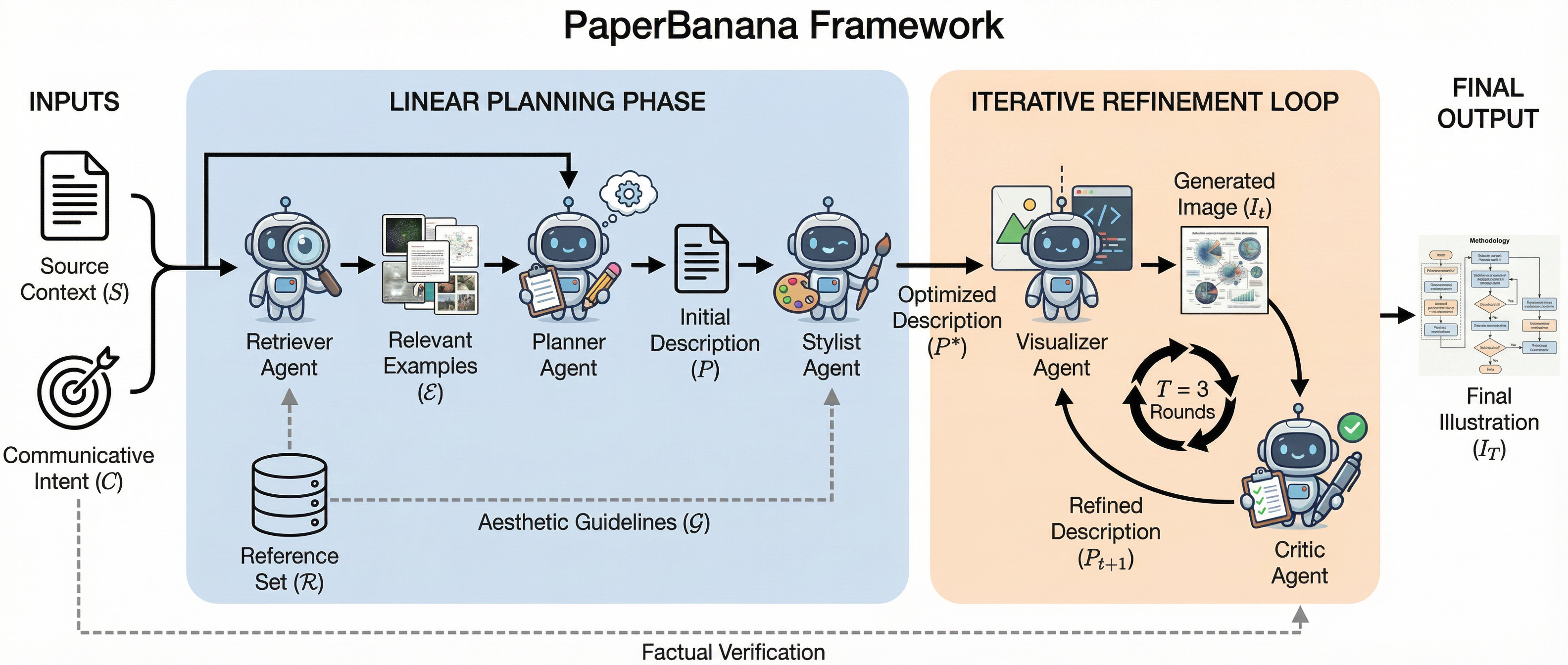
Originally published as **PaperBanana**, PaperVizAgent achieves high-quality academic illustration generation by orchestrating five specialized agents in a structured pipeline:
1. **Retriever Agent**: Identifies the most relevant reference diagrams from a curated collection to guide downstream agents
2. **Planner Agent**: Translates method content and communicative intent into comprehensive textual descriptions using in-context learning
3. **Stylist Agent**: Refines descriptions to adhere to academic aesthetic standards using automatically synthesized style guidelines
4. **Visualizer Agent**: Transforms textual descriptions into visual outputs using state-of-the-art image generation models
5. **Critic Agent**: Forms a closed-loop refinement mechanism with the Visualizer through multi-round iterative improvements
## Quick Start
### Clone the Repo
```bash
git clone [your-repo-url]
cd PaperVizAgent
```
### Configuration
PaperVizAgent supports configuring API keys and Google Cloud settings via environment variables OR a YAML configuration file.
You can duplicate the `configs/model_config_template.yaml` file into `configs/model_config.yaml` to externalize all user configurations. `configs/model_config.yaml` is ignored by git to keep your API keys and local overrides secret.
The model layer now supports mixed backends per agent:
- API backends: Gemini, OpenAI, Anthropic, OpenRouter
- Ollama-compatible chat backends for text / multimodal reasoning
- External CLI backends for text / code generation (for example `codex` or a custom `claude-glm 5.1` command)
Important limitation: diagram rendering still requires an image-capable backend such as Gemini image generation, GPT-Image, or an OpenRouter-routed image model. Text-only models exposed through CLI or Ollama can drive planning, styling, retrieval, critique, and plot code generation, but they do not directly replace the final image renderer for diagrams.
Current local-image direction for this fork: `ComfyUI Desktop` on macOS is the preferred next local backend to evaluate for draft images, while cloud image generation remains the recommended path for final renders when higher prompt adherence is needed.
### Downloading the Dataset
*PaperBananaBench dataset will be released shortly.*
Once available, you will place it under the `data` directory (e.g., `data/PaperBananaBench/`). The framework is designed to function gracefully without the dataset by bypassing the Retriever Agent's few-shot learning capability.
### Installing the Environment
1. We use `uv` to manage Python packages. Please install `uv` following the instructions [here](https://docs.astral.sh/uv/getting-started/installation/).
2. Create and activate a virtual environment
```bash
uv venv # This will create a virtual environment in the current directory, under .venv/
source .venv/bin/activate # or .venv\Scripts\activate on Windows
```
3. Install python 3.12
```bash
uv python install 3.12
```
4. Install required packages
```bash
uv pip install -r requirements.txt
```
5. Set up API Keys
```bash
export GOOGLE_API_KEY="your_google_api_key" #
export ANTHROPIC_API_KEY="your_anthropic_api_key"
export OPENAI_API_KEY="your_openai_api_key"
export OPENROUTER_API_KEY="your_openrouter_api_key"
```
Or create a local `.env` file in the project root. `main.py`, `demo.py`, and the model routing utilities now load `.env` automatically.
### Mixed-Backend Example
You can route different agents to different models in `configs/model_config.yaml`:
```yaml
defaults:
model_name: "codex"
image_model_name: "openrouter/google/gemini-3.1-flash-image-preview"
agent_models:
retriever: "codex"
stylist: "codex"
planner: "kimi-k2.5:cloud"
critic: "kimi-k2.5:cloud"
plot_visualizer: "codex"
diagram_visualizer: "openrouter/google/gemini-3.1-flash-image-preview"
polish_image: "openrouter/google/gemini-3.1-flash-image-preview"
ollama:
host: "http://127.0.0.1:11434"
openrouter:
base_url: "https://openrouter.ai/api/v1"
api_key: ""
app_title: "PaperVizAgent"
cli_models:
codex:
command: "codex exec"
"claude-glm 5.1":
command: "claude-glm 5.1 -p"
```
Notes:
- `codex` and other CLI entries are treated as non-interactive text/code backends.
- `kimi-k2.5:cloud` is routed through the Ollama-compatible chat endpoint.
- Models prefixed with `openrouter/` are routed through OpenRouter's OpenAI-compatible API using `OPENROUTER_API_KEY` or `openrouter.api_key`.
- If you assign a CLI backend to a multimodal stage, image inputs are replaced with placeholders rather than being uploaded to the CLI.
### Launch PaperVizAgent
#### Interactive Demo (Streamlit)
The easiest way to launch PaperVizAgent is via the interactive Streamlit demo:
```bash
streamlit run demo.py
```
For local, non-benchmark runs, the most practical inputs are plain project files: a `.md` with the paper text or just the relevant section for `diagram`, and a `.csv` or `.json` with structured data for `plot`.
The web interface provides two main workflows:
**1. Generate Candidates Tab**:
- Paste your method section content (Markdown recommended) and provide the figure caption.
- Configure settings (pipeline mode, retrieval setting, number of candidates, aspect ratio, critic rounds).
- Click "Generate Candidates" and wait for parallel processing.
- View results in a grid with evolution timelines and download individual images or batch ZIP.
**2. Refine Image Tab**:
- Upload a generated candidate or any diagram.
- Describe desired changes or request upscaling.
- Select resolution (2K/4K) and aspect ratio.
- Download the refined high-resolution output.
#### Command-Line Interface
You can also run PaperVizAgent from the command line:
```bash
# Basic usage with default settings
python main.py
# Advanced usage with custom settings
python main.py \
--dataset_name "PaperBananaBench" \
--task_name "diagram" \
--split_name "test" \
--exp_mode "dev_full" \
--retrieval_setting "auto"
```
**Available Options:**
- `--dataset_name`: Dataset to use (default: `PaperBananaBench`)
- `--task_name`: Task type - `diagram` or `plot` (default: `diagram`)
- `--split_name`: Dataset split (default: `test`)
- `--exp_mode`: Experiment mode (see section below)
- `--retrieval_setting`: Retrieval strategy - `auto`, `manual`, `random`, or `none` (default: `auto`)
**Experiment Modes:**
- `vanilla`: Direct generation without planning or refinement
- `dev_planner`: Planner → Visualizer only
- `dev_planner_stylist`: Planner → Stylist → Visualizer
- `dev_planner_critic`: Planner → Visualizer → Critic (multi-round)
- `dev_full`: Full pipeline with all agents
- `demo_planner_critic`: Demo mode (Planner → Visualizer → Critic) without evaluation
- `demo_full`: Demo mode (full pipeline) without evaluation
### Visualization Tools
View pipeline evolution and intermediate results:
```bash
streamlit run visualize/show_pipeline_evolution.py
```
View evaluation results:
```bash
streamlit run visualize/show_referenced_eval.py
```
## Project Structure
```
├── .venv/
│ └── ...
├── data/
│ └── PaperBananaBench/
│ ├── diagram/
│ │ ├── images/
│ │ ├── pdfs/
│ │ ├── test.json
│ │ └── ref.json
│ └── plot/
├── agents/
│ ├── __init__.py
│ ├── base_agent.py
│ ├── retriever_agent.py
│ ├── planner_agent.py
│ ├── stylist_agent.py
│ ├── visualizer_agent.py
│ ├── critic_agent.py
│ ├── vanilla_agent.py
│ └── polish_agent.py
├── prompts/
│ ├── __init__.py
│ ├── diagram_eval_prompts.py
│ └── plot_eval_prompts.py
├── style_guides/
│ ├── generate_category_style_guide.py
│ └── ...
├── utils/
│ ├── __init__.py
│ ├── config.py
│ ├── paperviz_processor.py
│ ├── eval_toolkits.py
│ ├── generation_utils.py
│ ├── image_utils.py
│ └── result_artifacts.py
├── visualize/
│ ├── show_pipeline_evolution.py
│ └── show_referenced_eval.py
├── scripts/
│ ├── run_main.sh
│ ├── run_demo.sh
├── configs/
│ └── model_config_template.yaml
├── results/
│ ├── PaperBananaBench_diagram/
│ ├── demo/
│ └── ...
├── main.py
├── demo.py
└── README.md
```
## Key Features
### Multi-Agent Pipeline
- **Reference-Driven**: Learns from curated examples through generative retrieval
- **Iterative Refinement**: Critic-Visualizer loop for progressive quality improvement
- **Style-Aware**: Automatically synthesized aesthetic guidelines ensure academic quality
- **Flexible Modes**: Multiple experiment modes for different use cases
### Interactive Demo
- **Parallel Generation**: Generate up to 20 candidate diagrams simultaneously
- **Pipeline Visualization**: Track the evolution through Planner → Stylist → Critic stages
- **High-Resolution Refinement**: Upscale to 2K/4K using Image Generation APIs
- **Batch Export**: Download all candidates as PNG or ZIP
### Extensible Design
- **Modular Agents**: Each agent is independently configurable
- **Task Support**: Handles both conceptual diagrams and data plots
- **Evaluation Framework**: Built-in evaluation against ground truth with multiple metrics
- **Async Processing**: Efficient batch processing with configurable concurrency
## Citation
If you find this repo helpful, please cite our paper as follows:
```bibtex
@article{zhu2026paperbanana,
title={PaperBanana: Automating Academic Illustration for AI Scientists},
author={Zhu, Dawei and Meng, Rui and Song, Yale and Wei, Xiyu and Li, Sujian and Pfister, Tomas and Yoon, Jinsung},
journal={arXiv preprint arXiv:2601.23265},
year={2026}
}
```
## Disclaimer
This is not an officially supported Google product. This project is not eligible for the [Google Open Source Software Vulnerability Rewards Program](https://bughunters.google.com/open-source-security).
This project is intended for demonstration purposes only. It is not intended for use in a production environment.




