
# OffensiveNim
My experiments in weaponizing [Nim](https://nim-lang.org/) for implant development and general offensive operations.
## Table of Contents
- [OffensiveNim](#offensivenim)
- [Table of Contents](#table-of-contents)
- [Why Nim?](#why-nim)
- [Examples in this repo that work](#examples-in-this-repo-that-work)
- [Examples that are a WIP](#examples-that-are-a-wip)
- [Compiling the examples in this repo](#compiling-the-examples-in-this-repo)
- [Easy Way (Recommended)](#easy-way-recommended)
- [Hard way (For the bold)](#hard-way-for-the-bold)
- [Cross Compiling](#cross-compiling)
- [Interfacing with C/C++](#interfacing-with-cc)
- [Creating Windows DLLs with an exported `DllMain`](#creating-windows-dlls-with-an-exported-dllmain)
- [Creating XLLs](#creating-xlls)
- [Optimizing executables for size](#optimizing-executables-for-size)
- [Reflectively Loading Nim Executables](#reflectively-loading-nim-executables)
- [Executable size difference when using the Winim library vs without](#executable-size-difference-when-using-the-winim-library-vs-without)
- [Opsec Considerations](#opsec-considerations)
- [Writing Nim without the Nim Runtime](#writing-nim-without-the-nim-runtime)
- [Converting C code to Nim](#converting-c-code-to-nim)
- [Language Bridges](#language-bridges)
- [Debugging](#debugging)
- [Setting up a dev environment](#setting-up-a-dev-environment)
- [Pitfalls I found myself falling into](#pitfalls-i-found-myself-falling-into)
- [Interesting Nim libraries](#interesting-nim-libraries)
- [Nim for implant dev links](#nim-for-implant-dev-links)
- [Contributors](#contributors)
## Why Nim?
- Compiles *directly* to C, C++, Objective-C and Javascript.
- Since it doesn't rely on a VM/runtime does not produce what I like to call "T H I C C malwarez" as supposed to other languages (e.g. Golang)
- Python inspired syntax, allows rapid native payload creation & prototyping.
- Has **extremely** mature [FFI](https://nim-lang.org/docs/manual.html#foreign-function-interface) (Foreign Function Interface) capabilities.
- Avoids making you actually write in C/C++ and subsequently avoids introducing a lot of security issues into your software.
- Super easy cross compilation to Windows from *nix/MacOS, only requires you to install the `mingw` toolchain and passing a single flag to the nim compiler.
- The Nim compiler and the generated executables support all major platforms like Windows, Linux, BSD and macOS. Can even compile to Nintendo switch , IOS & Android. See the cross-compilation section in the [Nim compiler usage guide](https://nim-lang.github.io/Nim/nimc.html#crossminuscompilation)
- You could *technically* write your implant and c2 backend both in Nim as you can compile your code directly to Javascript. Even has some [initial support for WebAssembly's](https://forum.nim-lang.org/t/4779)
## Examples in this repo that work
| File | Description |
| --- | --- |
| [pop_bin.nim](../master/src/pop_bin.nim) | Call `MessageBox` WinApi *without* using the Winim library |
| [pop_winim_bin.nim](../master/src/pop_winim_bin.nim) | Call `MessageBox` *with* the Winim libary |
| [pop_winim_lib.nim](../master/src/pop_winim_lib.nim) | Example of creating a Windows DLL with an exported `DllMain` |
| [execute_assembly_bin.nim](../master/src/execute_assembly_bin.nim) | Hosts the CLR, reflectively executes .NET assemblies from memory |
| [clr_host_cpp_embed_bin.nim](../master/src/clr_host_cpp_embed_bin.nim) | Hosts the CLR by directly embedding C++ code, executes a .NET assembly from disk |
| [scshell_c_embed_bin.nim](../master/src/scshell_c_embed_bin.nim) | Shows how to quickly weaponize existing C code by embedding [SCShell](https://github.com/Mr-Un1k0d3r/SCShell) (C) directly within Nim |
| [fltmc_bin.nim](../master/src/fltmc_bin.nim) | Enumerates all Minifilter drivers |
| [blockdlls_acg_ppid_spoof_bin.nim](../master/src/blockdlls_acg_ppid_spoof_bin.nim) | Creates a suspended process that spoofs its PPID to explorer.exe, also enables BlockDLLs and ACG |
| [named_pipe_client_bin.nim](../master/src/named_pipe_client_bin.nim) | Named Pipe Client |
| [named_pipe_server_bin.nim](../master/src/named_pipe_server_bin.nim) | Named Pipe Server |
| [embed_rsrc_bin.nim](../master/src/embed_rsrc_bin.nim) | Embeds a resource (zip file) at compile time and extracts contents at runtime |
| [self_delete_bin.nim](../master/src/self_delete_bin.nim) | A way to delete a locked or current running executable on disk. Method discovered by [@jonasLyk](https://twitter.com/jonasLyk/status/1350401461985955840) |
| [encrypt_decrypt_bin.nim](../master/src/encrypt_decrypt_bin.nim) | Encryption/Decryption using AES256 (CTR Mode) using the [Nimcrypto](https://github.com/cheatfate/nimcrypto) library |
| [amsi_patch_bin.nim](../master/src/amsi_patch_bin.nim) | Patches AMSI out of the current process |
| [amsi_providerpatch_bin.nim](../master/src/amsi_providerpatch_bin.nim) | Patches the AMSI Provider DLL (in this case MpOav.dll) to bypass AMSI. Published [here](https://i.blackhat.com/Asia-22/Friday-Materials/AS-22-Korkos-AMSI-and-Bypass.pdf) |
| [etw_patch_bin.nim](../master/src/etw_patch_bin.nim) | Patches ETW out of the current process (Contributed by ) |
| [wmiquery_bin.nim](../master/src/wmiquery_bin.nim) | Queries running processes and installed AVs using using WMI |
| [out_compressed_dll_bin.nim](../master/src/out_compressed_dll_bin.nim) | Compresses, Base-64 encodes and outputs PowerShell code to load a managed dll in memory. Port of the orignal PowerSploit script to Nim. |
| [dynamic_shellcode_local_inject_bin.nim](../master/src/dynamic_shellcode_local_inject_bin.nim) | POC to locally inject shellcode recovered dynamically instead of hardcoding it in an array. |
| [shellcode_callback_bin.nim](../master/src/shellcode_callback_bin.nim) | Executes shellcode using Callback functions |
| [shellcode_bin.nim](../master/src/shellcode_bin.nim) | Creates a suspended process and injects shellcode with `VirtualAllocEx`/`CreateRemoteThread`. Also demonstrates the usage of compile time definitions to detect arch, os etc..|
| [shellcode_fiber.nim](../master/src/shellcode_fiber.nim) | Shellcode execution via fibers |
| [shellcode_inline_asm_bin.nim](../master/src/shellcode_inline_asm_bin.nim) | Executes shellcode using inline assembly |
| [ssdt_dump.nim](../master/src/ssdt_dump.nim) | Simple SSDT retrieval using runtime function table from exception directory. Technique inspired from [MDSEC](https://www.mdsec.co.uk/2022/04/resolving-system-service-numbers-using-the-exception-directory/) article |
| [syscalls_bin.nim](../master/src/syscalls_bin.nim) | Shows how to make direct system calls |
| [execute_powershell_bin.nim](../master/src/execute_powershell_bin.nim) | Hosts the CLR & executes PowerShell through an un-managed runspace |
| [passfilter_lib.nim](../master/src/passfilter_lib.nim) | Log password changes to a file by (ab)using a password complexity filter |
| [minidump_bin.nim](../master/src/minidump_bin.nim) | Creates a memory dump of lsass using `MiniDumpWriteDump` |
| [http_request_bin.nim](../master/src/http_request_bin.nim) | Demonstrates a couple of ways of making HTTP requests |
| [execute_sct_bin.nim](../master/src/execute_sct_bin.nim) | `.sct` file Execution via `GetObject()` |
| [scriptcontrol_bin.nim](../master/src/scriptcontrol_bin.nim) | Dynamically execute VBScript and JScript using the `MSScriptControl` COM object |
| [excel_com_bin.nim](../master/src/excel_com_bin.nim) | Injects shellcode using the Excel COM object and Macros |
| [keylogger_bin.nim](../master/src/keylogger_bin.nim) | Keylogger using `SetWindowsHookEx` |
| [memfd_python_interpreter_bin.nim](../master/src/memfd_python_interpreter_bin.nim) | Use `memfd_create` syscall to load a binary into an anonymous file and execute it with `execve` syscall. |
| [uuid_exec_bin.nim](../master/src/uuid_exec_bin.nim) | Plants shellcode from UUID array into heap space and uses `EnumSystemLocalesA` Callback in order to execute the shellcode. |
| [unhookc.nim](../master/src/unhookc.nim) | Unhooks ntdll.dll to evade EDR/AV hooks (embeds the C code template from [ired.team](https://www.ired.team/offensive-security/defense-evasion/how-to-unhook-a-dll-using-c++)) |
| [unhook.nim](../master/src/unhook.nim) | Unhooks ntdll.dll to evade EDR/AV hooks (pure nim implementation) |
| [taskbar_ewmi_bin.nim](../master/src/taskbar_ewmi_bin.nim) | Uses Extra Window Memory Injection via Running Application property of TaskBar in order to execute the shellcode. |
| [fork_dump_bin.nim](../master/src/fork_dump_bin.nim) | (ab)uses Window's implementation of `fork()` and acquires a handle to a remote process using the PROCESS_CREATE_PROCESS access right. It then attempts to dump the forked processes memory using `MiniDumpWriteDump()` |
| [ldap_query_bin.nim](../master/src/ldap_query_bin.nim) | Perform LDAP queries via COM by using ADO's ADSI provider |
| [sandbox_process_bin.nim](../master/src/sandbox_process_bin.nim) | This sandboxes a process by setting it's integrity level to Untrusted and strips important tokens. This can be used to "silently disable" a PPL process (e.g. AV/EDR) |
| [list_remote_shares.nim](../master/src/list_remote_shares.nim) | Use NetShareEnum to list the share accessible by the current user |
| [chrome_dump_bin.nim](../master/src/chrome_dump_bin.nim) | Read and decrypt cookies from Chrome's sqlite database|
| [suspended_thread_injection.nim](../master/src/suspended_thread_injection.nim) | Shellcode execution via suspended thread injection |
| [dns_exfiltrate.nim](../master/src/dns_exfiltrate.nim) | Simple DNS exfiltration via TXT record queries |
| [rsrc_section_shellcode.nim](../master/src/rsrc_section_shellcode.nim) | Execute shellcode embedded in the .rsrc section of the binary |
| [token_steal_cmd.nim](../master/src/token_steal_cmd.nim) | Steal a token/impersonate and then run a command |
| [anti_analysis_isdebuggerpresent.nim](../master/src/anti_analysis_isdebuggerpresent.nim) | Simple anti-analysis that checks for a debugger |
| [sandbox_domain_check.nim](../master/src/sandbox_domain_check.nim) | Simple sandbox evasion technique, that checks if computer is connected to domain or not |
| [Hook.nim](../master/src/Hook.nim) | Offensive Hooking example for MessageBoxA |
| [anti_debug.nim](../master/src/anti_debug.nim) | Showcasing two anti debugging techniques |
| [anti_debug_via_tls.nim](../master/src/anti_debug_via_tls.nim) | Anti-debugging vis TLS |
| [local_pe_execution.nim](../master/src/local_pe_execution.nim) | Execute exe and dll files in memory |
| [stack_string_allocation.nim](../master/src/stack_string_allocation.nim) | Allocate c and wide strings on the stack using arrays |
| [hardware_breakpoints.nim](../master/src/hardware_breakpoints.nim) | Hook functions using hardware breakpoints |
## Examples that are a WIP
| File | Description |
| --- | --- |
| [amsi_patch_2_bin.nim](../master/wip/amsi_patch_2_bin.nim) | Patches AMSI out of the current process using a different method (**WIP, help appreciated**) |
| [excel_4_com_bin.nim](../master/wip/excel_4_com_bin.nim) | Injects shellcode using the Excel COM object and Excel 4 Macros (**WIP**) |
## Compiling the examples in this repo
This repository does not provide binaries, you're gonna have to compile them yourself. This repo was setup to cross-compile the example Nim source files to Windows from Linux or MacOS.
### Easy Way (Recommended)
Use [VSCode Devcontainers](https://code.visualstudio.com/docs/remote/create-dev-container) to automatically setup a development environment for you (See the [Setting Up a Dev Environment](#setting-up-a-dev-environment) section). Once that's done simply run `make`.
### Hard way (For the bold)
[Install Nim](https://nim-lang.org/install_unix.html) using your systems package manager (for Windows [use the installer on the official website](https://nim-lang.org/install_windows.html))
- `brew install nim`
- `apt install nim`
- `choco install nim`
(Nim also provides a [docker image on Dockerhub](https://hub.docker.com/r/nimlang/nim/))
You should now have the `nim` & `nimble` commands available, the former is the Nim compiler and the latter is Nim's package manager.
Install the `Mingw` toolchain needed for cross-compilation to Windows (Not needed if you're compiling on Windows):
- *nix: `apt-get install mingw-w64`
- MacOS: `brew install mingw-w64`
Finally, install the magnificent [Winim](https://github.com/khchen/winim) library, along with [zippy](https://github.com/guzba/zippy/) and [nimcrypto](https://github.com/cheatfate/nimcrypto)
- `nimble install winim zippy nimcrypto`
Then cd into the root of this repository and run `make`.
You should find the binaries and dlls in the `bin/` directory
## Cross Compiling
See the cross-compilation section in the [Nim compiler usage guide](https://nim-lang.github.io/Nim/nimc.html#crossminuscompilation), for a lot more details.
Cross compiling to Windows from MacOs/*nix requires the `mingw` toolchain, usually a matter of just `brew install mingw-w64` or `apt install mingw-w64`.
You then just have to pass the `-d=mingw` flag to the nim compiler.
E.g. `nim c -d=mingw --app=console --cpu=amd64 source.nim`
## Interfacing with C/C++
See the insane [FFI section](https://nim-lang.org/docs/manual.html#foreign-function-interface) in the Nim manual.
If you're familiar with csharps P/Invoke it's essentially the same concept albeit a looks a tad bit uglier:
Calling `MessageBox` example
```nim
type
HANDLE* = int
HWND* = HANDLE
UINT* = int32
LPCSTR* = cstring
proc MessageBox*(hWnd: HWND, lpText: LPCSTR, lpCaption: LPCSTR, uType: UINT): int32
{.discardable, stdcall, dynlib: "user32", importc: "MessageBoxA".}
MessageBox(0, "Hello, world !", "Nim is Powerful", 0)
```
For any complex Windows API calls use the [Winim library](https://github.com/khchen/winim), saves an insane amount of time and doesn't add too much to the executable size (see below) depending on how you import it.
Even has COM support!!!
## Creating Windows DLLs with an exported `DllMain`
Big thanks to the person who posted [this](https://forum.nim-lang.org/t/1973) on the Nim forum.
The Nim compiler tries to create a `DllMain` function for you automatically at compile time whenever you tell it to create a windows DLL, however, it doesn't actually export it for some reason. In order to have an exported `DllMain` you need to pass `--nomain` and define a `DllMain` function yourself with the appropriate pragmas (`stdcall, exportc, dynlib`).
You need to also call `NimMain` from your `DllMain` to initialize Nim's garbage collector. (Very important, otherwise your computer will literally explode).
Example:
```nim
import winim/lean
proc NimMain() {.cdecl, importc.}
proc DllMain(hinstDLL: HINSTANCE, fdwReason: DWORD, lpvReserved: LPVOID) : BOOL {.stdcall, exportc, dynlib.} =
NimMain()
if fdwReason == DLL_PROCESS_ATTACH:
MessageBox(0, "Hello, world !", "Nim is Powerful", 0)
return true
```
To compile:
```
nim c -d=mingw --app=lib --nomain --cpu=amd64 mynim.dll
```
### Creating XLLs
You can make an XLL (an Excel DLL, imagine that) with an auto open function that can be used for payload delivery. The following code creates a simple for an XLL that has an auto open function and all other boilerplate code needed to compile as a link library. The POC compiles as a DLL, you can then change the extension to .xll and it will open in Excel and run the payload when double clicked:
```nim
#[
Compile:
nim c -d=mingw --app=lib --nomain --cpu=amd64 nim_xll.nim
Will compile as a DLL, you can then just change the extension to .xll
]#
import winim/lean
proc xlAutoOpen() {.stdcall, exportc, dynlib.} =
MessageBox(0, "Hello, world !", "Nim is Powerful", 0)
proc NimMain() {.cdecl, importc.}
proc DllMain(hinstDLL: HINSTANCE, fdwReason: DWORD, lpvReserved: LPVOID) : BOOL {.stdcall, exportc, dynlib.} =
NimMain()
return true
```
There are many other sneaky things that can be done with XLLs. See [more examples of XLL tradecraft here](https://github.com/Octoberfest7/XLL_Phishing).
## Optimizing executables for size
Taken from the [Nim's FAQ page](https://nim-lang.org/faq.html)
For the biggest size decrease use the following flags `-d:danger -d:strip --opt:size`
Additionally, I've found you can squeeze a few more bytes out by passing `--passc=-flto --passl=-flto` to the compiler. Also take a look at the `Makefile` in this repo.
These flags decrease sizes **dramatically**: the shellcode injection example goes from 484.3 KB to 46.5 KB when cross-compiled from MacOSX!
## Reflectively Loading Nim Executables
Huge thanks to [@Shitsecure](https://twitter.com/ShitSecure) for figuring this out!
By default, Nim doesn't generate PE's with a relocation table which is needed by most tools that reflectively load EXE's.
To generate a Nim executable *with* a relocation section you need to pass a few additional flags to the linker.
Specifically: ```--passL:-Wl,--dynamicbase```
Full example command:
```
nim c --passL:-Wl,--dynamicbase my_awesome_malwarez.nim
```
## Executable size difference when using the Winim library vs without
Incredibly enough the size difference is pretty negligible. Especially when you apply the size optimizations outlined above.
The two examples `pop_bin.nim` and `pop_winim_bin.nim` were created for this purpose.
The former defines the `MessageBox` WinAPI call manually and the latter uses the Winim library (specifically `winim/lean` which is only the core SDK, see [here](https://github.com/khchen/winim#usage)), results:
```
byt3bl33d3r@ecl1ps3 OffensiveNim % ls -lah bin
-rwxr-xr-x 1 byt3bl33d3r 25K Nov 20 18:32 pop_bin_32.exe
-rwxr-xr-x 1 byt3bl33d3r 32K Nov 20 18:32 pop_bin_64.exe
-rwxr-xr-x 1 byt3bl33d3r 26K Nov 20 18:33 pop_winim_bin_32.exe
-rwxr-xr-x 1 byt3bl33d3r 34K Nov 20 18:32 pop_winim_bin_64.exe
```
If you import the entire Winim library with `import winim/com` it adds only around ~20ish KB which considering the amount of functionality it abstracts is 100% worth that extra size:
```
byt3bl33d3r@ecl1ps3 OffensiveNim % ls -lah bin
-rwxr-xr-x 1 byt3bl33d3r 42K Nov 20 19:20 pop_winim_bin_32.exe
-rwxr-xr-x 1 byt3bl33d3r 53K Nov 20 19:20 pop_winim_bin_64.exe
```
## Opsec Considerations
Because of how Nim resolves DLLs dynamically using `LoadLibrary` using it's FFI none of your external imported functions will actually show up in the executables static imports (see [this blog post](https://web.archive.org/web/20210117002945/https://secbytes.net/implant-roulette-part-1:-nimplant/) for more on this):

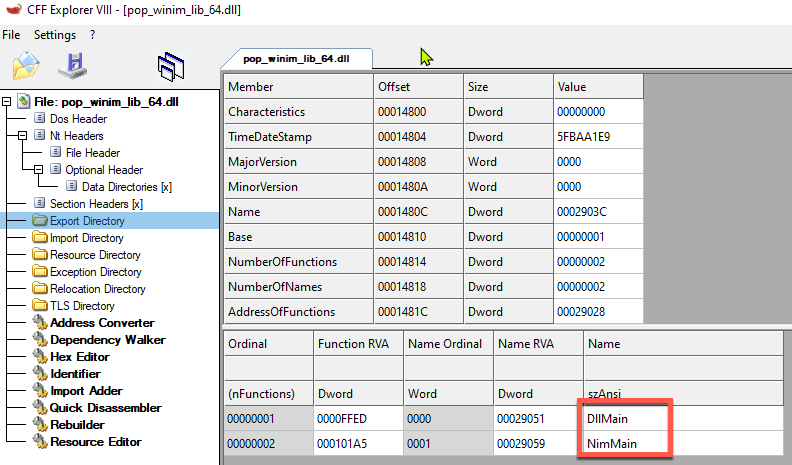
If you compile Nim source to a DLL, seems like you'll always have an exported `NimMain`, no matter if you specify your own `DllMain` or not (??). This could potentially be used as a signature, don't know how many shops are actually using Nim in their development stack. Definitely stands out.
## Writing Nim without the Nim Runtime
Since Nim is heavily flagged by Anti-Virus solutions, one way around this is writing Nim programs without the Nim runtime. [Writing Nim-less Nim](https://www.youtube.com/watch?v=EXX3HmCG3pw) is a talk given on the steps outlining how to write Nim code without the Nim and C runtime, source code from this talk is available [here](https://github.com/m4ul3r/writing_nimless). The talk follows and expands on [zimawhit3's](https://github.com/zimawhit3) work with [Bitmancer](https://github.com/zimawhit3/Bitmancer/tree/main).
The premise is to rely on `winim`'s type definitions and leverage code writing that would not result in Nim's runtime being used.
## Converting C code to Nim
https://github.com/nim-lang/c2nim
Used it to translate a bunch of small C snippets, haven't tried anything major.
## Language Bridges
- Python integration https://github.com/yglukhov/nimpy
* This is actually super interesting, [especially this part](https://github.com/yglukhov/nimpy/blob/master/nimpy/py_lib.nim#L330). With some modification could this load the PythonxXX.dll from memory?
- Jave VM integration: https://github.com/yglukhov/jnim
## Debugging
Use the `repr()` function in combination with `echo`, supports almost all (??) data types, even structs!
See [this blog post for more](https://nim-lang.org/blog/2017/10/02/documenting-profiling-and-debugging-nim-code.html)
## Setting up a dev environment
This repository supports [VSCode Devcontainers](https://code.visualstudio.com/docs/remote/create-dev-container) which allows you to develop in a Docker container. This automates setting up a development environment for you.
1. Install VSCode and Docker desktop
2. Clone this repo and open it in VSCode
3. Install the `Visual Studio Code Remote - Containers` extension
4. Open the command pallete and select `Remote-Containers: Reopen in Container` command
VScode will now build the Docker image (will take a bit) and put you right into your pre-built Nim dev environment!
## Pitfalls I found myself falling into
- When calling winapi's with Winim and trying to pass a null value, make sure you pass the `NULL` value (defined within the Winim library) as supposed Nim's builtin `nil` value. (Ugh)
- To get the OS handle to the created file after calling `open()` on Windows, you need to call `f.getOsFileHandle()` **not** `f.getFileHandle()` cause reasons.
- The Nim compiler does accept arguments in the form `-a=value` or `--arg=value` even tho if you look at the usage it only has arguments passed as `-a:value` or `--arg:value`. (Important for Makefiles)
- When defining a byte array, you also need to indicate at least in the first value that it's a byte array, bit weird but ok (https://forum.nim-lang.org/t/4322)
Byte array in C#:
```csharp
byte[] buf = new byte[5] {0xfc,0x48,0x81,0xe4,0xf0,0xff}
```
Byte array in Nim:
```nim
var buf: array[5, byte] = [byte 0xfc,0x48,0x81,0xe4,0xf0,0xff]
```
## Interesting Nim libraries
- https://github.com/dom96/jester
- https://github.com/pragmagic/karax
- https://github.com/Niminem/Neel
- https://github.com/status-im/nim-libp2p
- https://github.com/PMunch/libkeepass
- https://github.com/def-/nim-syscall
- https://github.com/tulayang/asyncdocker
- https://github.com/treeform/ws
- https://github.com/guzba/zippy
- https://github.com/rockcavera/nim-iputils
- https://github.com/FedericoCeratto/nim-socks5
- https://github.com/CORDEA/backoff
- https://github.com/treeform/steganography
- https://github.com/miere43/nim-registry
- https://github.com/status-im/nim-daemon
## Nim for implant dev links
- https://web.archive.org/web/20210117002945/https://secbytes.net/implant-roulette-part-1:-nimplant/
- https://securelist.com/zebrocys-multilanguage-malware-salad/90680/
- https://github.com/MythicAgents/Nimplant
- https://github.com/elddy/Nim-SMBExec
- https://github.com/elddy/NimScan
## Contributors
Virtual hug to everyone who contributed ❤️
