# diagrams-mcp-server
[](https://pypi.org/project/diagrams-mcp-server/)
[](https://github.com/ByteOverDev/diagrams-mcp/actions/workflows/ci.yml)
MCP server for generating cloud architecture diagrams, flowcharts, sequence diagrams, and more — powered by three rendering engines: [mingrammer/diagrams](https://github.com/mingrammer/diagrams), [Mermaid](https://mermaid.js.org/), and [PlantUML](https://plantuml.com/).
## Getting Started
### Local Installation
#### Prerequisites
Graphviz is required for the default local/in-process rendering mode. Mermaid CLI and PlantUML are optional — install them only if you need those specific rendering engines locally.
| Dependency | Required for | Install |
|---|---|---|
| [Graphviz](https://graphviz.org/) | `render_diagram` (cloud architecture) | `brew install graphviz` |
| [Mermaid CLI](https://github.com/mermaid-js/mermaid-cli) | `render_mermaid` (flowcharts, sequence, etc.) | `npm install -g @mermaid-js/mermaid-cli` |
| [Java](https://openjdk.org/) + [PlantUML](https://plantuml.com/) | `render_plantuml` (UML diagrams) | `brew install openjdk` + download [plantuml.jar](https://github.com/plantuml/plantuml/releases) |
#### Install the server
**Via uvx** (recommended):
```bash
uvx diagrams-mcp-server
```
**Via pip:**
```bash
pip install diagrams-mcp-server
```
**From source:**
```bash
pip install git+https://github.com/ByteOverDev/diagrams-mcp.git
```
#### Configure your MCP client
Claude Desktop
Add to your `claude_desktop_config.json` (`Settings` → `Developer` → `Edit Config`):
**uvx (recommended):**
```json
{
"mcpServers": {
"diagrams-mcp": {
"command": "uvx",
"args": ["diagrams-mcp-server"]
}
}
}
```
**pip:**
```json
{
"mcpServers": {
"diagrams-mcp": {
"command": "diagrams-mcp-server"
}
}
}
```
Claude Code (CLI)
Run:
```bash
claude mcp add diagrams-mcp -- uvx diagrams-mcp-server
```
Or add to your `.mcp.json`:
**uvx (recommended):**
```json
{
"mcpServers": {
"diagrams-mcp": {
"command": "uvx",
"args": ["diagrams-mcp-server"]
}
}
}
```
**pip:**
```json
{
"mcpServers": {
"diagrams-mcp": {
"command": "diagrams-mcp-server"
}
}
}
```
Cursor
Add to your `.cursor/mcp.json`:
**uvx (recommended):**
```json
{
"mcpServers": {
"diagrams-mcp": {
"command": "uvx",
"args": ["diagrams-mcp-server"]
}
}
}
```
**pip:**
```json
{
"mcpServers": {
"diagrams-mcp": {
"command": "diagrams-mcp-server"
}
}
}
```
Windsurf
Add to your `~/.codeium/windsurf/mcp_config.json`:
**uvx (recommended):**
```json
{
"mcpServers": {
"diagrams-mcp": {
"command": "uvx",
"args": ["diagrams-mcp-server"]
}
}
}
```
**pip:**
```json
{
"mcpServers": {
"diagrams-mcp": {
"command": "diagrams-mcp-server"
}
}
}
```
VS Code
Add to your `.vscode/mcp.json`:
**uvx (recommended):**
```json
{
"servers": {
"diagrams-mcp": {
"type": "stdio",
"command": "uvx",
"args": ["diagrams-mcp-server"]
}
}
}
```
**pip:**
```json
{
"servers": {
"diagrams-mcp": {
"type": "stdio",
"command": "diagrams-mcp-server"
}
}
}
```
## Available Tools
### Discovery
- `list_providers()` → `list[str]` — List all diagram providers (`aws`, `gcp`, `k8s`, `azure`, `onprem`, etc.)
- `list_services(provider)` → `list[str]` — List service categories within a provider (e.g. `aws` → `compute`, `database`, `network`)
- `list_nodes(provider, service)` → `list[dict]` — List node classes for a provider.service pair with import paths
- `search_nodes(query)` → `list[dict]` — Search for nodes by keyword across all providers (e.g. "postgres", "lambda")
### Rendering
- `render_diagram(code)` → `Image` (PNG) — Execute a Python script using [mingrammer/diagrams](https://github.com/mingrammer/diagrams) in a sandboxed subprocess. Returns a rendered cloud architecture diagram.
- `render_mermaid(definition)` → `Image` (PNG/SVG) — Render a [Mermaid](https://mermaid.js.org/) diagram definition (flowcharts, sequence, class, ER, state, Gantt, and more).
- `render_plantuml(definition)` → `Image` (PNG) — Render a [PlantUML](https://plantuml.com/) diagram definition (sequence, class, component, activity, state, deployment).
### Cross-Provider Equivalence
- `find_equivalent(node, target_provider?)` → `dict` — Find equivalent services across cloud providers (e.g. `EC2` → `ComputeEngine` on GCP).
- `list_categories()` → `list[dict]` — List all 30 infrastructure role categories with mapped nodes across providers.
## Resources
The server provides reference documentation accessible via MCP resource URIs:
| URI | Description |
|---|---|
| `diagrams://reference/diagram` | Diagram constructor parameters, defaults, and usage |
| `diagrams://reference/edge` | Edge operators, labels, styling, and chaining |
| `diagrams://reference/cluster` | Cluster nesting, styling, and graph attributes |
| `diagrams://reference/mermaid` | Mermaid syntax examples for 6 diagram types |
| `diagrams://reference/plantuml` | PlantUML syntax examples for 6 diagram types |
## Examples
### Cloud Architecture (mingrammer/diagrams)
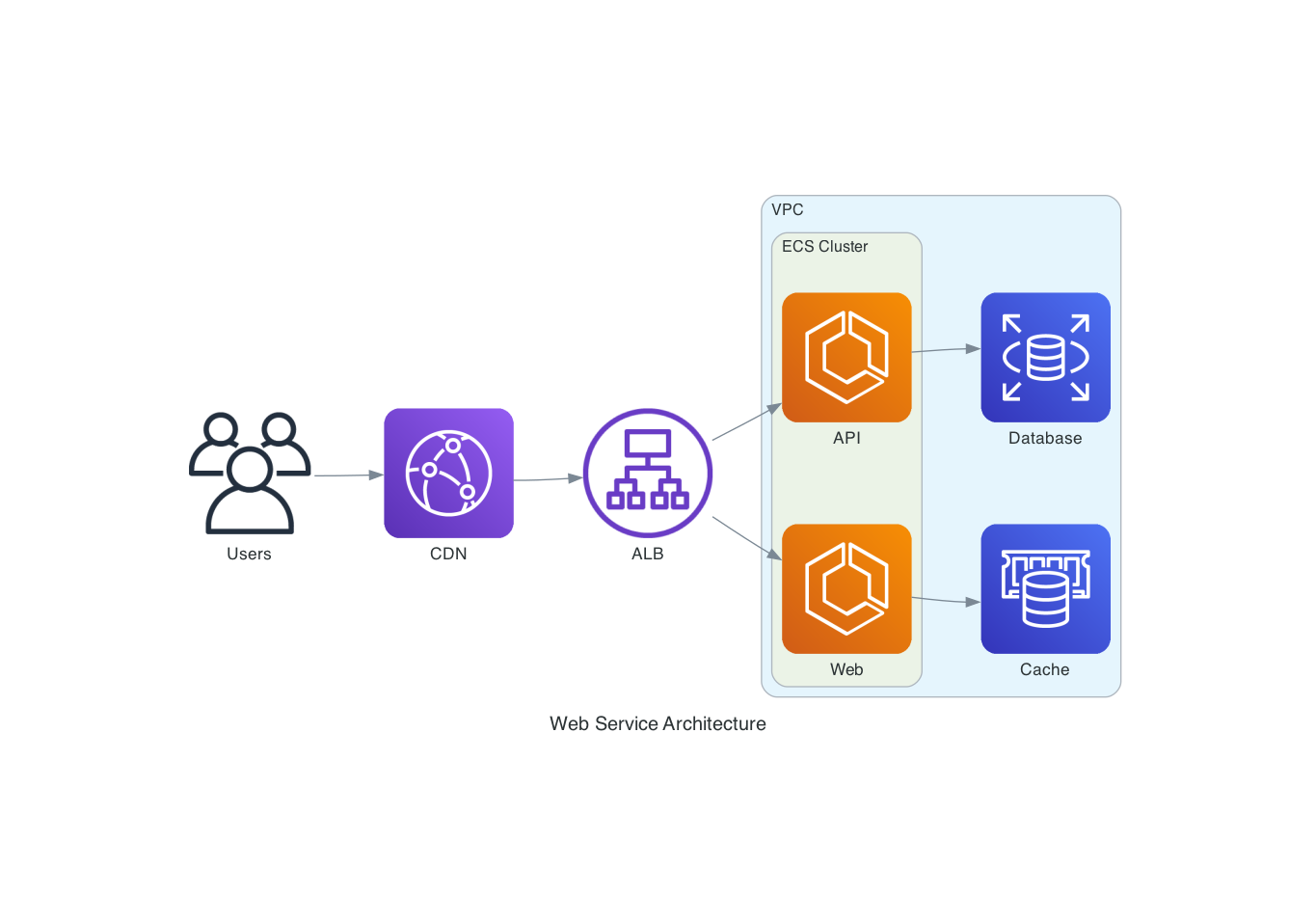
> "Draw an AWS architecture with an ALB routing to two ECS services, backed by RDS and ElastiCache"
```python
from diagrams import Diagram, Cluster
from diagrams.aws.network import ALB
from diagrams.aws.compute import ECS
from diagrams.aws.database import RDS, ElastiCache
with Diagram("ECS Service", direction="LR"):
lb = ALB("ALB")
with Cluster("ECS Cluster"):
services = [ECS("Web"), ECS("API")]
lb >> services
services[0] >> ElastiCache("Cache")
services[1] >> RDS("Database")
```
### Flowchart (Mermaid)
> "Create a flowchart showing a CI/CD pipeline"

### Sequence Diagram (PlantUML)
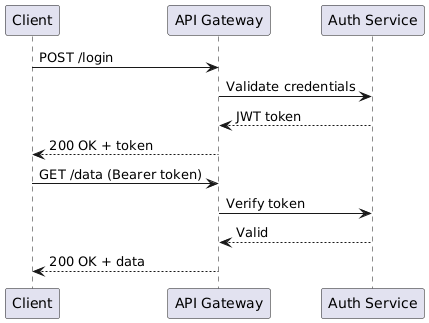
> "Show the authentication flow between a client, API gateway, and auth service"
```plantuml
@startuml
Client -> "API Gateway": POST /login
"API Gateway" -> "Auth Service": Validate credentials
"Auth Service" --> "API Gateway": JWT token
"API Gateway" --> Client: 200 OK + token
Client -> "API Gateway": GET /data (Bearer token)
"API Gateway" -> "Auth Service": Verify token
"Auth Service" --> "API Gateway": Valid
"API Gateway" --> Client: 200 OK + data
@enduml
```
## Development
```bash
# Clone and install
git clone https://github.com/ByteOverDev/diagrams-mcp.git
cd diagrams-mcp
pip install -e ".[dev]"
# Run tests
pytest
# Lint and format
ruff check .
ruff format .
# Run the MCP server locally (stdio mode)
diagrams-mcp-server
```
### Split Facade/Renderer Mode
For hosted deployments, the MCP server can run as a lightweight facade that delegates render work to a separate renderer service. This keeps the always-on MCP process small while Graphviz, Chromium, Mermaid CLI, Java, and PlantUML live only in the renderer image.
```bash
# Terminal 1: renderer service
RENDERER_HOST=0.0.0.0 RENDERER_PORT=8001 diagrams-renderer-server
# Terminal 2: HTTP MCP facade delegating to the renderer
FASTMCP_TRANSPORT=http \
FASTMCP_HOST=0.0.0.0 \
FASTMCP_PORT=8000 \
DIAGRAMS_RENDERER_MODE=remote \
DIAGRAMS_RENDERER_URL=http://127.0.0.1:8001 \
diagrams-mcp-server
```
Docker/Railway examples are included:
| File | Purpose |
|---|---|
| `Dockerfile.facade` | Slim MCP facade image without renderer-only binaries |
| `Dockerfile.renderer` | Renderer image with Graphviz, Chromium, Mermaid CLI, Java, and PlantUML |
| `railway.facade.toml` | Example Railway facade service config |
| `railway.renderer.toml` | Example Railway renderer service config |
Key environment variables:
| Variable | Purpose |
|---|---|
| `DIAGRAMS_RENDERER_MODE=remote` | Makes the facade use the HTTP renderer service |
| `DIAGRAMS_RENDERER_URL` | Renderer base URL, for example `http://diagrams-renderer.railway.internal:8080` |
| `DIAGRAMS_IMAGE_STORE_DIR` | Optional file-backed temporary image store directory |
| `BASE_URL` | Optional public base URL used when returning absolute download links |
## Supported Providers
The `render_diagram` tool supports all providers from the [mingrammer/diagrams](https://diagrams.mingrammer.com/docs/nodes/aws) library, including:
**AWS**, **GCP**, **Azure**, **Kubernetes**, **On-Premise**, **AlibabaCloud**, **OCI**, **OpenStack**, **DigitalOcean**, **Elastic**, **Outscale**, **Generic**, and **Custom** nodes.
Use `list_providers()` and `search_nodes(query)` to discover available nodes.
## License
MIT