# Google Maps for AI agents
**Stop rebuilding place search, routing, and location workflows for every AI app.**
`@cablate/mcp-google-map` turns Google Maps Platform into 18 read-only agent tools and three focused Skills. An agent can find real places, verify routes, compare options, build practical itineraries, or audit local search visibility—through MCP or a standalone CLI.
You choose the integration model: Codex or Claude Code Plugin when you want Skills without MCP setup, stdio for desktop MCP clients, or Streamable HTTP for shared and remote deployments.
English · 繁體中文




## Why use it?
Giving an agent a raw Maps API is only the beginning. Useful answers often require several dependent calls: resolve a place, preserve its identity, search around it, check opening details, calculate travel time, and explain what was actually verified. This project packages that work into one consistent interface.
- **Move from lookup to outcome.** Atomic tools handle geocoding, place details, directions, weather, air quality, and maps. Composite tools explore areas, compare candidates, optimize stops, and measure local rankings.
- **Use the same capabilities with or without MCP.** The standalone `exec` CLI works with Agent Skills and automation; the MCP server exposes the same 18 tools over stdio or HTTP.
- **Give agents workflow guidance, not just function names.** Three Skills cover general map research, evidence-backed travel planning, and local SEO. Codex loads their full instructions only when a request matches.
- **Keep deployment and credentials under your control.** Run locally or self-host. API keys remain in your environment or request headers, with per-session isolation for HTTP deployments.
- **Start narrow and grow later.** Register only the tools you need with `GOOGLE_MAPS_ENABLED_TOOLS`, or use the full catalog.
## What can an agent do?
| Outcome | How the project helps |
|---|---|
| Find and evaluate real places | Natural-language and nearby search, place details, ratings, hours, reviews, and distance comparison |
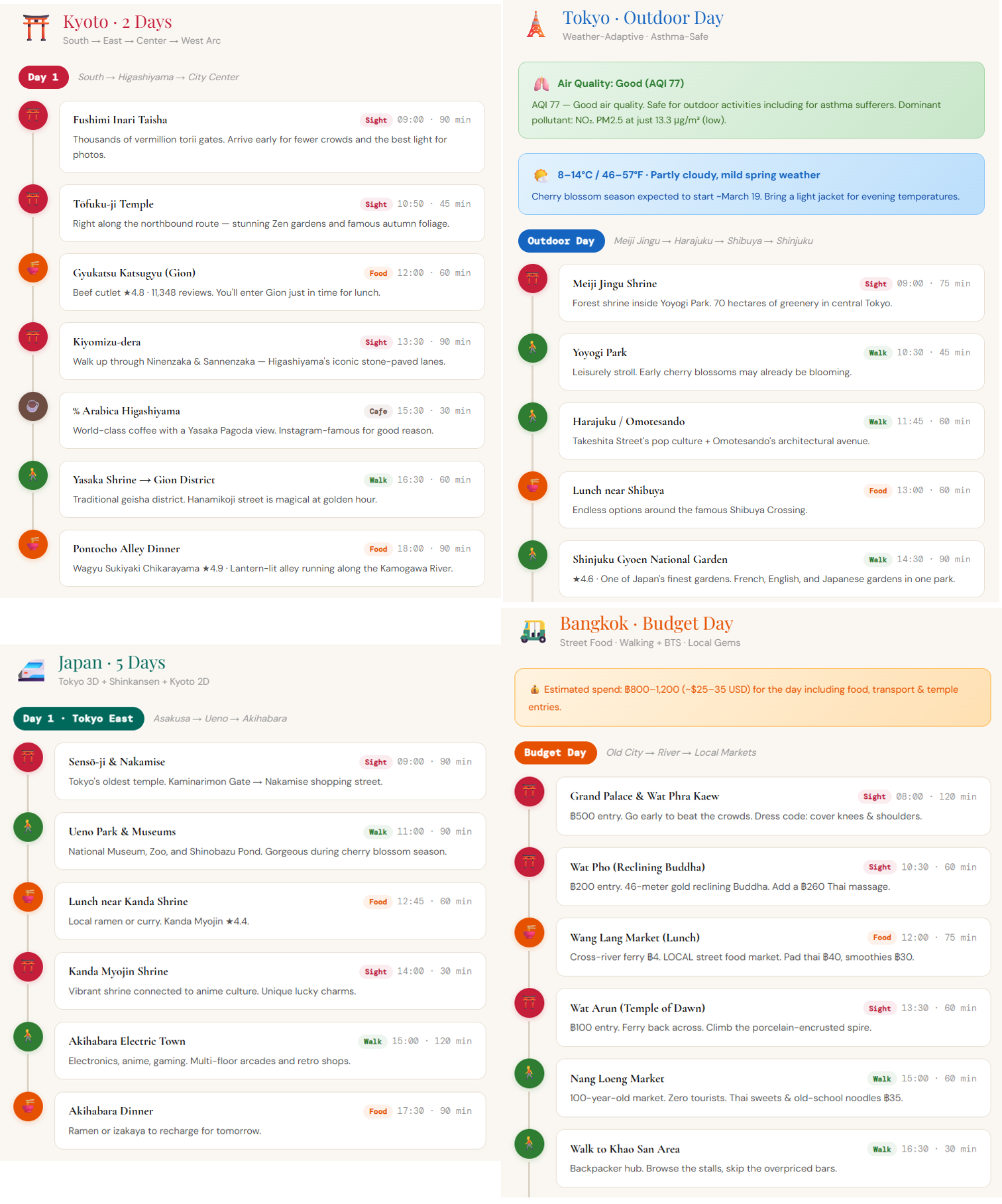
| Build a trip that works geographically | Candidate discovery, along-route stops, travel-time checks, multi-stop optimization, weather, and static maps |
| Research a neighborhood | Multi-category exploration plus targeted distance, elevation, timezone, weather, and air-quality checks |
| Plan field work or deliveries | Route matrices and optimized stop ordering for up to 25 stops |
| Audit local search visibility | Geographic grid ranking, competitor discovery, ARP, ATRP, and SoLV metrics |
| Enrich location data | Single or batch geocoding, reverse geocoding, and structured JSON output |
These are data and planning tools, not guarantees of safety, accessibility, opening status, or ranking outcomes. Applications displaying Places reviews, photos, or AI summaries must follow the [content attribution and storage guidance](./skills/_shared/content-attribution.md).
## Choose your integration
| Use | Best for | What runs |
|---|---|---|
| **Codex Plugin** | Asking Codex map, travel, or local SEO questions without MCP configuration | A matching Skill loads on demand and calls the standalone CLI |
| **Claude Code Plugin** | Installing the same three Skills from a Claude marketplace | Skills are namespaced under `mcp-google-map` and call the standalone CLI |
| **Standalone CLI** | Scripts, automation, and other Skill-compatible agents | One stateless command returns JSON |
| **MCP stdio** | Claude Desktop, Cursor, VS Code, and other local MCP clients | The client starts a local MCP process |
| **Streamable HTTP** | Multi-session, containerized, LAN, or remote access | A self-hosted server exposes `/mcp` |
All options require Node.js 22+ and a Google Maps Platform API key. Live calls may be billable. Enable the APIs needed by your selected tools; common place and route workflows require **Places API (New)**, **Routes API**, and often **Geocoding API**.
## Start with Codex—no MCP required
```bash
codex plugin marketplace add cablate/mcp-google-map --ref main
codex plugin add mcp-google-map@cablate
```
Set `GOOGLE_MAPS_API_KEY` in the environment where Codex runs, then start a new conversation. Verify the local setup without making a Google API request:
```bash
npx -y @cablate/mcp-google-map doctor
```
Success means the `node`, `package`, and `api-key` checks pass and `live-api` is skipped. Use `doctor --live` only when you intend to send potentially billable checks to Geocoding, Places, and Routes.
Try asking:
> Plan a practical two-day Kyoto itinerary. Group nearby places, check travel times, and explain any opening-hour assumptions.
Codex selects `google-maps` for general location research, `google-maps-travel-planning` for itineraries, or `google-maps-local-seo` for business visibility analysis. The plugin does not register or start an MCP server. See the [no-MCP walkthrough](./examples/agent-skill-demo.md) for a reproducible example.
## Install in Claude Code—no MCP required
```bash
claude plugin marketplace add cablate/mcp-google-map
claude plugin install mcp-google-map@cablate-maps
```
Start a new Claude Code session, set `GOOGLE_MAPS_API_KEY` in its environment, and run the same `doctor` check shown above. Claude exposes the installed Skills with the plugin namespace, for example `/mcp-google-map:google-maps-travel-planning`.
Each GitHub release also includes a versioned `mcp-google-map-claude-plugin-v*.zip` and SHA-256 checksum for direct distribution. The release workflow builds this archive from the same `skills/` source and validates it with Claude Code's official strict validator before publishing.
## Use the standalone CLI
Every MCP tool also has a short CLI name:
```bash
npx -y @cablate/mcp-google-map exec geocode '{"address":"Tokyo Tower"}'
npx -y @cablate/mcp-google-map exec search-places '{"query":"quiet cafes in Kyoto"}'
npx -y @cablate/mcp-google-map exec directions '{"origin":"Tokyo Station","destination":"Tokyo Skytree","mode":"transit"}'
```
Each call is stateless. Successful calls return `{ "success": true, "data": ... }` on stdout; failures exit nonzero and write structured JSON to stderr.
For bulk address enrichment:
```bash
npx @cablate/mcp-google-map batch-geocode -i addresses.txt -o results.json
cat addresses.txt | npx @cablate/mcp-google-map batch-geocode -i -
```
## Connect an MCP client
### stdio
```json
{
"mcpServers": {
"google-maps": {
"command": "npx",
"args": ["-y", "@cablate/mcp-google-map", "--stdio"],
"env": { "GOOGLE_MAPS_API_KEY": "YOUR_API_KEY" }
}
}
}
```
To reduce tool-list context, add a comma-separated allowlist such as `"GOOGLE_MAPS_ENABLED_TOOLS": "maps_geocode,maps_directions,maps_search_places"`. Omit it or use `*` to expose all tools.
### Streamable HTTP
```bash
npx @cablate/mcp-google-map --host 127.0.0.1 --port 3000 --apikey "YOUR_API_KEY"
```
```json
{
"mcpServers": {
"google-maps": {
"type": "http",
"url": "http://127.0.0.1:3000/mcp"
}
}
}
```
Bind to `0.0.0.0` only when the server must accept external connections. For multi-tenant deployments, prefer the `X-Google-Maps-API-Key` request header so keys remain isolated by session.
## Tool catalog
| Group | Tools |
|---|---|
| Places and discovery | `maps_search_places`, `maps_search_nearby`, `maps_place_details`, `maps_explore_area`, `maps_compare_places`, `maps_search_along_route` |
| Location and routing | `maps_geocode`, `maps_reverse_geocode`, `maps_directions`, `maps_distance_matrix`, `maps_plan_route`, `maps_batch_geocode` |
| Context and visualization | `maps_elevation`, `maps_timezone`, `maps_weather`, `maps_air_quality`, `maps_static_map` |
| Local SEO | `maps_local_rank_tracker` |
All 18 tools declare `readOnlyHint: true` and `destructiveHint: false`. Exact parameters, response shapes, and workflow recipes live in the [tool reference](./skills/google-maps/references/tools-api.md).
## API key and Google Cloud setup
The key must belong to a Google Cloud project with billing enabled and restrictions compatible with the runtime. The [setup and diagnostics guide](./skills/_shared/setup-and-diagnostics.md) maps each capability to its required API and explains common failures.
Credential priority is:
1. `X-Google-Maps-API-Key` HTTP request header
2. `--apikey` command-line option
3. `GOOGLE_MAPS_API_KEY` environment variable
Prefer environment variables or request headers. Command-line secrets can appear in shell history and process listings.
## Trust and limits
- Place and route facts come from the Google Maps Platform APIs enabled for your project; weather availability has regional limitations.
- A successful API response does not prove accessibility, safety, legal suitability, or real-time availability.
- The package preserves source and disclosure metadata where returned, but your interface remains responsible for compliant attribution and storage.
- HTTP mode supports per-session API-key isolation and DNS rebinding protection.
- This project is MIT licensed and self-hostable. See [SECURITY.md](./SECURITY.md) for vulnerability reporting and [Security Assessment Clarifications](./SECURITY_ASSESSMENT.md) for the review checklist.
## Development
```bash
git clone https://github.com/cablate/mcp-google-map.git
cd mcp-google-map
npm ci
npm run build
npm run test:unit
npm test
```
Live E2E calls require `GOOGLE_MAPS_API_KEY` and may be billable: `npm run test:e2e`.
Contributions are welcome. Read [CONTRIBUTING.md](./CONTRIBUTING.md) before opening a pull request. Release history is in [CHANGELOG.md](./CHANGELOG.md).
## Acknowledgements
Thanks to [@junyinnnn](https://github.com/junyinnnn) for helping add Streamable HTTP support.
## License
[MIT](./LICENSE)