Starting a new AI session often means repeating your preferences and project
decisions. Cairn provides memory tools to save that context between sessions,
inspect the submitted text behind each memory, and update it when things change.
## A preference changes
Suppose you save **“Keep my reports short.”** Later, you decide you need detailed
reports. You can inspect the old memory and its source text, correct the saved
preference, or forget it so it is no longer available for active recall.
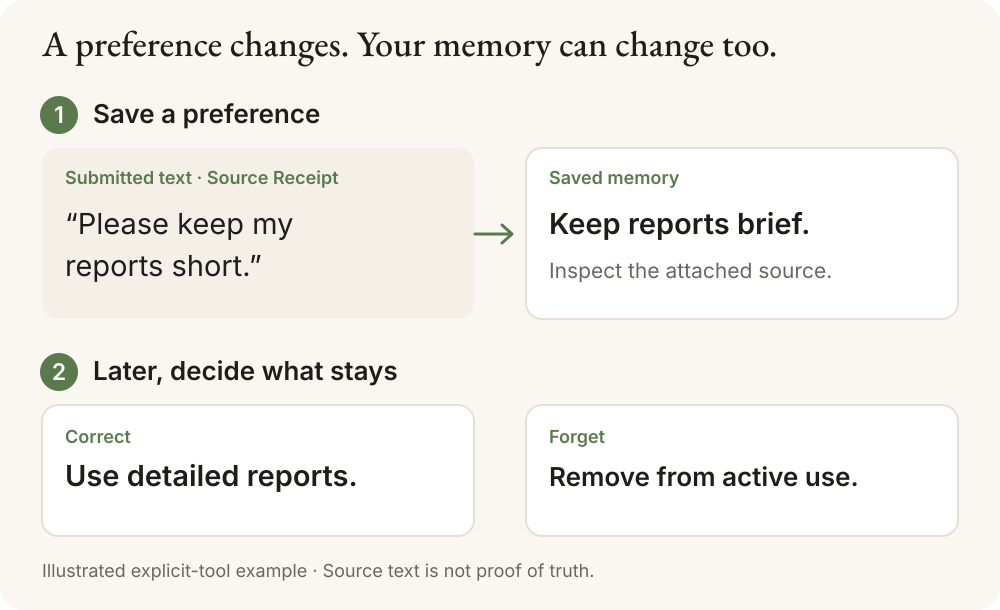
This is an **illustrated explicit-tool example**, not a chat-client screenshot.
The local preview uses tools to save, inspect, correct and forget; it does not
automatically read your conversations.
- **Inspect the source.** Read the source text stored with a memory. A receipt
does not prove that the memory is true or correctly interpreted.
- **Correct what changed.** Update the memory at the revision you inspected.
- **Forget what should go.** Remove a memory from active recall.
[Deletion and backup boundaries](#local-privacy-and-control) apply.
A **Source Receipt** is the submitted text attached to a memory. It helps you
check what was supplied when the memory was saved or corrected. It is not a
verified transcript of the whole conversation or proof of human intent.
## Cairn Memory and Cairn
**Cairn Memory** is the open-source toolkit in this repository for saving,
inspecting and changing AI memory. **[Cairn](https://cairn.ink)** is the hosted
shared memory map for people and AI, where people organize, review and share
knowledge.
This repository includes local memory tools and connectors to the hosted Cairn
service. Each path has its own setup and feature boundaries. Local use does not
require a Cairn account; hosted connections require a compatible service and
authentication.
## Choose your starting point
| You want to… | Start here | What you need |
| --- | --- | --- |
| Understand the idea before installing | [繁體中文](README.zh-TW.md) or the [recorded walkthrough](#watch-the-recorded-walkthrough) | No installation or account |
| Try the open-source tools on your computer | [Local preview setup](#try-the-local-memory-layer) or [Windows guide](docs/windows-install.md) | Terminal setup; Linux x64 and a bounded native Windows x64 check; no Cairn account |
| Use the documented hosted Claude Code or Codex connection | [Hosted setup](#existing-hosted-integration) | A compatible hosted service and authentication; separate from local-preview client support |
| Build on the memory layer | [Architecture](docs/architecture.md) and [MCP tools](docs/standalone-mcp.md) | JavaScript or MCP integration work |
If you use Claude or Codex but do not usually install tools from a terminal,
start with the example and recorded walkthrough. This preview requires setup;
check the [tested client paths](docs/promotion-claims.md#supported-paths) before
connecting your AI tool.
## Current preview
Cairn's open-source memory layer stores memories in your own SQLite file and
exposes them through MCP or JavaScript. No Cairn account is needed for local use.
**Developer preview.** Installed persistence and a narrow real-model memory loop
have [retained evidence](docs/promotion-claims.md). Default extraction still fails
our source-support bar; see [known limitations](docs/limitations.md).
Save, inspect, correct and forget work without a model key. Semantic recall
requires your OpenAI key and sends selected context to that provider.
## Watch the recorded walkthrough
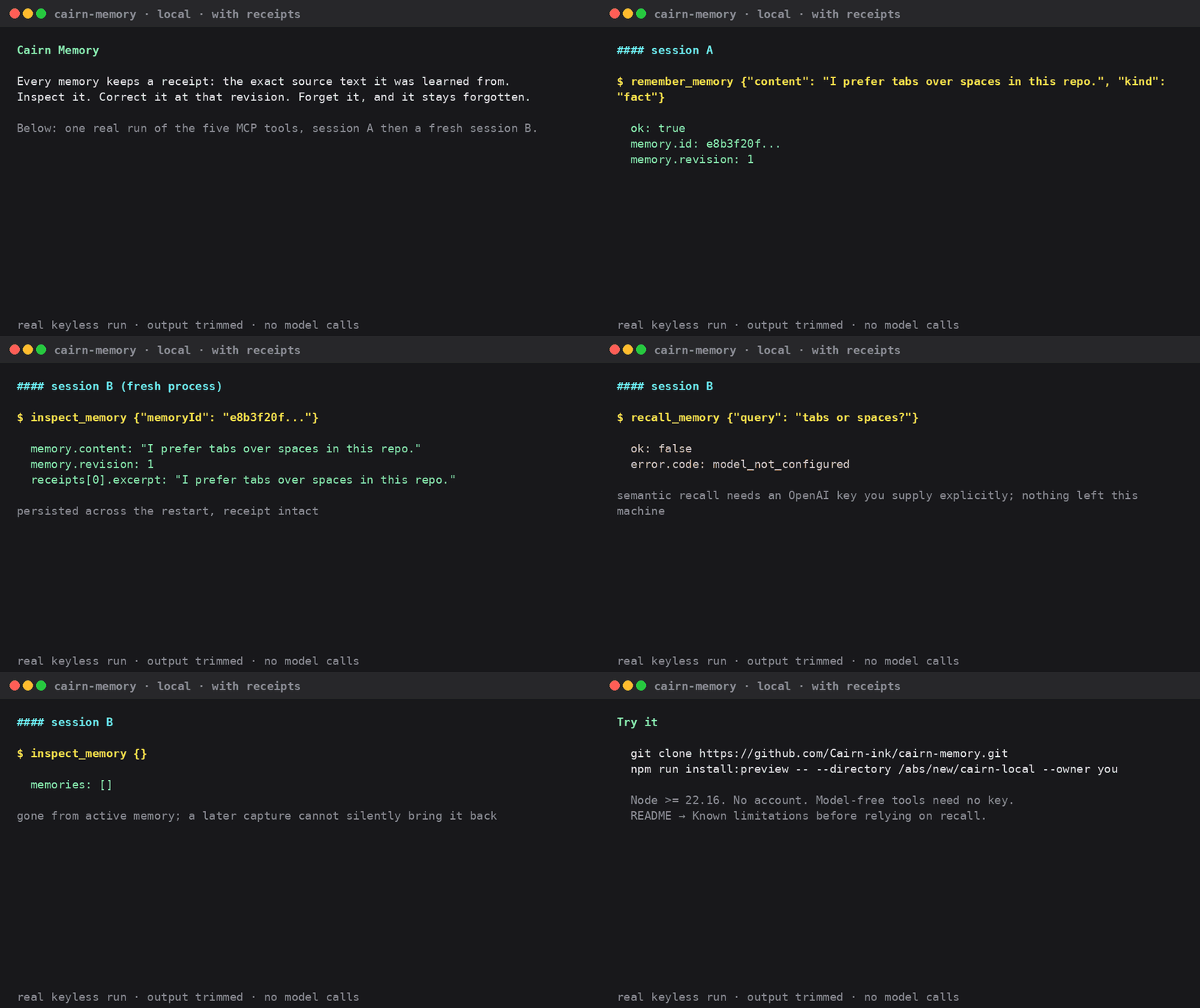
[Watch the 36-second model-free demo (MP4)](docs/promotion/demo/cairn-memory-preview.mp4).
This records the memory tools running, rather than a conversation in Claude or
Codex. “Model-free” means no AI model is called during the walkthrough.
For long-conversation results, see the [four-case real-model pilot](docs/evidence/long-history-live-pilot.md).
It is an opt-in diagnostic with one failed Cairn answer, not a measurement of
long-term default-client recall reliability. [Known limitations](docs/limitations.md)
Open the recorded tool walkthrough (GIF)
The demo below records the **model-free loop**: save, restart, inspect, correct
and forget. Its recall step reports `model_not_configured`.
[Recorded responses and regeneration instructions](docs/demo/README.md) ·
[Verified capabilities and client support](docs/promotion-claims.md#supported-paths)
## Install
For **Claude Code and Codex**, run the one-command installer:
```sh
npx @cairn-ink/memory setup
```
A fresh interactive install asks once: local MCP memory tools on this computer,
or cloud automatic memory with cairn.ink sign-in; choose directly with
`setup --local` or `setup --cloud`. Fresh non-interactive runs need `--local`
or `--cloud`; local mode has no automatic capture or recall in 0.6.0.
Installer **0.6.0** was published on 2026-10-25, so `npx @cairn-ink/memory setup`
uses it; a checkout can also run `node packages/setup/bin/memory.mjs setup`. The plugin stays 0.3.2.
Requires Node ≥22.16 and at least one CLI on PATH. Cloud setup asks about new tools,
updates connected tools, and uses one browser sign-in when connecting both.
The default server is cairn.ink. Conflicting servers or memory IDs present a
choice; non-interactive conflicts change nothing. Codex must pass format
qualification before automatic memory is enabled. Automated `codex exec` runs
skip capture and prompt recall by default; opt in with
`npx @cairn-ink/memory config --codex-capture-exec on`.
Choose the mode that fits your workflow:
- **[Local preview](#try-the-local-memory-layer):** your SQLite database,
explicit MCP memory tools, no Cairn account. Start here to try the open-source
memory layer. Semantic recall uses your OpenAI key.
- **[Hosted integration](#existing-hosted-integration):** memory on cairn.ink,
with automatic capture and recall through the Claude Code plugin. Requires a
Cairn account, token and compatible service. Explicit hosted MCP is also available.
## Try the local memory layer
Prerequisites: **Git, Node >=22.16, npm and `tar`**. Recorded checks cover Linux
x64 and a [bounded native Windows x64 installation](docs/evidence/windows-install.md).
**On Windows, use the [PowerShell setup and walkthrough](docs/windows-install.md)**;
the commands below use Linux/WSL paths. Other platforms are unverified.
Install from this repository:
the unscoped npm and PyPI packages named `cairn-memory` are unrelated projects.
The local archive is not published to npm yet.
**1. Install into a new directory.** Replace the path below with a new absolute
directory beneath an existing parent you control.
```sh
git clone https://github.com/Cairn-ink/cairn-memory.git
cd cairn-memory
npm run install:preview -- --directory /absolute/new/cairn-local --owner local-user
```
The installer builds this checkout and downloads pinned public npm dependencies
without install scripts. It creates `app/`, `data/` and a private
`installation-receipt.json` containing the executable path and MCP settings.
It makes no model calls. Keep the receipt private: it contains local paths and
identity. [Installation details, recovery and backup](packaging/README.md)
**2. Run the model-free check.** From the source checkout, use the same
installation path. No chat-client setup or model key is needed.
```sh
npm ci --prefix adapters/mcp
node adapters/mcp/walkthrough.mjs --executable /absolute/new/cairn-local/app/node_modules/.bin/cairn-memory
```
Expect `status: "passed"`. The check uses a fresh synthetic database and verifies
the five tools, receipts, process-restart persistence, correction and forgetting.
It strips the model key from the child process; `model_not_configured` is the
expected recall result. [Steps and expected results](docs/local-memory-demo.md)
**3. Connect a client.** Copy `stdio.command` and `stdio.args` from your private
installation receipt into the client's local MCP configuration. Keep the same
database, owner and project across sessions. See the
[tested client matrix](docs/promotion-claims.md#supported-paths).
For semantic recall, explicitly supply `OPENAI_API_KEY` through the MCP process's
secret environment. The walkthrough's optional `--with-recall` path sends
synthetic context to OpenAI and incurs model charges; it has no built-in dollar
cap. A fully local model path is not yet verified.
For the Hermes native provider, follow its [separate setup guide](docs/hermes-first-use.md).
It uses a profile-local database and owner, plus `CAIRN_MEMORY_OPENAI_API_KEY`,
rather than the generic MCP settings above.
| Tool | Purpose |
| --- | --- |
| `remember_memory` | Explicitly save one memory and its receipt |
| `recall_memory` | Model-guided retrieval of current memories and receipts |
| `inspect_memory` | List memories, or inspect an ID, revision and receipts |
| `correct_memory` | Replace content at the revision you inspected |
| `forget_memory` | Logically delete at the revision you inspected |
The default local server exposes explicit tools. For opt-in submitted-message
capture, project scope and configuration checks, see the
[installed preview guide](packaging/README.md). The
[full evidence and limitations](docs/limitations.md) cover extraction failures,
long-history retrieval and the boundaries of individual client tests.
## Local privacy and control
- Memory, receipts and organization persist in your selected SQLite database.
No Cairn account, hosted service or hidden core telemetry is required.
- MCP does not read transcripts or save whole conversations automatically.
Receipt text records a tool assertion; it is not proof of authenticated human intent.
- Model processing is cloud processing when configured. Redaction is best-effort,
not a guarantee that all secrets are removed. Retrieved text is untrusted data,
never instructions to follow.
- Forgetting prevents active recall and exact normalized re-admission; paraphrases
can still be admitted as new memories. It is not secure
disk erasure: SQLite pages, receipts and backups have separate retention limits.
Stop all writers before copying the database and sidecars for backup.
- Uninstalling the executable preserves the external database. See
[backup, upgrade and deletion boundaries](packaging/README.md),
[architecture](docs/architecture.md), [dependency notices](packaging/THIRD_PARTY_NOTICES.md)
and [security reporting](SECURITY.md).
## Existing hosted integration
The hosted plugin connects to cairn.ink, automatically captures allowlisted
conversation text and has its own telemetry defaults. Its service has not been
migrated to the local engine.
The [v0.2.0 prerelease](CHANGELOG.md#020--2026-10-01) changes the hosted protocol.
Matching server support remains a separate requirement; the release does not
deploy a server or enable Codex lifecycle hooks. See
[release and client compatibility](docs/promotion-claims.md) before upgrading.
## Install for Claude Code (automatic memory)
Run the published installer from your terminal:
```sh
npx @cairn-ink/memory setup
```
Installer **0.6.0** (plugin **0.3.2**) is published, so these flows run through
npx. To run this checkout instead, use `node packages/setup/bin/memory.mjs setup`.
Without `--client`, setup finds both tools and asks only about new connections.
It updates connected tools. Close both tools and wait for background work before
confirming shared memory. The sign-in line shows the server (default cairn.ink).
There is no endpoint or daily-cap question; `--endpoint` remains available.
Conversations are saved after best-effort local masking. Each prompt sends a
masked, length-limited copy for recall. Claude usage stats are on by default and
can be turned off. Codex's sign-in is stored in an unencrypted user-only file.
See [privacy and controls](https://cairn.ink/memory/privacy).
A memory ID connects the same project across tools. Existing IDs are retained.
Server conflicts offer two choices; unsafe Codex credential migrations require
logout first. When two independent IDs exist, choose one; the other key is backed
up only after successful sign-in and validation, never deleted. Old projects may
no longer automatically match the old ID. Non-interactive conflicts write nothing.
Setup never reads Claude native secret files. Adding Claude after Codex validates
and reuses the installer credential; adding Codex after Claude needs one browser
sign-in using the same account. Claude's existing sign-in is kept.
Automated `codex exec` runs skip both automatic capture and prompt recall by
default. Opt in with `npx @cairn-ink/memory config --codex-capture-exec on`;
use `off` to restore the default. This setting enables both capture and recall
for exec. `status` shows it only when enabled; rerunning setup preserves it.
The hooks read the transcript's session-bound `session_meta.payload.source`,
and also detect a native exec ancestor for `exec resume` of an older CLI thread.
If the header is missing or cannot be verified, they skip capture and injection.
Interactive sessions with verified CLI headers continue normally. Threads on the
Codex app-server (the TUI since 0.160, the VS Code extension and the desktop app)
count as interactive only when their `originator` is one of those three clients;
other app-server clients are treated like exec and need the same opt-in. Older frozen
runtimes must first be updated with setup; config prints the exact command.
To stop prompt recall while keeping automatic capture, run
`npx @cairn-ink/memory prompt-recall-off --client codex`.
Use `prompt-recall-on --client codex` to enable it again. This does not change MCP.
Codex defaults to 200 automatic captures per day; reruns keep an existing cap.
Change it with `setup --codex-daily-cap N` or `config --codex-daily-cap N`.
Status shows today's count and cap. Unscoped `pause` and `resume` select installed
Codex, and pause both tools when paired. Uninstall preserves keys and memories.
```sh
npx @cairn-ink/memory status
npx @cairn-ink/memory prompt-recall-off --client codex
npx @cairn-ink/memory pause
npx @cairn-ink/memory config --codex-daily-cap 300
node packages/setup/bin/memory.mjs setup --dry-run
```
`status` reads local state without testing remote service or hooks. `--verbose`
shows technical diagnostics. Review and allow the four Cairn entries in Codex
`/hooks` after installation. `--client claude|codex` restricts the run.
`--no-browser` allows sign-in on another device. Legacy MCP removal requires
confirmation. Unqualified Codex alone may offer manual MCP tools.
[Setup options and credential handling](packages/setup/README.md) ·
[chichi's release checklist](docs/npx-setup-release.md)
**Manual fallback:** from your terminal, run:
```sh
claude plugin marketplace add Cairn-ink/cairn-memory
claude plugin install cairn-memory@cairn-memory
```
Or use the slash-command form inside Claude Code:
```text
/plugin marketplace add Cairn-ink/cairn-memory
/plugin install cairn-memory@cairn-memory
```
Create a personal access token at `https://cairn.ink/settings/tokens`, then run
`/plugin configure cairn-memory@cairn-memory` in Claude Code and enter it there.
Start a new session after installation.
`/cairn-memory:status` reads content-free credential observations written by the
hooks, because Claude Code's Bash tool does not inherit sensitive plugin options.
`configured (verified


