# ByteRover CLI
ByteRover Logo

Interactive REPL CLI for AI-powered context memory

License Version Downloads Documentation Discord

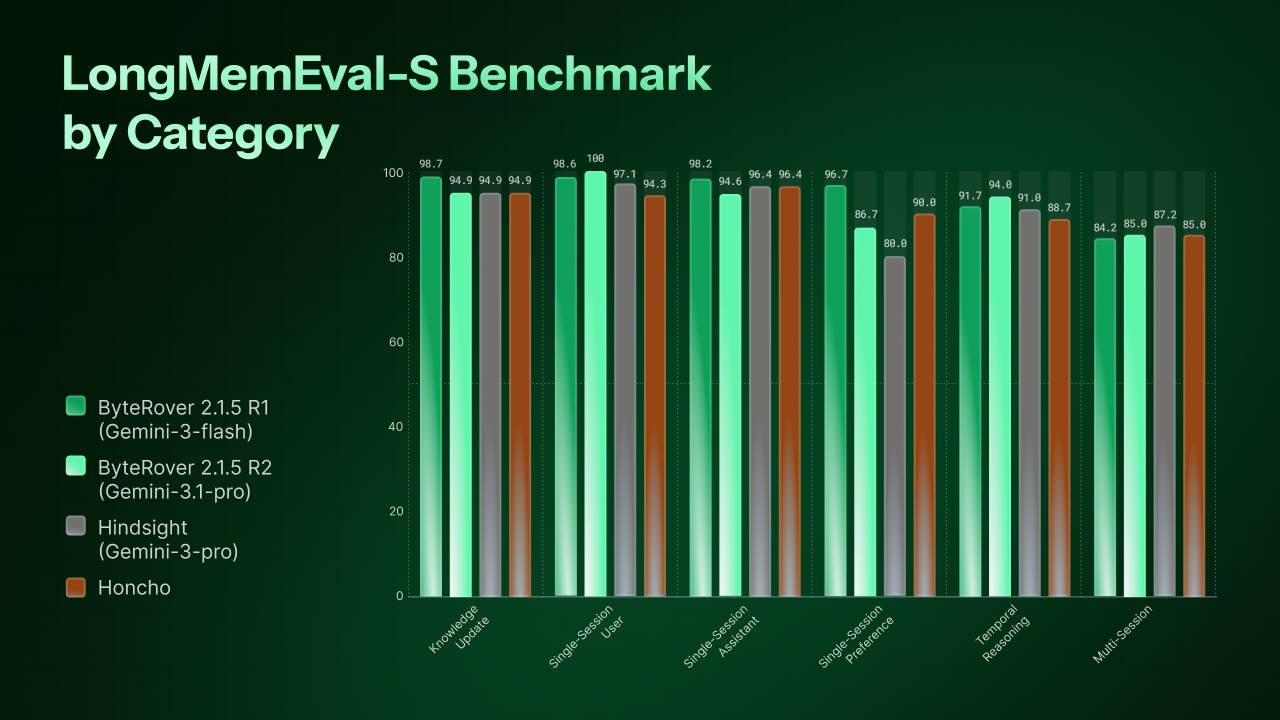
## Overview ByteRover CLI (`brv`) gives AI coding agents persistent, structured memory. It lets developers curate project knowledge into a context tree, sync it to the cloud, and share it across tools and teammates. Run `brv` in any project directory to start an interactive REPL powered by your choice of LLM. The agent understands your codebase through an agentic map, can read and write files, execute code, and store knowledge for future sessions. 📄 Read the [paper](https://arxiv.org/abs/2604.01599) for the full technical details. Or download our self-hosted PDF version of the paper [here](https://byterover.dev/paper). **Key Features:** - 🌐 Web dashboard for curating and querying context (`brv webui`) - 🖥️ Interactive TUI with REPL interface (React/Ink) - 🧠 Context tree and knowledge storage management - 🔀 Git-like version control for the context tree (branch, commit, merge, push/pull) - 🤖 20 LLM providers (Anthropic, OpenAI, Google, Groq, Mistral, xAI, DeepSeek, and more) - 🛠️ 24 built-in agent tools (code exec, file ops, knowledge search, memory management) - 🔄 Cloud sync with push/pull - 👀 Review workflow for curate operations (approve/reject pending changes) - 🔌 MCP (Model Context Protocol) integration - 📦 Hub and connectors ecosystem for skills and bundles - 🤝 Works with 22+ AI coding agents (Cursor, Claude Code, Windsurf, Cline, and more) - 🏢 Enterprise proxy support ## Benchmark Results All benchmarks are run using the production `byterover-cli` codebase in this repository - no separate research prototype. We evaluate on two long-term conversational memory benchmarks: - **LoCoMo** - ultra-long conversations (~20K tokens, 35 sessions) testing single-hop, multi-hop, temporal, and open-domain retrieval. - **LongMemEval-S** - large-scale benchmark (23,867 docs, ~48 sessions per question) testing 6 memory abilities including knowledge update, temporal reasoning, and multi-session synthesis. **LoCoMo** - 96.1% overall accuracy (1,982 questions, 272 docs). **LongMemEval-S** - 92.8% overall accuracy (500 questions, 23,867 docs).

LongMemEval-S Benchmark by Category

All metrics are LLM-as-Judge accuracy (%). See the [paper](https://arxiv.org/abs/2604.01599), or self-hosted [PDF](https://byterover.dev/paper) for full details. ## Quick Start ### Shell Script (macOS & Linux) No Node.js required - everything is bundled. ```bash curl -fsSL https://byterover.dev/install.sh | sh ``` Supported platforms: macOS ARM64, macOS x64 (Intel), Linux x64, Linux ARM64. ### npm (All Platforms) Requires Node.js >= 20. ```bash npm install -g byterover-cli ``` ### Verify ```bash brv --version ``` ### First Run ```bash cd your/project brv ``` The REPL auto-configures on first run - no setup needed. Type `/` to discover all available commands: ``` /curate "Auth uses JWT with 24h expiry" @src/middleware/auth.ts /query How is authentication implemented? ``` ## ByteRover Cloud ByteRover Cloud is a hosted platform for teams to sync, share, and manage context knowledge across projects and machines. Everything works locally by default - Cloud adds collaboration and persistence without changing your workflow.

Try ByteRover Cloud

Sign in from the dashboard, or run `brv login` with an [API key](https://app.byterover.dev/settings/keys). - 🔄 **Team context sync** — push and pull shared knowledge across teammates - 📂 **Shared spaces** — organize context across multiple projects and teams - 💻 **Multi-machine access** — sync your context tree across devices with cloud backup - 💻 **Multi-machine access** — sync your context tree across devices - 🧠 **Built-in hosted LLM** — start immediately with limited free usage - 👥 **Team management** — manage members, spaces, and permissions via the web app - 📊 **Usage analytics** — track seat allocation and monthly credit consumption - 🔒 **SOC 2 Type II** certified infrastructure with privacy mode

CLI Usage

Most users only need `brv webui`. The commands below are for advanced users and automation. Run `brv --help` for the full, up-to-date reference. ### Core Workflow ```bash brv # Start interactive REPL brv webui # Open the ByteRover dashboard (primary UI) brv status # Show project and daemon status brv curate # Add context to knowledge storage brv curate view # View curate history brv query # Query context tree and knowledge brv review pending # List pending review operations brv review approve # Approve curate operations brv review reject # Reject curate operations ``` ### Sync (Legacy) ```bash brv push # Legacy — migrate or snapshot context to cloud brv pull # Legacy — restore context from cloud snapshot ``` > Use `brv vc push` / `brv vc pull` for version-controlled sync going forward. ### Version Control ```bash brv vc init # Initialize version control for context tree brv vc status # Show version control status brv vc add # Stage files for the next commit brv vc commit # Save staged changes as a commit brv vc log # Show commit history brv vc branch # List, create, or delete branches brv vc checkout # Switch branches brv vc merge # Merge a branch into the current branch brv vc clone # Clone a ByteRover space repository brv vc push # Push commits to ByteRover cloud brv vc pull # Pull commits from ByteRover cloud brv vc fetch # Fetch refs from ByteRover cloud brv vc remote # Show current remote origin brv vc remote add # Add a named remote brv vc remote set-url # Update a remote URL brv vc config # Get or set commit author brv vc reset # Unstage files or undo commits ``` ### Providers & Models ```bash brv providers list # List available LLM providers brv providers connect # Connect to an LLM provider brv providers switch # Switch active provider brv providers disconnect # Disconnect a provider brv model list # List available models brv model switch # Switch active model ``` ### Hub & Connectors ```bash brv hub list # List available hub packages brv hub install # Install a hub package brv hub registry add # Add a custom registry brv hub registry list # List registries brv hub registry remove # Remove a registry brv connectors list # List connectors brv connectors install # Install a connector ``` ### Spaces (Deprecated) ```bash brv space list # Deprecated — use web dashboard brv space switch # Deprecated — use brv vc clone ``` ### Settings `brv` ships with operational defaults that suit most users. The `brv settings` command group lets you inspect and override these values. ```bash brv settings # List all settings with current and default values brv settings list # Alias for `brv settings` brv settings get # Show current and default for one key brv settings set # Update one key (restart required) brv settings reset # Restore one key to its default (restart required) ``` Available keys: | Key | Default | What it controls | |---|---|---| | `agentPool.maxSize` | 10 | Maximum concurrent active projects (one agent process per project) | | `agentPool.maxConcurrentTasksPerProject` | 5 | Parallel `brv curate` / `brv query` tasks within a single project | | `llm.iterationBudgetMs` | 600000 | Wall-clock budget for the agentic loop on one task, in milliseconds | | `llm.requestTimeoutMs` | 120000 | Wall-clock budget for one direct LLM HTTP request, in milliseconds | | `taskHistory.maxEntries` | 1000 | Number of task records `brv query-log view` retains per project | Raise `llm.iterationBudgetMs` when a single `brv curate` or `brv query` on a slow local LLM (Ollama on CPU, heavy quantization, cold model load) routinely hits the default 10-minute cap on legitimate work. Lower it on cloud providers when you want a stuck task to surface as an error faster instead of waiting out the full budget. The cap is enforced per task, not per request. `llm.requestTimeoutMs` bounds one HTTP request to the LLM. A frozen Ollama or LM Studio connection aborts at this boundary and the retry layer treats it as a transient error rather than wasting the full iteration budget. The setting must satisfy `llm.requestTimeoutMs <= llm.iterationBudgetMs`; the daemon rejects writes that violate the rule and falls back to defaults for both keys when the file violates it at startup. Suggested presets: | Profile | `llm.requestTimeoutMs` | `llm.iterationBudgetMs` | |---|---|---| | Cloud | 120000 (2 min) | 600000 (10 min) | | Local LLM, fast GPU | 300000 (5 min) | 1200000 (20 min) | | Local LLM, CPU / heavy quantization | 900000 (15 min) | 3600000 (60 min) | Settings persist in `settings.json` under the `brv` global data directory: - Linux: `$XDG_DATA_HOME/brv/settings.json` (defaults to `~/.local/share/brv/settings.json`) - macOS: `~/Library/Application Support/brv/settings.json` - Windows: `%LOCALAPPDATA%/brv/settings.json` Set the `BRV_DATA_DIR` environment variable to override the directory. Changes apply after `brv restart`. The daemon reads the file once at startup and does not observe file changes during runtime. This keeps every running agent on the same configuration for the lifetime of the daemon. Example session: ```bash $ brv settings list KEY CURRENT DEFAULT RESTART? agentPool.maxSize 10 10 yes agentPool.maxConcurrentTasksPerProject 5 5 yes taskHistory.maxEntries 1000 1000 yes $ brv settings set agentPool.maxSize 20 Setting saved. Run `brv restart` to apply. $ brv settings get agentPool.maxSize 20 (default: 10) ``` Every command supports `--format json` for scripting. Validation errors (unknown key, value out of range) exit with code 1 and a message naming the key. ### Other ```bash brv mcp # Start MCP server brv login # Authenticate to ByteRover brv logout # Disconnect and clear credentials brv locations # List registered projects brv restart # Restart daemon brv debug # Debug mode ``` Run `brv --help` for the full command reference.

Supported LLM Providers

ByteRover CLI supports 20 LLM providers out of the box. Connect and switch providers from the dashboard, or use `brv providers connect` / `brv providers switch`. | Provider | Description | |----------|-------------| | Anthropic | Claude models | | OpenAI | GPT models | | Google | Gemini models | | Groq | Fast inference | | Mistral | Mistral models | | xAI | Grok models | | Cerebras | Fast inference | | Cohere | Command models | | DeepInfra | Open-source model hosting | | DeepSeek | DeepSeek V3 and R1 reasoning models | | OpenRouter | Multi-provider gateway | | Perplexity | Search-augmented models | | TogetherAI | Open-source model hosting | | Vercel | AI SDK provider | | Minimax | Minimax models | | Moonshot | Kimi models | | GLM | GLM models | | GLM Coding Plan | GLM models on Z.AI Coding Plan subscription | | OpenAI-Compatible | Any OpenAI-compatible API | | ByteRover | ByteRover's hosted models |
## Worktrees and Knowledge Sources > **Vocabulary** > - **Worktree link** — a subdirectory pointer to a parent project (`brv worktree`) > - **Source** — a read-only reference to another project's knowledge (`brv source`) > - **Origin** — where an indexed search result came from (`local` vs `shared`) ByteRover can run from a linked subdirectory without creating a nested `.brv/`. - `projectRoot`: the directory that owns `.brv/config.json` - `worktreeRoot`: the linked worktree directory, or `projectRoot` when unlinked - `clientCwd`: the shell cwd where you ran `brv` When you run `brv query` or `brv curate` from a linked worktree, implicit defaults use `worktreeRoot` so scope stays stable even if `clientCwd` drifts deeper into the package. Explicit relative paths that you pass yourself, such as `brv curate -f ./src/auth.ts`, still resolve from `clientCwd` to match normal shell behavior. Use `brv worktree add` from the project root to register a subdirectory (or sibling) as a worktree. This creates a `.brv` pointer file in the target directory that redirects to the parent project — the same pattern git uses for `git worktree`. Use `brv worktree remove` to unregister, and `brv worktree list` to inspect. To search another project's knowledge from here, use `brv source add ` (with `brv source list` / `brv source remove` to inspect or detach). ## Documentation Visit [**docs.byterover.dev**](https://docs.byterover.dev) for full guides on setup, integrations, and advanced usage. | Topic | Description | |-------|-------------| | [Getting Started](https://docs.byterover.dev) | Installation, first run, and basic usage | | [Cloud Sync](https://docs.byterover.dev) | Push/pull workflows and team sharing | | [Version Control](https://docs.byterover.dev) | Context tree branching, commits, and collaboration | | [LLM Providers](https://docs.byterover.dev) | Provider setup and model configuration | | [AI Agent Integrations](https://docs.byterover.dev) | Using ByteRover with Cursor, Claude Code, Windsurf, etc. | | [Hub & Connectors](https://docs.byterover.dev) | Skills, bundles, and the connector ecosystem | | CLI Reference | Run `brv --help` | ## Contributing We welcome contributions! See our [Contributing Guide](CONTRIBUTING.md) for development setup, coding standards, and the PR workflow. ## Community & Support ByteRover CLI is built and maintained by the [ByteRover team](https://byterover.dev/). - Join our [Discord](https://discord.com/invite/UMRrpNjh5W) to share projects, ask questions, or just say hi - [Report issues](https://github.com/campfirein/byterover-cli/issues) on GitHub - If you enjoy ByteRover CLI, please give us a star on GitHub — it helps a lot! - Follow [@kevinnguyendn](https://x.com/kevinnguyendn) on X ## Contributors [![Contributors](https://contrib.rocks/image?repo=campfirein/byterover-cli&max=40&columns=10)](https://github.com/campfirein/byterover-cli/graphs/contributors) ## Star History Star History Chart ## License Elastic License 2.0. See [LICENSE](LICENSE) for full terms.