# MatLivre
[](https://github.com/campuslivre/matlivre/releases/download/v0.1.9/matlivre-win-Setup.exe)
[matlivre-win-Setup.exe](https://github.com/campuslivre/matlivre/releases/download/v0.1.9/matlivre-win-Setup.exe) · Windows installer, version 0.1.9
[MatLivre-0.1.9-macOS.dmg](https://github.com/campuslivre/matlivre/releases/download/v0.1.9/MatLivre-0.1.9-macOS.dmg) · macOS disk image (Apple Silicon and Intel), version 0.1.9
**MatLivre is a fast live script editor and runtime for MATLAB code.** It opens, edits and runs
MATLAB live scripts (`.mlx`) and plain scripts (`.m`) with results, tables and figures inline,
in a native Windows 11 app. The language engine is an independent, clean-room implementation
of MATLAB, written in Rust: no MATLAB installation, license or Java runtime is needed.
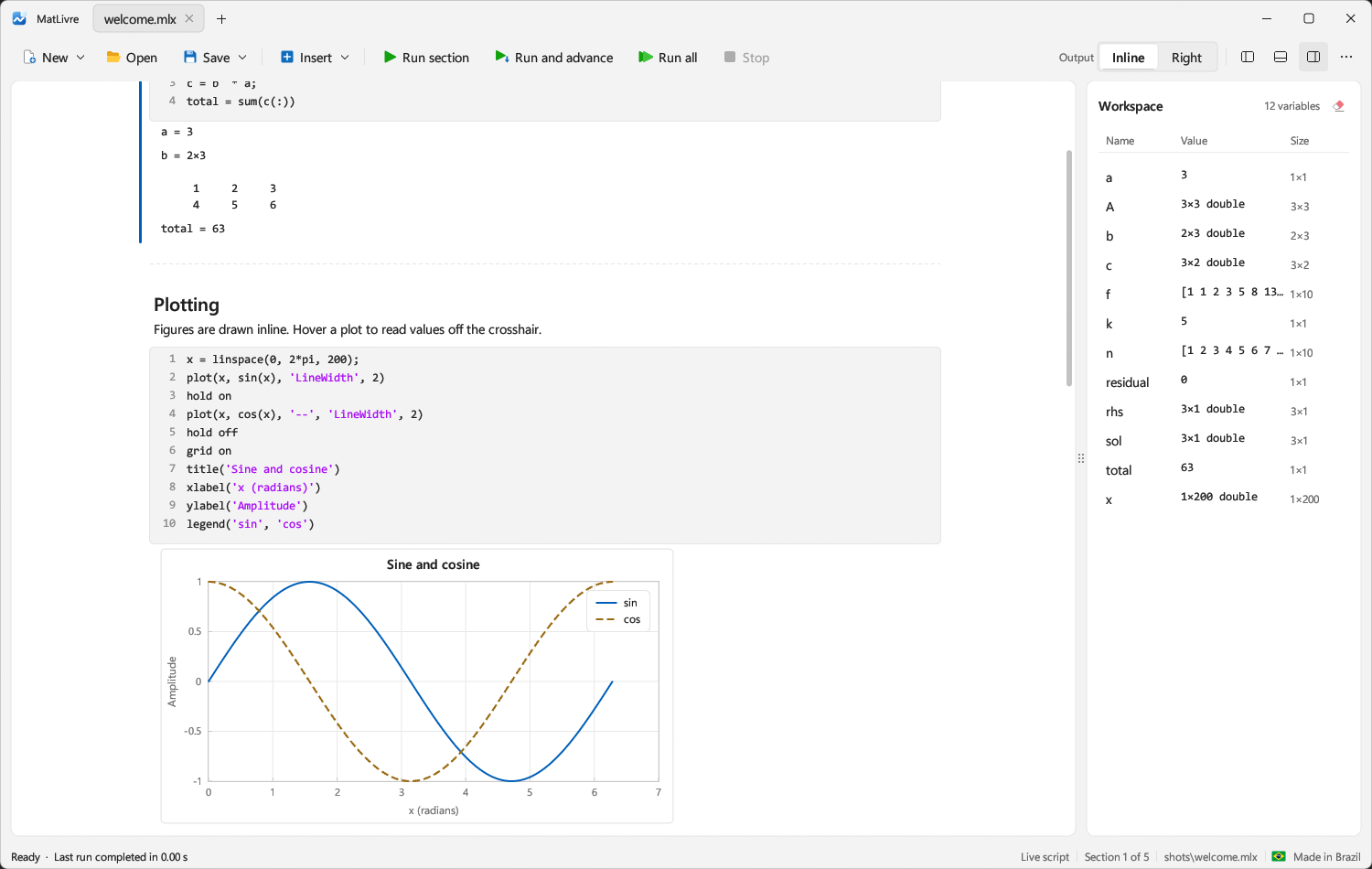
- **Starts in a blink.** The app is ready in 0.3 s (1 s on a first launch). MATLAB needs
about 4 s for its desktop to run code and 24 s on a cold first start.
- **Runs live scripts fast.** A typical notebook with four figures runs in 0.11 s. MATLAB's
Live Editor takes 4.9 s for the same file, and 14.3 s the first time: 43 to 100 times slower.
- **Runs code fast.** On a 12-case benchmark of loops, recursion, array growth, linear
algebra, sorting, strings, structs and cells, MatLivre is 5.5x faster than MATLAB R2023b,
83x faster than GNU Octave and 83x faster than Scilab (geometric mean), with identical results
in all four.
- **Speaks MATLAB.** 1,889 MATLAB and Symbolic Math Toolbox functions, MATLAB's display format,
error messages and semantics, checked against MATLAB R2023b output.
- **One small program.** A single 36 MB executable that depends only on DLLs shipped with
Windows.
## Star History
## macOS
MatLivre runs natively on macOS (Apple Silicon and Intel) with ⌘ shortcuts, tabs dragged between
windows and files opened from Finder. Install Rust from , then:
```bash
./build-mac.sh # release build, creates dist/MatLivre.app (`fast` builds quicker)
open dist/MatLivre.app
```
## Performance
Measured on one machine (Intel Core i5-10600K, 24 GB, Windows 11) against MATLAB R2023b, GNU Octave
11.3 and Scilab 2025.0, run one after another.
| | MatLivre | MATLAB R2023b |
|---|---:|---:|
| App start, warm (first launch) | **0.31 s** (0.97 s) | 3.90 s desktop, 24.3 s cold `-batch` |
| Live script with four figures, warm (first run) | **0.11 s** (0.14 s) | 4.91 s (14.30 s) in the Live Editor |
| 12-case language benchmark, geometric mean | **5.5x faster** | 1x (Octave and Scilab: 83x slower) |
All 12 benchmark checksums agree in all four engines. MatLivre is behind MATLAB on a few
operations (`linsolve_300`, sparse conjugate gradients, `rand` of 1e7 numbers, QR and symmetric
`eig`), and the suites are small and favour its native loop compilation. The cold-start, live
script, language, sparse and everyday-operation benchmarks and the reasons for the speed
(Cranelift-compiled loops, multithreaded linear algebra and FFT, fused elementwise math, a
retaining allocator) are in [`docs/performance.md`](docs/performance.md); the scripts are in
[`benchmarks`](benchmarks).
## The app
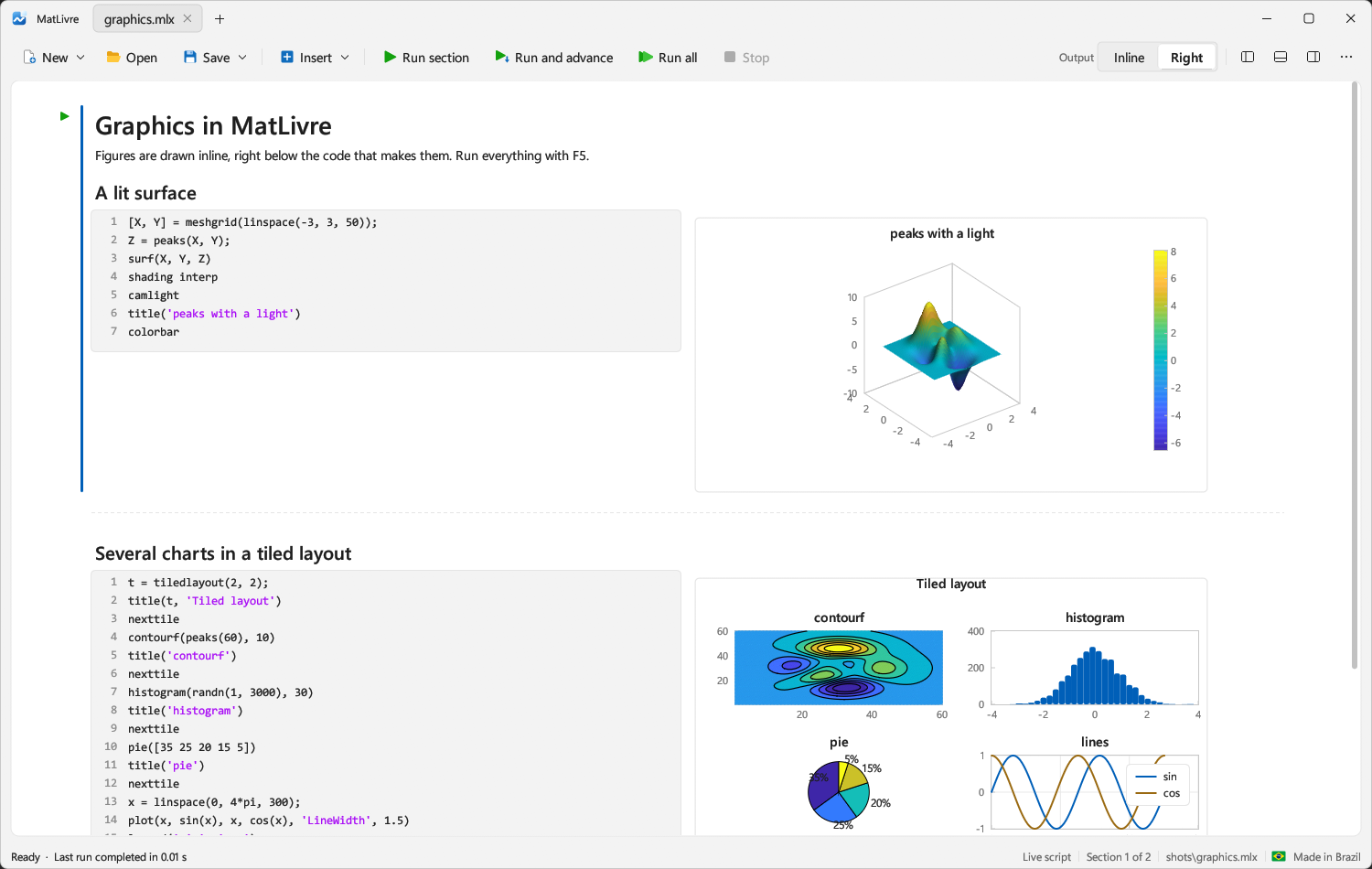
- Live scripts with formatted text, code, and results inline or on the right; run a section
(Ctrl+Enter), run and advance (Ctrl+Shift+Enter) or run all (F5), and stop between
statements.
- Live controls (sliders, drop-downs, check boxes, edit fields) in `.mlx` files.
- Figures drawn inline: 2-D and 3-D plots, surfaces with lighting, contours, images, bar, pie,
histogram, polar plots and more; charts (heatmaps, box, swarm and bubble charts, pie and
donut charts, word clouds, stacked and parallel coordinates plots); two y axes (`yyaxis`, `plotyy`),
secondary axis labels, date ticks, tiled layouts, annotations, data tips and colorbars, with a crosshair that reads values off
the plot. Graphics objects are handles (`get`, `set`, `findobj`, `copyobj`, arrays of them). `saveas`, `print` and `exportgraphics` write PNG and SVG; `savefig` and `openfig` save and reopen MATLAB `.fig` files.
- A files panel (open a folder as the project root, like VS Code), workspace browser, command window and floating figure windows; tabs that can
be dragged between windows; light and dark themes.
- A variable viewer, like MATLAB's Variables editor (read-only): double-click a variable in the
workspace to open it beside the document as a grid of its elements, with numbered rows and
columns that stay in place while it scrolls, whatever the size of the array. Hovering a matrix
in the workspace previews its first rows and columns.
- The interface in English, Portuguese, Spanish, French, German, Italian, Russian, Chinese
and Japanese: the system's language on first start, and a flag menu at the top right to
switch at any time. MATLAB output and error messages stay as MATLAB shows them.
- Code runs on its own engine thread, so the editor never freezes while a script runs.
- Files changed by another program (an editor, Claude Code, git) reload in their tab, as in
VS Code and MATLAB. A tab with unsaved changes asks instead: reload the file or keep your
version, and it never saves over a change it has not shown you.
- Claude, through the Claude Code installed on your computer (no API key):
- **Claude panel** (Ctrl+L): chat with Claude, which can run code in your workspace, see
your figures, and read and edit the open documents. It asks before it runs or changes
anything.
- **Code completions**: after a pause in typing, Claude suggests the rest of the line or
block in grey; Tab inserts it, Esc dismisses it, Alt+\ asks at once. Toggle them in the
… menu.
- **MCP server**: … › Connect Claude Code copies a `claude mcp add` command, after which
Claude Code in a terminal works in the open MatLivre window (or in a MatLivre without a
window, `matlivre --mcp`, when none is open).
| Shortcut | Action |
|---|---|
| Ctrl+Enter | Run current section |
| Ctrl+Shift+Enter | Run section and advance |
| F5 | Run all |
| Ctrl+Alt+Enter | Insert section break |
| Ctrl+N / Ctrl+O / Ctrl+S | New / Open / Save |
| Ctrl+L | Show or hide the Claude panel |
| Tab / Esc / Alt+\ | Accept / dismiss / request a code suggestion |
## The language
MATLAB compatibility is the rule: semantics, display and error messages follow MATLAB R2023b.
[`docs/matlab-coverage.md`](docs/matlab-coverage.md) lists every function of the MATLAB and
Symbolic Math Toolbox references and its status (1,889 implemented).
- **Core:** N-D arrays of every numeric type, strings, complex numbers, every `format` mode,
regular expressions and text patterns; cells, structs, function handles, `containers.Map`,
`dictionary`, `categorical`, `table`, `timetable`, `timeseries`, `datetime` (with time zones),
`duration`.
- **Classes and validation:** `classdef` (inheritance, handle and value semantics, events,
enumerations, System objects), `arguments` blocks, `inputParser`, `message` objects, `timer`.
- **Graphs and sparse matrices:** `graph` and `digraph` algorithms and plots; sparse matrices
with iterative solvers, `ichol`, `ilu`, reorderings and `spy`.
- **Mathematics:** linear algebra and factorizations, polynomials and interpolation, ODE solvers
(stiff, DAE, implicit, `ode` objects), delay, boundary value and parabolic PDE problems,
integration, optimization, statistics, FFT and filtering, computational geometry, special
functions, image resizing and indexed color.
- **Signal Processing (in progress):** 258 functions so far, compared call by call with
MATLAB R2023b (about 8,800 recorded calls): windows, waveforms, `butter`/`cheby1`/`cheby2`/`ellip`/`besself`
designed through state space with MATLAB's pole and zero order, `freqz`/`freqs`, `levinson`
and reflection-coefficient conversions, spectral estimates. Plan and known deviations:
[`docs/signal-coverage-plan.md`](docs/signal-coverage-plan.md).
- **Symbolic Math:** exact arithmetic, `diff`, `int`, `limit`, `taylor`, `solve`, `dsolve` for
linear equations, Laplace, Z, Fourier and Hilbert transforms, `simplify`, symbolic matrices
and canonical forms, abstract functions and DAE structure tools, `subexpr`, `symmatrix`,
special functions, number theory, units of measurement.
- **Files:** text and CSV, Excel, MAT files, images, audio, `Tiff`, JSON, XML, zip and tar.
Try [`examples/welcome.m`](examples/welcome.m), [`examples/graphics.m`](examples/graphics.m) and
[`examples/features.m`](examples/features.m).
## Build from source
```bash
cargo run -p livre-app --release
```
Pass a file to open it: `cargo run -p livre-app --release -- path\to\script.mlx`. On Windows,
`build.bat` builds and `run.bat [file]` builds and starts the app. `target\release\matlivre.exe`
links the C runtime statically (`.cargo/config.toml`), so it runs on any Windows 10/11 machine
without installing anything.
`matlivre-cli script.m` runs a script headless and prints its output.
### Using MatLivre from agents (CLI and MCP)
MatLivre ships both, so a coding agent can run MATLAB code without the GUI.
**CLI.** `matlivre-cli script.m` runs the script in a fresh workspace, like `matlab -batch`
(the script's folder is on the search path, so it can call the functions next to it).
Results go to stdout; warnings and errors go to stderr (`Error (line N): message`). The exit
code is 0 on success, 1 when the script raised an error, 2 for a usage error or an unreadable
file. Figures are not written out by the CLI; save them from the script (`exportgraphics`,
`saveas`). Set `MATLIVRE_NOJIT=1` to run loops in the interpreter, and `MATLIVRE_JIT_LOG=1` to
print on stderr why a loop or function was not compiled.
```bash
matlivre-cli analysis.m > out.txt 2> err.txt
```
**MCP.** MatLivre is an MCP server for Claude Code and other MCP clients. In the app, choose
… › Connect Claude Code to copy the command, or run it yourself once:
```bash
claude mcp add matlivre -- /path/to/matlivre --mcp
```
`matlivre --mcp` speaks MCP over stdio. When a MatLivre window is open it forwards to that
window, so the agent works in the same workspace and documents you see; otherwise it runs a
workspace of its own, without a window. Tools:
| Tool | Offered | What it does |
|---|---|---|
| `run_code` | always | Runs MATLAB code in the base workspace; returns the command window output, figures as images |
| `get_workspace` | always | Lists the variables: name, class, size, short value |
| `list_documents`, `read_document` | with a window | Lists and reads the open scripts, unsaved changes included |
| `edit_document`, `write_document`, `open_document` | with a window | Edits appear in the editor unsaved; you save them |
| `run_document` | with a window | Runs a document or one `%%` section |
Without a window only `run_code` and `get_workspace` exist. Every window also serves MCP over
HTTP on 127.0.0.1 at a URL with a random token (written to `mcp-url.txt` in MatLivre's
settings folder), for clients that take `claude mcp add --transport http matlivre `.
### Linux
Install the build dependencies (Ubuntu/Debian) and Rust (via rustup), then build:
```bash
sudo apt install build-essential pkg-config libgtk-3-dev libxkbcommon-dev libwayland-dev
cargo run -p livre-app --release
```
For binaries that run on older distributions (glibc 2.31: Ubuntu 20.04, Debian 11, Linux Mint 20
and newer), `tools/linux/build-portable.sh` builds with `cargo zigbuild` against glibc 2.31 and
checks the result with `objdump -T`; the AppImage release is built this way. It needs
`cargo install cargo-zigbuild --locked` and [Zig](https://ziglang.org/download) on the `PATH`.
`tools/linux/package.sh` builds and packs `dist/matlivre-linux-.tar.gz`; its
`install.sh` installs `matlivre` and `matlivre-cli` into `~/.local/bin` and adds MatLivre to
the application menu.
## Project layout
| Crate | Purpose |
|---|---|
| `crates/livre-lang` | Lexer, parser, interpreter and native-code compiler, values and MATLAB display, builtins, classdef, Symbolic Math, figure model |
| `crates/livre-doc` | Live script document model; `.mlx` (OPC/ZIP + WordprocessingML) and `.m` reader/writer |
| `crates/livre-app` | The desktop app (eframe/egui): editor, outputs, plots, workspace, command window |
## Clean-room process
MatLivre was written from observed behavior only. The live script format is described in
[`docs/SPEC-live-script.md`](docs/SPEC-live-script.md), produced by inspecting the `.mlx` data
files shipped with MATLAB and the public behavior of the Live Editor. Language behavior is
checked by running code in MATLAB and comparing outputs. No MathWorks source code was read or
copied.
## Tests
```bash
cargo test --workspace
```
The Arch Linux workflow runs the workspace tests with Arch's packaged Rust toolchain,
then builds both binaries and exercises the CLI and headless MCP PNG/SVG exports.
To run the binary smoke checks locally after `cargo build --locked --workspace --bins`:
```bash
python tools/linux/smoke.py
```
These checks need no display server or MATLAB installation. They do not validate the
interactive GUI, desktop portals, or a particular window manager.
The tests compare MatLivre's output with MATLAB R2023b's for each function family.
`livre-doc/tests/matlab_samples.rs` round-trips the live scripts shipped with a local MATLAB
installation when one is present. Benchmarks: [`benchmarks/run_bench.bat`](benchmarks/run_bench.bat)
(language), [`benchmarks/coldstart.ps1`](benchmarks/coldstart.ps1) (start-up) and
[`benchmarks/livescript`](benchmarks/livescript) (live scripts).
## Known limits
The main ones: saved outputs in `.mlx` files are not restored on opening (run the script to
regenerate them), rich text in live scripts is shown as plain text, and Windows is the main
platform (Linux builds and runs, macOS builds natively). The full list of gaps in the language,
the Symbolic Math Toolbox and the charts is in [`docs/known-limits.md`](docs/known-limits.md);
unimplemented functions are in [`docs/matlab-coverage.md`](docs/matlab-coverage.md).
## License
[MIT](LICENSE)