
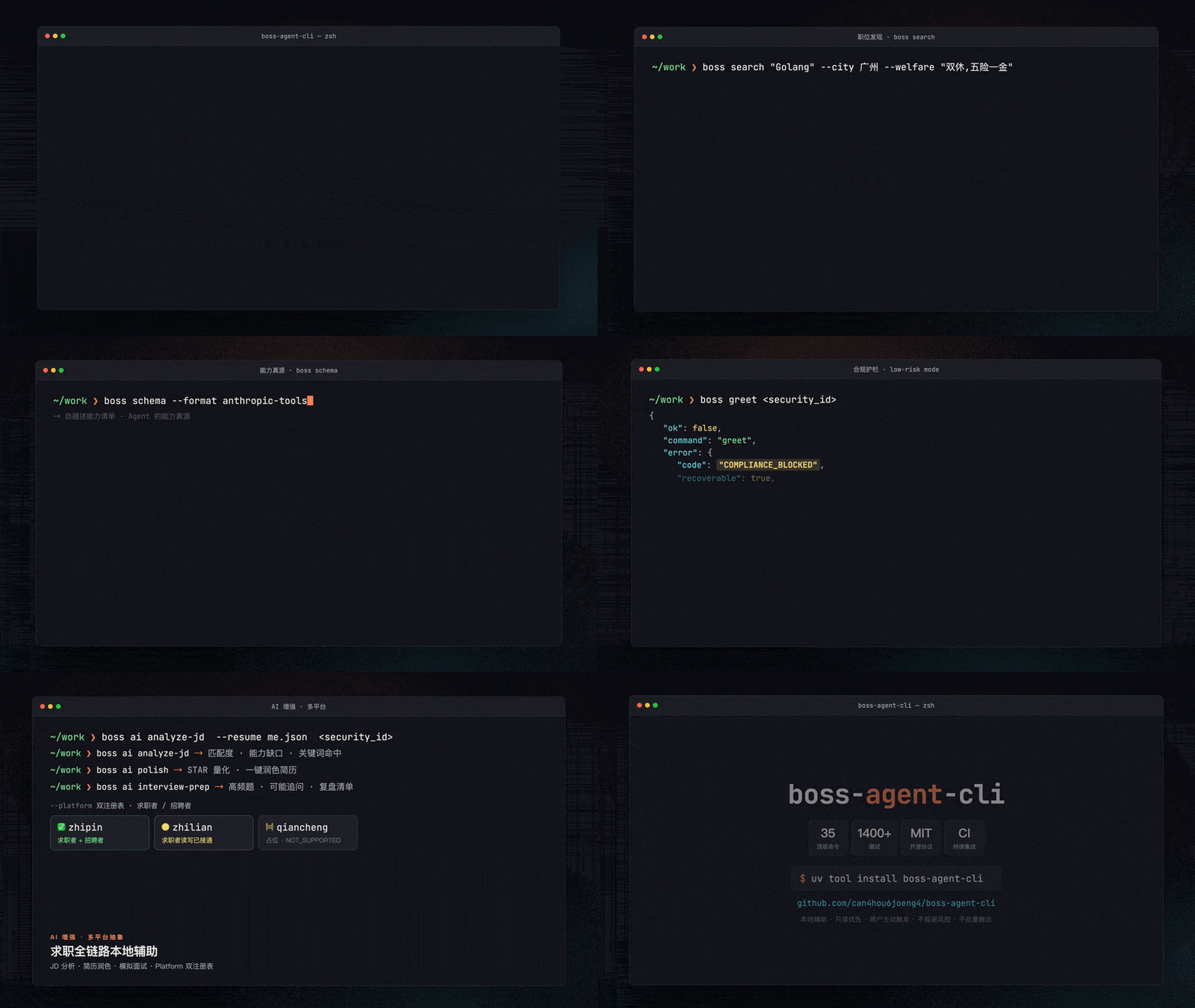
boss-agent-cli logo # boss-agent-cli *🤖 专为 AI Agent 设计的 BOSS 直聘本地辅助 CLI —— 搜索 · 福利筛选 · 候选池 · JSON 信封,默认 assisted,支持显式 Research Mode。* [![CI](https://github.com/can4hou6joeng4/boss-agent-cli/actions/workflows/ci.yml/badge.svg)](https://github.com/can4hou6joeng4/boss-agent-cli/actions/workflows/ci.yml) [![Coverage](https://codecov.io/gh/can4hou6joeng4/boss-agent-cli/branch/master/graph/badge.svg)](https://codecov.io/gh/can4hou6joeng4/boss-agent-cli) [![Python](https://img.shields.io/badge/Python-≥3.10-3776AB?logo=python&logoColor=white&style=flat-square)](https://python.org) [![License](https://img.shields.io/badge/License-MIT-green.svg?style=flat-square)](LICENSE) [![GitHub Release](https://img.shields.io/github/v/release/can4hou6joeng4/boss-agent-cli?style=flat-square)](https://github.com/can4hou6joeng4/boss-agent-cli/releases) [![PyPI Downloads](https://img.shields.io/pypi/dm/boss-agent-cli?style=flat-square)](https://pypi.org/project/boss-agent-cli/) [![PRs Welcome](https://img.shields.io/badge/PRs-welcome-brightgreen.svg?style=flat-square)](https://github.com/can4hou6joeng4/boss-agent-cli/pulls) [快速上手](docs/getting-started.md) · [Agent 集成](#-agent-集成) · [命令](#-命令) · [排障](docs/troubleshooting.md) · [路线图](ROADMAP.md) · **中文** | [English](README.en.md) boss-agent-cli 项目展示动图 **[观看完整展示视频](demo/showcase/boss-agent-cli-showcase.mp4)** · [终端交互演示](demo/demo-zh.gif) · schema 驱动 · 福利筛选 · JSON 信封



Atlas Cloud

> 🎁 **[Atlas Cloud](https://www.atlascloud.ai/?utm_source=github&utm_medium=link&utm_campaign=boss-agent-cli)** 为 `boss ai` 提供了一个全模态、OpenAI 兼容的推理入口 —— 一个 key 即可访问 DeepSeek、Qwen、GLM、Kimi、MiniMax、Claude、GPT 等模型,无需逐家接入。在 `boss ai config` 里选用 `--provider atlas`(`base_url=https://api.atlascloud.ai/v1`、默认模型 `deepseek-ai/deepseek-v4-pro`)即可,配置详见 [AI 模型接入](docs/integrations/ai-models.md#atlas-cloud一个-key-覆盖多家模型);预算友好的 [coding plan](https://www.atlascloud.ai/console/coding-plan)。 > [!TIP] > Doloffer logo > > **Doloffer Guide** 致力于让优质 AI 工具的获取更简单。平台主打 GPT 与 Claude 等主流 AI 服务的正版会员充值,提供一站式订阅管理,主打安全稳定与无忧售后。 > > 💡 **极速订阅**: [专属链接](https://doloffer.com/friend/BEv3yvKS)(输入优惠码 `AI8888` 享 9 折特惠) ## 🧭 为什么 自动投递、批量打招呼这类求职脚本,本质是在替平台做它不希望自动化的事——账号被封只是时间问题。boss-agent-cli 反其道而行:**把「低风险、只读、你主动触发」的那部分交给终端和 Agent,把打招呼 / 投递 / 沟通这类敏感动作留给你在官网手动完成。** 你描述期望,Agent 负责搜索、筛选、整理候选岗位并输出结构化 JSON;`boss schema` 是能力真源,天然适配 Claude / Cursor 等 MCP 宿主。合规不是事后补丁,而是默认姿态。 ## ⚠️ 合规边界 默认启用 **Assisted Mode**:本地辅助 · 只读优先 · 用户主动触发。打招呼(greet / batch-greet)、投递、联系方式交换、招聘者候选人搜索 / 简历 / 聊天、消息回复等敏感能力默认阻断并返回 `COMPLIANCE_BLOCKED`;需要时请回到 BOSS 直聘平台官网由用户手动完成。仓库同时允许显式 `boss config set operating_mode research` 启用 **Research Mode**,用于有界的浏览器协议、反调试、风控适配和受控采集研究;该模式仍要求脱敏、checkpoint、停止开关和可审计脚本来源。 ## ✨ 核心能力 - **职位发现**:关键词搜索 + 8 维筛选,按编号回看缓存结果 —— `search` `show` `detail` - **福利筛选(核心差异化)**:`--welfare "双休,五险一金"` 自动翻页补抓、按 AND 逻辑做**真实匹配**,并可 `--sort score` 按本地匹配分排序 —— `search --welfare` - **本地候选池与统计**:查看详情后本地保存 / 用标签和备注复盘候选岗位、离线对比、查看漏斗统计;投递与沟通回到官网手动完成 —— `shortlist` `stats` `watch` `preset` - **AI 求职增强 + 本地模型**:JD 分析、简历润色、定向优化、候选池匹配、模拟面试、沟通指导;本地模型权重外置,支持 Ollama/vLLM OpenAI 兼容接口 —— `ai analyze-jd` `ai local configure` `ai local smoke` - **Schema 驱动 + JSON 信封**:stdout 只输出 `{ok, data, pagination, error, hints}` 信封,`boss schema` 是能力真源,适合 CLI 编排 / Shell Agent / MCP / Python SDK - **招聘者最小闭环**:职位列表与上下架(`hr jobs list/online/offline`);候选人个人数据链路默认阻断 - **多平台抽象**:`Platform` / `RecruiterPlatform` 双注册表,`--platform zhipin|zhilian|qiancheng` ## 🚀 快速开始 ```bash # 安装(uv 推荐;浏览器内核仅用于用户主动登录 / 本地导出) uv tool install boss-agent-cli patchright install chromium # 跑通低风险闭环 boss doctor # 环境自检 boss login # 用户主动登录(按平台选择链路) boss status # 验证登录态 boss search "Golang" --city 广州 --welfare "双休,五险一金" # 搜索 + 福利筛选 boss detail # 查看详情 boss shortlist add --tags 后端,远程 # 加入本地候选池并打本地标签 boss shortlist compare --tag 远程 # 离线对比候选岗位 boss stats # 本地统计 # 招聘者模式(候选人数据链路默认阻断) boss hr jobs list ``` 所有命令输出结构化 JSON(`ok` 判断成败,`exit 0/1`)。完整上手见 [快速上手](docs/getting-started.md)。 ## 🎭 角色与多平台 | 平台 | 求职者 | 招聘者 | 状态 | |------|:--:|:--:|------| | BOSS 直聘 (`zhipin`) | ✅ | ✅ | 默认 | | 智联招聘 (`zhilian`) | ✅ 候选者侧只读 + 本地辅助对等 | 🟡 `agent` browser/CDP 自动化 V1 | `hr` 子命令仍仅限 BOSS;智联招聘者侧通过 `boss --platform zhilian --role recruiter agent ...` 进入 | | 前程无忧 / 51job (`qiancheng`) | 🚧 已注册占位 | — | 统一返回 `NOT_SUPPORTED`,待只读研究门槛满足后再接入 | ```bash boss --platform zhilian search "Python" # 指定平台(也支持 --platform zhipin|zhilian|qiancheng) boss config set platform zhilian # 设为默认 ``` `boss hr ...` 当前仅支持默认招聘者平台 `zhipin-recruiter`;智联招聘者侧自动化走 `agent` 命令和 browser/CDP adapter。设计细节见 [docs/platform-abstraction.md](docs/platform-abstraction.md)。 ## 🤖 Agent 集成 推荐先读:[Agent Quickstart](docs/agent-quickstart.md) · [Capability Matrix](docs/capability-matrix.md) · [Host Examples](docs/agent-hosts.md) ```json // 方式一:MCP(推荐)—— Claude Desktop / Cursor 等 MCP 宿主,暴露 45 个低风险工具 { "mcpServers": { "boss-agent": { "command": "uvx", "args": ["--from", "boss-agent-cli[mcp]", "boss-mcp"] } } } ``` OpenCode 源码项目可直接使用仓库示例: ```bash cp examples/opencode/opencode.json ./opencode.json uv sync --all-extras uv run boss-mcp --data-dir ./.boss-agent --help ``` portable / 全局安装后,在任意 OpenCode 项目里使用 `examples/opencode.json`,它会启动 `boss-mcp --data-dir ./.boss-agent`,让 review、pending、日志按项目隔离。 ```bash # 方式二:subprocess —— 先让 Agent 读能力自描述,再解析 stdout JSON boss schema ``` ```python # 方式三:Python 直接嵌入(随 py.typed 发布,可作类型化库) from boss_agent_cli import AuthManager, BossClient, AuthRequired with BossClient(AuthManager(...)) as client: result = client.search_jobs("Golang", city="广州") ``` ## 📚 命令 `boss schema` 暴露 36 个顶层命令 + 9 个一级招聘者子命令,按工作流分组: - **认证**:`login` · `logout` · `status` · `doctor` - **职位发现**:`search` · `detail` · `show` · `cities` · `history` - **本地整理**:`watch` · `preset` · `shortlist` · `stats` - **简历 / AI**:`resume` · `me` · `ai analyze-jd` · `ai polish` · `ai optimize` · `ai fit` · `ai suggest-keywords` · `ai resume-optimize` · `ai cover-letter` · `ai interview-prep` · `ai chat-coach` · `ai local` - **系统**:`schema` · `platforms` · `export` · `config` · `clean` - **招聘者**:`hr jobs list/online/offline` - **受限动作(默认低风险模式阻断)**:`greet` · `batch-greet` · `apply` · `exchange` · `chat*` · `pipeline` · `digest` 完整命令表、参数与福利筛选原理见 **[命令参考](docs/commands.md)**;能力真源是 `boss schema`(支持 `--format openai-tools` / `anthropic-tools` 导出工具定义)。 ## 🩺 诊断与排障 ```bash boss doctor # 环境自检 boss status --live # 可选:一次低频只读探测 boss doctor --live-probe ``` 错误信封统一携带 `code` + `recoverable` + `recovery_action`,可程序化恢复。Browser Bridge 本地诊断覆盖 `bridge_daemon` / `bridge_extension` / `bridge_protocol` / `bridge_workspace` / `bridge_exec` / `bridge_fetch` / `bridge_navigate` 七项,daemon 用 `python -m boss_agent_cli.bridge.daemon --serve` 启动。Assisted Mode 命中平台风控时停止自动化访问;Research Mode 可运行显式声明的风控适配器,但必须有限运行、保存 checkpoint,并由用户主动决定是否继续。 完整检查项、CDP 启动示例与错误码见 **[诊断与排障](docs/troubleshooting.md)**;涉及 Cookie / CDP / patchright / 请求频率 / 接口漂移的问题先读 [平台风险边界](docs/platform-risk.md)。 ## ⚙️ 配置 ```bash boss config list # 查看所有配置 boss config set log_level debug # 设置日志级别 boss config reset # 恢复默认 ``` 配置位于 `~/.boss-agent/config.json`:运行模式(`operating_mode=assisted|research`)、请求间隔、批量打招呼间隔、日志级别、CDP 地址、导出目录、平台 / 角色。 ## 🏗️ 技术架构 ``` CLI (Click) └─ 能力策略(默认 assisted;research 显式开放声明的研究能力) └─ AuthManager ── 用户主动登录态(Fernet + PBKDF2 机器绑定加密) └─ Platform 双注册表 ── BossPlatform / ZhilianPlatform / QianchengPlatform └─ BossClient ── httpx + 节流(高斯延迟);兼容 CDP / Bridge / patchright 登录与导出 └─ CacheStore(SQLite WAL) · AIService(OpenAI-compatible / Ollama / vLLM) └─ output.py → JSON 信封 → stdout ``` `QianchengPlatform (51job 占位适配器,统一返回 NOT_SUPPORTED)`:仅用于平台注册与 schema 可见性,接真实接口前需满足只读研究门槛。 **不变量**:stdout 仅 JSON 信封 · stderr 仅日志 · `exit 0/1` · 错误含 `code/recoverable/recovery_action` · `boss schema` 为能力真源。 **选型**:Python ≥ 3.10 · Click · httpx · patchright / CDP / Bridge(登录、导出与显式 Research Mode adapter)· cryptography(Fernet)· sqlite3(WAL)· pytest(1400+ 项)。 ## 🔌 本地存储 所有状态在 `~/.boss-agent/`:加密登录态、搜索缓存、候选池、本地简历、AI 配置与外置模型登记。模型权重不进入 Python 包;除显式发起的 API 调用或本地模型下载外,数据不离开本机。 ## 🤝 贡献 & 致谢 欢迎 Issue / PR:`git clone` → `feat/xxx` 分支 → 写测试 → `python scripts/quality_baseline.py`(Windows 中文系统可先 `$env:PYTHONUTF8='1'`)→ PR。详见 [CONTRIBUTING.md](CONTRIBUTING.md),上手路径见 [快速上手](docs/getting-started.md)。 致谢 [geekgeekrun](https://github.com/geekgeekrun/geekgeekrun) · [boss-cli](https://github.com/jackwener/boss-cli) · [opencli](https://github.com/jackwener/opencli)。 贡献者 如果它帮到了你,欢迎 [Star ⭐](https://github.com/can4hou6joeng4/boss-agent-cli) 或分享给正在找工作的人。 ## ⚠️ 免责声明 本项目仅用于学习交流和本地辅助,使用时请遵守相关法律法规、BOSS 直聘平台用户协议和隐私政策。默认低风险模式会阻断自动触达、批量操作、规避风控和候选人个人信息处理链路;任何投递、沟通、联系方式交换、招聘者候选人处理都应回到平台官网由用户手动完成。因不当使用产生的一切后果由使用者自行承担,与本项目作者无关。 ## 📑 许可证 & 友情链接 [MIT](LICENSE) © [can4hou6joeng4](https://github.com/can4hou6joeng4) · 友链 [LINUX DO](https://linux.do/)