# image-process


画像のクリッピングまたはスケーリング、ローカルまたは同じドメインのビデオのスクショ機能を持つ関数である。キャンバスに実装されている。
- 画像のトリミング: 有効なトリミング オプション ([ImageHandlerOptions](#ImageHandlerOptions) を参照) を設定するか、または有効な幅と高さ何かを設定するだけで、画像が中央に配置されてトリミングされる。
- 比例スケーリング: 幅または高さを設定するだけ。
- ビデオのスクリーンショット: [VideoHandlerOptions](#VideoHandlerOptions) の設定 `currentTime` に従って写真を撮る。
[English](../README.md) | [简体中文](./README.md)
## Demo
https://capricorncd.github.io/image-process-tools/demo
## 使用方
```js
import { handleMediaFile } from 'image-process'
const options = {
mimeType: 'image/jpeg',
width: 600,
height: 400,
quality: 0.8
}
// 画像をトリミングまたは動画のスクリーンショット
handleMediaFile(file, options)
.then(res => {
console.log(res)
})
.catch (err => {
console.error(err)
})
```
htmlで使用する
```html
```
## インストール
```bash
# npm
npm install image-process
# npm i image-process
# yarn
yarn add image-process
# pnpm
pnpm install image-process
# pnpm i image-process
```
## 関数
### handleImageFile(file, options)
画像ファイルの圧縮またはトリミング関数。
パラメータ|型|必須|説明
:--|:--|:--|:--
file|`File`/`Blob`/`string`|yes|文字列の場合にはbase64データ限定。
options|`ImageHandlerOptions`|no|[ImageHandlerOptions](#ImageHandlerOptions)を参照してください。
- @returns `Promise` [ImageHandlerResult](#ImageHandlerResult)を参照してください。
### handleMediaFile(file, options)
画像処理または動画のスクリーンショット処理関数。
パラメータ|型|必須|説明
:--|:--|:--|:--
file|`File`|yes|画像またはビデオファイル。
options|`MediaFileHandlerOptions`|no|[MediaFileHandlerOptions](#MediaFileHandlerOptions)を参照してください。
- @returns `Promise` [MediaFileHandlerResult](#MediaFileHandlerResult)を参照してください。
### handleVideoFile(file, options)
動画ファイルのスクリーンショット処理関数。
パラメータ|型|必須|説明
:--|:--|:--|:--
file|`File`|yes|ビデオ ファイル オブジェクト。
options|`VideoHandlerOptions`|no|[VideoHandlerOptions](#VideoHandlerOptions)を参照してください。
- @returns `Promise` [VideoHandlerResult](#VideoHandlerResult)を参照してください。
## タイプ
### ImageHandlerOptions
[handleImageFile](#handleimagefilefile-options) 関数のオプション。
プロップ|型|必須|説明
:--|:--|:--|:--
enableDevicePixelRatio|`boolean`|no|デバイスのピクセル比を有効にするかどうか。2倍の場合、返される画像のサイズは`x2`になる。デフォルトは`false`である。
mimeType|`string`|no|mimeType、デフォルトは「image/jpeg」である。
isForce|`boolean`|no|画像の幅または高さが設定値よりも小さい場合、対象の画像の幅または高さを強制的に設定値に調整するか。デフォルトは`false`である。
perResize|`number`|no|画像をスケーリングするときにギザギザのエッジを防ぐため、数回でスケーリングする際、毎回スケーリングするピクセルである。デフォルトは`500`である。
quality|`number`|no|処理後に返される画質。値の範囲は`0-1`である。詳細については、[toDataURL](https://developer.mozilla.org/en-US/docs/Web/API/HTMLCanvasElement/toDataURL) を参照してください。デフォルトは `0.9` である。
width|`number`|no|画像の「幅」を設定する。デフォルトは`0`である。
height|`number`|no|画像の「高さ」を設定する。デフォルトは`0`である。
longEdge|`number`|no|画像の長辺を設定する。デフォルトは`0`である。
cropInfo|`OptionsCropInfo`|no|[OptionsCropInfo](#OptionsCropInfo)を参照してください。
ソース
```ts
interface ImageHandlerOptions {
// Whether to enable the device pixel ratio, when 2 times, the size of the returned image is x2. Default is `false`.
enableDevicePixelRatio?: boolean
// Multipurpose Internet Mail Extensions. Default is `image/jpeg`.
// https://developer.mozilla.org/en-US/docs/Web/HTTP/Basics_of_HTTP/MIME_types
mimeType?: string
// When the image width or height is less than the set value,
// force the target image width or height to be adjusted to the set value.
// Default is `false`.
isForce?: boolean
// Reduce the width each time. To prevent jagged edges when scaling an image.
// Default is `500`.
perResize?: number
// A Number between 0 and 1 indicating the image quality to use for image formats that use lossy compression such as image/jpeg and image/webp.
// If this argument is anything else, the default value for image quality is used. The default value is 0.92. Other arguments are ignored.
// See [toDataURL](https://developer.mozilla.org/en-US/docs/Web/API/HTMLCanvasElement/toDataURL).
// Default is `0.9`.
quality?: number
// The `width` of the processed image. Default is `0`.
width?: number
// The `height` of the processed image. Default is `0`.
height?: number
// The value of long edge. Valid when width and height are `0`. Default is `0`.
longEdge?: number
// See [OptionsCropInfo](#OptionsCropInfo).
cropInfo?: OptionsCropInfo
}
```
### ImageHandlerResult
[handleImageFile](#handleimagefilefile-options) 関数から返されるデータ。
プロップ|型|必須|説明
:--|:--|:--|:--
blob|`Blob`|yes|画像ブロブ データ。
data|`string`|yes|画像 base64 データ。
width|`number`|yes|画像の幅。
height|`number`|yes|画像の高さ。
type|`string`|yes|画像のタイプ。
size|`SizeInfo`|yes|画像のサイズ情報。 [SizeInfo](#SizeInfo) を参照してください。
url|`string`|yes|画像のブロブ URL。
element|`HTMLImageElement`/`HTMLCanvasElement`|yes|`HTMLImageElement`または`HTMLCanvasElement`.
raw|`MediaFileHandlerRawData`|yes|元画像の情報。[MediaFileHandlerRawData](#MediaFileHandlerRawData) を参照してください。
ソース
```ts
interface ImageHandlerResult extends MediaHandlerResultBase {
// `HTMLImageElement` or `HTMLCanvasElement`.
element: HTMLImageElement | HTMLCanvasElement
// Raw information of the image file being processed. See [MediaFileHandlerRawData](#MediaFileHandlerRawData).
raw: MediaFileHandlerRawData
}
```
### MediaFileHandlerOptions
[handleMediaFile](#handlemediafilefile-options) 関数のオプション。
[VideoHandlerOptions](#VideoHandlerOptions) を参照してください。
```ts
type MediaFileHandlerOptions = VideoHandlerOptions
```
### MediaFileHandlerRawData
処理中の画像ファイルの情報。
プロップ|型|必須|説明
:--|:--|:--|:--
blob|`Blob`|yes|画像ブロブ データ。
data|`string`|yes|画像 base64 データ。
width|`number`|yes|画像の幅。
height|`number`|yes|画像の高さ。
type|`string`|yes|画像のタイプ。
size|`SizeInfo`|yes|画像のサイズ情報。 [SizeInfo](#SizeInfo) を参照してください。
url|`string`|yes|画像のブロブ URL。
element|`HTMLImageElement`|yes|`HTMLImageElement`
ソース
```ts
interface MediaFileHandlerRawData extends MediaHandlerResultBase {
// `HTMLImageElement`
element: HTMLImageElement
}
```
### MediaFileHandlerResult
[handleMediaFile](#handlemediafilefile-options) 関数から返されるデータ。
プロップ|型|必須|説明
:--|:--|:--|:--
blob|`Blob`|yes|画像ブロブ データ。
data|`string`|yes|画像 base64 データ。
width|`number`|yes|画像の幅。
height|`number`|yes|画像の高さ。
type|`string`|yes|画像のタイプ。
size|`SizeInfo`|yes|画像のサイズ情報。 [SizeInfo](#SizeInfo) を参照してください。
url|`string`|yes|画像のブロブ URL。
element|`HTMLImageElement`/`HTMLCanvasElement`|yes|`HTMLImageElement`または`HTMLCanvasElement`.
raw|`MediaFileHandlerRawData`|yes|元画像の情報。[MediaFileHandlerRawData](#MediaFileHandlerRawData) を参照してください。
videoInfo|`VideoInfo`|no|ビデオ ファイル情報。[VideoInfo](#videoinfo) を参照してください。
ソース
```ts
interface MediaFileHandlerResult extends ImageHandlerResult {
// Video file information. See [VideoInfo](#videoinfo).
videoInfo?: VideoInfo
}
```
### MediaHandlerResultBase
プロップ|型|必須|説明
:--|:--|:--|:--
blob|`Blob`|yes|画像ブロブ データ。
data|`string`|yes|画像 base64 データ。
width|`number`|yes|画像の幅。
height|`number`|yes|画像の高さ。
type|`string`|yes|画像のタイプ。
size|`SizeInfo`|yes|画像のサイズ情報。 [SizeInfo](#SizeInfo) を参照してください。
url|`string`|yes|画像のブロブ URL。
ソース
```ts
interface MediaHandlerResultBase {
// Image blob data.
blob: Blob
// Image base64 data.
data: string
// The width of the image.
width: number
// The height of the image.
height: number
// The type of the image.
type: string
// The size information of the image. See [SizeInfo](#SizeInfo).
size: SizeInfo
// A blob url of the image.
url: string
}
```
### OptionsCropInfo
https://developer.mozilla.org/en-US/docs/Web/API/CanvasRenderingContext2D/drawImage
> 値が無効な場合は無視される。
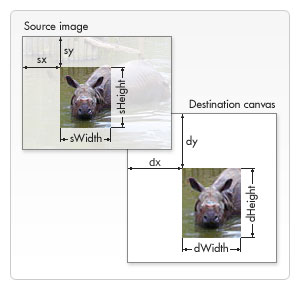
プロップ|型|必須|説明
:--|:--|:--|:--
sx|`number`|yes|x座標。
sy|`number`|yes|y座標。
sw|`number`|yes|`sx` 座標からの x 軸に沿った長さ。
sh|`number`|yes|`sy` 座標からの y 軸に沿った長さ。
ソース
```ts
interface OptionsCropInfo {
// The x-axis coordinate of the top left corner of the sub-rectangle of the source `image` to draw into the destination context. Use the 3- or 5-argument syntax to omit this argument.
sx: number
// The y-axis coordinate of the top left corner of the sub-rectangle of the source `image` to draw into the destination context. Use the 3- or 5-argument syntax to omit this argument.
sy: number
// The width of the sub-rectangle of the source `image` to draw into the destination context. If not specified, the entire rectangle from the coordinates specified by `sx` and `sy` to the bottom-right corner of the image is used. Use the 3- or 5-argument syntax to omit this argument.
sw: number
// The height of the sub-rectangle of the source `image` to draw into the destination context. Use the 3- or 5-argument syntax to omit this argument.
sh: number
}
```
### SizeInfo
ファイルサイズ情報。
プロップ|型|必須|説明
:--|:--|:--|:--
text|`string`|yes|文字列としてのファイルサイズ。例えば`1.23MiB`。
unit|`string`|yes|ファイルサイズの単位、例えば`MiB`。
value|`number`|yes|単位なしの適切な数値としてのファイルのサイズ、例えば`1.23`。
bytes|`number`|yes|画像のサイズ (バイト単位)。
ソース
```ts
interface SizeInfo {
// File size as a string, `1.23MiB` etc.
text: string
// Unit of file size, `MiB` etc.
unit: string
// The size of the file as a suitable number, without units, `1.23` etc.
value: number
// What is the size of the image in bytes.
bytes: number
}
```
### VideoHandlerOptions
[handleVideoFile](#handlevideofilefile-options) 関数のオプション。
プロップ|型|必須|説明
:--|:--|:--|:--
enableDevicePixelRatio|`boolean`|no|デバイスのピクセル比を有効にするかどうか。2倍の場合、返される画像のサイズは`x2`になる。デフォルトは`false`である。
mimeType|`string`|no|mimeType、デフォルトは「image/jpeg」である。
isForce|`boolean`|no|画像の幅または高さが設定値よりも小さい場合、対象の画像の幅または高さを強制的に設定値に調整するか。デフォルトは`false`である。
perResize|`number`|no|画像をスケーリングするときにギザギザのエッジを防ぐため、数回でスケーリングする際、毎回スケーリングするピクセルである。デフォルトは`500`である。
quality|`number`|no|処理後に返される画質。値の範囲は`0-1`である。詳細については、[toDataURL](https://developer.mozilla.org/en-US/docs/Web/API/HTMLCanvasElement/toDataURL) を参照してください。デフォルトは `0.9` である。
width|`number`|no|画像の「幅」を設定する。デフォルトは`0`である。
height|`number`|no|画像の「高さ」を設定する。デフォルトは`0`である。
longEdge|`number`|no|画像の長辺を設定する。デフォルトは`0`である。
cropInfo|`OptionsCropInfo`|no|[OptionsCropInfo](#OptionsCropInfo)を参照してください。
currentTime|`number`|no|ビデオのスクショを撮る時点。デフォルトは、動画の長さの「ランダムな」タイムスタンプである。
ソース
```ts
interface VideoHandlerOptions extends ImageHandlerOptions {
// The `HTMLMediaElement` interface's `currentTime` property specifies the current playback time in seconds.
// If it is longer than the video duration, the last frame will be captured.
// The default is a `random` timestamp in the video duration.
currentTime?: number
}
```
### VideoHandlerResult
[handleVideoFile](#handlevideofilefile-options) 関数から返されるデータ。
プロップ|型|必須|説明
:--|:--|:--|:--
blob|`Blob`|yes|画像ブロブ データ。
data|`string`|yes|画像 base64 データ。
width|`number`|yes|画像の幅。
height|`number`|yes|画像の高さ。
type|`string`|yes|画像のタイプ。
size|`SizeInfo`|yes|画像のサイズ情報。 [SizeInfo](#SizeInfo) を参照してください。
url|`string`|yes|画像のブロブ URL。
element|`HTMLImageElement`/`HTMLCanvasElement`|yes|`HTMLImageElement`または`HTMLCanvasElement`.
raw|`MediaFileHandlerRawData`|yes|元画像の情報。[MediaFileHandlerRawData](#MediaFileHandlerRawData) を参照してください。
videoInfo|`VideoInfo`|yes|When taking a screenshot of the video, the original video file information. See [VideoInfo](#VideoInfo).
ソース
```ts
interface VideoHandlerResult extends ImageHandlerResult {
// When taking a screenshot of the video, the original video file information.
// See [VideoInfo](#VideoInfo).
videoInfo: VideoInfo
}
```
### VideoInfo
ビデオ ファイル情報。
プロップ|型|必須|説明
:--|:--|:--|:--
url|`string`|yes|ビデオ ファイルの BLOB URL。
videoFile|`File`|yes|ビデオ ファイル オブジェクト。
videoWidth|`number`|yes|ビデオの幅。
videoHeight|`number`|yes|ビデオの高さ。
duration|`number`|yes|ビデオの長さ。
currentTime|`number`|yes|ビデオのスクリーンショットの時点。
ソース
```ts
interface VideoInfo {
// A blob url of the video file.
url: string
// The video file object.
videoFile: File
// The width of the video.
videoWidth: number
// The height of the video.
videoHeight: number
// The duration of the video.
duration: number
// The time point of the video screenshot.
currentTime: number
}
```
## そのほかの関数
下記関数の仕様書は https://github.com/capricorncd/zx-sml を参照してください
```js
import {
fileToBase64,
createElement,
formatBytes,
splitBase64,
createBlobURL,
base64ToBlob,
} from 'image-process'
```
## ライセンス
Code and documentation copyright 2018-Present. [Capricorncd](https://github.com/capricorncd). Code released under the MIT License.