# stack-diagram [![Release](https://img.shields.io/github/v/release/caru-ini/stack-diagram)](https://github.com/caru-ini/stack-diagram/releases/latest) [![License](https://img.shields.io/github/license/caru-ini/stack-diagram)](../LICENSE) [![skills.sh](https://skills.sh/b/caru-ini/stack-diagram)](https://skills.sh/caru-ini/stack-diagram) [English](../README.md) | [日本語](README.ja.md) | **简体中文** | [한국어](README.ko.md) 用一句话描述你的技术栈,就能得到一张带官方 Logo 的架构图。 架构图:用户通过 HTTPS 访问 Vercel 上的 Next.js;Next.js 通过 RPC 调用同一 Vercel 部署中的 Hono API;Hono 通过 SQL 查询 Neon,并调用 Clerk 管理会话、调用 Stripe 处理支付;GitHub Actions 负责部署 > Diagram our stack: Next.js and a Hono API on Vercel. Postgres on Neon, auth with Clerk, payments with Stripe. GitHub Actions deploys. ```bash npx skills add caru-ini/stack-diagram ``` 适用于 Claude Code、Codex、Cursor 以及[其他支持 Skills 的智能体](https://agentskills.io)。在 Claude 应用中,从 [Releases](https://github.com/caru-ini/stack-diagram/releases/latest) 下载 `stack-diagram.zip`,作为 Skill 上传即可。 ## 更多示例
Monorepo 开发工具架构图:开发者推送到 GitHub Actions,由它运行 Turborepo 并发布到 npm;在 pnpm workspace 中,Lefthook 在每次提交前运行 Biome,Turborepo 运行 Biome 和 Vitest

不只是云服务,开发工具也能画

Draw our monorepo tooling: a pnpm workspace with Turborepo, Biome, Vitest and Lefthook. GitHub Actions runs CI and publishes to npm.
AI 应用架构图:用户向 Vercel 上的 Next.js 提问;Next.js 在 Supabase pgvector 中进行向量搜索,并把提示词发送给 Claude;Inngest 每晚同步 Notion 文档,并把嵌入向量存入 Supabase

AI 应用

Draw our docs chatbot: Next.js on Vercel searches Supabase pgvector and answers with Claude. Inngest syncs Notion every night.
AWS 架构图:用户通过 HTTPS 访问 CloudFront;CloudFront 从 S3 提供静态路径,并把 API 路径转发到 VPC 公有子网中的 ALB;ALB 转发到私有子网中的 Fargate,Fargate 通过 SQL 查询 RDS,并使用 ElastiCache 作为缓存

AWS,使用 AWS 官方图标

Draw our app on AWS: CloudFront in front of S3 and an ALB in a public subnet. Fargate, RDS and ElastiCache sit in a private subnet.
Google Cloud 架构图:用户通过 HTTPS 访问 Cloud Load Balancing;负载均衡器从 Cloud Storage 提供静态路径,并把 API 路径转发到 VPC 内某一区域中的 GKE;GKE 通过 SQL 查询 Cloud SQL,并使用 Memorystore 作为缓存

Google Cloud,使用 Google 官方图标

Draw our app on Google Cloud: a global load balancer in front of Cloud Storage and GKE. GKE, Cloud SQL and Memorystore run in one region of a VPC.
Azure 架构图:用户通过 HTTPS 访问 Azure Front Door;Front Door 从 Azure Blob Storage 提供静态路径,并把 API 路径转发到日本东部区域的 Azure App Service;App Service 通过虚拟网络中的专用终结点,以 SQL 查询 Azure SQL Database,并使用 Azure Managed Redis 作为缓存

Azure,使用 Microsoft 官方图标

Draw our app on Azure: Front Door in front of Blob Storage and App Service. App Service reaches Azure SQL and Managed Redis through private endpoints in a VNet.
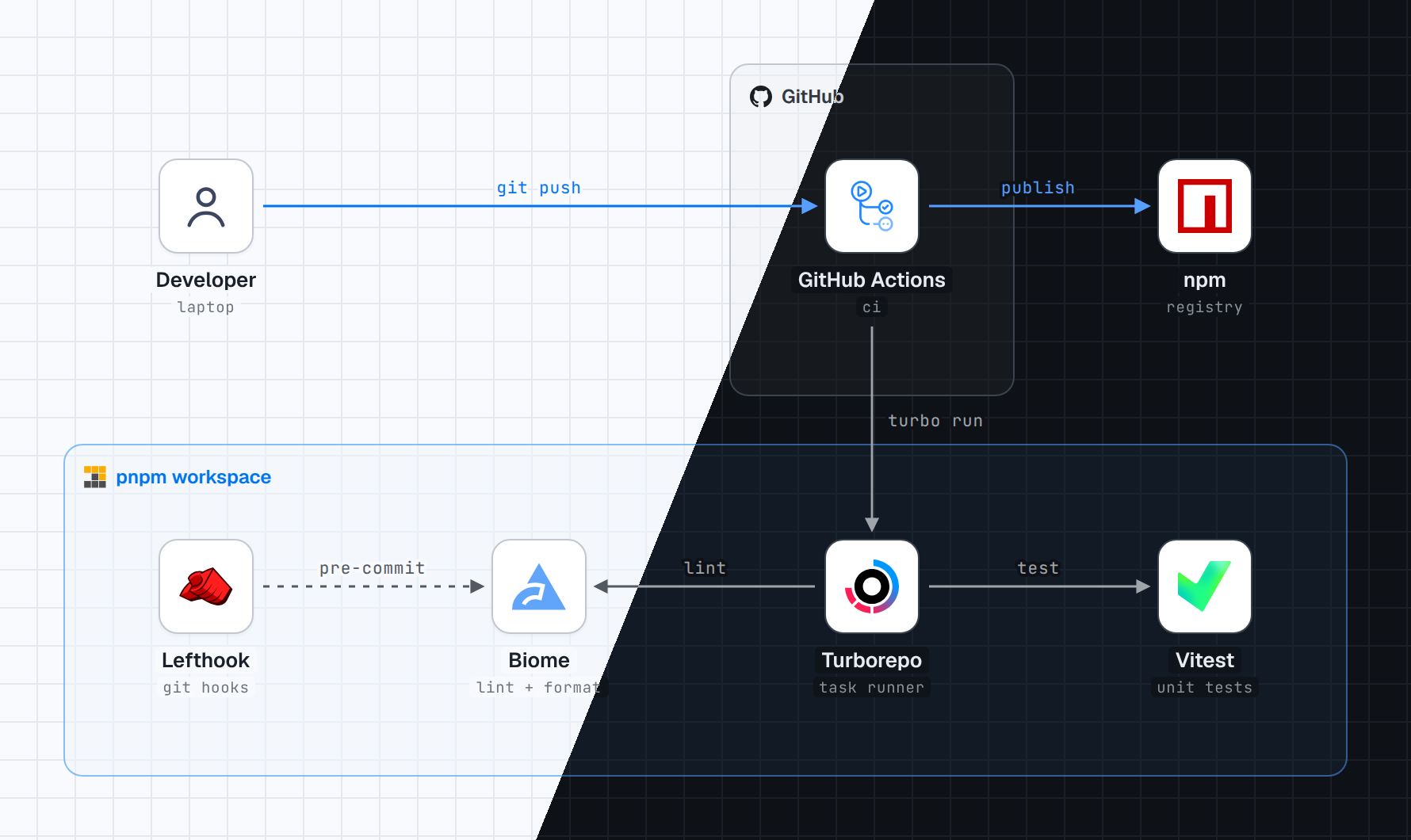
## 浅色与深色 每张图都会同时生成浅色和深色两种主题。图块始终保持白色,Logo 因此能保留原本的颜色;分组标签则会换成品牌的深色主题 Logo。 沿对角线切开的 Monorepo 开发工具架构图:左上为浅色主题,右下为深色主题 ## 以 Artifact 形式分享 图表是一个内嵌了字体和 Logo 的 HTML 文件,无需联网即可在任何地方显示。你可以把它发布为 Claude Artifact 并分享链接,也可以直接放进代码仓库或 Wiki。PNG 和 React 组件也都由这个文件渲染而来。 文档问答机器人的架构图,以 HTML 页面形式在浏览器窗口中打开,包含标题、简短说明、图表、图例和页脚 ## 分享到图库 画完图后,智能体会询问一次是否要把图发布到公开图库 。它会先展示将要公开的内容(浅色和深色 PNG、英文标题、技术栈和显示名称),只有在你两次回答“是”之后才会发布。你的提示词不会被发送。GitHub 登录是可选的,且不会公开显示,它的唯一作用是让你日后可以删除帖子。网站源码位于 [`site/`](../site)。 ## 特点 - **自动获取官方 Logo。** 依次从 [svgl](https://svgl.app)、[devicon](https://devicon.dev)、[gilbarbara/logos](https://github.com/gilbarbara/logos) 获取,或从品牌自己的代码仓库获取。AWS、Google Cloud、Azure、Kubernetes 和 CNCF 项目的图标来自各厂商的官方图标包:[AWS](https://aws.amazon.com/architecture/icons/)、[Google Cloud](https://cloud.google.com/icons)、[Azure](https://learn.microsoft.com/en-us/azure/architecture/icons/)、[Kubernetes](https://github.com/kubernetes/community/tree/master/icons)、[CNCF](https://github.com/cncf/artwork)。Databricks 没有图标包,因此 Databricks 产品图标使用 databricks.com 上 Databricks 自己的图稿,借助社区维护的 [databricks-architecture-icons](https://github.com/oieduardorabelo/databricks-architecture-icons) 目录找到。从不重新着色或重绘。 - **箭头不会穿过文字。** 连线会绕开标签,智能体会先渲染并检查图表,再交给你。 - **输出你需要的格式。** 自包含的 HTML 文件(默认)、PNG、无依赖的 React 组件,或 Artifact。 需要 Python 3.9+,并需联网获取 Logo。导出 PNG 需要 Playwright 和 Chromium。 ## Star 历史 caru-ini/stack-diagram 的 GitHub Star 数随时间变化的图表 ## 许可证与商标 - 代码和文档:MIT,见 `LICENSE`。 - 内置字体:SIL Open Font License 1.1,见 `skills/stack-diagram/assets/fonts/`。 - Logo **不**随 Skill 一起分发,而是在构建时从以下来源下载:[svgl](https://svgl.app)、[devicon](https://devicon.dev)(MIT)、[gilbarbara/logos](https://github.com/gilbarbara/logos)(CC0)、[AWS Architecture Icons](https://aws.amazon.com/architecture/icons/)、[Google Cloud product icons](https://cloud.google.com/icons)、[Azure icons](https://learn.microsoft.com/en-us/azure/architecture/icons/)、[Kubernetes Community Icons](https://github.com/kubernetes/community/tree/master/icons)(Apache-2.0 / CC-BY-4.0)、[CNCF Artwork](https://github.com/cncf/artwork)(遵循 Linux Foundation 商标使用指南)、通过 [databricks-architecture-icons](https://github.com/oieduardorabelo/databricks-architecture-icons) 找到的 databricks.com 上的 Databricks 图稿(该目录采用 MIT 许可,是非官方项目,未获 Databricks 认可;图稿归 Databricks 所有)、[Lucide](https://lucide.dev)(ISC),或品牌自己的网站或代码仓库。`docs/` 中的示例图片包含第三方 Logo。所有品牌名称和 Logo 均为其各自所有者的商标;在图中使用并不代表获得其认可。脚本从不重新着色或修改 Logo。Microsoft 允许在架构图、培训材料和文档中使用 Azure 图标。