 ### Deprecating XML
XML had a good ride but times have changed and we should too. XML is a decent format for declaring static content - but that’s not what UIs are anymore. UIs increasingly have a ton of dynamic behavior - and trying to [jerry-rig](https://developer.android.com/topic/libraries/data-binding) XML layouts into adopting this dynamic behavior has taken things from bad to worse. What sort of dynamic behaviors do we expect from our UIs?
- Change configuration based on screen size
- Lazy loading elements of the UI.
- A / B testing components at runtime
- Dynamic theming
- Add & remove components based on app state
Let’s face it - XML is a static markup language and we’re trying to make it a full-fledged programming language. What’s the alternative? A full-fledged programming language! Kotlin! What sort of things do we get by abandoning the XML model?
- No findViewById - view declaration exists in scope.
- No R.id.my_view ambiguity - Kotlin has namespacing & encapsulation!
- Static typing!
- Great IDE Support (No more laggy xml editor)
- ViewHolders aren’t needed
- Easier DI
## Usage
Similar to `ConstraintLayout`, Contour works by creating relationships between views' position and size. The difference is, instead of providing opaque XML attributes, you provide functions which are directly called during the layout phase. Contour calls these functions "axis solvers" and they're provided using `layoutBy()`. Here's an example:
```kotlin
class BioView(context: Context) : ContourLayout(context) {
private val avatar = ImageView(context).apply {
scaleType = CENTER_CROP
Picasso.get().load("https://i.imgur.com/ajdangY.jpg").into(this)
}
private val bio = TextView(context).apply {
textSize = 16f
text = "..."
}
init {
avatar.layoutBy(
x = leftTo { parent.left() }.widthOf { 60.xdip },
y = topTo { parent.top() }.heightOf { 60.ydip }
)
bio.layoutBy(
x = leftTo { avatar.right() + 16.xdip }.rightTo { parent.right() },
y = topTo { parent.top() }
)
contourHeightOf { bio.bottom() }
}
}
```
#### Runtime Layout Logic
Because you're writing plain Kotlin, you can reference other Views and use maths in your lambdas for describing your layout. These lambdas can also be used for making runtime decisions that will be evaluated on every layout pass.
```kotlin
bio.layoutBy(
x = ...
y = topTo {
if (isSelected) parent.top() + 16.ydip
else avatar.centerY() - bio.height() / 2
}.heightOf {
if (isSelected) bio.preferredHeight()
else 48.ydip
}
)
```
When paired with an animator, your runtime layout decisions can even act as keyframes for smoothly updating your layout.
```kotlin
setOnClickListener {
TransitionManager.beginDelayedTransition(this)
isSelected = !isSelected
requestLayout()
}
```
What does the end result of this look like?

#### Context-Aware API
Contour tries to make it easy to do the right thing. As part of this effort, all of the layout functions return interfaces as views of the correct available actions.
For example, when defining a constraint of `leftTo`, the only exposed methods to chain in this layout are `rightTo` or `widthOf`. Another `leftTo`, or `centerHorizontallyTo` don't really make sense in this context and are hidden. In short:
```kotlin
layoutBy(
x = leftTo { name.left() }.leftTo { name.right() },
y = topTo { name.bottom() }
)
```
will not compile.
#### Axis Type Safety
Contour makes heavy use of inline classes to provide axis type safety in layouts. What this means is,
```kotlin
toLeftOf { view.top() }
```
will not compile either. `toLeftOf {}` requires a `XInt`, and `top()` returns a `YInt`. In cases where this needs to be forced, casting functions are made available to `toY()` & `toX()`.
Inline classes are a lightweight compile-time addition that allow this feature with minimal to no performance costs.
https://kotlinlang.org/docs/reference/inline-classes.html
### Circular Reference Debugging
Circular references are pretty easy to unintentionally introduce in any layout. To accidentally declare
- `name.right` aligns to `note.left`
- and `note.left` aligns to `name.right`
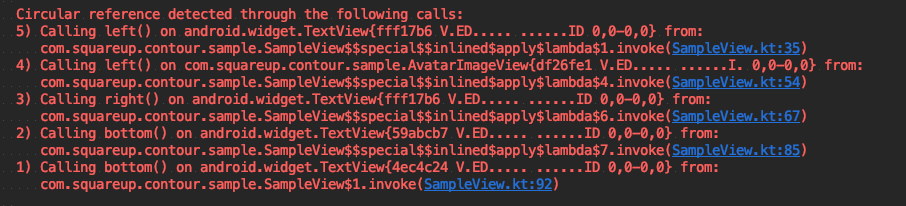
Contour fails fast and loud when these errors are detected, and provides as much context as possible when doing so. The screenshot below is an example of the trace provided when a circular reference is detected.
### Deprecating XML
XML had a good ride but times have changed and we should too. XML is a decent format for declaring static content - but that’s not what UIs are anymore. UIs increasingly have a ton of dynamic behavior - and trying to [jerry-rig](https://developer.android.com/topic/libraries/data-binding) XML layouts into adopting this dynamic behavior has taken things from bad to worse. What sort of dynamic behaviors do we expect from our UIs?
- Change configuration based on screen size
- Lazy loading elements of the UI.
- A / B testing components at runtime
- Dynamic theming
- Add & remove components based on app state
Let’s face it - XML is a static markup language and we’re trying to make it a full-fledged programming language. What’s the alternative? A full-fledged programming language! Kotlin! What sort of things do we get by abandoning the XML model?
- No findViewById - view declaration exists in scope.
- No R.id.my_view ambiguity - Kotlin has namespacing & encapsulation!
- Static typing!
- Great IDE Support (No more laggy xml editor)
- ViewHolders aren’t needed
- Easier DI
## Usage
Similar to `ConstraintLayout`, Contour works by creating relationships between views' position and size. The difference is, instead of providing opaque XML attributes, you provide functions which are directly called during the layout phase. Contour calls these functions "axis solvers" and they're provided using `layoutBy()`. Here's an example:
```kotlin
class BioView(context: Context) : ContourLayout(context) {
private val avatar = ImageView(context).apply {
scaleType = CENTER_CROP
Picasso.get().load("https://i.imgur.com/ajdangY.jpg").into(this)
}
private val bio = TextView(context).apply {
textSize = 16f
text = "..."
}
init {
avatar.layoutBy(
x = leftTo { parent.left() }.widthOf { 60.xdip },
y = topTo { parent.top() }.heightOf { 60.ydip }
)
bio.layoutBy(
x = leftTo { avatar.right() + 16.xdip }.rightTo { parent.right() },
y = topTo { parent.top() }
)
contourHeightOf { bio.bottom() }
}
}
```
#### Runtime Layout Logic
Because you're writing plain Kotlin, you can reference other Views and use maths in your lambdas for describing your layout. These lambdas can also be used for making runtime decisions that will be evaluated on every layout pass.
```kotlin
bio.layoutBy(
x = ...
y = topTo {
if (isSelected) parent.top() + 16.ydip
else avatar.centerY() - bio.height() / 2
}.heightOf {
if (isSelected) bio.preferredHeight()
else 48.ydip
}
)
```
When paired with an animator, your runtime layout decisions can even act as keyframes for smoothly updating your layout.
```kotlin
setOnClickListener {
TransitionManager.beginDelayedTransition(this)
isSelected = !isSelected
requestLayout()
}
```
What does the end result of this look like?

#### Context-Aware API
Contour tries to make it easy to do the right thing. As part of this effort, all of the layout functions return interfaces as views of the correct available actions.
For example, when defining a constraint of `leftTo`, the only exposed methods to chain in this layout are `rightTo` or `widthOf`. Another `leftTo`, or `centerHorizontallyTo` don't really make sense in this context and are hidden. In short:
```kotlin
layoutBy(
x = leftTo { name.left() }.leftTo { name.right() },
y = topTo { name.bottom() }
)
```
will not compile.
#### Axis Type Safety
Contour makes heavy use of inline classes to provide axis type safety in layouts. What this means is,
```kotlin
toLeftOf { view.top() }
```
will not compile either. `toLeftOf {}` requires a `XInt`, and `top()` returns a `YInt`. In cases where this needs to be forced, casting functions are made available to `toY()` & `toX()`.
Inline classes are a lightweight compile-time addition that allow this feature with minimal to no performance costs.
https://kotlinlang.org/docs/reference/inline-classes.html
### Circular Reference Debugging
Circular references are pretty easy to unintentionally introduce in any layout. To accidentally declare
- `name.right` aligns to `note.left`
- and `note.left` aligns to `name.right`
Contour fails fast and loud when these errors are detected, and provides as much context as possible when doing so. The screenshot below is an example of the trace provided when a circular reference is detected.