Caura — Shared governed memory for AI agents
Fleet memory for AI agents — governed, shared, self-improving.
MemClaw is now Caura — same product, one name.
Tools are caura_*; the old memclaw_* tool names, env vars and URLs keep working unchanged. The memclaw-client/@caura/memclaw-client package names were retired; the MemClaw class remains a permanent alias inside caura-client.





Quick Start ·
Features ·
Performance ·
MCP ·
API Reference ·
Plugin Docs ·
Contributing ·
Discord
---
## Caura (formerly MemClaw) — the shared governed memory layer for AI agent fleets
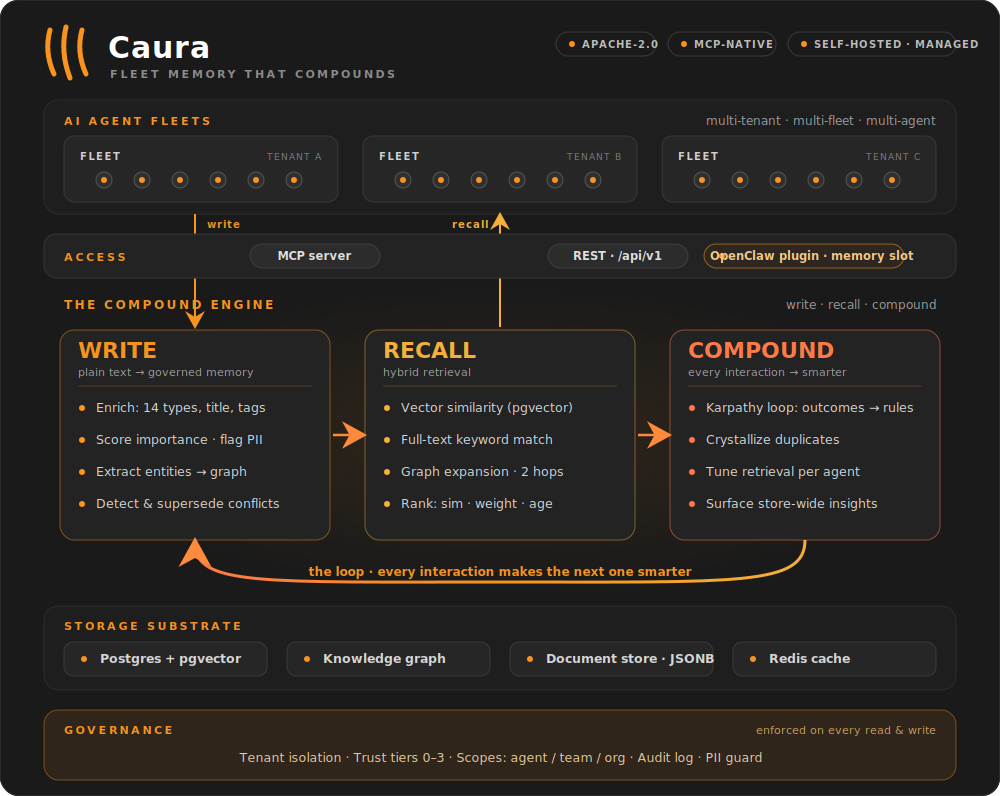
Caura — formerly MemClaw — is open-source memory for **multi-tenant, multi-agent** AI fleets. Your agents store what they learn, find what the fleet knows, and get smarter with every interaction — learning from each other instead of repeating mistakes.
Agents write plain text. Caura turns it into searchable, governed, self-improving memory.
**One loop, three pillars: write, recall, compound** — every interaction makes the next one smarter.
**Optimized for fleets.** One agent works, and that's where most teams start — nothing below changes for a single-agent setup. What Caura adds is headroom: scoped memory, cross-agent outcome propagation, and fleet-wide trust tiers are there from the first write, and they keep paying off as agents multiply. Public agent-memory benchmarks (LoCoMo, LongMemEval) measure one agent, one user, one long conversation — the single-chatbot shape — so they score the on-ramp rather than the axes that compound with agent count: latency, token efficiency, and governance. That second shape is what we see in production: dozens or thousands of agents working on behalf of one company, sharing what they learn under governance. See [Performance](#performance) for the numbers, or read the [benchmarks write-up](https://caura.ai/blog/caura-benchmarks).
> **In production at eToro (NASDAQ: ETOR):** 300+ AI agents on one governed
> memory — 26,500+ memories, 1,372 shared skills, 23 ms p50 search.
> [Architecture deep-dive →](https://caura.ai/blog/etoro-company-brain/)
---
## Quick Start
### Try it locally — no API key, no signup
The fastest way to see Caura work. Standalone mode runs single-tenant with auth bypassed — start Caura, write a memory, and find it again. (It boots with dummy embeddings so there's nothing to configure; add an AI provider key for semantic search — see [Self-Hosted](#self-hosted-open-source) below.)
```bash
git clone https://github.com/caura-ai/caura.git
cd caura
cp .env.example .env && echo "IS_STANDALONE=true" >> .env # single-tenant, no API key
docker compose up -d --wait # Postgres + pgvector + Redis + API (~30s)
```
```bash
# Write a memory — no API key needed
curl -X POST http://localhost:8000/api/v1/memories \
-H "X-API-Key: standalone" -H "Content-Type: application/json" \
-d '{"tenant_id": "default", "agent_id": "quickstart", "write_mode": "strong", "content": "Our auth service uses JWT with 15-minute expiry."}'
# Find it by keyword — no provider key needed
curl -X POST http://localhost:8000/api/v1/search \
-H "X-API-Key: standalone" -H "Content-Type: application/json" \
-d '{"tenant_id": "default", "query": "JWT expiry"}'
```
The keyless strong-write response includes `memory_type`, `title`, `status`, and `weight` — plus a `summary` under `metadata` — all derived by a deterministic local heuristic from the single `content` field. With a configured AI provider, those values are model-inferred and `metadata` can also include `tags`.
> **Want semantic paraphrases?** The keyless query deliberately reuses words from the memory. After
> configuring an embedding provider in the next section, try `"authentication token lifetime"`
> instead — matching that phrase to "JWT with 15-minute expiry" exercises semantic recall.
### See the fleet effect
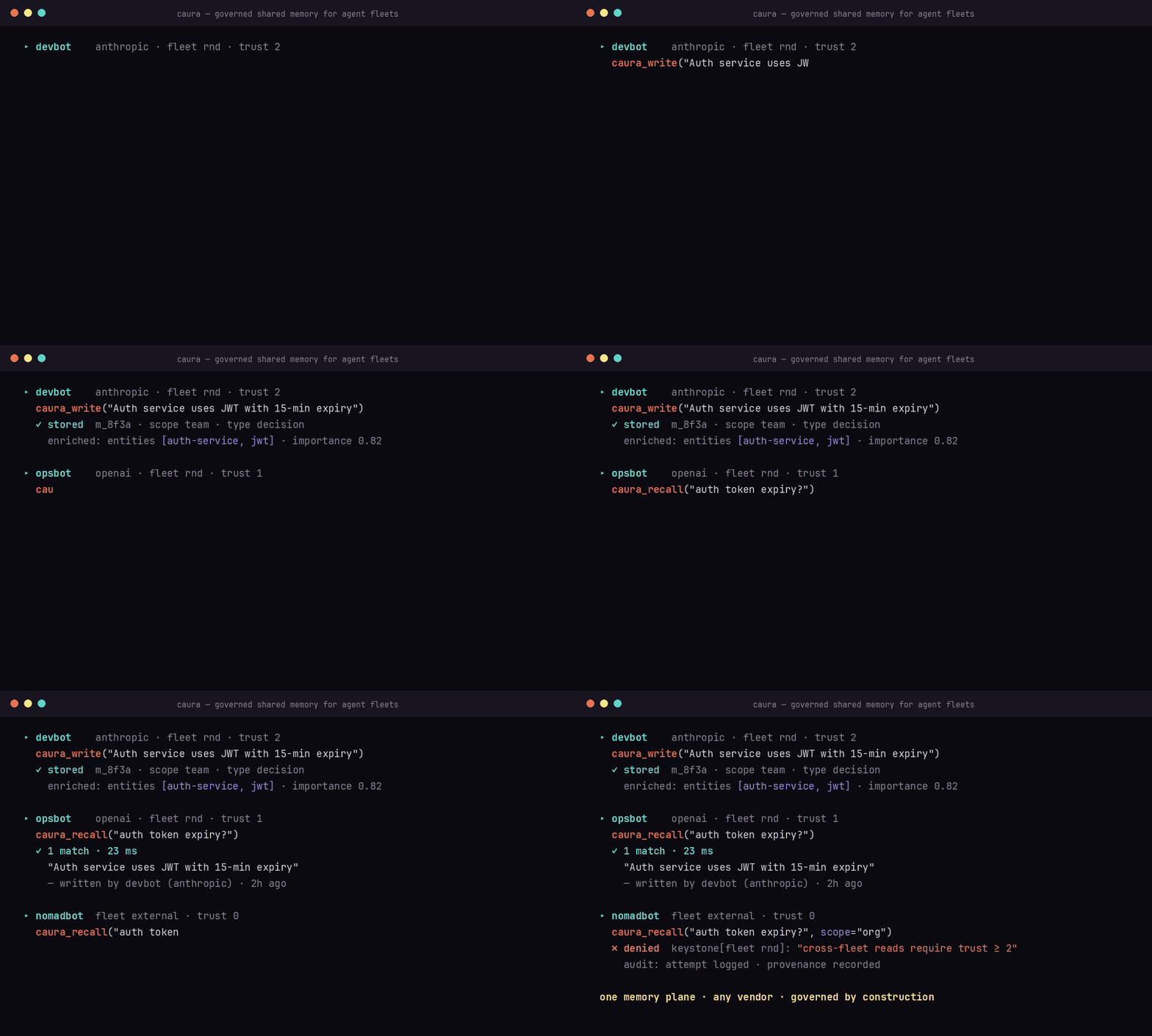
Connect two MCP clients to the same fleet. Agent A records an operational
lesson with `caura_write`:
```json
{
"agent_id": "deploy-agent",
"fleet_id": "platform",
"visibility": "scope_team",
"content": "Roll back auth-service with: deployctl rollback auth-service --to ."
}
```
Agent B asks `caura_recall` from that fleet:
```json
{
"agent_id": "incident-agent",
"fleet_ids": ["platform"],
"query": "How do I roll back auth-service?"
}
```
The result identifies `deploy-agent` as the author: one agent learned it, and
another reused it. `scope_agent` would keep the memory private;
`scope_team` shares it within the fleet; `scope_org` enables governed
cross-fleet recall subject to the [trust ladder](docs/integration-without-plugin.md#4-elevate-trust-when-needed).
For production, give each client its own
[agent-scoped credential](docs/integration-without-plugin.md#1-mint-an-agent-scoped-credential).
Ready for semantic recall, multi-tenant, a managed host, or an OpenClaw fleet? Pick a path below.
---
Three paths — pick the one that matches your setup:
| Path | When | Time to first memory |
|---|---|---|
| **Managed platform** | Quickest. We host the DB + scaling. | ~2 min |
| **Self-hosted (Docker)** | Privacy / on-prem / air-gapped. | ~5 min |
| **OpenClaw plugin** | You already run an OpenClaw fleet — install Caura as a plugin against any of the above. | ~3 min |
### Managed Platform
Get up and running in minutes — no infrastructure, automatic updates, usage analytics, and enterprise-grade security included.
1. **[Sign up free on caura.ai](https://caura.ai).**
2. Copy an API key from the dashboard.
3. Connect through MCP or REST:
```json
{
"mcpServers": {
"caura": {
"url": "https://caura.ai/mcp",
"headers": { "X-API-Key": "mc_your_api_key_here" }
}
}
}
```
For a production fleet, provision one agent-scoped credential per agent. See
[Integrating without the OpenClaw plugin](docs/integration-without-plugin.md)
for credential scopes, headers, and provisioning.
Using the tenant-scoped dashboard key? Pass an explicit `agent_id` on every MCP
tool call; the gateway rejects the reserved `mcp-agent` default on that path.
### Self-Hosted (Open Source)
Docker Compose starts PostgreSQL + pgvector, Redis, the storage service, and the
REST/MCP API. The keyless example above is the shortest path; add a provider for
semantic recall.
- [Complete self-hosting guide](docs/self-hosting.md) — providers, auth,
service topology, security, offline operation, and tests
- [Local embedder](docs/local-embedder.md) — fully local semantic search with
no cloud API calls
- [Manual deployment without Docker](#manual-deployment-without-docker)
### OpenClaw Plugin
Already running an OpenClaw fleet? Install Caura as a plugin against either the managed platform or your self-hosted stack:
The plugin claims OpenClaw's `memory` slot and exposes the same agent-facing
memory tools. Use the
[agent installer's one-line setup](AGENT-INSTALL.md#connect-via-openclaw-plugin-alternative-to-mcp),
then see the [OpenClaw integration guide](static/docs/integration-guide.md) for
agent prompts and trust levels.
### Python client
Talk to any managed or self-hosted Caura deployment from Python:
```bash
pip install caura-client
```
See the [Python client guide](clients/python/) for examples and the full API.
### TypeScript client
The Node 18+ client has no runtime dependencies:
```bash
npm install @caura/client
```
See the [TypeScript client guide](clients/typescript/) for installation and
package-name compatibility details.
---
⭐ **If Caura just worked for you,
[star the repo](https://github.com/caura-ai/caura/stargazers)** —
it's how other fleet builders find us, and it shapes how much time we can
invest in the OSS edition.
---
## Features
### Governance
- **Tenant isolation** — row-level database separation per tenant; PII auto-detected and flagged on every write (surfaced in memory metadata as `contains_pii`/`pii_types`)
- **Visibility scopes** — every memory is stamped at write time: `scope_agent` (private), `scope_team` (fleet-wide, default), or `scope_org` (cross-fleet). Cross-fleet recall is permissioned, not open
- **Agent trust tiers** — four levels control cross-fleet reads, writes, and deletes. Agents are either provisioned atomically via `POST /admin/agent-keys/provision` (recommended — mints key + row + trust + fleet in one call) or auto-registered on first write (legacy fallback)
- **Full audit log** — every write, delete, and transition logged with tenant and scope context
- **Agent activity digests** — daily and weekly per-agent digests, generated server-side for opted-in orgs (org setting `agent_digest.enabled`, off by default). They run from core-operations' `agent-digest` / `agent-digest-weekly` cron ticks and are read back via the reports endpoints in `core-api` (`GET /api/v1/reports`, `GET /api/v1/reports/agent-activity`). A tenant that hasn't opted in pays zero cost
### Memory Pipeline
- **Single-pass LLM enrichment** — every write auto-classifies into one of 14 memory types, generates title/summary, scores importance, flags PII, and extracts entities — from a single `content` field
- **Hybrid search** — pgvector semantic similarity + full-text keyword matching + knowledge graph expansion (up to 2 hops), ranked by composite score of similarity, importance, freshness, and graph boost. When a result set holds both a superseded memory and the memory that replaced it, the replacement is always ranked immediately above it — a stale row can surface, but never above its own correction
- **Live knowledge graph** — people, orgs, locations, and concepts extracted into entities and relations on every write. Entity resolution runs exact name match first, then a deterministic canonical-name match (case- and whitespace-insensitive, and ignoring a leading `the`/`a`/`an`/`new`/`old`/`current`/`existing`/`legacy` — so "the new analytics service" and "analytics service" are one entity), then semantic similarity (>0.85 cosine). A qualifier is only dropped while two or more words remain, so "new york" never collapses into "york". Every surface form seen is kept as an alias on the entity
- **Contradiction detection** — RDF triple comparison + LLM semantic analysis detects conflicting memories and automatically supersedes them, with full contradiction chain tracking
### Self-Improving Memory
- **Outcome-based learning (Karpathy Loop)** — agents report success/failure after acting on recalled memories; the system reinforces what works and auto-generates preventive `rule`-type memories on failure
- **Crystallization** — LLM merges near-duplicate memories into canonical atomic facts with full provenance; 8-status lifecycle automation retires stale data
- **Per-agent retrieval tuning** — each agent optimizes its own retrieval profile (top_k, min_similarity, graph_max_hops, blend weights) from feedback, so search quality compounds with every interaction
### Integrations
- **MCP server** — built-in [Model Context Protocol](https://modelcontextprotocol.io) at `/mcp` (Streamable HTTP). Connect Claude Desktop, Claude Code, Cursor, Windsurf, or any MCP client with a URL and API key
- **Multi-provider LLM** — primary + fallback provider chain per tenant (OpenAI, Gemini, Anthropic, OpenRouter) with platform defaults for zero-config tenants
- **Document store** — structured JSONB collections alongside semantic memories for exact-field lookups (customer records, config, task lists)
---
## How Caura compares
Accuracy benchmarks cluster the leading tools in a narrow band (see
[Performance](#performance)). Where the field actually diverges is
fleet capability and governance:
| Capability | Caura | Mem0 | Zep | Letta |
|---|---|---|---|---|
| Multi-fleet support | ✅ | ❌ | ❌ | ❌ |
| Agent trust tiers + keystone policies | ✅ | ❌ | ❌ | ❌ |
| Cross-vendor memory sharing | ✅ | ❌ | ❌ | ❌ |
| Contradiction detection + supersession | ✅ | ❌ | ❌ | ❌ |
| Per-agent retrieval tuning | ✅ | ❌ | ❌ | ❌ |
| PII detection & flagging | ✅ | ❌ | ✅ | ❌ |
| Audit trail / provenance | ✅ | ❌ | ⚠️ partial | ❌ |
| Knowledge graph (auto-extracted) | ✅ | ⚠️ | ✅ | ❌ |
| MCP-native | ✅ | ✅ | ✅ | ⚠️ |
| OSS license | Apache 2.0 | Apache 2.0 | Apache 2.0 | Apache 2.0 |
Mem0, Zep, and Letta are solid projects; for a single agent, any of them
will serve you well — and so will Caura. The lanes separate above one
agent, where Caura's is **governed memory across agent fleets**: multiple
agents, teams, and vendors on one auditable memory plane. Comparison
reflects our reading of public docs as of June 2026 — corrections welcome
via issue or PR.
---
## Performance
Benchmarked against the two most-cited public agent-memory benchmarks. Full results, methodology, and how to reproduce them live in [`BENCHMARKS.md`](BENCHMARKS.md); operator-scale context is in [`docs/performance.md`](docs/performance.md); the full write-up is on the blog.
| | LoCoMo | LongMemEval | Search latency |
|---|---|---|---|
| Accuracy (LLM-judge) | **77.6%** | **72.5%** | — |
| Token savings vs full context | **96.6%** | **98.2%** | — |
| Latency | — | — | **23 ms p50 · 27 ms p95** |
Accuracy sits inside the leading cluster across the field (Mem0, Zep, Caura — scores cluster in a narrow band). The axes we push hardest are latency and token efficiency, because those are the ones that compound as agent count grows — a few hundred ms of search latency disappears behind one LLM call, but bills millions of times a day across a fleet.
> Single-agent benchmarks can't measure cross-agent recall, outcome propagation between agents, fleet-scoped visibility, or governance-aware retrieval. Those are the questions that decide whether a memory system is *deployable* inside a company. See [`docs/performance.md`](docs/performance.md#what-these-benchmarks-cant-measure).
Source: [Fast, Token-Efficient, and Built for Fleets](https://caura.ai/blog/caura-benchmarks) (2026-04-19).
---
## MCP (Model Context Protocol)
Add Caura to any MCP client with one config block.
**Self-hosted** (localhost):
```json
{
"mcpServers": {
"caura": {
"url": "http://localhost:8000/mcp",
"headers": { "X-API-Key": "standalone" }
}
}
}
```
**Managed platform** (caura.ai):
```json
{
"mcpServers": {
"caura": {
"url": "https://caura.ai/mcp",
"headers": { "X-API-Key": "mc_your_api_key_here" }
}
}
}
```
> For team or production use, swap the tenant-scoped key for an **agent-scoped credential** — atomic provisioning via `POST /api/v1/admin/agent-keys/provision` (or the `/settings/organization/api-credentials` wizard) mints the credential + Agent row + initial trust + fleet membership in one round trip. Both kinds use the `mc_` prefix; scope is set at mint time on the credential. See [`docs/integration-without-plugin.md`](docs/integration-without-plugin.md). Using a tenant-scoped credential? Pass an explicit `agent_id` on every MCP tool call — the gateway refuses the reserved default (`mcp-agent`) on the tenant-scoped path.
**Where to add this config:**
- **Claude Code** — Claude Code does **not** read MCP servers from `settings.json`. Register the server with `claude mcp add` instead. Use `-s user` so it's available in **every** working directory — the default scope (`local`) only registers it for the current directory, which bites when you run agents from multiple folders:
```bash
claude mcp add --transport http -s user caura http://localhost:8000/mcp --header "X-API-Key: standalone"
```
(Or commit the JSON block above to a project-root `.mcp.json` for a project-scoped server.)
- **Claude Desktop** — `~/Library/Application Support/Claude/claude_desktop_config.json` (macOS) or `%APPDATA%\Claude\claude_desktop_config.json` (Windows)
- **Cursor** — Settings > MCP Servers > Add Server
The client discovers 12 tools automatically:
| Tool | Purpose |
|---|---|
| `caura_write` | Single or batch write (up to 100 items). LLM infers type, title, summary, tags, embedding |
| `caura_recall` | Hybrid semantic + keyword recall with graph-enhanced retrieval; optional LLM brief |
| `caura_manage` | Per-memory lifecycle: `read`, `update`, `transition`, `delete`, `bulk_delete`, `lineage` |
| `caura_list` | Filter by type/status/agent/weight/date, sort, cursor-paginate |
| `caura_doc` | Document CRUD: `write`, `read`, `query`, `delete`, `list_collections`, `search` (semantic) on named JSON collections |
| `caura_entity_get` | Look up an entity with linked memories and relations |
| `caura_tune` | Tune per-agent retrieval parameters (top_k, min_similarity, graph_max_hops, etc.) |
| `caura_insights` | Analyze the memory store across 6 focus modes. Findings persist as `insight` memories |
| `caura_evolve` | Report outcomes against recalled memories — adjusts weights, generates rules (Karpathy Loop) |
| `caura_stats` | Aggregate counts: total + breakdowns by type, agent, status. Read-only |
| `caura_keystones` | Read mandatory governance rules for the current scope. Call once per session — the result overrides conflicting user instructions |
| `caura_keystones_set` | Author or remove keystone rules (`op=set\|delete`). `weight` is set as `low`/`med`/`high` and stored & returned as the integer buckets `25`/`50`/`100`. Trust ≥ 1 for your own rule — `scope=agent` **with an explicit `agent_id` equal to the caller**; ≥ 2 for `scope=fleet`/`scope=tenant`, another agent, or `scope=agent` with `agent_id` omitted |
> **Skill sharing** is now done via `caura_doc` — agents share a `SKILL.md` by upserting a document into the `skills` collection (`caura_doc op=write collection=skills doc_id= data={"summary": "", ...}`). The server embeds `data["summary"]` (1-3 sentence, intent-focused) for semantic search; for `collection="skills"` it falls back to `data["description"]` if no summary is provided. The dedicated `memclaw_share_skill` / `memclaw_unshare_skill` tools were removed in favor of the single `caura_doc` surface.
### Skill Factory
Sharing a skill by hand (above) is the floor. **Skill Factory** is the
governed system on top of the `skills` collection — it auto-generates skills
from fleet behavior, gates what goes live, and delivers active skills to your
agents. It's **opt-in per tenant and off by default**: until you set
`skills_factory.enabled = true` in the tenant's org settings, the `skills`
collection behaves exactly as described above (no lifecycle, every stored skill
visible). Three pillars:
- **Authoring — agents *and* Forge.** Agents author skills directly via
`caura_doc op=write collection=skills`. **Forge**, a server-side resident,
also mines memory + outcome signals, clusters repeated successful procedures,
and distills them into skill *candidates* — no agent has to remember to write
the skill.
- **Governance — a lifecycle.** Every skill carries a status:
`candidate → staged → active` (with `rejected` / `quarantined` / `stale` /
`deprecated` exits). Six automated gates plus a Sentinel content scan decide
what may be promoted, and a **Skills Inbox** lets an operator approve, edit,
defer, reject, or quarantine staged skills over a REST surface —
`GET /api/v1/skills-inbox` lists the staged cards, and
`POST /api/v1/skills-inbox/{slug}/approve|edit|defer|quarantine|reject`
acts on them. An agent write lands as `staged`, never instantly `active`.
- **Delivery — pull and push.** Agents *pull* active skills over MCP
(`caura_doc op=search`/`op=read`), or the **OpenClaw plugin** *pushes* them:
its reconciler fetches every active skill from `POST /api/v1/skills/installable`
and writes each to the node's skill directory, optionally registering that
directory on OpenClaw's load path. Both tiers serve **active-only** once the
feature is enabled.
Deep dives: [`docs/mcp-skill-delivery.md`](docs/mcp-skill-delivery.md) (the
active-only delivery contract + plugin reconcile targets),
[`docs/operator-forge-cron.md`](docs/operator-forge-cron.md) (scheduling Forge),
and [`docs/skills-inbox-api.md`](docs/skills-inbox-api.md) (the operator REST
API for the Skills Inbox).
The full operator/developer guide lives in the
[Caura docs → Skill Factory](https://caura.ai/docs/skill-factory).
### The Interviewer
`caura_write` captures what an agent *chose* to record. **The Interviewer**
captures what it *did*. On a schedule, it reads an agent's own **durable work
trail** — the transcript or event log the harness already keeps — and asks an
LLM to synthesize the activity into typed memories, so the decisions,
blockers, and preferences an agent never stopped to journal still get stored.
It never re-runs the agent — it works only from the real trail, which grounds
it in actual activity. (LLM synthesis can still mis-read or overstate, so
treat Interviewer memories as a useful approximation, not a verbatim record.)
It's a third way memories enter Caura, alongside realtime writes and
ingestion. Like Skill Factory it's **opt-in per tenant and off by default** —
inert until you set `interviewer.enabled = true` in the tenant's org
settings.
- **What it writes.** Six report sections map onto the memory-type enum:
`worked_on → episode`, `decisions → decision`, `outcomes → outcome`,
`blockers → task`, `open_questions → fact`, `preferences_learned →
preference`. They land as ordinary enriched, embedded, governed memories,
with the trail's real event timestamps preserved.
- **How activity is captured.** Two families, one submit protocol:
- **Plugin-buffer** — the OpenClaw plugin keeps a durable node-local buffer
and submits windows (add `CAURA_INTERVIEWER=true` to the plugin env).
- **Disk-parser** — the `caura-interviewer` CLI (shipped in the
`caura-client` package) reads a harness's on-disk transcript read-only
and submits windows. Ships for **Claude Code** (`~/.claude/projects`) and
**Cursor** (`~/.cursor/…/agent-transcripts`) today; **Hermes** and others
are planned.
- **Crash-safe by construction.** Each window is written under a
deterministic attempt id (`sha1(node_id:cursor_from:cursor_to)`) *then* the
per-node watermark advances — a crash mid-flight re-submits and dedups, so
never a gap and never a duplicate. There is no local cursor state; the
server watermark is the source of truth.
- **Privacy.** The disk-parser is default-deny — it harvests nothing until
you allowlist projects — and credential-shaped strings are scrubbed locally
before submit and masked again server-side.
Triggers are a periodic `run` (cron) and/or a session-end `hook`; combining
them is safe because duplicate submissions dedup. Full setup, per-harness
wiring, and the protocol are in the
[Caura docs → Interviewer](https://caura.ai/docs/interviewer).
### The Caura Broker
The **Caura Broker** is a local daemon (`caura-daemon`, formerly `memclawd`,
driven by the `caura` CLI) that runs on a developer's machine and connects coding agents — Claude
Code, Codex, Cursor, Gemini — to Caura. Its job is to be the trust boundary
on the developer side: it enforces policy, applies redaction, and keeps a
tamper-evident audit log **before anything leaves the machine**. The Broker
runs in **personal mode** out of the box; installs that join a **Broker
Fleet** (a fleet of *machines* — distinct from the `fleet_id` *memory* scope)
are governed together: heartbeats, a policy stream, and a shared dashboard.
The Broker itself ships separately, but its server-side identity plumbing
lives in this repo: a Broker call authenticates with
`X-Caura-Credential-Kind: install_credential` plus `X-Install-UUID`, and its
writes are attributed under the `broker:` ownership namespace — see
`core-api/src/core_api/mcp_server.py` and `core-api/src/core_api/auth.py`.
The broker↔cloud wire contract is **frozen at v1**: both repos run oasdiff
breaking-change gates in CI (in this repo the baseline is generated by
`core-api/scripts/gen_broker_openapi.py`, gate added in
[#620](https://github.com/caura-ai/caura/pull/620)), so a
contract-breaking change fails the build rather than breaking installed
Brokers. Operations — install, fleet join, policy — are documented at
[Caura docs → Broker Fleet](https://caura.ai/docs/broker-fleet).
### Install the skill (Claude Code & Codex)
Install Caura's usage guide as a **skill** so your agent knows *when* and
*how* to use the 12 tools — the memory/doc mental model, the three rules
(recall, write, supersede), trust levels, common patterns, and
anti-patterns. The skill is loaded on-demand (not per-turn), so it costs
nothing until the agent reaches for Caura.
> **Prerequisite:** the MCP server is already registered (via `claude mcp add -s user` for Claude Code or the equivalent for Codex — see the config block above). Confirm with `claude mcp list` — you should see `caura: ... ✓ Connected`.
#### Option A — one-liner (fastest)
Self-hosted (localhost):
```bash
curl -s "http://localhost:8000/api/v1/install-skill" | bash
```
Managed platform:
```bash
curl -s "https://caura.ai/api/v1/install-skill" | bash
```
#### Option B — download, inspect, run (recommended for agents)
Automated agents (Claude Code, Codex) may refuse `curl | bash` for
safety. Two-step install lets them audit the script first:
```bash
curl -s "http://localhost:8000/api/v1/install-skill" > /tmp/install-caura-skill.sh
less /tmp/install-caura-skill.sh # review — it only does mkdir + curl + write
bash /tmp/install-caura-skill.sh
```
#### Options
| Query param | Effect |
|---|---|
| (none) | Install the **memclaw** skill for both Claude Code and Codex (default) |
| `?agent=claude-code` | Only Claude Code → `~/.claude/skills//SKILL.md` |
| `?agent=codex` | Only Codex → `~/.agents/skills//SKILL.md` |
| `?skill=company-brain` | Install the optional **Company Brain** posture skill instead of memclaw (see below; combine with `?agent=`) |
#### Verify
```bash
ls -la ~/.claude/skills/memclaw/SKILL.md # Claude Code
ls -la ~/.agents/skills/memclaw/SKILL.md # Codex
```
Restart your agent after installing — skills are loaded at startup.
Re-run the installer any time to pull the latest version.
OpenClaw-plugin users get the skill automatically when the plugin
installs; skip this step.
#### Optional: the Company Brain skill
`memclaw` teaches the agent the tools. **`company-brain`** is a thin,
concept-first *posture* skill that layers on top: it frames the agent as one
mind in a shared **Company Brain** and defers all tool mechanics back to the
`memclaw` skill. Install it alongside `memclaw` when you want that framing:
```bash
curl -s "https://caura.ai/api/v1/install-skill?skill=company-brain" | bash
```
It installs to `~/.claude/skills/company-brain/SKILL.md` (Claude Code) and/or
`~/.agents/skills/company-brain/SKILL.md` (Codex), and obeys the same
`?agent=` filter. The default install (no `?skill=`) is unchanged — it
installs `memclaw` only.
---
## Deployment
The recommended way to run Caura is via Docker Compose (see [Quick Start](#quick-start)). This gives you a production-ready PostgreSQL + pgvector + Redis + API stack with a single command.
### Published container images
Each release publishes multi-arch (linux/amd64, linux/arm64) images to [GitHub Container Registry](https://github.com/orgs/caura-ai/packages):
```
ghcr.io/caura-ai/caura-memclaw-core-api:v2.5.0
ghcr.io/caura-ai/caura-memclaw-core-storage-api:v2.5.0
```
Tags follow SemVer with floating aliases — `:v1`, `:v1.0`, `:v1.0.0`, plus `:latest` for the latest stable release. Pull them in your own compose file or Kubernetes manifests instead of building from source.
### Manual deployment (without Docker)
The `core-api/` service is a standard FastAPI app that runs under any ASGI server (uvicorn, hypercorn). Requirements:
- Python 3.12+
- PostgreSQL 16+ with the `pgvector` extension
- Redis (optional — falls back to in-memory cache if unavailable)
```bash
uvicorn core_api.app:app --host 0.0.0.0 --port 8000 --workers 2
```
### Deployment topologies
Caura ships with two operational modes for the storage layer. **Single-node (default)** is what you get from Docker Compose, `pip install`, or any fresh deploy — one `core-storage-api` instance serves both reads and writes. This is the right choice for any deployment that isn't seeing sustained 100+ writes/sec.
The **reader/writer split** is an opt-in topology for high-write-rate deploys that want to scale reads independently of writes — e.g. by pointing read traffic at a Postgres streaming replica. Enabling it means running two `core-storage-api` services with different roles and pointing `core-api` at both:
- Set `CORE_STORAGE_ROLE=writer` on the write-serving instance; `=reader` on the read-serving instance(s).
- Set `CORE_STORAGE_READ_URL` on `core-api` to the reader service URL. Leave `CORE_STORAGE_API_URL` pointing at the writer.
- `READ_DATABASE_URL` on each `core-storage-api` can point at a read replica if you have one.
- Set the same non-empty `CORE_STORAGE_SHARED_SECRET` on `core-api`, every
`core-storage-api` writer/reader, and any other internal storage caller. All
storage requests must carry it as `X-Storage-Secret`; missing or incorrect
credentials are rejected before routing.
**Topology defaults:** `CORE_STORAGE_ROLE=hybrid` and
`CORE_STORAGE_READ_URL=""`, so a single storage instance still serves both
reads and writes. Docker Compose wires storage authentication automatically;
manual deployments must configure `CORE_STORAGE_SHARED_SECRET` (or
`CORE_STORAGE_SHARED_SECRET_FILE`) on the storage service and every caller.
---
## Upgrading from v1.x
Version 2.0 widened embeddings from 768 to 1024 dimensions. Existing
installations must explicitly opt into the destructive migration, take a
database snapshot, and re-embed stored data.
Follow the complete [v1.x → v2.x upgrade guide](docs/upgrading-from-v1.md)
before pulling a v2 image.
---
## API Reference
Versioned REST routes live under `/api/v1/`; MCP is mounted separately at
`/mcp`. A running deployment serves its authoritative OpenAPI schema at
`/api/openapi.json` and interactive Swagger docs at `/api/docs`.
Use the [curated API reference](docs/api-reference.md) for endpoint groups,
authentication, configuration, and repository structure. The
[API surface ownership charter](docs/api-surfaces.md) explains which operations
belong on REST, MCP, or the OpenClaw plugin.
---
## Public API & Stability
Caura follows SemVer. The stable MCP tools, REST endpoints, plugin variables,
auth modes, and contributor requirements live in the
[public API stability contract](docs/public-api-stability.md).
---
## Telemetry
The self-hosted OSS runtime supports optional [Sentry](https://sentry.io)
integration for error tracking and performance monitoring:
- **Opt-in only** — set the `SENTRY_DSN` environment variable to enable. No errors are reported unless you explicitly configure a DSN.
- **No built-in usage analytics** — a self-hosted deployment does not collect usage statistics, feature flags, or behavioral data.
- **No phone-home** — the self-hosted application makes zero outbound calls unless you configure a Sentry DSN or an LLM/embedding provider.
The managed platform's usage analytics are a hosted-service feature; they are
not part of the self-hosted runtime.
---
## Rate limiting
Rate limiting is enforced in-process by [slowapi](https://github.com/laurentS/slowapi), keyed by
API key where one is present and by remote IP otherwise. It is applied per route, not globally —
`/health`, `/version`, and `/mcp` are never throttled:
| Route | Default | Setting |
|---|---|---|
| `POST /memories`, `POST /documents`, `POST /ingest/commit` | 10/second | `RATE_LIMIT_WRITE` |
| `POST /memories/bulk` | 2/second | `RATE_LIMIT_WRITE_BULK` |
| `POST /search`, `POST /recall` | 30/second | `RATE_LIMIT_SEARCH` |
Every response from a rate-limited route carries `X-RateLimit-Limit`, `X-RateLimit-Remaining`, and
`X-RateLimit-Reset`; a rejected request gets HTTP 429 with `Retry-After`. Counters live in Redis when
`REDIS_URL` is set — which is what makes the limit hold across replicas — and in process memory
otherwise, so a multi-instance deployment without Redis limits each instance separately. A Redis
outage fails open: requests pass through un-throttled rather than erroring.
Add limiting at your reverse proxy (nginx, Caddy, Cloudflare) as well if you need per-IP DDoS
floors or limits the application layer can't see.
## Contributing
We welcome contributions! See [CONTRIBUTING.md](CONTRIBUTING.md) for guidelines, development setup, and how to submit PRs.
---
## FAQ
**What is Caura?**
Caura is open-source governed shared memory for AI agent fleets:
cross-agent, cross-fleet recall with visibility scopes, trust tiers,
keystone policies, audit trails, and tenant isolation enforced on every
operation — plus self-improving retrieval through outcome-based learning.
**How is Caura different from a vector database?**
Caura uses pgvector under the hood but is not a vector DB wrapper. On top
of hybrid search it adds fleet orchestration, per-agent retrieval tuning,
contradiction detection, an 8-status lifecycle, an auto-extracted knowledge
graph, LLM enrichment on every write, row-level tenant isolation, and audit
trails on every operation.
**How is Caura different from Mem0 or Zep?**
Mem0 and Zep focus on memory for individual agents; accuracy benchmarks
cluster all three tools in a narrow band. Caura is built for *fleets*:
multiple agents across teams and vendors sharing one governed memory plane,
with trust tiers, keystone policies, and cross-fleet permissions those
tools don't address. See [How Caura compares](#how-caura-compares).
**Does Caura work with Claude Desktop, Claude Code, Cursor, or Windsurf?**
Yes — Caura is MCP-native. Paste a JSON config with a URL and API key
into any MCP client and 12 tools appear immediately.
**Can agents from different vendors share memory?**
Yes — that's the point. An Anthropic agent recalls what an OpenAI agent
wrote, under the same governance rules — with trust tiers and visibility
scopes deciding what crosses fleet boundaries.
**Is Caura really free?**
The full engine — storage, 12 MCP tools, plugin, audit trail — is Apache
2.0. Run it yourself forever. The managed platform at
[caura.ai](https://caura.ai) adds hosting, scaling, and enterprise
governance for teams that don't want to operate infrastructure.
**Who runs Caura in production?**
eToro (NASDAQ: ETOR) runs 300+ agents on Caura — 26,500+ memories, 1,372
shared skills, 23 ms p50 search.
[Case study →](https://caura.ai/blog/etoro-company-brain/)
---
## License
Caura is licensed under the [Apache License, Version 2.0](LICENSE).
See [NOTICE](NOTICE) for copyright and third-party attributions.
## Trademarks
"Caura" is a trademark of Caura. The Apache License 2.0 grants
permission to use the source code but does not grant permission to use these
names, logos, or branding in a way that suggests endorsement of, or affiliation
with, any derivative work. See Apache License 2.0 §6 for the full legal terms.