
简体中文 · English



# dsh-TUI
`dsh-TUI` is an interactive terminal front door for DeepSeek Harness. It is
mounted as a Cordis plugin and provides a Claude Code-style conversation, tool,
session, and fullscreen terminal experience while continuing to use the
official DSH agent, model, tool, session, and persistence services.
The project does not patch DeepSeek Harness core. Installing the plugin enables
the interface, and removing it leaves no core modifications behind.
> Status: public beta. It is suitable for daily use and extension work. Read
> [Architecture and limitations](docs/architecture.en.md) before relying on its
> permission model or terminal-specific behavior.

## Highlights
- **Terminal-native interaction**: streaming Markdown, structured tool cards,
command and file completion, `@` file references (complete anywhere; text
files attach content, directories attach listings, and PNG/JPEG/WebP/GIF are
sent as durable image blocks), history
search, message selection, inline or alternate-screen rendering, and `/lang`
zh/en UI language switching.
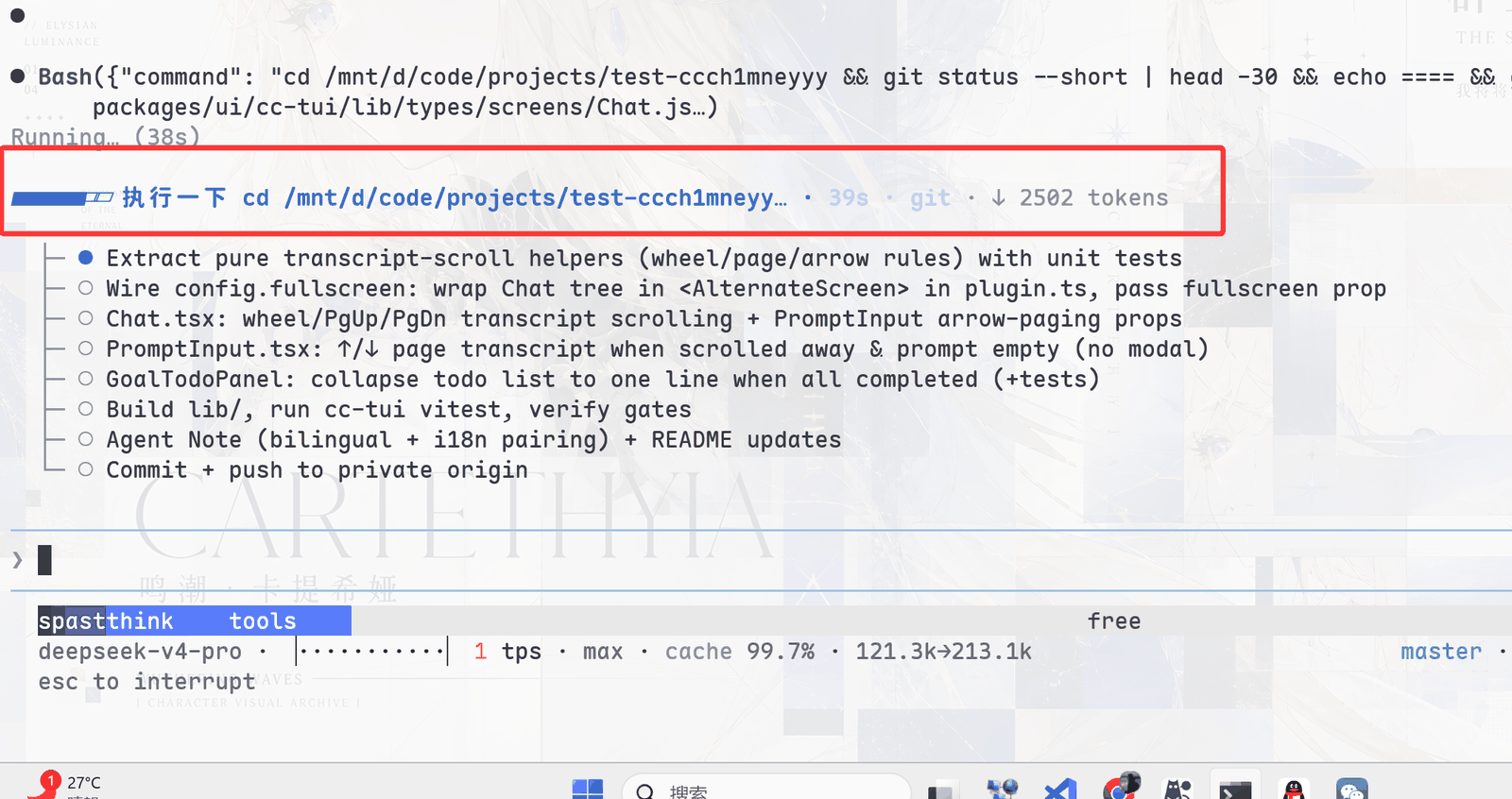
- **Visible agent state**: live activity, segmented context usage, TPS, cache
hit rate, reasoning effort, input/output tokens, and Git/session metadata.
- **Complete session workflow**: `/resume`, `/new`, `/workspace`, `/compact`, `/export`, the
`/btw` side question, model switching, and double-`Esc` rewind through a
session fork.
- **Official DSH integrations**: agent presets, skills, MCP, goals, todos,
subagents, and `ask_user_question` are connected through existing services
and registries.
- **Designed for long sessions**: event-driven projection, differential output,
message virtualization, replay coalescing, and bounded caches prevent render
cost and memory from growing without limit.
## Preview
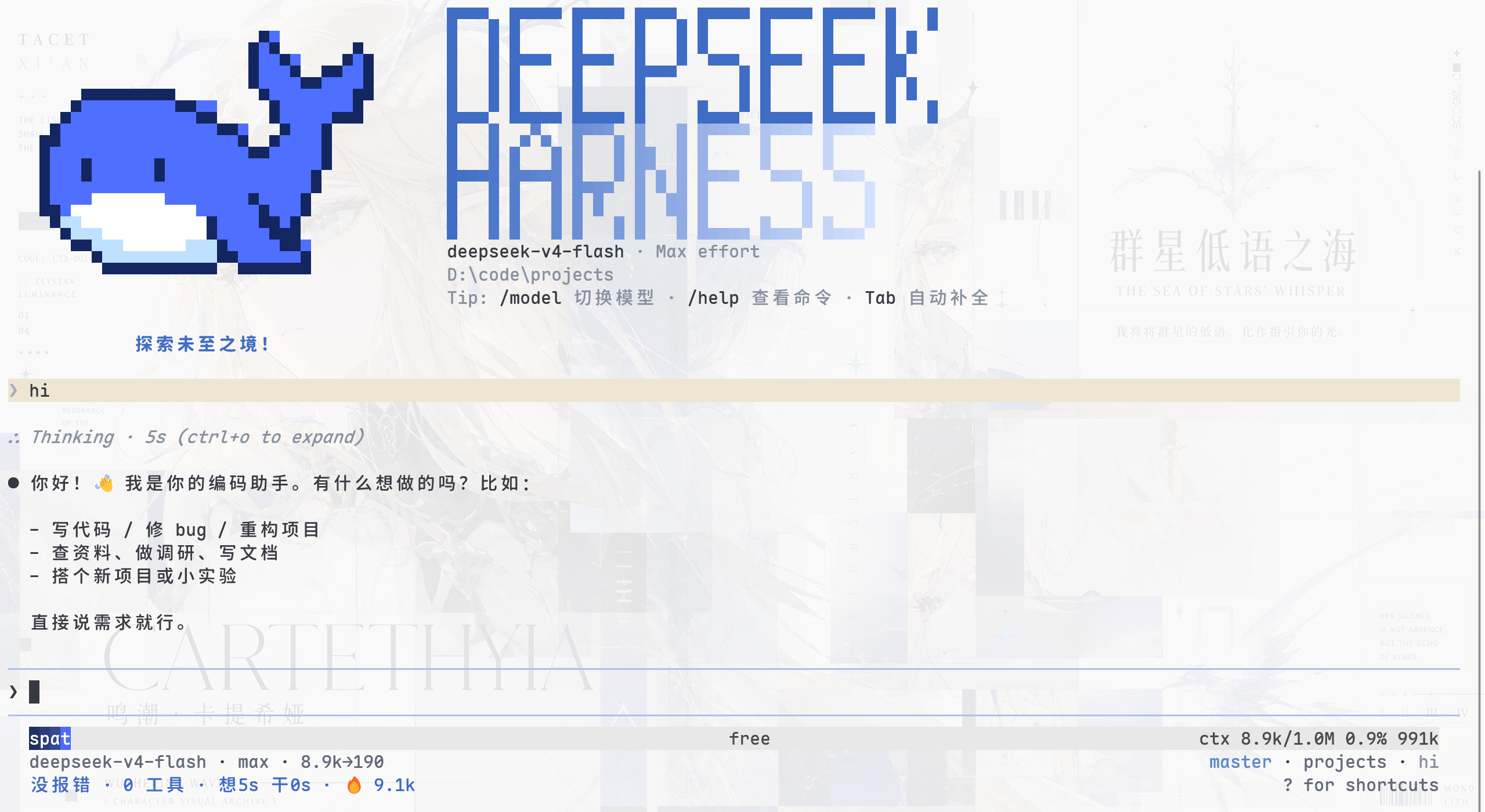
Live activity, goal/todo state, and context metrics:
## Quick Start
Prerequisites: an interactive terminal TTY, the official `dsh` CLI, and
`pnpm` 10+. Model requests also require `DEEPSEEK_API_KEY`.
```sh
# 1. Install the CLI and this plugin globally (ships the dsh-tui command)
npm install -g @deepseek-ai/dsh @deepseek-harness-tui/dsh-tui
# 2. Start it (first run auto-initializes the dsh-tui profile; needs pnpm)
dsh-tui
```
Manual alternative: `dsh plugin --profile dsh-tui add @deepseek-harness-tui/dsh-tui`
(the repository's `sh install.sh` wraps this step and checks the required
commands), then `dsh-tui` and `dsh --profile dsh-tui` are equivalent.
`dsh-tui --resume` restores the most recently selected session; on Windows
the repository's `dsh-tui.cmd` works the same way.
For running dsh-TUI inside VS Code — directly in the integrated terminal or
via the `dsh-tui-vscode` companion extension (real-integrated-terminal
sessions, an experience almost identical to the official Claude Code
extension; available on the VS Code Marketplace) — see
[Running dsh-TUI in VS Code](docs/vscode.en.md).
See [Getting started](docs/getting-started.en.md) for profile composition,
source builds, and troubleshooting.
Inside the TUI, `/update` updates the installed
`@deepseek-harness-tui/dsh-tui` package and automatically restarts into the current session.
The TUI also checks npm for updates in the background after startup. The check
never blocks the first frame and silently ignores offline or registry errors.
For migration from the former `dsh-cc-tui` package and `cc-tui` profile, see
[Getting started](docs/getting-started.en.md#migrate-from-the-former-package).
## Keybindings
| Key | Action |
|---|---|
| `Enter` | Send (`Shift+Enter` for a newline); executes the selected item when a command menu is open |
| `Ctrl+C` | Interrupt the current turn; press twice while idle to exit |
| `Esc` | Close the command/file menu; double-press while idle clears the input; **double-press on empty input = time rewind** |
| `Ctrl+O` | Expand/collapse details (full thinking text, tool arguments and output) |
| `Ctrl+R` | History search |
| `/` | In-session full-text search (`n`/`N` to jump) |
| `Tab` / `Enter` | Command / `@` file completion (keep drilling into directories) |
| `Ctrl+V` | Paste text or files from the file manager; images show as `[Image #N]` and are sent as durable attachments |
| `Ctrl+X` | Edit the current input with `$VISUAL`/`$EDITOR` (e.g. nvim); content is filled back in on save and exit |
| `?` | Keybinding menu |
| `Shift+↑` | Message selection mode (`Enter` expands a single message) |
**macOS modifier keys**: the `Ctrl+` bindings above also work with `⌘`
on macOS (e.g. `⌘V` paste, `⌘O` expand details, `⌘Enter` send immediately);
only `Ctrl+C` / `Ctrl+D` (interrupt/exit) stay on Ctrl, to avoid clashing
with muscle memory for macOS system-level `⌘C` copy and similar. `⌘` requires
terminal support for the extended keyboard protocol (iTerm2 / kitty / WezTerm /
ghostty / tmux); macOS's built-in Terminal.app consumes `⌘` shortcuts itself,
so keep using `Ctrl`.
**Mouse** (`fullscreen: true` fullscreen mode; off by default, enabled by the profile patch layer)
| Action | Function |
|---|---|
| Drag to select | In-app text selection, **copied on release** (OSC 52 with native `wl-copy`/`xclip`/`xsel` fallback; `load-buffer -w` inside tmux); the selection is cleared after copying and a "Copied N characters" notice pops up |
| Double / triple click | Select word / line, copied on selection just the same |
| Scroll wheel | Scroll the message list |
| `Esc` | Cancel an in-progress drag selection (no copy) |
**Questionnaires** (when the model fires `ask_user_question`)
| Key | Action |
|---|---|
| `↑/↓` | Choose an option |
| `Space` | Toggle multi-select options |
| `Tab` | Switch to a custom answer (type directly without picking an option) |
| `Enter` | Submit the current selection |
| `Esc` | Abort the question (the model receives ASK_ABORTED and can continue the conversation) |
**Local commands** (a full replica of the CC command set, all routed through the official DSH pipeline)
| Group | Commands |
|---|---|
| Session | `/new` new session · `/resume` session browser (search, preview, cross-project, sub-agent runs folded) · `/rename` rename session · `/workspace resume|rename|open` manage workspaces · `/clear` clear screen · `/compact` compact · `/export` export Markdown · `/trace` trace timeline |
| Status | `/context` loaded-context details · `/status` session info · `/cost` token usage · `/doctor` environment self-check · `/config` configuration sources · `/init` create AGENTS.md |
| Model | `/model` picker · `/thinking` thinking display · `/tokens` token details · `/theme` theme picker · `/lang` zh/en UI switch |
| Accounts/Policy | `/provider` add a model provider · `/login` credential status · `/logout` logout notes · `/permissions` permission notes · `/add-dir` file-policy scope · `/hooks` · `/mcp` |
| Skills | `/audit` code audit · `/bug` bug report · `/review` code review · `/practice` coding practice · `/pr_comments` PR comments · `/release-notes` release notes · `/vuln-check` vulnerability check |
| Other | `/agents` subagent list · `/update` auto-update and restart · `/vim` · `/terminal-setup` · `/connect` · `/help` · `/exit` |
| Registry | `/plan` `/goal` (DSH command-registry plugins, merged into the `/` menu automatically with the plugin) |
## Documentation
| Topic | Contents |
| --- | --- |
| [Getting started](docs/getting-started.en.md) | Prerequisites, installation, startup, profile lifecycle, source development |
| [Configuration](docs/configuration.en.md) | Cordis overrides, fields, agent presets, MCP, environment variables |
| [Themes](docs/themes.en.md) | Built-in themes, background detection, custom JSON themes, validation |
| [Interaction and commands](docs/interaction.en.md) | Keyboard, mouse, questionnaires, slash commands, session workflows |
| [Architecture and limitations](docs/architecture.en.md) | Runtime path, rendering, persistence, security boundary, known limitations |
| [VS Code guide](docs/vscode.en.md) | Running dsh-tui in the VS Code integrated terminal; the `dsh-tui-vscode` companion extension offers an experience almost identical to the official Claude Code extension (on the Marketplace) |
| [Contributing](docs/contributing.en.md) | Contribution workflow, repository map, build artifacts, verification matrix, change rules |
| [Plugin development](docs/plugins.en.md) | Plugin seams (session events / slots / skills / themes / prompt sections), contract, conventions, listing |
The complete bilingual index is [`docs/README.md`](docs/README.md).
## Configuration & Extensions
- **Agent presets**: four official agent modes (`standard` / `code` / `minimal` / `cordis`)
plus the TUI-bundled Liangshen mode (`liangshen`),
switched with `/preset`; sessions that already have a conversation cannot switch, while
blank sessions take effect immediately. The default preset persists in
`~/.dsh-tui/agent-preset.json`; `/model` selections persist in `~/.dsh-tui/model.json`.
See [Configuration](docs/configuration.en.md#agent-preset).
- **Custom themes**: the `/theme` picker (`auto` follows the system/terminal background,
built-in `light` / `dark` / `dark-ansi`) also accepts custom themes from
`~/.dsh-tui/themes/.json` — selecting one hot-swaps and persists it; precedence is
`DSH_TUI_THEME` env var > persisted selection > OSC 11 terminal-background auto-detection.
See [Themes](docs/themes.en.md).
- **MCP**: servers are mounted via `@deepseek-ai/dsh-mcp-client`, with tools registered as
`mcp____`; `/mcp` shows connection status.
See [Configuration](docs/configuration.en.md#mcp).
## How It Works
```text
dsh profile
-> dsh-base
-> dsh-TUI Cordis patch
-> agent preset + DSH services
-> session/event
-> Channel projection
-> React components
-> ported Ink/Yoga renderer
-> terminal
```
The TUI owns interaction and presentation only. The session log remains the
conversation source of truth, while model calls, tool execution, fork/resume,
compaction, and persistence remain owned by DSH services. See the
[architecture guide](docs/architecture.en.md) for module boundaries and
performance details.
```text
chat / tool base events ──> persisted Session log ──> TUI / Web
└───────────────> ActivityTracker (memory) ──> TUI status only
```
## Technical Notes
- **Gentle Mist Blue palette**: mist blue carries only branding, focus, interaction,
and highlights; body text stays neutral gray. On startup the terminal background
color (OSC 11) is queried to auto-select a light or dark palette, falling back to
dark when the terminal does not respond.
- **Event-driven rendering**: the `session/event` stream drives incremental differential
rendering; scroll state is maintained independently.
- **Layout-level virtualization**: per-frame cost for long sessions drops from
O(entire session) to O(visible window) — off-screen message lines render as
height-only placeholders whose subtrees never take part in layout.
- **Context progress bar**: based on the pi-nano-context algorithm (largest-remainder
segmented coloring + multi-level condensed readouts).
- **TPS meter**: based on pi-tps-meter — a streaming 1/8-block gauge, historical
min-max sparkline, and speed-based semantic colors (≥50 green / ≥20 yellow / <20 red).
- **working-activity ecosystem**: the working-status line reuses the pure state machine of
[dsh-working-activity](https://github.com/ccch1mneyyy/working-activity),
deriving it in-process from base session events without writing UI state into the shared log.
- **Terminal paste**: in raw mode `Ctrl+V` is handled by the app and reads the system
clipboard per platform — PowerShell `Get-Clipboard` on Windows, `osascript`/`pbpaste`
on macOS, and auto-detected `wl-paste`/`xclip`/`xsel` on Linux; regular files insert
their path, image files generate an `@` reference, clipboard bitmaps are written to
the attachment library and shown in the input as `[Image #N]`, and plain text is
inserted at the cursor.
## Known Limitations
- Injected context (plugin source content) has no standalone display and is merged
into the progress-bar statistics along with the system prompt.
- `/model` live switching works via "session fork continuation" (DSH has no in-place
model-switch API): history is preserved as-is, the new session routes to the new
model, and the old session stays in the `/resume` list; the choice is written to
`~/.dsh-tui/model.json` and survives both restart and `/new`.
- `Ctrl+V` clipboard reads depend on external tools per platform: PowerShell
`Get-Clipboard` on Windows (auto-retries when the clipboard is briefly locked by
another process, silently gives up when persistently locked); `osascript`/`pbpaste`
on macOS (multi-file copies in Finder have no stable AppleScript read path, falling
back to text/images); Linux needs one of `wl-paste`/`xclip`/`xsel` and a connectable
session (a missing tool or unreachable session shows a "no clipboard tool available"
notice). Unsupported image formats or an unavailable attachment service keep a
temporary file reference as a degraded fallback.
- Exit finishes with a process exit and does not wait for the agent's async disk writes
(persistence is covered by the persistence plugin as a backstop).
- Tool-level approval is implemented: the approval service + TUI answerer (CC-style
approval panel) consumes the approval stream, and privilege-escalation commands pop
an approval bar. `/permission` preset switching comes from dsh-base's
`permission-presets` plugin and is available in the profile composition by default;
the bare `cordis.yml` composition does not mount that plugin (no `/permission` command).
- `/vim` `/connect` `/hooks` are CC-named placeholders: the corresponding
capabilities have no equivalent mechanism on the DSH side, and the commands give an
explicit explanation rather than staying silent.
See [Architecture and limitations](docs/architecture.en.md) for the complete list of
known limitations and the security boundary.
## Development
CI uses Node 24 and pnpm 11. The package supports Node `^22.19 || >=24`.
```sh
pnpm install --frozen-lockfile
pnpm build
pnpm smoke
```
`lib/types/` is ignored generated output. `pnpm build` recompiles it from a
clean output directory and runs the build gates. npm Git URL installs generate
the same runtime through `prepare`. Rendering, questionnaire, or tool-card
changes also require the relevant regression scripts.
## Plugin Ecosystem
Want to build a plugin or extension for dsh-TUI? Join the ecosystem:
- **Plugin development guide**: [`docs/plugins.en.md`](docs/plugins.en.md)
(seams, contract, conventions, and verification checklist)
- **Organization**: [dsh-tui-ecosystem](https://github.com/dsh-tui-ecosystem)
(home of community plugins and templates)
- **Template repository**: [plugin-template](https://github.com/dsh-tui-ecosystem/plugin-template)
(start from the template and ship a plugin in minutes)
- **Reference implementation**: `dsh-working-activity` (live working-status
line with dual outlets: TUI prompt slot + `activity/status` session events)
The core repository remains independent; community plugins live in their own
repos. The organization only maintains the listing and admission rules — it
does not endorse or warrant the functionality, quality, or safety of community
plugins. Plugin authors keep full ownership of their repositories and are
responsible for their maintenance and security.
## Community
- **Ecosystem organization**: [dsh-tui-ecosystem](https://github.com/dsh-tui-ecosystem) —
the home of community plugins, templates, and the curated list. Come ship a
plugin, pitch an idea, or just hang out 🐋
- **Chat groups** (Chinese-language): usage questions, plugin ideas, and
feature wishes are all welcome.
| WeChat group | QQ group (ID 572549239) |
| :---: | :---: |
|  |
|  |
> The WeChat QR code expires roughly every 7 days; if it stops working, use
> the QQ group (572549239) or open an issue to nudge us for a refresh.
## Permissions and Security Boundary
`dsh-TUI` does not implement a separate sandbox. It uses the filesystem,
shell, sandbox, and approval policies of the active DSH profile. The supplied
profile uses workspace confinement and approvals by default on non-Windows
platforms. Windows currently has no corresponding sandbox backend, so the
composition falls back to `danger-full-access` without approval prompts.
Inspect the profile before starting it around sensitive credentials or an
untrusted repository.
See [Permissions and security boundary](docs/architecture.en.md#permissions-and-security-boundary)
for details.
## Featured by DeepSeek Harness
The DeepSeek Harness official WeChat account featured this plugin among its
early user-built extensions. [View the feature screenshot](screenshots/wechat-official.png).
## Friends' Links
Community, related projects, and companion tools built by friends:
[see the links page](docs/links.md)
## Trend
[](https://star-history.com/#ccch1mneyyy/dsh-TUI&Date)
## License
[MIT](LICENSE)
|
> The WeChat QR code expires roughly every 7 days; if it stops working, use
> the QQ group (572549239) or open an issue to nudge us for a refresh.
## Permissions and Security Boundary
`dsh-TUI` does not implement a separate sandbox. It uses the filesystem,
shell, sandbox, and approval policies of the active DSH profile. The supplied
profile uses workspace confinement and approvals by default on non-Windows
platforms. Windows currently has no corresponding sandbox backend, so the
composition falls back to `danger-full-access` without approval prompts.
Inspect the profile before starting it around sensitive credentials or an
untrusted repository.
See [Permissions and security boundary](docs/architecture.en.md#permissions-and-security-boundary)
for details.
## Featured by DeepSeek Harness
The DeepSeek Harness official WeChat account featured this plugin among its
early user-built extensions. [View the feature screenshot](screenshots/wechat-official.png).
## Friends' Links
Community, related projects, and companion tools built by friends:
[see the links page](docs/links.md)
## Trend
[](https://star-history.com/#ccch1mneyyy/dsh-TUI&Date)
## License
[MIT](LICENSE)