# lanshu-create-ai-presenter-video
**English** | [简体中文](README.zh-CN.md)
[](https://agentskills.io)



[](explainer/STYLES.md)
[](https://hyperframes.heygen.com)
[](https://github.com/cclank/lanshu-create-ai-presenter-video/actions/workflows/validate.yml)
[](LICENSE)
[](https://github.com/cclank/lanshu-create-ai-presenter-video/releases/latest)
[](https://www.python.org/)
[](https://ffmpeg.org/)
[](https://nodejs.org/)
[](https://github.com/cclank/lanshu-create-ai-presenter-video/stargazers)
[](https://x.com/LufzzLiz)
[](https://x.com/LufzzLiz)
> Turn a topic or script into a verified, publish-ready explainer video — presented by a digital human from one authorized portrait, or acted out on screen in one of twelve explainer styles — driven by the coding agent you already use.
`lanshu-create-ai-presenter-video` is an [Agent Skill](https://agentskills.io) that takes an AI agent through the full production of an explainer video. On the **presenter route** that means script, narration, presenter generation, lip-sync, captions and keyword motion graphics, editing, rendering, and quality assurance. On the **styled route** the narration is performed scene by scene in one of twelve styles (nine visual, three narrative), from a word-timed story to a rendered film. Every stage is gated by evidence on disk, and nothing is delivered until the output passes decode and loudness checks.
## Highlights
- **Harness-neutral.** A standard `SKILL.md` that loads in Claude Code, Codex, Gemini CLI, Cursor, OpenCode, GitHub Copilot, and other Agent Skills clients. Any agent that can read files and run shell commands can follow it directly.
- **Provider-neutral.** On the presenter route, voice, presenter video, lip-sync, and speech recognition are selected by capability at run time; each job records the provider, model, parameters, and task IDs it actually used. The styled route voices with MiniMax (word timestamps come from the voice engine) or takes narration you voiced or recorded elsewhere.
- **Twelve performed explainer styles.** Nine visual styles — editorial, tech HUD, notebook, paper pop-up, pop comic, 3D one-take, drafting sheet, chalkboard, and clay town — plus three narrative styles: derivation, casefile, and life-scene sitcom. Each has a reusable kit, starter, and example project.
- **Audio-locked timeline.** The approved narration is the master clock for presenter motion, captions, cuts, and final duration, which keeps lip-sync and scene boundaries aligned.
- **Evidence-gated workflow.** Eight production states, from `intake` to `verified`, computed from artifacts instead of declared by hand.
- **Cost guardrails.** Pilot-first generation, an explicit billing statement before the first paid call, retry ceilings, and task-ID recovery to avoid duplicate charges.
- **Verified delivery.** Master and share encodes are fully decoded and loudness-checked before any file is published.
## Two routes
| Route | The video | You provide | Paid generation | Format |
|---|---|---|---|---|
| **Presenter** | A digital human presents; captions and keyword graphics support it | Topic or script + authorized portrait | Voice + presenter video | Any; 9:16 by default |
| **Styled explainer** | No presenter: every narrated phrase is acted out on screen in one of twelve styles (nine visual, three narrative) | Topic or script (or your own recorded narration) | Voice only (none with your own narration) | 16:9 |
The agent infers the route from your request or asks once, with the style gallery. All styles share one contract —
word-timed captions, chapter chips, a performed closing line, a one-frame recap. Nine are visual styles that differ in
how ideas are acted out: editorial paper, tech HUD, notebook and pen, paper pop-up book, pop comic, 3D one-take,
drafting sheet, chalkboard, and a clay town. Below is the same moment of the bundled KV cache explainer in all nine:
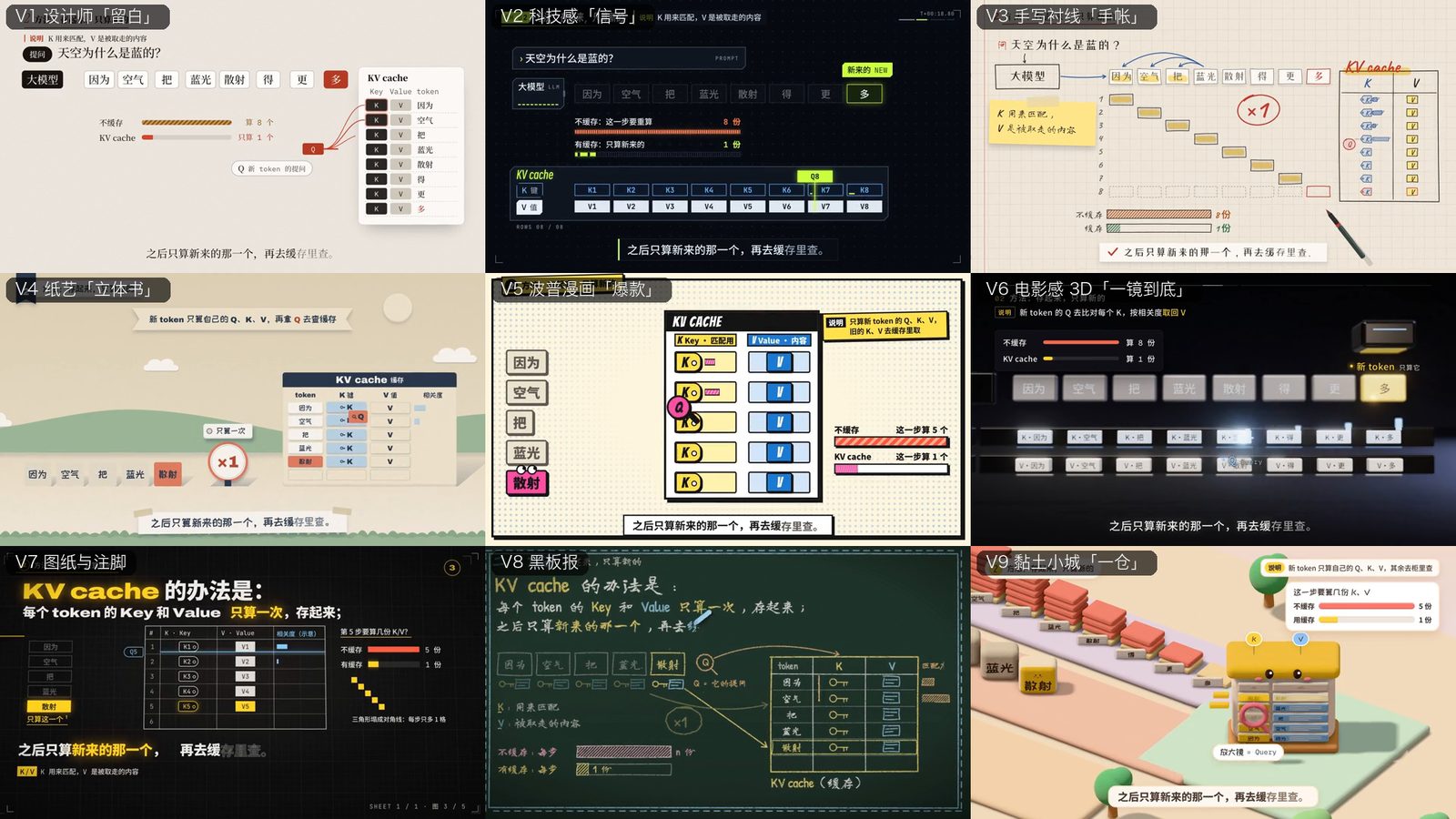
Three are narrative styles, where the look comes with a way of telling and the script can draw on its suggested arc: **推演**
(derive it on one canvas, formulas and geometry bound by colour), **案卷** (investigate it on an evidence board, from the
anomaly to the closed case) and **小剧场** (a life-scene sitcom: a misconception, a bill or a queue that shows the cause,
one sentence that maps the analogy to the real term). Below is the same KV cache topic told the three ways:

A new topic becomes a playable draft in any style in a few commands — narration, word timing, captions, chapters,
closing line, recap, and sound are generated; the agent then performs each line's scene. See
[`explainer/STYLES.md`](explainer/STYLES.md) to choose a style and
[`references/styled-explainer.md`](references/styled-explainer.md) for the workflow — including an optional method for
bringing your digital human into a styled film.
## What you provide
| Input | Required | Notes |
|---|---|---|
| Topic or finished script | Yes | A topic becomes a 45–75 second script; a supplied script keeps its natural length. |
| Presenter image | Presenter routes | One clear adult presenter, with confirmed rights to use the image. Not needed for the styled explainer. |
| Voice sample | No | Used only with explicit cloning authorization; otherwise a stock voice is selected and recorded. |
| Supporting media | No | Screen recordings, images, B-roll, or brand assets, used where they prove or clarify a spoken point. |
| Delivery preferences | No | Platform, duration, aspect ratio, style, watermark, music, and call to action. |
## How it works
Presenter route:
```text
Topic or script + authorized portrait
│
▼
Lock script and full narration ──► narration becomes the master clock
│
▼
Low-cost presenter pilot
│
▼
Presenter generation (split at real pauses when a provider caps duration)
│
▼
Audio-driven edit: captions, keyword graphics, cover, close
│
▼
Technical and visual QA
│
▼
Master, share copy, contact sheet, and delivery report
```
Styled route:
```text
Topic or script ──► choose a style (menu + galleries, or drafts in the nine visual styles)
│
▼
Script written for the style ──► voice with word timestamps (or your own narration)
│
▼
Draft film from the style's starter: captions, chapters, closing line, recap, sound
│
▼
Storyboard ──► every line performed on screen, on its words
│
▼
QA (check, stillness, cover) ──► render ──► master, share copy, subtitles, delivery report
```
Each state requires evidence before a job may advance. `check_state.py` computes the state from the job's artifacts:
| State | Evidence required |
|---|---|
| `intake` | Job created |
| `content_locked` | Passing preflight report, script, beat sheet |
| `audio_locked` | Decodable final narration, ASR report |
| `visual_plan_locked` | Timeline, storyboard, approved plan |
| `presenter_generated` | Recorded presenter capability, selected video, visual review |
| `composition_checked` | Composition report |
| `rendered` | Decodable render with video and audio |
| `verified` | Master, share copy, and a delivery report with passing output loudness |
On the styled route, `audio_locked` also needs a voiced `story.json` (a `--dry` draft never counts), and
`presenter_generated` is reached by the performed film and its visual review instead of a presenter video.
## Requirements
- An Agent Skills harness, or any coding agent that can read files and run shell commands.
- Python 3.9+, FFmpeg with `ffprobe`, Bash, `jq`, `awk`, and `sed`.
- For the presenter route: access to at least one voice synthesis, presenter video generation, and lip-sync capability — a cloud CLI, an API, or a local model — and optionally a deterministic timeline compositor such as HyperFrames for captions, motion graphics, and final rendering.
- For the styled explainer: Node.js (HyperFrames runs with `npx`), `rsync`, Python with `numpy` (sound bed; point
`PYTHON` at it), and a MiniMax API key (`MINIMAX_API_KEY`) for the voice and its word timestamps — or your own
recorded narration.
## Installation
The repository directory is the skill. Clone it into your harness's skills directory and keep the folder name `lanshu-create-ai-presenter-video`, which the Agent Skills specification requires to match the skill `name`.
| Harness | Skills directory | Explicit invocation |
|---|---|---|
| Claude Code | `~/.claude/skills/` or project-level `.claude/skills/` | `/lanshu-create-ai-presenter-video` |
| Codex | `~/.codex/skills/` | `$lanshu-create-ai-presenter-video` |
| Other Agent Skills clients | See the client's documentation, linked from the [client list](https://agentskills.io/clients) | Client-specific |
For example, with Claude Code:
```bash
git clone https://github.com/cclank/lanshu-create-ai-presenter-video.git \
~/.claude/skills/lanshu-create-ai-presenter-video
```
Run `git pull` in the installed directory to update. If you use several harnesses, clone once into each skills directory.
Tagged versions and a ready-to-extract skill ZIP are available in [Releases](https://github.com/cclank/lanshu-create-ai-presenter-video/releases). See [CHANGELOG.md](CHANGELOG.md) for version history.
**Agents without Agent Skills support.** Clone the repository anywhere, then start the session with:
```text
Read /path/to/lanshu-create-ai-presenter-video/SKILL.md and follow its workflow exactly.
```
## Quick start
Most harnesses select the skill automatically from its description, so you can describe the video you want:
```text
Turn this script and portrait into a 30-second 16:9 presenter video with live captions.
```
For a styled explainer you don't need to know the styles yet — ask, and the agent shows the twelve with pictures and
recommends a few for your topic:
```text
Make a 40-second explainer about RAG, no presenter. Which styles are there?
```
Use the explicit invocation from the table above to guarantee selection. The skill works in the language of your request.
The agent runs the bundled scripts itself. To set up a job manually, point `SKILL_DIR` at your installation:
```bash
SKILL_DIR=~/.claude/skills/lanshu-create-ai-presenter-video
python3 "$SKILL_DIR/scripts/init_job.py" \
--job-dir ~/Videos/my-presenter-video \
--presenter-image ~/Pictures/presenter.png \
--topic "Context engineering in one minute" \
--duration 60 \
--aspect 9:16 \
--rights-confirmed \
--adult-presenter-confirmed
```
Complete the manual review and upload approvals in `job.json`, then run preflight:
```bash
python3 "$SKILL_DIR/scripts/preflight.py" ~/Videos/my-presenter-video/job.json
```
After each stage, record its artifacts in `job.json` and let the checker compute the state:
```bash
python3 "$SKILL_DIR/scripts/check_state.py" ~/Videos/my-presenter-video/job.json --write
```
A styled explainer by hand, from a job directory (`X=$SKILL_DIR/explainer`):
```bash
python3 "$SKILL_DIR/scripts/init_job.py" --job-dir . --route styled --explainer-style v8-chalkboard --topic "RAG in 40 seconds"
python3 "$X/tools/story.py" story # story/script.md → voice + word times → story/story.json
bash "$X/tools/new_film.sh" v8-chalkboard story film # a playable draft; perform each line in film/beats.js
python3 "$X/tools/qa.py" film qa/film # check, stillness, snapshots, cover
bash "$X/tools/render.sh" film rag outputs # master, share copy, subtitles
```
## Scripts
| Script | Purpose |
|---|---|
| `init_job.py` | Creates a self-contained job directory, copies all inputs into it, and records job-relative paths. |
| `preflight.py` | Validates inputs, manual review, and approvals; separates local errors from remote-generation blockers. |
| `plan_segments.py` | Splits the locked narration at real ASR pauses when a provider caps request or reference-audio duration. |
| `check_state.py` | Computes the evidence-backed production state and exits non-zero when the recorded state overclaims. |
| `finalize_delivery.sh` | Builds master and share encodes, verifies full decode, delivered loudness, and black or frozen frames, then publishes them with a contact sheet and report. |
## Explainer tools
Under `explainer/tools/`, used on the styled route:
| Tool | Purpose |
|---|---|
| `story.py` | `script.md` → MiniMax voice per line with the engine's word timestamps → `story.json`; `--audio` for your own narration, `--dry` for a silent draft, `--check` for the plan and estimated length. |
| `new_film.sh` / `new_topic.sh` | A playable film from a style's starter (or drafts in the nine visual styles at once). |
| `docs.py` | Script, beat sheet, timeline, and a storyboard table from the story. |
| `qa.py` | `hyperframes check`, snapshots at every chapter, stillness pairs, a cover frame, and a composition report. |
| `render.sh` | Render, finalize with `finalize_delivery.sh`, write subtitles (SRT); `DRAFT=1` makes a 720p review copy for a phone. |
| `srt.py`, `still_grid.py`, `fonts.py`, `sync.sh`, `stamp.py` | Subtitles, a 3×3 style comparison still, font subsets, and project plumbing. |
## Reference guides
The agent loads each guide only when it reaches the matching stage, which keeps context usage low.
| Guide | Covers |
|---|---|
| [`generation.md`](references/generation.md) | Intake, script and narration, capability selection, billing gates, segment planning, presenter prompts |
| [`editing.md`](references/editing.md) | Timeline contract, segment seams, openings and closes, captions, keyword graphics, preview and export |
| [`qa-recovery.md`](references/qa-recovery.md) | Acceptance gates and recovery playbooks for lip-sync, identity, seams, loudness, and remote tasks |
| [`styled-explainer.md`](references/styled-explainer.md) | The styled explainer route: story pipeline, style starters, performing scenes, and an optional method for adding a digital human |
| [`explainer/STYLES.md`](explainer/STYLES.md) | The style menu and gallery, common words → styles, and how to write the narration for each style |
| [`explainer/KITS.md`](explainer/KITS.md) | The kit contract, the aesthetic baseline, the starters, and the tools |
| [`explainer/GOTCHAS.md`](explainer/GOTCHAS.md) | HyperFrames pitfalls met while building the styles |
## Repository layout
```text
lanshu-create-ai-presenter-video/
├── SKILL.md # Skill entry point: metadata and workflow
├── README.md
├── README.zh-CN.md
├── agents/
│ └── openai.yaml # Codex display metadata; other harnesses ignore it
├── assets/
│ └── job.template.json # Job manifest template
├── references/ # Stage guides loaded on demand
├── scripts/ # Job setup, gates, segment planning, delivery
├── explainer/ # Styled explainer engine: core runtime, twelve style kits + starters, tools, examples
│ ├── STYLES.md # Style chooser with the gallery
│ ├── KITS.md # The kit contract and tools
│ ├── kits/