---
description: Set up an authentication provider
---
# Authentication
Redwood has integrated auth end to end, from the web side to the api side.
On the web side, the router can protect pages via the `PrivateSet` component, and even restrict access at the role-level.
And if you'd prefer to work with the primitives, the `useAuth` hook exposes all the pieces to build the experience you want.
Likewise, the api side is locked down by default: all SDLs are generated with the `@requireAuth` directive, ensuring that making things publicly available is something that you opt in to rather than out of.
You can also require auth anywhere in your Services, and even in your serverful or serverless functions.
Last but not least, Redwood provides it's own self-hosted, full-featured auth provider: [dbAuth](./auth/dbauth.md).
In this doc, we'll cover auth at a high level.
All auth providers share the same interface so the information here will be useful no matter which auth provider you use.
## Official integrations
Redwood has a simple API to integrate any auth provider you can think of. But to make it easier for you to get started, Redwood provides official integrations for some of the most popular auth providers out of the box:
- [Auth0](./auth/auth0.md)
- [Azure Active Directory](./auth/azure.md)
- [Clerk](./auth/clerk.md)
- [Firebase](./auth/firebase.md)
- [Netlify](./auth/netlify.md)
- [Supabase](./auth/supabase.md)
- [SuperTokens](./auth/supertokens.md)
:::tip[how to tell if an integration is official]
To tell if an integration is official, look for the `@cedarjs` scope.
For example, Redwood's Auth0 integration comprises two npm packages: `@cedarjs/auth-auth0-web` and `@cedarjs/auth-auth0-api`.
:::
Other than bearing the `@cedarjs` scope, the reason these providers are official is that we're committed to keeping them up to date.
You can set up any of them via the corresponding auth setup command:
```
yarn rw setup auth auth0
```
## The API at a high-level
We mentioned that Redwood has a simple API you can use to integrate any provider you want.
Whether you roll your own auth provider or choose one of Redwood's integrations, it's good to be familiar with it, so let's dive into it here.
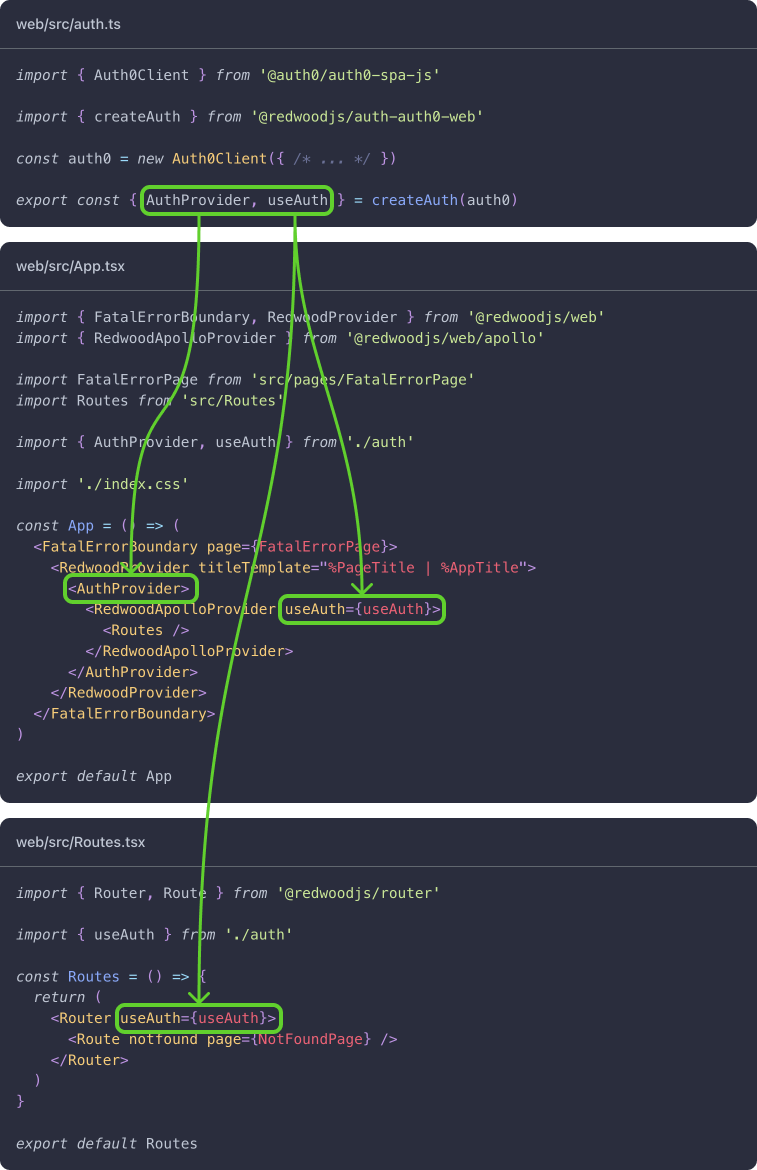
On the web side, there are two components that can be auth enabled: the `RedwoodApolloProvider` in `web/src/App.tsx` and the `Router` in `web/src/Routes.tsx`.
Both take a `useAuth` prop. If provided, they'll use this hook to get information about the app's auth state. The `RedwoodApolloProvider` uses it to get a token to include in every GraphQL request, and the `Router` uses it to determine if a user has access to private or role-restricted routes.
When you set up an auth provider, the setup command makes a new file, `web/src/auth.ts`. This file's job is to create the `AuthProvider` component and the `useAuth` hook by integrating with the auth provider of your choice. Whenever you need access to the auth context, you'll import the `useAuth` hook from this file. The `RedwoodApolloProvider` and the `Router` are no exceptions:
Once auth is setup on the web side, every GraphQL request includes a JWT (JSON Web Token).
The api side needs a way of verifying and decoding this token if it's to do anything with it.
There are two steps to this process:
- decoding the token
- mapping it into a user object
The `createGraphQLHandler` function in `api/src/functions/graphql.ts` takes two props, `authDecoder` and `getCurrentUser`, for each of these steps (respectively):
```ts title="api/src/functions/graphql.ts"
// highlight-next-line
import { authDecoder } from '@cedarjs/auth-auth0-api'
import { createGraphQLHandler } from '@cedarjs/graphql-server'
import directives from 'src/directives/**/*.{js,ts}'
import sdls from 'src/graphql/**/*.sdl.{js,ts}'
import services from 'src/services/**/*.{js,ts}'
// highlight-next-line
import { getCurrentUser } from 'src/lib/auth'
import { db } from 'src/lib/db'
import { logger } from 'src/lib/logger'
export const handler = createGraphQLHandler({
// highlight-start
authDecoder,
getCurrentUser,
// highlight-end
loggerConfig: { logger, options: {} },
directives,
sdls,
services,
onException: () => {
// Disconnect from your database with an unhandled exception.
db.$disconnect()
},
})
```
### Destructuring the `useAuth` hook
That was auth at a high level.
Now for a few more details on something you'll probably use a lot, the `useAuth` hook.
The `useAuth` hook provides a streamlined interface to your auth provider's client SDK.
Much of what the functions it returns do is self explanatory, but the options they take depend on the auth provider:
| Name | Description |
| :---------------- | :--------------------------------------------------------------------------------------------------------------------------------------------------------------------------- |
| `client` | The client instance used in creating the auth provider. Most of the functions here use this under the hood |
| `currentUser` | An object containing information about the current user as set on the `api` side, or if the user isn't authenticated, `null` |
| `getToken` | Returns a JWT |
| `hasRole` | Determines if the current user is assigned a role like `"admin"` or assigned to any of the roles in an array |
| `isAuthenticated` | A boolean indicating whether or not the user is authenticated |
| `loading` | If the auth context is loading |
| `logIn` | Logs a user in |
| `logOut` | Logs a user out |
| `reauthenticate` | Refetch auth data and context. (This one is called internally and shouldn't be something you have to reach for often) |
| `signUp` | Signs a user up |
| `userMetadata` | An object containing the user's metadata (or profile information), fetched directly from an instance of the auth provider client. Or if the user isn't authenticated, `null` |
### Protecting routes
You can require that a user be authenticated to navigate to a route by wrapping it in the `PrivateSet` component.
An unauthenticated user will be redirected to the route specified in either component's `unauthenticated` prop:
```tsx title="web/src/Routes.tsx"
import { Router, Route, PrivateSet } from '@cedarjs/router'
const Routes = () => {
return (
// highlight-next-line
)
}
```
You can also restrict access by role by passing a role or an array of roles to the `PrivateSet` component's `roles` prop:
```tsx title="web/src/Routes.tsx"
import { Router, Route, PrivateSet } from '@cedarjs/router'
const Routes = () => {
return (
// highlight-next-line
// highlight-next-line
)
}
```
:::note[Note about roles]
A route is permitted when authenticated and user has **any** of the provided roles such as `"admin"` or `["admin", "editor"]`.
:::
### api-side currentUser
We briefly mentioned that GraphQL requests include an `Authorization` header in every request when a user is authenticated.
The api side verifies and decodes the token in this header via the `authDecoder` function.
While information about the user is technically available at this point, it's still pretty raw.
You can map it into a real user object via the `getCurrentUser` function.
Both these functions are passed to the `createGraphQLHandler` function in `api/src/functions/graphql.ts`:
```ts title="api/src/functions/graphql.ts"
export const handler = createGraphQLHandler({
authDecoder,
getCurrentUser,
// ...
})
```
If you're using one of Redwood's official integrations, `authDecoder` comes from the corresponding integration package (in auth0's case, `@cedarjs/auth-auth0-api`):
```ts
import { authDecoder } from '@cedarjs/auth-auth0-api'
```
If you're rolling your own, you'll have to write it yourself. See the [Custom Auth](./auth/custom.md#api-side) docs for an example.
It's always up to you to write `getCurrentUser`, though the setup command will stub it out for you in `api/src/lib/auth.ts` with plenty of guidance.
`getCurrentUser`'s return is made globally available in the api side's context via `context.currentUser` for convenience.
### Locking down the GraphQL api
Use the `requireAuth` and `skipAuth` [GraphQL directives](directives#secure-by-default-with-built-in-directives) to protect individual GraphQL calls.