[npm-version-image]: https://img.shields.io/npm/v/mklicense.svg?color=0971fe
[npm-version-url]: https://www.npmjs.com/package/mklicense
[npm-downloads-image]: https://img.shields.io/npm/dm/mklicense.svg?color=2ecc40
[npm-downloads-url]: https://www.npmjs.com/package/mklicense
[action-image]: https://github.com/cezaraugusto/mklicense/actions/workflows/ci.yml/badge.svg?branch=main
[action-url]: https://github.com/cezaraugusto/mklicense/actions
[provenance-image]: https://img.shields.io/badge/provenance-verified-0971fe?logo=npm&logoColor=white
[provenance-url]: https://www.npmjs.com/package/mklicense
> CLI tool for building Licenses files. Easily.
# mklicense [![Version][npm-version-image]][npm-version-url] [![Downloads][npm-downloads-image]][npm-downloads-url] [![workflow][action-image]][action-url] [![provenance][provenance-image]][provenance-url]
## Why should I use this?
* It writes your details (year, author, project description) into the file, which the GitHub generator does not always do.
* It is friendly for beginners and busy people: no flags to memorize, just answer a couple of prompts.
* It generates the file locally, so you never hand your `LICENSE` details to a third-party service.
## Install
```bash
npm install -g mklicense
```
## Usage
Run the command inside your project folder:
```bash
mklicense
```
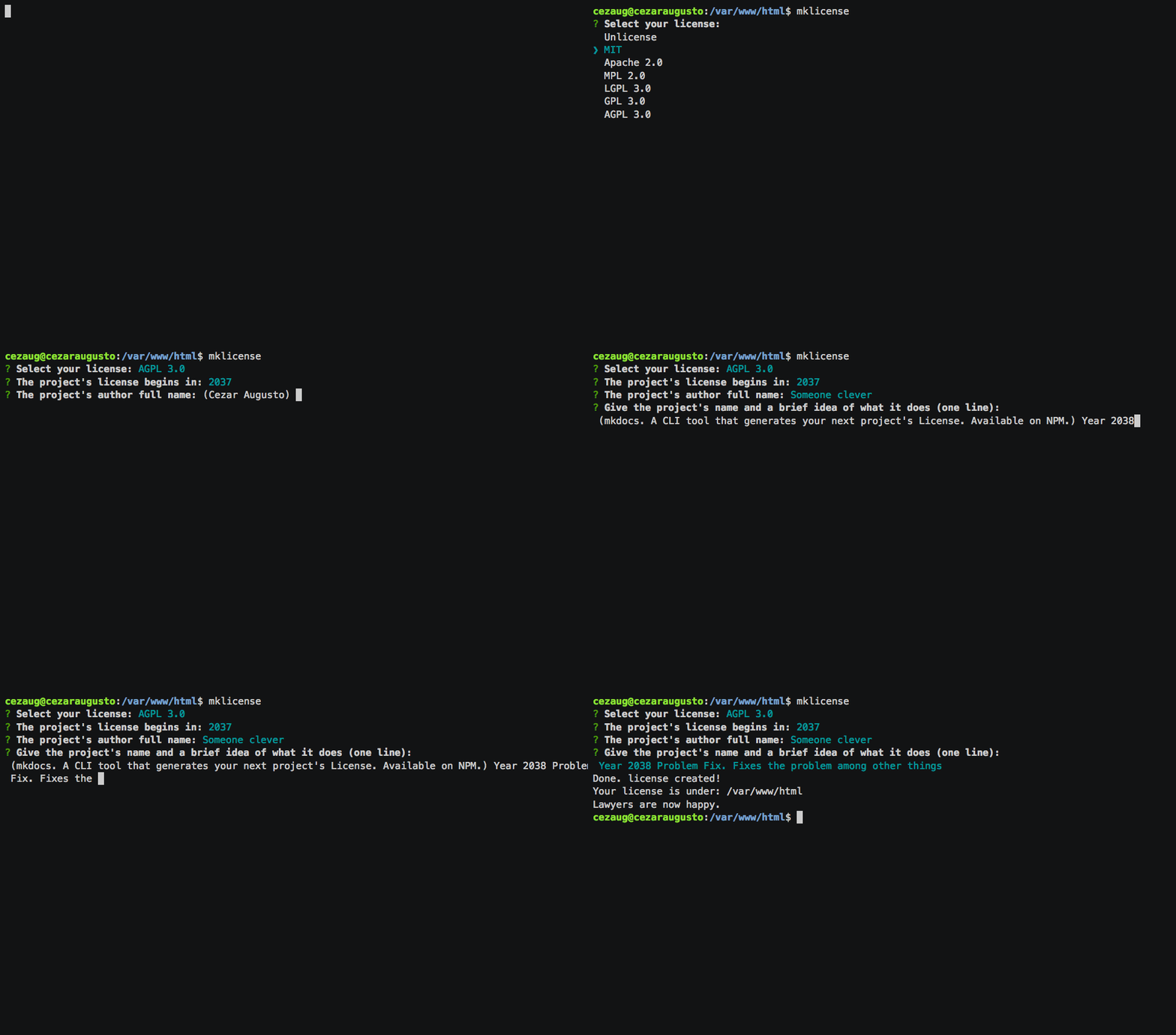
The CLI walks you through a short interactive flow:
1. Select a license from the list (see below).
2. For MIT, Apache, GPL and AGPL, enter the starting year and the author name (both prefilled, the author defaults to your `git config user.name`).
3. For GPL and AGPL, enter a one-line project description.
`mklicense` then writes a `LICENSE` file in the current directory. It is fully interactive and takes no command-line flags. Requires `Node` `>=18`.
## Related projects
* [pintor](https://github.com/cezaraugusto/pintor)
* [log-md](https://github.com/cezaraugusto/log-md)
* [prefers-yarn](https://github.com/cezaraugusto/prefers-yarn)
* [go-git-it](https://github.com/cezaraugusto/go-git-it)
* [git-precision](https://github.com/cezaraugusto/git-precision)
* [isolated-deps](https://github.com/cezaraugusto/isolated-deps)
## Licenses included
* Unlicense
* MIT
* Apache 2.0
* MPL 2.0
* GNU LGPL 3.0
* GNU GPL 3.0
* GNU AGPL 3.0
## You talk about trust. So, where are all the licenses located?
`mklicense` extracts licenses from https://choosealicense.com/ (which is [curated by GitHub](https://choosealicense.com/about/)), and creates a `LICENSE` file for your desired project. I have no control over any license, which is a good thing for you and me.
## License
MIT (c) Cezar Augusto.