# Blueprint
A pane (or tab-bar side panel) that draws what the tab's coding agent is building. The agent writes Mermaid flowcharts into Blueprint's data folder; Blueprint lays them out on a dotted canvas, marks finished boxes with a check and work in progress in yellow, and turns a click on a box into a change request typed into that agent's terminal.
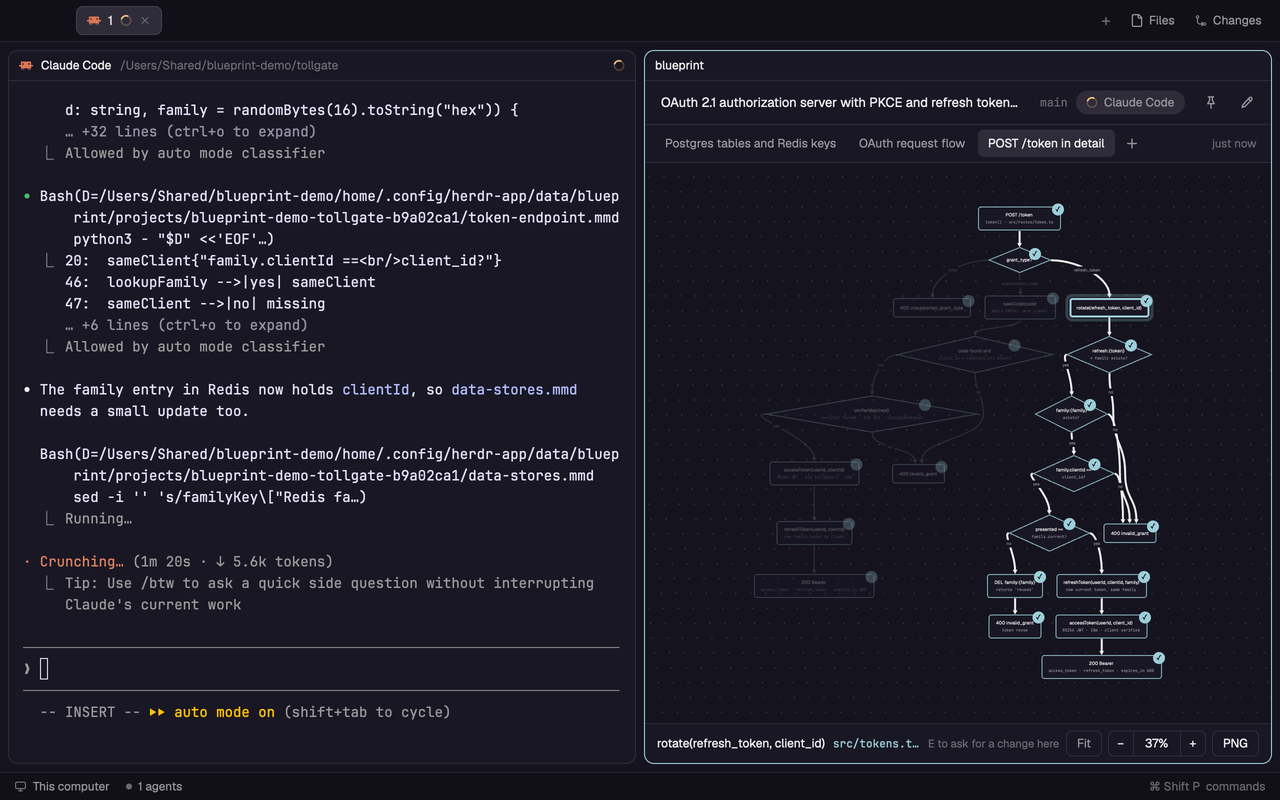
## What you see
Top to bottom, filling the pane:
1. **Header, 44px.** Left: the project's topic (first line of `topic.txt`, else the checkout's folder name), semibold, truncated; then the branch in the mono font, 11.5px, `dim`. Right: the agent pill, 24px high, fully rounded, `raised` background, holding the agent's status mark and its name (12px, `muted`, max 160px); then 28px icon buttons with 15px monochrome SVGs in `muted` (hover: `hover` background, `foreground` text; on: `accent` at 16% behind, `accent` icon): refresh (`refresh.svg`), pin (`pin.svg` / `pin-on.svg`), open as pane (`pane.svg`, panel only), edit (`edit.svg`). Each has a tooltip. 1px `border` under it.
2. **Tabs row, 38px.** One tab per diagram, as wide as its title up to 200px; a longer title ends in "…" and the tooltip has all of it. When the tabs don't fit, the longest ones narrow together to an equal cap (the short ones keep their size), down to 72px. 12px text, 26px high, radius 6, 1px `border`; the shown one on `raised` with an `input` border and `foreground` text, others `muted`. An 11px pin icon in front of pinned ones; on the shown one, a 16px × (`close.svg`, `dim`, tooltip "Close: it opens again when the agent changes it") after its title. Then a bordered "Drawing…" chip while a requested diagram hasn't arrived, a 26px `+` (`plus.svg`) right after the tabs, and at the far right the shown diagram's age ("3 min ago"), 11.5px `dim`. 1px `border` under it.
3. **Canvas, the rest.** `canvas` background with a dot grid over all of it: 1.6px dots every 20px × zoom (kept between 12 and 40px), `foreground` at 11%, moving with the drawing. Boxes: rect radius 8, `( )` radius 14, `([ ])` stadium, `(( ))` circle, `[( )]` cylinder, `{ }` diamond; at least 120×52; title 12.5px semibold `foreground`, optional second line 10.5px mono `muted`; `background` fill, 1px `input` stroke. Edges are cubic béziers, 1.25px `muted` at 75% with filled arrow heads; `-.->` is dashed 4/4; labels sit on a patch of `canvas`.
4. **Footer, 40px.** Left: a hint ("Click a node to light its flow · E to edit · drag to move · ⌘/Ctrl scroll to zoom"), or the picked box's title and code path (`accent`, mono) plus "E to ask for a change here". Right: Fit, −, zoom %, +, and PNG (macOS only).
As a side panel it is a card: radius 10, 1px `border`, like Files and Changes beside it.
Status colours: done is the theme's `done`; in progress is the first of `working`, `accent`, `ansi5`, `ansi3` that is more than 60 RGB units away from `done` (so they never look alike).
With no diagram yet, a centred 440px card says "No diagram for this project yet", the project path and branch, and lists the tab's agents as 34px rows (name, terminal address in mono). With no agent in the tab: "Run an agent in this tab (Claude Code, Codex, Grok…) to connect it".
## How it behaves
- **Which project.** The tab's agents are found from `agents()` and from terminals whose program key is a known coding agent. The project is the git top level (`git rev-parse --show-toplevel`) of one agent terminal's folder: the one already followed while it stays, else the connected one, else the first. Each worktree is its own project. A pane serves the tab it was opened in (`props.tab`, else the tab shown when it is first laid out, corrected on click); the side panel serves the tab on screen. Switching tabs clears the view at once and looks the project up again.
- **Connecting.** Clicking an agent in the empty card types a draw request into it (`hc send`): the folder to save `.mmd` files in, the rules below, and a request to write the project's topic to `topic.txt`. Until a file arrives (or 10 minutes pass with the agent not working) the card says "Asked Claude Code to draw" instead of listing agents again.
- **Rules given to agents.** YAML frontmatter `title:`, short (2 to 4 words, no parentheses: it is the tab); labels in the person's language; `
` for a second line; cylinders only for real database tables, one per table, edges labelled with the relation; draw only what the code has (no database: say so and draw what plays that part, under its real name); `%% code: :` for each box; `class done`, `class active`, `class current`; update the file in place after each unit of work.
- **Agent status** (pill in the header, same marks as Herdr's Agents list): working is `spinner.svg`, 12px, `working` colour, spinning once per 900 ms; done is a 7px `done` dot; idle is a 7px ring (`idle`); blocked is a 14px "!" on `blocked` at 15%. The status word is the tooltip.
- **Box status.** Done: stroke `done` at 80% and a check badge (16px circle × zoom, at least 12px) on the shape's top-right edge. Active or current: 2px stroke in the in-progress colour and an 11px dot badge; current adds a 28%-alpha ring around the dot. Nothing pulses.
- **Work in progress.** Edges between two in-progress boxes, plus one edge leading into each place where work begins (from a done box when there is one), are dashed and in-progress coloured (45%). While the pane has focus (the panel: while hovered) one dot per branch of that work runs along those edges, going straight under boxes, then rests 360 ms. At most 8 runs and about 40 dot positions in all. Without focus there is colour only.
- **Clicks.** A box: its whole upstream and downstream flow stays lit, the rest drops to 28% (fading 160 ms), lit edges go to 2px `foreground`. Again on it, or empty canvas: back. Drag pans; ⌘/Ctrl + scroll zooms around the pointer (20% to 300%); the view starts fitted (at most 140%) and refits when the file changes. If the other direction (LR vs TB) fits the pane at least 20% larger, it is drawn that way.
- **Keys** (also with a Korean or Japanese input source on): `E` with a box picked opens its request box, without one toggles edit mode (a click then opens the request box); `Esc` closes the request, then edit mode, then the selection; `F` fit; `0` 100%; `=`/`-` zoom; `1` to `9` tabs.
- **Request box.** 560px max, 12px above the canvas bottom, `popover` with an `accent` border at 60%: the box title and code path, a chip "→ Claude Code ⇄" that cycles the tab's agents, and an input ("What should change? e.g. add rate limiting here"). Enter sends "In Blueprint I pointed at the box …" with the box's line in the source, its `%% code` path, the note, what to do (change the code, run the tests, update the diagram file, don't use herdr-blueprint send, mark the boxes it adds or changes `active`/`current` while it works and `done` once they work) and the whole Mermaid source. The note stays if sending fails; once sent, the pick is cleared so the boxes the agent adds aren't dimmed. Opening the box in a low pane moves the drawing up until the picked box shows above it (the box is 136px tall, 12px above the canvas bottom).
- **Saves.** The project folder is watched. A batch naming a `.mmd` file, `topic.txt` or the folder itself reads the diagrams again; any other batch reads only `project.json`. Every 5 s the files are read again anyway, and the view redraws only if one changed. That timer and the refresh button also start the watch again if it ended.
- **Tab order.** Tabs follow `project.json` `order`; files not in it go after, by name, so a new diagram lands at the right end. A tab pressed and released over another takes its place (after it when it came from the left, before it otherwise); released over itself, it is shown. While one is held, hovering another gives it an `accent` border.
- **Closing a tab** (×, middle click, or the `close-tab` command) hides it, it doesn't delete the file: `project.json` `closed` keeps the file's sum, and once the file's text changes the entry goes and the tab is back (shown, like a new file). Closing also unpins it, so the keeping rules clear it away in time. The tab to its right is shown next, else the one to its left.
- **New files.** A diagram file Blueprint hasn't seen before (the agent started one for the feature it is building) becomes the shown tab, unless a box is picked or a request is being written.
- **`+`.** The same box with "New diagram", suggestion chips (The data model, The API request flow, The whole project's structure, This feature in detail:) and a prompt naming the files not to overwrite. The new file opens as a tab when it arrives.
- **Keeping.** A file's time is when Blueprint first saw its current text, or when it was last shown, whichever is later. Unpinned files go after 7 days; past a day old, a project keeps 10. A project folder with no diagram, not opened or asked for 7 days, is removed when Blueprint starts. Folders are made only when an agent is connected or a diagram is asked for.
- **Language.** A pick made with `lang-en`, `lang-ko` or `lang-ja` (kept in shared state `blueprint.lang`, for every copy and across restarts); else Korean or Japanese when `~/.claude/settings.json` has `language` set to one of them; else English. Checked every 60 s. `lang-auto` drops the pick.
- **Open as pane** (panel only): focuses a Blueprint pane already in the tab, else splits the agent's pane to the right with `props: { tab }`, and hides the panel.
- **Refresh** (the header button, or the `refresh` command): drops measured text sizes, layouts and built paths, looks the project up again, reads and parses its files again, and draws from scratch. The view stays where it was.
- **Big diagrams.** Layouts are made between frames, never in a render, and only what is on screen is built. Until a diagram's first layout is made the canvas says "Laying out…"; after that, a newer layout (the text was just measured, the file changed) replaces the old drawing when it is ready. A render that runs out of its budget stops adding boxes and the footer says "Too big to draw at once here: zoom in to see the rest". A diagram that throws while drawn keeps its last good drawing, else the canvas says it couldn't draw it, with a refresh button; a render that throws anywhere shows the same message for the whole view instead of Herdr's error bar.
- **Tab bar button.** `herdr-app do blueprint.add-button` / `remove-button` (see Built from).
- **Updates.** At start and every 6 hours a Blueprint looks at shared state `blueprint.update` `{ checked, latest, off }`; when it is a day old (or never set) it GETs the repository's `mods/blueprint/mod.json` from raw.githubusercontent.com and stores `latest`, marking `checked` first so other copies don't ask too. A failed request is asked again in an hour, and its reason stays in `error`. When `latest` is newer than the `version` in its own `mod.json` (dotted numbers), the header shows a small "Update" button (the same word in every language; 11.5px `accent` text on 16% `accent`, 22px high, fully rounded, the versions only in its tooltip) before the agent pill. It and the other header controls keep their size; the title is what shrinks. A click types an update request into the tab's agent: read AGENTS.md, replace the files of `mods/blueprint` with the repository's (the same mod, so overwrite rather than add a renamed copy), keep keys.json and layouts, run `herdr-app check`, say what changed. With no agent in the tab it only notifies. `update`, `update-check-off`, `update-check-on` commands.
## Built from
- `mods/blueprint/`: `main.js` (the view), `mermaid.js` (flowchart subset parser: HTML and Mermaid entities in labels (`<`, `<`, `#lt;`) decoded; shapes above, `-->`, `-.->`, `==>`, `---`, `-.-`, `|label|`, `-- label -->`, `class`, `click id "path:line"`, `%% code:`; frontmatter title; direction LR/RL/TB/TD/BT, none means TB), `layout.js` (layered layout, also as a generator `layoutSteps` that yields between rounds: ranks by longest path, then every box with more edges out than in moved down to just above what it leads to; dummy nodes for long edges, barycenter ordering, then each layer placed where its edges are shortest (weighted least squares, long edges' pieces weighted more) while keeping order and spacing (isotonic regression), one-to-one links straightened, ports spread per side, back edges as side arcs, cubic segments, edge labels moved along their path off other labels and boxes), `store.js` (project folders, `project.json`, retention), `setup.js` (the button), `update.js` (the update check and the request to the agent), `i18n.js` (en/ko/ja text, IME key aliases ㄷ/ㄹ/い/は for E/F), SVG icons (`icon.svg`, `refresh.svg`, `close.svg`, `pin.svg`, `pin-on.svg`, `pane.svg`, `edit.svg`, `plus.svg`, `spinner.svg`), `mod.json` `{ "place": "none", "title": "Blueprint" }`.
- `herdr`: `theme`, `settings`, `agents`, `knownAgents`, `panes`, `spaces`, `focused`, `props`, `window` (platform), `shared("layout")`, `shared`/`setShared` (`blueprint.lang`, `blueprint.update`), `fetch` (the update check), `run` (`pane.split`, `pane.focus`, `layout.hide`, `mod.clone`, `layout.switch`), `hc(["send", address, text])`, `exec` (`git`; `sips`, `osascript`, `herdr-app shot` for PNG on macOS), `readTextFile`, `writeTextFile` (compare-and-swap for `project.json`), `watchFolder`, `notify`, `nextCommand`, `appHome`, `home`. `fs/promises` for `readdir`, `exists`, `mkdir`, `unlink`, `rmdir`, `readFile`, `writeFile`.
- gpui-kit: `div`, `svg`, `PathBuilder` + `window.paint_path` (grid, edges, arrows, diamond and cylinder shapes), `.frames()` (the running dot), `.spin()`, `.tooltip()`; gpui-base `v_flex`, `h_flex`, `InputState`, `Input`.
- Data: `/data/blueprint/projects/-/` with `*.mmd`, `topic.txt`, `project.json` `{ path, agent, asked, pinned, seen, files: { file: { sum, at } }, order: [file], closed: { file: sum }, opened }`.
- The button: `mod.clone tabs → tabs-blueprint`, then in its `main.js` the panels list gets `"blueprint"`, a `panelButton("blueprint", "Blueprint", "mods/blueprint/icon.svg")` after Changes, and `syncPanel` keyed by `space.id/tab id` so the panel is per tab; `layouts/main-blueprint.json` is written from `layouts/main.json` with the `tabs` block on `tabs-blueprint` and a `panel-body` child `{ id: "blueprint", type: "block", content: { mod: "blueprint", props: { panel: true } } }`; then `layout.switch`. The layout in use before is kept in `data/blueprint/previous-layout.txt` for remove-button.
## Watch out
- Herdr cuts off a render that runs about 50 ms ("interrupted", and a red "This view could not be re-rendered" bar over the last good frame); a task or `init` gets about 500 ms. A 100-box diagram's two layouts took 57 ms of a render, so: no layout in a render (a timer runs `layoutSteps` 12 ms at a time), only what is on screen is built, the grid, edge and shape paths are built once per look and view (`PathBuilder.build()` gives immutable geometry that later renders can paint again), and a render stops adding to the drawing after 26 ms (16, then 10, for 20 s after a render was cut off, which the next render notices because the last one never reached its end). One host call of each kind per render; `on_size_change` redraws only on a real change; a render marks itself done at its end and a timer re-asks up to 5 times.
- `scripts/bench.sh` renders Blueprint once with a generated diagram of N boxes in Herdr's own engine (`herdr-app check`) and prints how long the layouts and the render took, or "interrupted".
- `.frames()` repaints the whole window on every tick while shown (one dot at 45 ms took Herdr from ~11% to ~28% CPU), and each spot carries the whole cycle as strings: 20 spots × 37 ticks drew, 40 × 66 was dropped. Hence dots only with focus and the 40-spot budget.
- `panes()` doesn't say which Blueprint pane is this one; "the first Blueprint pane" is wrong with two. Init is no help either (a reload re-inits hidden copies).
- A Claude Code that reports no status shows as program key `claude` with `agent: false`, and `agents()` is empty then; find agents by program key too.
- Two Blueprints (panel and pane) can have one project open: write `project.json` by applying a change to what is on disk with `writeTextFile(path, text, expected)` and retry on a stale snapshot, and re-read it when the folder watch reports it. Writing your own copy back undoes the other's pin.
- `watchFolder` returns the folder itself when more changed than it keeps track of, which means read everything. A path that doesn't start with the folder as Blueprint spells it (`\` on Windows) counts the same way. A watch can also end on an error, so a timer reads the files too, as Herdr's own Files mod does. On macOS the watch picked up a save in under 0.1 s; the timer takes up to 5 s.
- There is no `stat` in `fs/promises` and no shell on Windows, so file times are recorded by content hash; normalise `\` to `/` in paths.
- `run()` only queues a command: wait for its result on disk. Don't use `layout.clone` mid-task: it switches layouts at once.
- Two identical arrow heads in one fill path cancel out (even-odd); dedupe tips.
- Placing a layer by pushing nodes apart left to right and then re-centring it diverges when a long edge crosses a branch (each pass wider; a 20-box diagram grew to 2300px at 24% zoom). Project onto order and spacing by least squares instead: it can only shorten edges.
- A symlinked mod folder doesn't hot-reload; copy files in.
- Text sizes are measured with invisible elements (one tab per render) before layout; until then they are estimated (CJK characters count as wide).
- `fs/promises` reads only inside the home folder (and writes only under the app folder): an app folder outside home (`HERDR_APP_HOME=/Users/Shared/...`) shows no diagrams. `readTextFile` reads anywhere.
- A covered or locked window isn't redrawn, and `herdr-app shot` keeps returning its last frame: record demos with the window in front.
- Herdr's `zoom` (settings.json, ⌘= / ⌘-) scales every px given to an element and `paint_path` geometry (coordinates, stroke widths, dashes), but not what crosses the other way: sizes from `on_size_change` (the canvas, the view's width, measured text), pointer positions and wheel deltas arrive in real px. Keep everything in layout px: divide what comes in by the zoom, and give paths layout px as they are (scaling them too draws edges at zoom², short of their boxes). Read the zoom once per render (in `canvas()`).
- Not tested on Windows or Linux yet. PNG export is macOS only.
## Tests
`node --import ./tests/stubs.mjs --test 'tests/*.test.mjs'` (Node 24 or newer) loads `main.js` against stubbed Herdr modules and checks, at zoom 1 and 1.2, that fit stays inside the canvas, edges meet their boxes, outlines fill them, the dot grid covers the canvas, measured text and pointer moves come out in layout px.
## Done when
- `herdr-app check` passes for `mods/blueprint`, and the tests pass.
- With `"zoom": 1.2` in settings.json, edges still meet their boxes and fit shows the whole drawing.
- In a tab with Claude Code in a git repo, `herdr-app do pane.split --direction right --mod blueprint` opens Blueprint listing that agent; picking it types the draw request into its terminal, and a saved `.mmd` in the project folder shows up as a tab within a second or two.
- A box marked `class x done` has a check; `class y active` has a yellow 2px stroke and the edge into it is dashed yellow; with the pane focused a dot runs along it, and without focus nothing moves.
- Clicking a box dims everything outside its flow; `E` then opens the request box, and Enter types a prompt starting "In Blueprint I pointed at the box" into the agent.
- A second Blueprint pane in another tab shows that tab's project, not the first one's.
- Pinning in one Blueprint and reloading the project in another keeps the pin in `project.json`.
- Visiting tabs without connecting creates no folder under `data/blueprint/projects/`.
- A new `.mmd` saved by the agent while nothing is picked becomes the shown tab.
- A tab dragged onto another moves there, in the panel and in a pane on the same project; × hides the shown tab, and it is back once the agent saves a change to that file.
- `herdr-app do blueprint.add-button` adds a Blueprint button after Changes and switches to `main-blueprint`; `remove-button` returns to the previous layout and deletes `main-blueprint.json` and `mods/tabs-blueprint`.