



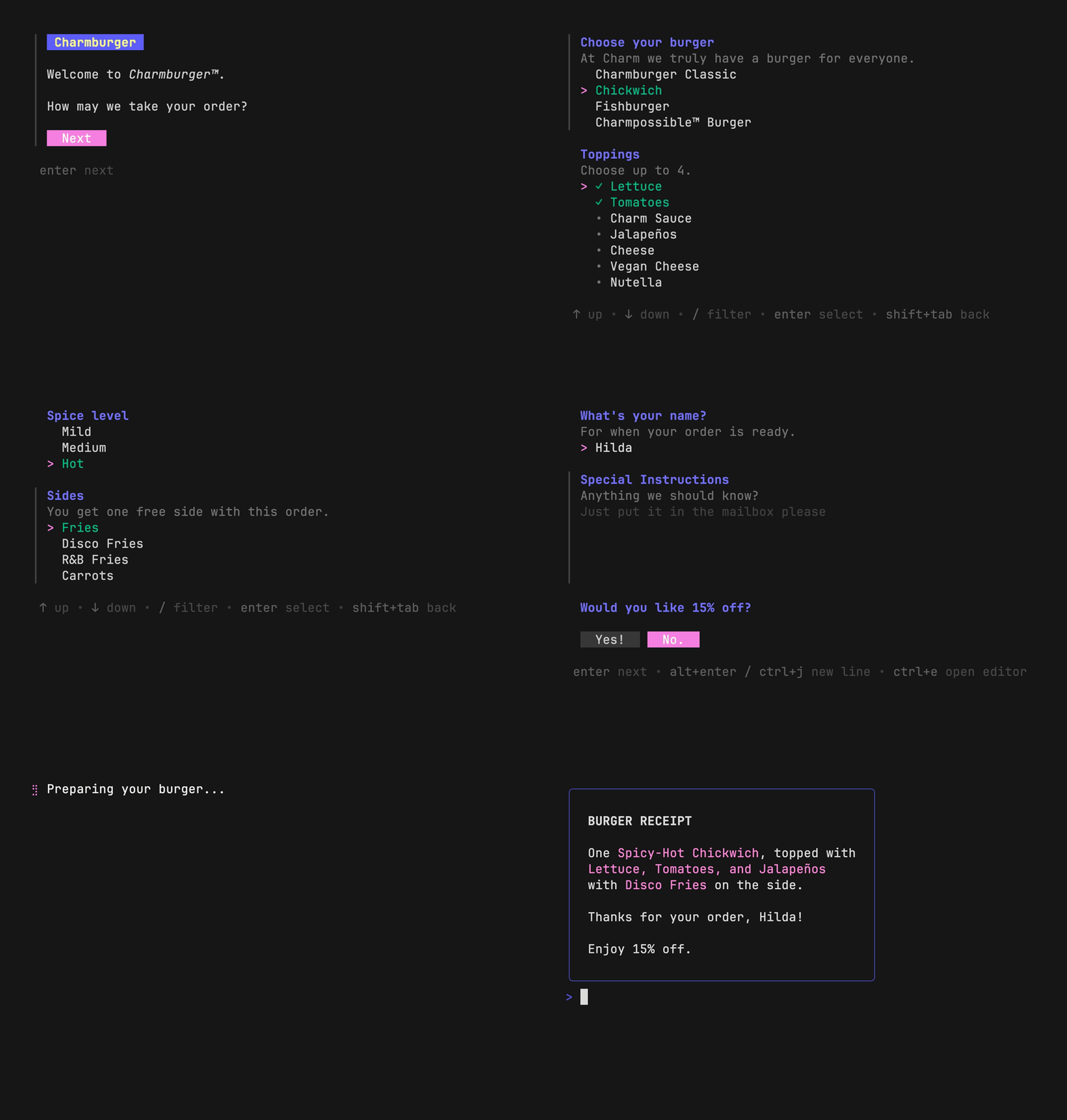
 `huh?` is easy to use in a standalone fashion, can be
[integrated into a Bubble Tea application](#what-about-bubble-tea), and contains
a first-class [accessible mode](#accessibility) for screen readers.
The above example is running from a single Go program ([source](./examples/burger/main.go)).
## Tutorial
Let’s build a form for ordering burgers. To start, we’ll import the library and
define a few variables where we'll store answers.
```go
package main
import "charm.land/huh/v2"
var (
burger string
toppings []string
sauceLevel int
name string
instructions string
discount bool
)
```
`huh?` separates forms into groups (you can think of groups as pages). Groups
are made of fields (e.g. `Select`, `Input`, `Text`). We will set up three
groups for the customer to fill out.
```go
form := huh.NewForm(
huh.NewGroup(
// Ask the user for a base burger and toppings.
huh.NewSelect[string]().
Title("Choose your burger").
Options(
huh.NewOption("Charmburger Classic", "classic"),
huh.NewOption("Chickwich", "chickwich"),
huh.NewOption("Fishburger", "fishburger"),
huh.NewOption("Charmpossible™ Burger", "charmpossible"),
).
Value(&burger), // store the chosen option in the "burger" variable
// Let the user select multiple toppings.
huh.NewMultiSelect[string]().
Title("Toppings").
Options(
huh.NewOption("Lettuce", "lettuce").Selected(true),
huh.NewOption("Tomatoes", "tomatoes").Selected(true),
huh.NewOption("Jalapeños", "jalapeños"),
huh.NewOption("Cheese", "cheese"),
huh.NewOption("Vegan Cheese", "vegan cheese"),
huh.NewOption("Nutella", "nutella"),
).
Limit(4). // there’s a 4 topping limit!
Value(&toppings),
// Option values in selects and multi selects can be any type you
// want. We’ve been recording strings above, but here we’ll store
// answers as integers. Note the generic "[int]" directive below.
huh.NewSelect[int]().
Title("How much Charm Sauce do you want?").
Options(
huh.NewOption("None", 0),
huh.NewOption("A little", 1),
huh.NewOption("A lot", 2),
).
Value(&sauceLevel),
),
// Gather some final details about the order.
huh.NewGroup(
huh.NewInput().
Title("What’s your name?").
Value(&name).
// Validating fields is easy. The form will mark erroneous fields
// and display error messages accordingly.
Validate(func(str string) error {
if str == "Frank" {
return errors.New("Sorry, we don’t serve customers named Frank.")
}
return nil
}),
huh.NewText().
Title("Special Instructions").
CharLimit(400).
Value(&instructions),
huh.NewConfirm().
Title("Would you like 15% off?").
Value(&discount),
),
)
```
Finally, run the form:
```go
err := form.Run()
if err != nil {
log.Fatal(err)
}
if !discount {
fmt.Println("What? You didn’t take the discount?!")
}
```
And that’s it! For more info see [the full source][burgersource] for this
example as well as [the docs][docs].
If you need more dynamic forms that change based on input from previous fields,
check out the [dynamic forms](#dynamic-forms) example.
[burgersource]: ./examples/burger/main.go
[docs]: https://pkg.go.dev/charm.land/huh/v2?tab=doc
## Field Reference
- [`Input`](#input): single line text input
- [`Text`](#text): multi-line text input
- [`Select`](#select): select an option from a list
- [`MultiSelect`](#multiple-select): select multiple options from a list
- [`Confirm`](#confirm): confirm an action (yes or no)
> [!TIP]
> Just want to prompt the user with a single field? Each field has a `Run`
> method that can be used as a shorthand for gathering quick and easy input.
```go
var name string
huh.NewInput().
Title("What’s your name?").
Value(&name).
Run() // this is blocking...
fmt.Printf("Hey, %s!\n", name)
```
### Input
Prompt the user for a single line of text.
`huh?` is easy to use in a standalone fashion, can be
[integrated into a Bubble Tea application](#what-about-bubble-tea), and contains
a first-class [accessible mode](#accessibility) for screen readers.
The above example is running from a single Go program ([source](./examples/burger/main.go)).
## Tutorial
Let’s build a form for ordering burgers. To start, we’ll import the library and
define a few variables where we'll store answers.
```go
package main
import "charm.land/huh/v2"
var (
burger string
toppings []string
sauceLevel int
name string
instructions string
discount bool
)
```
`huh?` separates forms into groups (you can think of groups as pages). Groups
are made of fields (e.g. `Select`, `Input`, `Text`). We will set up three
groups for the customer to fill out.
```go
form := huh.NewForm(
huh.NewGroup(
// Ask the user for a base burger and toppings.
huh.NewSelect[string]().
Title("Choose your burger").
Options(
huh.NewOption("Charmburger Classic", "classic"),
huh.NewOption("Chickwich", "chickwich"),
huh.NewOption("Fishburger", "fishburger"),
huh.NewOption("Charmpossible™ Burger", "charmpossible"),
).
Value(&burger), // store the chosen option in the "burger" variable
// Let the user select multiple toppings.
huh.NewMultiSelect[string]().
Title("Toppings").
Options(
huh.NewOption("Lettuce", "lettuce").Selected(true),
huh.NewOption("Tomatoes", "tomatoes").Selected(true),
huh.NewOption("Jalapeños", "jalapeños"),
huh.NewOption("Cheese", "cheese"),
huh.NewOption("Vegan Cheese", "vegan cheese"),
huh.NewOption("Nutella", "nutella"),
).
Limit(4). // there’s a 4 topping limit!
Value(&toppings),
// Option values in selects and multi selects can be any type you
// want. We’ve been recording strings above, but here we’ll store
// answers as integers. Note the generic "[int]" directive below.
huh.NewSelect[int]().
Title("How much Charm Sauce do you want?").
Options(
huh.NewOption("None", 0),
huh.NewOption("A little", 1),
huh.NewOption("A lot", 2),
).
Value(&sauceLevel),
),
// Gather some final details about the order.
huh.NewGroup(
huh.NewInput().
Title("What’s your name?").
Value(&name).
// Validating fields is easy. The form will mark erroneous fields
// and display error messages accordingly.
Validate(func(str string) error {
if str == "Frank" {
return errors.New("Sorry, we don’t serve customers named Frank.")
}
return nil
}),
huh.NewText().
Title("Special Instructions").
CharLimit(400).
Value(&instructions),
huh.NewConfirm().
Title("Would you like 15% off?").
Value(&discount),
),
)
```
Finally, run the form:
```go
err := form.Run()
if err != nil {
log.Fatal(err)
}
if !discount {
fmt.Println("What? You didn’t take the discount?!")
}
```
And that’s it! For more info see [the full source][burgersource] for this
example as well as [the docs][docs].
If you need more dynamic forms that change based on input from previous fields,
check out the [dynamic forms](#dynamic-forms) example.
[burgersource]: ./examples/burger/main.go
[docs]: https://pkg.go.dev/charm.land/huh/v2?tab=doc
## Field Reference
- [`Input`](#input): single line text input
- [`Text`](#text): multi-line text input
- [`Select`](#select): select an option from a list
- [`MultiSelect`](#multiple-select): select multiple options from a list
- [`Confirm`](#confirm): confirm an action (yes or no)
> [!TIP]
> Just want to prompt the user with a single field? Each field has a `Run`
> method that can be used as a shorthand for gathering quick and easy input.
```go
var name string
huh.NewInput().
Title("What’s your name?").
Value(&name).
Run() // this is blocking...
fmt.Printf("Hey, %s!\n", name)
```
### Input
Prompt the user for a single line of text.
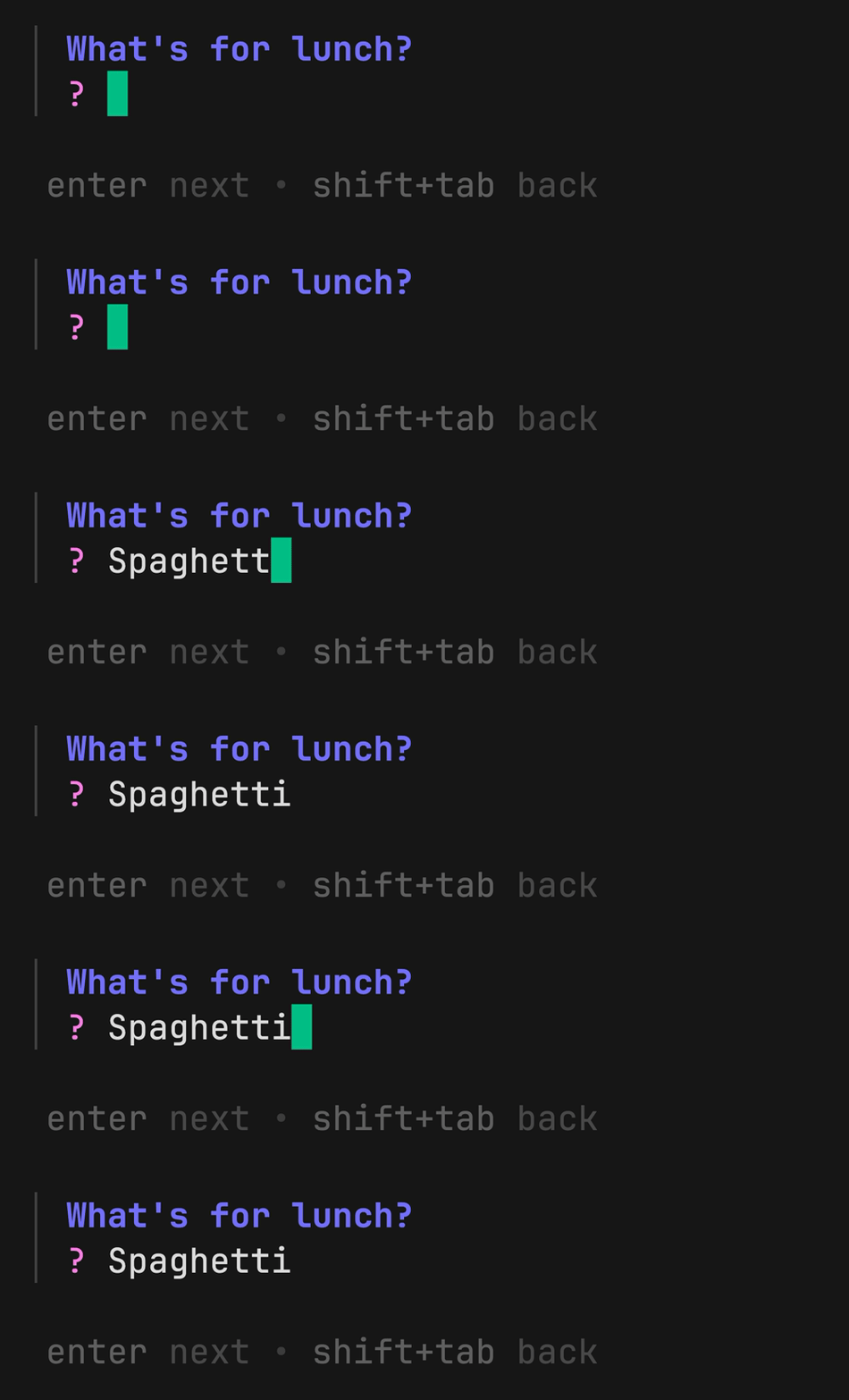 ```go
huh.NewInput().
Title("What’s for lunch?").
Prompt("?").
Validate(isFood).
Value(&lunch)
```
### Text
Prompt the user for multiple lines of text.
```go
huh.NewInput().
Title("What’s for lunch?").
Prompt("?").
Validate(isFood).
Value(&lunch)
```
### Text
Prompt the user for multiple lines of text.
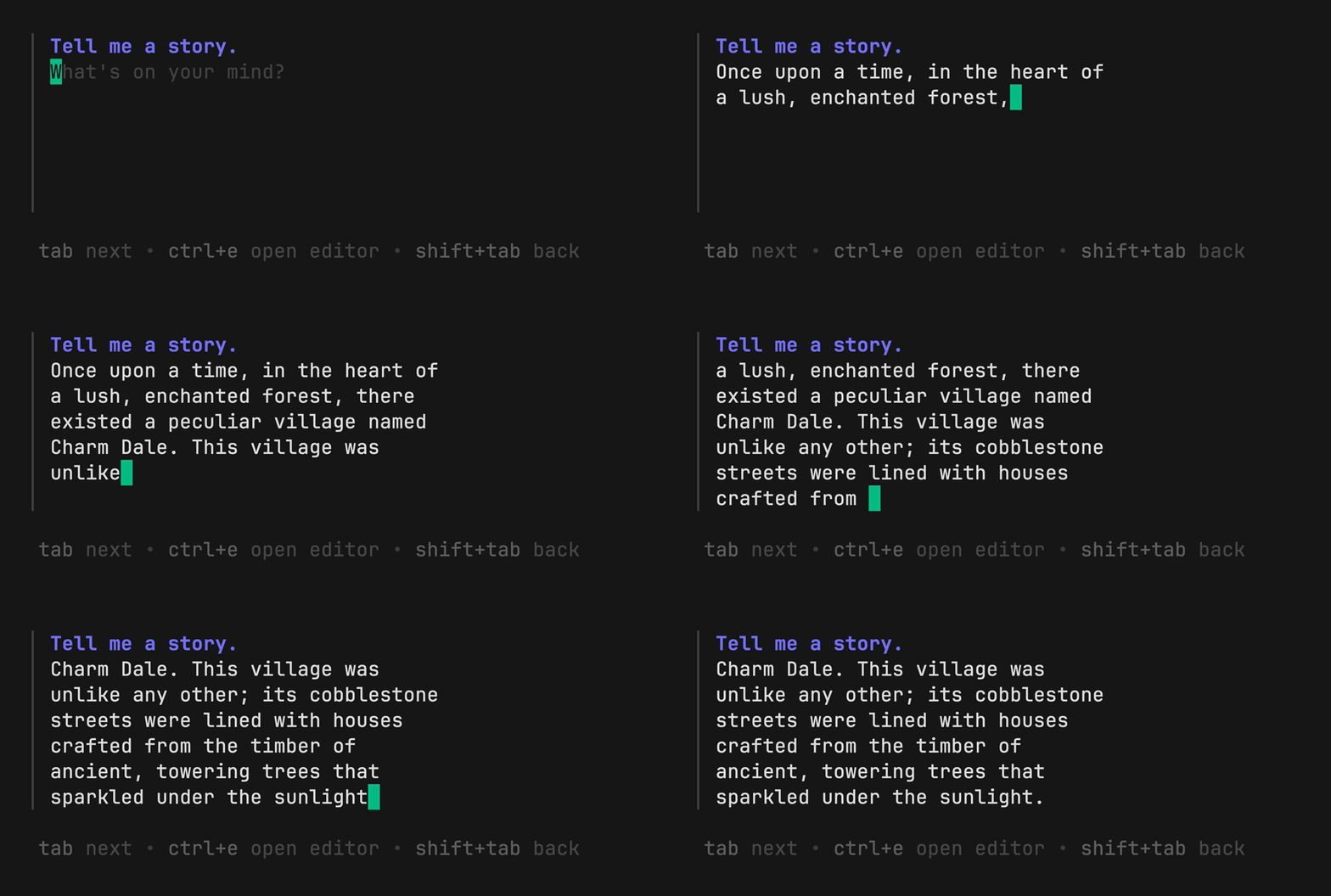 ```go
huh.NewText().
Title("Tell me a story.").
Validate(checkForPlagiarism).
Value(&story)
```
### Select
Prompt the user to select a single option from a list.
```go
huh.NewText().
Title("Tell me a story.").
Validate(checkForPlagiarism).
Value(&story)
```
### Select
Prompt the user to select a single option from a list.
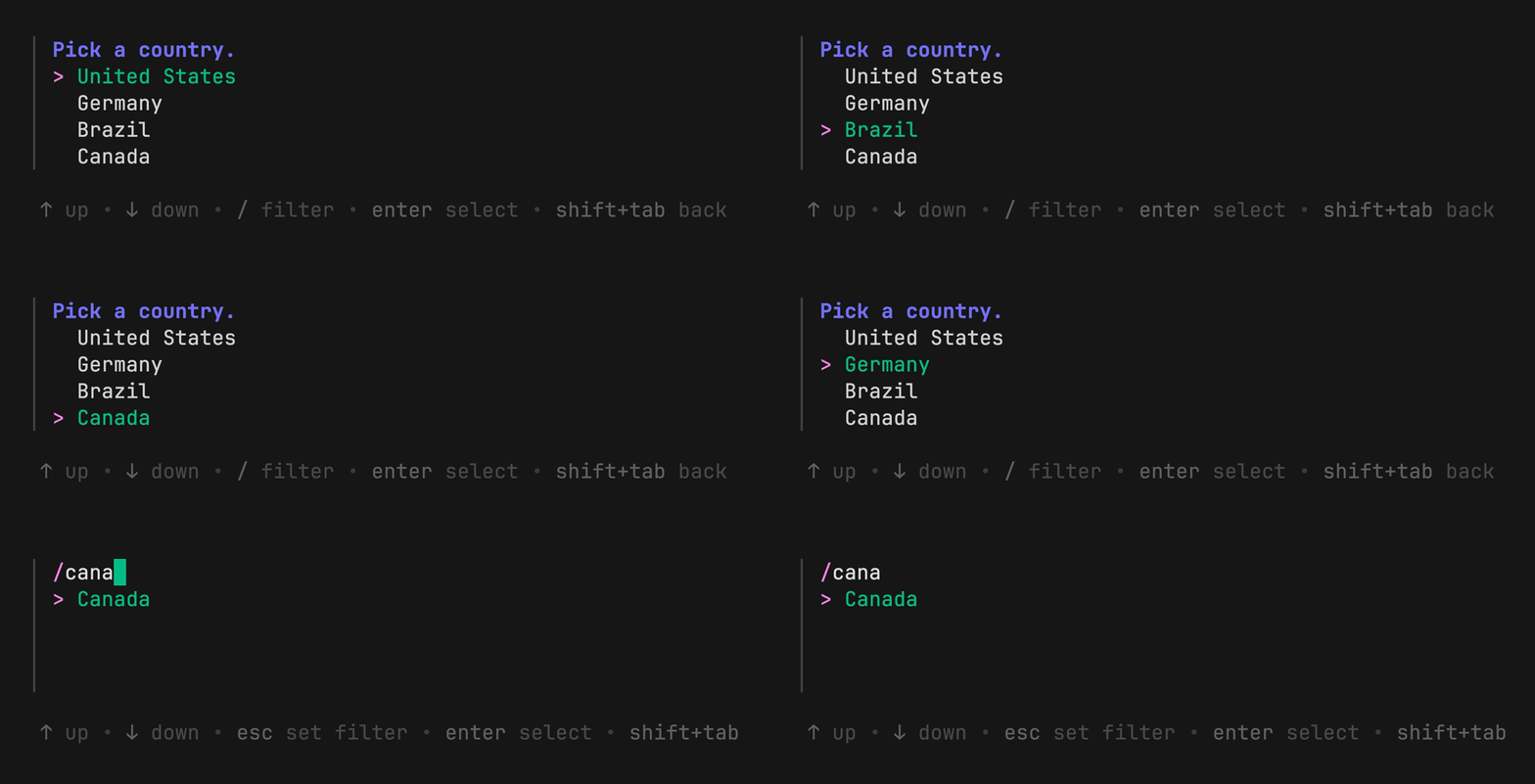 ```go
huh.NewSelect[string]().
Title("Pick a country.").
Options(
huh.NewOption("United States", "US"),
huh.NewOption("Germany", "DE"),
huh.NewOption("Brazil", "BR"),
huh.NewOption("Canada", "CA"),
).
Value(&country)
```
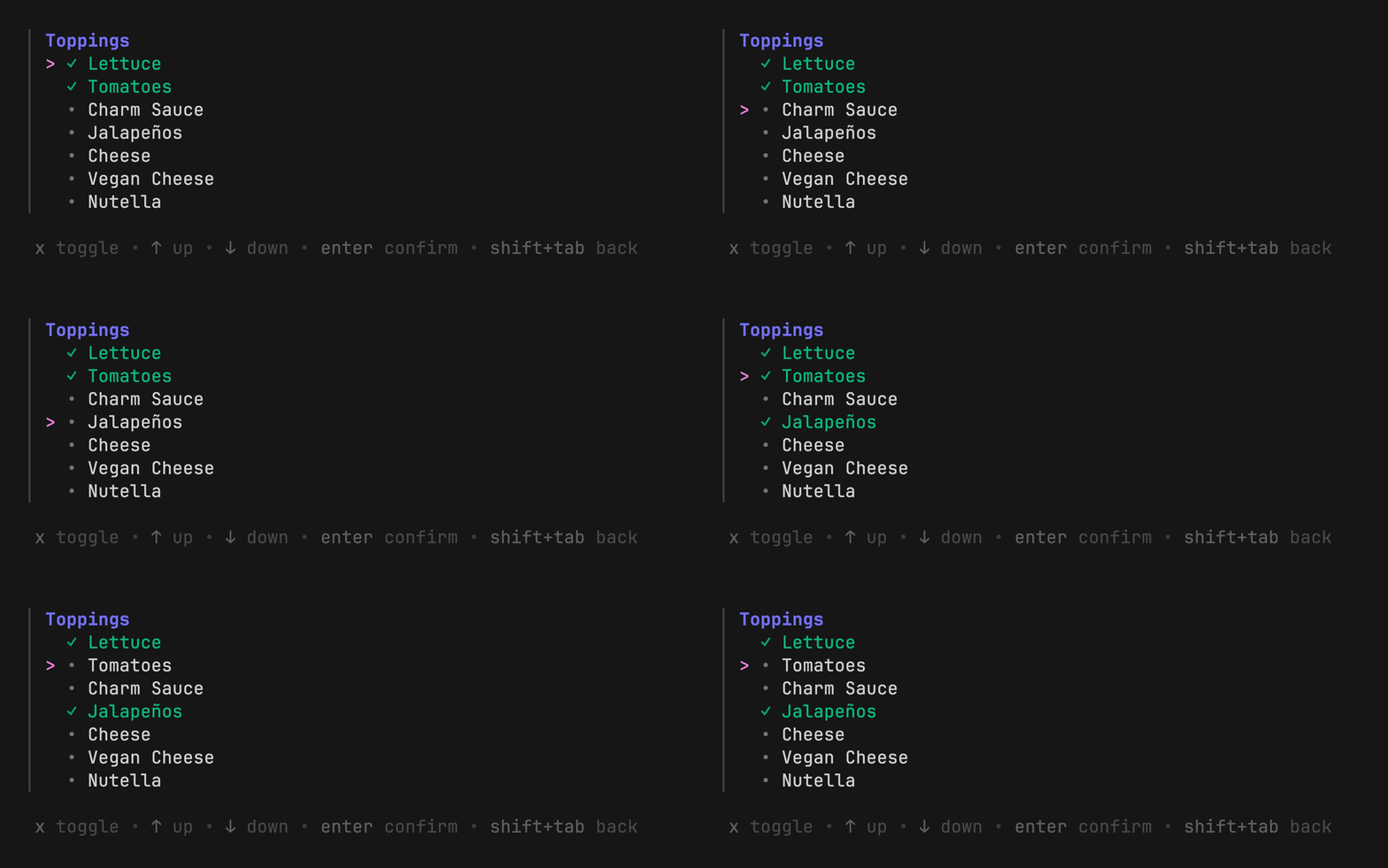
### Multiple Select
Prompt the user to select multiple (zero or more) options from a list.
```go
huh.NewSelect[string]().
Title("Pick a country.").
Options(
huh.NewOption("United States", "US"),
huh.NewOption("Germany", "DE"),
huh.NewOption("Brazil", "BR"),
huh.NewOption("Canada", "CA"),
).
Value(&country)
```
### Multiple Select
Prompt the user to select multiple (zero or more) options from a list.
 ```go
huh.NewMultiSelect[string]().
Options(
huh.NewOption("Lettuce", "Lettuce").Selected(true),
huh.NewOption("Tomatoes", "Tomatoes").Selected(true),
huh.NewOption("Charm Sauce", "Charm Sauce"),
huh.NewOption("Jalapeños", "Jalapeños"),
huh.NewOption("Cheese", "Cheese"),
huh.NewOption("Vegan Cheese", "Vegan Cheese"),
huh.NewOption("Nutella", "Nutella"),
).
Title("Toppings").
Limit(4).
Value(&toppings)
```
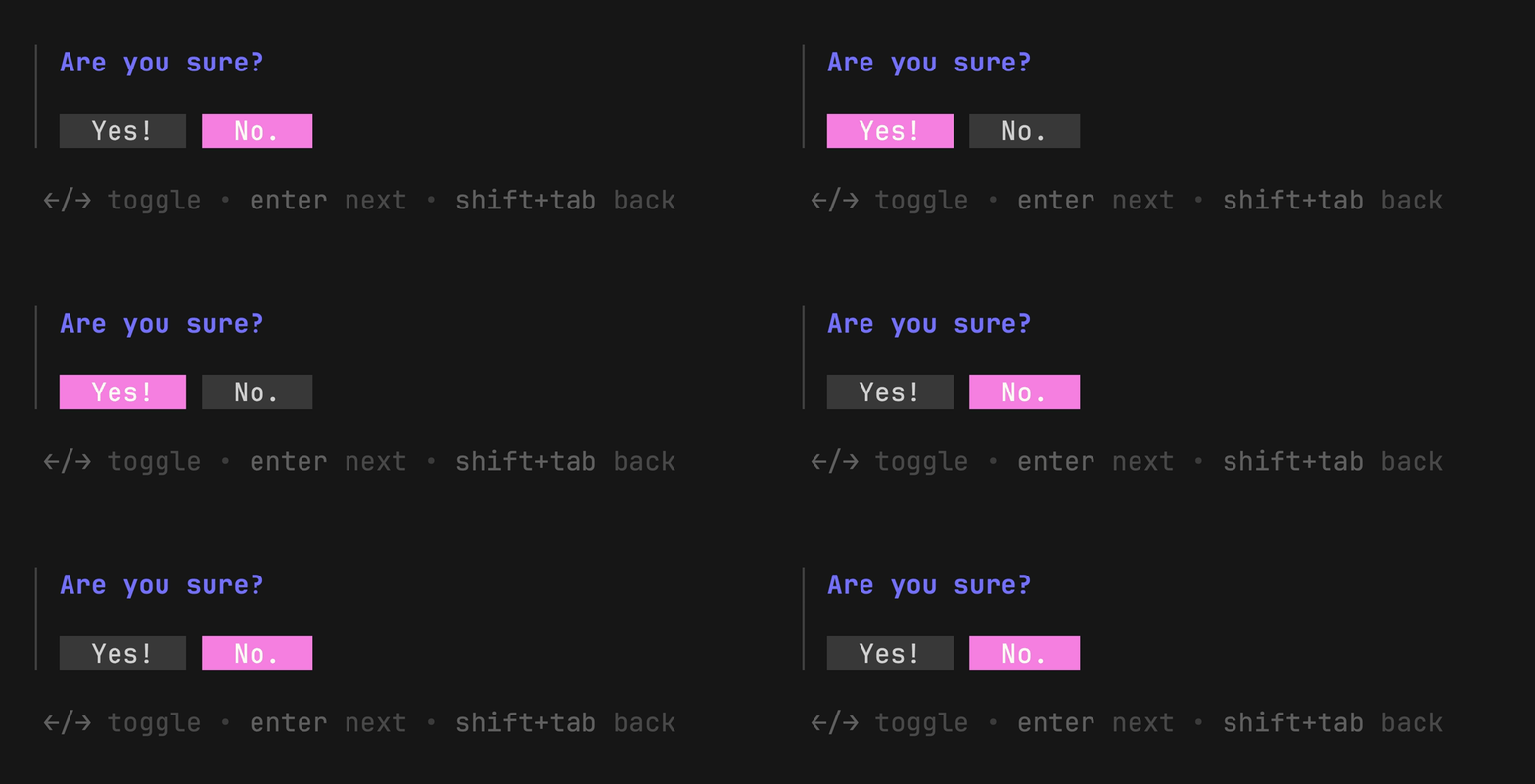
### Confirm
Prompt the user to confirm (Yes or No).
```go
huh.NewMultiSelect[string]().
Options(
huh.NewOption("Lettuce", "Lettuce").Selected(true),
huh.NewOption("Tomatoes", "Tomatoes").Selected(true),
huh.NewOption("Charm Sauce", "Charm Sauce"),
huh.NewOption("Jalapeños", "Jalapeños"),
huh.NewOption("Cheese", "Cheese"),
huh.NewOption("Vegan Cheese", "Vegan Cheese"),
huh.NewOption("Nutella", "Nutella"),
).
Title("Toppings").
Limit(4).
Value(&toppings)
```
### Confirm
Prompt the user to confirm (Yes or No).
 ```go
huh.NewConfirm().
Title("Are you sure?").
Affirmative("Yes!").
Negative("No.").
Value(&confirm)
```
## Accessibility
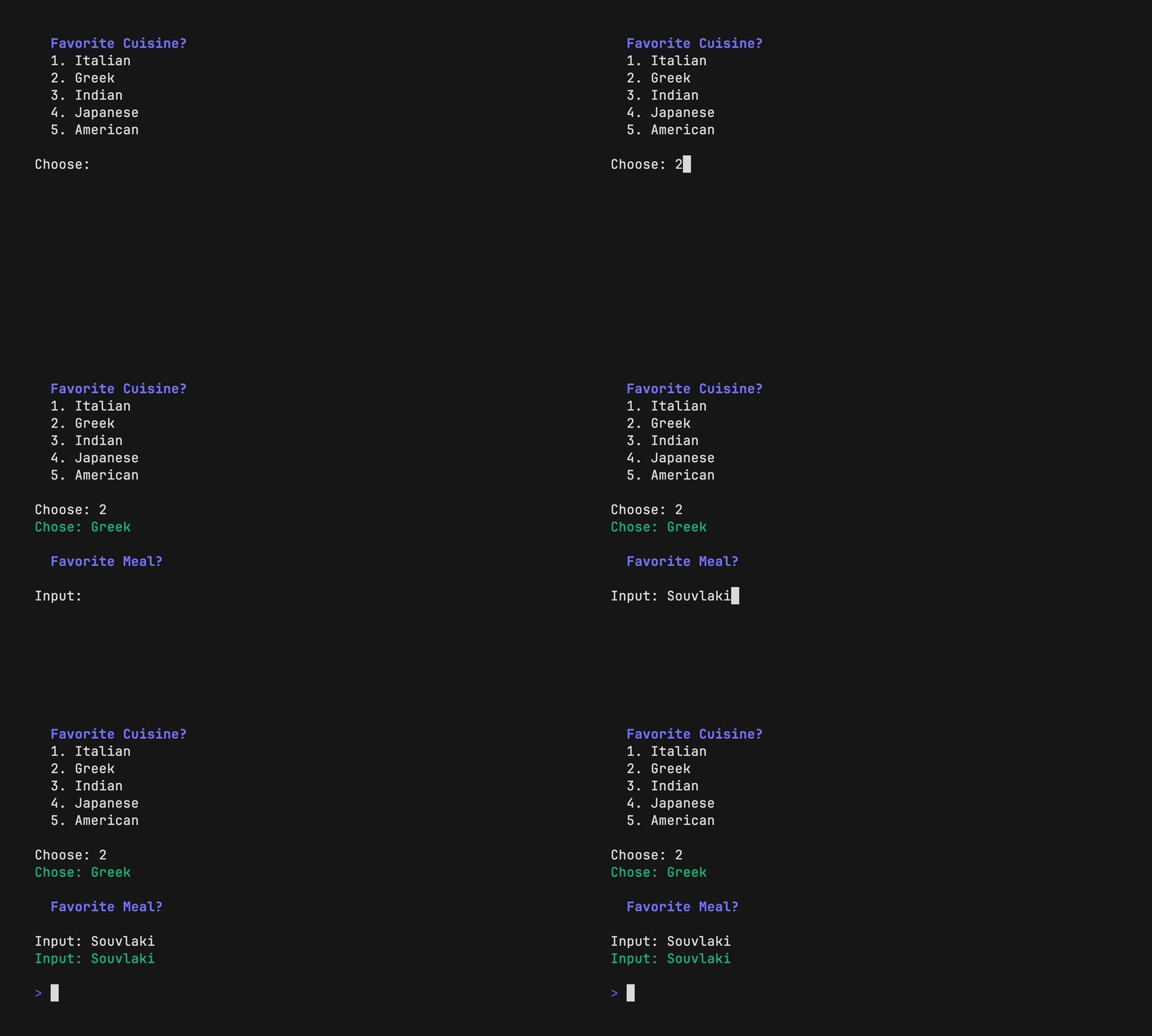
`huh?` has a special rendering option designed specifically for screen readers.
You can enable it with `form.WithAccessible(true)`.
> [!TIP]
> We recommend setting this through an environment variable or configuration
> option to allow the user to control accessibility.
```go
accessibleMode := os.Getenv("ACCESSIBLE") != ""
form.WithAccessible(accessibleMode)
```
Accessible forms will drop TUIs in favor of standard prompts, providing better
dictation and feedback of the information on screen for the visually impaired.
```go
huh.NewConfirm().
Title("Are you sure?").
Affirmative("Yes!").
Negative("No.").
Value(&confirm)
```
## Accessibility
`huh?` has a special rendering option designed specifically for screen readers.
You can enable it with `form.WithAccessible(true)`.
> [!TIP]
> We recommend setting this through an environment variable or configuration
> option to allow the user to control accessibility.
```go
accessibleMode := os.Getenv("ACCESSIBLE") != ""
form.WithAccessible(accessibleMode)
```
Accessible forms will drop TUIs in favor of standard prompts, providing better
dictation and feedback of the information on screen for the visually impaired.
 ## Themes
`huh?` contains a powerful theme abstraction. Supply your own custom theme or
choose from one of the five predefined themes:
- `Charm`
- `Dracula`
- `Catppuccin`
- `Base 16`
- `Default`
## Themes
`huh?` contains a powerful theme abstraction. Supply your own custom theme or
choose from one of the five predefined themes:
- `Charm`
- `Dracula`
- `Catppuccin`
- `Base 16`
- `Default`


 ## Bonus: Spinner
`huh?` ships with a standalone spinner package. It’s useful for indicating
background activity after a form is submitted.
## Bonus: Spinner
`huh?` ships with a standalone spinner package. It’s useful for indicating
background activity after a form is submitted.
 Create a new spinner, set a title, set the action (or provide a `Context`), and run the spinner:
| Action Style | Context Style |
| ```go err := spinner.New(). Title("Making your burger..."). Action(makeBurger). Run() fmt.Println("Order up!") ``` | ```go go makeBurger() err := spinner.New(). Type(spinner.Line). Title("Making your burger..."). Context(ctx). Run() fmt.Println("Order up!") ``` |
 Huh is built on [Bubble Tea][tea] and, in addition to its standalone mode,
`huh?` has first-class support and can be easily integrated into
Bubble Tea applications. It’s very useful in portions of your Bubble Tea
application that need form-like input, and for times when you need more
flexibility than `huh?` alone can offer.
Huh is built on [Bubble Tea][tea] and, in addition to its standalone mode,
`huh?` has first-class support and can be easily integrated into
Bubble Tea applications. It’s very useful in portions of your Bubble Tea
application that need form-like input, and for times when you need more
flexibility than `huh?` alone can offer.
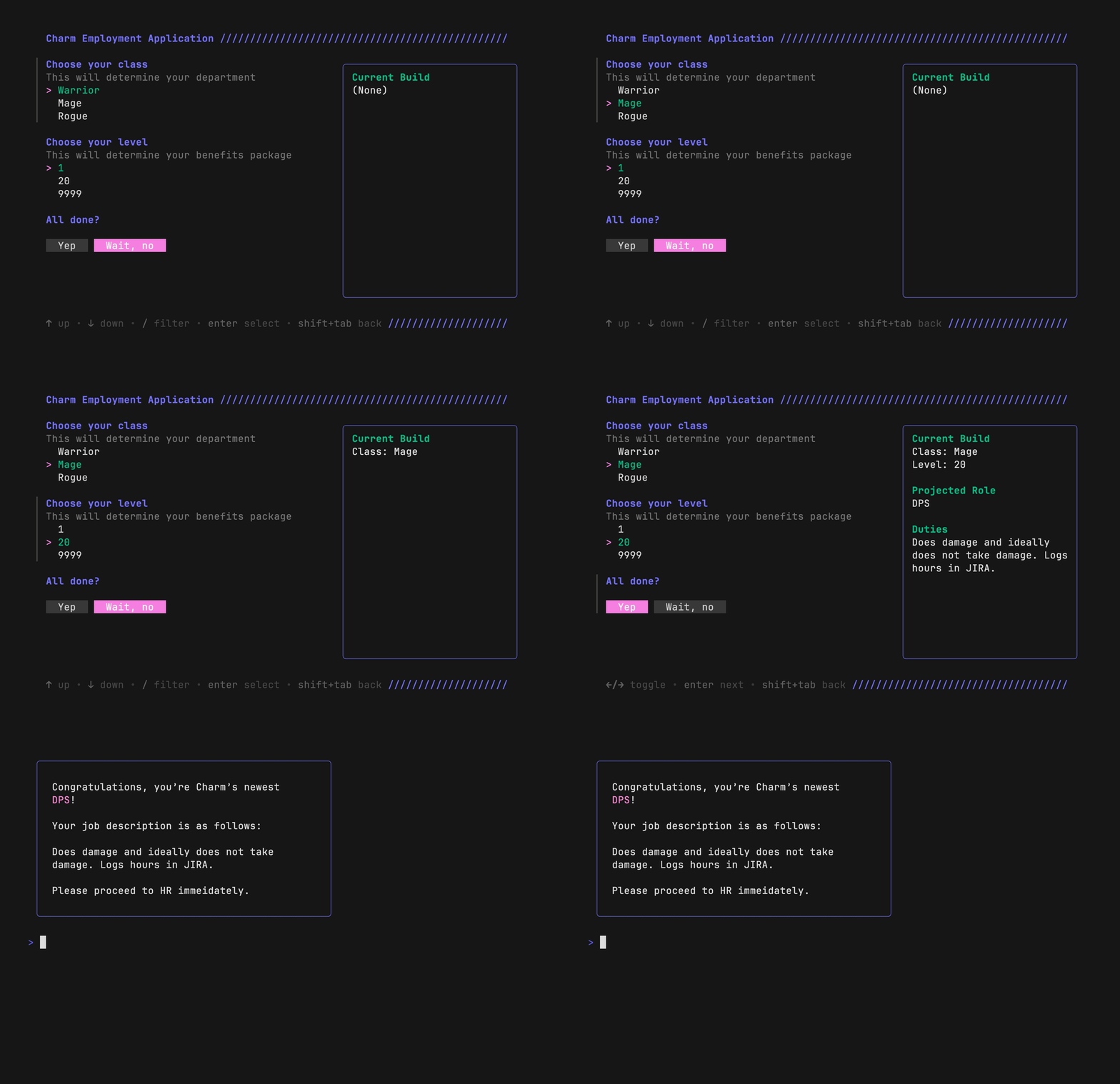 A `huh.Form` is just a `tea.Model`, so you can use it just as
you would any other [Bubble](https://github.com/charmbracelet/bubbles).
```go
type Model struct {
form *huh.Form // huh.Form is just a tea.Model
}
func NewModel() Model {
return Model{
form: huh.NewForm(
huh.NewGroup(
huh.NewSelect[string]().
Key("class").
Options(huh.NewOptions("Warrior", "Mage", "Rogue")...).
Title("Choose your class"),
huh.NewSelect[int]().
Key("level").
Options(huh.NewOptions(1, 20, 9999)...).
Title("Choose your level"),
),
)
}
}
func (m Model) Init() tea.Cmd {
return m.form.Init()
}
func (m Model) Update(msg tea.Msg) (tea.Model, tea.Cmd) {
// ...
form, cmd := m.form.Update(msg)
if f, ok := form.(*huh.Form); ok {
m.form = f
}
return m, cmd
}
func (m Model) View() string {
if m.form.State == huh.StateCompleted {
class := m.form.GetString("class")
level := m.form.GetInt("level")
return fmt.Sprintf("You selected: %s, Lvl. %d", class, level)
}
return m.form.View()
}
```
For more info in using `huh?` in Bubble Tea applications see [the full Bubble
Tea example][example].
[tea]: https://github.com/charmbracelet/bubbletea
[bubbles]: https://github.com/charmbracelet/bubbles
[example]: https://github.com/charmbracelet/huh/blob/main/examples/bubbletea/main.go
## `Huh?` in the Wild
For some `Huh?` programs in production, see:
* [glyphs](https://github.com/maaslalani/glyphs): a unicode symbol picker
* [meteor](https://github.com/stefanlogue/meteor): a highly customisable conventional commit message tool
* [freeze](https://github.com/charmbracelet/freeze): a tool for generating images of code and terminal output
* [savvy](https://github.com/getsavvyinc/savvy-cli): the easiest way to create, share, and run runbooks in the terminal
## Contributing
See [contributing][contribute].
[contribute]: https://github.com/charmbracelet/huh/contribute
## Feedback
We’d love to hear your thoughts on this project. Feel free to drop us a note!
- [Twitter](https://twitter.com/charmcli)
- [The Fediverse](https://mastodon.social/@charmcli)
- [Discord](https://charm.sh/chat)
## Acknowledgments
`huh?` is inspired by the wonderful [Survey][survey] library by Alec Aivazis.
[survey]: https://github.com/AlecAivazis/survey
## License
[MIT](https://github.com/charmbracelet/bubbletea/raw/master/LICENSE)
---
Part of [Charm](https://charm.sh).
A `huh.Form` is just a `tea.Model`, so you can use it just as
you would any other [Bubble](https://github.com/charmbracelet/bubbles).
```go
type Model struct {
form *huh.Form // huh.Form is just a tea.Model
}
func NewModel() Model {
return Model{
form: huh.NewForm(
huh.NewGroup(
huh.NewSelect[string]().
Key("class").
Options(huh.NewOptions("Warrior", "Mage", "Rogue")...).
Title("Choose your class"),
huh.NewSelect[int]().
Key("level").
Options(huh.NewOptions(1, 20, 9999)...).
Title("Choose your level"),
),
)
}
}
func (m Model) Init() tea.Cmd {
return m.form.Init()
}
func (m Model) Update(msg tea.Msg) (tea.Model, tea.Cmd) {
// ...
form, cmd := m.form.Update(msg)
if f, ok := form.(*huh.Form); ok {
m.form = f
}
return m, cmd
}
func (m Model) View() string {
if m.form.State == huh.StateCompleted {
class := m.form.GetString("class")
level := m.form.GetInt("level")
return fmt.Sprintf("You selected: %s, Lvl. %d", class, level)
}
return m.form.View()
}
```
For more info in using `huh?` in Bubble Tea applications see [the full Bubble
Tea example][example].
[tea]: https://github.com/charmbracelet/bubbletea
[bubbles]: https://github.com/charmbracelet/bubbles
[example]: https://github.com/charmbracelet/huh/blob/main/examples/bubbletea/main.go
## `Huh?` in the Wild
For some `Huh?` programs in production, see:
* [glyphs](https://github.com/maaslalani/glyphs): a unicode symbol picker
* [meteor](https://github.com/stefanlogue/meteor): a highly customisable conventional commit message tool
* [freeze](https://github.com/charmbracelet/freeze): a tool for generating images of code and terminal output
* [savvy](https://github.com/getsavvyinc/savvy-cli): the easiest way to create, share, and run runbooks in the terminal
## Contributing
See [contributing][contribute].
[contribute]: https://github.com/charmbracelet/huh/contribute
## Feedback
We’d love to hear your thoughts on this project. Feel free to drop us a note!
- [Twitter](https://twitter.com/charmcli)
- [The Fediverse](https://mastodon.social/@charmcli)
- [Discord](https://charm.sh/chat)
## Acknowledgments
`huh?` is inspired by the wonderful [Survey][survey] library by Alec Aivazis.
[survey]: https://github.com/AlecAivazis/survey
## License
[MIT](https://github.com/charmbracelet/bubbletea/raw/master/LICENSE)
---
Part of [Charm](https://charm.sh).
 Charm热爱开源 • Charm loves open source • نحنُ نحب المصادر المفتوحة