

# sms-port
A native PC port of **Super Mario Sunshine** (GameCube, North America, GMSE01), built from the [matching decompilation](https://github.com/chasem-dev/sms-english).
No game data is included.
You build the program from source, and it reads the models, textures, levels, music and movies from **your own disc image** at run time.
For guided setup, updates and a Play button, use our dedicated [SMS Launcher](https://github.com/chasem-dev/sms-launcher) for Windows, macOS and Linux.
The launcher sets up this port on your computer using your own supported disc image; downloads are on its [releases page](https://github.com/chasem-dev/sms-launcher/releases/latest).
## Decompilation progress
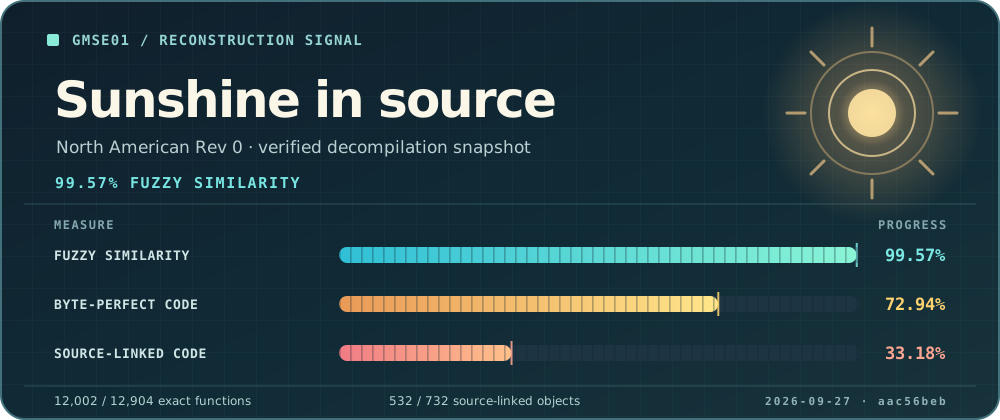
This card shows the [GMSE01 decompilation](https://github.com/chasem-dev/sms-english) snapshot recorded by the source revision pinned in this port.
Fuzzy similarity measures approximate code similarity; the other two tracks show byte-perfect code and code linked from matching source.
## Supported systems
| System | Word size | Status | Output |
| --- | --- | --- | --- |
| Linux (x86) | 32-bit (default) | plays | `build/linux-32/sms` |
| Linux (x86-64) | 64-bit (`SMS_ARCH=64`) | plays; still being tested stage by stage ([docs/64-BIT.md](docs/64-BIT.md)) | `build/linux-64/sms` |
| macOS (Intel, or Apple Silicon under Rosetta 2) | 64-bit | plays | `build/macos-64/sms` |
| macOS, native Apple Silicon (`SMS_ARCH=arm64`) | arm64 | plays | `build/macos-arm64/sms` |
| Windows (MSYS2 MINGW64) | 64-bit | boots under Wine; native runtime checks | `build/windows-64/sms.exe` |
The game code keeps pointers in 4-byte fields, so it was written for a 32-bit machine.
The 64-bit builds keep every address the game sees below 4 GiB; see [docs/64-BIT.md](docs/64-BIT.md).
## Quick start
1. **Get the source**, including the decompilation submodule:
```sh
git clone --recursive https://github.com/chasem-dev/sms-pc-port.git
cd sms-pc-port
```
2. **Install the prerequisites** for your system: [Linux](BUILD.md#linux), [macOS](BUILD.md#macos), [Windows](BUILD.md#windows-msys2-mingw64).
3. **Put your disc image in [`rom/`](rom/)**: one `.iso`, `.gcm` or Dolphin `.ciso` of GMSE01 Rev 0.
4. **Build and play:**
```sh
./build.sh
./run.sh
```
On Windows, run these in the MSYS2 MINGW64 shell, or run `.\build.cmd` and `.\run.cmd` from PowerShell.
The first build compiles about 600 game files and takes a while; later builds only rebuild what changed.
Because the image is in `rom/`, `./build.sh` also makes a **standalone** copy with the game's files inside (`sms-standalone`, or `SMS.app` on macOS) that runs without the image.
See [BUILD.md](BUILD.md#standalone-executable).
You can also keep the image elsewhere and pass it: `./run.sh "/path/to/Super Mario Sunshine (US).iso"`.
## Build and run
The same two scripts work on every system:
| Command | What it does |
| --- | --- |
| `./build.sh [IMAGE]` | builds `build/-/sms`; with an image (argument, `SMS_DISC_IMAGE`, or the one in `rom/`) also the standalone copy |
| `./run.sh [IMAGE] [--headless]` | runs that build: with the image you pass, else the standalone copy, else the image in `rom/` |
| `./clean.sh [--all] [--dry-run]` | deletes the build output (every `build/-/`); never deletes your disc image, and keeps the downloaded SDL2; `--all` deletes all of `build/` |
| `SMS_ARCH=64 ./build.sh` | chooses the word size (Linux: `32` default or `64`; macOS: `64` default or, on Apple Silicon, `arm64` (native, [MACOS-ARM64.md](docs/MACOS-ARM64.md)); Windows: `64` default (`32` legacy with MINGW32)) |
| `JOBS=2 ./build.sh` | limits parallel compiler jobs (default: all cores) |
| `SMS_STANDALONE=0 ./build.sh` | skips the standalone copy even when an image is found |
`./build.sh --help`, `./run.sh --help` and `./clean.sh --help` print the details.
When both a 32-bit and a 64-bit build exist, `./run.sh` runs the 32-bit one unless `SMS_ARCH=64` is set.
## Options
Options can be kept in [`settings.txt`](settings.txt) (`resolution = 2`, `texture_packs = on`, ...), or set as environment variables before the command, for example `SMS_SKIP_MOVIES=1 ./run.sh`; an environment variable wins over the file:
| Option | Effect |
| --- | --- |
| `SMS_SKIP_MOVIES=1` | skip cutscenes; keep portal animations playing |
| `SMS_SKIP_INTRO=1` | start at the title: no Nintendo and Dolby logos or opening movie (A skips each of them anyway) |
| `SMS_ECLIPSE_SUNSHINE_MOVIES=PATH` | Super Mario Eclipse: play the ten movies it kept from Sunshine from this Sunshine disc, at Sunshine's quality (default: the one in `rom/`; `0` for Eclipse's copies; [docs/ECLIPSE.md](docs/ECLIPSE.md)) |
| `SMS_LANGUAGE=fr` | play in French, German (`de`), Spanish (`es`), Italian (`it`) or Polish (`pl`) instead of English (`en`, the default), with that [language pack](#languages) installed |
| `SMS_HEAT_HAZE=0` | turn off the heat-wave shimmer that distorts the picture in sunny areas |
| `SMS_PAUSE_TRACKER=0` | hide the pause menu's [Shine and blue coin tracker](#pause-menu-tracker) |
| `SMS_RADAR=1` | show the [radar](#radar): the stage around Mario with its Shines and blue coins; `SMS_RADAR_ZOOM` (game units, default 2500) and `SMS_RADAR_SIZE` (percent) |
| `SMS_BUTTON_PROMPTS=style` | the buttons shown in the game's text and on the FLUDD gauge: `gamecube` (the game's own, the default), `xbox`, `playstation`, `steamdeck`, `keyboard`, or `auto` (keyboard and mouse or the controller in use) |
| `SMS_BUTTON_PROMPT_PAD=style` | with `auto`, how every controller's prompts look: `xbox`, `playstation`, `steamdeck` or `gamecube` (default: match the controller) |
| `SMS_BUTTON_PROMPT_DIR=dir` | the prompt images, `