# Run Coach — Garmin MCP App
Connect your Garmin watch to Claude Desktop or ChatGPT. Explore interactive charts.
Unofficial. Not affiliated with or endorsed by Garmin. Garmin is a trademark of Garmin Ltd.

## Install
### Claude Desktop
1. Download the latest `.mcpb` file from [Releases](https://github.com/chenhunghan/garmin-mcp-app/releases)
2. Drag it into Claude Desktop to install
3. Ask Claude anything about your Garmin data — it will prompt you to sign in on first use
### ChatGPT (desktop app)
Requires Node.js 20+.
1. In the ChatGPT desktop app, open **Settings → Plugins → Add marketplace**
2. **Source:** `chenhunghan/garmin-mcp-app` (leave Git ref and sparse paths empty) → **Add marketplace**
3. Restart the app, open the Plugins Directory, choose the **Run Coach** marketplace and install **Coach**
Or with the [Codex CLI](https://developers.openai.com/codex): `codex plugin marketplace add chenhunghan/garmin-mcp-app` then `codex plugin add garmin@garmin-mcp`.
**Coach** then appears in the sidebar (daily briefing and performance dashboard) and as a **Training Week** tab in conversations; or just ask "@Coach how am I today?". It runs on your computer, so it works in the desktop app only.
### Other MCP clients (Cursor, VS Code, Claude Code, Codex CLI, …)
Requires Node.js 20+. Add the server to your client's MCP config:
```json
{
"mcpServers": {
"garmin": { "command": "npx", "args": ["-y", "garmin-mcp-app"] }
}
}
```
Or from the command line: `claude mcp add garmin -- npx -y garmin-mcp-app` (Claude Code), `codex mcp add garmin -- npx -y garmin-mcp-app` (Codex CLI).
Clients that support [MCP Apps](https://modelcontextprotocol.io/docs/extensions/apps) (e.g. VS Code) show the interactive charts and the sign-in form. Other clients still get every Garmin tool as data, but can't show the sign-in form: sign in once from an MCP Apps client — the tokens are saved in `~/.garminconnect` and shared by every client on your computer.
## What you can do
Ask Claude about your health, training, and fitness — it reads your Garmin data and shows interactive charts right in the conversation.
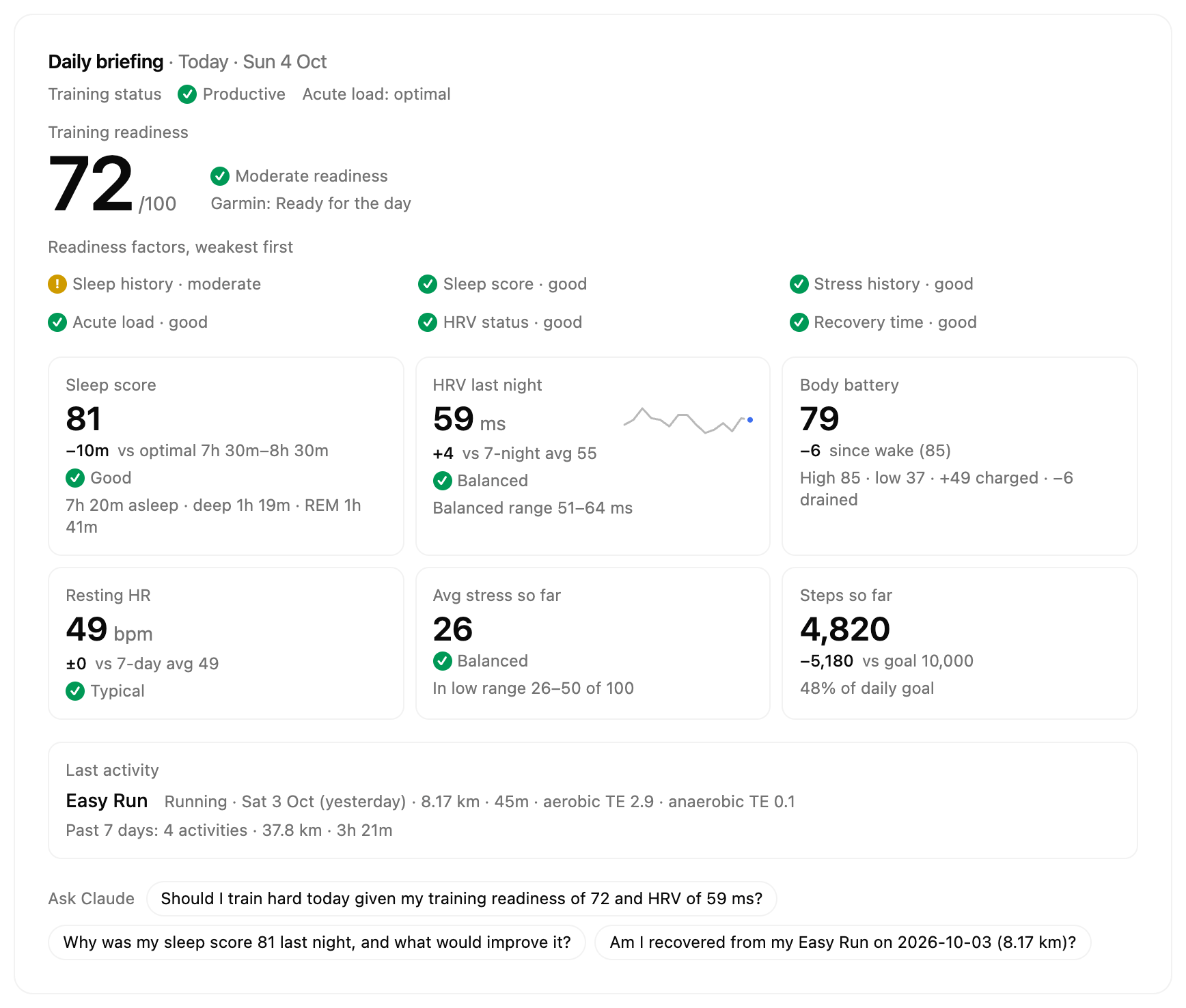
- **Start your day** — a morning briefing: readiness, sleep, HRV, body battery and resting HR against your own baselines, with Claude's suggestions
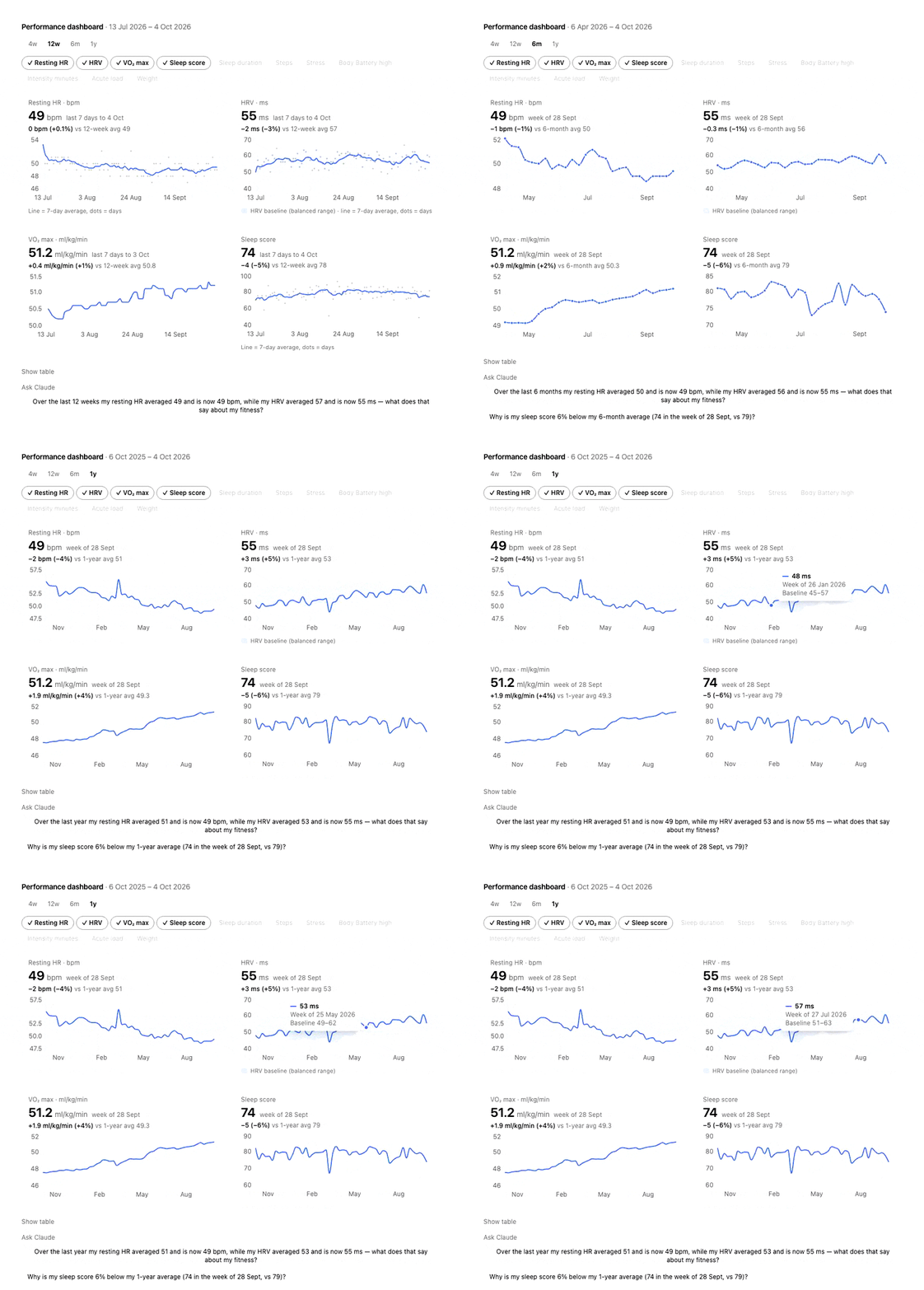
- **See your trends** — compare up to 4 metrics over 4 weeks to a year, and ask Claude what changed
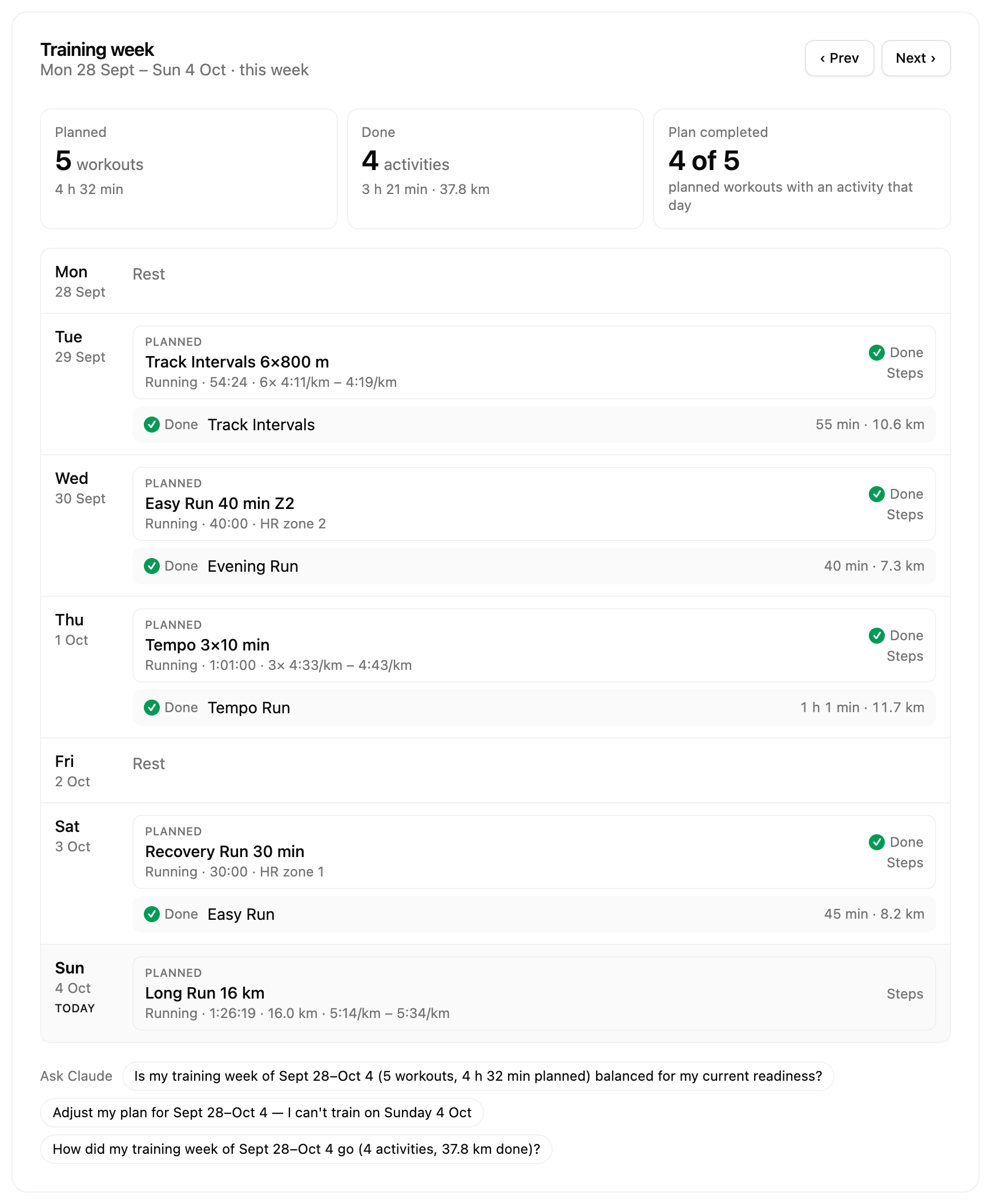
- **Plan your week** — Claude designs a week of training from your data, then creates and schedules the workouts on your Garmin calendar
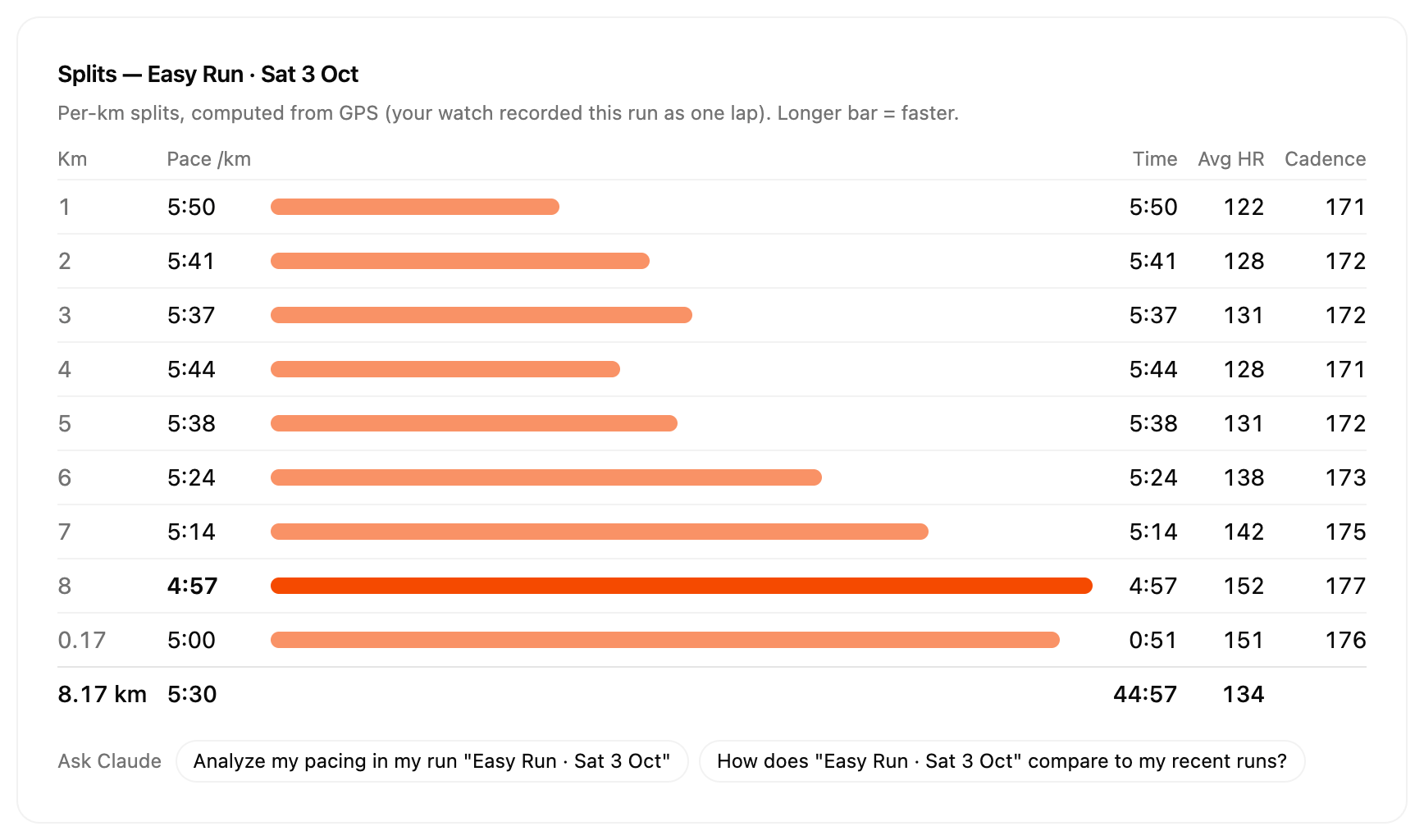
- **Analyze your workouts** — per-km splits (even for single-lap runs), HR zones, and training effect
- **Track your fitness** — training readiness, training load, VO2 Max, race predictions, and 30+ more Garmin metrics
### Your Garmin, coached by Claude
The app frames your data against your own baselines; Claude reads it and suggests what to do. Every view has **Ask Claude** questions built from your numbers, and Claude knows what you're looking at.
**Daily briefing** — _"How am I today?"_
**Performance dashboard** — _"How has my fitness trended this year?"_
**Weekly training plan** — _"Plan my training week"_ (or the `plan-training-week` prompt)
**Per-km splits** — _"Show the splits of my last run"_
Screenshots use the built-in demo mode (`npm run dev:ui:demo`): a fictional runner, no real person's data. Light and [dark](docs/images/daily-briefing-dark.png) themes follow Claude Desktop.
What you can visualize
Plot your activities

Visualize training readiness

Full list of supported Garmin Connect data
| Category | Data |
| -------------- | ----------------------------------------------------------------------------------------------------------- |
| Daily health | Steps, heart rate, sleep stages, stress, body battery (+ events), HRV, respiration, SpO2, floors, hydration |
| Trends | Resting heart rate, weekly steps, weekly stress, weekly intensity minutes, weigh-ins |
| Activities | List / by date, details, splits, typed splits, HR time-in-zones, chart data, weather, exercise sets, gear |
| Training | Training readiness, training status & load, VO2 Max, race predictions, endurance score, hill score |
| Performance | Lactate threshold, cycling FTP, HR zones, fitness age, personal records, running tolerance, progress |
| Devices & gear | Devices, primary training device, last used device, gear, goals, training plans, calendar |
| Workouts | List, create, update, delete, and schedule workouts |
## Privacy & Security
**No data is stored or collected by this app.** Your data flows directly between your machine and the Garmin Connect API — there is no intermediate server.
Learn more
- **Your credentials stay private.** You sign in through a secure login form rendered inside Claude Desktop. The login and MFA tools are marked as app-only (`visibility: ["app"]`), meaning Claude (the LLM) cannot call them and **never sees your email, password, or MFA code**.
- **Claude doesn't know who you are.** The LLM only receives the health/fitness data you ask for (steps, sleep, etc.) — it has no access to your Garmin account credentials, OAuth tokens, or profile (name, email, location).
- **Your password is never sent in plain text.** The login form encrypts it with a single-use key before it passes through Claude Desktop, so it can't leak into host logs.
- **Tokens are stored locally.** OAuth tokens are saved on your machine at `~/.garminconnect/` with restrictive file permissions (`0600`). They are never sent anywhere other than the Garmin Connect API.
- **You can log out anytime.** Logging out clears all saved tokens from your machine.
---
Developer / Contributor Guide
## Getting Started
```bash
git clone https://github.com/chenhunghan/garmin-mcp-app.git
cd garmin-mcp-app
npm install
```
`npm install` automatically sets up git hooks via [prek](https://github.com/j178/prek):
- **commit-msg** — enforces [Conventional Commits](https://www.conventionalcommits.org/) via commitlint
- **pre-push** — runs lint, format check, typecheck, and tests (same as CI)
### Troubleshooting: `core.hooksPath`
If `npm install` warns about `core.hooksPath`, prek cannot install git hooks. Fix it by unsetting the local config:
```bash
git config --unset-all --local core.hooksPath
npm run prepare
```
## Development
```bash
npm run dev # watch-build server + UI
npm run dev:ui # standalone UI dev at localhost:5173
npm run test:lib # run garmin-connect tests
npm run pack # build + package .mcpb bundle
```
`npm run dev:ui` opens `http://localhost:5173` with the React UI wired to the real MCP server in-process. You can test login, MFA, and logout against the actual Garmin API without deploying to Claude Desktop.
## Testing in Claude Desktop
Run `npm run build` (one-off) or `npm run dev` (watch mode for live rebuilds), then add to `~/Library/Application Support/Claude/claude_desktop_config.json`:
```json
{
"mcpServers": {
"garmin-mcp": {
"command": "node",
"args": ["/absolute/path/to/garmin-mcp-app/dist/index.js"]
}
}
}
```
Restart Claude Desktop. Ask Claude to check your Garmin auth — it will render the app UI in an iframe and run the real login/MFA flow.
## Architecture
- **MCP Server** (`src/server.ts`) — Node.js server over stdio, registers tools + UI resource
- **React UI** (`src/app.tsx`) — Rendered in host's sandboxed iframe, communicates via `postMessage`
- **garmin-connect** (`packages/garmin-connect/`) — TypeScript client library for Garmin Connect OAuth + API
## Commit Convention
Commits must follow the Conventional Commits format:
```
type(optional-scope): description
```
Allowed types: `feat`, `fix`, `chore`, `docs`, `ci`, `refactor`, `test`
## Disclaimer
Run Coach is an independent, open-source project. It is not affiliated with, endorsed by, or sponsored by Garmin Ltd. or its subsidiaries. Garmin and Garmin Connect are trademarks of Garmin Ltd. or its subsidiaries; they are used here only to describe compatibility. The app uses the unofficial Garmin Connect API with your own account.