简体中文 ·
Agent installation guide ·
Developer guide ·
Custom Nodes ·
Example Gallery

🎬 DeepSeek-Harness Video-Director
A visual, node-based video director for DeepSeek Harness.
Script · Prompt · Image · Audio · Video · Fully local workflows
DSH Plugin · ComfyUI · Ollama · MiniMax-H3 · Uncensored
DeepSeek-Harness Video-Director is a video-production plugin built for [DeepSeek Harness](https://github.com/deepseek-ai/deepseek-harness). It turns script, image, audio, and video generation into a connectable canvas, with ready-to-use paths for ComfyUI, Ollama, OpenAI-compatible APIs, and Codex Plan.
Beginners can start with the built-in workflows instead of assembling every provider call by hand. Native Qwen3.8-27B and MiniMax-H3 paths make a **fully local, uncensored, deployment-controlled** multimedia pipeline possible when the selected models and runtime support it.
## ✨ Why Video-Director
| Highlight | What you get |
|---|---|
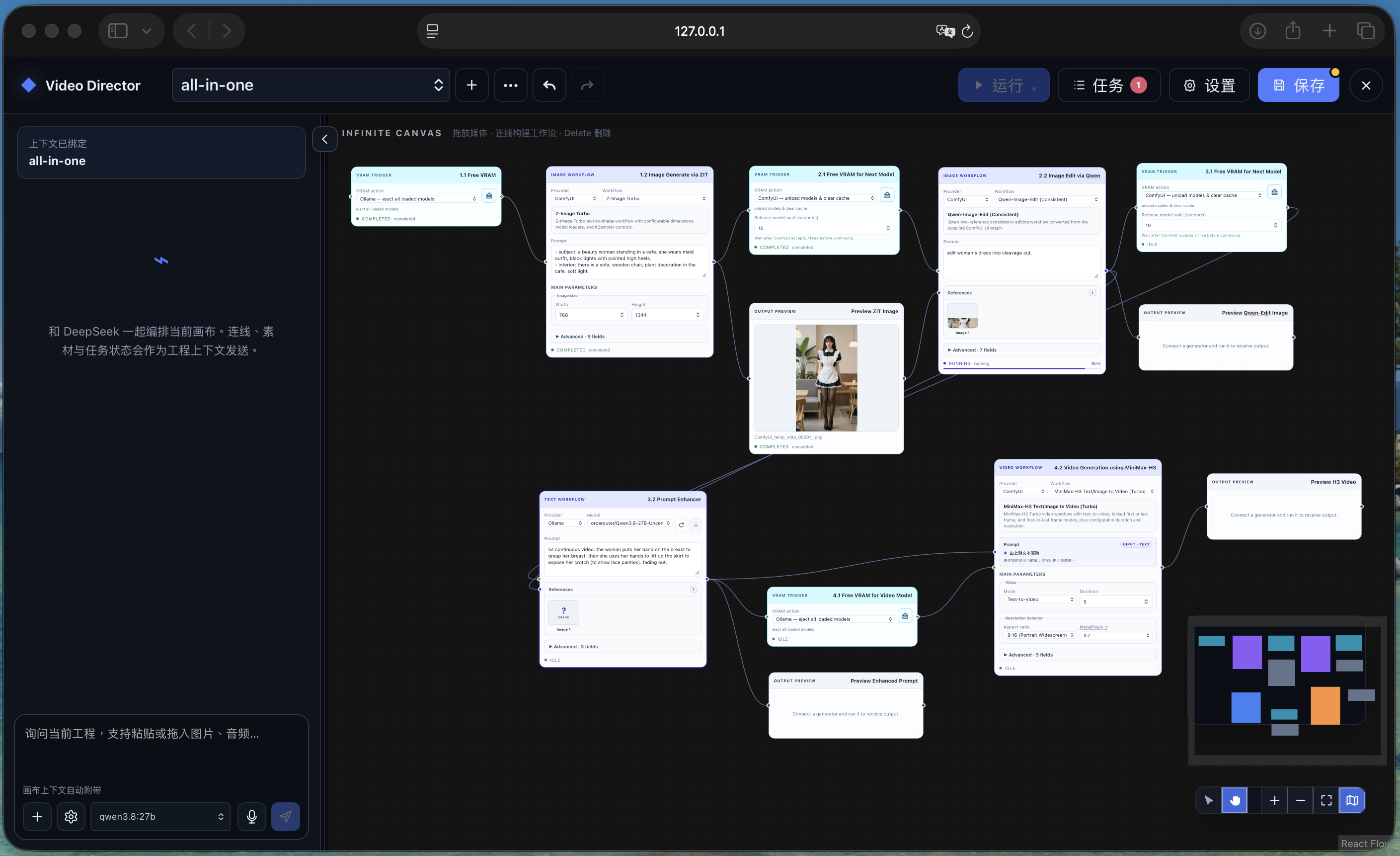
| 🧩 **Visual production graph** | Connect text, images, audio, video, workflows, previews, and saved outputs on one infinite canvas. |
| 🚀 **Beginner-ready workflows** | Start from bundled image, H3 video, H3 audio, and prompt-enhancement workflows. |
| 🏠 **Local-first generation** | Use Ollama and ComfyUI on your own machine, including Qwen3.8-27B and MiniMax-H3 pipelines. |
| 🔌 **Multiple providers** | Mix Ollama, OpenAI-compatible endpoints, Codex Plan, and one logical ComfyUI backend in the same project. |
| 🎞️ **Project-aware direction** | Every Video Project keeps its own canvas, chat session, jobs, immutable assets, and provider choices. |
| 🛠️ **Extensible by design** | Import reviewed ComfyUI API workflows or package them as declarative Video Director Custom Nodes. |
## 🚀 Quick start
### 1. Install into DSH and run
Requirements: Git, Node.js `^22.19.0` or `>=24`, pnpm `11.7.0`, and an installed `dsh` CLI. For a single-machine, fully local deployment, **NVIDIA DGX Spark is the recommended environment**, but it is not required; the exact hardware requirement depends on the workflow profile and model precision you select. Run the following from the directory where you want to keep the plugin:
```bash
git clone --branch uncensored --single-branch https://github.com/chiphoton/DeepSeek-Harness-Video-Director.git
cd DeepSeek-Harness-Video-Director
pnpm install --frozen-lockfile
pnpm run build
dsh plugin --profile web add "file:$PWD"
dsh web
```
`dsh web` opens the DSH Web UI. The plugin is installed persistently into the `web` profile, so later starts only need:
```bash
dsh web
```
If you run DSH from a sibling source checkout instead of an installed CLI:
```bash
# Run once in DeepSeek-Harness-Video-Director
pnpm install --frozen-lockfile
pnpm run build
# Then run in the sibling deepseek-harness checkout
pnpm dsh plugin --profile web add ../DeepSeek-Harness-Video-Director
pnpm dsh web
```
### 2. Connect a generator
If Ollama or ComfyUI is not ready yet, give the [agent installation guide](docs/INSTALL.md) to an agent. It inventories the exact models, ComfyUI workflows, and Custom Nodes used by this repository, installs only the selected workflow profile, and verifies the result. The default path installs both services locally; a separate path keeps cloud services bound to their remote loopback interfaces and reaches them through SSH local port forwarding.
Open **Settings → Connections** in Video-Director:
- **Ollama:** defaults to `127.0.0.1:11434`; install a model such as Qwen3.8-27B on the Ollama host, then select it in Video-Director.
- **ComfyUI:** defaults to `127.0.0.1:8188`; install each workflow's required models and Custom Nodes on the ComfyUI host.
- **OpenAI-compatible:** set the Base URL, model ids, and API key for your provider.
- **Codex Plan:** uses the machine's existing Codex sign-in for prompt and image workflows.
You only need one working provider to begin. Video-Director does not silently install models, ComfyUI nodes, or external services.
### 3. Build your first flow
Double-click empty canvas space, add nodes, and connect compatible handles:
```text
Text → Prompt Enhancer → H3 Video → Preview → Save Output
```
Set the provider and workflow on each executable node, enter a prompt, then click **Run**. Use **Save** in the top bar to persist canvas edits; generation can run from the current unsaved canvas snapshot.
## 🧰 Nodes and how to use them
| Group | Nodes | Use |
|---|---|---|
| **Inputs** | Text, Image, Audio, Video, Sketch | Type, upload, paste, drop, or draw source material. |
| **Workflows** | Prompt Enhancer, Image Processing, H3 Video, H3 Audio | Generate or transform media with the selected provider and workflow. |
| **Utilities** | VRAM Trigger | Insert an execution barrier and optionally eject Ollama models or clear ComfyUI VRAM/cache. |
| **Outputs** | Preview, Save Output | Inspect results in the project or download them with an explicit filename. |
| **Custom Node** | Bundled and imported definitions | Run typed, reusable ComfyUI-backed nodes with compact primary and Advanced controls. |
Useful canvas gestures:
- Double-click blank space to search the node menu.
- Drag an output onto blank space to create and connect a compatible node.
- Right-click a node to run, cancel, duplicate, rename, inspect, or delete it.
- Select a node and use **Run** for one node, a selection, downstream nodes, or the whole graph.
- Connect generated media to **Preview** and **Save Output**; unconnected results receive an automatic Preview.
Bundled Custom Nodes include Qwen image editing, Z-Image Turbo, MiniMax-H3 text/image-to-video, reference-to-video, and Turbo/Standard H3 audio workflows. See [`custom_nodes/`](custom_nodes/README.md) for dependencies and safety notes.
## 🪄 ComfyUI workflow-to-node Skill
The bundled [`comfyui-workflow-to-node`](skills/comfyui-workflow-to-node/SKILL.md) Skill converts a trusted ComfyUI workflow into either:
- a repository built-in workflow; or
- a portable, declarative Video Director Custom Node v1 pack.
Invoke it from a DSH conversation:
```text
$comfyui-workflow-to-node
Convert /absolute/path/my-workflow-api.json into a reusable Video Director
Custom Node. Keep model and sampler controls in Advanced.
```
API-format workflows can be analyzed offline. Editor/UI workflows require exact metadata from the matching ComfyUI `/object_info`; the Skill stops instead of guessing when a mapping is ambiguous. Conversion does not submit the graph, install Python Custom Nodes, download models, or generate media.
The Skill is already prepared for plugin distribution: its project source lives under `skills/comfyui-workflow-to-node/`, `package.json` includes `skills/` in the published package, and the Host strips the Skill's YAML front matter before registering its body with the DSH Skills service while retaining its local references and script.
## 💾 Where files are saved
The default Host data directory is `./.dsh-video-director`, resolved from the directory where `dsh web` starts:
```text
.dsh-video-director/
├── projects//project.json # canvas, settings, and recent jobs
├── assets/. # uploaded and generated media
├── assets/index.json # immutable asset metadata and hashes
└── workflows.json # imported workflow registry
```
Change `dataDir` in the plugin's DSH configuration if you need a stable absolute location. **Save Output** downloads a copy through the browser to the browser's configured download directory; the project-owned asset remains under `dataDir/assets`.
## 📝 Notes
- This plugin orchestrates providers; it is not a hosted generation service. Ollama, ComfyUI, models, and remote API accounts are operated separately.
- “Fully local” means the selected Ollama/ComfyUI path stays on infrastructure you control. “Uncensored” behavior depends on the selected model, runtime configuration, applicable law, and model licenses.
- MiniMax-H3 weights have a separate license. Review it before enabling production or commercial use.
- ComfyUI workflow JSON is executable configuration because it can invoke installed local Python Custom Nodes. Import only trusted graphs.
- Uploaded assets are limited to 200 MiB each by default. Projects retain the latest 100 job records.
- Canvas edits are explicit-save. Running captures an immutable snapshot, so later edits do not change work already queued.
- The plugin binds DSH Web to its normal loopback-safe defaults. Protect and authenticate any remote Ollama, ComfyUI, or OpenAI-compatible endpoint.
For configuration, architecture, transport behavior, recovery, security, limitations, and development commands, read the [developer guide](docs/DEVELOP.md).
## License
[MIT](LICENSE). Model weights, ComfyUI, Custom Nodes, and external services retain their own licenses and terms.