# VeriPower User Manual
[中文版](USER-MANUAL.zh.md)
This guide covers preparing a design task, running the flow, reviewing its
outputs, and continuing after changes or interruptions. `{module_dir}` means
the directory containing the whole design workspace. Use its absolute path
when asking the agent to work on it.
## 1. Prepare the environment
Install VeriPower using the [README quickstart](../README.md#quickstart).
Host-specific setup is documented for [Claude Code](../.claude-plugin/README.md),
[opencode](../.opencode/README.md), [DeepSeek Harness](../.dsh/README.md), and
[Codex](../codex/README.md).
The Python scripts require Python 3.10 or later and the packages listed in
`requirements.txt`. From a source checkout, install them with:
```bash
python3 -m pip install -r requirements.txt
```
The full flow uses SpyGlass, Design Compiler, PrimeTime, and VCS with UVM.
The specification, verification planning, and RTL design stages can run
without these EDA tools. Tool paths, licenses, libraries, and environment
variables are described in [EDA Tool Environment](eda-env.md). Export the
settings in the environment used to launch the coding agent.
To check readiness before a design run, ask in a separate session:
> Run the env-precheck skill.
The check inspects tools and environment settings, then runs small tool jobs
for the stages you select. It reports which stages can run and suggests
settings for missing variables. It does not edit your shell configuration.
Resolve the reported environment issues before launching the affected stages.
## 2. Prepare the design input
The flow starts from `{module_dir}/intent/brainstorm.md`. The filename is fixed,
but the document can use your existing specification format. Keep referenced
material in the same `intent/` tree.
```text
module_dir/
└── intent/
├── brainstorm.md
└── ... Reference models, register maps, standards, or other sources
```
### Use an existing specification
Save your specification as `intent/brainstorm.md` and include the material
needed to interpret it. Describe the required behavior, interfaces, clocks,
resets, and any timing, area, power, or coverage targets. State the conditions
under which a target applies, such as the operating scenario for a power bound.
Mark open questions and choices you want the agent to make.
Copy authoritative reference files into `intent/` so their content is tracked
with the specification. A file outside this tree is not automatically included
as intent. A symbolic link records where it points, rather than changes to the
target's content.
Existing RTL or tests can be supplied as reference material. Explain their role
in the specification. The flow creates and records its own stage deliveries.
Putting files in the module directory does not register a completed stage.
### Develop requirements with the agent
If the requirements need discussion, use a separate session:
> Run the brainstorm skill for {module_dir}.
The skill works through the requirements and unresolved choices, then writes
`intent/brainstorm.md`. It returns the path and a short description of what it
covered or changed. Review the document before starting the flow. When you
already have a suitable specification, you can start directly from that file.
## 3. Start and monitor the flow
Start a separate session and ask:
> Run the design-flow skill for {module_dir}.
The agent coordinates stage execution and repairs. It continues within your
authorization and brings back decisions that need your input, along with the
relevant evidence. Review deliveries whenever useful. Reading a report does
not itself require the flow to pause.
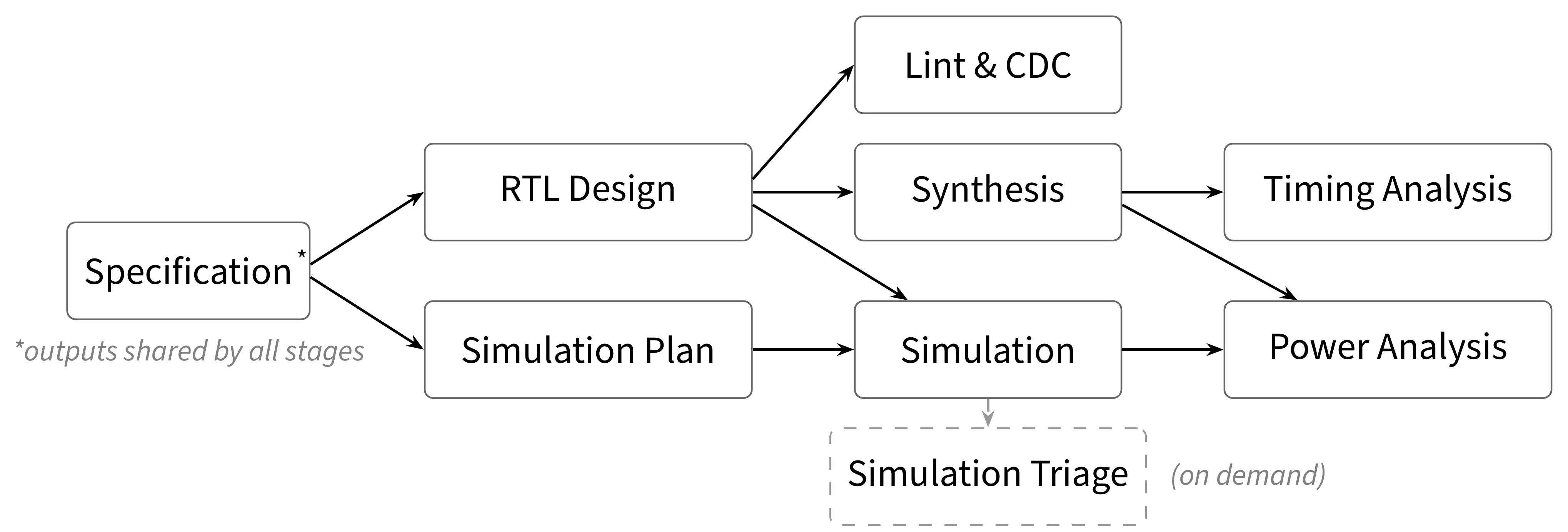
The diagram shows the main artifact dependencies. RTL design and verification
planning both start from specification. Ready work can run in parallel, and
the scheduler also accounts for ongoing work and repairs. The flow can revisit
earlier stages when a later check finds a problem.
To check progress, ask:
> Show the current status of {module_dir}, including any failed checks and unfinished runs.
| State | Meaning | What to do |
|---|---|---|
| `missing` | No result has been collected for this stage | Let the flow schedule the required work |
| `in-flight` | A dispatched run has not been collected | Let the agent check its executor and collect it when it exits |
| `valid` | The latest result passes and its recorded files still match | Review the result as needed |
| `stale` | The latest result passed, but a recorded input or output changed | Ask the flow to reassess the affected work |
| `failed` | The latest result reports a failure | Inspect the finding and follow the repair work |
| `blocked` | The latest collection could not establish a pass/fail result | Resolve the reported cause, such as a missing or malformed result |
`in-flight` describes an uncollected run. The executor may already have exited.
A `blocked` result identifies incomplete execution or collection, while
`failed` carries a stage's technical failure conclusion.
## 4. Review the results
Each stage publishes files below `Design/` or `Verification/`. Its
`result.json` records the verdict and delivered artifact list. The tables
below identify the files most useful for review, relative to `{module_dir}`.
### Requirements and verification plan
| Directory | Files to start with | Review focus |
|---|---|---|
| `Design/specification/` | `design.md`, `requirements.json`, `spec-review/findings/`, `spec-review/decisions.md` | Required behavior, unresolved requirements, numerical targets, interface and clock decisions |
| `Verification/simulation-plan/` | `verification-plan.md`, `plan-review/findings.md`, `plan-review/decisions.md` | Whether the planned tests cover the requirements and how review findings were resolved |
The requirements ledger preserves source wording and names who judges each
entry. Review open items, decisions, external responsibilities, and numerical
bounds. `unassignable` entries must be resolved before specification passes.
Other specification outputs include `manifest.json`, `clocks.json`,
`top-io.json`, `check-hints.json`, and `constraints/`.
The verification plan is supported by `tb-scaffold.json`, `sequences.json`,
and `power-scenarios.json`. The power scenarios describe the measurements the
power stage needs to perform.
### RTL and static analysis
| Directory | Files to start with | Review focus |
|---|---|---|
| `Design/rtl-design/` | `src/`, `rtl-files.json`, `constraint-annotations.json`, `semantic-review/` | Implementation, source layout, timing annotations, and design review findings |
| `Design/lint-cdc/` | `lint-report.txt`, `cdc-report.txt`, `scripts/waiver.tcl` | Reported violations and the technical basis for each waiver |
| `Design/synthesis/` | `reports/timing_setup.rpt`, `reports/area.rpt`, `reports/qor.rpt`, `out/` | Setup slack, cell area, report consistency, and the synthesized design |
| `Design/timing-analysis/` | `timing-report.txt` | Setup/hold results, analysis coverage, and timing exceptions |
RTL sources are under `Design/rtl-design/src/`. Use `rtl-files.json` for the
source list and associated compilation inputs. Constraint annotations supply
RTL-specific information to lint/CDC and synthesis. Stage-local constraint
files include `scripts/local.sgdc` for lint/CDC and `constraints.local.sdc`
for synthesis.
Synthesis measures setup slack from `timing_setup.rpt` and cell area from
`area.rpt`, using `qor.rpt` to cross-check setup violations. Numerical judgments
are recorded under `stage_specific.requirements` in `result.json`.
The `out/` directory contains the netlist, exported SDC, SDF, and any support
files used downstream. A new stage run can reuse applicable measurements when
the change only requires reassessing the existing evidence.
### Simulation and power
| Directory | Files to start with | Review focus |
|---|---|---|
| `Verification/simulation/` | `case-results-summary.md`, `structural-coverage.json`, `check-review.md`, `tb/uvm/refmodel/` | Executed tests, DUT coverage, checking logic, and expected behavior |
| `Verification/power-analysis/` | `analysis.md`, `experiment/`, `reports_ptpx//` | Measurement conditions, experiment checks, switching activity, and power for each scenario |
For a failed simulation case, inspect `regression-log.txt` and the case logs
under `logs/`. `tests/testlist.json` lists declared tests and `case-results.json`
records their counts. The compilation environment is described by `env.sh`,
`filelist.f`, and `rtl_filelist.f`. When the cause is unclear, the flow can run
`simulation-triage` and publish its analysis under `Verification/simulation-triage/`.
For power, begin with the measured conditions and conclusions in `analysis.md`.
Each scenario has a `power_flat.rpt` total, a `power_hier.rpt` breakdown, and a
`switching_activity.rpt` describing activity annotation. Its SAIF data is under
`saif/.saif`. These are interval-average measurements for the executed
scenario, so compare them with the matching requirement and conditions.
## 5. Make changes and resume work
### Change a design or test
Tell the agent what needs to change and what behavior must be preserved. For
example:
> Update the RTL in {module_dir} to address this timing finding, then run the affected checks.
If you edited a file yourself, identify the file and the purpose of the edit.
The next status query compares recorded versions with the current files.
The producing stage and consumers that recorded the changed artifact may
become `stale`. Later analyses are reassessed against their own inputs, such
as the netlist delivered by synthesis.
A new run copies the stage's selected existing artifacts into a fresh work
directory. Those files are a starting point for the agent's work, and the
agent may revise them to satisfy the task. Keep changes you want to preserve
in version control and state that requirement when continuing.
### Revise the requirements
The running flow treats `intent/` as read-only. Finish or stop active work
before revising it. Ask the agent to update the specification, or use the
brainstorm skill again in a separate session to discuss the revision.
Then resume the flow with the updated input. Every stage records the intent
tree, so a content change there causes the flow to reassess all eight stages.
### Continue after an interruption
Keep the module directory and ask in a new session:
> Continue the design flow for {module_dir}. Check any unfinished executors before collecting their results.
The agent checks the event history and files, and determines whether previously
launched jobs are still running. It waits for or stops those jobs as appropriate
to the task, confirms exit, and collects the run. A run without a usable result
can be collected as `blocked`, after which the reported cause can be addressed.
Existing passing results remain reusable when their recorded versions match.
### Resolve a blocker
Ask the agent for the failing stage, run, relevant report, and proposed repair.
A stage may repair its own work or route a change to an input-producing stage.
If more information or a decision is needed, provide it and ask the flow to
continue. Later diagnosis can correct an earlier repair attribution.
## 6. Complete and keep the delivery
The flow finishes when all required stages have current passing results and
all dispatched runs have been collected. Ask for a delivery summary identifying
the requirements checked, key reports, and any external responsibilities.
If the task includes a recorded acceptance, ask the agent to prepare signoff.
It checks current results and whether published files are covered by the stage
records, then presents the acceptance evidence. Decisions follow your existing
authorization. The record includes the decision maker and basis.
Signoff applies to the accepted stage evidence. Changes that invalidate that
evidence invalidate its acceptance, and results from a new stage run need a
new acceptance when that is in scope. Ordinary completion does not require
an additional signoff.
For source control, keep the intent, specification, RTL source tree and file
lists, constraint annotations, verification plan, testbench sources, experiment
sources, and reports needed for review. The stage's `result.json` identifies
its published artifacts.
For a resumable snapshot, retain the whole module directory, including
`events.jsonl`, published results, and `runs/`, together with the tool and
library configuration. Archive the module directory as an independent copy,
since run and published paths can share file content through hard links.
The delivered RTL, UVM sources, SDC/SGDC constraints, netlists, and reports use
the EDA tools' normal formats. They can be used outside VeriPower with their
required files and environment settings.
## 7. Troubleshooting
| Symptom | Next step |
|---|---|
| Module directory or `intent/brainstorm.md` is missing | Check the absolute module path and place the input document in its `intent/` directory |
| An EDA tool cannot run or obtain a license | Check the launch environment and the affected stage with `env-precheck` |
| A run remains `in-flight` after the session ends | Have the agent inspect the executor, confirm exit, and collect the run |
| Collection reports a missing or invalid result | Inspect the run's logs and result error, then let the stage complete its work and write a new result |
| Coverage cannot be read | Check the URG text reports and DUT instance scope against [EDA Tool Environment](eda-env.md#coverage-report-urg-text-layout) |
| VCS compilation fails during C/C++ linking | Check compiler compatibility with the installed VCS and the `VCS_CC` / `VCS_CPP` settings in [EDA Tool Environment](eda-env.md#optional) |
| Signoff reports an invalid stage | Resume the flow to resolve its missing, failed, or stale result |
| Signoff reports unrecorded files | Review whether those files belong in the delivery, then have the stage record the intended artifacts or remove the extras |
For the execution and data model, see [Architecture](../ARCHITECTURE.md).