Whale Isle
An open-source, community-enhanced desktop client for DeepSeek Harness
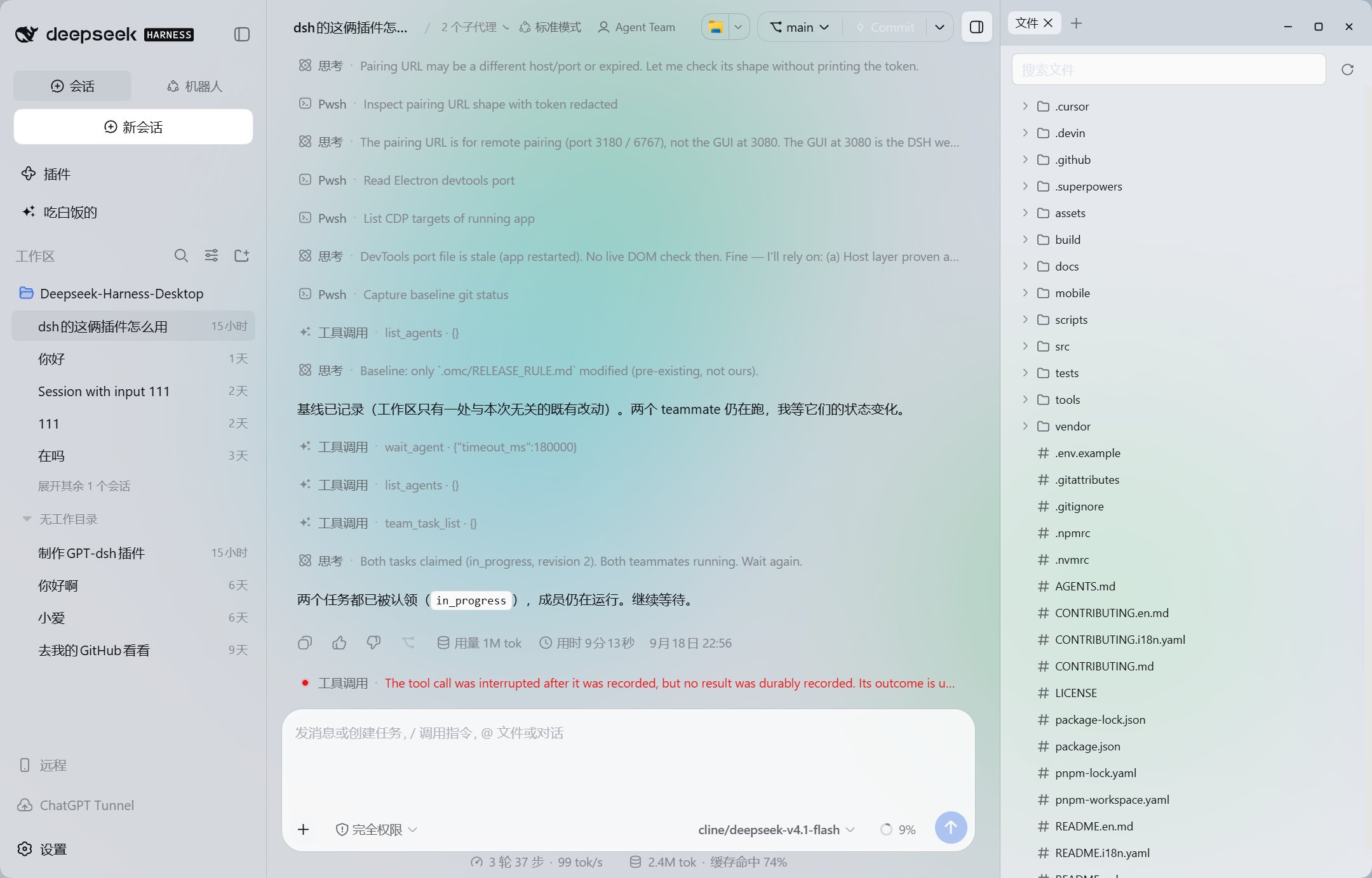
Chat with AI, explore projects, run commands, and manage Git in one window.
中文 · English
·
Download
·
Changelog
·
Report an issue


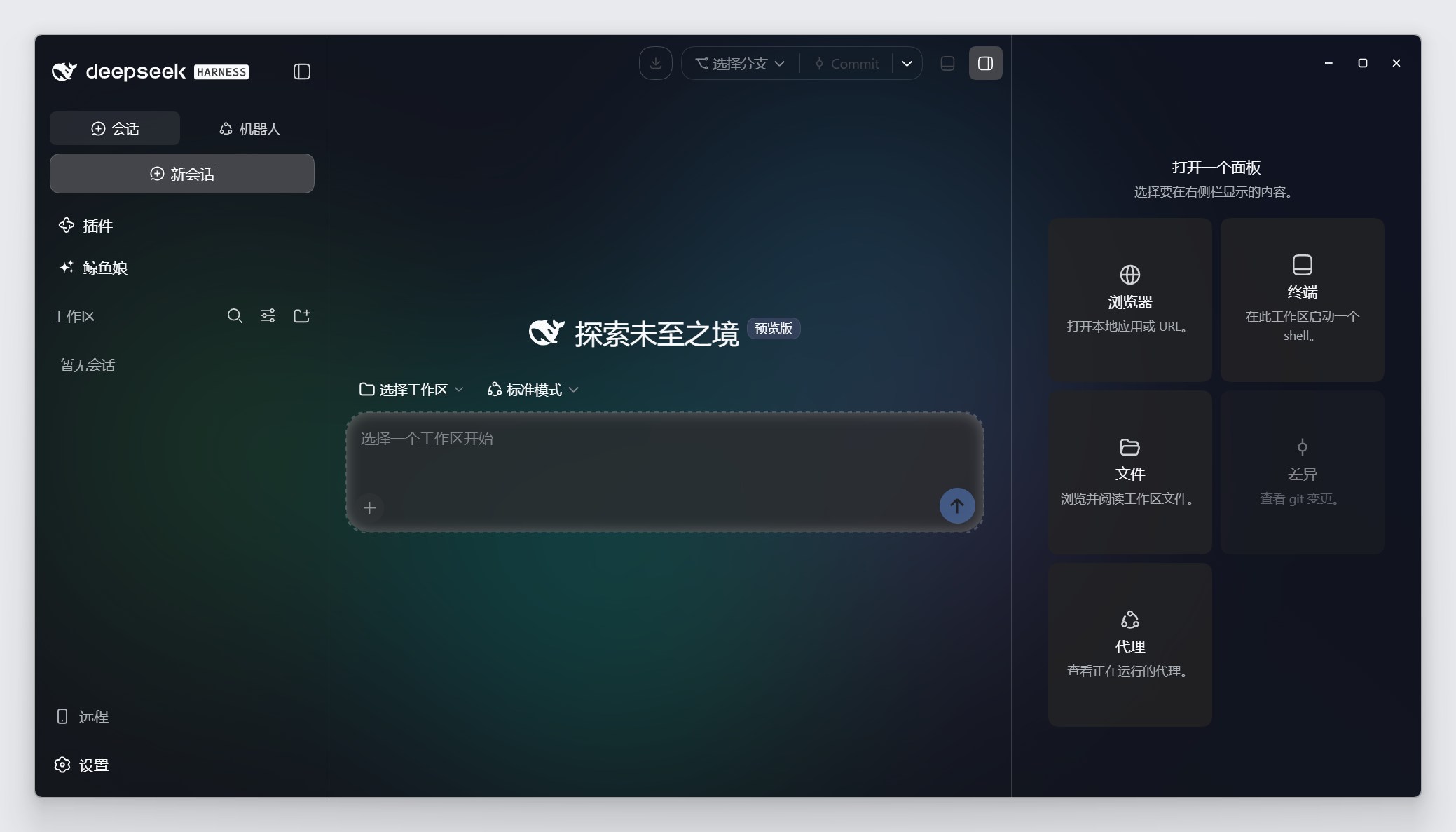
**Whale Isle is an open-source, community-enhanced desktop client built on [DeepSeek Harness](https://github.com/deepseek-ai/deepseek-harness), independently maintained and not an official DeepSeek product.** The official Harness's core features are also available here: AI conversations, tool calls, Agent Teams, terminal and Git, MCP, skills, and plugins.
Whale Isle builds on these capabilities with an expanded desktop experience:
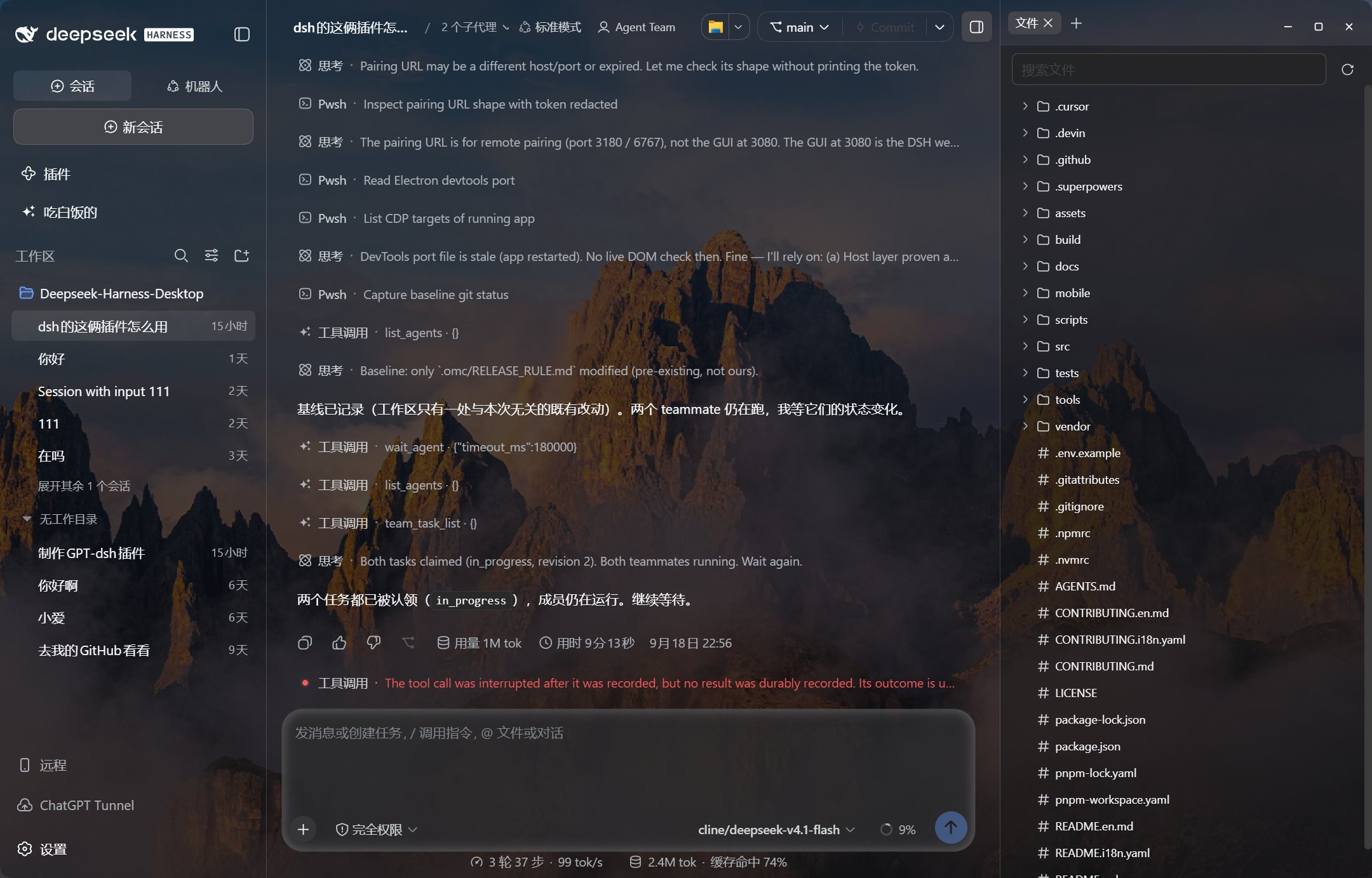
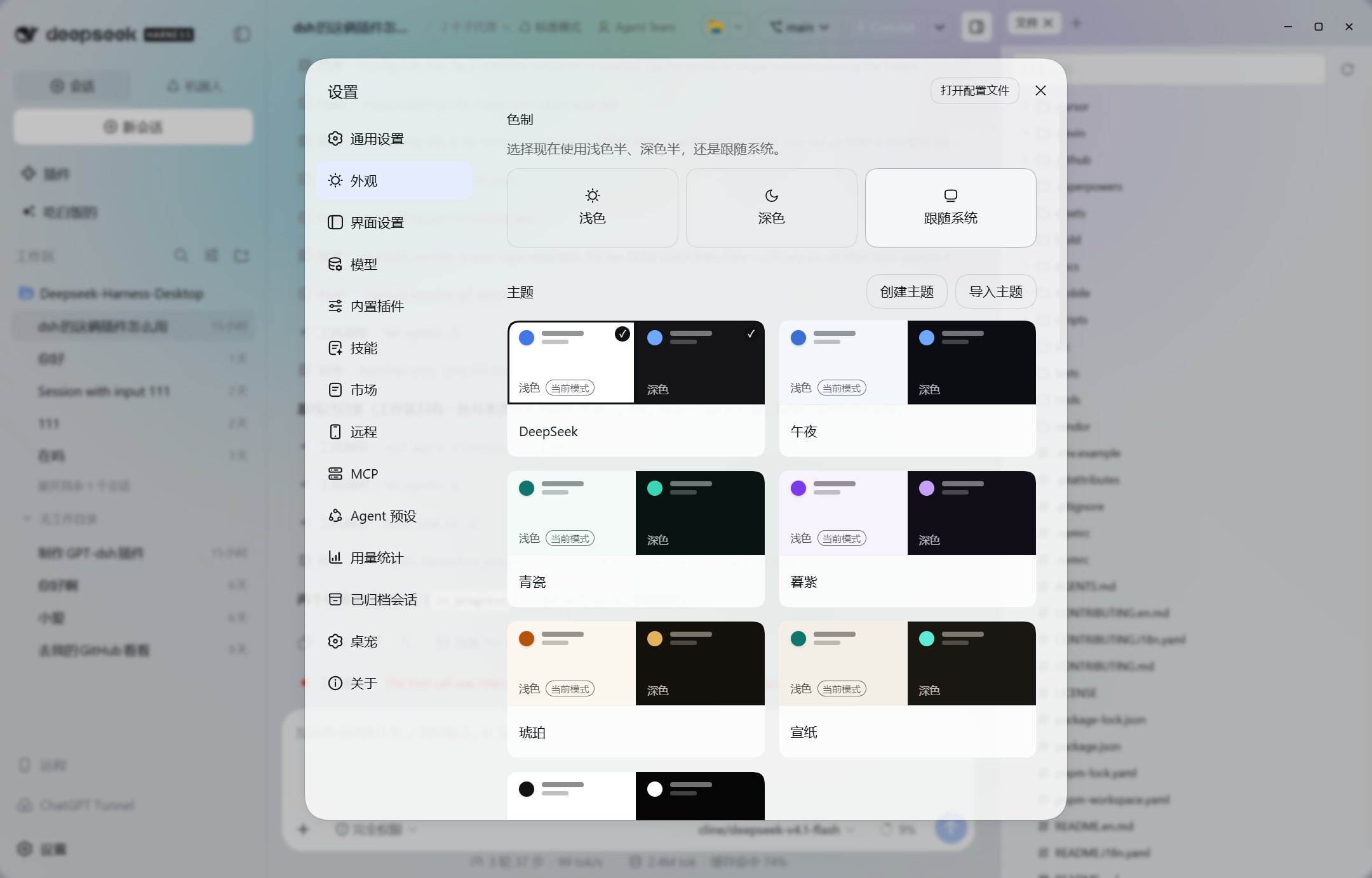
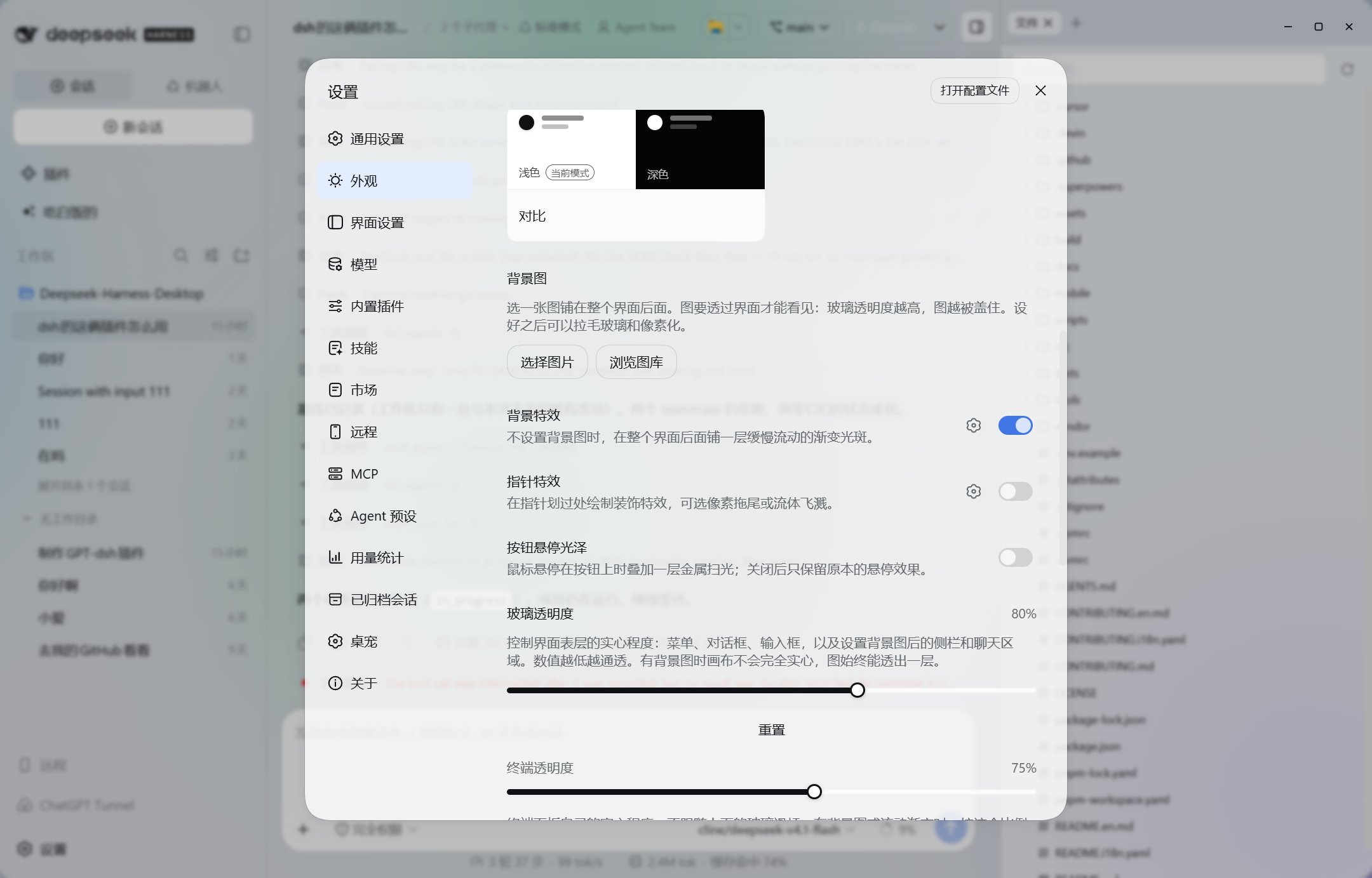
- **More appearance options**: Transparent themes, custom wallpapers, frosted glass, and animated backgrounds to make the workspace your own.
- **Whale-girl desktop pet**: An interactive companion with head pats, feeding, and growth tied to actual token usage.
- **Extended usage statistics**: Cross-session token totals, activity heatmaps, cost estimates, and data export for a clearer view of usage.
- **Mobile remote access**: Enable it when needed and scan a QR code to access desktop sessions from a mobile browser.
Sessions and settings live in a separate data directory, with official CLI data import and plugin troubleshooting available through the launcher.
## Features
- **AI conversations**: Organize workspaces and chat history, inspect tool calls, approve actions, and edit and resend messages — with Agent Teams and parallel subagents.
- **Project tools**: Search and edit files, inspect diffs, preview web pages, and add file or terminal selections to a conversation. Browser previews can move into a chat-area mini-player.
- **Terminal and Git**: Run commands, switch branches, commit changes, push code, and open pull requests without leaving the app.
- **Models and extensions**: Configure model providers, manage MCP servers, skills, and plugins, and install extensions from the built-in marketplace. A built-in Bots tab orchestrates multi-bot sessions.
- **Usage statistics**: View token usage across sessions, activity heatmaps, and session costs estimated against peak/valley price windows, with data export support.
- **Desktop pet**  : A Live2D whale-girl lives on the desktop, grows with your token usage, pushes pinned notifications, and supports "take a look", chat, and head-pat interactions.
- **Appearance**: Light, dark, and transparent themes; a wallpaper gallery (Bing daily, Wallhaven, and custom HTTPS catalogs) with frosted-glass, pixelation, and ambient-gradient backgrounds; independent terminal opacity and button-sheen controls.
- **Remote access**: Enable remote connections when needed and scan a QR code to access desktop sessions from a mobile browser. Remote listening is off by default.
- **Desktop integration**: System tray support, differential updates (only changed installer blocks are downloaded), and a launcher for data import and plugin troubleshooting.
## How It Works
- **Local-first**: Sessions, settings, and plugin configuration live in a desktop-specific `dsh-home`, separate from the official CLI's `~/.dsh`.
- **One workspace flow**: Conversations, files, Browser, diffs, terminal, and Git share the active workspace. File references and terminal selections can return directly to the Composer.
- **Extensible runtime**: Model providers, MCP, skills, and plugins use DeepSeek Harness's plugin architecture. Desktop-owned features are attached through controlled desktop plugins.
- **Desktop safety boundary**: High-impact tool actions follow Harness approval and permission policies. Remote access requires an explicit opt-in.
## Download and Install
| Platform | Download |
| --- | --- |
| Windows 10 or later · x64 | [Download latest public release](https://github.com/ChisaAlter/WhaleIsle/releases/latest) |
Public distribution currently focuses on a Windows x64 installer. Other platforms can run or build from source as described below. See [Releases](https://github.com/ChisaAlter/WhaleIsle/releases) for versions and release notes.
> [!NOTE]
> The Windows installer is not digitally signed, so Windows may display a security warning. Download only from this repository. The release page provides `SHA512SUMS.txt` for integrity checks.
### Getting Started
1. Install and open the app. Wait for the launcher to open the main window.
2. Choose a provider and configure its API key in Settings → Models. For a custom provider, check that its API URL matches the selected protocol.
3. Select a project directory as your workspace, or start a conversation without a workspace.
If you have used the official CLI, choose the data you want to migrate on the launcher's Import page.
## FAQ
### Do I need my own API key?
You need to configure an API key for your chosen model provider. This project does not include model credits; usage is billed by the provider.
### What if a conversation fails with `DeepSeek Messages request failed (404)`?
Confirm that you are using the [latest public release](https://github.com/ChisaAlter/WhaleIsle/releases/latest), then check the provider, API URL, and protocol in Settings → Models. The DeepSeek integration uses the Messages API; a third-party service that only supports Chat Completions needs a matching provider configuration.
If it still fails, [open an issue](https://github.com/ChisaAlter/WhaleIsle/issues/new/choose) with the app version, provider name, API URL (remove sensitive parameters), selected protocol, and complete error message. Do not include your API key. A 404 alone cannot identify whether the cause is configuration or the service.
### How do I upgrade?
The app checks for updates at startup. Upgrades ride a differential channel that downloads only changed installer blocks, falling back to a full download if that fails. You can also install a newer package over the existing version. Desktop installations normally keep their data during upgrades. Back up your data directory before upgrading.
To migrate from the official CLI or an older desktop installation, use Import in the launcher. Do not overwrite databases or copy the entire `profiles` directory. After importing, add the original workspace path again to find its conversations.
### Where is my data stored?
The desktop app uses a separate data directory and does not directly read the official CLI's `~/.dsh`. Open it from Settings > About > Open runtime directory.
| Platform | Sessions and settings directory |
| --- | --- |
| Windows | `%APPDATA%\Deepseek-Harness-Desktop\dsh-home` |
| macOS (source builds) | `~/Library/Application Support/Deepseek-Harness-Desktop/dsh-home` |
### What if the desktop pet cannot be fed after clearing session logs?
Update to v0.3.3 or later. Version 0.3.3 fixes lifetime feeding totals blocking newly earned food, while preserving growth and lifetime feeding records. New usage after upgrading can be fed, and restoring old logs does not generate food twice. If the problem persists, open an issue with your app version and reproduction steps.
### What if a plugin prevents startup?
Disable the affected plugin in the launcher's troubleshooting tools, then restart. Older dshbot versions may be incompatible with the newer Harness and can be disabled individually the same way, without deleting settings or conversations.
## Run from Source
Requirements: Windows 10+ or macOS 14+ (Apple Silicon), Git, and Node.js 22.x starting at 22.19 or version 24+. See [`.nvmrc`](.nvmrc) for the CI Node.js version. The root dependencies provide pnpm; a separate global installation is unnecessary.
```shell
git clone https://github.com/ChisaAlter/WhaleIsle.git
cd WhaleIsle
npm ci
npm run setup:harness
npm start
```
`setup:harness` installs the vendored Harness dependencies from its lockfile and builds the profile used by the desktop app, which may take a while initially. `npm start` rebuilds stale client output before launching. Source and installed builds share a single-instance lock, so quit the installed app, including its tray process, before starting a source build.
```shell
npm test # Desktop and mobile behavior tests
npm run test:tools # Build, release, and maintenance tool tests
npm run docs:check # Check relative documentation links
npm run dist # Build the Windows installer
npm run dist:mac # Build the macOS installer; requires macOS
```
## Documentation
- [Product and architecture handbook](docs/handbook/README.md) (Chinese)
- [Design guidelines](docs/design-language.en.md) · [Motion guidelines](docs/motion.en.md)
- [Feature contracts](docs/features/README.md) (Chinese)
- [Development and maintenance](docs/maintenance/README.md) (Chinese)
- [Build guide](docs/handbook/modules/build-release.md) · [CI and automatic releases](docs/handbook/modules/release-process.md) (Chinese)
## Contributing
Issues and pull requests are welcome for features, bug fixes, and documentation. Use a work branch and explain the request, changes, and relevant validation in your PR; the maintainer decides whether to merge. Development CI runs automatically, and successful main builds publish when the version increases. Documentation-only changes do not start product builds. See the [contribution guide](CONTRIBUTING.en.md).
When reporting a problem, include the app version, operating system, reproduction steps, expected and actual behavior, and relevant screenshots or logs. Remove API keys and other sensitive information before sharing them.
## Community
: A Live2D whale-girl lives on the desktop, grows with your token usage, pushes pinned notifications, and supports "take a look", chat, and head-pat interactions.
- **Appearance**: Light, dark, and transparent themes; a wallpaper gallery (Bing daily, Wallhaven, and custom HTTPS catalogs) with frosted-glass, pixelation, and ambient-gradient backgrounds; independent terminal opacity and button-sheen controls.
- **Remote access**: Enable remote connections when needed and scan a QR code to access desktop sessions from a mobile browser. Remote listening is off by default.
- **Desktop integration**: System tray support, differential updates (only changed installer blocks are downloaded), and a launcher for data import and plugin troubleshooting.
## How It Works
- **Local-first**: Sessions, settings, and plugin configuration live in a desktop-specific `dsh-home`, separate from the official CLI's `~/.dsh`.
- **One workspace flow**: Conversations, files, Browser, diffs, terminal, and Git share the active workspace. File references and terminal selections can return directly to the Composer.
- **Extensible runtime**: Model providers, MCP, skills, and plugins use DeepSeek Harness's plugin architecture. Desktop-owned features are attached through controlled desktop plugins.
- **Desktop safety boundary**: High-impact tool actions follow Harness approval and permission policies. Remote access requires an explicit opt-in.
## Download and Install
| Platform | Download |
| --- | --- |
| Windows 10 or later · x64 | [Download latest public release](https://github.com/ChisaAlter/WhaleIsle/releases/latest) |
Public distribution currently focuses on a Windows x64 installer. Other platforms can run or build from source as described below. See [Releases](https://github.com/ChisaAlter/WhaleIsle/releases) for versions and release notes.
> [!NOTE]
> The Windows installer is not digitally signed, so Windows may display a security warning. Download only from this repository. The release page provides `SHA512SUMS.txt` for integrity checks.
### Getting Started
1. Install and open the app. Wait for the launcher to open the main window.
2. Choose a provider and configure its API key in Settings → Models. For a custom provider, check that its API URL matches the selected protocol.
3. Select a project directory as your workspace, or start a conversation without a workspace.
If you have used the official CLI, choose the data you want to migrate on the launcher's Import page.
## FAQ
### Do I need my own API key?
You need to configure an API key for your chosen model provider. This project does not include model credits; usage is billed by the provider.
### What if a conversation fails with `DeepSeek Messages request failed (404)`?
Confirm that you are using the [latest public release](https://github.com/ChisaAlter/WhaleIsle/releases/latest), then check the provider, API URL, and protocol in Settings → Models. The DeepSeek integration uses the Messages API; a third-party service that only supports Chat Completions needs a matching provider configuration.
If it still fails, [open an issue](https://github.com/ChisaAlter/WhaleIsle/issues/new/choose) with the app version, provider name, API URL (remove sensitive parameters), selected protocol, and complete error message. Do not include your API key. A 404 alone cannot identify whether the cause is configuration or the service.
### How do I upgrade?
The app checks for updates at startup. Upgrades ride a differential channel that downloads only changed installer blocks, falling back to a full download if that fails. You can also install a newer package over the existing version. Desktop installations normally keep their data during upgrades. Back up your data directory before upgrading.
To migrate from the official CLI or an older desktop installation, use Import in the launcher. Do not overwrite databases or copy the entire `profiles` directory. After importing, add the original workspace path again to find its conversations.
### Where is my data stored?
The desktop app uses a separate data directory and does not directly read the official CLI's `~/.dsh`. Open it from Settings > About > Open runtime directory.
| Platform | Sessions and settings directory |
| --- | --- |
| Windows | `%APPDATA%\Deepseek-Harness-Desktop\dsh-home` |
| macOS (source builds) | `~/Library/Application Support/Deepseek-Harness-Desktop/dsh-home` |
### What if the desktop pet cannot be fed after clearing session logs?
Update to v0.3.3 or later. Version 0.3.3 fixes lifetime feeding totals blocking newly earned food, while preserving growth and lifetime feeding records. New usage after upgrading can be fed, and restoring old logs does not generate food twice. If the problem persists, open an issue with your app version and reproduction steps.
### What if a plugin prevents startup?
Disable the affected plugin in the launcher's troubleshooting tools, then restart. Older dshbot versions may be incompatible with the newer Harness and can be disabled individually the same way, without deleting settings or conversations.
## Run from Source
Requirements: Windows 10+ or macOS 14+ (Apple Silicon), Git, and Node.js 22.x starting at 22.19 or version 24+. See [`.nvmrc`](.nvmrc) for the CI Node.js version. The root dependencies provide pnpm; a separate global installation is unnecessary.
```shell
git clone https://github.com/ChisaAlter/WhaleIsle.git
cd WhaleIsle
npm ci
npm run setup:harness
npm start
```
`setup:harness` installs the vendored Harness dependencies from its lockfile and builds the profile used by the desktop app, which may take a while initially. `npm start` rebuilds stale client output before launching. Source and installed builds share a single-instance lock, so quit the installed app, including its tray process, before starting a source build.
```shell
npm test # Desktop and mobile behavior tests
npm run test:tools # Build, release, and maintenance tool tests
npm run docs:check # Check relative documentation links
npm run dist # Build the Windows installer
npm run dist:mac # Build the macOS installer; requires macOS
```
## Documentation
- [Product and architecture handbook](docs/handbook/README.md) (Chinese)
- [Design guidelines](docs/design-language.en.md) · [Motion guidelines](docs/motion.en.md)
- [Feature contracts](docs/features/README.md) (Chinese)
- [Development and maintenance](docs/maintenance/README.md) (Chinese)
- [Build guide](docs/handbook/modules/build-release.md) · [CI and automatic releases](docs/handbook/modules/release-process.md) (Chinese)
## Contributing
Issues and pull requests are welcome for features, bug fixes, and documentation. Use a work branch and explain the request, changes, and relevant validation in your PR; the maintainer decides whether to merge. Development CI runs automatically, and successful main builds publish when the version increases. Documentation-only changes do not start product builds. See the [contribution guide](CONTRIBUTING.en.md).
When reporting a problem, include the app version, operating system, reproduction steps, expected and actual behavior, and relevant screenshots or logs. Remove API keys and other sensitive information before sharing them.
## Community

Scan to join the Chinese-language WeChat group. If the QR code has expired, contact the maintainer through an [Issue](https://github.com/ChisaAlter/WhaleIsle/issues).
## Acknowledgments
Thanks to [DeepSeek Harness](https://github.com/deepseek-ai/deepseek-harness) for the foundation and to the [Linux.do](https://linux.do) community for its support.
## License
[MIT](LICENSE)