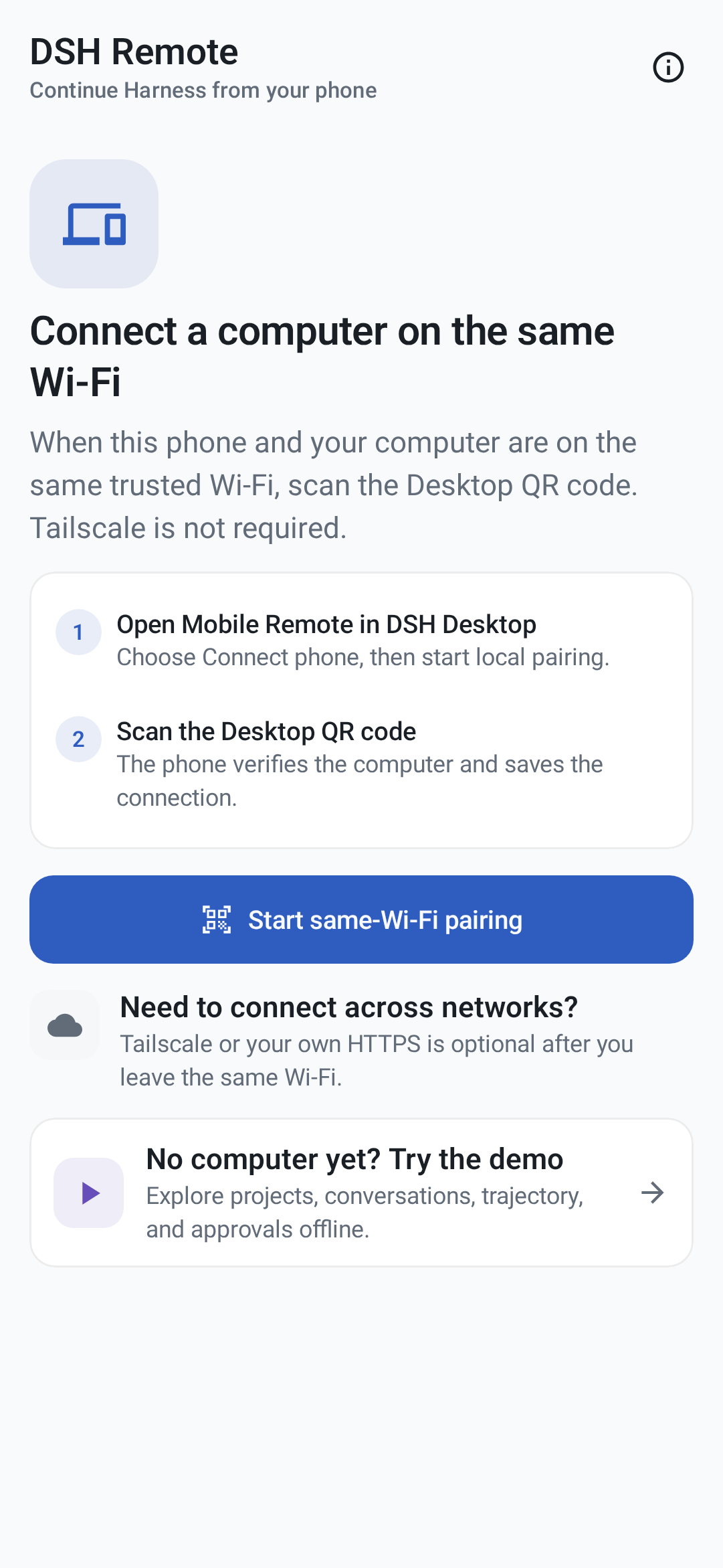
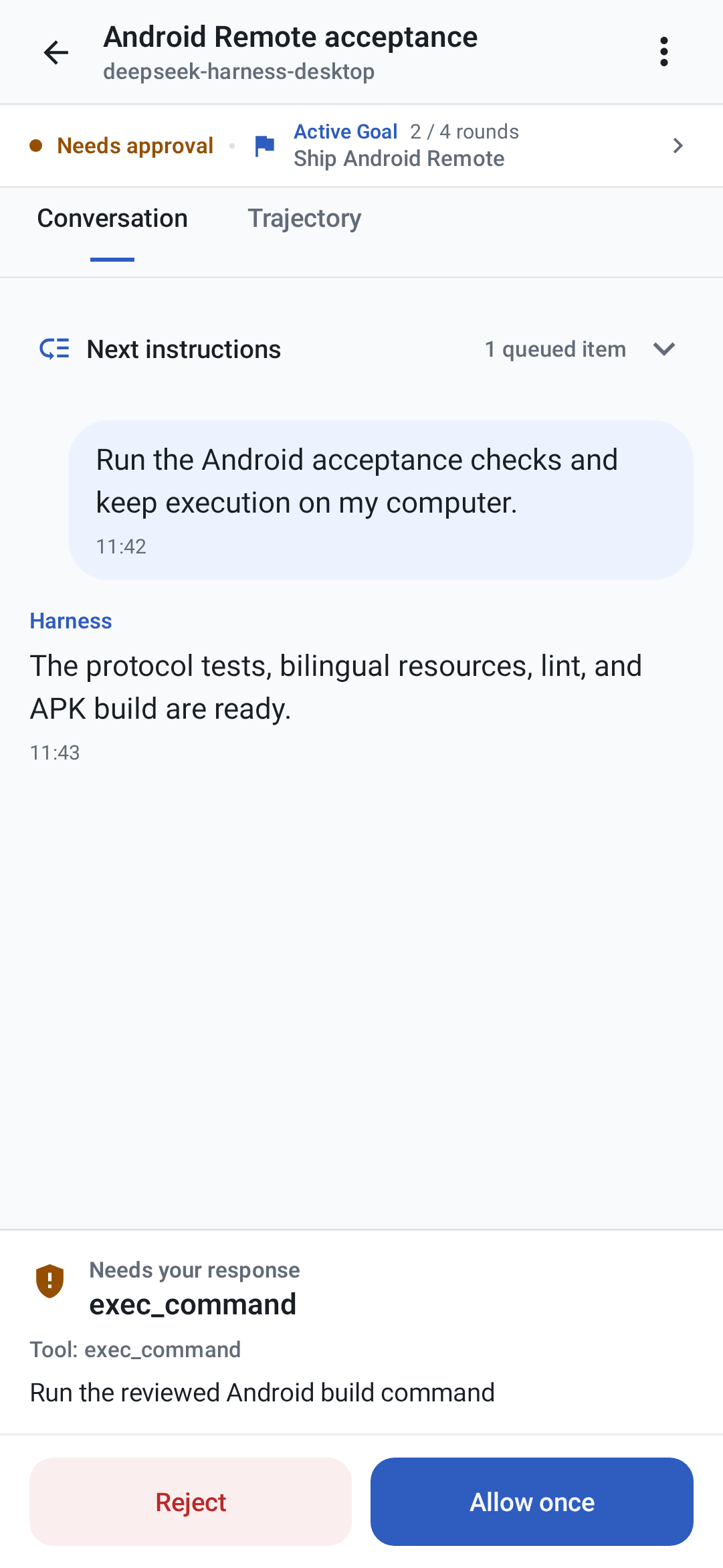
Pairing and offline Demo · Conversation, queue, and approvals
## Install the GitHub release 1. Open the [`v0.4.1` release](https://github.com/chokwinlee/deepseek-harness-desktop/releases/tag/v0.4.1). 2. Install the Desktop package from that release on the computer that will run Harness. An older Desktop build may not provide the Android Remote contract expected by this release. 3. On an Android 8.0 or later device, download `DSH-Remote-Android-v0.4.1.apk` from the same release. 4. If Android asks, allow **Install unknown apps** for the browser or file manager that opened this APK. You can turn that source permission off again after installation. 5. Open DSH Remote. Choose **Try the demo** to explore it offline, or pair a computer by following the next section. Android may show a generic warning for sideloaded apps. Do not bypass a signature or checksum mismatch, and do not install an APK copied from another website. ### Verify the download Download `SHA256SUMS.txt` from the same release. On macOS, compare the APK's computed hash with its line in that file: ```sh shasum -a 256 DSH-Remote-Android-v0.4.1.apk grep 'DSH-Remote-Android-v0.4.1.apk$' SHA256SUMS.txt ``` On Linux, replace the first command with: ```sh sha256sum DSH-Remote-Android-v0.4.1.apk ``` On Windows PowerShell: ```powershell Get-FileHash .\DSH-Remote-Android-v0.4.1.apk -Algorithm SHA256 Select-String -Path .\SHA256SUMS.txt -Pattern 'DSH-Remote-Android-v0.4.1.apk$' ``` The two SHA-256 values must match exactly. The APK is also signed with the project's permanent certificate; its public fingerprint is recorded in the [release-signing guide](../docs/ANDROID_RELEASE_SIGNING.md#provisioned-project-identity). ## Pair and use it ### Same trusted Wi-Fi 1. Keep the matching DSH Desktop build running. 2. Open **DSH Desktop → Settings → General → Mobile Remote → Connect phone**. 3. Enable same-Wi-Fi access and scan the Desktop-generated QR code in DSH Remote. 4. Open a project and create or continue a session. Agent execution, code, repositories, Shell access, and model credentials remain on the computer. Same-Wi-Fi mode uses an authenticated but unencrypted HTTP connection. Use it only on a private network you trust, never on hotel, café, school, office guest, or other shared Wi-Fi. If Desktop regenerates or disables its LAN endpoint, scan the new QR code instead of reusing an old credential. ### Tailscale away from the local network 1. Install Tailscale on the computer and Android device, then sign in to the same private Tailnet. 2. In Desktop's phone connection panel, enable anywhere access. Desktop configures a private Tailscale Serve HTTPS address and a new QR code. 3. Scan that HTTPS QR code in DSH Remote. To test the real remote path, turn off Wi-Fi and send a message while cellular data and Tailscale remain connected. Use Tailscale **Serve**, not Funnel. Funnel would expose the endpoint to the public internet. ## Offline Demo On the first screen, choose **Try the demo**. The Demo uses sample projects, sessions, approvals, questions, queue controls, Activity, and subagents. It does not connect to a computer, use the network, call a model, or modify a real Harness session. Demo changes are not transferred to a computer later. ## Permissions - **Camera:** optional; used only after you choose to scan a Desktop pairing QR code. QR image pixels and decoded contents are processed on-device and are not uploaded. The bundled Google ML Kit scanner does send Google diagnostic and usage metrics, as disclosed in the [privacy policy](../docs/PRIVACY.md#android-qr-scanner-and-google-ml-kit). - **Local network / Nearby devices:** Android 17 asks for this before a direct same-Wi-Fi connection. Tailscale HTTPS does not use this direct-LAN permission path. - **Notifications:** optional; enables local, best-effort task updates while the app process is observing the computer. - **Photos:** Android's system Photo Picker grants access only to images you explicitly select. DSH Remote does not request broad photo-library access. - **VPN:** Tailscale may request Android's VPN permission in its own app. DSH Remote does not receive your Tailscale credentials. The one-time **Install unknown apps** setting belongs to the browser or file manager used for sideloading; it is not a runtime permission requested by DSH Remote. ## Capabilities - Pair with Desktop by QR code on an authenticated trusted LAN, or use the user's Tailscale HTTPS / self-managed HTTPS endpoint. - Save multiple computers with the entire host record encrypted by an Android Keystore AES-256-GCM key. - Browse authoritative workspaces and directory-based fallback groups, create sessions, and open current or archived conversation history. - Queue or steer prompts, stop work, edit the queue, answer approvals and structured questions, and recover state with polling plus WebSocket events. - Select models and reasoning effort already configured on the computer. - Display user, assistant, reasoning, tool, terminal, code, diff, Goal, Plan, lifecycle, and Activity records. - Select or paste and sanitize images with the system Photo Picker or clipboard, apply host limits, and display persisted message attachments. - Insert file, directory, and session references. - Browse nested subagents, load their history, continue eligible agents, and stop running agents. - Use a complete offline Demo without a computer, network request, or model call. - Follow system light/dark appearance with complete English and Simplified Chinese product resources and TalkBack semantics. Code, repositories, model credentials, model calls, Shell access, and Agent execution remain on the computer. ## Upgrade a GitHub release Download a newer APK only from this repository, verify its SHA-256 value, then open it and choose **Update**. GitHub APKs use the same application ID and permanent signing identity, so a newer build can update the existing install without deleting saved computers. Do not uninstall first if you want to retain that local pairing data. Android will reject an older version or an APK signed by another identity. ## Known limits - Android physical-device coverage is still limited. Camera pairing, direct LAN behavior, Tailscale across cellular networks, notifications, photo input, Android 17 local-network permission, 16 KB page-size devices, and manufacturer background restrictions need broader tester coverage. - The computer must remain powered on with DSH Desktop and Harness running. - Notifications are local best-effort signals, not remote push. Android Doze, process death, or manufacturer restrictions can stop them. - The authenticated same-Wi-Fi transport is not encrypted. Use Tailscale HTTPS on any network you do not fully trust. - Google Play distribution is not available yet. Play-specific setup and review work do not affect installation of the signed GitHub release. ## Report feedback Open a [GitHub issue](https://github.com/chokwinlee/deepseek-harness-desktop/issues) and include: - DSH Remote version from **About and privacy**; - Android device manufacturer/model and Android version; - Desktop operating system, DSH Desktop version, and displayed Harness version; - connection type: Demo, trusted same Wi-Fi, or Tailscale; - exact reproduction steps, expected result, actual result, and approximate time of the failure; - the visible error text and a redacted screenshot or short recording; - whether the same action works in Demo and whether reconnecting or rescanning changes the result. If you can use Android developer tools, a short, redacted `adb logcat` excerpt around the failure is useful. Never post API keys, QR codes, pairing credentials, Tailnet names, private IP addresses, confidential prompts, source code, or full unreviewed logs. See the [support guide](../docs/SUPPORT.md) for connection checks and a copyable report template. ## Build Requirements: - JDK 17 - Android SDK Platform 37 - Android SDK Build Tools 37.0.0 The repository pins Gradle 9.4.1, Android Gradle Plugin 9.2.0, Kotlin 2.3.21, and the Compose BOM 2026.08.00. ```sh cd android ./gradlew testDebugUnitTest compileDebugAndroidTestKotlin lintDebug validateDebugScreenshotTest assembleDebug assembleRelease bundleRelease ``` The debug APK is written to: ```text android/app/build/outputs/apk/debug/app-debug.apk ``` Without signing variables, local Release builds remain unsigned. With the project distribution key configured, the installable APK is written to `android/app/build/outputs/apk/release/app-release.apk` and the Play bundle to `android/app/build/outputs/bundle/release/app-release.aab`. Install it on a connected development device with: ```sh cd android ./gradlew installDebug ``` The debug APK is development-signed. GitHub tag builds require the persistent project distribution key and publish only the installable APK; the AAB remains an Actions artifact. A Google Play release additionally requires a Play Console app record, store metadata, Data Safety answers, testing track, and review. See [`docs/ANDROID_RELEASE_SIGNING.md`](../docs/ANDROID_RELEASE_SIGNING.md). ## Security boundary - `host.describe` verifies the endpoint is Harness. - Public or manually entered addresses require HTTPS. - Cleartext HTTP is accepted only for a private/local address imported from a Desktop-generated QR code with a valid bearer credential. - Android 17 requests `ACCESS_LOCAL_NETWORK` at runtime before opening a direct LAN socket. Tailscale HTTPS does not use this direct-LAN permission path. - The LAN proxy exposes only the reviewed mobile RPC allowlist and `/api/events.mux`; it does not expose settings, credentials, arbitrary directories, plugins, or a raw terminal. - Saved computer names, addresses, and access credentials are encrypted as one authenticated payload. System backup and device transfer exclude app data. - Selected photos are bounded, decoded, re-oriented, resized, and re-encoded before transfer so source metadata is not forwarded. - Camera frames and decoded QR contents are processed in memory by the bundled ML Kit model and are not saved or uploaded. ML Kit separately sends Google diagnostic and usage metrics described in the privacy policy. The platform-neutral contract is documented in [`docs/REMOTE_PROTOCOL_V1.md`](../docs/REMOTE_PROTOCOL_V1.md). Future Play submission notes are in [`docs/ANDROID_DATA_SAFETY.md`](../docs/ANDROID_DATA_SAFETY.md). ## Validation boundary Gradle unit tests, lint, Compose reference screenshot validation, debug/release assembly, and Compose instrumentation test compilation are automated. Camera, trusted-LAN, Tailscale, notification, photo, and manufacturer-specific background behavior still require Android physical-device acceptance before a public store release.