> [!CAUTION]
> **Steam compatibility and account safety are unconfirmed.** AgePad modifies
> local copies of Steam client and SDK files to run on iPadOS and uses internal
> client interfaces. We cannot confirm whether this integration complies with
> Steam's terms or what consequences using it could have for your account,
> including restrictions or bans. I am investigating interoperability changes
> with the goal of making the port compliant; that outcome is not established or
> guaranteed. Consider this uncertainty before signing in. For comparable
> projects and reported bans, see [Steam account safety](#steam-account-safety)
> and the [full risk review](docs/STEAM-ACCOUNT-RISK.md).

# AgePad
Age of Empires II: Definitive Edition, native on iPad.
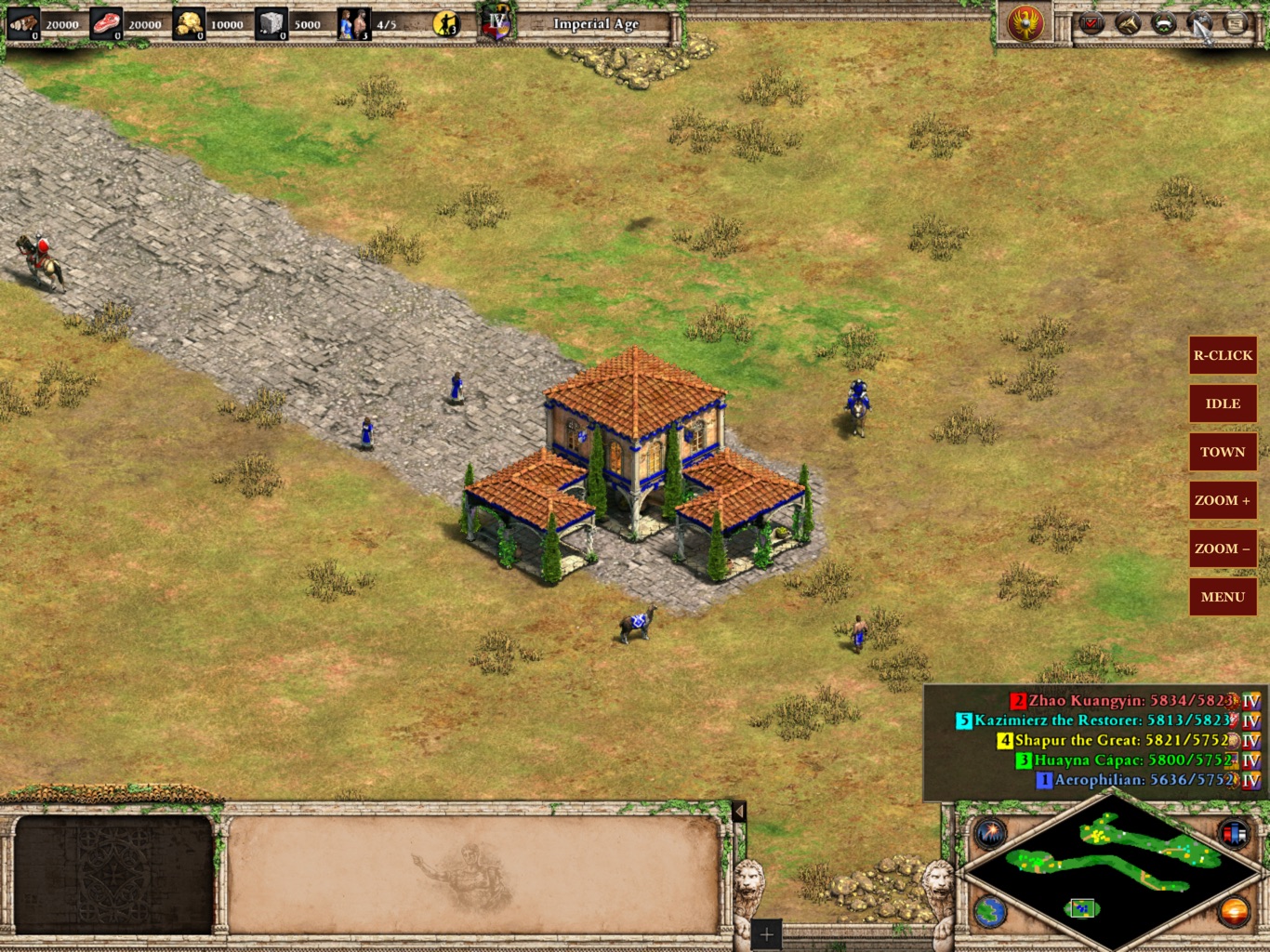
Your own Steam copy of the Mac game running on the iPad itself, with touch, Apple Pencil, mouse and keyboard controls and Steam signed in on the iPad. No streaming and no computer at play time, online or offline.
AgePad runs the Mac edition of Age of Empires II: Definitive Edition (developed by
Forgotten Empires and World's Edge, published by Xbox Game Studios, Mac port by
Feral Interactive) on iPadOS. It supplies the iPad compatibility layer, touch and
Pencil controls, an in-app Steam sign-in built on Valve's own Steam client, game-data
management and packaging. The game itself and Steam come from your own installs.












> [!IMPORTANT]
> **Bring your own game.** AgePad needs Age of Empires II: Definitive Edition from
> Steam (the Mac version comes with the Steam purchase). Releases contain only
> AgePad's own code: no game program, game data, Steam software or saves. You
> assemble your app on your Mac from your own copy.
>
> **Developer preview.** Tested on one iPad (iPad Pro 12.9-inch, M2, 8 GB): menu in
> about 30 seconds, skirmishes at about 120 fps, save and load, Steam online, and
> offline play through Steam's offline mode. Full online matches, long sessions,
> mice and other iPads are not yet verified. Unofficial fan project, not affiliated
> with Microsoft, Valve, Feral Interactive or Apple.
>
> **Steam account risk.** AgePad modifies local copies of Steam client and SDK
> files for iPadOS and uses internal client interfaces. Account safety is not
> guaranteed. Read the [account-risk review](docs/STEAM-ACCOUNT-RISK.md) before
> signing in. Using your own files does not establish Valve's approval.
>
> **AI disclosure:** AgePad uses substantial AI assistance for code, tests,
> documentation, debugging and maintenance. There is no audited percentage of
> AI-generated code. Build, test and device records describe what was checked.
## Steam account safety
**What do we know about bans?** Our 1 October 2026 search found related projects
using unofficial Steam integrations and client modifications, but no
substantiated report matching AgePad's particular combination of genuine sign-in,
owned-game play and adapted Mac Steam libraries on iPadOS. The examples below do
not establish that Steam-wide account bans are routine for ordinary compatibility
play. They also do not establish permission or guarantee safety.
| Comparable project or incident | What the public evidence shows |
| --- | --- |
| [GameNative on Android](https://github.com/utkarshdalal/GameNative/blob/master/THIRD_PARTY_NOTICES#steam-client-bootstrap-shim-source-withheld) | Its notices describe real Steam-client token login and undocumented internal interfaces. We found no substantiated Steam-account ban report solely for ordinary use. Its binary adaptations have not been matched to AgePad's. |
| [Millennium Steam client modifications](https://docs.steambrew.app/users/getting-started/faq) | We found no substantiated Steam-account ban attributed solely to normal use. Its maintainer's safety claim is not Valve approval. An apparent [ban appeal](https://github.com/SteamClientHomebrew/Millennium/discussions/870) concerned Discord, not Steam. |
| [ArchiSteamFarm suspension reports](https://github.com/JustArchiNET/ArchiSteamFarm/wiki/FAQ#did-anybody-get-banned-for-it) | The maintainer documents account/trade restrictions involving large bot networks, commercial activity or excessive traffic, with messages attributed to Steam Support. Those messages were not independently authenticated; these cases do not establish bans for ordinary compatibility play. |
| [CS2 and AMD drivers, October 2023](https://store.steampowered.com/news/posts/?appids=730&enddate=1697825171&feed=steam_community_announcements) | Valve confirmed VAC bans affecting users of incompatible AMD drivers and announced reversals. This shows software compatibility problems can trigger anti-cheat enforcement; it does not establish a Steam-wide account ban for AgePad. |
| [Destiny 2 and Proton](https://help.bungie.net/hc/en-us/articles/360049517431-Destiny-Account-Restrictions-and-Banning-Policies) | Bungie explicitly says circumventing its SteamOS/Proton incompatibility results in a game ban. This is that publisher's policy, not an established Age of Empires restriction or a Steam-wide ban. |
**There is no defensible ban-risk percentage for AgePad.** We do not have a
representative user population, an observation period or verified causes for
each incident. Private support and Discord reports were not reviewed. AgePad is
new, so its own absence of reports provides no meaningful enforcement history.
Neither "0% risk" nor a figure such as "1%" or "5%" is supported by this research.
**What does AgePad change, and can Valve see it?** Your personal app contains
copies of Steam client and SDK files with changed platform headers, library paths
and signatures. Their original code and data sections are preserved, but they
are still modified files. AgePad uses real Valve authentication and ownership
checks, and its QR request explicitly names the device **AgePad (iPad)**. The
local request probe found no executable hash or OS identifier in that first
request; later client telemetry remains unmeasured. Successful login confirms
authentication, not approval of the integration.
I am investigating interoperability changes with the goal of making the port
compliant. That outcome remains unconfirmed. Offline mode retains the adapted
files and depends on an earlier sign-in; it is not a verified ban-safe mode.
Full online matches remain unverified.
**If you'd like more detail:** the [Steam risk review](docs/STEAM-ACCOUNT-RISK.md)
covers the modifications, published terms and different kinds of restrictions.
The [focused interoperability investigation](docs/STEAM-INTEROPERABILITY-LOOP.md)
traces authentication, local integrity checks, Steam-visible signals, legal
precedents and alternative architectures. These are research findings, not
approval from Valve, Microsoft or Feral Interactive.
## Get AgePad
| Device | Download | Setup |
| --- | --- | --- |
| iPad, 8 GB+ | [AgePad 0.1.0 preview](https://github.com/chrissotraidis/agepad/releases/latest) · `AgePad-v0.1.0-ios-unsigned.ipa` | [With PadMint](#with-padmint) or [directly](#directly-with-the-inject-command) |
| iPad, build it yourself | This repository | [Setup guide](docs/IPAD-SETUP.md) (Xcode, Apple Developer account; paid recommended) |
The release app is about 1 MB because it holds only AgePad's own code: no game
program, game data or Steam software. Your Mac adds your own game and Steam files to
it in a few seconds; you then install the result with your usual sideloading tool.
[How the release works](docs/IPA-ROUTE.md).
**You need** a Mac with Age of Empires II: DE installed through Steam (the Mac
version comes with the Steam purchase), an iPad with 8 GB of memory or more with
25 GB free, and a sideloading tool. A paid Apple Developer account is recommended
for full matches ([why](docs/IPA-ROUTE.md#memory-the-one-real-limit)).
**Version check:** AgePad 0.1.0 needs the exact game and Steam versions its base
app was made for. The 1 October 2026 check rejected an updated Steam beta client;
a compatible profile for that update has not been verified. If you get a version
mismatch, stop there: do not change the recipe's hashes or replace your Steam files
to force it through. Updating PadMint alone does not fix that mismatch.
### With PadMint
**No Mac?** AgePad needs an Apple Silicon Mac today: PadMint adds the Mac
edition of Age of Empires II from your Steam library on that Mac. [PadMint's
Windows
list](https://github.com/chrissotraidis/padmint/blob/main/docs/WINDOWS.md)
records the Windows route being explored.
AgePad is in PadMint 0.2.7 and newer.
1. Download [PadMint](https://github.com/chrissotraidis/padmint/releases/latest), unzip it and double-click `PadMint.command`.
2. There is no game file to choose: in the PadMint page that opens in your browser, choose **AgePad** and click **Make my copy**. PadMint downloads the AgePad release, finds your game and Steam in Steam's folders on this Mac, checks every file against the release and saves your AgePad IPA in your Downloads folder, usually in under a minute.
3. Continue with [install and copy the game data](#then-install-and-copy-the-game-data).
### Directly, with the inject command
1. Download this repository and `AgePad-v0.1.0-ios-unsigned.ipa` from the release. The next step uses Python 3; if your Mac doesn't have it yet, macOS offers to install it (Command Line Tools) the first time.
2. Run `scripts/agepad-ipad.sh inject ~/Downloads/AgePad-v0.1.0-ios-unsigned.ipa`. It checks your game and Steam versions and writes `generated/AgePad-mine.ipa`.
### Then: install and copy the game data
1. Install your IPA with Sideloadly or AltStore (fine for short matches). For full matches with a paid developer account, set up the memory limit once ([Setup guide, Step 1](docs/IPAD-SETUP.md#step-1--signing-with-the-larger-memory-limit-once)) and install with `scripts/sign-agepad-ipa.sh [your app ID]`.
2. Connect the iPad, open it in **Finder → Files**, and drag the `AgeOfEmpires2Data` folder (Steam → Age of Empires II: DE → Manage → Browse local files) onto **AgePad**. About 20 GB; keep 25 GB free.
3. Open AgePad and sign in to Steam once by scanning the code with the Steam app on your phone. From then on, tap the icon to play.
The IPA you make contains your own copy of the game program and Steam: keep it to
yourself and never upload it.
**Update in place.** Reinstalling over an existing AgePad keeps your game files,
saves and Steam sign-in. Deleting the app removes all of them, including the 20 GB of
game data.
## Playing
**Need help or found a bug?** Ask in the [Discord](https://discord.gg/xwHfUD2bxW) or
[open an issue](../../issues). `scripts/agepad-ipad.sh logs` copies the iPad's logs to
your Mac (it needs Xcode and `brew install libimobiledevice`; set `AGEPAD_BUNDLE_ID` if
your app ID isn't the default); please don't attach game files, saves or Steam details.
[Frequently asked questions](#frequently-asked-questions) · [Setup guide and full controls](docs/IPAD-SETUP.md) · [Release route and limits](docs/IPA-ROUTE.md)
- **Touch:** tap to select, two-finger tap for orders (right click), two- or
three-finger drag to move the map, pinch to zoom. Side buttons: R-CLICK, IDLE villager, TOWN
center, ZOOM and MENU.
- **Apple Pencil:** tap a unit, then each Pencil tap on the map is an order; hold for
half a second, double-tap the Pencil, or squeeze an Apple Pencil Pro to stop.
- **Mouse, trackpad and keyboard:** clicks, right clicks, drag-select, the wheel
(zoom) and the game's own hotkeys.
- **Online and offline:** AgePad connects through its in-app Steam engine; full
online matches are not yet verified.
Without Internet AgePad uses Steam's offline mode (single player, skirmish and
campaigns). Open AgePad once with Internet before you go offline.
- **HUD size** starts at 125% on a new install; change it in the game's
Options → Interface. **Signing out:** iPad Settings → AgePad → *Sign out of Steam*.
Checked on the tested iPad: touch, Apple Pencil, keyboard and trackpad, save/load,
Steam sign-in, going online, and offline play. Map dragging was rebuilt on 30
September: the map now follows your fingers (a little faster than them, 1.2×;
before, it moved the wrong way, ignored small drags and ran away on big ones),
iPadOS no longer takes three-finger swipes for undo, and a drag no longer turns into
a zoom halfway. A mouse, full online matches, sessions over an hour and other iPad
models are not yet verified.
## How it works
AgePad is not an emulator, and no CPU instructions are translated. The Mac edition
of the game is already native Apple silicon code, and an iPad runs the same kind
of processor on a close relative of macOS, so the game's own program runs directly
on the iPad at full speed. What the iPad lacks is the Mac's app frameworks, so
AgePad fills that gap, a little like Wine does for Windows programs:
| Piece | What AgePad does |
| --- | --- |
| The game program | Your own copy, with only its header relabelled from Mac to iPad; code and data are byte-identical |
| Mac windows, mouse and keyboard (AppKit) | Replaced by iPad windows, touch, Apple Pencil, trackpad and keyboard |
| Graphics and sound | Mac-only Metal and CoreGraphics calls answered with their iPad equivalents |
| Steam | Valve's own Steam client engine, from your Mac's Steam, running inside the app |
iPadOS runs only code signed into an app, so each player assembles and signs their
own copy. [The release route](docs/IPA-ROUTE.md) has the details.
## Frequently asked questions
Is this emulation?
No. The Mac game is native Apple silicon code and runs directly on the iPad's
processor; AgePad supplies the Mac system pieces the iPad doesn't have. See
[How it works](#how-it-works).
Can I download a ready-to-play IPA?
No. A complete app would contain Microsoft's game program and Valve's Steam software, which aren't ours to distribute, and iPadOS only runs code signed into the app. The release is AgePad's own code plus a list of which of your files go where; `inject` assembles your app from your own copy. The release is audited to contain no game or Steam files.
Which iPads work?
iPads with 8 GB of memory or more, for example iPad Pro with M1, M2 or M4, or iPad Air with M2 or later. Only an iPad Pro 12.9-inch (M2) has been tested. iPhones and 4–6 GB iPads can't hold a match.
Do I need a paid Apple Developer account?
It's recommended. With a paid account (99 USD a year) the app gets Apple's larger memory limit (8 GB on the tested iPad) and lasts a year between installs. A free Apple ID gives about 5 GB: a five-player match loads and plays, but with little spare memory, so long matches may be closed by iPadOS; free installs also expire after 7 days. See [memory](docs/IPA-ROUTE.md#memory-the-one-real-limit).
Could using AgePad get my Steam account banned?
We cannot guarantee that it won't. AgePad modifies copies of your Mac Steam client
and SDK files and uses internal client interfaces. We found no substantiated
matching ban precedent, but cannot confirm compliance or calculate a reliable
percentage. [Steam account safety](#steam-account-safety) explains the comparable
projects and documented restrictions, with links to the full research.
VAC bans, publisher game bans and Steam-wide account restrictions are different
outcomes. Genuine login and ownership checks do not establish permission, and
offline mode does not remove the modified files or earlier sign-in. If you cannot
accept this uncertainty, use the supported Mac version.
How does Steam work on the iPad? Is my password stored?
AgePad runs Valve's own Steam client engine, taken from your Mac's Steam, inside the app. You sign in once by scanning a QR code with the Steam phone app (or with your password and Steam Guard). AgePad keeps Steam's sign-in token in the iPad Keychain and never stores or logs your password. Steam itself decides whether your account owns the game. The iPad appears in your account as "AgePad (iPad)".
Can I play offline, for example on a flight?
Yes, through Steam's own offline mode: single player, skirmish and campaigns. It needs an earlier online sign-in on the iPad; open AgePad once with Internet before you go. Tested with Internet blocked; a real airplane-mode flight hasn't been tried.
What happens when the game or Steam updates?
The iPad keeps the game version it has and tells you when Steam has a newer one. Online matches need the current version, which needs a matching AgePad release first. Each release matches one game and one Steam version, so `inject` refuses newer files until a matching release is out (building it yourself picks up the new Steam at once). AgePad attempts Steam's offline mode for connection or protocol failures when cached ownership permits it. Continued access after token revocation, account restrictions or future service changes is not guaranteed. See the [account-risk review](docs/STEAM-ACCOUNT-RISK.md).
How much storage does AgePad use?
About 20 GB of game data plus about 180 MB for the app. Keep 25 GB free for the first copy.
Does this repository include Age of Empires II?
No. There is no game program, game data, Steam software or saves here. Don't request or attach game files in issues.
## Build and contribute
[Setup guide](docs/IPAD-SETUP.md) · [Release route](docs/IPA-ROUTE.md) · [Steam engine log](docs/STEAM-ENGINE-LOOP.md) · [Building from scratch](docs/DE-BOOTSTRAP-20260919.md) · [Engineering history](docs/ENGINEERING-HISTORY.md)
`scripts/agepad-ipad.sh check` lists what's ready and what's missing; `setup` builds,
signs and installs in place and copies the game files over USB-C; `sync` copies only
what a game update changed; `kit` makes the release base app and audits it.
Contributions are welcome through issues and pull requests; please keep game and
Steam files out of them.
## Community and support
[Join the Discord](https://discord.gg/xwHfUD2bxW) for help and news. It is one
community for AgePad and its sibling projects, such as KartPad, BlueWake and
MeleePad: ask about setup, building with PadMint, and installing, share how it
runs on your device, and hear about new releases first.
Found a bug? [Open an issue](https://github.com/chrissotraidis/agepad/issues)
with your device, its OS version, and the steps that led to it.
## Credits and license
Age of Empires II: Definitive Edition is developed by Forgotten Empires and World's
Edge and published by Xbox Game Studios; the Mac version is by Feral Interactive.
Steam is Valve's. AgePad is an independent fan project and is not affiliated with or
endorsed by any of them.
AgePad's own code is released under the [MIT License](LICENSE). Game and Steam files
are not included in this repository and are not covered by it. Third-party code and
patches keep their own licenses: [THIRD_PARTY_NOTICES.md](THIRD_PARTY_NOTICES.md).