# BlueWake
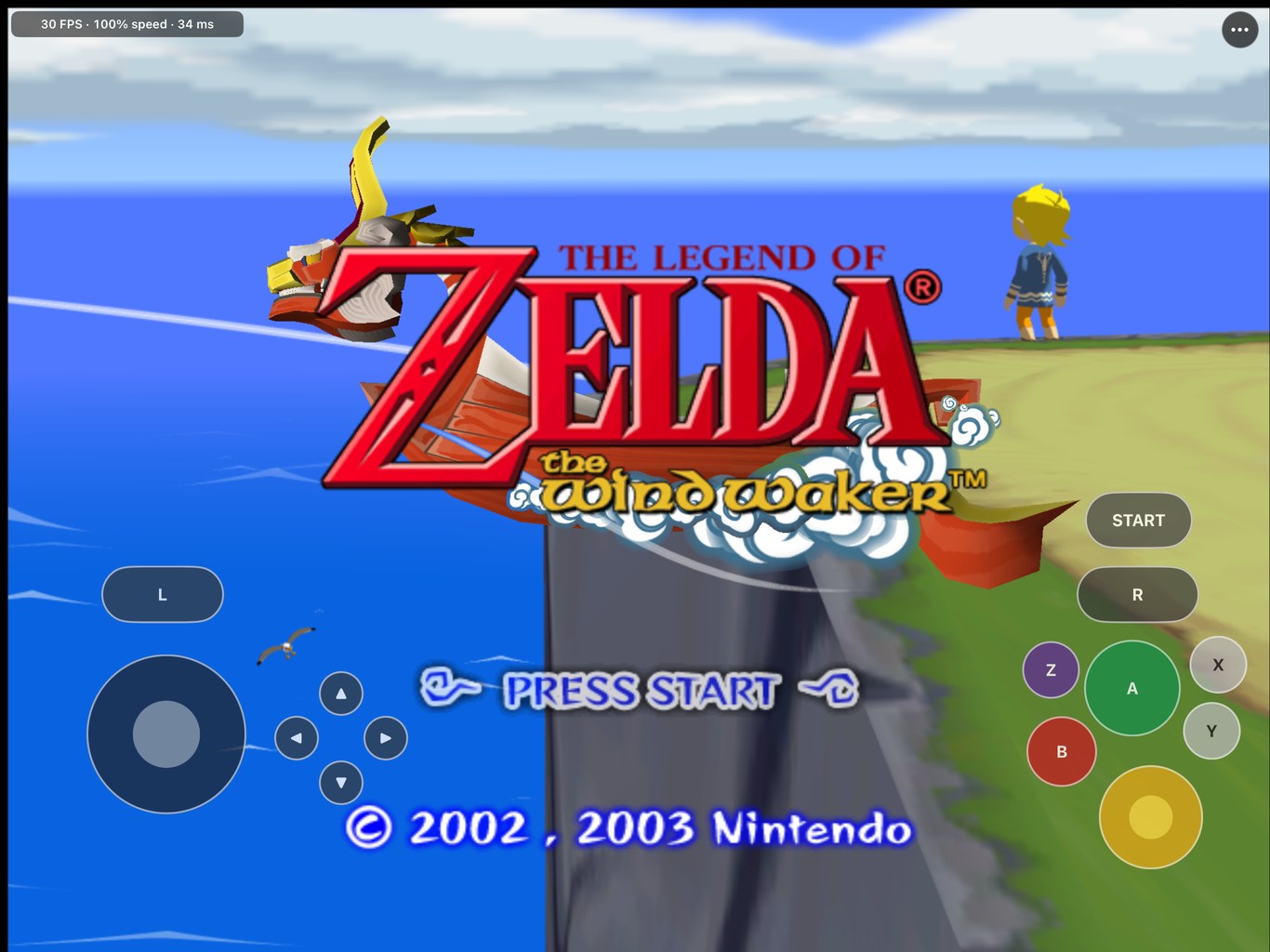
The Legend of Zelda: The Wind Waker, running natively on iPhone, iPad, Mac, Windows and Linux.
A static recompilation of the GameCube original, with touch controls, controller support and mods.


-30%20FPS-30D158)




> [!IMPORTANT]
> **Bring your own disc.** BlueWake needs your own legally obtained copy of *The Wind Waker* for
> GameCube, USA version (`GZLE01`, revision 0). This repository contains no disc image, game assets
> or saves.
## Get BlueWake
| You play on | What to do |
| --- | --- |
| **Windows** 10 or 11 | [Download the ready-made build](#windows) and choose your disc image |
| **iPhone or iPad** | [Build your own app](#iphone-and-ipad) on an Apple Silicon Mac, then install it |
| **Mac** (Apple silicon) | [Build your own app](#mac) from this repository |
| **Apple TV** | Follow the [tvOS build guide](docs/status/TVOS_BUILD.md) (experimental) |
| **Linux** (x86-64) | [Build the native version](docs/LINUX.md); a ready-made download is not published yet |
On Mac, iPhone, iPad and Linux, the app you build contains code translated from your disc. **It is yours
alone: never share or upload it.**
**Questions or bugs?** Ask on [Discord](https://discord.gg/xwHfUD2bxW) or
[open an issue](https://github.com/chrissotraidis/bluewake/issues).
## Coming from Wind Waker Recomp?
Wind Waker Recomp has moved here. Its creator, [Elliott](https://github.com/elliotttate), now
maintains BlueWake together with Chris, and his work is part of BlueWake with his authorship kept.
- **Windows:** BlueWake 0.7.0, on the [latest release](https://github.com/chrissotraidis/bluewake/releases/latest),
is built from BlueWake itself and replaces Wind Waker Recomp 0.4.0. Smooth
Motion is off by default (press **F10** to turn it on), and 0.4.0's experimental 60 FPS game logic
is gone.
- **Saves carry over:** both use `%APPDATA%\BlueWake`. Back that folder up before switching.
- **Bugs and requests** go to [BlueWake's issues](https://github.com/chrissotraidis/bluewake/issues).
Say which build you use and attach your session log.
How the move happened and what's left of it: [migration status](docs/MIGRATION_STATUS.md).
## Install
### Windows
1. Download `BlueWake-v0.7.0-windows-x64.zip` from the
[Releases page](https://github.com/chrissotraidis/bluewake/releases/latest).
2. Unpack the whole ZIP and run `BlueWake.exe`.
3. On first launch, choose your disc image (`.iso` or `.gcm`). A Dolphin `.rvz` must first be
converted to ISO in Dolphin: right-click the game and choose **Convert File**.
You need a Direct3D 12 GPU and a CPU with AVX2 (Intel Haswell from 2013, AMD Ryzen, or newer). If
nothing happens when you open it, see the FAQ below. To build it yourself from your disc instead, see
[BlueWake on Windows](docs/WINDOWS.md).
### Linux
The native x86-64 Linux source build is available now; a ready-made AppImage has
not been published yet. Build it from your disc, optionally package the
AppImage, and open its graphical setup with `--setup`. See
[BlueWake on Linux](docs/LINUX.md) for the commands, dependencies and AppImage
instructions.
### iPhone and iPad
You need:
- a Mac with Apple silicon, Xcode (with the iOS platform installed), and at least 25 GB of free space
- your `GZLE01` revision 0 disc image
- an A13 or newer iPhone or iPad on iOS/iPadOS 17 or later, with Developer Mode on
- an Apple ID for signing (a free one works, but its apps expire after seven days)
Then:
1. **Build your app.** The easiest way is [PadMint](https://github.com/chrissotraidis/padmint): open it,
choose BlueWake and pick your disc. It takes the app from the
[latest release](https://github.com/chrissotraidis/bluewake/releases/latest) and adds the game made
from your disc. To build from the latest source instead, run this from a checkout of this repository:
~~~bash
scripts/builder/build.sh "/path/to/The Legend Of Zelda The Wind Waker.iso" --ipa build/BlueWake.ipa
~~~
Expect a first build of well over an hour. Add `--source-only` first to check your tools and
disc in a few minutes.
2. **Install the IPA** with Sideloadly, AltStore, SideStore or Xcode.
3. **Copy the same disc image to your device:** in Finder, select the device, open **Files** and
drag it onto **BlueWake**. The app imports it on first launch.
Step by step, with updating and troubleshooting: [Build your own BlueWake](docs/BUILD_YOUR_OWN.md).
If you used PadMint, please tell us how it went in
[#104](https://github.com/chrissotraidis/bluewake/issues/104), whether it worked or not.
### Mac
~~~bash
scripts/builder/build.sh "/path/to/your/GZLE01.iso" --platform macos --out build/macos
~~~
This writes `build/macos/packaged/BlueWake.app`, which you can move anywhere. Saves are kept in
`~/Library/Application Support/BlueWake`, so replacing the app keeps them. Details:
[Mac personal app](docs/BUILD_YOUR_OWN.md#mac-personal-app).
## What works
- **Tested:** the opening and prologue, Outset Island, sailing the Great Sea, Windfall, a late-game
Hyrule save, menus, and saving and reloading with the game's own memory card. Later dungeons and
boss fights are largely untested, so please [report](#getting-help) what you find there.
- **Touch controls** with a layout editor, and **controllers and keyboards** with button remapping
- **Settings:** FPS display, render resolution up to 4×, 16× anisotropic filtering, aspect ratio,
save backup and restore, and Report a Problem
- **Mods:** widescreen, HD texture packs, [Better Wind Waker](https://github.com/WideBoner/betterww),
optional gameplay tweaks and the experimental Smooth Motion
| Device | Developer build |
| --- | --- |
| iPad Pro 12.9" (M2) | Steady 30 FPS at full speed, with brief dips at area loads |
| iPhone 14 (A15) | 30 FPS in most play; about 25-27 FPS in the busiest scenes |
| Older devices | A13 or newer is required; slower chips have not been measured |
30 FPS is the game's own frame rate. These numbers come from the developer build; frame-rate tests of
player-built apps on iPad are still to come. The Mac, Windows, Linux and Apple TV versions remain
experimental.
**Known issues:** changing areas can briefly stall, some objects can take a moment to appear the first
time you visit an untested area, and busy scenes on iPhone drop below 30 FPS.
## Mods
Open **⋯ › Mods** on iPhone and iPad, or press **F1 › Mods** on Windows and Linux. Mods apply the next
time BlueWake starts and never change your saves.
| Mod | What it does |
| --- | --- |
| **Widescreen 16:9 / 16:10 / 21:9** | A wider view with the HUD placed to fit. Built in |
| **HD Texture Pack** | Replaces the game's textures, for example with Hypatia's HD pack (see the FAQ) |
| **Better Wind Waker** | Swift Sail, instant text, faster animations and more, each set separately |
| **Gameplay extras** | Jump & Sprint, Fast Transitions and Quick Doors, under **⋯ › Gameplay** |
Code mods are built into your app, so a module built before an update does not gain newer Better Wind
Waker settings or 16:10 until you rebuild it. More in [docs/MODS.md](docs/MODS.md).
## Your saves
- Saves are in **GZLE01.card**: in Files under **On My iPhone/iPad › BlueWake › BlueWake**,
**`%APPDATA%\BlueWake`** on Windows, or **`~/.local/share/BlueWake`** on Linux. Windows and Linux also have
a portable mode ([Windows](docs/WINDOWS.md#your-saves-and-logs), [Linux](docs/LINUX.md)).
- On iPhone and iPad, **⋯ › Game Data & Saves › Back Up Saves…** exports a copy, and
**Restore Saves…** brings one back.
- Install updates over the existing app. **Deleting BlueWake deletes its saves**, so back them up first.
## Getting help
- **Discord:** [discord.gg/xwHfUD2bxW](https://discord.gg/xwHfUD2bxW), one community for BlueWake and
its sibling projects such as KartPad, MeleePad and SunPad
- **Bug reports:** **⋯ › Help & Feedback › Report a Problem on GitHub** opens a prefilled issue.
Say which device, where in the game it happened and what you saw, and attach the session log
(**Share Session Log**, same menu). Please don't attach game files or disc images.
## Frequently asked questions
Can I download it?
On Windows, yes: the [Releases page](https://github.com/chrissotraidis/bluewake/releases/latest) has a
ready-made build that needs your own disc image. The native Linux source build is available, but a
ready-made Linux download has not been published yet. On Mac, iPhone and iPad, you build your own app
from your disc (see [Install](#install)); if an app-only download says "Translated game code:
Missing", add your game with PadMint.
Why does it need my disc?
The game's code is translated from your disc during the build, and the game's graphics, sound and
world data are read from your disc while you play. Neither is included here.
Which version of the game works?
Only the GameCube USA release, `GZLE01` revision 0. The build checks the disc and refuses others. The
Wii U *Wind Waker HD* is a different game and can't be used as the disc, but you can
[import its textures from your own HD disc](docs/WWHD_TEXTURES.md) into a texture pack.
Is this an emulator?
Not in the usual sense. BlueWake translates the game's PowerPC code (the main program and all 415 of
its modules) into native code ahead of time, on your computer. Nothing is compiled while you play, so
it needs no JIT; a few rare instructions fall back to an interpreter. The hardware around the CPU
(graphics, audio, memory card, timing) comes from a runtime derived from [Dolphin](https://dolphin-emu.org/).
Why does the first build take so long?
Besides translating the game, the builder tunes your app for speed. It runs the game briefly on your
Mac without a window, records which code runs most, then compiles your app with those counts. This
profile comes from the game itself, so it can't be published. You don't need to play or supply a save.
Skipping it with `--no-train` makes the build faster, but the game measured about 27.5 FPS instead of
30 at the Outset Island pier on an iPad Pro (M2). Rerunning the same command reuses finished work.
Why 30 FPS?
That is the game's own frame rate on the GameCube. Running the game faster would also make gameplay
faster. For smoother motion, try Smooth Motion below.
How does Smooth Motion work?
BlueWake matches objects between two game frames, works out where they are in between, and renders
extra views of the scene. **Game logic stays at 30 updates per second.** It uses no AI image
generation or DLSS, and it doesn't blend two finished screenshots.
On iPhone and iPad, **⋯ › Display › Smooth Motion (Experimental)** offers 60 FPS and, on ProMotion
screens, 120 FPS. On desktop you can also match your display, up to 240 FPS. It is off by default;
turn it off if you see glitches or slowdowns.
Does it work on iPhone?
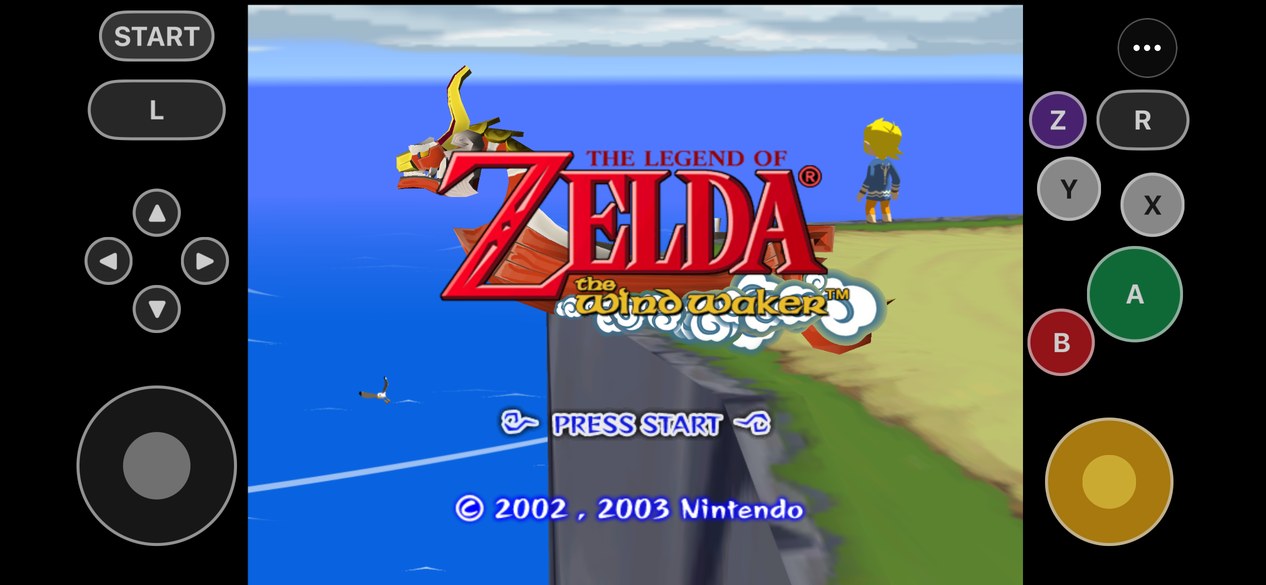
Yes, on an A13 or newer. The touch controls sit in the black bars beside the picture. The busiest
scenes dip below 30 FPS on an iPhone 14.
Is there a Linux version?
Yes. The native x86-64 Linux port was merged in
[#107](https://github.com/chrissotraidis/bluewake/pull/107) and can be built from your own disc by
following [the Linux guide](docs/LINUX.md). A ready-made Linux download has not been published yet.
Is there an Android version?
Not yet. LiquidAzir's Android port ([#93](https://github.com/chrissotraidis/bluewake/pull/93)) builds the game
from your own disc and plays, with the iPhone app's menu, touch controls, controllers and saves. It will be
merged as an experimental build-it-yourself option once it holds full speed on a phone; on a Galaxy Z Fold 7 it
runs Outset at about 70 to 80% today. Follow [#75](https://github.com/chrissotraidis/bluewake/issues/75) for news.
Do controllers work?
Yes. On iPhone and iPad, any controller iOS supports works, with rumble, camera inversion and button
remapping under **⋯ › Controller**. On Mac, Windows and Linux, Xbox, PlayStation, Switch Pro and other
SDL controllers work; remap buttons under **Settings › Controls › Controller buttons** (F1 or Esc
opens settings). The same tab changes what the mouse buttons and keyboard keys press.
If BlueWake doesn't see your controller at all (a generic Bluetooth pad, for example), download
`gamecontrollerdb.txt` from [SDL_GameControllerDB](https://github.com/mdqinc/SDL_GameControllerDB), put it
in the folder with your saves (`%APPDATA%\BlueWake` on Windows, or the `user` folder in portable mode;
`~/Library/Application Support/BlueWake` on a Mac; `~/.local/share/BlueWake` on Linux) and start
BlueWake again.
Does the Tingle Tuner work?
No. The Tingle Tuner needs a Game Boy Advance linked to the GameCube, and BlueWake doesn't emulate one,
so its co-op features aren't available. Better Wind Waker's **Tingle Chests without the Tingle Tuner**
(on by default, under Mods) lets you open Tingle Chests with ordinary bombs and shows them on the maps.
Will updates keep my saves?
Yes, as long as you install over the existing app. Back up your saves first, and never delete the app
to update it.
Can I use my Dolphin saves?
Yes, for USA (`GZLE01`) in-game saves; Dolphin save states are not supported. Export a `.gci` from
Dolphin's **Tools › Memory Card Manager**.
- **iPhone and iPad:** copy the save to your device and open
**⋯ › Game Data & Saves › Import Dolphin Save…**. Pick the quest log and the BlueWake slot to put it
in; the app backs up your current card first. Dolphin `.raw` cards work too.
- **Windows:** there is no import screen yet, and renaming a `.gci` to `.card` will not work.
Source users can use the [save-import helper](tests/dolphin_save_import_cli.c), which uses the same
importer as iOS. Close BlueWake, work on a copy of your card, then put the result at
`%APPDATA%\BlueWake\GZLE01.card`.
Where do I put Hypatia's texture pack?
Extract the pack. Its **`GZL` folder holds the textures**; keep its subfolders and filenames as they are.
- **Windows:** press **F1 › Mods › Open the texture folder** (or open
`%APPDATA%\BlueWake\Load\Textures\GZLE01`) and copy `GZL` into it.
- **iPhone and iPad:** use **⋯ › Mods › Install Texture Pack…** and select `GZL` in Files.
Then enable **HD Texture Pack** and restart BlueWake. Leave the pack's **Optional Textures** out
unless you pick specific ones, since they compete with the main textures. You don't need its
**WideScreen Patch**; use BlueWake's built-in widescreen. For a smaller pack on iPhone and iPad, see
[Mods](docs/MODS.md#installing).
BlueWake.exe does nothing when I open it
The most common cause is an older processor. The Windows build needs a CPU with AVX2 (Intel Haswell
from 2013, AMD Ryzen, or newer) and stops before showing any message without it. Check your CPU in
**Settings › System › About**.
If your CPU has AVX2:
1. Run `BlueWake.exe` from the complete unpacked folder, not from inside the ZIP.
2. Open `%APPDATA%\BlueWake\logs` and attach the newest `session-*.log` (and any `crash-*.log`) to
an issue, with your CPU, GPU and Windows version. If no new log appears, say so.
3. If Windows names a missing DLL, unpack the complete download again; don't collect DLLs from other sites.
Don't delete `%APPDATA%\BlueWake` to troubleshoot: it holds your saves and settings.
## Documentation
- [Build your own BlueWake](docs/BUILD_YOUR_OWN.md): the player's guide for iPhone, iPad and Mac
- [BlueWake on Windows](docs/WINDOWS.md): playing and building on Windows
- [BlueWake on Linux](docs/LINUX.md): building and playing on Linux and the Steam Deck
- [Apple TV build](docs/status/TVOS_BUILD.md) and [device build options](docs/status/DEVICE_BUILD.md)
- [Mods](docs/MODS.md), [Wind Waker HD textures](docs/WWHD_TEXTURES.md) and the
[developers' stage select](docs/STAGE_SELECT.md)
- [The Builder](docs/BUILDER.md): how the build works, and reusing it for other ports
- What's being worked on: [the plan](docs/GOAL_LOOP.md) and [the priorities](docs/PRIORITIES.md); how Wind Waker
Recomp became BlueWake: [migration status](docs/MIGRATION_STATUS.md)
- [History](docs/archive/HISTORY.md), [porting history](docs/archive/PORTING_HISTORY.md) and
[legal and provenance](docs/research/LEGAL_AND_PROVENANCE.md)
## Credits
- [Elliott (@elliotttate)](https://github.com/elliotttate), co-maintainer, whose
[Wind Waker Recomp](https://github.com/elliotttate/Wind-Waker-Recomp) brought the Windows port and
the rendering, camera, gameplay and performance work now in BlueWake
- [SunPad](https://github.com/chrissotraidis/sunpad), the Super Mario Sunshine port whose touch
controls BlueWake adapts
- [Dolphin](https://dolphin-emu.org/), for the compatibility runtime, DSP audio, the texture-pack
format and the widescreen code
- [RecompCore](https://github.com/chrissotraidis/RecompCore) and
[DolRecomp](https://github.com/chrissotraidis/DolRecomp), forked for BlueWake, with the Aurora
renderer and Dawn
- [zeldaret/tww](https://github.com/zeldaret/tww), the Wind Waker decompilation, for research
- [Better Wind Waker](https://github.com/WideBoner/betterww) by WideBoner
- HD texture pack authors, including
[Hypatia](https://forums.dolphin-emu.org/Thread-hypatia-s-tloz-the-wind-waker-hd-pack-v2-0001a)
- [Ian MacFarlane (@iannotian)](https://github.com/iannotian), for the Apple TV version
BlueWake is developed with substantial AI assistance for code, testing, documentation and debugging.
The [engineering log](docs/status/CURRENT.md) records what has been checked, and on what.
## License and legal
BlueWake is licensed under the [GNU GPL, version 3 or later](LICENSE), the license its Dolphin-derived
runtime and [SunPad](https://github.com/chrissotraidis/sunpad)-derived touch controls allow together.
See [RIGHTS_AND_LICENSES.md](RIGHTS_AND_LICENSES.md) for details and for game content.
BlueWake is an independent fan project, not affiliated with or endorsed by Nintendo. *The Legend of
Zelda*, *The Wind Waker* and GameCube are trademarks of Nintendo. You need your own legally obtained
disc and are responsible for following the laws that apply to it.