# DaggerPad
The Elder Scrolls II: Daggerfall via Daggerfall Unity, rebuilt for iPad.
Native Metal rendering, touch-first controls, Files-based setup, and support
for keyboards, pointing devices, and iPadOS game controllers.







Install ·
Controls ·
Screenshots ·
FAQ ·
Project status
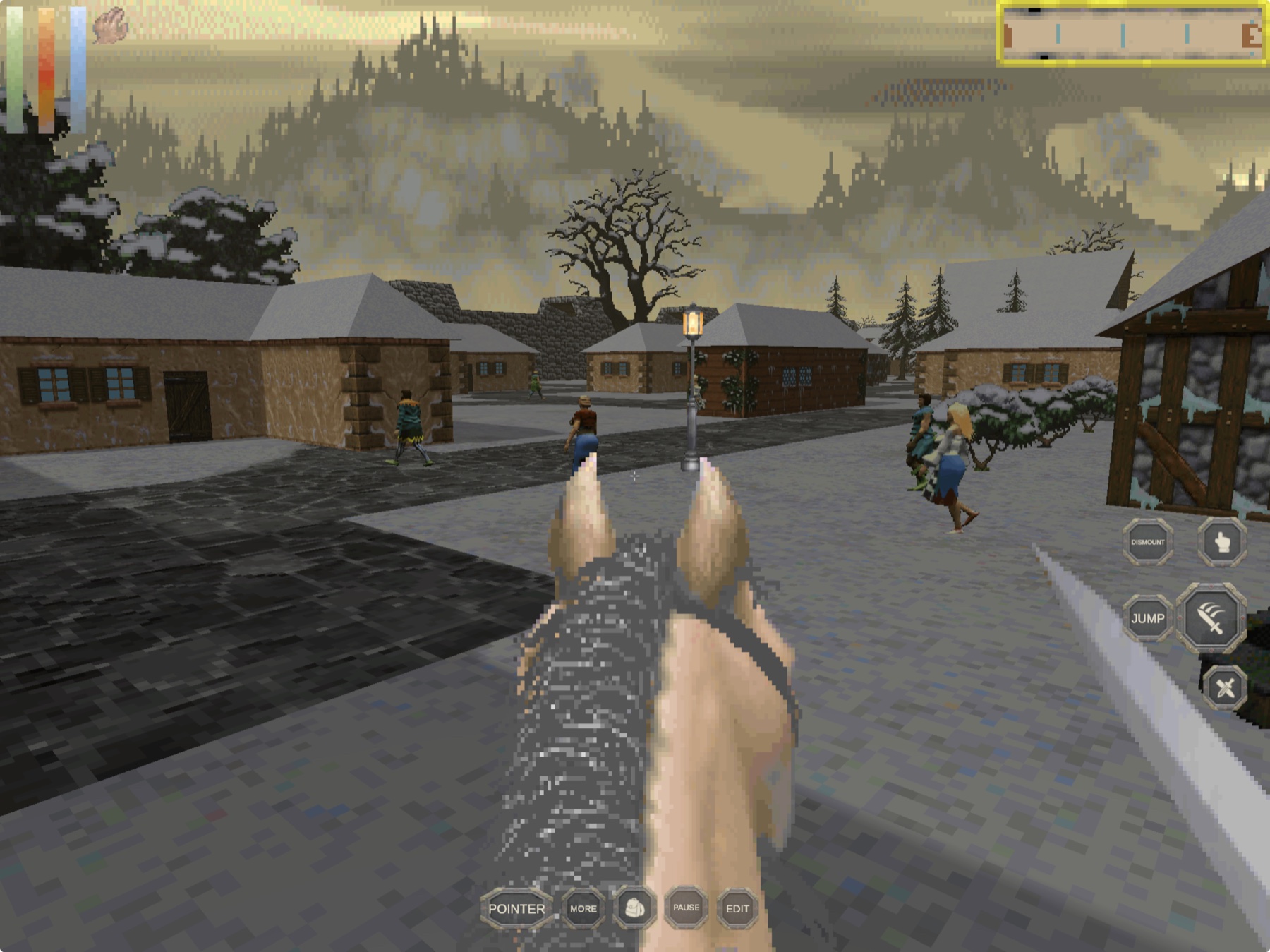
Version 10 running on a 12.9-inch iPad Pro: native landscape gameplay, contextual controls, and the original Daggerfall world.
DaggerPad brings
[Daggerfall Unity](https://github.com/Interkarma/daggerfall-unity) as a native
iPadOS app. It renders through Metal, imports your classic Daggerfall files
through Files, and adds a landscape touch interface designed for movement,
looking, combat, conversations, inventory, and the original game's dense UI.
The mobile baseline comes from
[Vwing's Daggerfall Unity Android fork](https://github.com/Vwing/daggerfall-unity-android),
with iPadOS integration, native pointer input, Files import, lifecycle handling,
and DaggerPad's touch layouts maintained in this repository. It does **not**
contain Daggerfall, Bethesda game data, or a prepared playable archive.
> [!NOTE]
> **AI disclosure:** DaggerPad uses substantial AI assistance for code, tests,
> documentation, debugging and maintenance. Some support replies and maintenance
> tasks are automated. There is no audited percentage of AI-generated code.
> Build, test and device records describe what was checked. This disclosure
> concerns DaggerPad's workflow, not the authorship of its upstream projects.
## Install status
| Option | Status | What to do |
|---|---|---|
| Public `.ipa` | **Preview 1 published** | Download [`DaggerPad-0.1.0-preview.1-unsigned.ipa`](https://github.com/chrissotraidis/daggerpad/releases/download/v0.1.0-preview.1/DaggerPad-0.1.0-preview.1-unsigned.ipa), then sign it with your own Apple ID before sideloading. |
| Local development `.ipa` | **Verified August 2, 2026** | A development-signed Release IPA was built, audited, installed, and launched on the physical test iPad. It remains a local, ignored artifact tied to the builder's Apple development profile. |
| Local iPad build | **Available now** | Follow the fresh-clone instructions below, then sign the generated Xcode project with your Apple development team. |
| Simulator | **Available now** | Best for setup, UI, and repeatable smoke testing; it is not a substitute for physical-device testing. |
| App Store / TestFlight | **Not announced** | No listing or public TestFlight currently exists. |
The current development source has been exported with Unity, signed and built
for arm64, installed over an existing copy, and launched on a 12.9-inch M2
iPad Pro. The in-place update preserved all three existing save slots. The
version 10 built-in layouts add clearer contextual command labels without
changing control placement, hit targets, or bindings, and text-field taps now
explicitly request the iPad software keyboard.
Those checks prove the build, installation, launch, and save preservation. The
current physical-iPad captures below confirm the version 10 labels, gameplay,
classic interfaces, and layout editor. Software-keyboard behavior without an
attached physical keyboard and long-session performance remain open checks.
Preview 1 uses the same clean arm64 Release app produced at source commit
`80cd8e5` with Unity `2022.3.62f3` and Xcode 26.6. The public package strips the
builder's signature and provisioning profile, includes the project and
third-party notices, and contains no Daggerfall game data or saves. Its SHA-256
is `d14544e950c8aee756822fbc4bc03f8922644173aa433bae5d7c09d0787de067`.
On August 18, 2026, that exact unsigned IPA was extracted, re-signed with a
local Apple development identity, verified strictly, installed in place on the
12.9-inch M2 iPad Pro, and launched. The process remained live and the existing
36-file save tree matched byte-for-byte after installation. The underlying app
had already passed the native landscape visual smoke shown below. This proves
the downloadable payload can be re-signed, installed, and launched; it does
not replace hands-on control or long-session performance testing.
## Get started
You need:
- a Mac with [Xcode](https://developer.apple.com/xcode/) and its command-line
tools;
- [Unity Hub](https://unity.com/download) with Unity `2022.3.62f3` and
**iOS Build Support** installed;
- an Apple ID configured in Xcode for development signing;
- an iPad running iPadOS 15 or later; and
- your own legally obtained Daggerfall folder containing `ARENA2` and
`FALL.EXE`.
Clone the project and prepare your game-data ZIP:
```sh
git clone https://github.com/chrissotraidis/daggerpad.git
cd daggerpad
bash scripts/prepare-game-data.sh "/path/to/your/DAGGER"
```
The script validates the folder and writes
`Builds/TestData/daggerfall.zip`. The ZIP stays ignored and must never be
committed or distributed with DaggerPad.
Build and run:
1. Open the repository folder in Unity Hub with `2022.3.62f3`.
2. Let the first Unity import finish.
3. Choose **DaggerPad → Build → iPadOS Device**.
4. Open `Builds/iOS/Device/Unity-iPhone.xcodeproj` in Xcode.
5. Select the `Unity-iPhone` target and choose your development team under
**Signing & Capabilities**.
6. Connect and trust your iPad, select it as the run destination, and press
**Run**.
See [`BUILDING.md`](BUILDING.md) for command-line export, signing, Simulator,
and troubleshooting instructions. The complete physical-device handoff is in
[`docs/IPAD_SETUP_AND_CONTROLS.md`](docs/IPAD_SETUP_AND_CONTROLS.md).
Prefer a command-line Unity export?
```sh
/Applications/Unity/Hub/Editor/2022.3.62f3/Unity.app/Contents/MacOS/Unity \
-batchmode -quit \
-projectPath "$PWD" \
-buildTarget iOS \
-executeMethod DaggerPad.Editor.DaggerPadIosBuild.BuildDevice \
-daggerpadBuildPath "$PWD/Builds/iOS/Device" \
-logFile "$PWD/Builds/iOS/unity-device.log"
```
Open the generated Xcode project and choose your development team as described
above. The full signed command-line path is in [`BUILDING.md`](BUILDING.md).
## First launch
DaggerPad never downloads or bundles game data.
1. Make `Builds/TestData/daggerfall.zip` available in Files, using iCloud
Drive, AirDrop, or another local transfer method.
2. Launch DaggerPad and tap **Import**.
3. Select `daggerfall.zip` in the Files picker.
4. Let DaggerPad extract and validate the classic game files.
5. Complete setup and tap **Play**.
Imported files, settings, mods, and saves remain visible at
**Files → On My iPad → DaggerPad → DaggerfallUnity**. When updating an existing
installation, keep the same bundle identifier and install in place; uninstalling
deletes the app's data container.
## Touch controls
DaggerPad's standard version 10 iPad layout keeps the game view readable while
placing essential actions within thumb reach:
- **Left half:** touch and drag to move from a floating origin.
- **Right half:** touch and drag to look; double-tap to use, open, or take the
object under the crosshair.
- **Actions:** Use, Mount / Dismount, Attack, Jump, and Draw / Sheathe sit near
the right thumb.
- **Commands:** Pointer / Look, More / Close, Inventory, Pause / Back, and
Edit / Done remain in the bottom strip and describe their current action.
- **More:** opens automap, rest, quick save/load, status, travel, journals,
hand switch, magic items, and a visible Run on/off toggle.
- **Classic lists:** swipe vertically with one finger to scroll conversations,
inventory-style lists, spell lists, and journals that support mouse-wheel
input.
- **Customize:** use Edit to move, resize, enable, disable, or remap controls.
Built-in layouts migrate forward while custom layouts are preserved.
| Surface or control | Gameplay behavior |
|---|---|
| Left half | Move in any direction; touch, keyboard, and controller movement are arbitrated rather than added together. |
| Right half | Look without a permanent on-screen stick. |
| Right-side double tap | Use, activate, open, or take the object under the crosshair. |
| Use | Explicit alternative to the right-side double tap. |
| Mount / Dismount | Mount an owned horse or cart outdoors, or return to foot. |
| Attack | Ready a sheathed weapon on the first tap, then attack. |
| Jump | Trigger Daggerfall's standard Jump action. |
| Pointer / Look / Enter | Switch pointer modes during gameplay; the label shows the next action and changes to Enter in dialogs. |
| More / Close | Open or close the compact secondary-action tray. |
| Pause / Back | Pause gameplay or close the current Daggerfall window. |
| Edit / Done | Open or close the layout editor after closing any open utility tray. |
Hold a visible control briefly to show its name in the HUD, away from the
finger covering the button. Automap is identified as `LOCAL MAP` to distinguish
it from the travel map. The bundled `simplified-layout`, `gesture-layout`,
and `accessibility-layout` presets cover the standard, gesture-combat, and
larger-control starting points.
The current layout, reset behavior, keyboard and trackpad mappings, and
physical retest list are documented in
[`docs/IPAD_SETUP_AND_CONTROLS.md`](docs/IPAD_SETUP_AND_CONTROLS.md).
Show keyboard, trackpad, and mouse shortcuts
| Input | Default behavior |
|---|---|
| `W`, `A`, `S`, `D` | Move at the iPad-tuned keyboard scale |
| Trackpad or mouse motion | Look during captured Look mode |
| Enter | Toggle Pointer mode and Look mode |
| Primary, secondary, middle click | Feed Daggerfall's normal mouse actions and menus |
| `Shift` | Run while held |
| `Space` | Jump |
| `C` | Crouch |
| `M` | Open the automap |
| `I` | Show status |
| `Z` | Ready or sheathe the weapon |
| Escape | Pause, close, or go back |
Daggerfall's normal bindings remain configurable. Pointer lock is requested
only during active gameplay, not while classic menus are open.
## Current screenshots
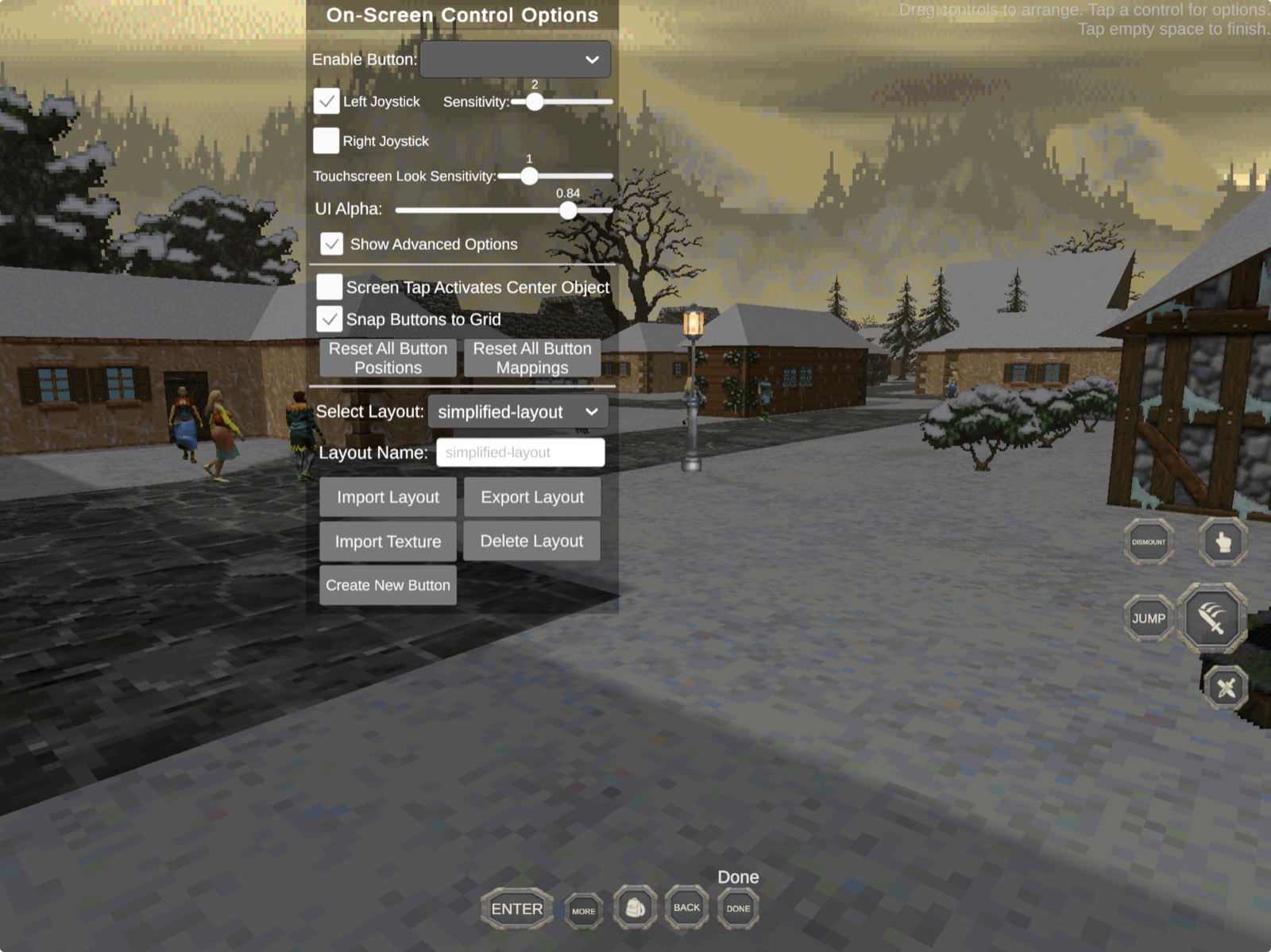
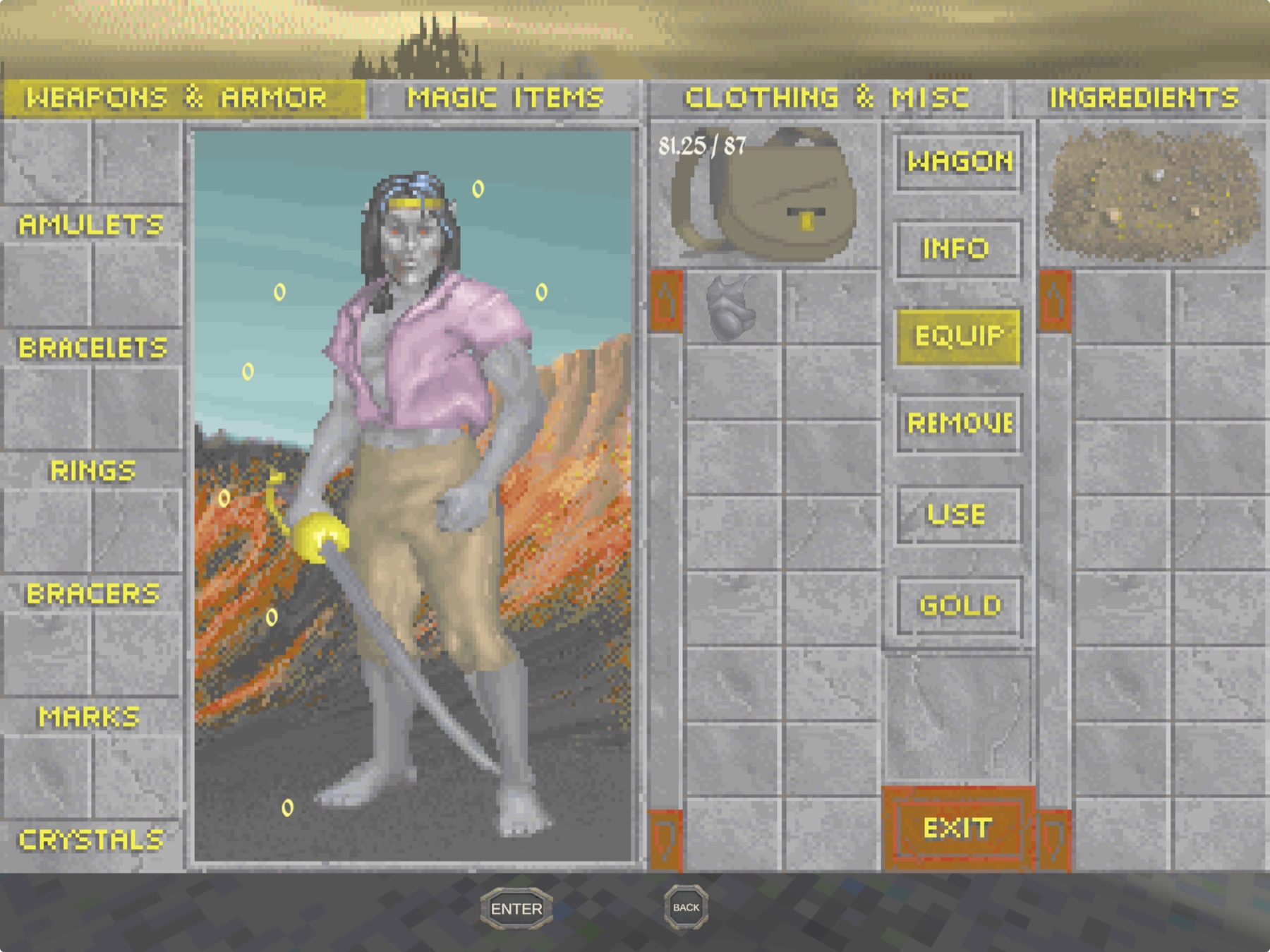
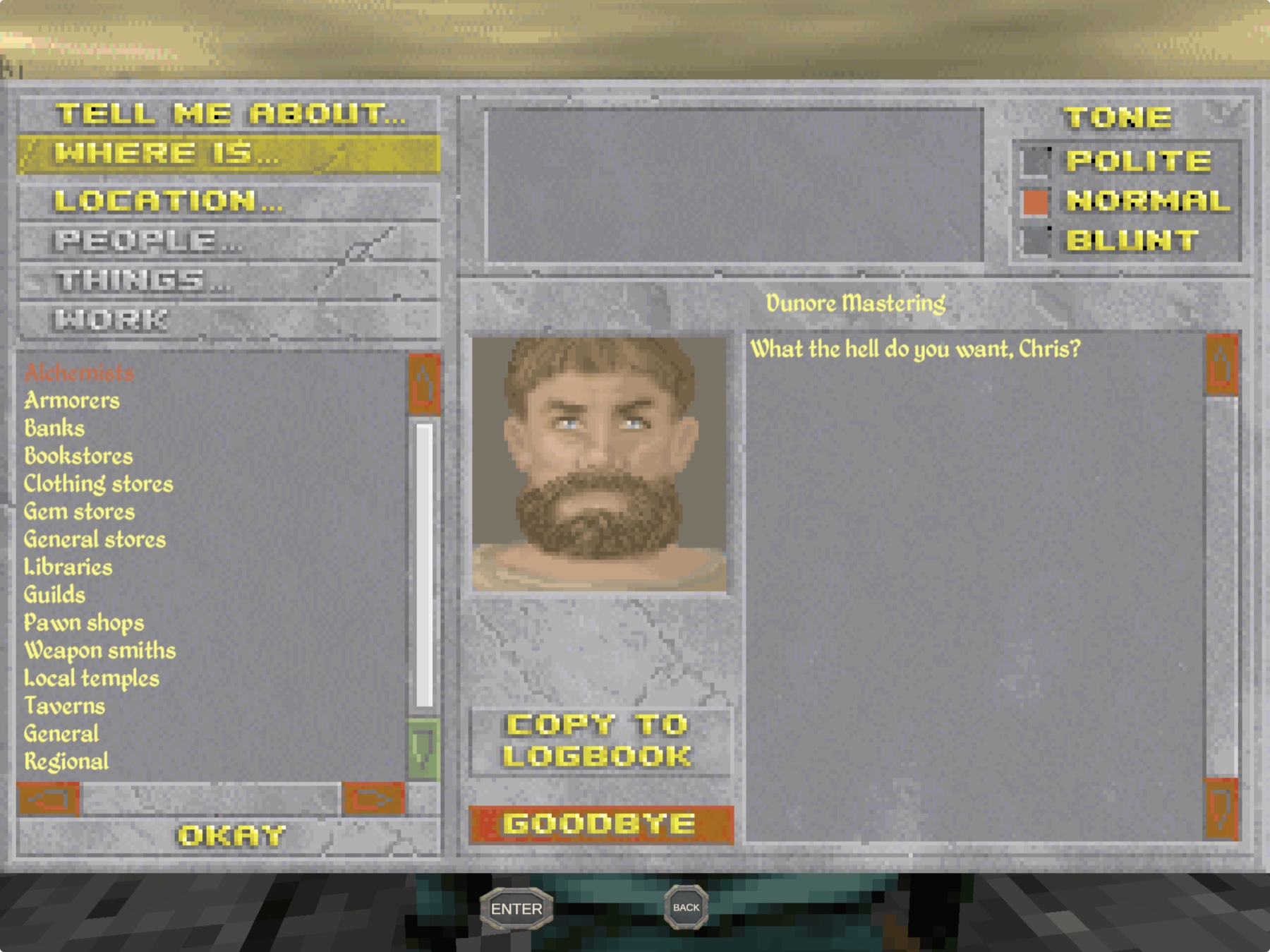
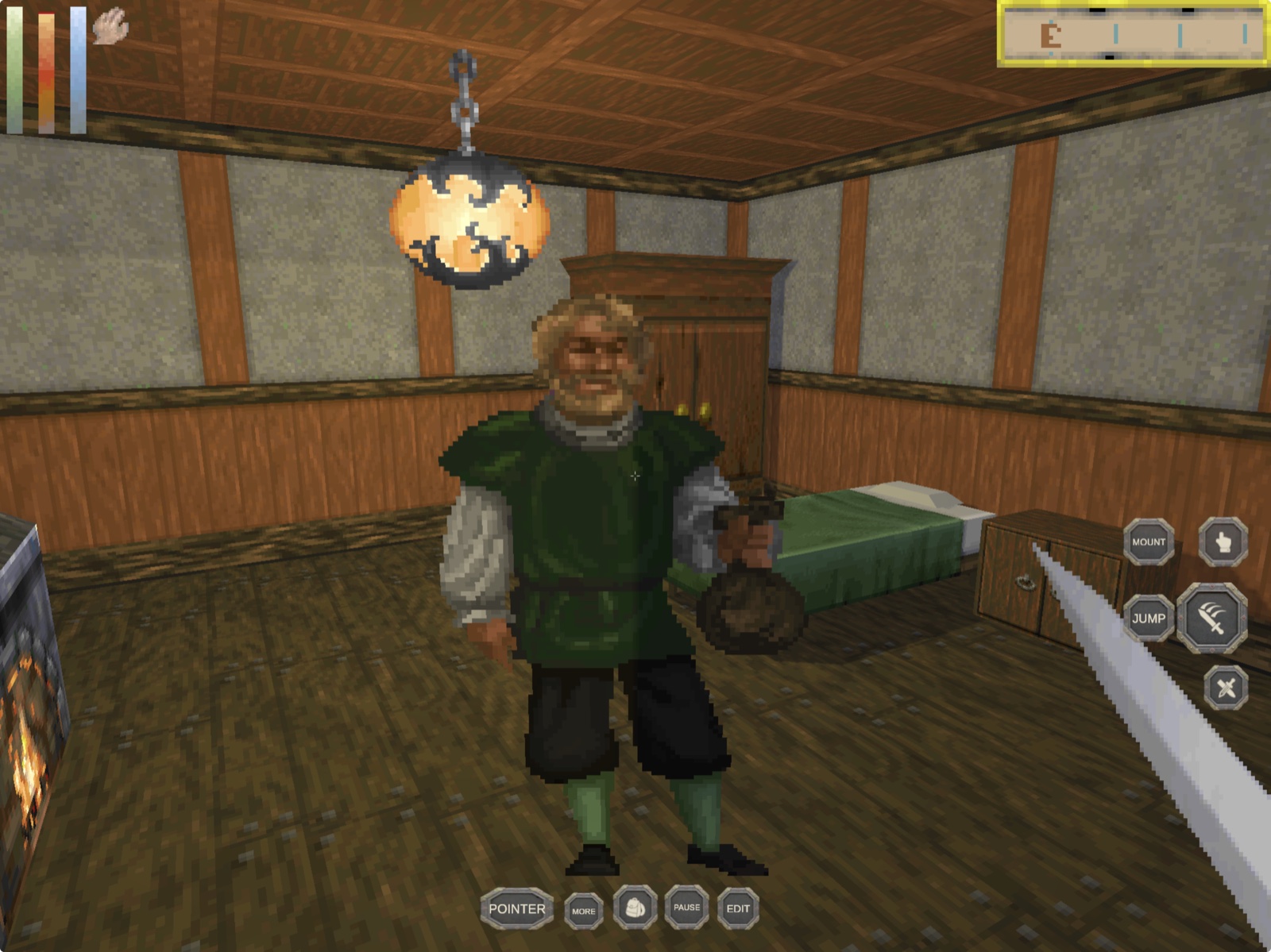
All five captures in this README come from the current version 10 build running
on a physical 12.9-inch iPad Pro. Click any image for the full-size view.
|
|
Controls that fit the game
Move, resize, remap, import, or export layouts without leaving gameplay. |
The complete classic interface
Inventory, equipment, encumbrance, and item actions remain intact. |
|
|
Conversation by touch
Browse classic topics and responses with one-finger list scrolling. |
Exploration and interaction
Look, use, fight, mount, and navigate with a restrained overlay. |
The snowy-town hero shows mounted outdoor play and the normal version 10 command
strip. All game data used for these captures was supplied locally and is not
part of this repository.
## Simulator test
The automated smoke path exports DaggerPad, builds it for the pinned iOS 18.5
iPad Pro Simulator, installs it, launches it, and captures local evidence.
Run the automated Simulator smoke path
```sh
bash scripts/prepare-game-data.sh "/path/to/your/DAGGER"
bash scripts/run-simulator-smoke.sh
```
The script creates or reuses the named test Simulator but intentionally
performs a clean DaggerPad install. Do not point it at a Simulator whose app
data or saves you need to keep. See [`docs/TESTING.md`](docs/TESTING.md) for
the exact evidence boundary and physical-iPad checklist.
## What works
| Area | Current result |
|---|---|
| Native app | Complete Unity project exports and builds for arm64 iPadOS 15+ through IL2CPP |
| Rendering | Metal rendering works in Simulator and on physical iPad |
| Game setup | Files-based ZIP import, validation, local extraction, and path recovery after app-container relocation work |
| Gameplay | Character creation, Privateer's Hold, pause, inventory, automap, named saves, load, and suspension autosave recovery have been exercised |
| Touch | Dual-zone movement/look, contextual commands, core actions, touch-scrollable classic lists, three presets, and an in-app layout editor are included |
| Input options | Touch, keyboard, native `GCMouse` mouse/trackpad input, and the inherited iOS controller path are present |
| Updates | Imported data, custom layouts, and saves can survive an in-place app update |
For detailed engineering evidence and the remaining physical-device gates, see
[`docs/STATUS.md`](docs/STATUS.md) and [`docs/TESTING.md`](docs/TESTING.md).
## Supported game
| Game | Engine | Status |
|---|---|---|
| **The Elder Scrolls II: Daggerfall** | [Daggerfall Unity](https://github.com/Interkarma/daggerfall-unity) | Supported with user-provided classic game files |
| Other Elder Scrolls games | — | Not supported by this app |
DaggerPad is a native Daggerfall Unity integration, not a DOS emulator or a
general Elder Scrolls launcher.
## Reproducible and game-data-free
```mermaid
flowchart LR
A["DaggerPad Unity source"] --> B["iPadOS Xcode export"]
B --> C["Locally signed app"]
D["Your Daggerfall folder"] --> E["prepare-game-data.sh"]
E --> F["Ignored daggerfall.zip"]
C --> G["Files import"]
F --> G
G --> H["Local data, saves, and gameplay"]
```
The app build never needs to bundle your Daggerfall files. The preparation
script creates a separate ignored ZIP from the folder you provide, and the app
introduces that data only after installation through the iPadOS Files picker.
Before handing off a source build, run:
```sh
bash scripts/verify-source.sh "/path/to/your/DAGGER"
bash scripts/verify-xcode-export.sh Builds/iOS/Device
```
The first command checks the pinned Unity/iPadOS configuration, touch contract,
the game-data folder you provide, script syntax, and whitespace. If you omit
the folder, local game-data checks run only when the default ignored `ref/`
folder exists. The second command checks a generated Xcode export for
Addressables, Files integration, iPad targeting, indirect input, and the native
pointer framework.
Generated Unity state, Xcode projects, build products, prepared ZIPs, classic
game files, saves, and local evidence are ignored and must never be committed.
## Important limits
- DaggerPad is an unofficial community port. You must supply your own
Daggerfall files.
- iPadOS uses IL2CPP. Runtime C# mods and precompiled managed mod assemblies do
not work; asset-only mods must be rebuilt for the iOS Unity target.
- A build, installed bundle, launched process, or device-side preset read-back
does not by itself prove physical control feel or long-session stability.
- Physical controller mappings, sustained performance, thermals, battery use,
memory, interruption recovery, and a desktop-to-iPad save round trip still
need broader device testing.
- Preview 1 is offered as an unsigned sideload IPA. No App Store build or
public TestFlight is currently offered.
## Frequently asked questions
Where is the IPA?
Download the unsigned Preview 1 IPA from the
[GitHub release](https://github.com/chrissotraidis/daggerpad/releases/tag/v0.1.0-preview.1).
It does not contain a provisioning profile and will not install directly:
re-sign it with your own Apple ID using your normal sideload workflow. You can
also build locally, select your Apple development team in Xcode, and install
from source. Neither route includes Daggerfall game data.
Does this repository include Daggerfall?
No. You must provide your own legally obtained classic Daggerfall folder. Do
not open issues requesting game data or download links.
Does it really run on a physical iPad?
Yes. Development builds have been signed, installed, launched, and exercised
on a 12.9-inch M2 iPad Pro. The current version 10 build is installed and
running there with the previous saves intact. The images above were captured
from that device. Detached-keyboard text entry and longer performance passes
still require hands-on acceptance.
Can I customize the touch controls?
Yes. Open Edit to move, resize, hide, enable, or remap controls. DaggerPad ships
standard, gesture-combat, and accessibility presets and preserves user-created
layouts during built-in preset migrations.
Does it support a keyboard, trackpad, mouse, or controller?
Keyboard movement and shortcuts are included. Mouse and trackpad input use a
native `GCMouse` bridge with gameplay-only pointer lock. Daggerfall Unity's
controller path is also present, but physical controller mappings and accessory
feel still need model-specific testing.
Do Daggerfall Unity mods work?
Asset-only mods can work when rebuilt for the iOS Unity target. Runtime C# mods
and precompiled managed mod assemblies are incompatible with the IL2CPP build.
Is this an App Store or TestFlight release?
No. App Store, TestFlight, and public sideload distribution require separate
signing, packaging, testing, and rights review. None has been announced.
What is the licensing status?
Daggerfall Unity and the Vwing mobile fork are MIT-licensed. This repository
carries the Daggerfall Workshop MIT license in [`LICENSE`](LICENSE), while
bundled third-party components retain their own notices under
[`Assets/Licenses/`](Assets/Licenses/). The license does not grant rights to
Bethesda's classic game files, names, or trademarks. Those game files are not
bundled with DaggerPad.
## Project map
| Path | Purpose |
|---|---|
| [`Assets/iOS/`](Assets/iOS/) | iPadOS build, lifecycle, Files, and platform integration |
| [`Assets/Plugins/iOS/`](Assets/Plugins/iOS/) | Native mouse and trackpad bridge |
| [`Assets/Android/Scripts/`](Assets/Android/Scripts/) | Shared mobile touch controls and layout management |
| [`scripts/prepare-game-data.sh`](scripts/prepare-game-data.sh) | Validate local classic files and create the ignored import ZIP |
| [`scripts/run-simulator-smoke.sh`](scripts/run-simulator-smoke.sh) | Deterministic iPad Simulator build, install, launch, and evidence path |
| [`scripts/verify-source.sh`](scripts/verify-source.sh) | Source, configuration, touch, and optional local-data gate |
| [`BUILDING.md`](BUILDING.md) | Fresh-clone build, signing, Simulator, and troubleshooting guide |
| [`docs/IPAD_SETUP_AND_CONTROLS.md`](docs/IPAD_SETUP_AND_CONTROLS.md) | Physical-iPad setup, safe updates, controls, and acceptance checklist |
| [`docs/STATUS.md`](docs/STATUS.md) | Implementation evidence and current boundaries |
| [`docs/TESTING.md`](docs/TESTING.md) | Simulator and physical-device test matrix |
Generated source state, build directories, app products, prepared game-data
archives, and user saves are local-only and ignored.
## Feedback and contributing
Use [GitHub Issues](https://github.com/chrissotraidis/daggerpad/issues) for
reproducible gameplay or platform defects. Include the DaggerPad commit, iPad
model, iPadOS version, and exact reproduction steps. Never attach or request
game data, prepared archives, or saves containing copyrighted material.
## Community and support
[Join the Discord](https://discord.gg/xwHfUD2bxW) for help and news. It is one
community for DaggerPad and its sibling projects, such as KartPad, BlueWake and
MeleePad: ask about setup and installing, share how it runs on your device, and
hear about new releases first.
Found a bug? [Open an issue](https://github.com/chrissotraidis/daggerpad/issues)
with your device, its OS version, and the steps that led to it.
## Legal and acknowledgements
DaggerPad is an unofficial community project and is not affiliated with or
endorsed by Bethesda Softworks, ZeniMax Media, Unity Technologies, Daggerfall
Workshop, or the Vwing project. It does not provide the game, game downloads,
or prepared playable data.
This project builds on Daggerfall Unity, Vwing's mobile work, Unity, Native
File Picker, and their contributors. All projects, copyrights, and trademarks
belong to their respective owners.