# HarkinianPad
Ocarina of Time via Ship of Harkinian, rebuilt for iPhone and iPad.
Native Metal rendering, touch controls, Files-based setup, and support for
keyboards, pointing devices, and iOS game controllers.







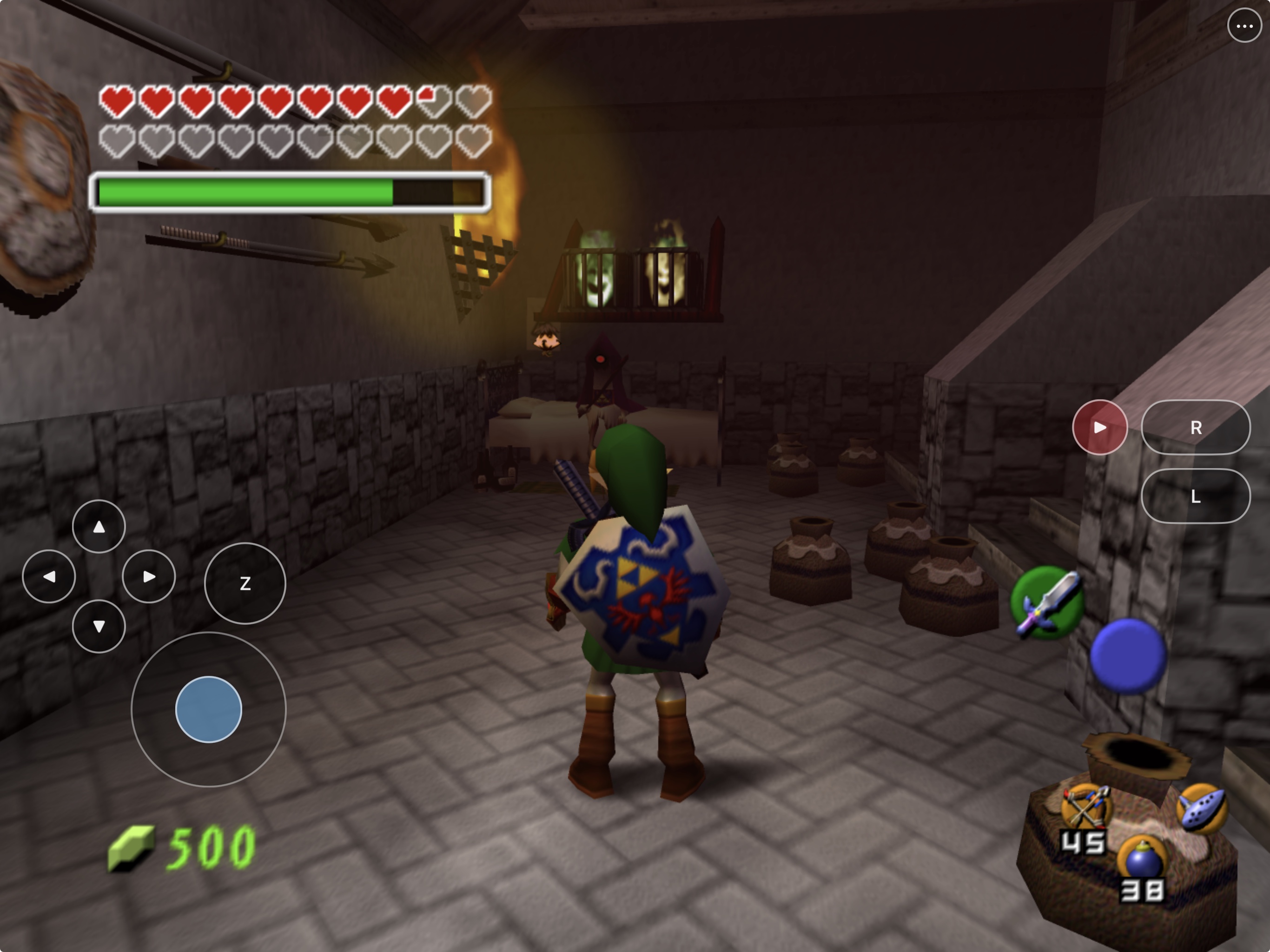
HarkinianPad packages the full
[Ship of Harkinian](https://github.com/HarbourMasters/Shipwright) source port
as a native iOS/iPadOS app. It renders through Metal, imports a user-provided
supported Ocarina of Time ROM through Files, and includes a landscape touch
controller that can be hidden whenever a physical controller is connected.
This repository contains the mobile integration and pinned build scripts.
The exact maintained forks and pins are in [sources.lock.json](sources.lock.json).
See [mod compatibility and support priorities](docs/MOD_SUPPORT.md).
The [source-maintenance qualification](docs/MODERNIZATION.md) records the
remaining source-delivery and reproducibility boundaries. It does **not** contain Ocarina of Time, a ROM, or a playable
ROM-derived archive. See the scoped
[`rights and licensing boundary`](RIGHTS_AND_LICENSES.md); it does not
relicense Shipwright, third-party projects, or game material.
> [!NOTE]
> **AI disclosure:** HarkinianPad uses substantial AI assistance for code,
> tests, documentation, debugging and maintenance. Some support replies and
> maintenance tasks are automated. There is no audited percentage of
> AI-generated code. Build, test and device records describe what was checked.
> This disclosure concerns HarkinianPad's workflow, not the authorship of its
> upstream projects.
## Install status
| Option | Status | What to do |
|---|---|---|
| Make your own IPA with PadMint | **Available now** | On a Mac, [PadMint](https://github.com/chrissotraidis/padmint/releases/latest) builds HarkinianPad from this repository's latest release and saves an unsigned IPA; install it with AltStore Classic, SideStore or Sideloadly. See [Get started](#get-started). |
| AltStore PAL / computer-free install | **Not available** | The current IPA is not an AltStore PAL release. Installing AltStore Classic through PAL does not remove Classic's requirement for AltServer on a Mac or Windows PC. |
| Local iPad build | **Available now** | Build and sign with your Apple development team using the instructions below. |
| Simulator | **Available now** | Best for development and UI testing; it is not a substitute for physical-device testing. |
| App Store / TestFlight | **Not announced** | No listing or public TestFlight currently exists. |
Earlier development builds have been signed, installed, and played on a
12.9-inch iPad Pro (6th generation) running iPadOS 26.5.2. Files import,
on-device archive loading, touch gameplay, save loading, the settings menu,
and in-place app updates have all been exercised on that hardware.
Preview 6's mod-pack changes have Simulator startup validation; physical-device
gameplay has not yet been verified for that release.
Audio has been heard during repeated physical-iPad playtests. Headphone,
Bluetooth, and interruption recovery still need a complete device matrix.
Controller sleep/reconnect ownership now has deterministic regression coverage
and physical-iPad foreground proof; hands-on Bluetooth, wired, natural-sleep,
mapping, rumble, motion, and two-controller acceptance remains open.
## Get started
**The easy way:** on a Mac with Xcode, the current public release requires these build libraries:
```sh
brew install cmake ninja pkgconf sdl2 glew nlohmann-json libpng libzip \
tinyxml2 libogg libvorbis opus opusfile sdl2_net
```
then download [PadMint](https://github.com/chrissotraidis/padmint/releases/latest), unzip it,
double-click `PadMint.command` and choose HarkinianPad. PadMint builds the app from this
repository's latest release (about 15 minutes) and saves an unsigned IPA in your Downloads folder.
Install it with your sideloading tool, copy your ROM into the HarkinianPad folder in Files,
then return to the app and tap **Rescan** (see [First launch](#first-launch)).
Releases publish no app: the app is compiled from the Ship of Harkinian decompilation, so you make your own.
The released recipe checks the build tools but does not check these desktop
libraries before compiling. Install the libraries above before starting PadMint.
**By hand:**
You need:
- a Mac with Xcode and its command-line tools;
- [Homebrew](https://brew.sh);
- an Apple ID configured in Xcode for physical-device signing; and
- your own legally acquired, supported Ocarina of Time ROM.
For the source build below, install CMake and use Python 3.9 or newer:
```sh
brew install cmake
```
Current source generates port resources with Python and fetches the iOS libraries
through CMake. Desktop SDL2, GLEW, Ninja and pkg-config are no longer player-build
prerequisites. The public release above still uses its older recipe.
Clone and build:
```sh
git clone https://github.com/chrissotraidis/harkinianpad.git
cd harkinianpad
# Simulator
scripts/build-ios.sh --simulator
# Physical iPhone or iPad
DEVELOPMENT_TEAM=ABCDE12345 \
BUNDLE_ID=com.yourname.harkinianpad \
scripts/build-ios.sh --device
```
Replace `ABCDE12345` with the 10-character team identifier shown in Xcode and
use a bundle identifier that belongs to you. The device app is written to:
```text
build-ios-soh/soh/Release-iphoneos/HarkinianPad.app
```
If Xcode needs to register the device or create a provisioning profile, open
`build-ios-soh/Ship.xcodeproj`, select the `soh` target and your device, then
choose your team under **Signing & Capabilities**.
See [`docs/BUILDING.md`](docs/BUILDING.md) for the complete Simulator,
signing, installation, controller, and package-audit workflow.
[`docs/INSTALL_IPA.md`](docs/INSTALL_IPA.md) is the short AltStore Classic
installation guide for the IPA you made.
Before publishing or sharing a build, follow the
[`release checklist`](docs/RELEASE_CHECKLIST.md).
## First launch
HarkinianPad never downloads or bundles game data.
1. Launch HarkinianPad once so iOS creates its Files-visible folder.
2. Open **Files → On My iPad → HarkinianPad**. This is the app's
`Documents` folder. In LiveContainer, open HarkinianPad's container and use
its `Documents` folder, not `SystemData`.
3. Move your supported Ocarina of Time ROM into that folder.
4. Return to HarkinianPad and select **Rescan**.
5. Leave the app open while it creates the local `oot.o2r` archive.
6. Press the on-screen Start button or Start on a connected controller.
The original ROM and generated archive stay inside the app container. They
are ignored by Git and rejected by the repository's package audit.
## Touch controls
HarkinianPad selects a landscape layout for the current device class:
- **Left:** a separate D-pad, the control stick, and Z within left-thumb reach.
- **Right:** Start/R/L, the native A/B/C HUD controls, and their transparent
UIKit touch targets.
- **Menu:** the small `•••` button remains available even when gameplay touch
controls are disabled.
- **Toggle:** use **Settings → Controls → Touch Controls** to hide or restore
the gameplay overlay.
- **Transparency:** enable **Touch Control Transparency** to reveal a 25%–100%
opacity slider. This is off by default and does not change touch targets.
- **Customize:** choose **Customize Touch Layout** to move, resize, or hide
controls in separate phone and tablet layouts.
- **Fallback:** enable **Legacy Fixed Touch Controls** to use the previous
non-customizable UIKit controller.
Opening the menu hides the gameplay controls so the settings interface remains
usable. Closing it restores the controls only when Touch Controls is enabled.
| Touch control | Shipwright binding |
|---|---|
| Control stick | W/A/S/D, including diagonals |
| D-pad | T/G/F/H |
| A / B | X / C |
| L / Z / R | E / Z / R |
| Start | Space or Return |
| C buttons | Arrow keys |
| Menu | Escape |
The touch stick is currently an eight-way control. A physical controller
remains the preferred option for full analog precision.
## Physical controllers
HarkinianPad uses libultraship's SDL2 controller manager. It reconciles the
currently attached controllers at startup, controller add/remove/remap events,
foreground resume, and a bounded active check. A valid controller keeps its
player slot; a stale controller is closed and releases its slot and held input;
a sole returning controller reclaims player 1; and an additional controller
uses the next free slot without displacing player 1. Existing mappings remain
in Shipwright's controller configuration.
These guarantees are covered by deterministic fake-controller tests and the
startup/foreground path has executed on the physical iPad. That evidence is
separate from hands-on controller acceptance: no Bluetooth, wired,
natural-sleep, full-mapping, or two-controller scenario is claimed as passed
until it is exercised with that hardware.
## Current screenshots
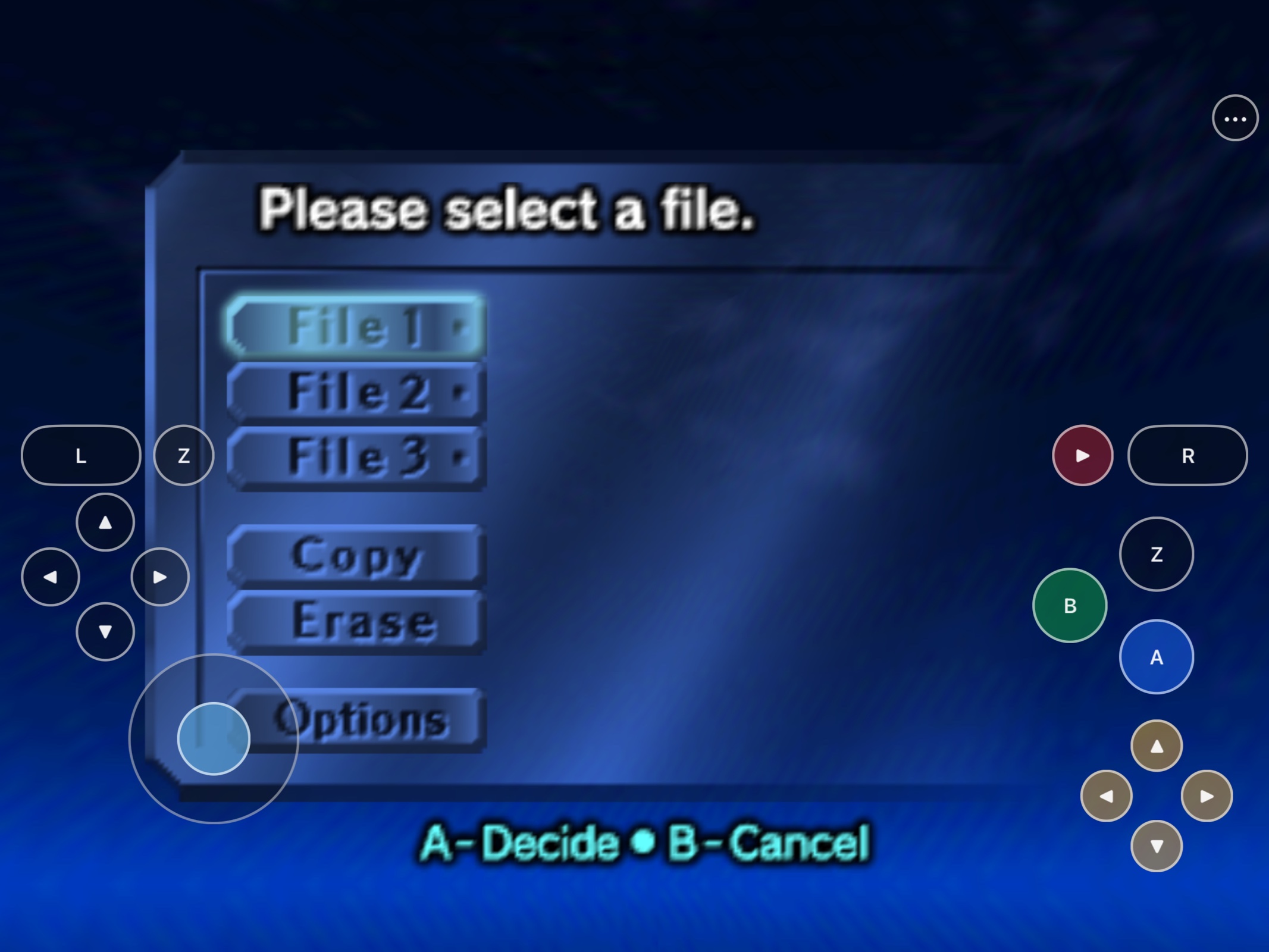
|
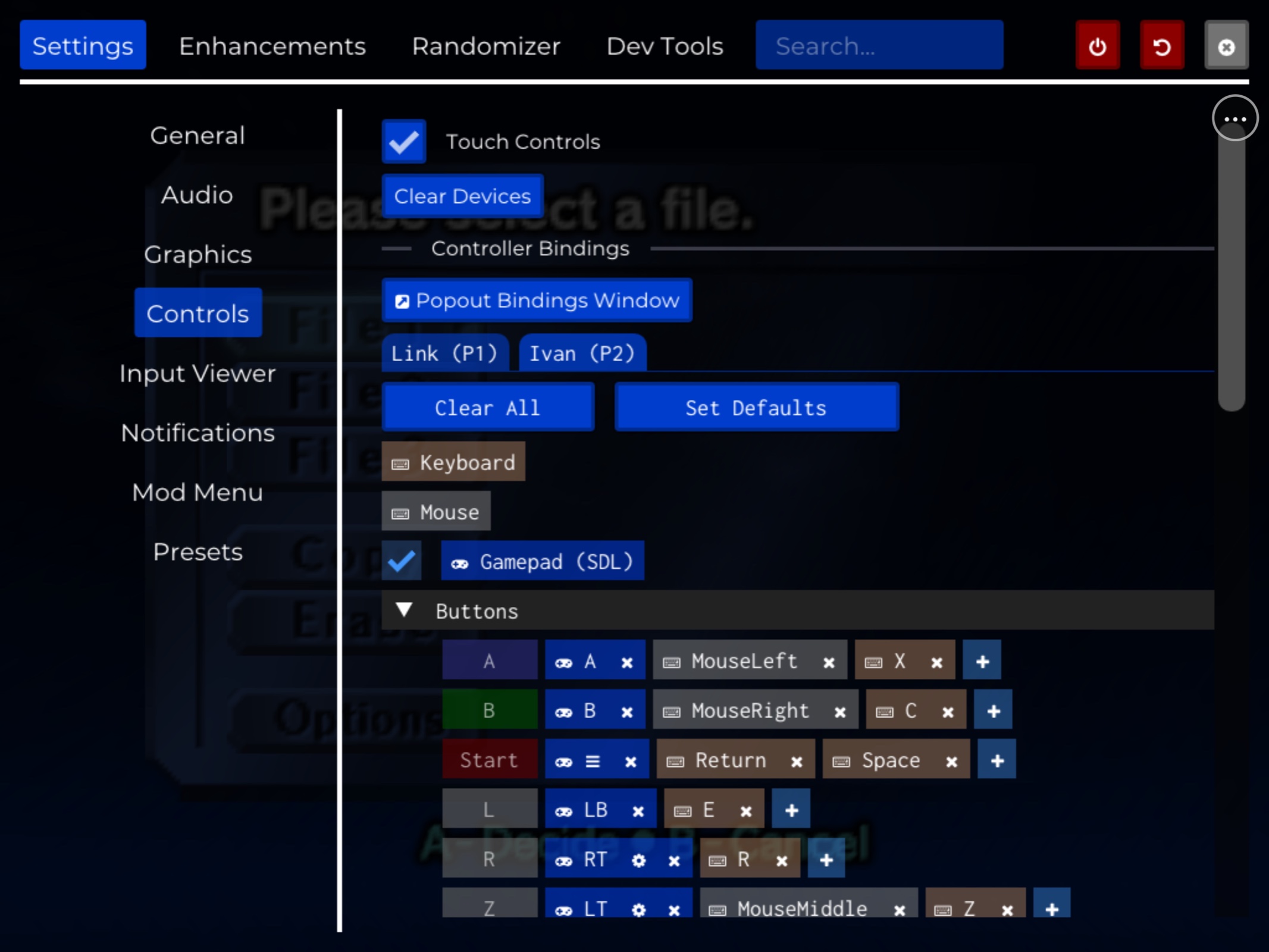
|
Ready to play
Every N64 input is available without a separate controller. |
Adjust while running
Touch controls can be toggled from Settings → Controls. |
The hero image is from the physical iPad build. The two interface captures are
from the current iPad Simulator build. All game data used for these captures
was supplied locally and is not part of this repository.
## What works
| Area | Current result |
|---|---|
| Native app | Current source defaults to arm64 iOS/iPadOS 15+; preserved earlier builds used 14+ |
| Rendering | Metal rendering works in Simulator and on physical iPad |
| Game setup | Files-visible ROM import and local `oot.o2r` loading work |
| Touch | Stick, D-pad, A/B/Z, C buttons, shoulders, Start, and persistent menu access |
| Saves | File creation/loading and in-place app updates preserving Documents data work |
| Input options | Touch, keyboard, mouse/trackpad, and reconciled SDL2 controller slots are included |
| Packaging | ROM/game-data exclusions and signed-package checks are built into the scripts |
For detailed engineering evidence and remaining hardware checks, see
[`docs/remaining-work.md`](docs/remaining-work.md).
## Supported game
| Game | Engine | Status |
|---|---|---|
| **The Legend of Zelda: Ocarina of Time** | [Ship of Harkinian](https://github.com/HarbourMasters/Shipwright) | Supported |
| **The Legend of Zelda: Majora's Mask** | [2 Ship 2 Harkinian](https://github.com/HarbourMasters/2ship2harkinian) | Not supported by this app; it requires a separate port |
HarkinianPad is a native source-port integration, not a general Nintendo 64
emulator. A Majora's Mask ROM cannot be substituted for Ocarina of Time data.
## Reproducible and ROM-free
```mermaid
flowchart LR
A["HarkinianPad scripts"] --> B["Pinned maintained source"]
B --> C["Committed iOS integration"]
C --> D["iOS app or unsigned preview IPA"]
E["Your supported ROM"] --> F["Files-visible app folder"]
D --> G["Local extraction"]
F --> G
G --> H["Local oot.o2r and gameplay"]
```
The compile never reads your ROM. `scripts/build-ios.sh` fetches exact maintained
submodule commits, verifies their contents and modes, generates
Shipwright's ROM-free `soh.o2r`, and builds the app. Your ROM is introduced
only after installation.
To create the unsigned, re-signable developer-preview package, run:
```sh
scripts/package-ios.sh
```
The current defaults in `version.json` are HarkinianPad `0.2.1`, build `8`,
with bundle identifier `com.chrissotraidis.harkinianpad`. The package is named
`HarkinianPad-0.2.1-preview.8-unsigned.ipa`. It contains no maintainer
certificate or provisioning profile; a sideload tool such as AltStore Classic
must re-sign it for the installer's device.
Releases publish no IPA; this packaging step is for your own local builds.
CI compiles and checks the package without uploading a downloadable full app.
An unsigned or ROM-free package is not automatically cleared for publication.
The audit rejects Simulator products, stale signing material, original ROMs,
ROM-derived `oot*.o2r`/`.otr` files, and prohibited game data. For a local
maintainer-signed package, use `REQUIRE_SIGNED=1 scripts/package-ios.sh`.
Your local IPA is an unsigned, self-signable package, not a public download,
App Store or TestFlight artifact. It does not currently carry a standalone Apple
privacy manifest; that remains an official-store distribution gate.
## Frequently asked questions
Where is the IPA?
There is no public IPA: HarkinianPad is compiled from the Ship of Harkinian decompilation, so PadMint builds your own on an Apple Silicon Mac. See [Get started](#get-started).
Does this repository include Ocarina of Time?
No. You must provide your own legally acquired supported ROM. Do not open
issues requesting game data or download links.
Does audio work?
Yes. Audio has been heard during repeated physical-iPad gameplay sessions.
Speaker playback is accepted for the developer preview; headphone, Bluetooth,
and interruption recovery remain additional hardware checks.
Can I hide touch controls and get them back later?
Yes. The persistent `•••` button keeps the menu reachable. Open
**Settings → Controls** and toggle **Touch Controls**.
Does it support controllers?
The existing Shipwright SDL controller mappings are compiled into the app for
iOS-compatible controllers. Physical gameplay, reconnect, rumble, and motion
support still require model-specific verification.
Is this an App Store or TestFlight release?
No. PadMint makes an unsigned IPA on your Mac for personal re-signing.
App Store, TestFlight, AltStore PAL, and SideStore distribution are
separate projects with different signing, review, account, and regional
requirements.
What is the licensing status?
Each upstream component retains its own license and copyright. Libultraship,
ZAPDTR, OTRExporter, SDL, and their dependencies carry their respective
licenses. HarkinianPad-owned integration code, scripts, documentation,
artwork, and original patch content are publicly readable but currently carry
no license grant. HarkinianPad is therefore source-available, not broadly
redistributable open source.
The pinned Shipwright tree also has no top-level license. Shipwright's official
[modding guide](https://github.com/HarbourMasters/Shipwright/blob/da4e6dc3321bda48a313b162261156580bc376f4/docs/MODDING.md)
documents public forks, modifications, and distributable builds. The free,
unsigned, ROM-free HarkinianPad developer preview follows that community
modding model. GitHub-hosted maintenance follows those explicit fork instructions. Complete
release-source distribution remains unqualified, alongside paid access, commercial
binary licensing and official-store distribution. See the
[modernization record](docs/MODERNIZATION.md).
## Project map
| Path | Purpose |
|---|---|
| [`scripts/build-ios.sh`](scripts/build-ios.sh) | Complete Simulator or device build |
| [`scripts/package-ios.sh`](scripts/package-ios.sh) | Unsigned/signed IPA and game-data audit |
| [`scripts/check-repo-safety.sh`](scripts/check-repo-safety.sh) | Fast tracked-asset, history, patch, script, and documentation gate |
| [`patches/`](patches/) | Historical Preview 5 patch mapping; not used by normal builds |
| [`docs/BUILDING.md`](docs/BUILDING.md) | Full build, signing, installation, and testing guide |
| [`docs/INSTALL_IPA.md`](docs/INSTALL_IPA.md) | Developer-preview IPA installation with AltStore Classic |
| [`docs/RELEASE_CHECKLIST.md`](docs/RELEASE_CHECKLIST.md) | Source and IPA publication gates |
| [`docs/touch-controls-design.md`](docs/touch-controls-design.md) | Touch layout and input contract |
| [`docs/native-hud-touch-experiment.md`](docs/native-hud-touch-experiment.md) | Native HUD touch implementation history and physical test log |
| [`docs/customizable-touch-controls.md`](docs/customizable-touch-controls.md) | Default movable/resizable touch controls and legacy fallback |
| [`docs/remaining-work.md`](docs/remaining-work.md) | Evidence ledger and remaining gates |
| [`ref/`](ref/) | Ignored local reference area; only its safety README is tracked |
Build directories, artifacts, ROMs, and ROM-derived
archives are ignored and must never be committed.
## Contributing and support
[Join the Discord community](https://discord.gg/xwHfUD2bxW) for questions and discussion.
Use the structured
[bug report](https://github.com/chrissotraidis/harkinianpad/issues/new/choose)
for reproducible gameplay or platform defects. Read
[`CONTRIBUTING.md`](CONTRIBUTING.md) before proposing a change and
[`SECURITY.md`](SECURITY.md) before reporting a sensitive vulnerability.
Never attach or request game data.
## Community and support
[Join the Discord](https://discord.gg/xwHfUD2bxW) for help and news. It is one
community for HarkinianPad and its sibling projects, such as KartPad, BlueWake
and MeleePad: ask about setup, building with PadMint, and installing, share how
it runs on your device, and hear about new releases first.
Found a bug? [Open an
issue](https://github.com/chrissotraidis/harkinianpad/issues) with your device,
its OS version, and the steps that led to it.
## Legal and acknowledgements
HarkinianPad is an unofficial community project and is not affiliated with or
endorsed by Nintendo or Harbour Masters. It does not provide the game, ROM
downloads, or playable ROM-derived data.
This project builds on Ship of Harkinian, libultraship, ZAPDTR, OTRExporter,
the Ocarina of Time decompilation project, SDL, and their contributors. All
projects, copyrights, and trademarks belong to their respective owners.
Preview 6 adds Files import and per-pack controls; see
[pack formats, creator links and tested limits](docs/MOD_SUPPORT.md).