






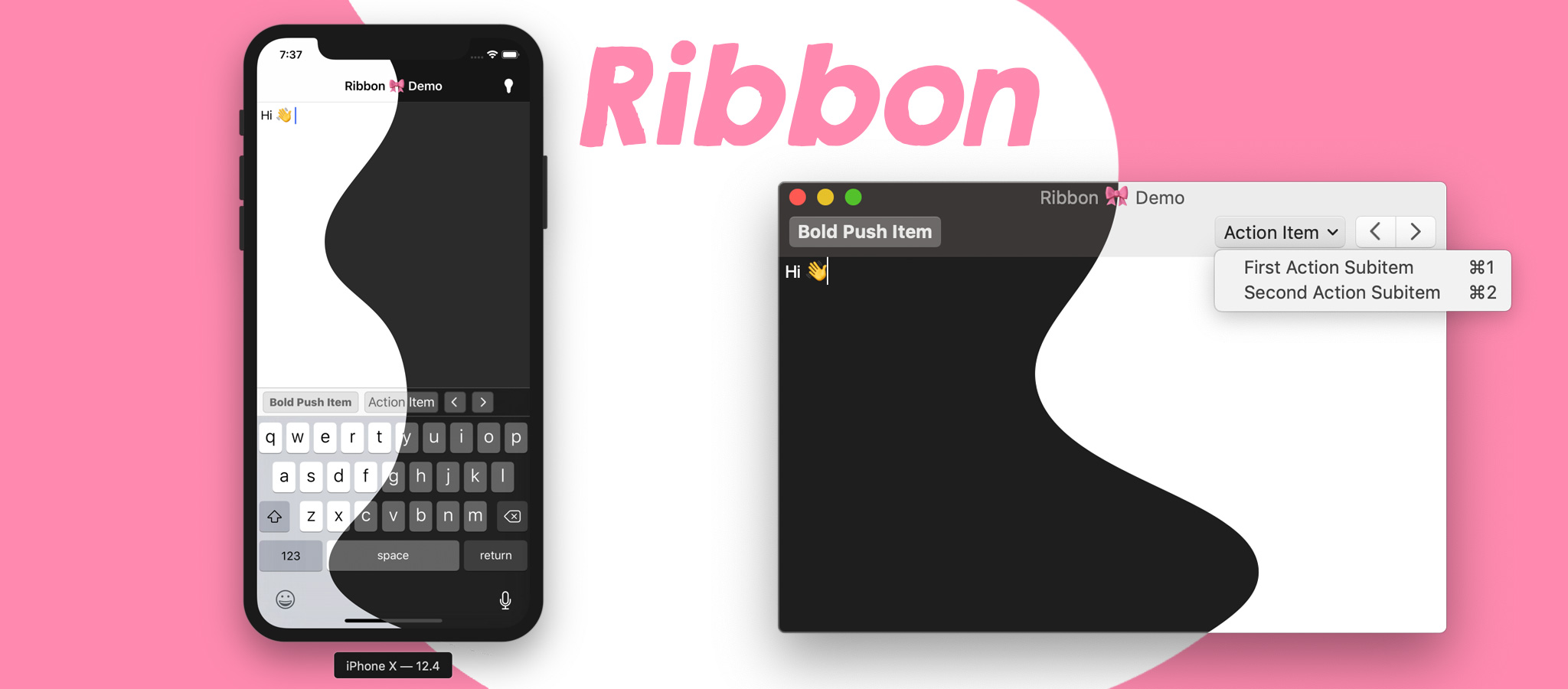
A simple cross-platform toolbar/custom input accessory view library for iOS & macOS.
Written in Swift.
A simple cross-platform toolbar/custom input accessory view library for iOS & macOS.
Written in Swift.
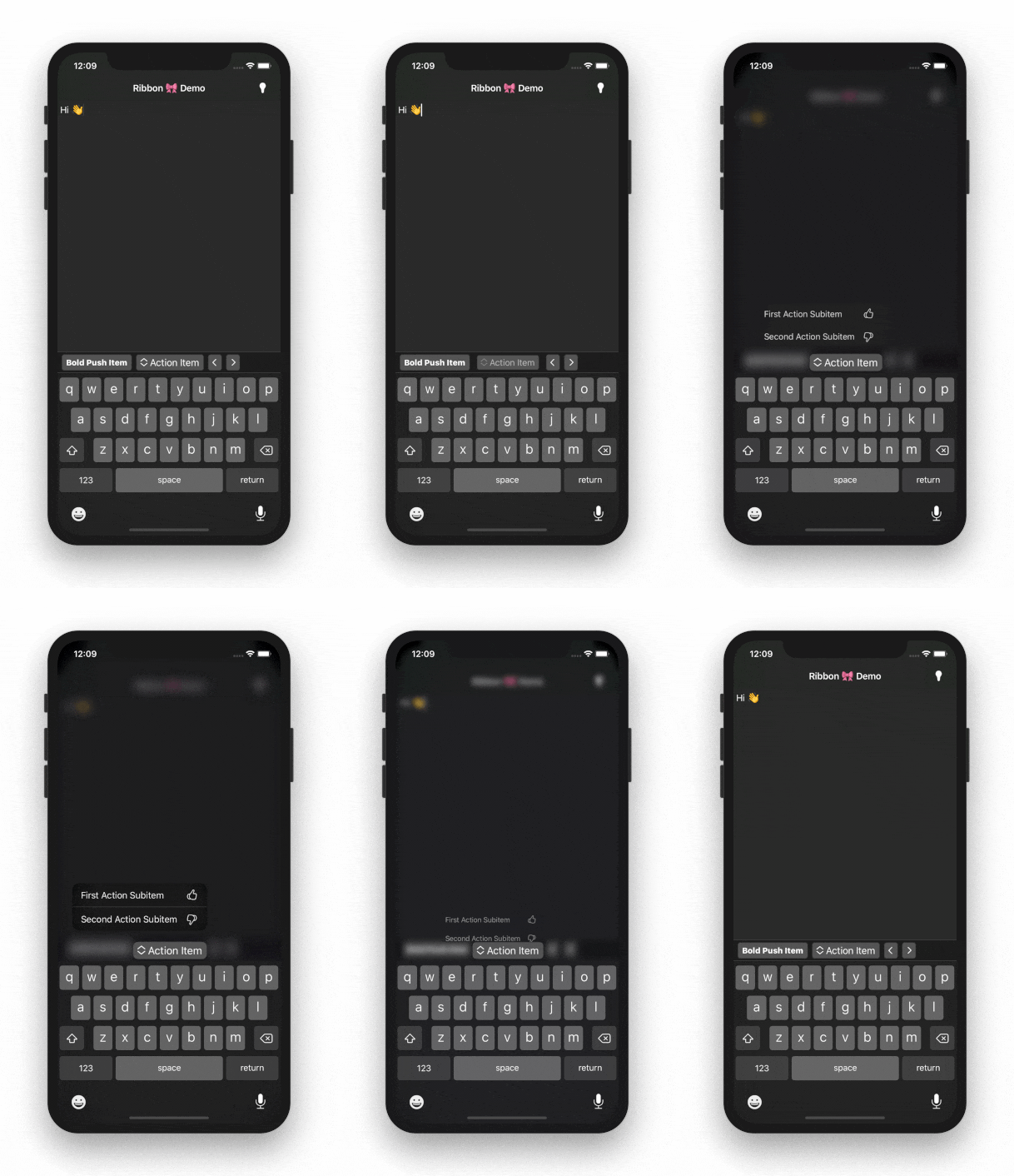 #### macOS
- Supports push, [action], & segmented control toolbar items.
- Provides `NSMenuItem`s for each item.
[action]:
https://developer.apple.com/design/human-interface-guidelines/macos/buttons/pull-down-buttons#action-buttons
Requirements
============
- iOS 10.0+ (12.0+ for dark mode)
- macOS 10.12+ (10.13+ for full functionality)
Installation
============
`Ribbon` is available for installation using Carthage or CocoaPods.
[Carthage](https://github.com/Carthage/Carthage)
------------------------------------------------
```ruby
github "chriszielinski/Ribbon"
```
[CocoaPods](http://cocoapods.org/)
----------------------------------
```ruby
pod "Ribbon"
```
Usage
=====
There are two ways of integrating `Ribbon` into your project:
Configuration File
------------------
> 🔥 The recommended approach.
The configuration file makes for a quick & easy integration. The default configuration filename is `ribbon-configuration.json` and should be copied into the target's bundle resources (in the _Copy Bundle Resources_ build phase).
The JSON below defines a single action item and toolbar configuration—which is only relevant for the macOS platform.
> 🧐 **See:** [_Demos/Shared/ribbon-configuration.json_](https://github.com/chriszielinski/Ribbon/blob/master/Demos/Shared/ribbon-configuration.json) for a more comprehensive example.
```json
{
"items": [
{
"action": "actionItemHandler",
"controlKind": "action",
"identifier": "action-item-identifier",
"imageName": "NSActionTemplate",
"keyEquivalent": "a",
"keyEquivalentModifier": ["command", "shift"],
"title": "Action Item",
"toolTip": "The action button's tool-tip.",
"subitems": [
{
"action": "firstActionSubitemHandler",
"identifier": "first-action-subitem",
"imageName": "hand.thumbsup",
"keyEquivalent": "1",
"keyEquivalentModifier": ["command"],
"title": "First Action Subitem",
"toolTip": "The first action's tool-tip."
},
{
"action": "secondActionSubitemHandler",
"identifier": "second-action-subitem",
"imageName": "hand.thumbsdown",
"keyEquivalent": "2",
"keyEquivalentModifier": ["command"],
"title": "Second Action Subitem",
"toolTip": "The second action's tool-tip."
}
]
}
],
"toolbar": {
"displayMode": "iconOnly",
"sizeMode": "regular",
"identifier": "toolbar-identifier",
"defaultItems" : ["NSToolbarFlexibleSpaceItem", "action-item-identifier"]
}
}
```
Integration into your view controller is as simple as:
> 📌 **Note:** The code below is an abstraction and **will not** compile.
```swift
import Ribbon
class YourViewController ... {
...
var ribbon: Ribbon!
override func viewDidLoad() {
ribbon = try! Ribbon.loadFromMainBundle(target: self)
#if canImport(UIKit)
textView.inputAccessoryView = ribbon
#endif
}
#if canImport(AppKit)
override func viewWillAppear() {
view.window?.toolbar = ribbon.toolbar
super.viewWillAppear()
}
#endif
@objc
func actionItemHandler() { }
@objc
func firstActionSubitemHandler() { }
@objc
func secondActionSubitemHandler() { }
}
```
Programmatically
----------------
> 📌 **Note:** The code below is an abstraction and **will not** compile.
```swift
import Ribbon
class YourViewController ... {
...
var ribbon: Ribbon!
override func viewDidLoad() {
let firstActionSubitem = RibbonItem(subItemTitle: "First Action Subitem")
firstActionSubitem.action = #selector(firstActionSubitemHandler)
let secondActionSubitem = RibbonItem(subItemTitle: "Second Action Subitem")
secondActionSubitem.action = #selector(secondActionSubitemHandler)
let actionItem = RibbonItem(controlKind: .action,
title: "Action Item",
subitems: [firstActionSubitem, secondActionSubitem])
actionItem.action = #selector(actionItemHandler)
ribbon = Ribbon(items: [actionItem], target: self)
#if canImport(UIKit)
textView.inputAccessoryView = ribbon
#endif
}
#if canImport(AppKit)
override func viewWillAppear() {
view.window?.toolbar = ribbon.toolbar
super.viewWillAppear()
}
#endif
@objc
func actionItemHandler() { }
@objc
func firstActionSubitemHandler() { }
@objc
func secondActionSubitemHandler() { }
}
```
// ToDo:
========
- [ ] Add documentation.
- [ ] Implement `UIKeyCommand`.
Community
=========
- Found a bug? Open an [issue](https://github.com/chriszielinski/ribbon/issues).
- Feature idea? ~~Open an [issue](https://github.com/chriszielinski/ribbon/issues).~~ Do it yourself & PR when done 😅 (or you can open an issue 🙄).
- Want to contribute? Submit a [pull request](https://github.com/chriszielinski/ribbon/pulls).
Acknowledgements
================
* Based on Rudd Fawcett's [`RFKeyboardToolbar`](https://github.com/ruddfawcett/RFKeyboardToolbar).
Contributors
============
- [Chris Zielinski](https://github.com/chriszielinski) — Original author.
Frameworks & Libraries
======================
`Ribbon` depends on the wonderful contributions of the Swift community, namely:
* **[realm/SwiftLint](https://github.com/realm/SwiftLint)** — A tool to enforce Swift style and conventions.
License
=======
`Ribbon` is available under the MIT license, see the [LICENSE](https://github.com/chriszielinski/ribbon/blob/master/LICENSE) file for more information.
#### macOS
- Supports push, [action], & segmented control toolbar items.
- Provides `NSMenuItem`s for each item.
[action]:
https://developer.apple.com/design/human-interface-guidelines/macos/buttons/pull-down-buttons#action-buttons
Requirements
============
- iOS 10.0+ (12.0+ for dark mode)
- macOS 10.12+ (10.13+ for full functionality)
Installation
============
`Ribbon` is available for installation using Carthage or CocoaPods.
[Carthage](https://github.com/Carthage/Carthage)
------------------------------------------------
```ruby
github "chriszielinski/Ribbon"
```
[CocoaPods](http://cocoapods.org/)
----------------------------------
```ruby
pod "Ribbon"
```
Usage
=====
There are two ways of integrating `Ribbon` into your project:
Configuration File
------------------
> 🔥 The recommended approach.
The configuration file makes for a quick & easy integration. The default configuration filename is `ribbon-configuration.json` and should be copied into the target's bundle resources (in the _Copy Bundle Resources_ build phase).
The JSON below defines a single action item and toolbar configuration—which is only relevant for the macOS platform.
> 🧐 **See:** [_Demos/Shared/ribbon-configuration.json_](https://github.com/chriszielinski/Ribbon/blob/master/Demos/Shared/ribbon-configuration.json) for a more comprehensive example.
```json
{
"items": [
{
"action": "actionItemHandler",
"controlKind": "action",
"identifier": "action-item-identifier",
"imageName": "NSActionTemplate",
"keyEquivalent": "a",
"keyEquivalentModifier": ["command", "shift"],
"title": "Action Item",
"toolTip": "The action button's tool-tip.",
"subitems": [
{
"action": "firstActionSubitemHandler",
"identifier": "first-action-subitem",
"imageName": "hand.thumbsup",
"keyEquivalent": "1",
"keyEquivalentModifier": ["command"],
"title": "First Action Subitem",
"toolTip": "The first action's tool-tip."
},
{
"action": "secondActionSubitemHandler",
"identifier": "second-action-subitem",
"imageName": "hand.thumbsdown",
"keyEquivalent": "2",
"keyEquivalentModifier": ["command"],
"title": "Second Action Subitem",
"toolTip": "The second action's tool-tip."
}
]
}
],
"toolbar": {
"displayMode": "iconOnly",
"sizeMode": "regular",
"identifier": "toolbar-identifier",
"defaultItems" : ["NSToolbarFlexibleSpaceItem", "action-item-identifier"]
}
}
```
Integration into your view controller is as simple as:
> 📌 **Note:** The code below is an abstraction and **will not** compile.
```swift
import Ribbon
class YourViewController ... {
...
var ribbon: Ribbon!
override func viewDidLoad() {
ribbon = try! Ribbon.loadFromMainBundle(target: self)
#if canImport(UIKit)
textView.inputAccessoryView = ribbon
#endif
}
#if canImport(AppKit)
override func viewWillAppear() {
view.window?.toolbar = ribbon.toolbar
super.viewWillAppear()
}
#endif
@objc
func actionItemHandler() { }
@objc
func firstActionSubitemHandler() { }
@objc
func secondActionSubitemHandler() { }
}
```
Programmatically
----------------
> 📌 **Note:** The code below is an abstraction and **will not** compile.
```swift
import Ribbon
class YourViewController ... {
...
var ribbon: Ribbon!
override func viewDidLoad() {
let firstActionSubitem = RibbonItem(subItemTitle: "First Action Subitem")
firstActionSubitem.action = #selector(firstActionSubitemHandler)
let secondActionSubitem = RibbonItem(subItemTitle: "Second Action Subitem")
secondActionSubitem.action = #selector(secondActionSubitemHandler)
let actionItem = RibbonItem(controlKind: .action,
title: "Action Item",
subitems: [firstActionSubitem, secondActionSubitem])
actionItem.action = #selector(actionItemHandler)
ribbon = Ribbon(items: [actionItem], target: self)
#if canImport(UIKit)
textView.inputAccessoryView = ribbon
#endif
}
#if canImport(AppKit)
override func viewWillAppear() {
view.window?.toolbar = ribbon.toolbar
super.viewWillAppear()
}
#endif
@objc
func actionItemHandler() { }
@objc
func firstActionSubitemHandler() { }
@objc
func secondActionSubitemHandler() { }
}
```
// ToDo:
========
- [ ] Add documentation.
- [ ] Implement `UIKeyCommand`.
Community
=========
- Found a bug? Open an [issue](https://github.com/chriszielinski/ribbon/issues).
- Feature idea? ~~Open an [issue](https://github.com/chriszielinski/ribbon/issues).~~ Do it yourself & PR when done 😅 (or you can open an issue 🙄).
- Want to contribute? Submit a [pull request](https://github.com/chriszielinski/ribbon/pulls).
Acknowledgements
================
* Based on Rudd Fawcett's [`RFKeyboardToolbar`](https://github.com/ruddfawcett/RFKeyboardToolbar).
Contributors
============
- [Chris Zielinski](https://github.com/chriszielinski) — Original author.
Frameworks & Libraries
======================
`Ribbon` depends on the wonderful contributions of the Swift community, namely:
* **[realm/SwiftLint](https://github.com/realm/SwiftLint)** — A tool to enforce Swift style and conventions.
License
=======
`Ribbon` is available under the MIT license, see the [LICENSE](https://github.com/chriszielinski/ribbon/blob/master/LICENSE) file for more information.