---
title: "Tidying, Visualising and Summarising Data"
subtitle: "FMB819: R을 이용한 데이터분석"
author: "고려대학교 경영대학 정지웅"
format:
revealjs:
theme: simple
transition: fade
transition-speed: fast
scrollable: true
chalkboard: true
slide-number: true
revealjs-plugins:
- revealjs-text-resizer # Thanks to https://github.com/gadenbuie/revealjs-text-resizer#readme
---
```{r setup, include=FALSE,warning=FALSE,message=FALSE}
options(htmltools.dir.version = FALSE)
knitr::opts_chunk$set(
message = FALSE,
warning = FALSE,
dev = "svg",
cache = TRUE,
fig.align = "center",
comment = "##"
#fig.width = 11,
#fig.height = 5
)
library(countdown)
# countdown style
countdown(
color_border = "#d90502",
color_text = "black",
color_running_background = "#d90502",
color_running_text = "white",
color_finished_background = "white",
color_finished_text = "#d90502",
color_finished_border = "#d90502"
)
```
## Working With Data
- [2014년 뉴욕타임즈 기사](https://www.nytimes.com/2014/08/18/technology/for-big-data-scientists-hurdle-to-insights-is-janitor-work.html)에 따르면, "데이터 과학자들은 데이터를 분석하기 전에 **50%에서 80%의 시간**을 데이터 수집 및 정리에 소비한다."라고 함.
- 본 강의에서는 **데이터 정리(Tidying), 시각화(Visualising), 요약(Summarising)**의 기본을 배움.
# Tidying Data
------------------------------------------------------------------------
## `dplyr` 소개
- [`dplyr`](https://dplyr.tidyverse.org)은 [`tidyverse`](https://www.tidyverse.org) 패키지군의 핵심 데이터 조작 패키지.
- [`data.table`](https://github.com/Rdatatable/data.table/wiki)도 대안으로 사용 가능하며, 거대 용량 데이터 처리에 최적화되어 있음.
- 본 강의에서는 문법이 직관적이고 가독성이 높은 `dplyr`을 다룸.
------------------------------------------------------------------------
## `dplyr` 개요
- `dplyr`은 직관적인 영어 동사(**verbs**) 중심으로 구성되어 있음.
- `data.frame` 또는 `tibble` 형식의 데이터를 주로 다룸.
$$\text{verb}(\underbrace{\text{data.frame}}_{\text{1st argument}}, \underbrace{\text{what to do}}_\text{2nd argument})$$
- 파이프 연산자 `%>%` (`magrittr` 패키지) 또는 R 4.1.0 이상 기본 `|>` 를 이용하면 코드를 물 흐르듯 작성 가능 (Ctrl+Shift+M):
$$\underbrace{\text{data.frame}}_{\text{1st argument}} \underbrace{\text{ %>% }}_{\text{"pipe" operator}} \text{verb}(\underbrace{\text{what to do}}_\text{2nd argument})$$
------------------------------------------------------------------------
## 주요 `dplyr` verbs
1. `filter()`: 특정 조건을 만족하는 **행(Row)** 선택
2. `arrange()`: 행 정렬 (오름차순/내림차순)
3. `select()`: 특정 **열(Column)** 선택
4. `mutate()`: 기존 열을 연산하여 **새 변수(열)** 생성
5. `summarise()`: 데이터 요약 통계 계산
6. `group_by()`: 범주형 변수를 기준으로 **그룹별 연산** 수행
------------------------------------------------------------------------
## 예제 데이터: 2016년 미국 대선 여론조사 (`dslabs` 패키지)
- 2016년 미국 대선과 관련된 여론조사 데이터를 포함
```{r dslabs, echo = TRUE}
if (!require("dslabs")) install.packages("dslabs")
if (!require("tidyverse")) install.packages("tidyverse")
data(polls_us_election_2016, package = "dslabs")
# 데이터를 'tibble' 형식으로 변환
polls_us_election_2016 <- as_tibble(polls_us_election_2016)
# 데이터의 첫 6개의 행과 첫 6개의 열을 출력
head(polls_us_election_2016[,1:6])
```
- tibble은 data.frame의 개선된 버전으로, 더 깔끔한 출력과 편리한 기능을 제공.
------------------------------------------------------------------------
## 예제 데이터: 구조 확인
- 이 데이터셋에 어떤 변수가 포함되어 있는지 확인
```{r, echo=TRUE}
str(polls_us_election_2016) # 데이터의 구조를 요약하여 출력
```
------------------------------------------------------------------------
## `dplyr`: `filter()`
```{r, echo=TRUE}
# 표본 크기(samplesize)가 2000보다 큰 행만 선택, 츨력
polls_us_election_2016 %>%
filter(samplesize > 2000)
```
------------------------------------------------------------------------
## `dplyr`: `filter()` 의 연산자들
기본적인 비교 연산자:
- `>`: 크다 (greater than) / `<`: 작다 (smaller than)
- `>=`: 크거나 같다 / `<=`: 작거나 같다
- `!=`: 같지 않다 (not equal to)
- `==`: 같다 (equal to) - **주의! `=` 가 아니라 `==` 임**
논리 연산자:
1. `x & y`: `x` **그리고** `y` (AND: 둘 다 참일 때만 참)
2. `x | y`: `x` **또는** `y` (OR: 둘 중 하나라도 참이면 참)
3. `!y`: **y가 아닐 때** (NOT: 논리 반전)
------------------------------------------------------------------------
## `dplyr`: `filter()` 와 `%in%`
- `%in%` 연산자: `x`가 `y` 벡터 안에 포함되어 있는지 확인
- `!(x %in% y)`: 반대로 포함되지 않은 것만 필터링
```{r, echo=TRUE}
# 3이 1부터 3까지의 숫자 중 하나인지 확인 (TRUE)
3 %in% 1:3
# 벡터화된 연산: 2와 5가 2부터 10 사이의 숫자 중 하나인지 확인
c(2,5) %in% 2:10
```
------------------------------------------------------------------------
## `dplyr`: `filter()` 복합 조건
A 등급을 받은 여론조사 중 표본 크기가 2,000명 이상이고, 트럼프가 최소 45%의 지지를 받은 여론조사는?
```{r, echo=TRUE}
# polls_us_election_2016 데이터에서
# 1. 등급(grade)이 "A"이고
# 2. 표본 크기(samplesize)가 2000명보다 크며
# 3. 트럼프의 여론조사 지지율(rawpoll_trump)이 45% 이상인 행을 필터링.
polls_us_election_2016 %>%
filter(grade == "A" & samplesize > 2000 & rawpoll_trump > 45)
```
------------------------------------------------------------------------
## `dplyr`: `mutate()`
새로운 변수(열)를 만들 때 사용.
1. 각 여론조사에서 트럼프와 클린턴의 지지율 합계
2. 트럼프의 원래(raw) 지지율과 조정(adjusted) 지지율 간의 차이
```{r, echo=TRUE}
#| code-line-numbers: "|5|6|7"
polls_us_election_2016 %>%
mutate(trump_clinton_tot = rawpoll_trump + rawpoll_clinton, # 두 후보 지지율 합계
trump_raw_adj_diff = rawpoll_trump - adjpoll_trump) %>% # 원래 지지율과 조정 지지율 차이
names() # 새롭게 생성된 변수명 확인
```
------------------------------------------------------------------------
## `dplyr`: `select()`
- 분석에 필요한 특정 열(변수)만 골라낼 때 사용. 데이터의 용량을 줄이고 직관성을 높임.
```{r, echo = TRUE}
# select() 함수를 사용하여 특정 열만 선택.
# 1. state: 조사된 주(State)
# 2. startdate: 여론조사가 시작된 날짜
# 3. enddate: 여론조사가 종료된 날짜
# 4. pollster: 여론조사 기관
# 5. rawpoll_clinton: 힐러리 클린턴의 원래(raw) 지지율
# 6. rawpoll_trump: 도널드 트럼프의 원래(raw) 지지율
polls_us_election_2016 %>%
select(state, startdate, enddate, pollster, rawpoll_clinton, rawpoll_trump) %>%
names() # 데이터 프레임의 변수명을 출력하여 올바르게 선택되었는지 확인
```
------------------------------------------------------------------------
## `dplyr`: `summarise()`
- 원하는 통계량으로 데이터를 요약 (평균, 최대값, 최소값 등)
- 트럼프의 최대 지지율은 얼마인가?
```{r, echo = TRUE}
# summarise() 함수를 사용하여 트럼프의 최대(raw) 지지율을 계산
# max() 함수는 주어진 열에서 가장 큰 값을 반환
polls_us_election_2016 %>%
summarise(max_trump = max(rawpoll_trump))
```
------------------------------------------------------------------------
## `dplyr`: `group_by()`
- `group_by()` 단독으로는 데이터에 눈에 띄는 변화가 없지만, `summarise()`나 `mutate()`와 결합하면 강력해짐.
- 여론조사 등급(grade)별 클린턴의 평균 지지율은 얼마인가?
```{r, echo = TRUE}
# group_by()를 사용하여 여론조사 등급(grade)별로 그룹을 나눔.
# summarise()를 사용하여 각 그룹에서 rawpoll_clinton(클린턴의 원래 지지율)의 평균 계산
polls_us_election_2016 %>%
group_by(grade) %>% # 여론조사 등급별 그룹화
summarise(mean_vote_clinton = mean(rawpoll_clinton, na.rm = TRUE)) # 각 그룹에서 클린턴의 평균 지지율 계산
```
------------------------------------------------------------------------
## 명령어 연결하기
::::: columns
::: {.column width="40%"}
```{r, echo=TRUE, eval = FALSE}
polls_us_election_2016
```
:::
::: {.column width="60%"}
```{r, echo = FALSE}
polls_us_election_2016
```
:::
:::::
------------------------------------------------------------------------
## 명령어 연결하기
::::: columns
::: {.column width="40%"}
```{r, echo=TRUE, eval = FALSE}
polls_us_election_2016 %>%
mutate(trump_clinton_diff =
rawpoll_trump -
rawpoll_clinton)
```
:::
::: {.column width="60%"}
```{r, echo = FALSE}
polls_us_election_2016 %>%
mutate(trump_clinton_diff =
rawpoll_trump -
rawpoll_clinton)
```
:::
:::::
------------------------------------------------------------------------
## 명령어 연결하기
::::: columns
::: {.column width="40%"}
```{r, echo=TRUE, eval = FALSE}
polls_us_election_2016 %>%
mutate(trump_clinton_diff =
rawpoll_trump -
rawpoll_clinton) %>%
filter(trump_clinton_diff>5 &
state == "Iowa" &
is.na(rawpoll_johnson))
```
:::
::: {.column width="60%"}
```{r, echo = FALSE}
polls_us_election_2016 %>%
mutate(trump_clinton_diff =
rawpoll_trump -
rawpoll_clinton) %>%
filter(trump_clinton_diff>5 &
state == "Iowa" &
is.na(rawpoll_johnson))
```
:::
:::::
## 명령어 연결하기
::::: columns
::: {.column width="40%"}
```{r, echo=TRUE, eval = FALSE}
polls_us_election_2016 %>%
mutate(trump_clinton_diff =
rawpoll_trump -
rawpoll_clinton) %>%
filter(trump_clinton_diff>5 &
state == "Iowa" &
is.na(rawpoll_johnson)) %>%
select(pollster) # pollster(여론조사 기관) 열만 선택
```
:::
::: {.column width="60%"}
```{r, echo = FALSE}
polls_us_election_2016 %>%
mutate(trump_clinton_diff =
rawpoll_trump -
rawpoll_clinton) %>%
filter(trump_clinton_diff>5 &
state == "Iowa" &
is.na(rawpoll_johnson)) %>%
select(pollster)
```
:::
:::::
------------------------------------------------------------------------
## 명령어 연결하기
::::: columns
::: {.column width="40%"}
```{r, echo=TRUE, eval = FALSE}
polls_us_election_2016 %>%
mutate(trump_clinton_diff =
rawpoll_trump -
rawpoll_clinton) %>%
filter(trump_clinton_diff>5 &
state == "Iowa" &
is.na(rawpoll_johnson)) %>%
pull(pollster) # pollster(여론조사 기관) 열의 값을 추출하여 벡터로 반환
```
:::
::: {.column width="60%"}
```{r, echo = FALSE}
polls_us_election_2016 %>%
mutate(trump_clinton_diff =
rawpoll_trump -
rawpoll_clinton) %>%
filter(trump_clinton_diff>5 &
state == "Iowa" &
is.na(rawpoll_johnson)) %>%
pull(pollster)
```
:::
:::::
------------------------------------------------------------------------
## 결측값(`NA`) 처리
::::: columns
::: {.column width="50%"}
- 값이 *누락(missing)* 되었을 경우 `NA`로 표시됨.
```{r, echo=TRUE}
x <- NA # x에 결측값(NA) 할당
```
- `NA`가 포함된 연산을 수행하면, 결과도 `NA`가 됨.
```{r, echo=TRUE}
NA > 5 # NA는 숫자가 아니므로 비교 불가능 -> NA 반환
NA + 10 # NA와 연산하면 결과도 NA
```
- `is.na(x)` 함수를 사용하면 값이 `NA`인지 확인 가능.
```{r, echo=TRUE}
is.na(x) # x가 NA인지 확인 -> TRUE 반환
```
:::
::: {.column width="50%"}
- NA 값은 서로 비교할 수 없음.
```{r, echo=TRUE}
NA == NA # NA끼리 비교하면 결과도 NA
```
- 예제
```{r, echo=TRUE}
# x는 Mary의 나이, 정확한 나이를 모름.
x <- NA
# y는 John의 나이, 정확한 나이를 모름.
y <- NA
# John과 Mary의 나이가 같은가?
x == y
```
- `NA == NA`는 `TRUE`가 아니라 `NA`를 반환하는데, 이는 두 값이 같은지 여부를 판단할 수 없기 때문임.
:::
:::::
------------------------------------------------------------------------
## Task 1 {background-color="#ffebf0"}
`r countdown(minutes = 10, top = "20px", right = "10px", font_size = "0.8em", color_border = "blue")`
다음 코드를 실행하여 데이터를 로드합니다.
```{r, echo = T, eval = F}
library(dslabs)
data(polls_us_election_2016)
```
1. grade 값이 결측치(NA)인 여론조사는? `head`를 사용하여 확인.
2. 다음 조건을 모두 만족하는 여론조사는?
(i) American Strategies, GfK Group, Merrill Poll에서 조사한 경우,
(ii) 표본 크기가 1,000명 이상인 경우,
(iii) 2016년 10월 20일에 시작된 경우.
**힌트**: (i) 조건에서는 %in% 연산자가 유용, 벡터는 `c()`함수로 만들 수 있음. (iii)에서는 날짜 변수의 형식을 확인 "yyyy-mm-dd"
3. 다음 조건을 모두 만족하는 여론조사는?
(i) Johnson 후보의 여론조사 데이터가 누락되지 않은 경우,
(ii) 트럼프와 클린턴의 원본 여론조사 지지율 합이 95%를 초과하는 경우,
(iii) 오하이오(OH) 주에서 실시된 경우
**힌트**: 트럼프와 클린턴의 지지율 합계를 계산하는 새로운 변수를 생성한 후 `filter()` 를 적용
4. 표본 크기가 2,000명 이상인 여론조사에서 트럼프의 평균 지지율이 가장 높은 주는?
**힌트**: `filter(), group_by(), summarise(), arrange()` 사용. 내림차순 정렬하려면 `arrange()` 함수 사용.
------------------------------------------------------------------------
## 주가 자료 다루기 {background-color="#E2E2E2"}
```{r, echo=T, eval=T}
if (!require("tidyquant")) install.packages("tidyquant")
library(tidyquant)
# 1. Apple(AAPL)과 Microsoft(MSFT) 주가 데이터 수집 (2020년 이후)
tech_stocks <- tq_get(c("AAPL", "MSFT"), from="2020-01-01", to=Sys.Date())
# 2. 일별 수익률(Daily Return) 계산하기
tech_returns <- tech_stocks %>%
group_by(symbol) %>% # 종목별로 그룹화 (중요!)
arrange(date) %>% # 날짜순 정렬
mutate(
# 어제 종가 대비 오늘 종가의 수익률 계산. lag() 함수는 '이전 행'의 값을 가져옴
daily_return = adjusted / lag(adjusted) - 1
) %>%
drop_na() # lag() 연산으로 인해 발생하는 첫 날의 NA값 제거
head(tech_returns %>% select(symbol, date, adjusted, daily_return))
```
# Visualising Data
## 기본 `R` 그래프와 `ggplot2`
- `ggplot2` (이 패키지는 `tidyverse`의 일부) 기본 `R`의 그래프 기능은 보다 유연함
- 데이터를 시각적 요소(색상, 형태, 크기 등)에 '매핑(Mapping)'한다는 철학(Grammar of Graphics)을 가짐.
- 예제를 실행하기 위해 `gapminder` 데이터셋 사용.
------------------------------------------------------------------------
## `gapminder` 개요
- 먼저 `gapminder` 데이터를 로드:
```{r, echo = TRUE}
library(dslabs) # dslabs 패키지 로드
data(gapminder, package = "dslabs") # gapminder 데이터셋 불러오기
```
- 데이터의 처음 3개 행과 마지막 2개 행을 확인.
```{r, echo = TRUE}
head(gapminder, n = 3) # 데이터의 처음 3행 출력
tail(gapminder, n = 2) # 데이터의 마지막 2행 출력
```
------------------------------------------------------------------------
## Task 2 {background-color="#ffebf0"}
`r countdown(minutes = 5, top = "20px", right = "10px", font_size = "0.8em", color_border = "blue")`
다음 코드를 실행하여 데이터를 로드.
```{r, eval = F}
library(dslabs)
data(gapminder, package = "dslabs")
```
1. 대륙(continent)/연도(year)별 **평균 인구(변수명: mean_pop)**를 계산하고, 결과를 새로운 객체 `gapminder_mean`에 저장하시오.
**힌트**: 두 개의 기준으로 그룹화해야 하므로 `group_by(continent, year)`를 사용하고 `summarise`를 적용.
```{r, echo=F}
gapminder_mean <- gapminder %>%
group_by(continent, year) %>%
summarise(mean_pop = mean(population))
```
------------------------------------------------------------------------
## gg = Grammar of Graphics
::::: columns
::: {.column width="40%"}
Data
``` r
data %>%
ggplot()
```
or
``` r
ggplot(data)
```
:::
::: {.column width="60%"}
- Tidy Data
- 각 변수는 ***열(column)***을 형성
- 각 관측치는 ***행(row)***을 형성
- 시각화를 시작할 때 고려 사항
- 시각화에서 어떤 정보를 사용할 것인가?
- 해당 데이터가 하나의 열 또는 행에 포함되어 있는가?
:::
:::::
------------------------------------------------------------------------
## gg = Grammar of Graphics
::::: columns
::: {.column width="40%"}
Data
Aesthetics
``` r
+ aes()
```
:::
::: {.column width="60%"}
데이터를 시각적 요소 또는 매개변수에 매핑
- year (연도)
- population (인구)
- country (국가)
:::
:::::
------------------------------------------------------------------------
## gg = Grammar of Graphics
::::: columns
::: {.column width="40%"}
Data
Aesthetics
``` r
+ aes()
```
:::
::: {.column width="60%"}
데이터를 시각적 요소 또는 매개변수에 매핑
- year (연도) → **x**
- population (인구) → **y**
- country (국가) → *shape*, *color*, etc.
:::
:::::
------------------------------------------------------------------------
## gg = Grammar of Graphics
::::: columns
::: {.column width="40%"}
Data
Aesthetics
``` r
+ aes()
```
:::
::: {.column width="60%"}
``` r
aes(
x = year,
y = population,
color = country
)
```
:::
:::::
------------------------------------------------------------------------
## gg = Grammar of Graphics
::::: columns
::: {.column width="40%"}
Data
Aesthetics
Geoms
``` r
+ geom_*()
```
:::
::: {.column width="60%"}
Geometric objects:
```{r geom_demo, echo=FALSE, fig.width=6, fig.height=3.5, out.width="650px"}
minimal_theme <- theme_bw() +
theme(
axis.text = element_blank(),
axis.ticks = element_blank(),
panel.grid = element_blank(),
panel.border = element_blank(),
axis.title = element_blank(),
plot.title = element_text(hjust = 0.5),
text = element_text(family = "Fira Mono"),
plot.background = element_rect(fill = "white", color = NA),
panel.background = element_rect(fill = "white", color = NA)
)
set.seed(4242)
df_geom <- data_frame(y = rnorm(10), x = 1:10)
g_geom <- list()
g_geom$point <- ggplot(df_geom, aes(x, y)) + geom_point() + ggtitle("geom_point()")
g_geom$line <- ggplot(df_geom, aes(x, y)) + geom_line() + ggtitle("geom_line()")
g_geom$bar <- ggplot(df_geom, aes(x, y)) + geom_col() + ggtitle("geom_col()")
g_geom$boxplot <- ggplot(df_geom, aes(y = y)) + geom_boxplot() + ggtitle("geom_boxplot()")
g_geom$histogram <- ggplot(df_geom, aes(y)) + geom_histogram(binwidth = 1) + ggtitle("geom_histogram()")
g_geom$density <- ggplot(df_geom, aes(y)) + geom_density(fill = "grey40", alpha = 0.25) + ggtitle("geom_density()") + xlim(-4, 4)
g_geom <- map(g_geom, ~ . + minimal_theme)
cowplot::plot_grid(plotlist = g_geom)
```
:::
:::::
------------------------------------------------------------------------
## gg = Grammar of Graphics
::::: columns
::: {.column width="40%"}
Data
Aesthetics
Geoms
``` r
+ geom_*()
```
:::
::: {.column width="60%"}
[링크: 많이 사용되는 geoms](https://eric.netlify.com/2017/08/10/most-popular-ggplot2-geoms/)
| 유형 | 함수 |
|:-----------:|:--------------------------:|
| 포인트 | `geom_point()` |
| 선 | `geom_line()` |
| 막대 그래프 | `geom_bar()`, `geom_col()` |
| 히스토그램 | `geom_histogram()` |
| 회귀선 | `geom_smooth()` |
| 박스플롯 | `geom_boxplot()` |
| 텍스트 | `geom_text()` |
| 수직/수평선 | `geom_{vh}line()` |
| 개수 세기 | `geom_count()` |
| 밀도 그래프 | `geom_density()` |
:::
:::::
------------------------------------------------------------------------
## gg = Grammar of Graphics
::::: columns
::: {.column width="40%"}
Data
Aesthetics
Geoms
``` r
+ geom_*()
```
:::
::: {.column width="60%"}
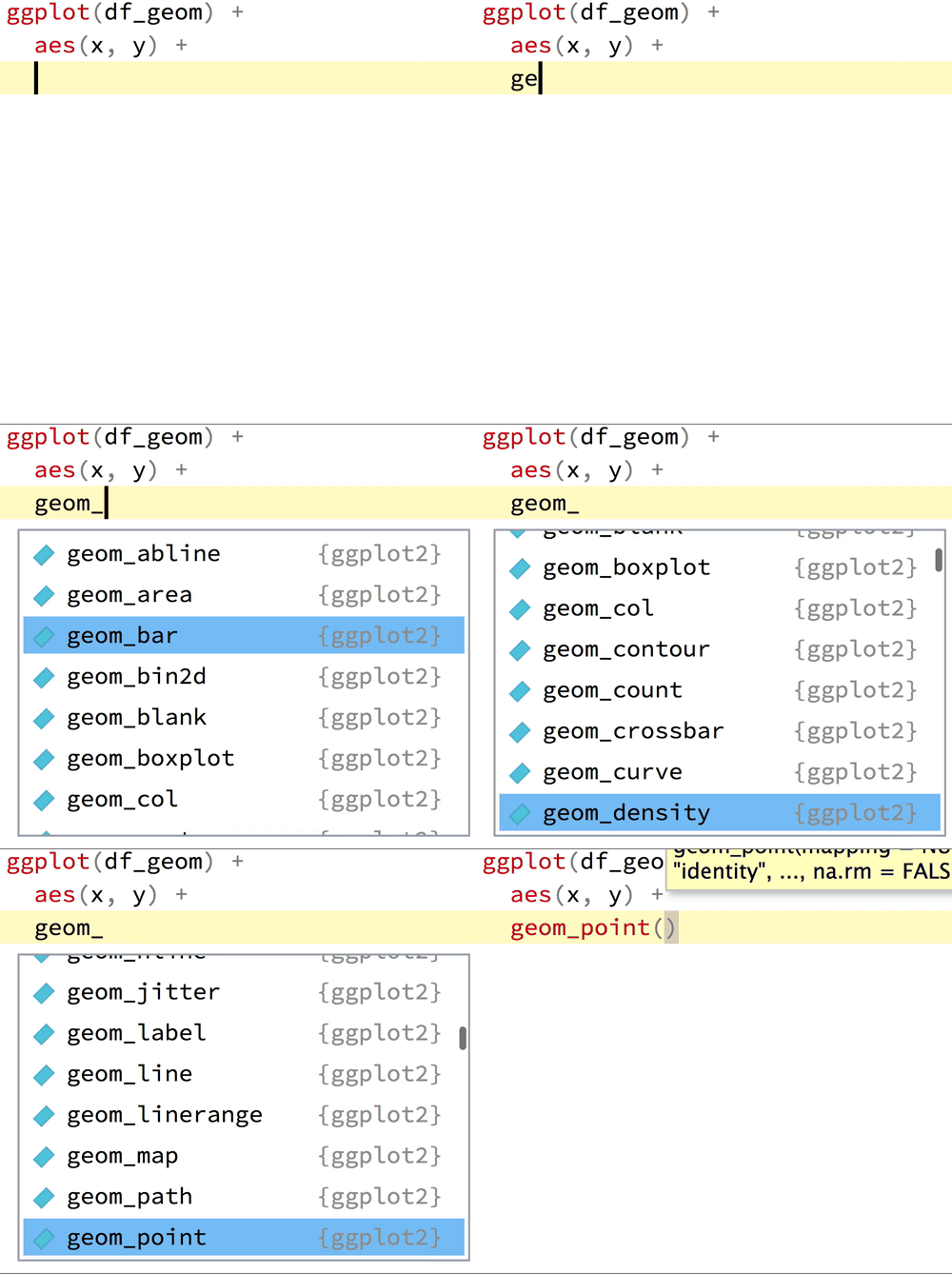
`RStudio`에서 `geom_`을 입력하면 자동 완성 기능을 통해 사용할 수 있는 모든 옵션 확인 가능
 :::
:::::
------------------------------------------------------------------------
## (Y)Our first plot!
::::: columns
::: {.column width="40%"}
```{r first-plot0a, echo=TRUE, eval=FALSE}
gapminder_mean
```
:::
::: {.column width="60%"}
```{r first-plot0a-out, ref.label='first-plot0a', echo=FALSE}
```
:::
:::::
------------------------------------------------------------------------
## (Y)Our first plot!
::::: columns
::: {.column width="40%"}
```{r first-plot1a, echo=TRUE, eval=FALSE}
gapminder_mean %>%
ggplot()
```
:::
::: {.column width="60%"}
```{r first-plot1a-out, ref.label='first-plot1a', echo=FALSE, fig.height = 3.5, out.width="100%"}
```
:::
:::::
------------------------------------------------------------------------
## (Y)Our first plot!
::::: columns
::: {.column width="40%"}
```{r first-plot1b, echo=TRUE, eval=FALSE}
gapminder_mean %>%
ggplot() +
aes(x = year, #<<
y = mean_pop) #<<
```
:::
::: {.column width="60%"}
```{r first-plot1b-out, ref.label='first-plot1b', echo=FALSE, fig.height = 3.5, out.width="100%"}
```
:::
:::::
------------------------------------------------------------------------
## (Y)Our first plot!
::::: columns
::: {.column width="40%"}
```{r first-plot1c, echo=TRUE, eval=FALSE}
gapminder_mean %>%
ggplot() +
aes(x = year,
y = mean_pop) +
geom_point() #<<
```
:::
::: {.column width="60%"}
```{r first-plot1c-out, ref.label='first-plot1c', echo=FALSE, fig.height = 3.5, out.width="100%"}
```
:::
:::::
------------------------------------------------------------------------
## (Y)Our first plot!
::::: columns
::: {.column width="40%"}
```{r first-plot1, echo=TRUE, eval=FALSE}
gapminder_mean %>%
ggplot() +
aes(x = year,
y = mean_pop,
color = continent) + #<<
geom_point()
```
:::
::: {.column width="60%"}
```{r first-plot1-out, ref.label='first-plot1', echo=FALSE, fig.height = 3.5, out.width="100%"}
```
:::
:::::
------------------------------------------------------------------------
## (Y)Our first plot!
::::: columns
::: {.column width="40%"}
```{r first-plot2-fake, echo=TRUE, eval=FALSE}
gapminder_mean %>%
ggplot() +
aes(x = year,
y = mean_pop,
color = continent) +
geom_point() +
geom_line() #<<
```
:::
::: {.column width="60%"}
```{r first-plot2-fake-out, ref.label='first-plot2-fake', fig.height = 3.5, echo=FALSE, out.width="100%"}
```
:::
:::::
------------------------------------------------------------------------
## (Y)Our first plot!
::::: columns
::: {.column width="40%"}
```{r first-plot2-line, echo=TRUE, eval=FALSE}
gapminder_mean %>%
ggplot() +
aes(x = year,
y = mean_pop,
color = continent) +
# geom_point() + #<<
geom_line()
```
:::
::: {.column width="60%"}
```{r first-plot2-line-out, ref.label='first-plot2-line', fig.height = 3.5, echo=FALSE, out.width="100%"}
```
:::
:::::
------------------------------------------------------------------------
## (Y)Our first plot!
::::: columns
::: {.column width="40%"}
```{r save-plot, echo=TRUE, eval=FALSE}
g = gapminder_mean %>% #<<
ggplot() +
aes(x = year,
y = mean_pop,
color = continent) +
# geom_point() +
geom_line()
g #<<
# graphs can be saved as
# objects!
```
:::
::: {.column width="60%"}
```{r save-plot-out, ref.label='save-plot', fig.height = 3.5, echo=FALSE, out.width="100%"}
```
:::
:::::
------------------------------------------------------------------------
## gg = Grammar of Graphics
::::: columns
::: {.column width="40%"}
Data
Aesthetics
Geoms
Facet
``` r
+ facet_wrap() # 여러 개의 작은 그래프로 분할 (자동 배치)
+ facet_grid() # 행과 열로 그래프를 체계적으로 배열
```
:::
::: {.column width="60%"}
:::
:::::
------------------------------------------------------------------------
## gg = Grammar of Graphics
::::: columns
::: {.column width="40%"}
Data
Aesthetics
Geoms
Facet
``` r
+ facet_wrap()
+ facet_grid()
```
:::
::: {.column width="60%"}
```{r geom_facet_setup, include=FALSE}
g <- ggplot(gapminder_mean) +
aes(x = year,
y = mean_pop,
color = continent) +
geom_point() +
geom_line()
```
```{r geom_facet, echo=TRUE, out.width="90%", fig.height = 3.5, fig.width=6}
g + facet_wrap(~ continent)
```
:::
:::::
------------------------------------------------------------------------
## gg = Grammar of Graphics
::::: columns
::: {.column width="40%"}
Data
Aesthetics
Geoms
Facet
``` r
+ facet_wrap()
+ facet_grid()
```
:::
::: {.column width="60%"}
```{r geom_grid, echo=TRUE, out.width="90%", fig.height = 3.5, fig.width=6}
g + facet_grid(~ continent)
```
:::
:::::
------------------------------------------------------------------------
## gg = Grammar of Graphics
::::: columns
::: {.column width="40%"}
Data
Aesthetics
Geoms
Facet
Labels
``` r
+ labs()
```
:::
::: {.column width="60%"}
```{r labs-ex, echo=TRUE, out.width="90%", fig.height = 3.5, fig.width=6}
g + labs(x = "Year", y = "Average Population", color = "Continent")
```
:::
:::::
------------------------------------------------------------------------
## gg = Grammar of Graphics
::::: columns
::: {.column width="40%"}
Data
Aesthetics
Geoms
Facet
Labels
Scales
``` r
+ scale_*_*()
```
:::
::: {.column width="60%"}
`scale` + `_` + `` + `_` + `` + `()`
어떤 매개변수를 조정하고 싶은가? → ``
그 매개변수의 유형은 무엇인가? → ``
- 이산형(x축) 조정
:::
:::::
------------------------------------------------------------------------
## (Y)Our first plot!
::::: columns
::: {.column width="40%"}
```{r first-plot0a, echo=TRUE, eval=FALSE}
gapminder_mean
```
:::
::: {.column width="60%"}
```{r first-plot0a-out, ref.label='first-plot0a', echo=FALSE}
```
:::
:::::
------------------------------------------------------------------------
## (Y)Our first plot!
::::: columns
::: {.column width="40%"}
```{r first-plot1a, echo=TRUE, eval=FALSE}
gapminder_mean %>%
ggplot()
```
:::
::: {.column width="60%"}
```{r first-plot1a-out, ref.label='first-plot1a', echo=FALSE, fig.height = 3.5, out.width="100%"}
```
:::
:::::
------------------------------------------------------------------------
## (Y)Our first plot!
::::: columns
::: {.column width="40%"}
```{r first-plot1b, echo=TRUE, eval=FALSE}
gapminder_mean %>%
ggplot() +
aes(x = year, #<<
y = mean_pop) #<<
```
:::
::: {.column width="60%"}
```{r first-plot1b-out, ref.label='first-plot1b', echo=FALSE, fig.height = 3.5, out.width="100%"}
```
:::
:::::
------------------------------------------------------------------------
## (Y)Our first plot!
::::: columns
::: {.column width="40%"}
```{r first-plot1c, echo=TRUE, eval=FALSE}
gapminder_mean %>%
ggplot() +
aes(x = year,
y = mean_pop) +
geom_point() #<<
```
:::
::: {.column width="60%"}
```{r first-plot1c-out, ref.label='first-plot1c', echo=FALSE, fig.height = 3.5, out.width="100%"}
```
:::
:::::
------------------------------------------------------------------------
## (Y)Our first plot!
::::: columns
::: {.column width="40%"}
```{r first-plot1, echo=TRUE, eval=FALSE}
gapminder_mean %>%
ggplot() +
aes(x = year,
y = mean_pop,
color = continent) + #<<
geom_point()
```
:::
::: {.column width="60%"}
```{r first-plot1-out, ref.label='first-plot1', echo=FALSE, fig.height = 3.5, out.width="100%"}
```
:::
:::::
------------------------------------------------------------------------
## (Y)Our first plot!
::::: columns
::: {.column width="40%"}
```{r first-plot2-fake, echo=TRUE, eval=FALSE}
gapminder_mean %>%
ggplot() +
aes(x = year,
y = mean_pop,
color = continent) +
geom_point() +
geom_line() #<<
```
:::
::: {.column width="60%"}
```{r first-plot2-fake-out, ref.label='first-plot2-fake', fig.height = 3.5, echo=FALSE, out.width="100%"}
```
:::
:::::
------------------------------------------------------------------------
## (Y)Our first plot!
::::: columns
::: {.column width="40%"}
```{r first-plot2-line, echo=TRUE, eval=FALSE}
gapminder_mean %>%
ggplot() +
aes(x = year,
y = mean_pop,
color = continent) +
# geom_point() + #<<
geom_line()
```
:::
::: {.column width="60%"}
```{r first-plot2-line-out, ref.label='first-plot2-line', fig.height = 3.5, echo=FALSE, out.width="100%"}
```
:::
:::::
------------------------------------------------------------------------
## (Y)Our first plot!
::::: columns
::: {.column width="40%"}
```{r save-plot, echo=TRUE, eval=FALSE}
g = gapminder_mean %>% #<<
ggplot() +
aes(x = year,
y = mean_pop,
color = continent) +
# geom_point() +
geom_line()
g #<<
# graphs can be saved as
# objects!
```
:::
::: {.column width="60%"}
```{r save-plot-out, ref.label='save-plot', fig.height = 3.5, echo=FALSE, out.width="100%"}
```
:::
:::::
------------------------------------------------------------------------
## gg = Grammar of Graphics
::::: columns
::: {.column width="40%"}
Data
Aesthetics
Geoms
Facet
``` r
+ facet_wrap() # 여러 개의 작은 그래프로 분할 (자동 배치)
+ facet_grid() # 행과 열로 그래프를 체계적으로 배열
```
:::
::: {.column width="60%"}
:::
:::::
------------------------------------------------------------------------
## gg = Grammar of Graphics
::::: columns
::: {.column width="40%"}
Data
Aesthetics
Geoms
Facet
``` r
+ facet_wrap()
+ facet_grid()
```
:::
::: {.column width="60%"}
```{r geom_facet_setup, include=FALSE}
g <- ggplot(gapminder_mean) +
aes(x = year,
y = mean_pop,
color = continent) +
geom_point() +
geom_line()
```
```{r geom_facet, echo=TRUE, out.width="90%", fig.height = 3.5, fig.width=6}
g + facet_wrap(~ continent)
```
:::
:::::
------------------------------------------------------------------------
## gg = Grammar of Graphics
::::: columns
::: {.column width="40%"}
Data
Aesthetics
Geoms
Facet
``` r
+ facet_wrap()
+ facet_grid()
```
:::
::: {.column width="60%"}
```{r geom_grid, echo=TRUE, out.width="90%", fig.height = 3.5, fig.width=6}
g + facet_grid(~ continent)
```
:::
:::::
------------------------------------------------------------------------
## gg = Grammar of Graphics
::::: columns
::: {.column width="40%"}
Data
Aesthetics
Geoms
Facet
Labels
``` r
+ labs()
```
:::
::: {.column width="60%"}
```{r labs-ex, echo=TRUE, out.width="90%", fig.height = 3.5, fig.width=6}
g + labs(x = "Year", y = "Average Population", color = "Continent")
```
:::
:::::
------------------------------------------------------------------------
## gg = Grammar of Graphics
::::: columns
::: {.column width="40%"}
Data
Aesthetics
Geoms
Facet
Labels
Scales
``` r
+ scale_*_*()
```
:::
::: {.column width="60%"}
`scale` + `_` + `` + `_` + `` + `()`
어떤 매개변수를 조정하고 싶은가? → ``
그 매개변수의 유형은 무엇인가? → ``
- 이산형(x축) 조정
`scale_x_discrete()`
- 연속형 변수에서 포인트 크기 조정
`scale_size_continuous()`
- y축을 로그 스케일로 변환
`scale_y_log10()`
- 색상 세팅 변환
`scale_fill_discrete()`
`scale_color_manual()`
:::
:::::
------------------------------------------------------------------------
## gg = Grammar of Graphics
::::: columns
::: {.column width="40%"}
Data
Aesthetics
Geoms
Facet
Labels
Scales
``` r
+ scale_*_*()
```
:::
::: {.column width="60%"}
```{r scale_ex1, out.width="90%", fig.height = 3.5, fig.width=6, echo=TRUE}
g + scale_color_viridis_d()
```
:::
:::::
## gg = Grammar of Graphics
::::: columns
::: {.column width="40%"}
Data
Aesthetics
Geoms
Facet
Labels
Scales
``` r
+ scale_*_*()
```
:::
::: {.column width="60%"}
```{r scale_ex2, out.width="90%", fig.height = 3.5, fig.width=6, echo=TRUE}
g + scale_y_log10()
```
:::
:::::
## gg = Grammar of Graphics
::::: columns
::: {.column width="40%"}
Data
Aesthetics
Geoms
Facet
Labels
Scales
``` r
+ scale_*_*()
```
:::
::: {.column width="60%"}
```{r scale_ex4, out.width="90%", fig.height = 3.5, fig.width=6, echo=TRUE}
g + scale_x_continuous(breaks = seq(1950, 2020, 10))
```
:::
:::::
------------------------------------------------------------------------
## `ggplot` 심화 학습
- `ggplot2`는 사용자가 정의할 수 있는 무수한 옵션을 제공.
- ggplot 웹사이트 에 있는 치트시트를 참고: [링크](https://ggplot2.tidyverse.org)
- [Garrick Aden-Buie](https://www.garrickadenbuie.com/)의 [Gentle Guide to the Grammar of Graphics with `ggplot2`](https://pkg.garrickadenbuie.com/gentle-ggplot2/#1)
------------------------------------------------------------------------
## Task 3 {background-color="#ffebf0"}
`r countdown(minutes = 10, top = "20px", right = "10px", font_size = "0.8em", color_border = "blue")`
`gapminder` 데이터를 사용하여 다음의 그래프를 `ggplot2`로 생성하시오
```{r}
library(dslabs)
data(gapminder, package = "dslabs")
```
1. 2015년 기대수명(Life Expectancy)의 히스토그램을 작성하시오.
**힌트**: 히스토그램을 만들 때 aes()에 y 값을 지정해야 할까? `geom_*` 내에서 다음 옵션을 설정하시오: `binwidth` = 5, `boundary` = 45, `colour` = "white", `fill` = "#d90502". x축은 "기대 수명", y축은 "빈도"로 레이블 하시오.
*Optional:* 생성한 히스토그램을 대륙(Continent)별로 나누어 (`facet_grid()`) 각 대륙이 새로운 행(row)에 표시되도록 만드시오. **힌트**: `facet_grid(rows = vars(continent))`
2. 연도/대륙별 평균 기대수명을 구하고 대륙별로 평균 기대수명에 대한 Boxplot 으로 그리시오. `geom_*` 옵션: `colour` = "black", `fill` = "#d90502".
**힌트**: continent 및 year 두 개의 변수로 그룹화해야함.
3. 2015년 출산율(Fertility Rate, y축)과 영아 사망률(Infant Mortality, x축) 간의 관계를 나타내는 산점도 (Scatter Plot)를 작성하시오. `geom_*` 옵션: `size` = 3, `alpha` = 0.5, `colour` = "#d90502". `labs()`를 사용하여 레이블을 추가 (x = "영아 사망률", y = "출산율")
---
## 주가 자료 다루기 {background-color="#E2E2E2"}
```{r, echo=T, eval=T}
# 1. ggplot2 정적 차트 (보고서/논문용)
library(ggthemes)
tech_returns %>%
ggplot(aes(x = date, y = adjusted, color = symbol)) +
geom_line(linewidth = 1) +
labs(title="Tech Stocks Price Trend", x="Date", y="Adjusted Close") +
theme_economist() # 이코노미스트 잡지 스타일 테마
```
## 주가 자료 다루기 {background-color="#E2E2E2"}
```{r, echo=T, eval=T}
# 2. highcharter 동적 차트 (웹/대시보드용)
if (!require("highcharter")) install.packages("highcharter")
library(highcharter)
# 애플 주가와 거래량을 하나의 인터랙티브 차트로 표현
apple_only <- tech_stocks %>% filter(symbol == "AAPL")
highchart(type = "stock") %>%
hc_add_series(apple_only, type = "line", hcaes(x = date, y = adjusted), name = "AAPL Price") %>%
hc_add_series(apple_only, type = "column", hcaes(x = date, y = volume), name = "Volume", yAxis = 1) %>%
hc_yAxis_multiples(
list(title = list(text = "Stock Price")),
list(title = list(text = "Trading Volume"), opposite = TRUE)
) %>%
hc_title(text = "AAPL Stock Price and Volume")
```
# Summarising
## Summarising Data
- 시각화를 통해 큰 흐름을 파악했다면, 구체적인 수치로 데이터를 요약할 차례.
- **요약 통계(summary statistics)**: 대규모의 데이터를 몇 개의 핵심 숫자로 압축.
- 특히, **중심 경향(central tendency)**과 **산포도/변동성(spread)**를 중점적으로 다룸.
------------------------------------------------------------------------
## Central Tendency
::::: columns
::: {.column width="45%"}
- 평균 (Mean)
`mean(x)`: `x`의 모든 값의 평균을 계산. $$\bar{x} = \frac{1}{N}\sum_{i=1}^N x_i$$
```{r, echo=T}
x <- c(1,2,2,2,2,100) # 데이터 샘플
mean(x) # 평균 계산
mean(x) == sum(x) / length(x) # 평균 공식 확인
```
:::
::: {.column width="45%"}
- 중앙값 (Median)
`median(x)`: `x`의 값들 중 **50%가 해당 값보다 작거나 같고, 50%가 크거나 같은 값**을 찾음. $m$이 중앙값이라면: $$\Pr(X \leq m) \geq 0.5 \text{ 그리고 } \Pr(X \geq m) \geq 0.5$$
중앙값은 **이상치(outliers)**에 강건(robust).
```{r, echo=T}
median(x, echo=T) # 중앙값 계산
```
:::
:::::
------------------------------------------------------------------------
## Spread
::::: columns
::: {.column width="45%"}
중심(평균)에서 얼마나 퍼져 있는지를 측정
분산(Variance)은 이러한 분포의 척도 중 하나
$$Var(X) = \frac{1}{N} \sum_{i=1}^N(x_i-\bar{x})^2$$
평균이 0인 두 개의 `정규 분포`를 비교해 보자.
:::
::: {.column width="55%"}
```{r, echo = FALSE, fig.height=4, message = FALSE, warning = FALSE}
library(ggplot2)
ggplot(data = data.frame(x = c(-5, 5)), aes(x)) +
stat_function(fun = dnorm, n = 101, args = list(mean = 0, sd = 1), aes(color = "1"), size = 2) +
stat_function(fun = dnorm, n = 101, args = list(mean = 0, sd = 2), aes(color = "4"), size = 2) +
ylab(NULL) +
scale_y_continuous(breaks = NULL) +
scale_color_manual("분산:", values = c("#d90502", "#DE9854")) +
theme_bw() +
theme(legend.position = c(0.02,0.98),
legend.justification = c(0,1),
text = element_text(size=20))
```
분산 계산:
```{r, eval = FALSE, echo=TRUE}
var(x)
```
:::
:::::
------------------------------------------------------------------------
## Tabulating Data
- `table(x)` 함수는 `x` 내 각 고유 값의 발생 횟수를 계산하는 데 유용.
```{r, echo=TRUE}
table(gapminder$continent)
```
- 동일한 작업을 dplyr의 count 함수를 사용하여 수행할 수도 있음.
```{r, echo=TRUE}
gapminder %>% count(continent)
```
------------------------------------------------------------------------
## Tabulating Data
- Contingency Table 생성
```{r, echo=TRUE}
gapminder_new <- gapminder %>%
filter(year == 2015) %>%
mutate(fertility_above_2 = (fertility > 2)) # dummy variable for fertility rate above replacement rate
```
::::: columns
::: {.column width="45%"}
```{r, echo=TRUE}
table(gapminder_new$fertility_above_2)
```
:::
::: {.column width="55%"}
```{r, echo=TRUE}
table(gapminder_new$fertility_above_2,gapminder_new$continent)
```
:::
:::::
- `prop.table`을 사용하여 비율을 계산 가능:
```{r, echo=TRUE}
# proportions by row
prop.table(table(gapminder_new$fertility_above_2,gapminder_new$continent), margin = 1)
# proportions by column
prop.table(table(gapminder_new$fertility_above_2,gapminder_new$continent), margin = 2)
```
- `NA` 값을 포함한 `table` 또는 `crosstable`을 얻으려면 `useNA = "always"` 또는 `useNA = "ifany"` 옵션을 사용
------------------------------------------------------------------------
## Tabulating Data
- count 함수를 사용한 데이터 요약
```{r, echo=T}
gapminder_new %>%
count(continent, fertility_above_2)
```
- `count` 함수는 `NA` 값이 포함된 경우에만 이를 표시.
------------------------------------------------------------------------
## 공분산 (Covariance)과 상관계수 (Correlation)
```{r x-y-corr,echo=TRUE,eval=TRUE,fig.align='center',fig.height = 4,fig.width=8}
ggplot(gapminder_new, aes(x=infant_mortality, y=fertility)) +
geom_point(color="#d90502") +
labs(
title = "Relationship between fertility and infant mortality in 2015",
x = "Infant mortality",
y = "Fertility rate"
) + theme_minimal()
```
------------------------------------------------------------------------
## Covariance
- 공분산은 두 변수의 공동 변동성(joint variability) 을 측정하는 지표
$$Cov(x,y) = \frac{1}{N} \sum_{i=1}^N(x_i-\bar{x})(y_i-\bar{y})$$
```{r, echo=T}
cov(gapminder_new$fertility,gapminder_new$infant_mortality, use = "complete.obs")
```
------------------------------------------------------------------------
## Correlation
- 상관관계는 두 변수 간의 선형 관계(linear association) 의 강도를 측정하는 지표 $$Cor(x,y) = \frac{Cov(x,y)}{\sqrt{Var(x)}\sqrt{Var(y)}}$$
```{r, echo=T}
cor(gapminder_new$fertility,gapminder_new$infant_mortality, use = "complete.obs")
```
------------------------------------------------------------------------
## Correlation
- 상관계수는 항상 -1과 1 사이의 값을 가짐
```{r, echo = F, out.width = "100%"}
knitr::include_graphics("../img/photos/correlation-examples.svg")
```
\[ *Source: [mathisfun](https://www.mathsisfun.com/data/correlation.html)*\]
------------------------------------------------------------------------
## Task 4 {background-color="#ffebf0"}
`r countdown(minutes = 10, top = "20px", right = "10px", font_size = "0.8em", color_border = "blue")`
1. 2011년 GDP의 평균을 계산하고 mean이라는 객체에 할당하시오. 결측값은 제외.
**힌트**: `mean` 함수의 도움말을 읽고 `NA`를 제거하는 방법을 확인
2. 2011년 GDP의 중앙값을 계산하고 median이라는 객체에 할당하시오. 마찬가지로 결측값을 제외. 중앙값이 평균보다 큰가, 작은가?
3. `geom_density`를 사용하여 2011년 GDP의 밀도 그래프(density plot)를 생성하시오. 밀도 그래프는 숫자형 변수의 분포를 나타내는 방법임. 또한 다음 코드를 추가하여 평균과 중앙값을 수직선으로 표시하시오.
``` r
geom_vline(xintercept = as.numeric(mean), colour = "red") +
geom_vline(xintercept = as.numeric(median), colour = "orange")
```
4. 2015년 출산율(fertility)과 유아 사망률(infant mortality)의 상관관계를 계산하시오. NA 값을 제외하려면 `cor()` 함수의 `use` 인수를 "pairwise.complete.obs"로 설정. 이 상관관계 값이 Task 3에서 생성한 그래프와 일치하는가?
## Task (Optional): 주가 데이터 분석 {background-color="#ebf8ff"}
1. `tidyquant`를 이용하여 한국의 대표 주식인 **삼성전자("005930.KS")**와 미국의 시장 지수인 **S&P500 ETF("SPY")**의 2021년 1월 1일 이후 주가 데이터를 다운로드하시오. (`tq_get`에 티커를 벡터 `c()` 형태로 입력)
2. `group_by()`와 `mutate()`, `lag()` 함수를 사용하여 두 종목의 **일별 수익률(daily_return)**을 각각 계산하고 `drop_na()`로 결측치를 제거하시오.
3. `ggplot2`를 사용하여 두 종목의 일별 수익률 분포를 비교하는 **밀도 그래프(`geom_density`)**를 겹쳐서(alpha 값 조정) 그리시오.
4. `summarise()`를 활용하여 두 종목 각각의 일평균 수익률(`mean`)과 변동성(`sd`)을 계산하시오.
5. 두 종목의 수익률 간 **상관계수(`cor`)**를 계산하시오. (상관관계를 구하려면 두 수익률을 가로(열)로 나란히 배치해야 하는데, 한국과 미국의 휴장일이 달라 데이터의 길이가 어긋나는 현상이 발생하기 때문에 날짜를 기준으로 데이터를 맞추는 과정(`pivot_wider` 또는 `inner_join`)이 필요함.)
# THE END!