---
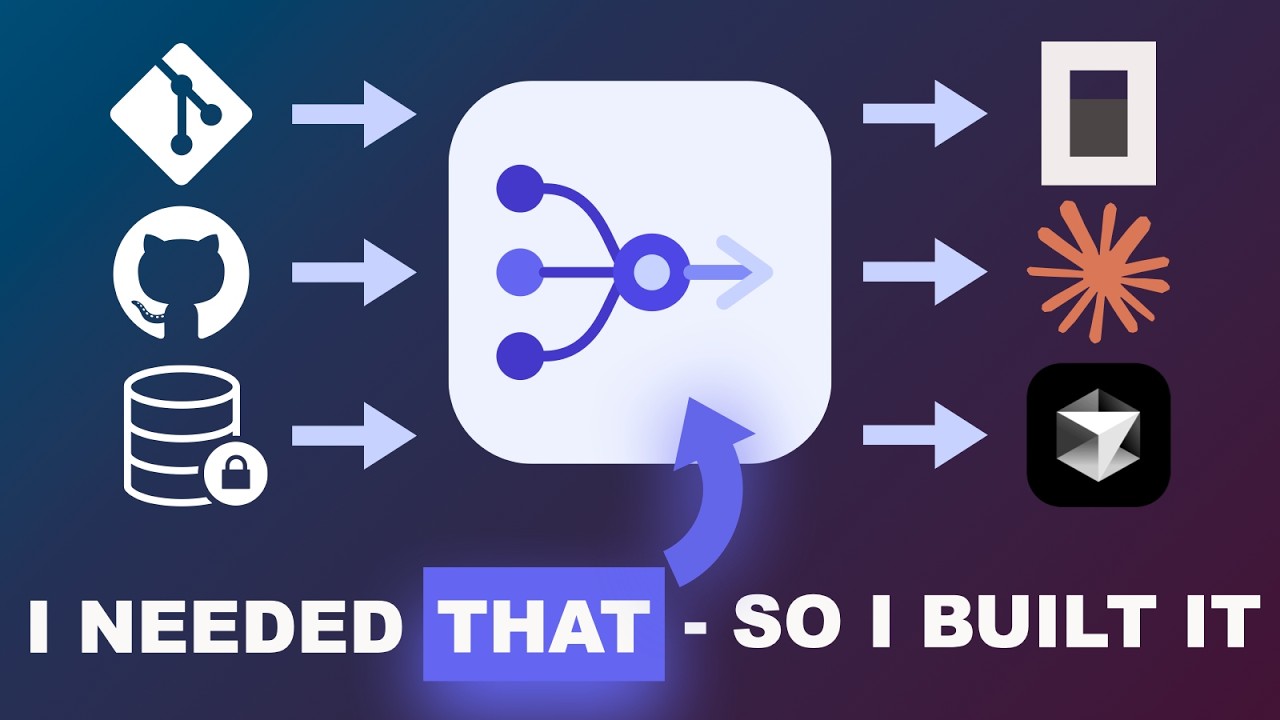
**RepoRelay** is a self-hosted code context engine for [MCP](https://modelcontextprotocol.io).
1. [**Add repositories**](https://chwoerz.github.io/reporelay/guide/getting-started) from any source — GitHub, GitLab, Bitbucket, on-premise, or local disk
2. [**Index the refs you need**](https://chwoerz.github.io/reporelay/guide/indexing-pipeline) — pick the branches and tags that matter; each gets its own versioned snapshot
3. [**Use them everywhere**](https://chwoerz.github.io/reporelay/guide/mcp-integration) — every indexed repo is instantly available as MCP tools in Claude Desktop, Cursor, Windsurf, OpenCode, or any other MCP-capable client
Manage everything through the [REST API](https://chwoerz.github.io/reporelay/reference/api) or the [admin dashboard](https://chwoerz.github.io/reporelay/guide/admin-dashboard). Register once, query from any project in any editor. RepoRelay parses files with [tree-sitter](https://tree-sitter.github.io/tree-sitter/), extracts symbols and imports, and stores everything in a hybrid search index (BM25 + pgvector).
RepoRelay runs entirely on your infrastructure — no third-party indexing service, no telemetry, no repo uploads. Code only leaves your network via the providers you explicitly configure: snippets requested by the LLM you connect via MCP (e.g. Claude, GPT), and chunks sent to your embedding provider during indexing (cloud providers like OpenAI see the code; a local Ollama setup keeps everything on-box).
---
## Demo
---
## Highlights
| | Feature | Description |
| :---------- | :-------------------------------------------------- | :---------------------------------------------------------------------------------------------- |
| **Repos** | Unlimited Repositories | Register repos from any Git host — GitHub, GitLab, Bitbucket, on-premise, or local paths |
| **Search** | Hybrid Search | BM25 full-text (ParadeDB) + vector similarity (pgvector), fused via Reciprocal Rank Fusion |
| **Parse** | Deep Code Understanding | tree-sitter parsing across 9 languages extracts symbols, imports, signatures, and doc comments |
| **Index** | Full-Index + SHA-256 Dedup | Every ref indexes all files via `git ls-tree`; SHA-256 content addressing skips unchanged files |
| **MCP** | MCP-Native | 7 tools, 2 resources, 3 prompts — works with any MCP host |
| **Version** | Versioned Snapshots | Every branch and tag is indexed independently; query with semver ranges like `^1.2` or `~3.0` |
| **Deploy** | Self-Hosted | Your code stays on your infrastructure. Postgres is the only runtime dependency |
| **UI** | REST API + Admin Dashboard | Fastify REST API (18 routes) + Angular 21 admin dashboard |
| **Embed** | Ollama | Ollama with Metal GPU acceleration for fast local embeddings |
| **Chunk** | Symbol-Aware Chunking | Respects function boundaries with overlap windows — never cuts a symbol in half |
| **Lang** | [Language Auto-Detection](#language-auto-detection) | Detects your project's languages from manifest files and filters relevant repos automatically |
---
## Quick Start
Option A: Docker Compose (recommended)
Run the entire stack — Postgres, worker, REST API, MCP server, and admin UI — with a single command. No Node.js installation required.
#### Prerequisites
| Requirement | Version |
| ----------- | ------- |
| Docker | Latest |
#### 1. Clone and configure
```bash
git clone https://github.com/chwoerz/reporelay.git
cd reporelay
cp .env.example .env
```
Edit `.env` if you need to change the embedding model or Git tokens for private repos. The defaults work out of the
box if you have [Ollama](https://ollama.com/) running locally with `nomic-embed-text` as a model.
#### 2. Start everything
```bash
docker compose up -d
```
This builds and starts all 5 services:
| Service | Port | Description |
| ---------- | ------- | ------------------------------------------ |
| `postgres` | `5432` | ParadeDB (Postgres + pgvector + pg_search) |
| `worker` | — | Background indexing worker (pg-boss) |
| `web` | `3001` | REST API + Swagger UI (`/docs`) |
| `mcp` | `3000` | MCP server (HTTP transport) |
| `ui` | `80` | Angular admin dashboard (nginx) |
| Ollama | `11434` | Embedding model (external) |
The worker runs database migrations automatically on first startup.
#### 3. Index your repos
```bash
# Register a remote repo
curl -sS -X POST http://localhost:3001/api/repos \
-H 'content-type: application/json' \
-d '{"name":"my-lib","remoteUrl":"https://github.com/org/my-lib.git"}'
# Trigger indexing for a specific branch
curl -sS -X POST http://localhost:3001/api/repos/my-lib/sync \
-H 'content-type: application/json' \
-d '{"ref":"main"}'
# Index a tagged release — each version is stored independently
curl -sS -X POST http://localhost:3001/api/repos/my-lib/sync \
-H 'content-type: application/json' \
-d '{"ref":"v2.0.0"}'
# Search across all indexed repos and versions
curl -sS 'http://localhost:3001/api/search?query=handleAuth'
```
Or use the admin dashboard at `http://localhost` and the Swagger UI at `http://localhost:3001/docs`.
#### 4. MCP Client
Configure your MCP client (Claude Desktop, Cursor, etc.) to connect to the MCP proxy at `http://localhost:3000/mcp` — see the [MCP Client Setup](#mcp-client-setup) section below for details.
Option B: Local Development
Run services directly with Node.js for a faster dev loop with hot-reload.
#### Prerequisites
| Requirement | Version |
| ----------- | ------- |
| Node.js | 22+ |
| pnpm | 9+ |
| Docker | Latest |
#### 1. Clone and install
```bash
git clone https://github.com/chwoerz/reporelay.git
cd reporelay
pnpm install
```
#### 2. Start Postgres
```bash
docker compose up -d postgres
```
This starts [ParadeDB](https://www.paradedb.com/) (Postgres with pgvector + pg_search).
#### 3. Configure environment
```bash
cp .env.example .env
# Defaults work for local development — no edits needed
```
#### 4. Start services
```bash
# All-in-one dev script (Postgres + worker + web API)
pnpm dev
# Or individual services
pnpm dev:worker # Background indexing worker
pnpm dev:mcp # MCP server (HTTP on :3000)
pnpm dev:web # REST API on :3001
pnpm dev:proxy # MCP proxy (connects to MCP server)
pnpm dev:ui # Angular dashboard on :4200
```
| Service | Port | Description |
| ---------- | ------- | ------------------------------------------ |
| `postgres` | `5432` | ParadeDB (Postgres + pgvector + pg_search) |
| `worker` | — | Background indexing worker (pg-boss) |
| `web` | `3001` | REST API + Swagger UI (`/docs`) |
| `mcp` | `3000` | MCP server (HTTP transport) |
| `proxy` | — stdio | MCP proxy (connects to MCP server) |
| `ui` | `4200` | Angular dev server |
| Ollama | `11434` | Embedding model (external) |
The worker bootstraps the database on first startup (extensions, migrations, BM25 index).
#### 5. Index your repos
```bash
# Register a local repo
curl -sS -X POST http://localhost:3001/api/repos \
-H 'content-type: application/json' \
-d '{"name":"my-app","localPath":"/absolute/path/to/my-app"}'
# Register a remote repo
curl -sS -X POST http://localhost:3001/api/repos \
-H 'content-type: application/json' \
-d '{"name":"my-lib","remoteUrl":"https://github.com/org/my-lib.git"}'
# Trigger indexing for a specific branch
curl -sS -X POST http://localhost:3001/api/repos/my-app/sync \
-H 'content-type: application/json' \
-d '{"ref":"main"}'
# Index a tagged release — each version is stored independently
curl -sS -X POST http://localhost:3001/api/repos/my-lib/sync \
-H 'content-type: application/json' \
-d '{"ref":"v2.0.0"}'
# Search across all indexed repos and versions
curl -sS 'http://localhost:3001/api/search?query=handleAuth'
# Check status
curl -sS http://localhost:3001/api/repos
```
Or use the admin dashboard at `http://localhost:4200`.
#### 6. MCP Client
Configure your MCP client (Claude Desktop, Cursor, etc.) to connect to the MCP proxy at `http://localhost:3000/mcp` — see the [MCP Client Setup](#mcp-client-setup) section below for details.
### Supported Git Hosts
RepoRelay works with **any Git repository** accessible over HTTPS or on the local filesystem. There is no vendor lock-in — your repos can come from any combination of:
- **GitHub** (github.com and GitHub Enterprise)
- **GitLab** (gitlab.com and self-managed)
- **Bitbucket** (Cloud and Data Center)
- **Azure DevOps**
- **Gitea / Forgejo**
- **Any on-premise Git server** (Gerrit, cgit, etc.)
- **Local repositories** on disk
For private repos, set a `GIT_TOKEN_` environment variable and RepoRelay handles authentication automatically. Host-specific username defaults are built-in for GitHub, GitLab, and Bitbucket — any other host uses `GIT_USER_` or falls back to `oauth2`.
```bash
# Example: authenticate with GitHub and a self-hosted GitLab
GIT_TOKEN_GITHUB_COM=ghp_xxxxxxxxxxxx
GIT_TOKEN_GITLAB_INTERNAL_CORP_COM=glpat-xxxxxxxxxxxx
```
---
## MCP Client Setup
### Claude Desktop / Cursor
Clients connect via the MCP proxy, which auto-detects your project's languages and forwards requests to the RepoRelay HTTP server:
```json
{
"mcpServers": {
"reporelay": {
"command": "npx",
"args": ["reporelay", "--server", "http://localhost:3000/mcp"]
}
}
}
```
See the [full documentation](https://chwoerz.github.io/reporelay/guide/mcp-integration) for OpenCode, remote server, and other client configurations.
### MCP Proxy
The MCP proxy is a lightweight local binary that sits between your IDE and the RepoRelay HTTP server. It:
1. Detects languages from the developer's working directory
2. Connects to the RepoRelay MCP server over HTTP
3. Forwards all MCP requests, injecting detected languages into tool calls
```bash
# Via CLI argument
npx reporelay --server http://localhost:3000/mcp
# Or via environment variable
REPORELAY_URL=http://localhost:3000/mcp npx reporelay
```
For a remote server, just change the URL:
```json
{
"mcpServers": {
"reporelay": {
"command": "npx",
"args": ["reporelay", "--server", "https://reporelay.example.com/mcp"]
}
}
}
```
The proxy injects languages into 4 tools that support language filtering: `search_code`, `get_symbol`, `find`, and `list_repos`. Per-request `languages` values provided by the caller take priority over auto-detected ones.
### Language Auto-Detection
When `MCP_LANGUAGES` is not set, the MCP server automatically detects the host project's language by scanning the working directory for well-known manifest files:
| Manifest File | Detected Languages |
| ------------------------------- | ---------------------- |
| `package.json`, `tsconfig.json` | typescript, javascript |
| `Cargo.toml` | rust |
| `go.mod` | go |
| `pyproject.toml`, `setup.py` | python |
| `pom.xml`, `build.gradle(.kts)` | java, kotlin |
| `CMakeLists.txt`, `Makefile` | c, cpp |
Detected languages are used to filter which repos are served — only repos whose `language_stats` contain a matching language above the threshold are included.
**`MCP_LANGUAGE_THRESHOLD`** (default: `10`) controls the minimum percentage a language must represent in a repo ref's file breakdown. Set to `0` to disable repo filtering entirely.
```json
{
"mcpServers": {
"reporelay": {
"command": "npx",
"args": ["tsx", "src/mcp/main.ts"],
"env": {
"DATABASE_URL": "postgresql://reporelay:reporelay@localhost:5432/reporelay",
"MCP_LANGUAGE_THRESHOLD": "0"
}
}
}
}
```
---
## Documentation
Full documentation is available at the **[RepoRelay docs site](https://chwoerz.github.io/reporelay/)**, including:
- [Indexing pipeline deep-dive](https://chwoerz.github.io/reporelay/guide/indexing-pipeline)
- [MCP tools, resources & prompts reference](https://chwoerz.github.io/reporelay/reference/mcp-tools)
- [REST API reference (18 endpoints)](https://chwoerz.github.io/reporelay/reference/api)
- [Configuration reference](https://chwoerz.github.io/reporelay/guide/configuration)
- [Database design](https://chwoerz.github.io/reporelay/guide/database-design)
- [Project structure](https://chwoerz.github.io/reporelay/reference/project-structure)
- [Tech stack](https://chwoerz.github.io/reporelay/reference/tech-stack)
---
## Testing
Comprehensive test suite (unit + integration) covering every module.
```bash
pnpm test # All tests
pnpm test:unit # Unit tests only
pnpm test:integration # Integration tests (requires Docker)
pnpm test:watch # Watch mode
```
Integration tests use real ParadeDB containers via [Testcontainers](https://testcontainers.com/).
---
## Tech Stack