[简体中文](README.md) · **English**
# Screen Translator
**Real-time on-screen translator for Android · capture → OCR → translate → overlay**
[](LICENSE)
[](../../releases)
[](../../releases)
[](../../stargazers)
[](../../issues)



[](https://qun.qq.com/universal-share/share?ac=1&authKey=%2Fs0%2FaO4mEHsgutzjUnhGIQEWLcAcGPXTefUY2YwdMkPdnHHuB%2FpLZm9hPjcrw6n5&busi_data=eyJncm91cENvZGUiOiIxMDU5NjU1OTI2IiwidG9rZW4iOiJ4b25nS0FvSFQyMko4WjJTMHhGRlIwSnppeVB2eGJCNjFua0FDTGZzNUhEWlY3VkdPcFVaOEdMams0aEY3aFBTIiwidWluIjoiNTcyMjQyOTk4In0%3D&data=j7H7DHUunIEqMXYLZxhTkx-K_LZTTs5aBJS95LT_Y50uQy37d5IiUU2y3gAPcy9CYRzRufvHuTCaSHOQsLTkTw&svctype=4&tempid=h5_group_info)
Capture via MediaProjection / Shizuku → on-device or cloud OCR → LLM / MT → floating overlay.
No ROOT, fully self-contained, designed for visual novels, manga, game dialogue and any on-screen text.
[Install](#-install) · [Usage](#-usage) · [Configuration](#%EF%B8%8F-configuration) · [Contributing](#-contributing) · [Releases](../../releases) · [Issues](../../issues)
---
## ✨ Features
### 🎯 In one line
Game / manga / visual novel on screen → tap the floating ball → translation appears overlaid on the source text in a couple of seconds.
### 🖱️ How to trigger
- **Tap the floating ball**: defaults to translating the whole screen; switchable to **Word-pick mode** — one tap lets you draw a rectangle around just the word or phrase you want translated (more precise)
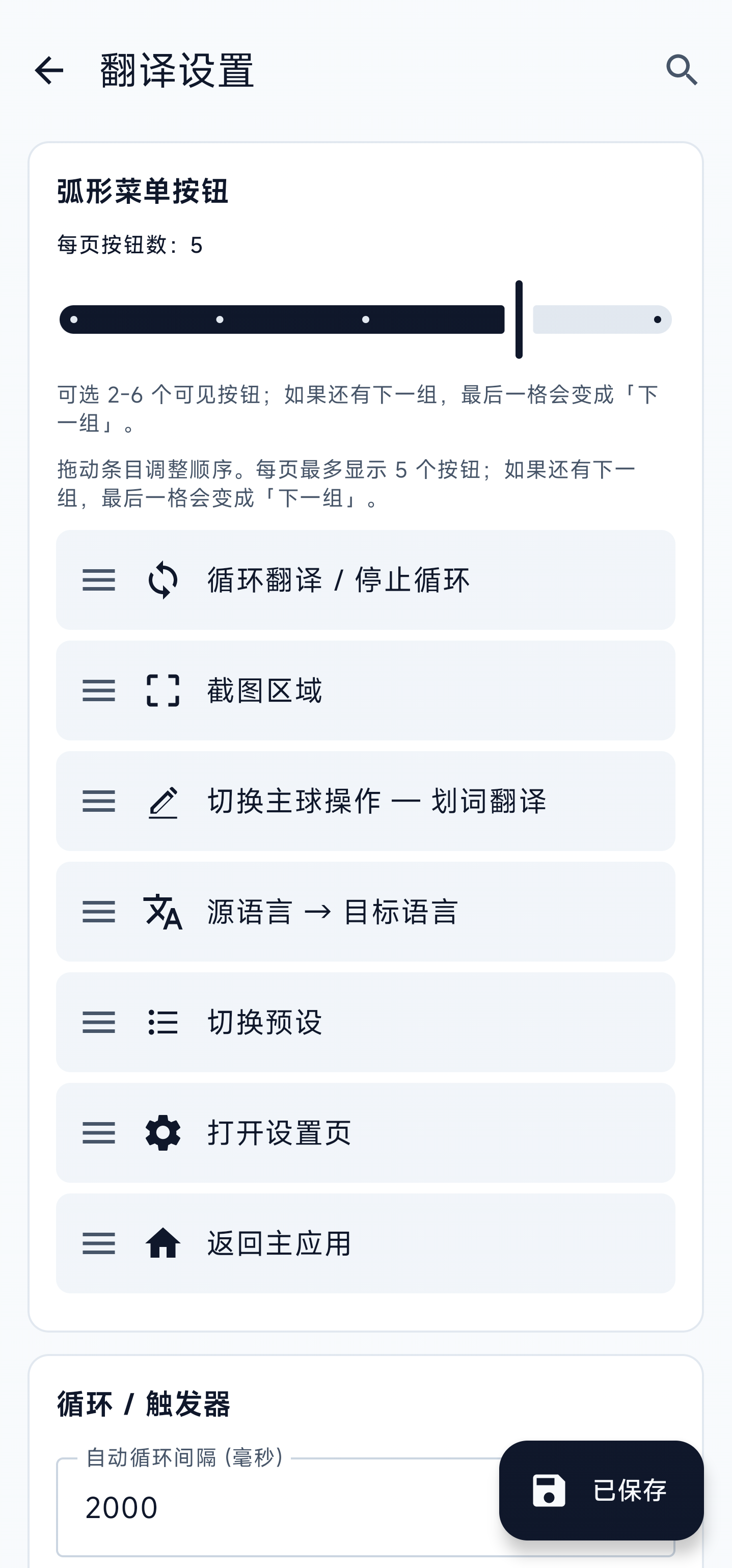
- **Long-press the floating ball**: opens an arc menu with common actions one finger can reach: loop / re-pick region / switch between **"Translate full screen"** and **"Translate a word"** / quick source-target language switch / preset switch / settings / back to main. **Order and page size are configurable** in settings; extra buttons paginate with a "Next page" button automatically
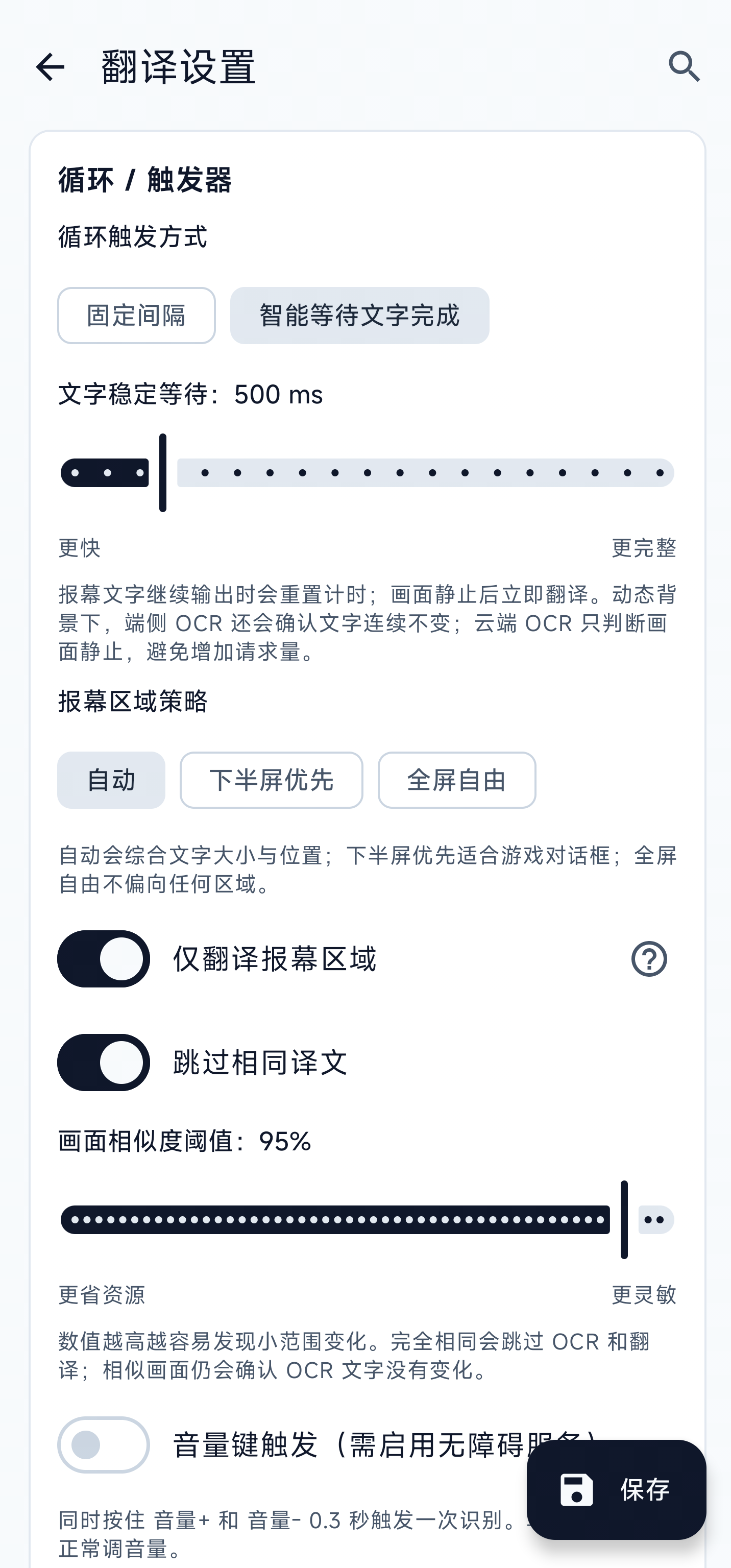
- **Loop mode**: choose a fixed interval or wait until dialogue text stabilizes; exact duplicate frames / translations are skipped, and detection can prioritize lower-screen dialogue regions for hands-free story reading
- **Volume two-key**: hold **Vol+ and Vol−** together for 0.3 s to trigger; your hands stay on the game (requires enabling the bundled accessibility service)
- **From any other app**: long-press to select some text in any app → tap "Screen Translator" in the system menu → translation card pops up immediately, no need to switch back to this app first
### 🔍 OCR (read the text on screen)
- **On-device**: ML Kit (CJK + Latin) / PaddleOCR / manga OCR — your screenshots never leave the phone; works offline; PaddleOCR supports multiple v5/v6 tiers
- **Local HTTP OCR**: connect to Umi-OCR / LunaTranslator services on your LAN or PC
- **Cloud**: PP-OCRv6 Online (PaddleOCR AI Studio) / Baidu / Tencent / Youdao — fall back to these when on-device OCR misreads; PP-OCRv6 Online requires an AI Studio Access Token
- When you switch source language, the app checks whether the current OCR engine can read it; if not, it suggests a better one
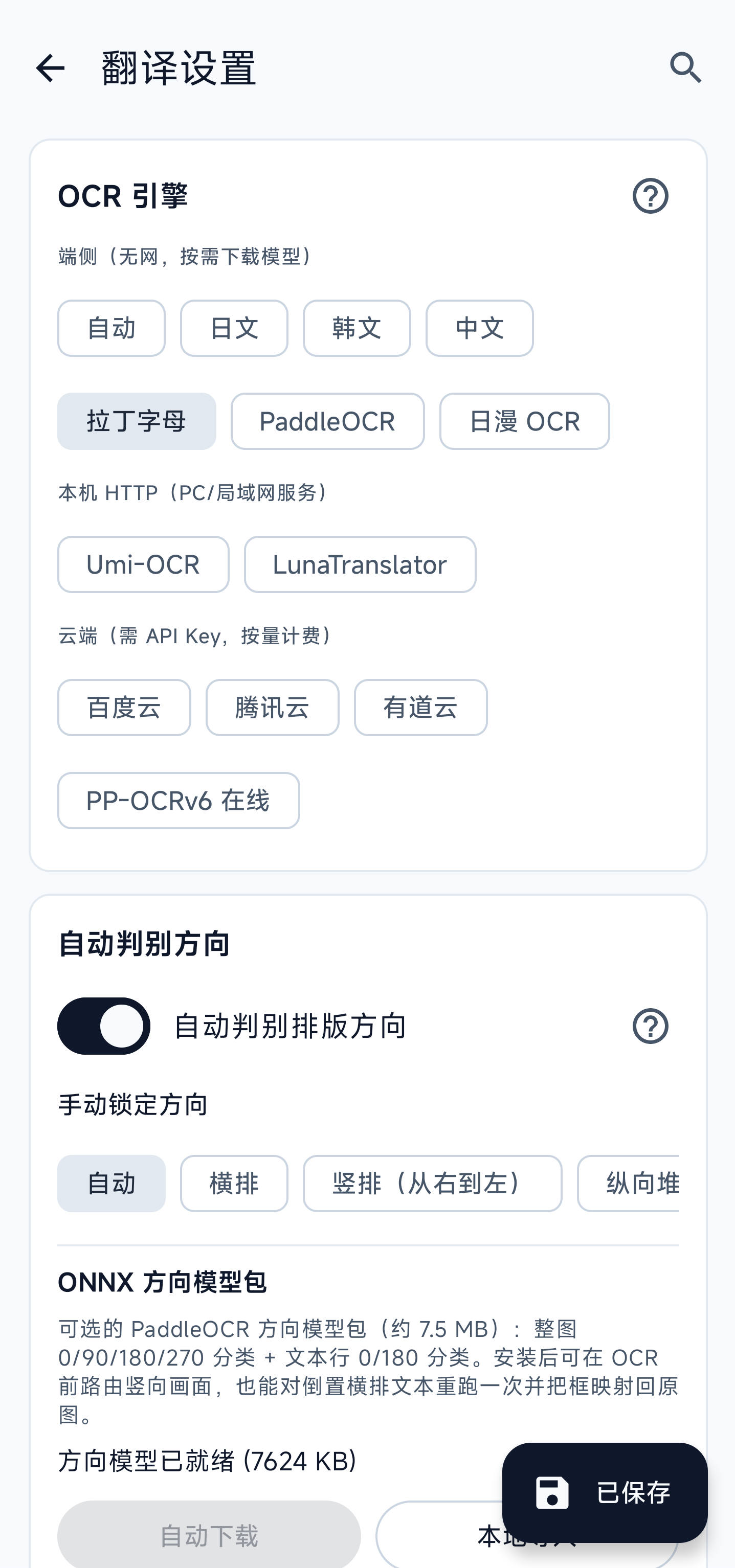
- Optional orientation detection can route horizontal / vertical / rotated text to a better OCR path, or you can lock the direction manually
- PaddleOCR, manga OCR, and orientation models select 1 / 2 / 4 / 6 CPU inference threads from the device's available cores, capped at 6
### 🌐 Translation engines
- **LLMs**: DeepSeek / ChatGPT / Zhipu / self-hosted compatible APIs… streamed token by token, no waiting for the whole reply
- **On-device LLMs**: Sakura (Japanese → Simplified Chinese ACGN/VN) and Hy-MT2 (multilingual translation) run from GGUF models after download, so they can translate offline once ready
- **Consistent terminology**: save names, places, organizations, and domain terms globally or per app so OpenAI-compatible and on-device LLM translation can keep preferred wording across scenes
- **DeepL**: free / Pro plan auto-detected, **supports self-hosted [deeplx](https://github.com/OwO-Network/DeepLX)** (open-source proxy, run on your own server, no key needed); pick between Official / deeplx / Auto-fallback
- **Youdao Pic-Trans**: skips the OCR step entirely — send the screenshot, get back boxes with translations. Great for comics.
- **Google**: no key, free (proxy required inside mainland China)
- Every engine has a **Test connection** button; DeepL additionally reports remaining monthly free quota
### 🔤 Word lookup (one tap = mini dictionary)
Not just full-screen translation. Draw a rectangle around a single word or phrase and a card pops up with:
- **Translation** — every engine returns this
- **Pronunciation / part of speech / multiple definitions / example sentence pairs / difficulty notes** — only when an **LLM engine** is selected; rare words, specialist terms, abbreviations, cultural references, and confusing usages are explained separately (Baidu / Tencent / DeepL etc. only return a plain translation)
- A "Copy source" and "Copy translation" button on the card; long-press any text inside to copy too
- In landscape, the close bar stays pinned at the top and both copy actions stay pinned at the bottom; only the content scrolls, clear of system bars and display cutouts
- Great for game / manga / VN vocabulary you don't recognize — one second per word, faster than switching to a dictionary app
### 🎨 How the overlay looks
- **Two render modes**: glued to each source box (BLOCKS), or packed into a **draggable / resizable floating window** — perfect for games with on-screen joysticks and buttons; you can lock the window to prevent accidental touches
- **Unified layout and reading order**: translated text follows OCR-detected horizontal / vertical layout and reading order by default; when disabled, both the layout and LTR / RTL direction must be selected manually, and OCR sorting uses the same resolved direction as rendering
- **Selectable translation blocks**: long-press a block for system text selection, or choose tap-to-open panel mode to select a range or copy the full source / translation
- **5 color themes + visual color picker**: choose background, text, border color, and opacity directly instead of typing ARGB; the picker scrolls on short landscape screens
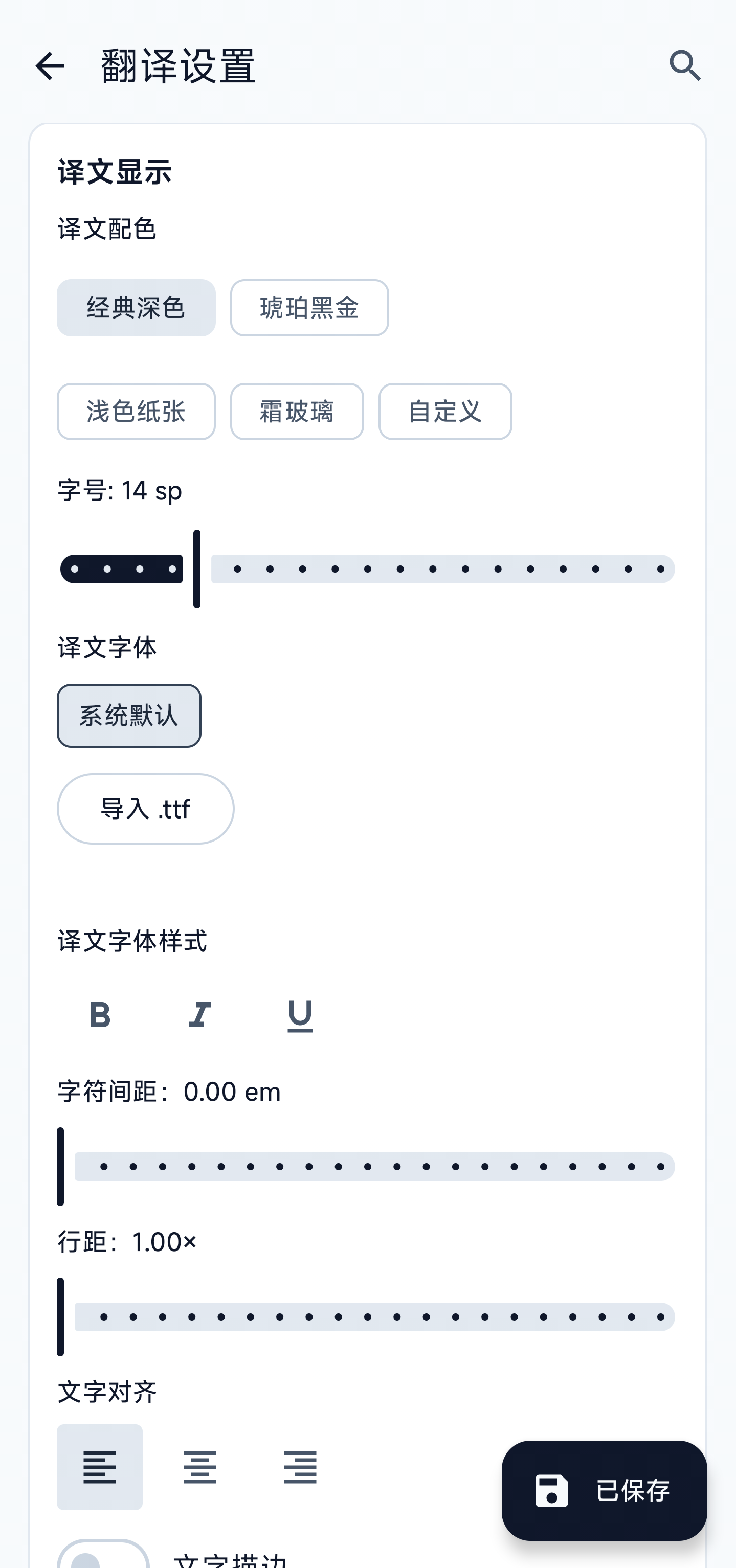
- **Full text styling**: bold, italic, underline, letter spacing, line spacing, alignment, outline, and shadow can be tuned independently, with a live preview
- **Comic / subtitle optimizations**: sentences split across multiple OCR boxes get merged before translating; vertical Japanese is read right-to-left; tiny ruby-text columns (furigana) next to kanji are filtered out so you don't get duplicate translations; vertical scenes can use vertical translation layout
- **Marquee for long lines**: in single-line mode, long translations scroll horizontally instead of being truncated with "…"
- **Custom translation font**: import `.ttf` files for translated text only; the app UI keeps using the system font, and imported fonts stay available as selectable chips
### 🛠️ Small conveniences
- **English / 简体中文 UI + Light / Dark / Follow-system theme**, applies instantly
- **In-settings search**: search in either language; new color, font, backup, import, and export settings are indexed too
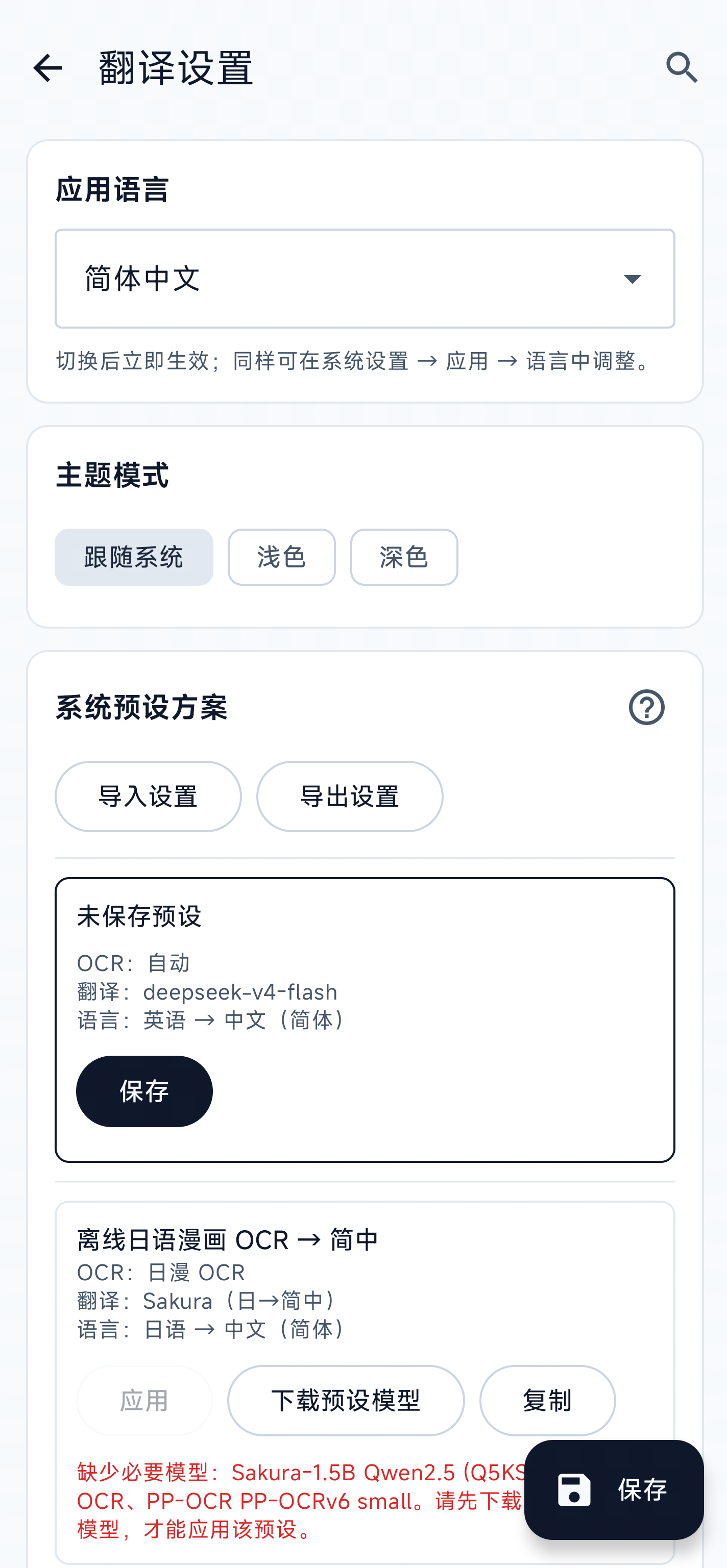
- **System presets**: built-in bundles such as "offline Japanese manga OCR → Simplified Chinese"; missing models are listed before a preset can be applied
- **Background model downloads**: continue after leaving Settings; both the in-app status and system notification show the current model, file, batch, and progress, with cancel, retry, and resume support
- **Per-app translation context**: detect the foreground app and apply its terminology; package names always stay on-device, and only the display name is sent when you explicitly enable that option for a context-aware translator
- **Portable settings bundle**: export / import non-sensitive settings, custom presets, and font files in one step; API keys and tokens remain on the current device
- **Translation cache**: during the current process, identical text with the same translation configuration reuses its result for cloud engines and on-device LLMs
- **Auto-saved crash reports**: Java crashes, native crashes, ANRs, low-memory exits, and related failures are surfaced on the next launch as an exportable sanitized report
- **Baseline TalkBack support**: the floating ball, arc menu, language / preset switchers, region picker, word card, and color picker expose labels, state, and action hints
- **Encrypted sensitive settings**: API keys, prompts, mirror URLs and presets are migrated into encrypted local storage to reduce plaintext leftovers
- **Update prompt**: checks for new versions when you open the home screen (at most once a day); offers a direct link if GitHub is unreachable
- **Chinese-ROM background guides**: shortcuts to auto-start / battery whitelist settings for Xiaomi / OPPO / VIVO / Huawei / Samsung devices that aggressively kill background services
- **Privacy default**: cleartext HTTP is only allowed inside your LAN by default; public hosts must use HTTPS
## 🧩 Project highlights
Screen Translator treats **capture, OCR, translation, and translated-text layout** as independently configurable parts:
| Feature | Description |
|---|---|
| **Mix and match OCR and translation** | Choose on-device, local HTTP, or cloud OCR independently from on-device models, OpenAI-compatible APIs, or multiple MT providers. One unavailable provider does not disable the whole workflow |
| **Fully offline or fully self-hosted** | On-device OCR with Sakura / Hy-MT2 keeps screenshots and text on the phone; OCR, DeepLX, Ollama, and compatible services can also run on your own computer or server |
| **Built for games, manga, and visual novels** | Wait for dialogue to finish typing, skip unchanged scenes, prioritize dialogue regions, handle vertical manga, preserve source position and reading direction, and keep per-game names and terms consistent |
| **Open source without configuration lock-in** | Apache-2.0 source; settings, presets, terminology, and fonts can be exported for migration, while API keys stay out of the export |
It is intended for users who want to choose their own OCR and translation methods while keeping offline use, vertical manga, and self-hosted services available.
## 📸 Screenshots
**Live overlay** — Discord rules page, OCR boxes glued to the source text:
| Classic Dark | Paper Light |
|---|---|
| 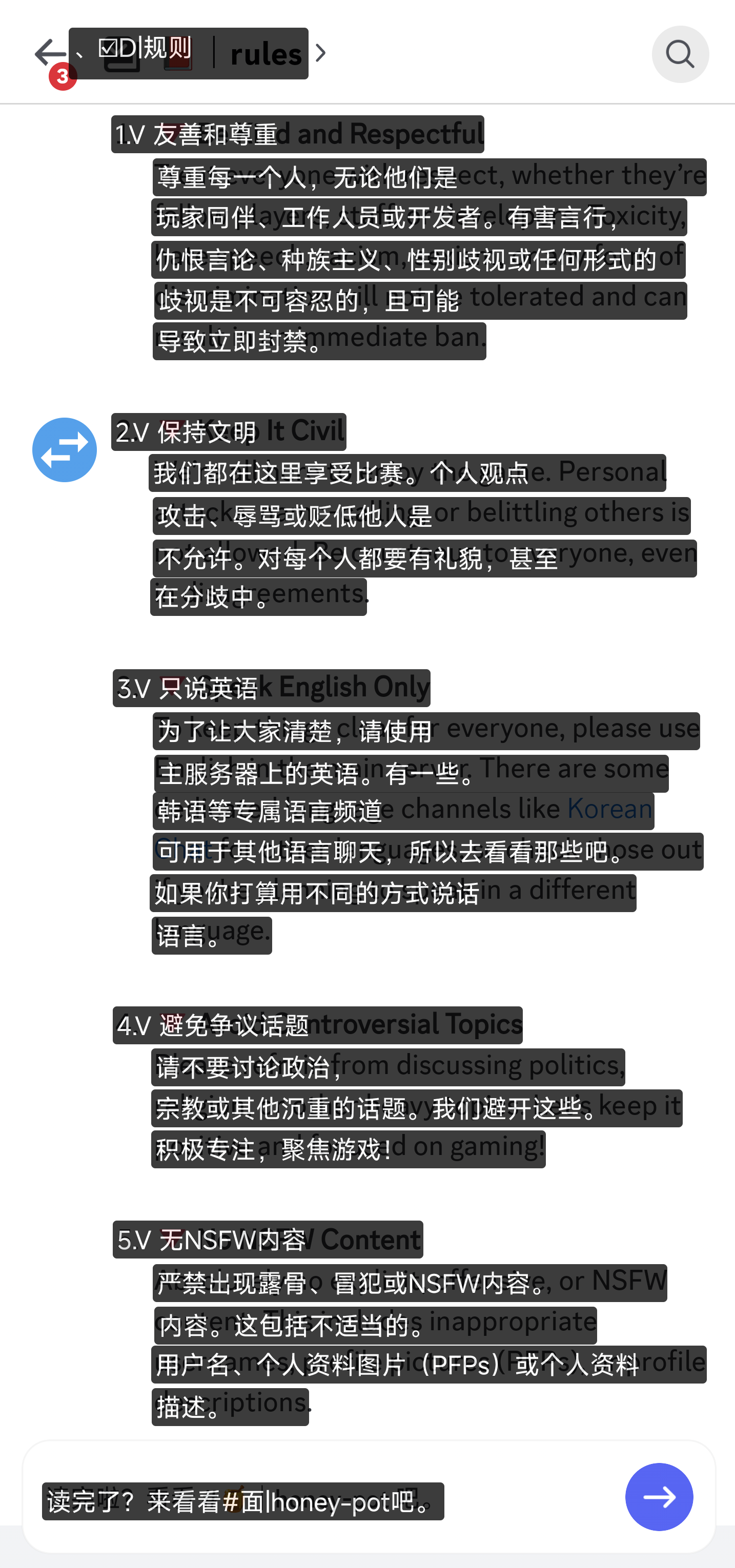 |
| 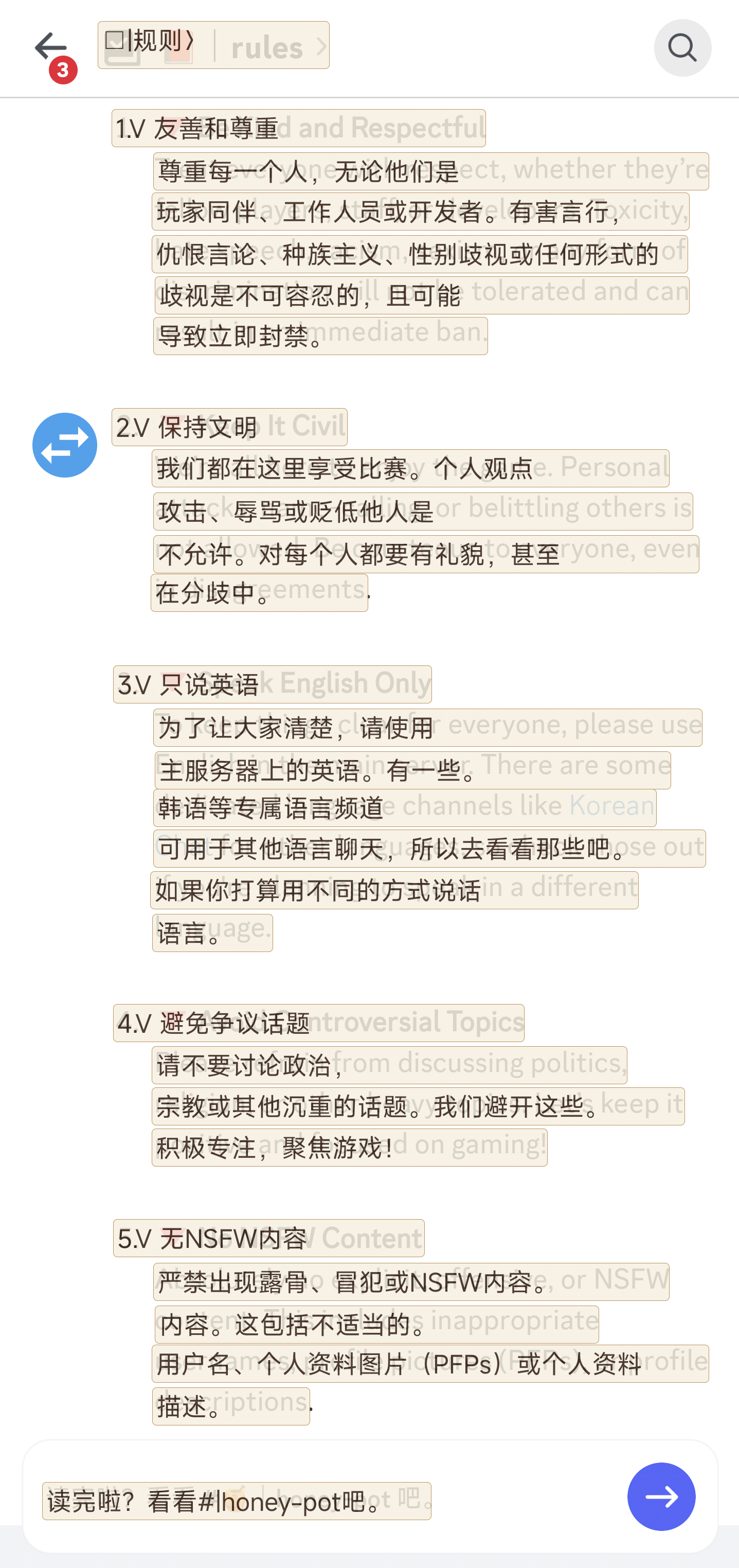 |
**In-game** — Sandship UI, Chinese detected and overlaid:
|
**In-game** — Sandship UI, Chinese detected and overlaid:
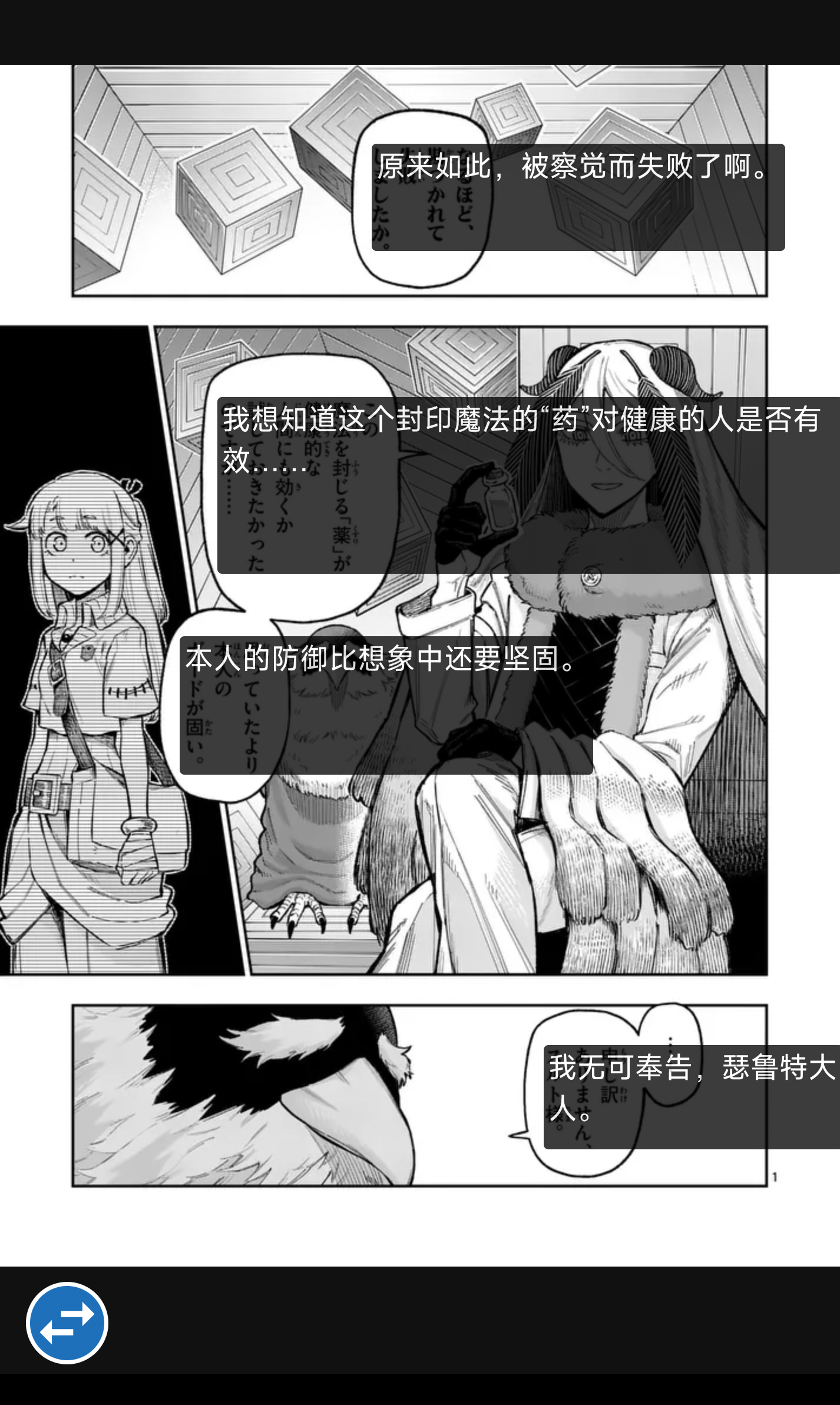
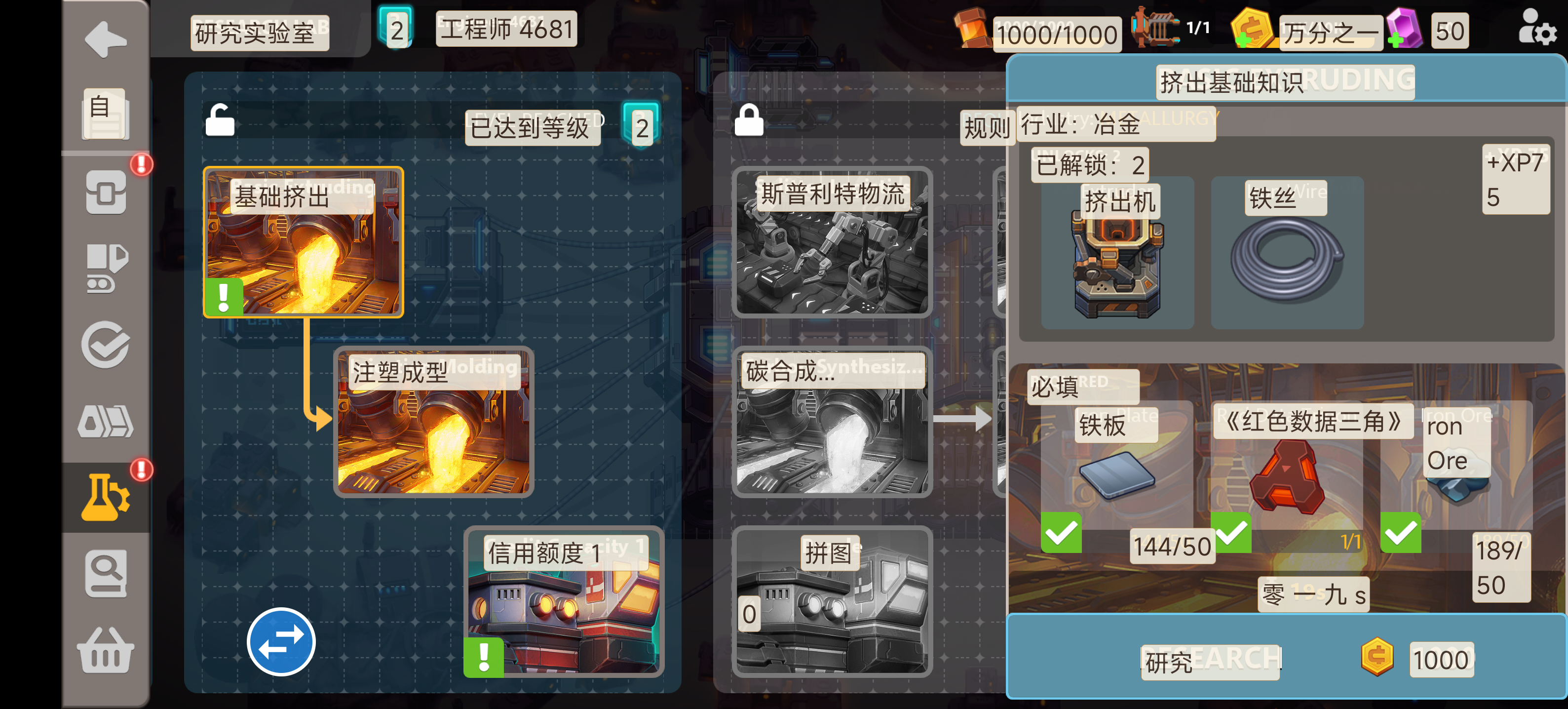 **Comic / subtitle scene** — manga bubbles OCR'd by column, translation glued to source:
| Korean manga | Vertical Japanese manga |
|---|---|
|
**Comic / subtitle scene** — manga bubbles OCR'd by column, translation glued to source:
| Korean manga | Vertical Japanese manga |
|---|---|
| 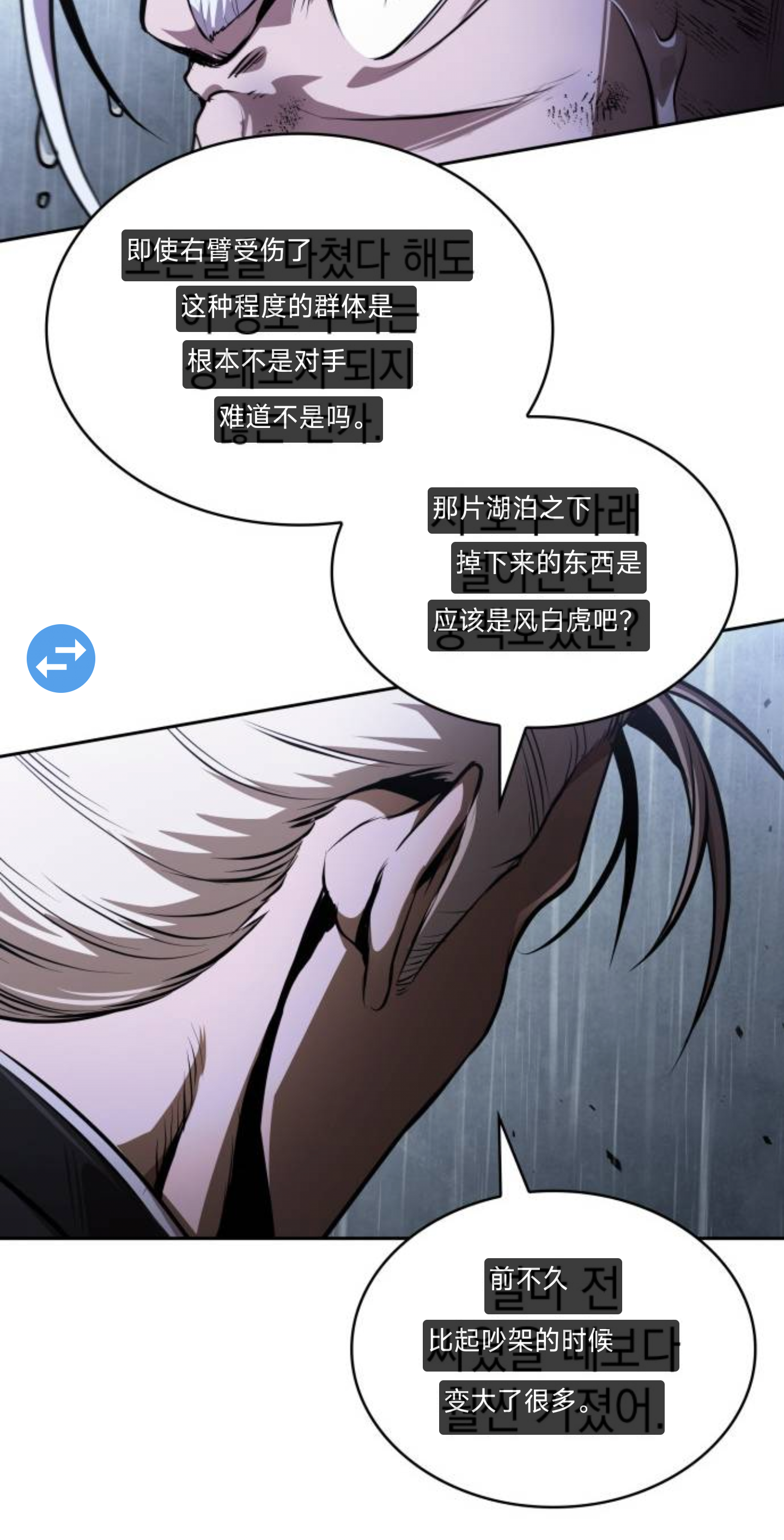 |
|  |
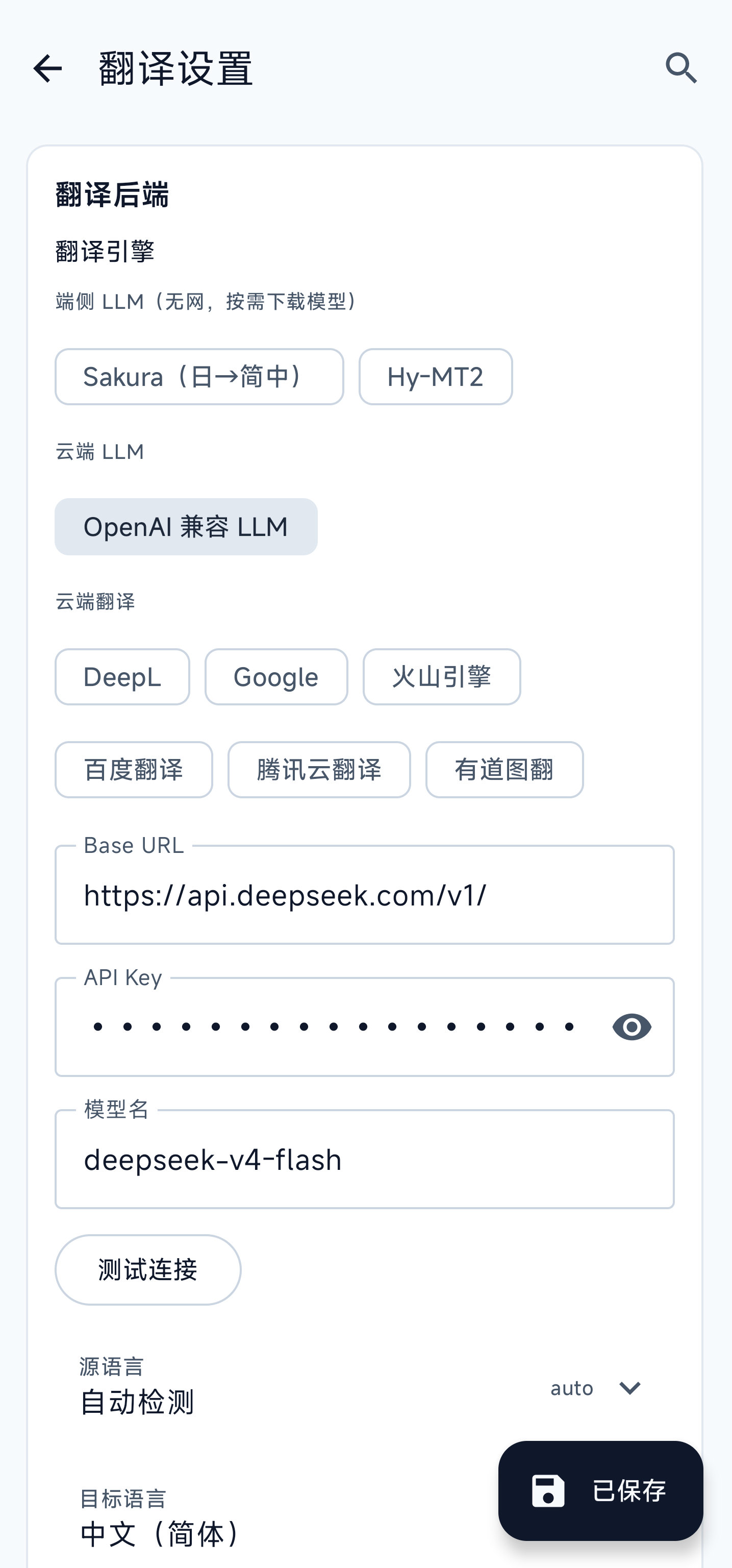
**Settings**:
| Language / theme / system presets | Translation backend |
|---|---|
|
|
**Settings**:
| Language / theme / system presets | Translation backend |
|---|---|
|  |
|  |
| **OCR engines / orientation detection** | **Overlay style and font** |
|
|
| **OCR engines / orientation detection** | **Overlay style and font** |
|  |
|  |
| **Arc-menu buttons** | **Floating-window mode options** |
|
|
| **Arc-menu buttons** | **Floating-window mode options** |
|  |
|  |
| **Box merge / floating ball** | **Smart loop translation** |
|
|
| **Box merge / floating ball** | **Smart loop translation** |
|  |
|  |
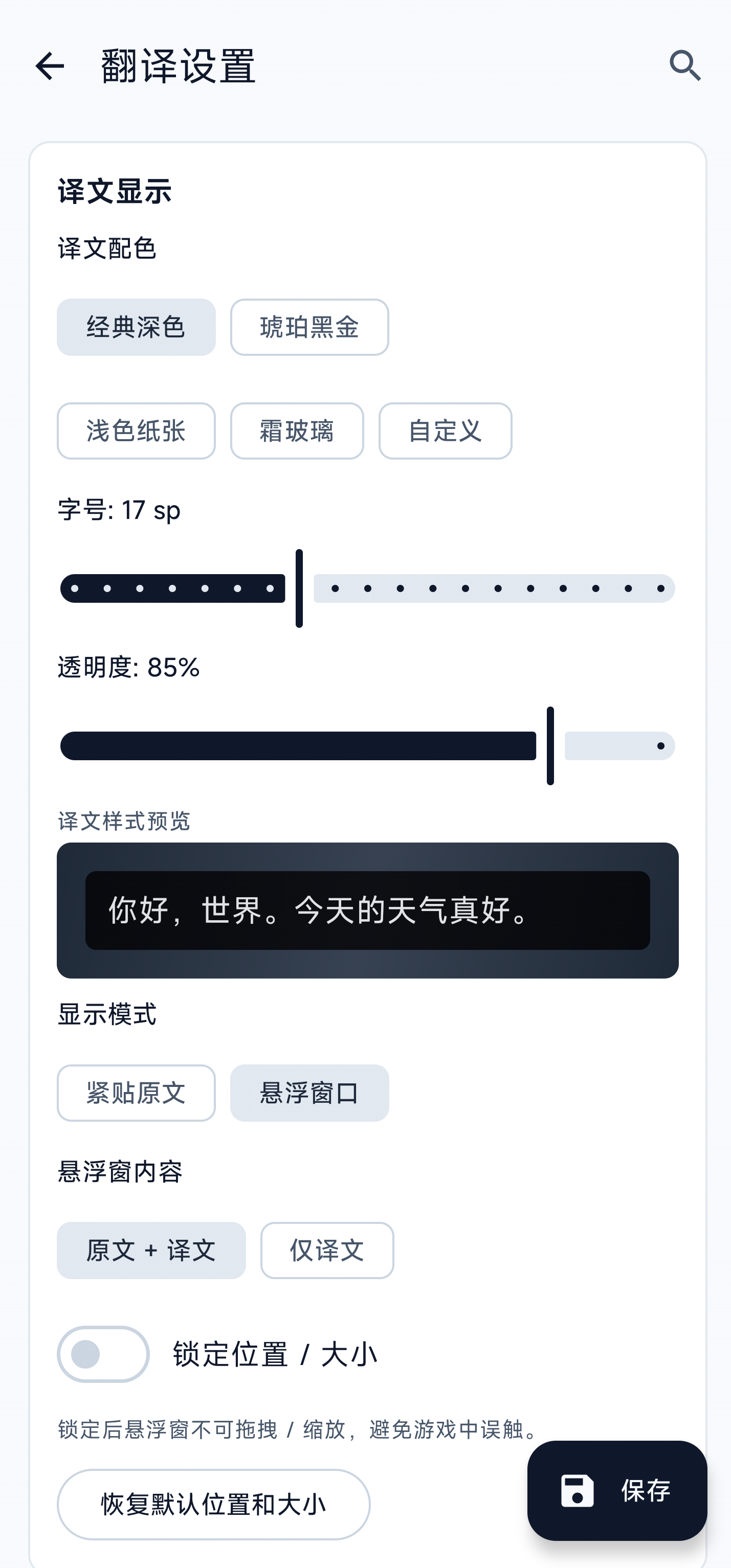
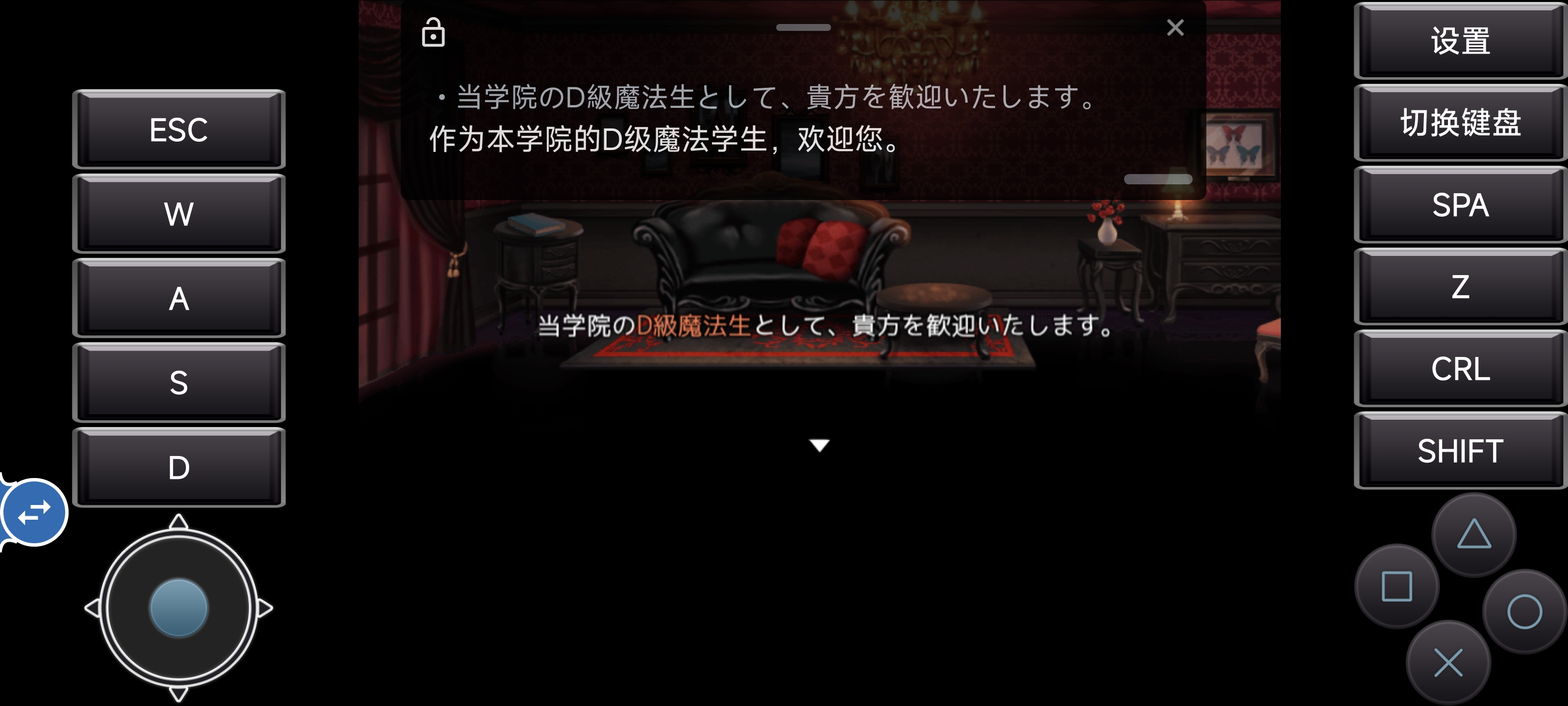
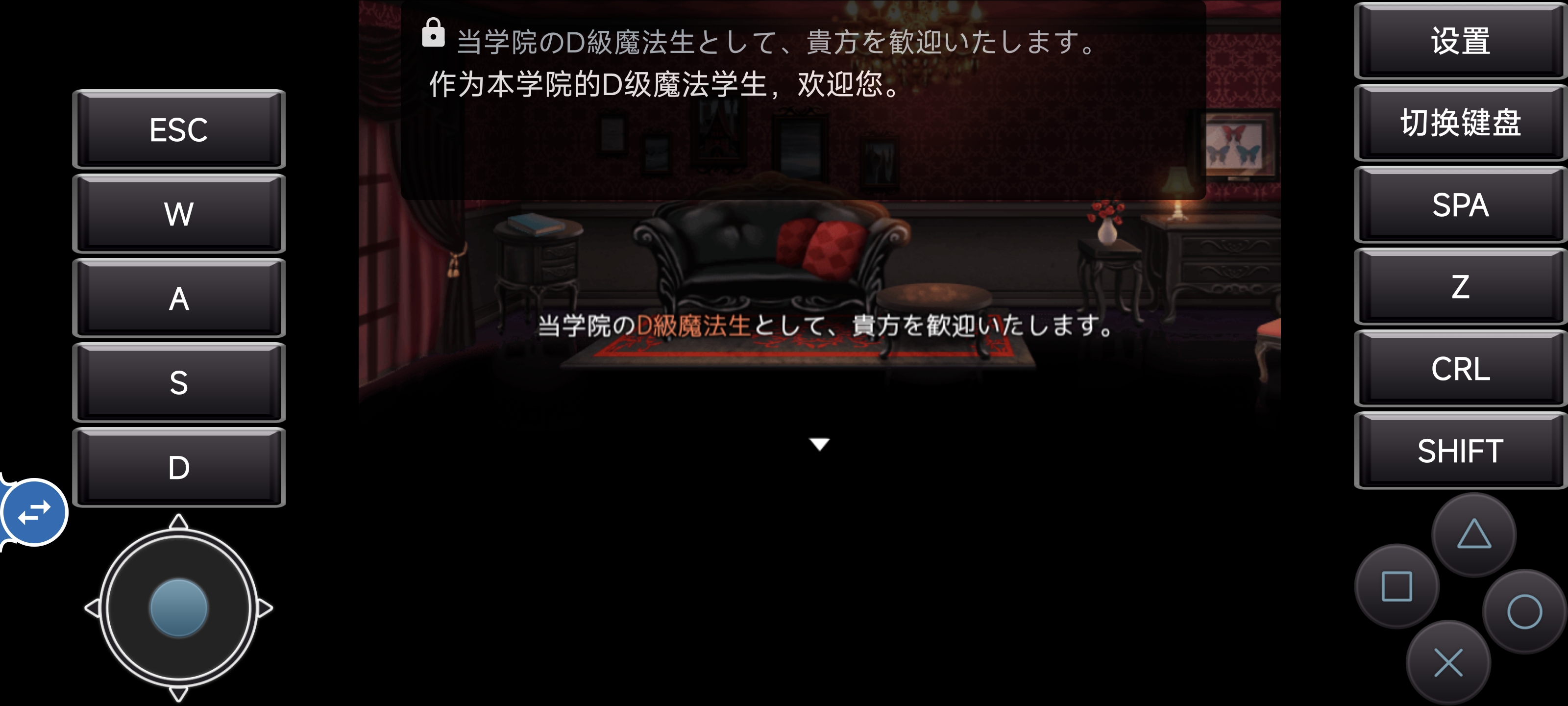
**Floating-window mode** — collects all source / translated lines into one draggable, resizable overlay so translations don't cover game controls (joysticks, action buttons, dialog-advance keys). The window can be **locked**: unlocked shows a close button + bottom resize handle and accepts drag / pinch; locked strips them away, leaving only the text and ignoring every gesture — no more accidental drags during gameplay.
| Unlocked (drag / resize / close) | Locked (gesture-proof, content only) |
|---|---|
|
|
**Floating-window mode** — collects all source / translated lines into one draggable, resizable overlay so translations don't cover game controls (joysticks, action buttons, dialog-advance keys). The window can be **locked**: unlocked shows a close button + bottom resize handle and accepts drag / pinch; locked strips them away, leaving only the text and ignoring every gesture — no more accidental drags during gameplay.
| Unlocked (drag / resize / close) | Locked (gesture-proof, content only) |
|---|---|
|  |
|  |
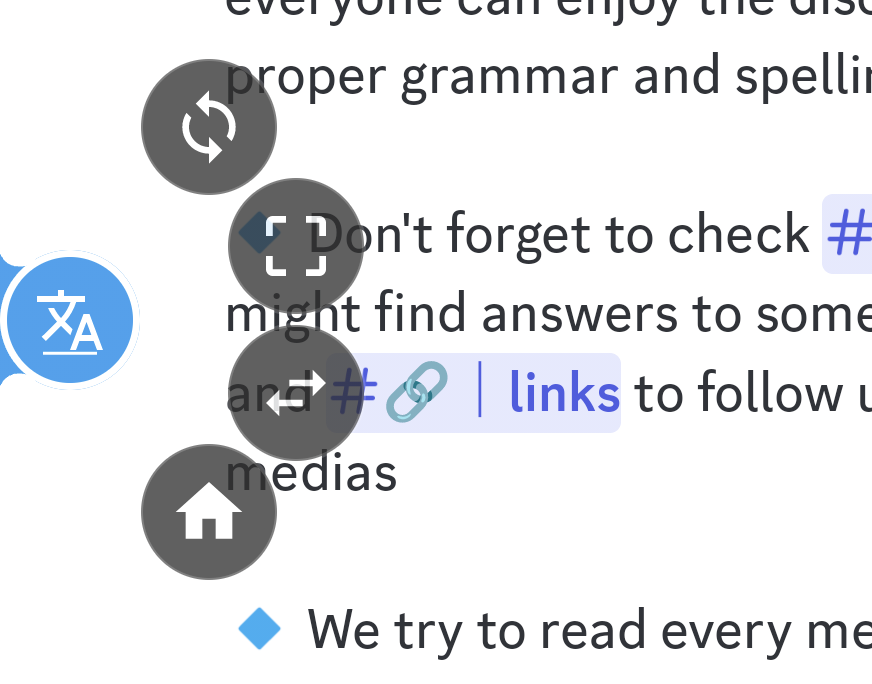
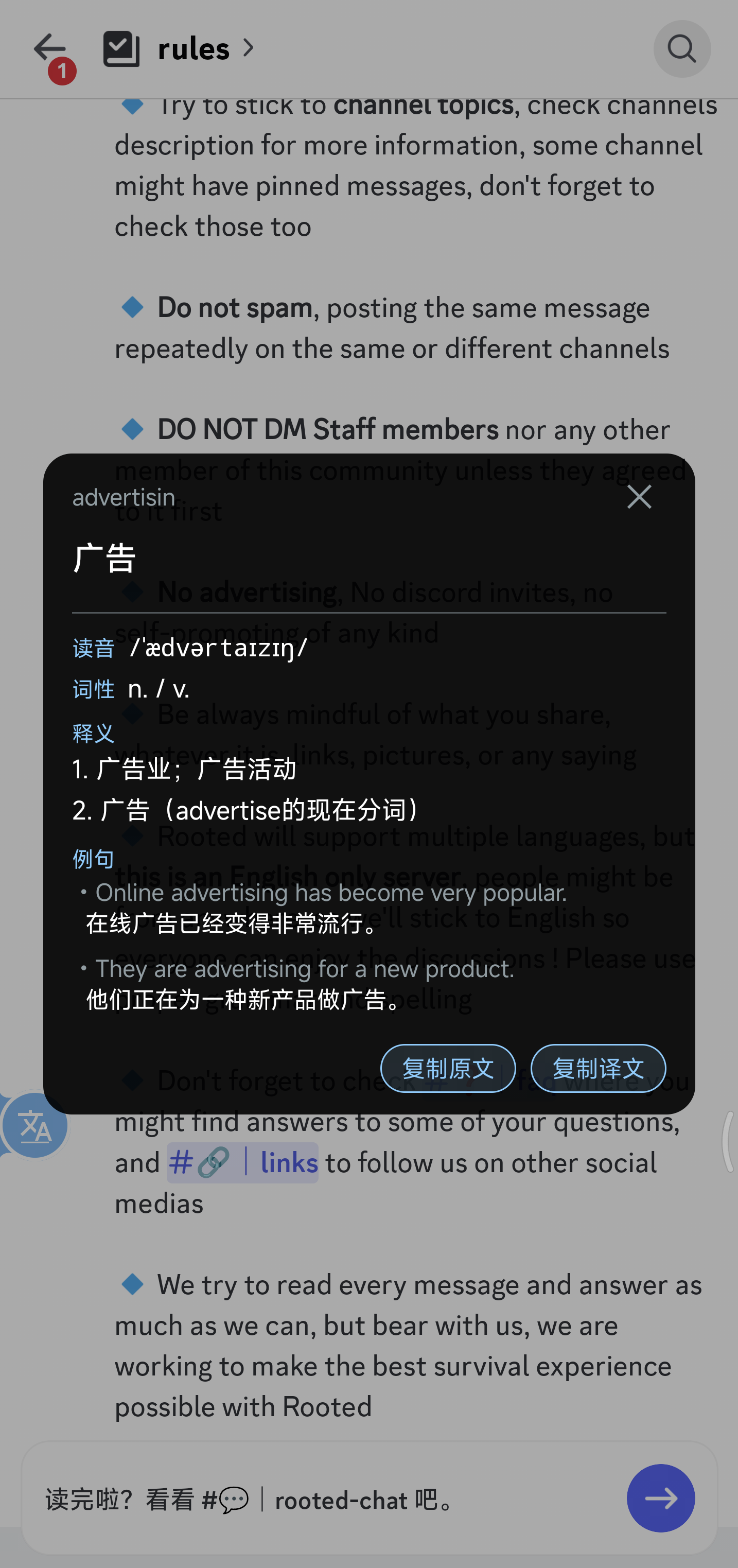
**Arc menu (long-press) & word-lookup card** — Left: the arc menu that fans out when you long-press the ball: loop / re-pick region / switch between "Translate full screen" and "Translate a word" / back to main app (the button order is freely reorderable in settings). Right: the card you get after circling a single word on screen — pronunciation, part of speech, multiple definitions and example sentences (the full dictionary requires an LLM-based engine).
| Arc menu on long-press | Word-lookup card (with mini dictionary) |
|---|---|
|
|
**Arc menu (long-press) & word-lookup card** — Left: the arc menu that fans out when you long-press the ball: loop / re-pick region / switch between "Translate full screen" and "Translate a word" / back to main app (the button order is freely reorderable in settings). Right: the card you get after circling a single word on screen — pronunciation, part of speech, multiple definitions and example sentences (the full dictionary requires an LLM-based engine).
| Arc menu on long-press | Word-lookup card (with mini dictionary) |
|---|---|
|  |
|  |
## 📦 Install
1. Grab the latest `ScreenTranslator-x.y.z.apk` from [Releases](../../releases)
2. Tap it on your Android device (first time you'll need to allow "Install unknown apps" in system settings)
3. Grant **Overlay** and **Notification** permissions on first launch
Only **`arm64-v8a` (64-bit ARM)** is published. armeabi-v7a / x86 are **not supported for now** — on-device OCR engines (PaddleOCR / ML Kit) ship large native libs, and 32-bit ARM lacks 64-bit NEON optimizations and has fewer registers, making inference noticeably slower and OCR wait times much longer. If you have a 32-bit device that needs this, please open an issue.
Each APK ships with a `.sha256` so you can verify integrity against `Get-FileHash` / `sha256sum`.
## 🚀 Usage
1. Open the app, tap **Start capture service**, accept the system "Start recording?" dialog
2. Switch to any game / VN / manga app
3. Tap the floating button → translation appears in ~2-3 s
4. Long-press the floating button → open the arc menu to toggle loop mode, re-pick the capture region, switch source/target language, switch presets, or toggle between full-screen and word-pick translation (loop can use a fixed interval or translate as soon as text stabilizes)
5. By default, tap a translation block to hide it or long-press to select and copy; Settings can instead make taps open the source / translation copy panel
Optional:
- Enable the accessibility service so **holding Vol+ and Vol- together for 300 ms** acts as a global trigger. The service does not inspect accessibility text or view trees from other apps; Screen Translator's own primary overlays expose TalkBack labels, state, and action hints.
- Install [Shizuku](https://github.com/RikkaApps/Shizuku) and grant permission; in settings, switch the capture path to Shizuku to skip the per-session system dialog. Capture prefers the raw-pixel path and falls back to PNG for compatibility.
- Pick a system preset at the top of settings, such as "Offline Japanese manga OCR → Simplified Chinese". If a required model is missing, the preset card lists it and offers a download action.
- For single-word lookup, switch the floating-ball action to **Word-pick mode** from the arc menu, then draw around the word / phrase. You can also select text in another app and invoke Screen Translator from the system selection menu.
## ⚙️ Configuration
Open the app and tap **Settings**. The top of the settings page lets you switch **App language** and **Theme**; any section is reachable through the search icon, matching both Chinese and English keywords.
### OCR engines
| Engine | Good for | Notes |
|---|---|---|
| **On-device** ML Kit (auto / latin / ja / zh / ko) | Default; Japanese / Chinese / Korean / Latin | Offline, on-device |
| **On-device** PaddleOCR PP-OCRv5 / v6 | Multilingual dense text, UI buttons, horizontal Chinese / English | Supports v5 mobile and v6 tiny / small / medium; models must be ready — see below |
| **On-device** manga OCR | Japanese manga, vertical bubbles, hand-drawn fonts | Uses manga-ocr ONNX and reuses DBNet detection; ~140 MB, downloadable or importable |
| **Local HTTP** Umi-OCR | You already run [Umi-OCR](https://github.com/hiroi-sora/Umi-OCR) on a PC / LAN server | Point the app at `http://:/api/ocr`; screenshots stay on your LAN |
| **Local HTTP** LunaTranslator | You already run [LunaTranslator](https://github.com/HIllya51/LunaTranslator) OCR on a PC / LAN server | Fill in the LunaTranslator OCR HTTP endpoint |
| **Cloud** PP-OCRv6 Online | Chinese, Japanese, and Latin-script languages | Uses the PaddleOCR AI Studio asynchronous `PP-OCRv6` jobs API; requires an AI Studio Access Token |
| **Cloud** Baidu OCR | Fallback when ML Kit / Paddle miss | Needs API Key + Secret, pay-per-call; 5 endpoints (basic / with-position / accurate / accurate-with-position / web-image); image size / aspect-ratio limits |
| **Cloud** Tencent OCR | Same | Needs SecretId + SecretKey; 3 endpoints: GeneralBasic / GeneralAccurate / **RecognizeAgent** (LLM agent, integrated with ParagNo paragraph grouping) |
| **Cloud** Youdao OCR | Simple one-tap | Needs App ID (API Key) + App Secret; `langType` auto-derived from source language, no separate picker |
**PaddleOCR models**: Settings → "Download PaddleOCR model" installs the selected model tier under `/models/paddle//`. PaddleOCR models do not ship inside the APK, so first use requires a download or local import; the default tier is v6 small, and you can switch between v5 mobile / v6 tiny / small / medium with HuggingFace, hf-mirror, or a custom mirror.
**PP-OCRv6 Online**: select "PP-OCRv6 Online" under OCR engines and enter an AI Studio Access Token. This cloud path encodes the screenshot as JPEG, submits a PaddleOCR AI Studio asynchronous `PP-OCRv6` job, and polls its result; it does not use the on-device model files described above.
- `det.onnx` (DBNet detector, size varies from several MB to tens of MB by tier)
- `rec.onnx` (CRNN recognizer, usually tens of MB depending on tier)
- `keys.txt` / `keys.yml` (dictionary, ~90-150 KB)
**Orientation models**: the ONNX orientation package classifies full-image 0/90/180/270 rotation and text-line 0/180 direction. Once installed, the app can route vertical screenshots before OCR and rerun upside-down horizontal text while mapping boxes back to the original image. The models are bundled; while they show as ready, download and local-import actions stay disabled. Delete the installed copy first if you need to replace it.
**Manga OCR models**: Settings → "Download manga OCR model" installs the encoder / decoder / vocab / config files required by `l0wgear/manga-ocr-2025-onnx`. The public source is mainly Hugging Face; when that is unreachable, use a proxy, custom mirror, or local import.
**Downloads and ready state**: PaddleOCR, manga OCR, orientation, and on-device LLM models use background download work. Downloads continue after leaving Settings, while the in-app state and system notification show the current model / file / batch / progress. You can cancel from Settings or the notification; interrupted work retries and resumes incomplete files. Once a complete model is marked ready, download and local-import actions are disabled; delete the installed model first if you need to replace it.
**Automatic orientation detection**: enabled by default. Automatic mode combines image orientation, OCR result shape, and language to pick a better OCR path; if it misclassifies a frame, lock the direction manually to horizontal, vertical right-to-left, or stacked vertical.
**DBNet advanced thresholds**: the OCR page exposes detection probability, box score, unclip ratio, manga-OCR unclip, and bubble-cluster gap. Most users should leave these alone; tune them only for missed tiny manga text, split vertical columns, or noisy boxes, then reset to defaults if needed.
**On-device CPU threads**: PaddleOCR, manga OCR, orientation models, and on-device LLMs no longer use a fixed 2–4 threads. They choose 1 / 2 / 4 / 6 inference threads from the processor count reported by Android, capped at 6. The count is selected when the model loads and does not continuously change during one translation.
**Baidu OCR caveats**: image limits are *longest side ≤ 4096 px, shortest side ≥ 15 px, aspect ratio 1:4–4:1, base64 < 4 MB*. The first two are handled automatically (downscale + JPEG quality fallback); aspect ratio out of range can only be fixed by shrinking the capture region.
### Translation engines
Choose by use case first; you do not need to read every setting before getting started:
| Engine | Best for | What you need | Before you use it |
|---|---|---|---|
| **Sakura (on-device)** | Japanese manga, visual novels, and galgames translated into Simplified Chinese | Download the ~1.26 GB model | Japanese → Simplified Chinese only; works offline but depends on phone performance |
| **Hy-MT2 (on-device)** | Multilingual offline translation | Download the ~1.13 GB model | Source and target follow your settings; low-memory devices may fail to load it |
| **OpenAI-compatible** | Existing DeepSeek, OpenAI, Zhipu, SiliconFlow, Ollama, or compatible services | Base URL, API key, and model name | Supports streaming and custom prompts; pricing and rate limits depend on the provider |
| **DeepL / DeepLX** | Conventional machine translation or an existing self-hosted DeepLX service | DeepL Auth Key or a DeepLX service URL | Official DeepL selects free / pro automatically; Test connection can show quota |
| **Youdao PicTrans** | Comics, full images, and screens with many text boxes | Youdao App ID + App Secret | Translates the screenshot directly and does not use the OCR engine selected above |
| **Google** | A quick trial without entering a key | Nothing | Uses an unofficial endpoint; usually needs a proxy in mainland China and may be rate-limited or stop working |
| **Volcengine** | Long loop-translation sessions | AK / SK with Machine Translation enabled | Keep the default region; this is an online service |
| **Baidu Translate** | General text translation | Baidu Translate APPID + secret | Separate product and account system from Baidu OCR |
| **Tencent Translate** | General translation or an existing Tencent OCR setup | Tencent SecretId + SecretKey | Reuses the same credentials as Tencent OCR |
Every online engine has a **Test connection** action. Use it before switching to your game.
|
## 📦 Install
1. Grab the latest `ScreenTranslator-x.y.z.apk` from [Releases](../../releases)
2. Tap it on your Android device (first time you'll need to allow "Install unknown apps" in system settings)
3. Grant **Overlay** and **Notification** permissions on first launch
Only **`arm64-v8a` (64-bit ARM)** is published. armeabi-v7a / x86 are **not supported for now** — on-device OCR engines (PaddleOCR / ML Kit) ship large native libs, and 32-bit ARM lacks 64-bit NEON optimizations and has fewer registers, making inference noticeably slower and OCR wait times much longer. If you have a 32-bit device that needs this, please open an issue.
Each APK ships with a `.sha256` so you can verify integrity against `Get-FileHash` / `sha256sum`.
## 🚀 Usage
1. Open the app, tap **Start capture service**, accept the system "Start recording?" dialog
2. Switch to any game / VN / manga app
3. Tap the floating button → translation appears in ~2-3 s
4. Long-press the floating button → open the arc menu to toggle loop mode, re-pick the capture region, switch source/target language, switch presets, or toggle between full-screen and word-pick translation (loop can use a fixed interval or translate as soon as text stabilizes)
5. By default, tap a translation block to hide it or long-press to select and copy; Settings can instead make taps open the source / translation copy panel
Optional:
- Enable the accessibility service so **holding Vol+ and Vol- together for 300 ms** acts as a global trigger. The service does not inspect accessibility text or view trees from other apps; Screen Translator's own primary overlays expose TalkBack labels, state, and action hints.
- Install [Shizuku](https://github.com/RikkaApps/Shizuku) and grant permission; in settings, switch the capture path to Shizuku to skip the per-session system dialog. Capture prefers the raw-pixel path and falls back to PNG for compatibility.
- Pick a system preset at the top of settings, such as "Offline Japanese manga OCR → Simplified Chinese". If a required model is missing, the preset card lists it and offers a download action.
- For single-word lookup, switch the floating-ball action to **Word-pick mode** from the arc menu, then draw around the word / phrase. You can also select text in another app and invoke Screen Translator from the system selection menu.
## ⚙️ Configuration
Open the app and tap **Settings**. The top of the settings page lets you switch **App language** and **Theme**; any section is reachable through the search icon, matching both Chinese and English keywords.
### OCR engines
| Engine | Good for | Notes |
|---|---|---|
| **On-device** ML Kit (auto / latin / ja / zh / ko) | Default; Japanese / Chinese / Korean / Latin | Offline, on-device |
| **On-device** PaddleOCR PP-OCRv5 / v6 | Multilingual dense text, UI buttons, horizontal Chinese / English | Supports v5 mobile and v6 tiny / small / medium; models must be ready — see below |
| **On-device** manga OCR | Japanese manga, vertical bubbles, hand-drawn fonts | Uses manga-ocr ONNX and reuses DBNet detection; ~140 MB, downloadable or importable |
| **Local HTTP** Umi-OCR | You already run [Umi-OCR](https://github.com/hiroi-sora/Umi-OCR) on a PC / LAN server | Point the app at `http://:/api/ocr`; screenshots stay on your LAN |
| **Local HTTP** LunaTranslator | You already run [LunaTranslator](https://github.com/HIllya51/LunaTranslator) OCR on a PC / LAN server | Fill in the LunaTranslator OCR HTTP endpoint |
| **Cloud** PP-OCRv6 Online | Chinese, Japanese, and Latin-script languages | Uses the PaddleOCR AI Studio asynchronous `PP-OCRv6` jobs API; requires an AI Studio Access Token |
| **Cloud** Baidu OCR | Fallback when ML Kit / Paddle miss | Needs API Key + Secret, pay-per-call; 5 endpoints (basic / with-position / accurate / accurate-with-position / web-image); image size / aspect-ratio limits |
| **Cloud** Tencent OCR | Same | Needs SecretId + SecretKey; 3 endpoints: GeneralBasic / GeneralAccurate / **RecognizeAgent** (LLM agent, integrated with ParagNo paragraph grouping) |
| **Cloud** Youdao OCR | Simple one-tap | Needs App ID (API Key) + App Secret; `langType` auto-derived from source language, no separate picker |
**PaddleOCR models**: Settings → "Download PaddleOCR model" installs the selected model tier under `/models/paddle//`. PaddleOCR models do not ship inside the APK, so first use requires a download or local import; the default tier is v6 small, and you can switch between v5 mobile / v6 tiny / small / medium with HuggingFace, hf-mirror, or a custom mirror.
**PP-OCRv6 Online**: select "PP-OCRv6 Online" under OCR engines and enter an AI Studio Access Token. This cloud path encodes the screenshot as JPEG, submits a PaddleOCR AI Studio asynchronous `PP-OCRv6` job, and polls its result; it does not use the on-device model files described above.
- `det.onnx` (DBNet detector, size varies from several MB to tens of MB by tier)
- `rec.onnx` (CRNN recognizer, usually tens of MB depending on tier)
- `keys.txt` / `keys.yml` (dictionary, ~90-150 KB)
**Orientation models**: the ONNX orientation package classifies full-image 0/90/180/270 rotation and text-line 0/180 direction. Once installed, the app can route vertical screenshots before OCR and rerun upside-down horizontal text while mapping boxes back to the original image. The models are bundled; while they show as ready, download and local-import actions stay disabled. Delete the installed copy first if you need to replace it.
**Manga OCR models**: Settings → "Download manga OCR model" installs the encoder / decoder / vocab / config files required by `l0wgear/manga-ocr-2025-onnx`. The public source is mainly Hugging Face; when that is unreachable, use a proxy, custom mirror, or local import.
**Downloads and ready state**: PaddleOCR, manga OCR, orientation, and on-device LLM models use background download work. Downloads continue after leaving Settings, while the in-app state and system notification show the current model / file / batch / progress. You can cancel from Settings or the notification; interrupted work retries and resumes incomplete files. Once a complete model is marked ready, download and local-import actions are disabled; delete the installed model first if you need to replace it.
**Automatic orientation detection**: enabled by default. Automatic mode combines image orientation, OCR result shape, and language to pick a better OCR path; if it misclassifies a frame, lock the direction manually to horizontal, vertical right-to-left, or stacked vertical.
**DBNet advanced thresholds**: the OCR page exposes detection probability, box score, unclip ratio, manga-OCR unclip, and bubble-cluster gap. Most users should leave these alone; tune them only for missed tiny manga text, split vertical columns, or noisy boxes, then reset to defaults if needed.
**On-device CPU threads**: PaddleOCR, manga OCR, orientation models, and on-device LLMs no longer use a fixed 2–4 threads. They choose 1 / 2 / 4 / 6 inference threads from the processor count reported by Android, capped at 6. The count is selected when the model loads and does not continuously change during one translation.
**Baidu OCR caveats**: image limits are *longest side ≤ 4096 px, shortest side ≥ 15 px, aspect ratio 1:4–4:1, base64 < 4 MB*. The first two are handled automatically (downscale + JPEG quality fallback); aspect ratio out of range can only be fixed by shrinking the capture region.
### Translation engines
Choose by use case first; you do not need to read every setting before getting started:
| Engine | Best for | What you need | Before you use it |
|---|---|---|---|
| **Sakura (on-device)** | Japanese manga, visual novels, and galgames translated into Simplified Chinese | Download the ~1.26 GB model | Japanese → Simplified Chinese only; works offline but depends on phone performance |
| **Hy-MT2 (on-device)** | Multilingual offline translation | Download the ~1.13 GB model | Source and target follow your settings; low-memory devices may fail to load it |
| **OpenAI-compatible** | Existing DeepSeek, OpenAI, Zhipu, SiliconFlow, Ollama, or compatible services | Base URL, API key, and model name | Supports streaming and custom prompts; pricing and rate limits depend on the provider |
| **DeepL / DeepLX** | Conventional machine translation or an existing self-hosted DeepLX service | DeepL Auth Key or a DeepLX service URL | Official DeepL selects free / pro automatically; Test connection can show quota |
| **Youdao PicTrans** | Comics, full images, and screens with many text boxes | Youdao App ID + App Secret | Translates the screenshot directly and does not use the OCR engine selected above |
| **Google** | A quick trial without entering a key | Nothing | Uses an unofficial endpoint; usually needs a proxy in mainland China and may be rate-limited or stop working |
| **Volcengine** | Long loop-translation sessions | AK / SK with Machine Translation enabled | Keep the default region; this is an online service |
| **Baidu Translate** | General text translation | Baidu Translate APPID + secret | Separate product and account system from Baidu OCR |
| **Tencent Translate** | General translation or an existing Tencent OCR setup | Tencent SecretId + SecretKey | Reuses the same credentials as Tencent OCR |
Every online engine has a **Test connection** action. Use it before switching to your game.
How do I fill in an OpenAI-compatible service?
- **Base URL**: use the provider's OpenAI-compatible endpoint, usually ending in `/v1/`
- **API key**: use the key issued by the provider; it may be left blank for a self-hosted service without authentication
- **Model name**: copy the exact name from the provider console or your self-hosted service instead of guessing from an example
- **Prompt template**: the default is written for conversational game translation. You may customize it; untouched prompts follow the UI language, while edited prompts are never overwritten automatically
On-device model downloads and performance
- Hugging Face, hf-mirror, custom mirrors, and local GGUF import are supported; background downloads provide notification progress, cancellation, retry, and resume
- Large downloads warn before starting on cellular or an unknown network type
- Sakura / Hy-MT2 select CPU inference threads from available cores, capped at 6; the production path currently uses the CPU
- Sakura Vulkan remains a default-off experimental path; on-device LLMs are offered only on supported 64-bit devices and OS versions
### Terminology and app context
- **Terminology library**: store a source term, preferred translation, language pair, category, case rule, and enabled state, scoped globally or to one app; filters cover source, translation, app, and category
- **Foreground app detection**: choose Auto, Accessibility, Usage access, or Global only. Package names are used only for on-device terminology matching and are never sent to translation services; "Send app name to the model" is a separate opt-in
- **Supported engines**: app names and terminology context currently apply only to OpenAI-compatible and on-device LLM translation; plain machine-translation engines keep their existing request format
### Loop translation
- **Trigger mode**: Fixed interval runs at the configured millisecond interval; "Wait for text completion" resets its timer while dialogue is still typing and translates as soon as text stabilizes
- **Animated backgrounds**: on-device OCR can verify that text remains unchanged even while the frame animates; cloud OCR uses frame stability only, avoiding extra paid verification requests
- **Dialogue region**: choose Auto, Lower screen first, or Anywhere, then decide whether to translate only that region or use it for stability while translating all text recognized in the first frame
- **Duplicate skipping**: exact frame matches skip both OCR and translation; similar frames still verify whether OCR text changed, with an adjustable sensitivity threshold
### Display
- **Render mode**: BLOCKS (per OCR box, glued to source) / **Floating window** (a draggable, resizable overlay — see the [screenshots section](#-screenshots))
- **Placement** (BLOCKS only): below / overlap / above + pixel-level x/y offset
- **Translation layout**: "Follow recognized text layout" is enabled by default, so horizontal / vertical layout and reading order jointly drive OCR-block sorting and translated-text rendering; turn it off to explicitly choose horizontal / vertical and LTR / RTL, including vertical manga and horizontal RTL
- **Block interaction**: the default is tap-to-close plus long-press range selection; an alternate mode makes taps open a panel where you can select or copy the full source / translation
- **Floating window**: switch between "source + translation" and "translation only" content modes; **lock** the window to disable dragging and resizing during gameplay; a "Reset position / size" button restores defaults in one tap
- **Theme**: 5 presets + a visual custom color picker for independent background / text / border color and opacity; borders support solid / dashed / dotted / double / groove styles
- **Text style**: bold / italic / underline, letter spacing, line spacing, left / center / right alignment, outline width and color, plus shadow radius / offset / color
- **Font**: import `.ttf` files for the translation layer and preview only; imported fonts are kept as horizontally selectable chips, and reselecting an existing font does not reorder them
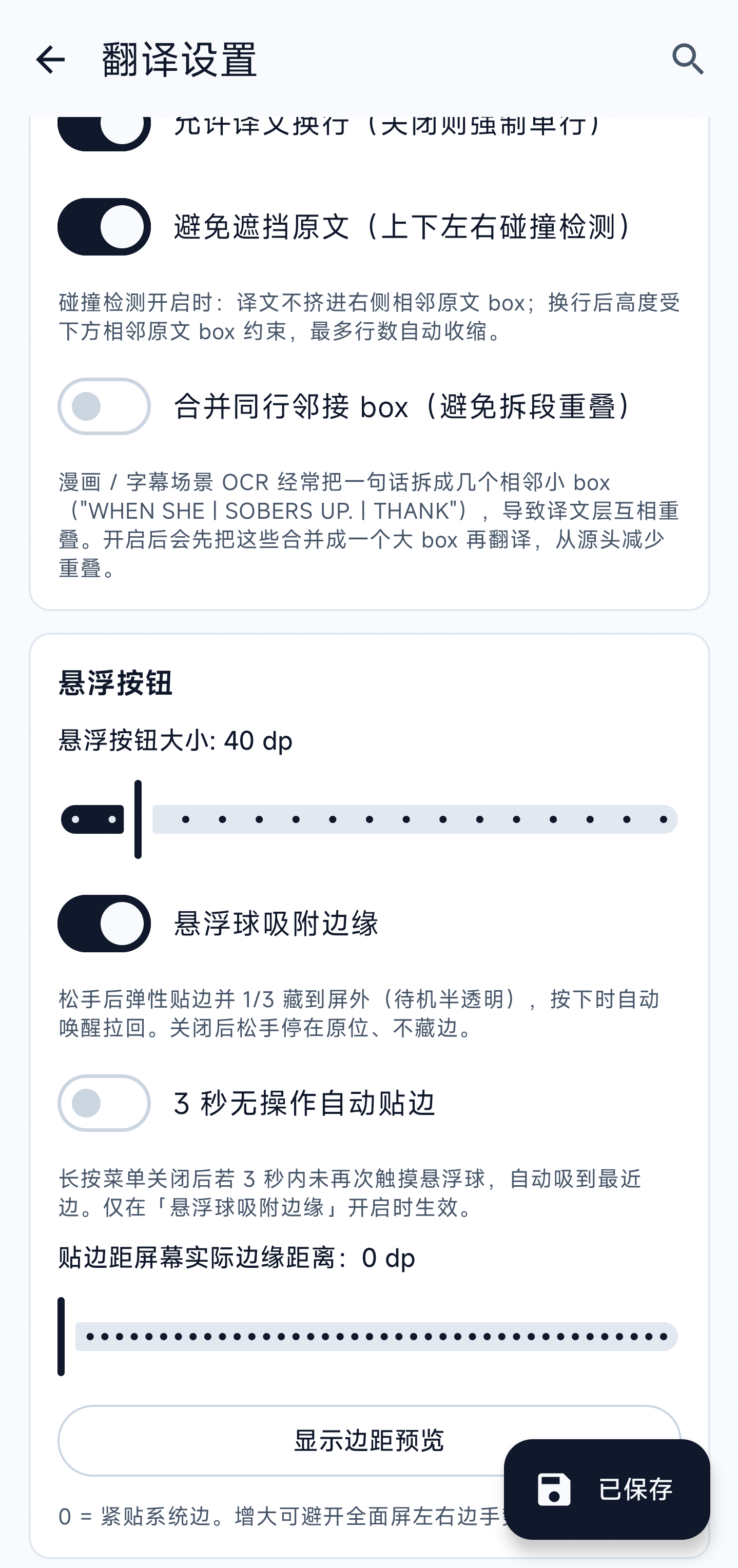
- **Avoidance & merge**: collision detection clamps translation width so it doesn't bleed into neighbouring OCR boxes; OCR-side box merging offers **Conservative / Standard / Aggressive** strengths — Conservative suits VNs / dense passages, Standard fits most scenes, Aggressive suits comic bubbles split into many columns (may occasionally merge adjacent bubbles)
### Presets and Arc Menu
- **System presets**: built-in bundles for "offline Japanese manga OCR → Simplified Chinese". A preset includes OCR, translator, language pair, display style, and tuning thresholds. Missing required models are shown item by item before the preset can be applied.
- **Custom presets**: save the current settings as a preset. A preset only shows as applied when all key settings still match; changing any key field returns the card to the unsaved state.
- **Arc-menu buttons**: drag to reorder and choose 2-6 visible buttons per page. If there are more actions, the last slot becomes "Next page". Actions can include loop, capture region, word/full-screen mode switch, language quick switch, preset quick switch, settings, and back to main app.
### Backup and migration
- **Complete settings bundle**: `.otsettings` exports all non-credential settings, custom presets, terminology entries, and imported `.ttf` fonts for device migration or configuration sharing
- **Secrets stay on-device**: API keys, tokens, secrets, access IDs, and app IDs are excluded; importing preserves credentials already stored on the destination device
- **Legacy preset support**: older `.otpresets` files remain importable; the new bundle validates imported data and de-duplicates preset names
- **Model choices, not binaries**: selected models, mirrors, and tuning values are exported, but multi-gigabyte model files are not; download or locally import them on the destination device
### Accessibility and diagnostics
- **TalkBack**: primary overlay entry points expose readable labels, toggle state, and double-tap / long-press actions; region selection announces state and dimensions, while complex menus are read row by row
- **Word card**: the top close bar and bottom copy bar stay fixed while the body scrolls; landscape sizing subtracts system bars and cutout insets so actions are not clipped
- **Crash logs**: in addition to Java exceptions, Android 11+ imports system-reported native crashes, ANRs, low-memory exits, and signal exits; settings snapshots are sanitized and system traces are read with a size limit
## ⚠️ Known limitations
- Android 14+ shows a system permission dialog on every fresh capture session — that's by design. The Shizuku path avoids it.
- Some ROMs (Xiaomi / OPPO / VIVO) kill background services or block overlays by default. You need to whitelist battery + allow background start manually. The app provides in-product shortcuts.
- Anti-cheat networked games may flag MediaProjection as a screen-recorder cheat — this project is for single-player / VN / manga only.
- Screens marked `FLAG_SECURE` (some banking / video apps) capture as black; this project does not bypass it.
- PaddleOCR on-device inference takes 1–3 s per shot on entry-level devices (Snapdragon 7-series or lower). Use region selection alongside.
- On-device LLM models are roughly 1 GB or larger, so first download should use Wi-Fi; low-memory devices may fail to load them reliably.
- Production on-device OCR and LLM inference is currently CPU-first and does not yet use Qualcomm QNN / NPU. Sakura's Vulkan path remains an experimental, default-off option and is not guaranteed to work or run faster on every device.
- The public manga-OCR source is mainly Hugging Face. If it is unreachable from your network, use a proxy, custom mirror, or local import.
- TalkBack covers the primary overlay workflow, but full-screen OCR text is not yet exposed as individually navigable system accessibility nodes.
## 🗺️ Roadmap
### ✅ Available now
| Feature | What users can do |
|---|---|
| **Floating translation** | Tap the floating ball over a game, manga, or visual novel and show translations beside the source or in a separate floating window |
| **Automatic loop** | Translate at a fixed interval or wait for dialogue to finish typing; skip unchanged screens and optionally prioritize lower-screen dialogue boxes |
| **Multiple OCR choices** | Use on-device ML Kit / PaddleOCR / manga OCR, connect to OCR on your LAN, or use Baidu, Tencent, Youdao, and PP-OCRv6 Online |
| **Horizontal and vertical text** | Detect rotated, horizontal, and vertical manga text; follow the recognized layout or manually choose layout and reading direction |
| **Multiple translators** | Use OpenAI-compatible services, DeepL, Google, Volcengine, Baidu, Tencent, Youdao PicTrans, or offline Sakura / Hy-MT2 models |
| **Copy translations** | Long-press to select a range, or tap a block to open a panel and copy part of the text, the full source, or the full translation |
| **Word lookup** | Select a word or phrase for a translation; LLM engines can also return pronunciation, part of speech, definitions, examples, and usage notes |
| **Consistent names and terms** | Save global or per-game names, places, and terminology so wording stays consistent across scenes |
| **Model downloads** | Download on-device models in the background, view progress in the app and notification, cancel, retry, or resume interrupted files |
| **Customization and migration** | Adjust colors, fonts, size, outline, and shadow; export settings, presets, terminology, and fonts for another device |
| **Assistive features** | Trigger with both volume keys, use TalkBack action hints, export crash logs, and open background-running guides for aggressive Android ROMs |
### 📋 Next directions
These are user-facing improvements we want to continue working on, not a fixed release order:
| Direction | Intended experience |
|---|---|
| **Translation speech (TTS)** | Play a translation directly from each block with clear play / stop state |
| **Translation history** | Revisit previously translated screens and dialogue instead of losing the last line after switching scenes |
| **Automatic scene styling** | Pick more suitable translation colors, background, and text size from the screenshot with less manual tuning |
| **Offline dictionary** | Show basic definitions and examples without a network connection or an LLM translator |
| **Faster on-device translation** | Reduce offline OCR / translation wait time, heat, and battery use during long sessions |
| **Deeper accessibility** | Make full-screen OCR text and dynamic translations individually navigable with a screen reader |
## 🤝 Contributing
Contributions of any kind — bug fixes, features, UI polish, translations, doc tweaks — are welcome.
### Branch & PR rules
> ⚠️ **Do not open PRs against `main`.**
>
> `main` is the stable trunk that drives releases; **only maintainer-reviewed merges land there**.
>
> External contributors:
1. **Open an issue first** to discuss direction — avoid wasted work / scope mismatches
2. **Fork** the repo, branch off the latest `main`:
```bash
git checkout -b feat/your-idea origin/main
```
3. **Develop and test locally** (at least `./gradlew installDebug` on a real device)
4. **Open the PR against `dev`** (if `dev` doesn't exist yet, ping the maintainer in the issue to create it). The maintainer aggregates multiple PRs on `dev`, retests, then merges into `main`
5. **Direct push / force-push to `main` is forbidden** (enforced by branch protection)
### Build locally
```bash
git clone https://github.com/ciddwd/overlay-translator.git
cd overlay-translator
cp local.properties.example local.properties
# Edit local.properties and point sdk.dir at your local Android SDK
./gradlew installDebug # installs onto the connected device
```
Requires JDK 17 + Android SDK 35. Opening the project in Android Studio auto-syncs and fills in the Gradle wrapper jar; on a bare CLI environment, run `gradle wrapper --gradle-version 8.10.2` first.
### Translation contributions
To add a new language or fix an existing one:
1. Copy `app/src/main/res/values/strings.xml` to `app/src/main/res/values-/strings.xml` (e.g. `values-zh-rTW`, `values-ja`)
2. Translate the **values** inside `` tags only. **Keep** the `name="..."` key and placeholders (`{source}`, `{target}`, `%1$s`, `\n`, etc.)
3. Add `` to `app/src/main/res/xml/locales_config.xml`
4. Append a row to `APP_LANGUAGE_OPTIONS` in `app/src/main/java/com/gameocr/app/ui/SettingsScreen.kt`
5. In the PR description, attach coverage (X / Y strings translated) and screenshots of the localized settings page
We may migrate to [Weblate](https://weblate.org/) when there are 10+ languages.
### Commit messages
Use a simplified [Conventional Commits](https://www.conventionalcommits.org/):
```
feat: new feature
fix: bug fix
docs: documentation
refactor: refactor (no behaviour change)
chore: build / CI / tooling
i18n: translations
```
Write the subject in either English or Chinese — **don't mix in one line**. Keep the first line ≤ 72 chars.
### Code of conduct
- Be civil, stay on topic
- No off-topic content, ads, or politics
- Maintainers reserve the right to close issues / PRs that don't match the project direction, with a brief reason
## 🙏 Acknowledgements
### Upstream
- [PaddleOCR](https://github.com/PaddlePaddle/PaddleOCR) · PP-OCRv5 mobile model
- [bukuroo/PPOCRv5-ONNX](https://huggingface.co/bukuroo/PPOCRv5-ONNX) · ONNX-converted v5 mobile mirror
- [l0wgear/manga-ocr-2025-onnx](https://huggingface.co/l0wgear/manga-ocr-2025-onnx) · manga-ocr ONNX model
- [kha-white/manga-ocr](https://github.com/kha-white/manga-ocr) · original manga-ocr project
- [ggml-org/llama.cpp](https://github.com/ggml-org/llama.cpp) · GGUF / on-device LLM inference
- [SakuraLLM/SakuraLLM](https://github.com/SakuraLLM/SakuraLLM) · Sakura Japanese-to-Chinese translation model
- [Tencent-Hunyuan/HY-MT](https://github.com/Tencent-Hunyuan/HY-MT) · Hy-MT translation model
- [Shizuku](https://github.com/RikkaApps/Shizuku) · privileged channel without ROOT
- [ML Kit](https://developers.google.com/ml-kit) · Google's on-device OCR
- [ONNX Runtime](https://onnxruntime.ai/) · on-device inference engine
- [Jetpack Compose](https://developer.android.com/jetpack/compose) / [Material 3](https://m3.material.io/) · UI stack
- [Hilt](https://dagger.dev/hilt/) · dependency injection
- [Retrofit](https://square.github.io/retrofit/) + [OkHttp](https://square.github.io/okhttp/) · networking
- [kotlinx.serialization](https://github.com/Kotlin/kotlinx.serialization) · JSON
- [Timber](https://github.com/JakeWharton/timber) · logging
### Contributors
 (Will appear automatically after the first PR is merged.)
### Inspiration
PC tools in the VNR / Visual Novel Reader family have served galgame / VN players for years. This project carries that pipeline to Android, redesigned for the phone (battery, ROM constraints, touch UI).
## 📄 License
Code is licensed under [Apache-2.0](LICENSE). Models and third-party dependencies retain their own licenses.
(Will appear automatically after the first PR is merged.)
### Inspiration
PC tools in the VNR / Visual Novel Reader family have served galgame / VN players for years. This project carries that pipeline to Android, redesigned for the phone (battery, ROM constraints, touch UI).
## 📄 License
Code is licensed under [Apache-2.0](LICENSE). Models and third-party dependencies retain their own licenses.