# DSH Tauri Launcher
**[简体中文](./README.md)**
[![Platform - Windows](https://img.shields.io/badge/platform-Windows-0078d4?logo=windows&logoColor=white)](#platform-support) [![License](https://img.shields.io/badge/license-MIT-green)](LICENSE) Following DeepSeek Harness's "everything-is-a-plugin" architecture, this project abstracts desktop launch, exit confirmation, and desktop-shortcut management into a standard Web plugin. From **Settings → Desktop Launcher** you can bring up the Tauri desktop app in one click — enjoying both the deep integration of the plugin ecosystem and a native desktop experience. The repository also ships the full Tauri desktop-app source plus a GitHub Release automation pipeline. ## Platform Support | Platform | Status | | -------- | ------------------------------------- | | Windows | ✅ Supported (incl. `.lnk` shortcut) | | Linux | 🚧 Planned | | macOS | 🚧 Planned | The Web plugin core (host/client JS) is cross-platform; the Windows-specific pieces are the desktop-shortcut creation and the loopback process-control implementation. Linux and macOS support are on the roadmap — feel free to open an issue with your use case. ## Features - **Desktop launch toggle**: one-click start/stop of the desktop app, with instant status feedback; - **Shortcut integration**: auto-create a desktop shortcut on enable, auto-remove on disable; manual re-create is available while running; - **Shutdown confirmation dialog**: confirmation popup before exit (with a notice that the shortcut will be removed); - **Live status indicator**: running 🟢 / stopped ⚪ / unknown 🟡, plus diagnostic info on errors; - **Dark-mode aware**: all colors flow through DSH theme tokens and adapt to light/dark automatically; - **Custom settings icon**: replaces the default gear with a vector monitor icon (sharp at any size). ## Screenshots
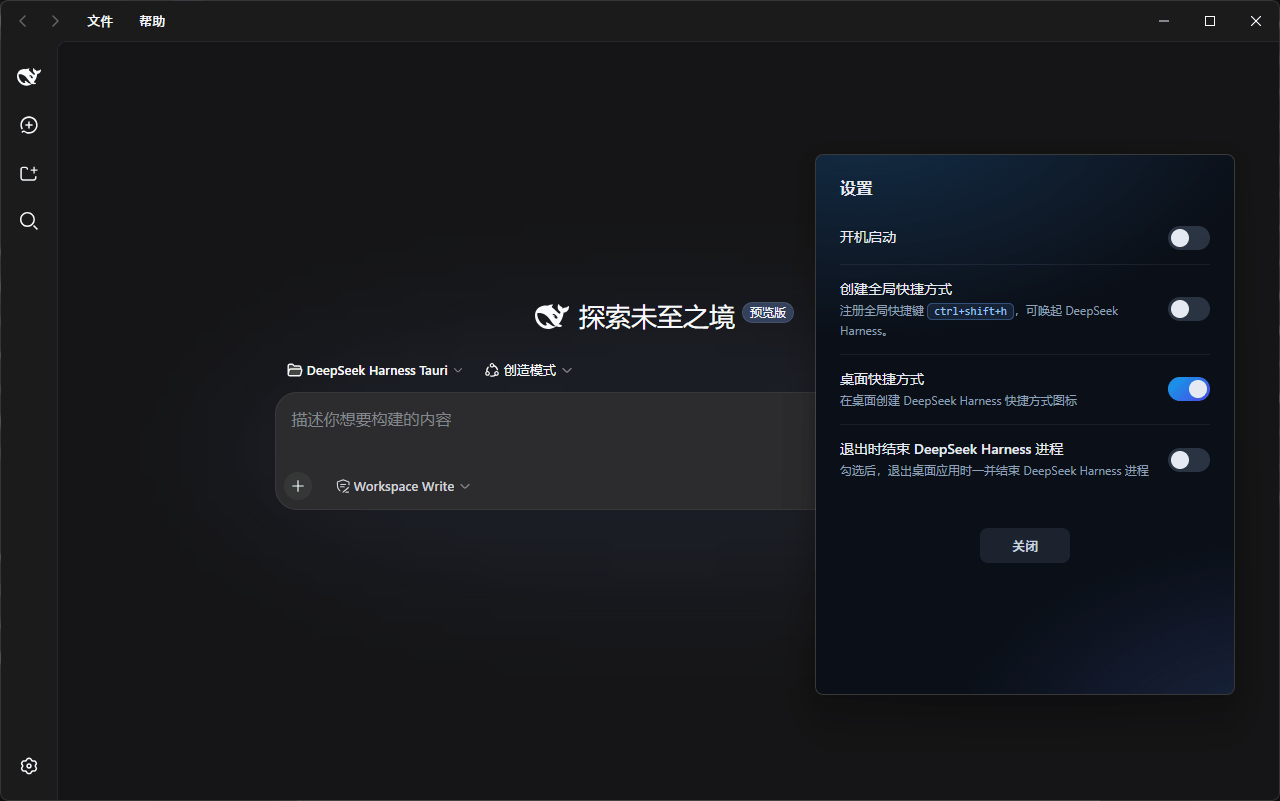
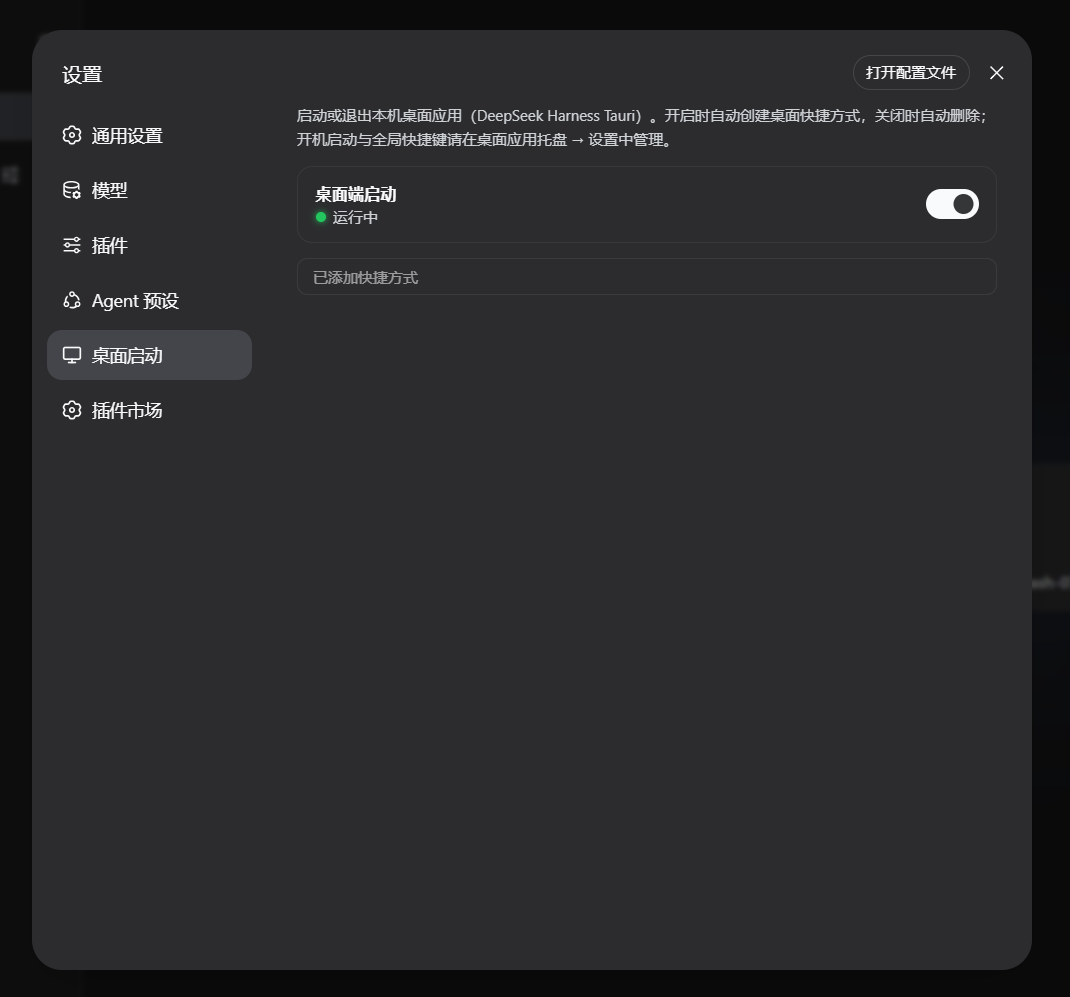
**Web settings panel (plugin section)** ![Desktop Launcher section in Harness settings](docs/screenshots/harness-settings.png) After install, DSH Settings → Desktop Launcher shows the launch toggle, runtime status, and shortcut-link indicator. **Desktop-app settings panel** ![Tauri desktop-app settings](docs/screenshots/launcher-settings.png) The Tauri desktop app's own settings: login autostart, global hotkey, desktop shortcut, and exit policy.
## How It Works (Summary) The Web plugin's host half talks to the browser half over `/api/dsh-tauri-launcher/*` loopback routes, and controls the desktop app via a sentinel-file protocol (see [docs/architecture.md](docs/architecture.md)): - `.dsh-heartbeat`: the desktop app writes a timestamp every second; the plugin uses it to detect liveness; - `.dsh-quit`: writing `1` makes the desktop app exit **only itself** (the Harness host process keeps running); the sentinel is self-deleting on consumption. ## Directory Layout ``` dsh-tauri-launcher/ ├── README.md # Chinese README ├── README.en.md # English README ├── package.json # dsh.bundle + dsh.client dual manifest ├── cordis.patch.yml # composition patch (inserts the plugin row) ├── lib/ │ ├── index.js # host half: loopback routes + control logic (configurable) │ └── client.js # browser half: settings section UI ├── launcher/ # Tauri desktop-app project (source + one-shot build; Windows only for now) ├── .github/workflows/ # CI: tag-driven Windows exe build + Release publish └── docs/ # architecture & release docs (Chinese) └── screenshots/ # screenshots referenced by the READMEs ``` ## Install (Web Plugin) > **About ``**: it refers to a DSH **profile** — a launchable plugin composition, > located at `$DSH_HOME/profiles//`. `` is a placeholder; **replace it with > the actual profile name you want to install into**. On most local setups the relevant > profile is `web` (the profile that starts the DSH Web GUI). List existing profiles: > `dir %USERPROFILE%\.dsh\profiles` (or `ls ~/.dsh/profiles`). > In the commands below, swap `` for `web` — e.g. `dsh plugin --profile web add ...`. Pick one of the three installation methods: ```bash # 1) npm (after publish) dsh plugin --profile web add @lenorin/dsh-tauri-launcher # 2) GitHub (git install; pure JS, zero build, no allowBuilds grant required) dsh plugin --profile web add github:cilis/dsh-tauri-launcher # 3) Local checkout / tarball dsh plugin --profile web add ./dsh-tauri-launcher dsh plugin --profile web add ./dsh-tauri-launcher-1.0.3.tgz ``` > If you have multiple profiles, replace `web` in the commands with the target profile name. Verify the plugin layer is active (you should see the `dsh-tauri-launcher` row): ```bash dsh --profile web --dump-config ``` Restart the DSH Web process and the "Desktop Launcher" section appears under Settings. Uninstall (replace `web` with your profile name): ```bash dsh plugin --profile web remove @lenorin/dsh-tauri-launcher ``` ## Configuration The plugin row supports the following configuration keys (no hard-coded tunables; defaults fit common deployments): ```yaml - id: desktop-launcher name: '@lenorin/dsh-tauri-launcher' config: launcherExe: '' # absolute path to the desktop-app exe; empty = auto-detect launcherDirs: [] # candidate exe directories; empty = built-in defaults freshSecs: 4 # heartbeat "freshness window" in seconds (must be > write interval) shortcutName: 'DeepSeek Harness.lnk' # desktop-shortcut file name ``` ## Desktop App Build & Release - The npm package ships a pre-built exe (`launcher/bin/dsh-launcher.exe`); the plugin auto-detects it on install — ready to use out of the box; - Local build: `pwsh -File launcher/build.ps1` (optional `-Offline -CargoHome `); - ⚠️ Maintenance rule: **after editing Rust sources under `launcher/src-tauri`, you must rebuild and re-sync `launcher/bin/dsh-launcher.exe`** (see [docs/release.md](docs/release.md)), or the shipped exe will drift from the sources; keep the version in `package.json` / `Cargo.toml` / `tauri.conf.json` in sync. - GitHub Release: push a `v*` tag; CI auto-builds the Windows exe and publishes it (Linux/macOS builds are not enabled yet — see [docs/release.md](docs/release.md)). ## Documentation - [docs/architecture.md](docs/architecture.md) — architecture & sentinel-file protocol (Chinese) - [docs/release.md](docs/release.md) — install, build, release, uninstall & configuration reference (Chinese) ## License [MIT](LICENSE)