OrcaQ - Next Generation database editor.
[](LICENSE)
[](https://www.npmjs.com/package/orcaq)
[](https://www.npmjs.com/package/orcaq)
[](https://github.com/cin12211/orca-q/stargazers)
[](https://github.com/cin12211/orca-q/issues)
[](https://github.com/cin12211/orca-q/pulls)
## Overview
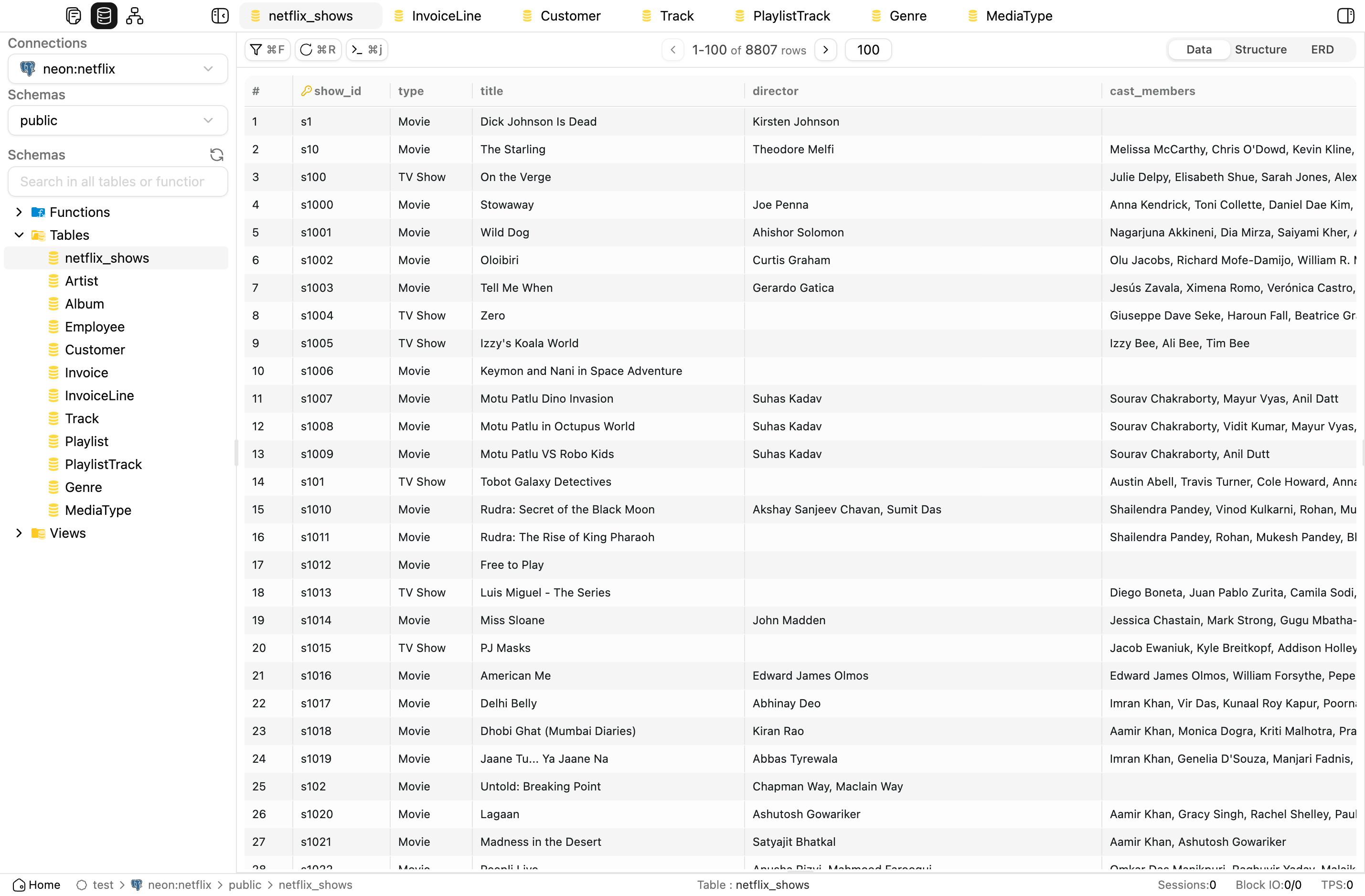
**OrcaQ** is a modern database editor for managing, querying, and exploring PostgreSQL, MySQL, MariaDB, Oracle, local and managed SQLite, and Redis data in a fast, intuitive, and secure way.
 ## Installation
####
## Installation
####  Desktop App
The recommended to experience the full capabilities
Download the latest build from [GitHub Releases](https://github.com/cin12211/orca-q/releases/latest).
**Available for:** `macOS` (`.dmg`, `.zip`) · `Linux` (`.AppImage`, `.deb`) · `Windows` comming soon.
####
Desktop App
The recommended to experience the full capabilities
Download the latest build from [GitHub Releases](https://github.com/cin12211/orca-q/releases/latest).
**Available for:** `macOS` (`.dmg`, `.zip`) · `Linux` (`.AppImage`, `.deb`) · `Windows` comming soon.
####  NPX
Best for a quick local run without cloning the repo.
```sh
npx orcaq
```
Requires `Node.js >= 18`. OrcaQ starts on [http://localhost:9432](http://localhost:9432).
> `npx` does not support SQLite file connections. Use the desktop app for that workflow.
####
NPX
Best for a quick local run without cloning the repo.
```sh
npx orcaq
```
Requires `Node.js >= 18`. OrcaQ starts on [http://localhost:9432](http://localhost:9432).
> `npx` does not support SQLite file connections. Use the desktop app for that workflow.
####  Local Development
Best for contributing or running the source locally.
```sh
git clone https://github.com/cin12211/orca-q.git
cd orcaq
bun install
npm run nuxt:dev
```
####
Local Development
Best for contributing or running the source locally.
```sh
git clone https://github.com/cin12211/orca-q.git
cd orcaq
bun install
npm run nuxt:dev
```
####  Docker
Best for a clean local deployment without installing Node.js tooling.
```sh
docker run -d \
--name orcaq \
--restart unless-stopped \
-p 9432:9432 \
cinny09/orcaq:latest
```
Open [http://localhost:9432](http://localhost:9432).
##
Docker
Best for a clean local deployment without installing Node.js tooling.
```sh
docker run -d \
--name orcaq \
--restart unless-stopped \
-p 9432:9432 \
cinny09/orcaq:latest
```
Open [http://localhost:9432](http://localhost:9432).
##  Supported Databases
| Database | Connection Methods | Core Workflows | Notes |
| ---------- | ------------------- | --------------------------------------------------------------- | ----------------------------------------------------------------- |
|
Supported Databases
| Database | Connection Methods | Core Workflows | Notes |
| ---------- | ------------------- | --------------------------------------------------------------- | ----------------------------------------------------------------- |
|  PostgreSQL | String, form | Connection test, raw query, schema browse, advanced admin tools | Broadest feature coverage |
|
PostgreSQL | String, form | Connection test, raw query, schema browse, advanced admin tools | Broadest feature coverage |
|  MySQL | String, form | Connection test, raw query, minimum metadata and table browsing | Advanced roles, metrics, and instance insights remain unsupported |
|
MySQL | String, form | Connection test, raw query, minimum metadata and table browsing | Advanced roles, metrics, and instance insights remain unsupported |
|  MariaDB | String, form | Connection test, raw query, minimum metadata and table browsing | Uses a distinct persisted `mariadb` type |
|
MariaDB | String, form | Connection test, raw query, minimum metadata and table browsing | Uses a distinct persisted `mariadb` type |
|  Oracle | String, form | Connection test, raw query, minimum metadata and table browsing | Structured form uses `serviceName` |
|
Oracle | String, form | Connection test, raw query, minimum metadata and table browsing | Structured form uses `serviceName` |
|  SQLite | File (desktop only), managed | Connection test, raw query, metadata and table browsing | Local files stay desktop-only; Cloudflare D1 and Turso reuse the SQL family path |
| Redis | String, form | Connection test, key browser, type-aware value inspection, workbench, analysis | SQL-only panels stay hidden for Redis sessions |
Advanced database-administration features are still intentionally PostgreSQL-first unless a database-specific adapter exists.
## Features
###
SQLite | File (desktop only), managed | Connection test, raw query, metadata and table browsing | Local files stay desktop-only; Cloudflare D1 and Turso reuse the SQL family path |
| Redis | String, form | Connection test, key browser, type-aware value inspection, workbench, analysis | SQL-only panels stay hidden for Redis sessions |
Advanced database-administration features are still intentionally PostgreSQL-first unless a database-specific adapter exists.
## Features
###  Workspace & Connection Management
- **Workspaces**: Organize related database connections into named workspaces with custom icons, descriptions, and last-opened tracking.
- **Connections**: Create and manage PostgreSQL, MySQL, MariaDB, Oracle, and SQLite connections using form fields, connection strings, or desktop file-based SQLite setup.
- **Security options**: Configure SSH tunnels, SSL modes, connection health checks, and environment tags with strict-mode confirmations for sensitive databases.
###
Workspace & Connection Management
- **Workspaces**: Organize related database connections into named workspaces with custom icons, descriptions, and last-opened tracking.
- **Connections**: Create and manage PostgreSQL, MySQL, MariaDB, Oracle, and SQLite connections using form fields, connection strings, or desktop file-based SQLite setup.
- **Security options**: Configure SSH tunnels, SSL modes, connection health checks, and environment tags with strict-mode confirmations for sensitive databases.
###  Exploration & Querying
- **Schema Explorer**: Browse schemas, tables, views, functions, and sequences from a searchable sidebar with context actions like quick query, rename, DDL preview, and ERD open.
- **File Explorer**: Manage SQL files and folders in a tree view with nested folders, rename/delete actions, search, and drag-and-drop organization.
- **Quick Query**: Explore table data in a grid with pagination, sorting, filters, inline editing, bulk actions, related-table previews, query logs, and metadata tabs.
- **Raw SQL Editor**: Write and run multi-statement SQL with CodeMirror, autocomplete, formatting, variables, EXPLAIN analysis, result tabs, and persisted query files.
- **Redis Workspace**: Browse keys, inspect string/hash/list/set/zset values, run commands in a workbench, and surface read-only or ACL-limited states clearly.
###
Exploration & Querying
- **Schema Explorer**: Browse schemas, tables, views, functions, and sequences from a searchable sidebar with context actions like quick query, rename, DDL preview, and ERD open.
- **File Explorer**: Manage SQL files and folders in a tree view with nested folders, rename/delete actions, search, and drag-and-drop organization.
- **Quick Query**: Explore table data in a grid with pagination, sorting, filters, inline editing, bulk actions, related-table previews, query logs, and metadata tabs.
- **Raw SQL Editor**: Write and run multi-statement SQL with CodeMirror, autocomplete, formatting, variables, EXPLAIN analysis, result tabs, and persisted query files.
- **Redis Workspace**: Browse keys, inspect string/hash/list/set/zset values, run commands in a workbench, and surface read-only or ACL-limited states clearly.
###  Database Tools
- **ERD Diagram**: Visualize a single table or a full schema as an interactive relationship diagram with zoom, pan, searchable table navigation, and FK edges.
- **Roles & Permissions**: Manage database roles, inheritance, grants, revokes, and bulk permission updates from a visual interface.
- **Instance Insights**: Monitor PostgreSQL activity, sessions, locks, replication, and configuration from a built-in database health dashboard.
- **Schema Diff**: Compare two schemas across connections and generate migration SQL with a safe mode that reduces destructive output.
- **Backup & Restore**: Run native export/import workflows with format options, scope selection, compression, and job progress tracking.
- **Family-aware shell**: Activity bar items, primary sidebar panels, tabs, and route fallbacks adapt to SQL and Redis families instead of assuming a relational session.
###
Database Tools
- **ERD Diagram**: Visualize a single table or a full schema as an interactive relationship diagram with zoom, pan, searchable table navigation, and FK edges.
- **Roles & Permissions**: Manage database roles, inheritance, grants, revokes, and bulk permission updates from a visual interface.
- **Instance Insights**: Monitor PostgreSQL activity, sessions, locks, replication, and configuration from a built-in database health dashboard.
- **Schema Diff**: Compare two schemas across connections and generate migration SQL with a safe mode that reduces destructive output.
- **Backup & Restore**: Run native export/import workflows with format options, scope selection, compression, and job progress tracking.
- **Family-aware shell**: Activity bar items, primary sidebar panels, tabs, and route fallbacks adapt to SQL and Redis families instead of assuming a relational session.
###  AI & Productivity
- **Orca Agent**: Ask natural-language questions about your database, generate SQL, inspect schemas, explain queries, detect anomalies, visualize data, export results, and render ERDs.
- **Safe AI execution**: Mutation queries are not auto-executed; OrcaQ shows the SQL and asks for explicit confirmation before applying changes.
- **Command Palette**: Jump quickly to tables, views, functions, files, ERDs, tabs, and system actions with keyboard-first search.
- **Multi-tab workspace**: Open tables, queries, ERDs, admin panels, and agent chats side by side while preserving tab state.
###
AI & Productivity
- **Orca Agent**: Ask natural-language questions about your database, generate SQL, inspect schemas, explain queries, detect anomalies, visualize data, export results, and render ERDs.
- **Safe AI execution**: Mutation queries are not auto-executed; OrcaQ shows the SQL and asks for explicit confirmation before applying changes.
- **Command Palette**: Jump quickly to tables, views, functions, files, ERDs, tabs, and system actions with keyboard-first search.
- **Multi-tab workspace**: Open tables, queries, ERDs, admin panels, and agent chats side by side while preserving tab state.
###  App Experience
- **Custom layout system**: Use resizable sidebars, multiple panels, saved layout presets, and a status-bar-driven app shell.
- **Settings**: Configure appearance, code editor behavior, table display, quick query options, AI providers, and environment tags from a unified settings area.
- **App data backup**: Export and restore workspaces, connections, query files, settings, and AI chat history as app-level backup data.
- **Desktop app enhancements**: Use SQLite file workflows, in-app updates, recent connections, and multi-window support in the Electron app.
## Contributing
We welcome all contributions!
1. **Fork the repo and create a new branch**:
```sh
git checkout -b feat/my-feature
```
2. **Follow commit conventions**:
- `feat: ...` Add a new feature
- `fix: ...` Fix a bug
- `chore: ...` Miscellaneous tasks
- `docs: ...` Update documentation
- `refactor: ...` Improve code without changing logic
3. **Create a Pull Request**:
Clearly describe changes and link to relevant issues (if any).
4. **Review & Merge**:
The core team will review and provide feedback promptly.
**See more**: [CONTRIBUTING.md](CONTRIBUTING.md)
## Community / Contact
- **Issues**: [GitHub Issues](https://github.com/cin12211/orca-q/issues)
- **Discussions**: [GitHub Discussions](https://github.com/cin12211/orca-q/discussions)
- **Email**: taccin03@gmail.com
## License
This project is licensed under the [MIT License](LICENSE).
## Acknowledgements
- [Tauri](https://tauri.app/) - Build cross-platform desktop apps with Rust and web technologies
- [Vue 3](https://vuejs.org/) - Progressive JavaScript framework
- [Vite](https://vitejs.dev/) - Next Generation Frontend Tooling
- [TypeScript](https://www.typescriptlang.org/)
- [Zod](https://zod.dev/) - TypeScript-first schema validation
- [@vueuse/core](https://vueuse.org/) - Vue Composition API utilities
- Icon design: [Figma Community](https://www.figma.com/design/wAm0jjPdhpKsEGXjtUw3tk/macOS-App-Icon-Template--Community-?node-id=102-4&t=B0v343GshmaCBMqU-0)
- Contributions from the open-source community
## Contributors
Many thanks to everyone who has contributed to OrcaQ.
App Experience
- **Custom layout system**: Use resizable sidebars, multiple panels, saved layout presets, and a status-bar-driven app shell.
- **Settings**: Configure appearance, code editor behavior, table display, quick query options, AI providers, and environment tags from a unified settings area.
- **App data backup**: Export and restore workspaces, connections, query files, settings, and AI chat history as app-level backup data.
- **Desktop app enhancements**: Use SQLite file workflows, in-app updates, recent connections, and multi-window support in the Electron app.
## Contributing
We welcome all contributions!
1. **Fork the repo and create a new branch**:
```sh
git checkout -b feat/my-feature
```
2. **Follow commit conventions**:
- `feat: ...` Add a new feature
- `fix: ...` Fix a bug
- `chore: ...` Miscellaneous tasks
- `docs: ...` Update documentation
- `refactor: ...` Improve code without changing logic
3. **Create a Pull Request**:
Clearly describe changes and link to relevant issues (if any).
4. **Review & Merge**:
The core team will review and provide feedback promptly.
**See more**: [CONTRIBUTING.md](CONTRIBUTING.md)
## Community / Contact
- **Issues**: [GitHub Issues](https://github.com/cin12211/orca-q/issues)
- **Discussions**: [GitHub Discussions](https://github.com/cin12211/orca-q/discussions)
- **Email**: taccin03@gmail.com
## License
This project is licensed under the [MIT License](LICENSE).
## Acknowledgements
- [Tauri](https://tauri.app/) - Build cross-platform desktop apps with Rust and web technologies
- [Vue 3](https://vuejs.org/) - Progressive JavaScript framework
- [Vite](https://vitejs.dev/) - Next Generation Frontend Tooling
- [TypeScript](https://www.typescriptlang.org/)
- [Zod](https://zod.dev/) - TypeScript-first schema validation
- [@vueuse/core](https://vueuse.org/) - Vue Composition API utilities
- Icon design: [Figma Community](https://www.figma.com/design/wAm0jjPdhpKsEGXjtUw3tk/macOS-App-Icon-Template--Community-?node-id=102-4&t=B0v343GshmaCBMqU-0)
- Contributions from the open-source community
## Contributors
Many thanks to everyone who has contributed to OrcaQ.
 ## ⭐ Stargazers
Many thanks to the kind individuals who leave a star.
Your support is much appreciated!
> _Made with ❤️ by the OrcaQ team and open-source contributors._
## ⭐ Stargazers
Many thanks to the kind individuals who leave a star.
Your support is much appreciated!
> _Made with ❤️ by the OrcaQ team and open-source contributors._