# CISA Google Workspace Secure Configuration Baseline for Common Controls
The Google Workspace (GWS) Admin console is the primary hub for configuring and setting up the subscription. The scope of this document is to provide recommendations for setting up the subscription's security controls. This Secure Configuration Baseline (SCB) provides specific policies to strengthen GWS tenant security.
The Cybersecurity and Infrastructure Security Agency's (CISA) Secure Cloud Business Applications (SCuBA) project provides guidance and capabilities to secure federal civilian executive branch (FCEB) agencies' cloud business application environments and protect federal information that is created, accessed, shared, and stored in those environments.
The CISA SCuBA SCBs for GWS help secure federal information assets stored within GWS cloud business application environments through consistent, effective, and manageable security configurations. CISA created baselines tailored to the federal government's threats and risk tolerance. Organizations outside of the federal government may also find these baselines to be useful references to help reduce risks even if such organizations have different risk tolerances or face different threats.
For non-federal users, the information in this document is being provided "as is" for INFORMATIONAL PURPOSES ONLY. CISA does not endorse any commercial product or service, including any subjects of analysis. Any reference to specific commercial entities or commercial products, processes, or services by service mark, trademark, manufacturer, or otherwise, does not constitute or imply endorsement, recommendation, or favoritism by CISA. Without limiting the generality of the foregoing, some controls and settings are not available in all products. CISA has no control over vendor changes to products offerings or features. Accordingly, these SCuBA SCBs for GWS may not be applicable to the products available to you. This document does not address, ensure compliance with, or supersede any law, regulation, or other authority. Entities are responsible for complying with any recordkeeping, privacy, and other laws that may apply to the use of technology. This document is not intended to, and does not, create any right or benefit for anyone against the United States, its departments, agencies, or entities, its officers, employees, or agents, or any other person.
This baseline is based on Google documentation and addresses the following:
- [Phishing-Resistant Multifactor Authentication](#1-phishing-resistant-multifactor-authentication)
- [Context Aware Access](#2-context-aware-access)
- [Login Challenges](#3-login-challenges)
- [User Session Duration](#4-user-session-duration)
- [Secure Passwords](#5-secure-passwords)
- [Privileged Accounts](#6-privileged-accounts)
- [Conflicting Account Management](#7-conflicting-account-management)
- [Account Recovery Options](#8-account-recovery-options)
- [GWS Advanced Protection Program](#9-gws-advanced-protection-program)
- [App Access to Google APIs](#10-app-access-to-google-apis)
- [Authorized Marketplace Apps](#11-authorized-google-marketplace-apps)
- [Google Takeout Service](#12-google-takeout-services-for-users)
- [System-Defined Rules](#13-system-defined-rules)
- [Google Workspace Logs](#14-google-workspace-logs)
- [Data Regions](#15-data-regions-and-storage)
- [Additional Google Services](#16-additional-google-services)
- [Multi-Party Approvals](#17-multi-party-approval)
- [Data Loss Prevention](#18-data-loss-prevention)
## Assumptions
This document assumes the organization is using GWS Enterprise Plus. The GWS Common Controls SCB is somewhat unique among CISA's GWS configuration baselines it does not align to one specific GWS application. Implementers should be aware of this when cross-referencing the baseline statements to the live GWS administrator console. This document serves as an enterprise-level compendium of implementable and testable configuration settings across the entire GWS administrator console. The configurations specified herein correlate to the Security, Account, Directory, Rules, and Marketplace applications sections of the GWS administrator console.
This document does not address, ensure compliance with, or supersede any law, regulation, or other authority. Entities are responsible for complying with any recordkeeping, privacy, and other laws that may apply to the use of technology. This document is not intended to, and does not, create any right or benefit for anyone against the United States, its departments, agencies, or entities, its officers, employees, or agents, or any other person.
This Common Controls baseline document:
- Assumes users are familiar with overarching federal cyber guidance and cloud security fundamentals, such as the shared responsibility model;
- Accounts for recent direction from Executive Order 14028, the Federal Zero Trust Strategy (published as Office of Management and Budget Memo M-22-09 *Moving the U.S. Government Toward Zero Trust Cybersecurity Principles*), CISA's Zero Trust Maturity Model, and the Federal Cloud Security Technical Reference Architecture;
- Observes industry guidance such as the Center for Internet Security's Google Workspace Foundations benchmark and Google official documentation; and
- Incorporates input from both the Office of Management and Budget (OMB) and Google product managers/security engineers.
## Key Terminology
The key words "MUST," "MUST NOT," "REQUIRED," "SHALL," "SHALL NOT," "SHOULD," "SHOULD NOT," "RECOMMENDED," "MAY," and "OPTIONAL" in this document are to be interpreted as described in [RFC 2119](https://datatracker.ietf.org/doc/html/rfc2119).
[](https://www.cisa.gov/news-events/directives/bod-25-01-implementation-guidance-implementing-secure-practices-cloud-services) (**BOD 25-01 Requirement**): This indicator means that the policy is required under CISA BOD 25-01.
[](#key-terminology) (**Automated Check**): This indicator means that the policy can be automatically checked via ScubaGoggles. See [our documentation](../../README.md) for help getting started.
[](../../docs/usage/Config.md#break-glass-accounts)(**Configurable**): This indicator means that the policy can be customized via a configuration file.
[](../../docs/usage/Limitations.md#log-based-policy-checks)(**Log-Based Check**): This indicator means that ScubaGoggles will check the policy by reviewing admin audit logs. See [Limitations](../../docs/usage/Limitations.md#log-based-policy-checks).
[](#gwscommoncontrols83v06-instructions)(**Manual**): This indicator means that the policy requires manual verification of configuration settings.
# Baseline Policies
## 1. Phishing-Resistant Multifactor Authentication
Multifactor authentication (MFA), particularly phishing-resistant MFA, is a critical security control against attacks such as password spraying, password theft, and phishing. Adopting phishing-resistant MFA may take time, especially on mobile devices. Organizations must upgrade to a phishing-resistant MFA method as soon as possible to be compliant with OMB M-22-09 and this policy, addressing the critical security threat posed by modern phishing attacks.
This control recognizes federation as a viable option for phishing-resistant MFA. It includes architectural considerations around on-premises and cloud-native identity federation in established federal civilian executive branch (FCEB) environments. Federation for GWS can be implemented via a cloud-native identity provider (IdP). Google's documentation acknowledges that on-premises Microsoft Active Directory implementations may be predominant in environments that adopt GWS. The documentation provides guidance on the use of Google Cloud Directory Sync (GCDS) to synchronize Google Account data with an established Microsoft Active Directory or LDAP server.
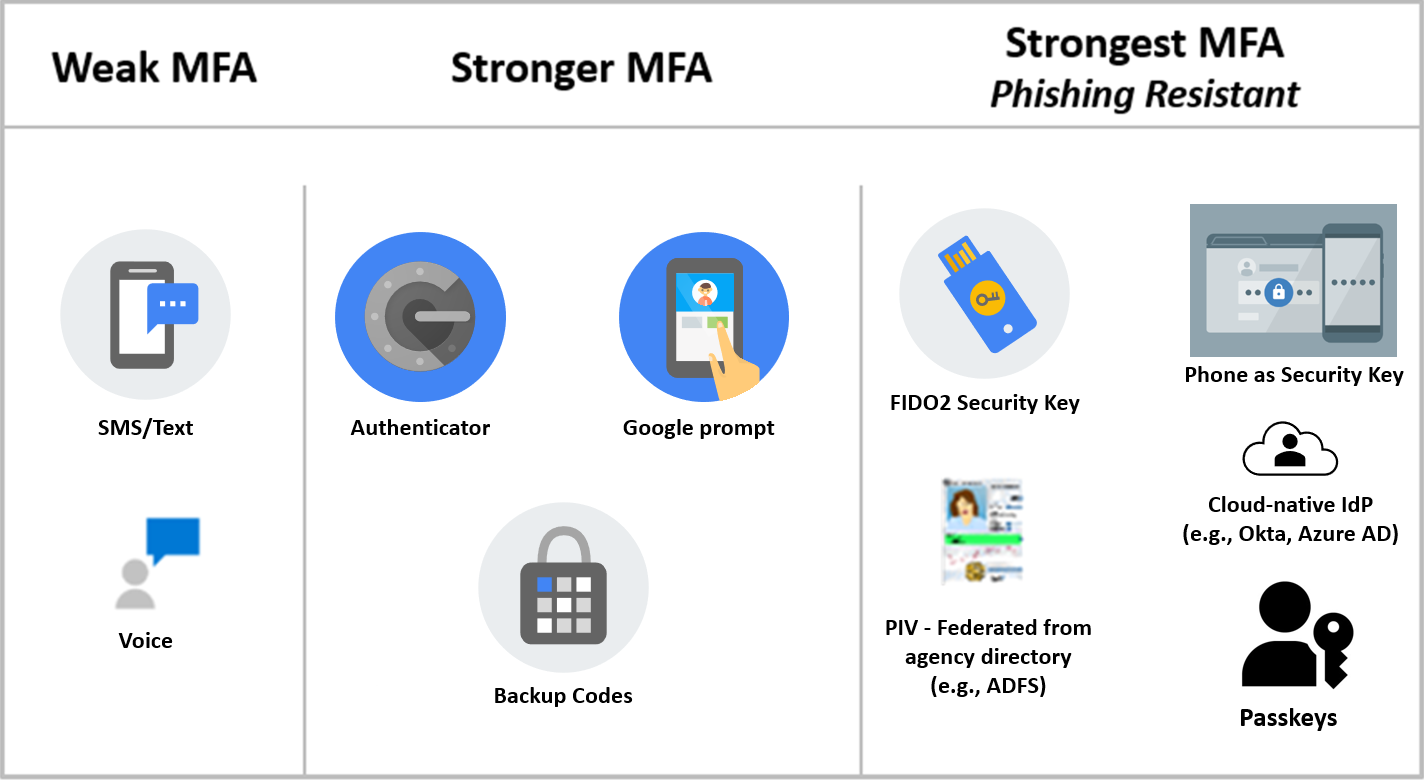
The following graphic illustrates the spectrum of MFA options and their relative strength, with phishing resistant MFA (per OMB Memo 22-09) being the mandated method.
Please note there is a distinction between Google 2-Step Verification (2SV) and MFA as a general term. While FIDO Security Key and Phone as a Security Key are acceptable forms of phishing-resistant MFA which rely on Google 2SV as the underlying mechanism, the other forms listed in the "strongest" column are still acceptable forms of Phishing-Resistant MFA even though they do not use Google 2SV.
 ### Policies
#### GWS.COMMONCONTROLS.1.1v1
Phishing-Resistant MFA SHALL be required for all users.
[](https://www.cisa.gov/news-events/directives/bod-25-01-implementation-guidance-implementing-secure-practices-cloud-services)
[](#key-terminology)
> Phishing-resistant methods:
- FIDO2 Security Key (directly in Google Workspace)
- Phone as Security Key
- FIDO2 Security Key (Federated from Identity Provider)
- Federal Personal Identity Verification (PIV) card (Federated from agency Active Directory or other identity provider).
- Google Passkeys
- _Rationale:_ Weaker forms of MFA do not protect against sophisticated phishing attacks. Enforcing phishing-resistant MFA methods reduces those risks. Additionally, the Office of Management and Budget (OMB) Memorandum M-22-09, “Moving the U.S. Government Toward Zero Trust Cybersecurity Principles,” requires phishing-resistant MFA for FCEB agency staff, contractors, and partners.
- _Last modified:_ January 2025
- _NIST SP 800-53 Rev. 5 FedRAMP High Baseline Mapping:_ IA-2(1), IA-2(2), IA-5c, IA-5g, IA-2(8)
- MITRE ATT&CK TTP Mapping
- [T1621: MFA Request Generation](https://attack.mitre.org/techniques/T1621/)
- [T1110: Brute Force](https://attack.mitre.org/techniques/T1110/)
- [T1110:001: Brute Force: Password Guessing](https://attack.mitre.org/techniques/T1110/001/)
- [T1110:002: Brute Force: Password Cracking](https://attack.mitre.org/techniques/T1110/002/)
- [T1110:003: Brute Force: Password Spraying](https://attack.mitre.org/techniques/T1110/003/)
- [T1556: Modifying Authentication Process](https://attack.mitre.org/techniques/T1556/)
- [T1556:006: Modifying Authentication Process: Multi-Factor Authentication](https://attack.mitre.org/techniques/T1556/006/)
- [T1566: Phishing](https://attack.mitre.org/techniques/T1566/)
- [T1566:001: Phishing: Spearphishing Attachment](https://attack.mitre.org/techniques/T1566/001/)
#### GWS.COMMONCONTROLS.1.2v1
If phishing-resistant MFA has not been enforced, an alternative MFA method SHALL be enforced for all users.
[](https://www.cisa.gov/news-events/directives/bod-25-01-implementation-guidance-implementing-secure-practices-cloud-services)
[](#key-terminology)
- _Rationale:_ This is a stopgap security policy to help protect the tenant if phishing-resistant MFA has not been enforced. This policy requires MFA enforcement, thus reducing single-form authentication risk.
- _Last modified:_ April 2025
- _NIST SP 800-53 Rev. 5 FedRAMP High Baseline Mapping:_ IA-2(1), IA-2(2)
- MITRE ATT&CK TTP Mapping
- [T1621: MFA Request Generation](https://attack.mitre.org/techniques/T1621/)
- [T1110: Brute Force](https://attack.mitre.org/techniques/T1110/)
- [T1110:001: Brute Force: Password Guessing](https://attack.mitre.org/techniques/T1110/001/)
- [T1110:002: Brute Force: Password Cracking](https://attack.mitre.org/techniques/T1110/002/)
- [T1110:003: Brute Force: Password Spraying](https://attack.mitre.org/techniques/T1110/003/)
- [T1556: Modifying Authentication Process](https://attack.mitre.org/techniques/T1556/)
- [T1556:006: Modifying Authentication Process: Multi-Factor Authentication](https://attack.mitre.org/techniques/T1556/006/)
- [T1566: Phishing](https://attack.mitre.org/techniques/T1566/)
- [T1566:001: Phishing: Spearphishing Attachment](https://attack.mitre.org/techniques/T1566/001/)
#### GWS.COMMONCONTROLS.1.3v1
SMS or Voice SHALL NOT be used as the MFA method.
[](https://www.cisa.gov/news-events/directives/bod-25-01-implementation-guidance-implementing-secure-practices-cloud-services)
[](#key-terminology)
- _Rationale:_ Weaker forms of MFA, such as SMS or Voice, do not protect against sophisticated phishing attacks. Enforcing methods phishing-resistant reduces those risks. Additionally, OMB M-22-09 requires phishing-resistant MFA for FCEB agency staff, contractors, and partners.
- _Last modified:_ April 2025
- _NIST SP 800-53 Rev. 5 FedRAMP High Baseline Mapping:_ CM-7b, IA-5c
- MITRE ATT&CK TTP Mapping
- [T1621: MFA Request Generation](https://attack.mitre.org/techniques/T1621/)
- [T1110: Brute Force](https://attack.mitre.org/techniques/T1110/)
- [T1110:001: Brute Force: Password Guessing](https://attack.mitre.org/techniques/T1110/001/)
- [T1110:002: Brute Force: Password Cracking](https://attack.mitre.org/techniques/T1110/002/)
- [T1110:003: Brute Force: Password Spraying](https://attack.mitre.org/techniques/T1110/003/)
- [T1556: Modifying Authentication Process](https://attack.mitre.org/techniques/T1556/)
- [T1556:006: Modifying Authentication Process: Multi-Factor Authentication](https://attack.mitre.org/techniques/T1556/006/)
- [T1566: Phishing](https://attack.mitre.org/techniques/T1566/)
- [T1566:001: Phishing: Spearphishing Attachment](https://attack.mitre.org/techniques/T1566/001/)
#### GWS.COMMONCONTROLS.1.4v1
The Google 2-Step Verification (2SV) new user enrollment period SHALL be set to at least one day and at most one week.
[](https://www.cisa.gov/news-events/directives/bod-25-01-implementation-guidance-implementing-secure-practices-cloud-services)
[](#key-terminology)
- _Rationale:_ Enrollment must be enforced within a reasonable timeframe. One week balances the need for allowing new personnel time to set up their authentication methods while minimizing the risks inherent to not enforcing MFA immediately.
- _Last modified:_ April 2025
- _NIST SP 800-53 Rev. 5 FedRAMP High Baseline Mapping:_ IA-2(1), IA-2(2)
- MITRE ATT&CK TTP Mapping
- [T1621: MFA Request Generation](https://attack.mitre.org/techniques/T1621/)
- [T1110: Brute Force](https://attack.mitre.org/techniques/T1110/)
- [T1110:001: Brute Force: Password Guessing](https://attack.mitre.org/techniques/T1110/001/)
- [T1110:002: Brute Force: Password Cracking](https://attack.mitre.org/techniques/T1110/002/)
- [T1110:003: Brute Force: Password Spraying](https://attack.mitre.org/techniques/T1110/003/)
- [T1556: Modifying Authentication Process](https://attack.mitre.org/techniques/T1556/)
- [T1556:006: Modifying Authentication Process: Multi-Factor Authentication](https://attack.mitre.org/techniques/T1556/006/)
- [T1566: Phishing](https://attack.mitre.org/techniques/T1566/)
- [T1566:001: Phishing: Spearphishing Attachment](https://attack.mitre.org/techniques/T1566/001/)
#### GWS.COMMONCONTROLS.1.5v1
Allow users to trust the device SHALL be disabled.
[](https://www.cisa.gov/news-events/directives/bod-25-01-implementation-guidance-implementing-secure-practices-cloud-services)
[](#key-terminology)
- _Rationale:_ Trusting the device allows users to bypass 2-Step Verification (2SV) for future logins on that device. Disabling this option makes it possible for multifactor authentication (MFA) to protect future logins on the device.
- _Last modified:_ February 2025
- _NIST SP 800-53 Rev. 5 FedRAMP High Baseline Mapping:_ IA-2(1), IA-2(2)
- MITRE ATT&CK TTP Mapping
- [T1621: MFA Request Generation](https://attack.mitre.org/techniques/T1621/)
- [T1110: Brute Force](https://attack.mitre.org/techniques/T1110/)
- [T1110:001: Brute Force: Password Guessing](https://attack.mitre.org/techniques/T1110/001/)
- [T1110:002: Brute Force: Password Cracking](https://attack.mitre.org/techniques/T1110/002/)
- [T1110:003: Brute Force: Password Spraying](https://attack.mitre.org/techniques/T1110/003/)
- [T1556: Modifying Authentication Process](https://attack.mitre.org/techniques/T1556/)
- [T1556:006: Modifying Authentication Process: Multi-Factor Authentication](https://attack.mitre.org/techniques/T1556/006/)
- [T1566: Phishing](https://attack.mitre.org/techniques/T1566/)
- [T1566:001: Phishing: Spearphishing Attachment](https://attack.mitre.org/techniques/T1566/001/)
### Resources
- [GWS Admin Help \| Set up 2-Step Verification (Deploy)](https://support.google.com/a/answer/9176657?hl=en&ref_topic=2759193&fl=1#zippy=%2Cchoose-a--step-verification-method-to-enforce%2Cturn-on-enforcement)
- [GWS Admin Help \| Set up 2-Step Verification (Protect your business)](https://support.google.com/a/answer/175197#zippy=%2Csecurity-keys%2Cconsider-using-security-keys-in-your-business)
- [Google Workspace Updates \| Simplify and Strengthen Sign-In by Enabling Passkeys for Your Users](https://workspaceupdates.googleblog.com/2023/06/passkey-open-beta.html)
- [Google Security Blog \| So Long Passwords, Thanks for all the Phish](https://security.googleblog.com/2023/05/so-long-passwords-thanks-for-all-phish.html)
- [CIS Google Workspace Foundations Benchmark](https://www.cisecurity.org/benchmark/google_workspace)
- [Office of Management and Budget (OMB) Memorandum M-22-09](https://bidenwhitehouse.archives.gov/wp-content/uploads/2022/01/M-22-09.pdf)
### Prerequisites
- GWS.COMMONCONTROLS.1.1v1 may require FIDO2-compliant security keys
### Implementation
#### Policy 1 Common Instructions
1. Sign in to [Google Admin console](https://admin.google.com/) as an administrator.
2. Select **Security** -\> **Authentication**.
3. Select **2-Step Verification**.
#### GWS.COMMONCONTROLS.1.1v1 Instructions
1. Under **Authentication**, ensure that **Allow users to turn on 2-Step Verification** is checked.
2. Set **Enforcement** to **On.**
3. Under **Methods** select **Only security key.**
4. Under **Security codes** select **Don't allow users to select security codes.**
5. Select **Save**.
#### GWS.COMMONCONTROLS.1.2v1 Instructions
1. Under **Authentication**, ensure that **Allow users to turn on 2-Step Verification** is checked.
2. Set **Enforcement** to **On**.
#### GWS.COMMONCONTROLS.1.3v1 Instructions
1. Under **Methods**, select **Any except verification codes via text, phone call**.
2. Select **Save**.
#### GWS.COMMONCONTROLS.1.4v1 Instructions
1. Set **New user enrollment** period to at least **1 Day** or at most **1 Week**.
2. Select **Save**.
#### GWS.COMMONCONTROLS.1.5v1 Instructions
1. Under Frequency, deselect the **Allow user to trust device** checkbox.
2. Select **Save**.
## 2. Context-aware Access
Device-based context-aware access provides access control policies based on device disposition attributes such as compliance with organizational secure configuration policies for devices (e.g., managed by Unified Endpoint Management). GWS also provides context-aware access policies based on authentication and network information. These can be used to implement more targeted access policies. For advanced use cases, custom context-aware access rules can be authored using the Common Expressions Language (CEL).
Device-based context-aware access can be used in several ways depending on agency business requirements. The following options are all acceptable approaches:
- Properties of the device as reported by Google (encryption, screen lock, OS version, etc.)
- Device inventory status (corporate-issued versus bring your own device)
- Use of managed Chrome browser
- Data based on integration with certain third-party device management tools
It is extremely important to understand how context-aware access policies affect one another. For example:
- At a given scope (e.g., Organizational Unit [OU] or Group), each context aware access rule is evaluated separately. If any rule grants access, then access is allowed to the given application.
- If rules are applied to OUs and Groups, which allow an action that may be denied after evaluating a policy at a higher level, then access will be allowed.
To enforce a device policy that requires company-owned devices, Google requires a list of serial numbers for company-owned devices.
### Policies
#### GWS.COMMONCONTROLS.2.1v1
Policies restricting access to Google Workspace (GWS) based on enterprise device signals SHOULD be implemented.
[](#key-terminology)
[](../../docs/usage/Limitations.md#log-based-policy-checks)
- _Rationale:_ Granular device access control afforded by context-aware access aligns with federal zero trust strategy and principles. Context-aware access can help to increase the security of GWS data by allowing organizations to restrict access to certain applications or services based on user/device attributes.
- _Last modified:_ July 2023
- _Note:_ Agencies may use controls with greater granularity if needed.
- _NIST SP 800-53 Rev. 5 FedRAMP High Baseline Mapping:_ IA-3
- MITRE ATT&CK TTP Mapping
- [T1098: Account Manipulation](https://attack.mitre.org/techniques/T1098/)
- [T1098:005: Account Manipulation: Device Registration](https://attack.mitre.org/techniques/T1098/005/)
### Resources
- [GWS Admin Help \| Context-Aware Access overview](https://support.google.com/a/answer/9275380)
- [GWS Admin Help \| Context-Aware Access examples for Basic mode](https://support.google.com/a/answer/9587667)
- [GWS Admin Help \| Context-Aware Access examples for Advanced mode](https://support.google.com/a/answer/11368990)
- [GWS Admin Help \| Device management security checklist](https://support.google.com/a/answer/7422256)
- [GWS Admin Help \| Set up guide: Deploy company-owned devices in Google endpoint management](https://support.google.com/a/answer/10287358)
- [GWS Admin Help \| Turn endpoint verification on or off](https://support.google.com/a/answer/9007320)
- [GWS Admin Help \| Set up guide: Deploy company-owned devices in Google endpoint management—Steps 1 and 2](https://support.google.com/a/answer/10287358#zippy=%2Cstep-sign-up-for-enterprise-management-services%2Cstep-source-devices)
- [GitHub \| Google \| Google Common Expressions Language (CEL)](https://github.com/google/cel-spec)
- [Google Cloud Access Context Manager \| Macros for CEL expressions](https://cloud.google.com/access-context-manager/docs/custom-access-level-spec#macros_for_cel_expressions)
- [Google Cloud Access Context Manager \| Custom access level specification](https://cloud.google.com/access-context-manager/docs/custom-access-level-spec)
- [GWS Blog \| Enable advanced context-aware access to Google Workspace in the Admin console](https://workspaceupdates.googleblog.com/2021/11/enable-advanced-context-aware-access-to.html)
- [GWS Admin Help \| Google Workspace Device management security checklist](https://support.google.com/a/answer/7422256)
- [GWS Admin Help \| Deploy Context-Aware Access](https://support.google.com/a/answer/12643733)
### Prerequisites
- One or more of the following user roles should have been configured to set context-aware policies:
> Super admin
> Delegated administrator with each of these privileges:
- Data Security -\> Access level management
- Data Security -\> Rule management
- Administrator API Privileges -\> Groups\>Read
- Administrator API Privileges -\> Users\>Read
- Serial numbers may be required to enforce a policy for company-owned devices. Refer to [Google documentation](https://support.google.com/a/answer/10287358) on device management for additional guidance.
### Implementation
#### GWS.COMMONCONTROLS.2.1v1 Instructions
To turn on Context-Aware Access:
1. Access the [Google Admin console](https://admin.google.com/).
2. From the menu, go to **Security** -\> **Access and data control** -\> **Context-Aware Access**.
3. Verify **Context-Aware Access** is **ON for everyone**. If not, click **Turn On**.
4. Select **Access Level** and then **Create Access Level**. Then determine the rule conditions per agency needs.
5. Select **Assign access levels to applications**, then select the applications to which the rule should apply.
Note that the implementation details of context-aware access use cases will vary per agency. Refer to [Google's documentation](https://support.google.com/a/answer/12643733) on implementing context-aware access for your specific use cases. Common use cases include:
- Require company-owned access on desktop but not on mobile device
- Require basic device security
- Allow access to contractors only through the corporate network
- Block access from known hijacker IP addresses
- Allow or disallow access from specific locations
- Use nested access levels instead of selecting multiple access levels during assignment
## 3. Login Challenges
Login challenges are additional security measures used to verify a user's identity, including post-single sign-on (Post-SSO) verification.
Post-SSO verification controls what additional checks are performed (e.g., Google 2SV) after a user successfully authenticates through a third-party identity provider.
SSO is managed through profiles, which can be assigned organization-wide or to specific organization units/groups.
Google Workspace handles post-SSO verification for profiles assigned organization-wide as a separate case, allowing users more control over when post-SSO verification requirements apply.
### Policies
#### GWS.COMMONCONTROLS.3.1v1
Post-single sign-on (SSO) verification SHOULD be enabled for users signing in using the organization's SSO profile.
[](#key-terminology)
[](../../docs/usage/Limitations.md#log-based-policy-checks)
- _Rationale:_ Without enabling post-SSO verification, Google 2-Step Verification (2SV) configurations are not enforced for third-party SSO users. Enabling post-SSO verification ensures the application of 2SV verification policies.
- _Last modified:_ January 2025
- _NIST SP 800-53 Rev. 5 FedRAMP High Baseline Mapping:_ IA-2(1), IA-2(2)
- MITRE ATT&CK TTP Mapping
- [T1110: Brute Force](https://attack.mitre.org/techniques/T1110/)
- [T1110:001: Brute Force: Password Guessing](https://attack.mitre.org/techniques/T1110/001/)
- [T1110:002: Brute Force: Password Cracking](https://attack.mitre.org/techniques/T1110/002/)
- [T1110:003: Brute Force: Password Spraying](https://attack.mitre.org/techniques/T1110/003/)
#### GWS.COMMONCONTROLS.3.2v1
Post-SSO verification SHOULD be enabled for users signing in using other SSO profiles.
[](#key-terminology)
[](../../docs/usage/Limitations.md#log-based-policy-checks)
- _Rationale:_ Without enabling post-SSO verification, any Google 2-Step Verification (2SV) configuration is ignored for third-party SSO users. Enabling post-SSO verification will apply 2SV verification policies.
- _Last modified:_ November 2024
- _NIST SP 800-53 Rev. 5 FedRAMP High Baseline Mapping:_ IA-2(1), IA-2(2)
- MITRE ATT&CK TTP Mapping
- [T1110: Brute Force](https://attack.mitre.org/techniques/T1110/)
- [T1110:001: Brute Force: Password Guessing](https://attack.mitre.org/techniques/T1110/001/)
- [T1110:002: Brute Force: Password Cracking](https://attack.mitre.org/techniques/T1110/002/)
- [T1110:003: Brute Force: Password Spraying](https://attack.mitre.org/techniques/T1110/003/)
### Resources
- [GWS Admin Help \| Protect Google Workspace accounts with security challenges](https://support.google.com/a/answer/6002699)
- [CIS Google Workspace Foundations Benchmark](https://www.cisecurity.org/benchmark/google_workspace)
### Prerequisites
- None
### Implementation
#### Policy Group 3 Common Instructions
1. Sign in to [Google Admin console](https://admin.google.com) as an administrator.
2. Select **Security**-\>**Authentication**-\>**Login challenges**.
3. Under **Organizational units**, ensure that the name for the entire organization is selected.
4. Click **Post-SSO verification**.
#### GWS.COMMONCONTROLS.3.1v1 Instructions
1. For **Settings for users signing in using the SSO profile for your organization**, select **Ask users for additional verifications from Google if a sign-in looks suspicious, and always apply 2-Step Verification policies (if configured)**.
2. Click **SAVE**.
#### GWS.COMMONCONTROLS.3.2v1 Instructions
1. For **Settings for users signing in using other SSO profiles**, select **Ask users for additional verifications from Google if a sign-in looks suspicious, and always apply 2-Step Verification policies (if configured)**.
2. Click **SAVE**.
## 4. User Session Duration
This control allows configuration for time limits on active GWS sessions before users are prompted for authentication credentials.
Note: If using a third-party identity provider (IdP) and agency-set web session lengths for its users, the IdP session length parameter needs to be set to expire before the Google session expires in order to ensure users are forced to sign in again. See [GWS documentation](https://support.google.com/a/answer/7576830) for additional details.
### Policies
#### GWS.COMMONCONTROLS.4.1v1
Users SHALL be forced to re-authenticate after an established 12-hour GWS login session has expired.
[](https://www.cisa.gov/news-events/directives/bod-25-01-implementation-guidance-implementing-secure-practices-cloud-services)
[](#key-terminology)
- _Rationale:_ Allowing sessions to persist indefinitely enables users to bypass 2-Step Verification (2SV) for future activity on that device. Limiting sessions to 12 hours may reduce the possibility of session hijacking attacks and prevent users from inadvertently remaining logged in on unattended devices.
- _Last modified:_ July 2023
- _NIST SP 800-53 Rev. 5 FedRAMP High Baseline Mapping:_ IA-11
- MITRE ATT&CK TTP Mapping
- [T1550: Use Alternate Authentication Material](https://attack.mitre.org/techniques/T1550/)
- [T1550:004: Use Alternate Authentication Material: Web Session Cookie](https://attack.mitre.org/techniques/T1550/004/)
- [T1078: Valid Accounts](https://attack.mitre.org/techniques/T1078/)
- [T1078:004: Valid Accounts: Cloud Accounts](https://attack.mitre.org/techniques/T1078/004/)
### Resources
- [GWS Admin Help \| Set session length for Google services](https://support.google.com/a/answer/7576830?hl=en)
### Prerequisites
- None
### Implementation
#### GWS.COMMONCONTROLS.4.1v1 Instructions
To configure Google session control:
1. Sign in to the [Google Admin console](https://admin.google.com) as an administrator.
2. Select **Security.**
3. Select **Access and data control** -\> **Google session control.**
4. Look for the **Web session duration** heading.
5. Set the duration to **12 hours.**
## 5. Secure Passwords
Per NIST 800-63 and OMB M-22-09, ensure that user passwords do not expire and that long passwords are chosen. Research indicates that frequent password rotation breeds poor password choice and encourages password reuse. Ensure that passwords are strong to defend against brute-force attacks. Ensure that passwords are not reused to defend against credential theft.
### Policies
#### GWS.COMMONCONTROLS.5.1v1
User password strength SHALL be enforced.
[](https://www.cisa.gov/news-events/directives/bod-25-01-implementation-guidance-implementing-secure-practices-cloud-services)
[](#key-terminology)
- _Rationale:_ Weak passwords increase the risk of account compromise. Enforcing password strength adds an additional layer of defense, reducing the risk of account compromise. Strong password policies protect an organization by discouraging the use of weak passwords.
- _Last modified:_ July 2023
- _NIST SP 800-53 Rev. 5 FedRAMP High Baseline Mapping:_ IA-5(1)
- MITRE ATT&CK TTP Mapping
- [T1110: Brute Force](https://attack.mitre.org/techniques/T1110/)
- [T1110:001: Brute Force: Password Guessing](https://attack.mitre.org/techniques/T1110/001/)
- [T1110:002: Brute Force: Password Cracking](https://attack.mitre.org/techniques/T1110/002/)
- [T1110:003: Brute Force: Password Spraying](https://attack.mitre.org/techniques/T1110/003/)
#### GWS.COMMONCONTROLS.5.2v1
User password length SHALL be at least 12 characters.
[](https://www.cisa.gov/news-events/directives/bod-25-01-implementation-guidance-implementing-secure-practices-cloud-services)
[](#key-terminology)
- _Rationale:_ The National Institute of Standards and Technology (NIST) published guidance indicating that password length is a primary factor in characterizing password strength (NIST SP 800-63B). Longer passwords tend to be more resistant to brute force and dictionary-based attacks.
- _Last modified:_ July 2023
- _NIST SP 800-53 Rev. 5 FedRAMP High Baseline Mapping:_ IA-5(1)
- MITRE ATT&CK TTP Mapping
- [T1110: Brute Force](https://attack.mitre.org/techniques/T1110/)
- [T1110:001: Brute Force: Password Guessing](https://attack.mitre.org/techniques/T1110/001/)
- [T1110:002: Brute Force: Password Cracking](https://attack.mitre.org/techniques/T1110/002/)
- [T1110:003: Brute Force: Password Spraying](https://attack.mitre.org/techniques/T1110/003/)
#### GWS.COMMONCONTROLS.5.3v1
User password length SHOULD be at least 16 characters.
[](#key-terminology)
- _Rationale:_ The National Institute of Standards and Technology (NIST) published guidance indicating that password length is a primary factor in characterizing password strength (NIST SP 800-63B). Longer passwords tend to be more resistant to brute force and dictionary-based attacks.
- _Last modified:_ January 2025
- _NIST SP 800-53 Rev. 5 FedRAMP High Baseline Mapping:_ IA-5(1)
- MITRE ATT&CK TTP Mapping
- [T1110: Brute Force](https://attack.mitre.org/techniques/T1110/)
- [T1110:001: Brute Force: Password Guessing](https://attack.mitre.org/techniques/T1110/001/)
- [T1110:002: Brute Force: Password Cracking](https://attack.mitre.org/techniques/T1110/002/)
- [T1110:003: Brute Force: Password Spraying](https://attack.mitre.org/techniques/T1110/003/)
#### GWS.COMMONCONTROLS.5.4v1
Password policy SHALL be enforced at next sign-in.
[](https://www.cisa.gov/news-events/directives/bod-25-01-implementation-guidance-implementing-secure-practices-cloud-services)
[](#key-terminology)
- _Rationale:_ If the password policy is not enforced at next login, a user could potentially operate indefinitely using a weak password. Enforcing the policy at next login helps ensure that all active user passwords meet current requirements.
- _Last modified:_ July 2023
- _NIST SP 800-53 Rev. 5 FedRAMP High Baseline Mapping:_ IA-5(1)
- MITRE ATT&CK TTP Mapping
- [T1110: Brute Force](https://attack.mitre.org/techniques/T1110/)
- [T1110:001: Brute Force: Password Guessing](https://attack.mitre.org/techniques/T1110/001/)
- [T1110:002: Brute Force: Password Cracking](https://attack.mitre.org/techniques/T1110/002/)
- [T1110:003: Brute Force: Password Spraying](https://attack.mitre.org/techniques/T1110/003/)
#### GWS.COMMONCONTROLS.5.5v1
User passwords SHALL NOT be reused.
[](https://www.cisa.gov/news-events/directives/bod-25-01-implementation-guidance-implementing-secure-practices-cloud-services)
[](#key-terminology)
- _Rationale:_ Password reuse represents a significant security risk. When possible, preventing password reuse limits the scope of a compromised password.
- _Last modified:_ July 2023
- _NIST SP 800-53 Rev. 5 FedRAMP High Baseline Mapping:_ IA-5(1)
- MITRE ATT&CK TTP Mapping
- [T1110: Brute Force](https://attack.mitre.org/techniques/T1110/)
- [T1110:001: Brute Force: Password Guessing](https://attack.mitre.org/techniques/T1110/001/)
- [T1110:002: Brute Force: Password Cracking](https://attack.mitre.org/techniques/T1110/002/)
- [T1110:003: Brute Force: Password Spraying](https://attack.mitre.org/techniques/T1110/003/)
#### GWS.COMMONCONTROLS.5.6v1
User passwords SHALL NOT expire.
[](https://www.cisa.gov/news-events/directives/bod-25-01-implementation-guidance-implementing-secure-practices-cloud-services)
[](#key-terminology)
- _Rationale:_ The National Institute of Standards and Technology (NIST), OMB, and Microsoft have published guidance indicating mandated periodic password changes make user accounts less secure. For example, OMB M-22-09 states, "Password policies must not require use of special characters or regular rotation."
- _Last modified:_ July 2023
- _NIST SP 800-53 Rev. 5 FedRAMP High Baseline Mapping:_ IA-5(1)
- MITRE ATT&CK TTP Mapping
- [T1110: Brute Force](https://attack.mitre.org/techniques/T1110/)
- [T1110:001: Brute Force: Password Guessing](https://attack.mitre.org/techniques/T1110/001/)
- [T1110:002: Brute Force: Password Cracking](https://attack.mitre.org/techniques/T1110/002/)
- [T1110:003: Brute Force: Password Spraying](https://attack.mitre.org/techniques/T1110/003/)
### Resources
- [GWS Admin Help \| Enforce and monitor password requirements for users](https://support.google.com/a/answer/139399?hl=en#zippy=%2Cwhat-makes-a-password-strong)
- [Create a strong password & a more secure account](https://support.google.com/accounts/answer/9094506?fl=1&sjid=14948418137648107240-NA)
- [CISA Cross-Sector Cybersecurity Performance Goals](https://www.cisa.gov/cross-sector-cybersecurity-performance-goals#MinimumPasswordStrength2B)
- [Office of Management and Budget (OMB) Memorandum M-22-09](https://bidenwhitehouse.archives.gov/wp-content/uploads/2022/01/M-22-09.pdf)
### Prerequisites
- None
### Implementation
To configure a strong password policy, use the Google Workspace admin console:
#### Policy Group 5 common Instructions
1. Sign in to the [Google Admin console](https://admin.google.com) as an administrator.
2. Select **Security** -\> **Authentication.**
3. Locate **Password management.**
4. Follow implementation for each individual policy.
5. Select **Save**.
#### GWS.COMMONCONTROLS.5.1v1 Instructions
1. Under **Strength**, select the **Enforce strong password** checkbox.
#### GWS.COMMONCONTROLS.5.2v1 Instructions
1. Under **Length**, set **Minimum Length** to 12+.
#### GWS.COMMONCONTROLS.5.3v1 Instructions
1. Under **Length**, set **Minimum Length** to 16+.
#### GWS.COMMONCONTROLS.5.4v1 Instructions
1. Under **Strength and Length enforcement**, select the **Enforce password policy at next sign-in** checkbox.
#### GWS.COMMONCONTROLS.5.5v1 Instructions
1. Under **Reuse**, uncheck the **Allow password reuse** checkbox.
#### GWS.COMMONCONTROLS.5.6v1 Instructions
1. Under **Expiration**, select **Never Expires.**
## 6. Privileged Accounts
Administrative, or "admin," accounts are privileged accounts in GWS that can manage settings, access sensitive data, and perform critical functions. The compromise of an administrative account could have catastrophic impacts on the organization. This section defines privileged accounts as both pre-built and custom administrative accounts.
Examples of these privileged accounts include the following pre-built GWS administrative roles:
- Super admin: This role possesses critical control over the entire GWS structure. It has access to all features in the Admin Console and Admin API. This role can manage every aspect of an organization's GWS accounts.
- User management admin: This account has rights to add, remove, and delete normal users, in addition to managing all user passwords, security settings, and other management tasks. A compromise of this role can be potentially critical.
- Services admin: This role has full rights to turn on/off GWS services and security settings for these services (Gmail, Drive, Voice, etc.). Given that most GWS features rely on these services being secure, compromise of this account type would be critical.
- Mobile admin: This role has full rights to manage all of an agency's mobile devices, including device use authorization and control of application downloads. This role can also set the security policies on all organization mobile devices connected to GWS.
- Groups admin: This role has full rights to view profiles in the organizational and Organizational Unit (OU) structures and can manage all rights for Groups members.
### Policies
#### GWS.COMMONCONTROLS.6.1v1
All administrative accounts SHALL be provisioned as cloud-only accounts separate from an agency's authoritative on-premises or other federated identity providers.
[](https://www.cisa.gov/news-events/directives/bod-25-01-implementation-guidance-implementing-secure-practices-cloud-services)
[](#key-terminology)
- _Rationale:_ Cloud-only accounts leveraging Google Account authentication with phishing resistant MFA for highly privileged accounts reduces the risks associated with a compromise of on-premises federation infrastructure. Enforcing this policy makes it more challenging for a threat actor to pivot from a compromised on-premises environment to the cloud with privileged access.
- _Last modified:_ November 2025
- _NIST SP 800-53 Rev. 5 FedRAMP High Baseline Mapping:_ AC-6(5)
- MITRE ATT&CK TTP Mapping
- [T1110: Brute Force](https://attack.mitre.org/techniques/T1110/)
- [T1110:001: Brute Force: Password Guessing](https://attack.mitre.org/techniques/T1110/001/)
- [T1110:002: Brute Force: Password Cracking](https://attack.mitre.org/techniques/T1110/002/)
- [T1110:003: Brute Force: Password Spraying](https://attack.mitre.org/techniques/T1110/003/)
- [T1556: Modifying Authentication Process](https://attack.mitre.org/techniques/T1556/)
- [T1556:006: Modifying Authentication Process: Multi-Factor Authentication](https://attack.mitre.org/techniques/T1556/006/)
#### GWS.COMMONCONTROLS.6.2v1
A minimum of **two** and a maximum of **eight** separate and distinct super admin users SHALL be configured.
[](https://www.cisa.gov/news-events/directives/bod-25-01-implementation-guidance-implementing-secure-practices-cloud-services)
[](#key-terminology)
[](../../docs/usage/Config.md#break-glass-accounts)
- _Rationale:_ The super admin role provides unfettered access to Google Workspace. Properly managing the number of users with this access level reduces the risk of a GWS compromise. Having too few super admin accounts can increase the risk of losing admin access entirely (e.g., if a super admin forgets their password). Maintaining between two to eight super admin accounts helps mitigate accessibility and security concerns.
- _Last modified:_ July 2023
- _Note:_ The total number of super admin accounts does not include "break-glass" super admin accounts.
- _NIST SP 800-53 Rev. 5 FedRAMP High Baseline Mapping:_ AC-6(5)
- MITRE ATT&CK TTP Mapping
- [T1136: Create Account](https://attack.mitre.org/techniques/T1136/)
- [T1136:003: Create Account: Cloud Account](https://attack.mitre.org/techniques/T1136/003/)
- [T1098: Account Manipulation](https://attack.mitre.org/techniques/T1098/)
- [T1098:003: Account Manipulation: Additional Cloud Roles](https://attack.mitre.org/techniques/T1098/003/)
### Resources
- [Google Cloud Architecture Center \| Best practices for planning accounts and organizations](https://cloud.google.com/architecture/identity/best-practices-for-planning)
- [GWS Admin Help \| Create, edit, and delete custom admin roles](https://support.google.com/a/answer/2406043)
- [GWA Admin Help \| Assign Specific Admin Roles](https://support.google.com/a/answer/9807615?hl=en)
- [GWA Admin Help \| Pre-Built Admin Roles](https://support.google.com/a/answer/2405986?hl=en)
### Prerequisites
- Super admin users cannot log in to admin.google.com with a third-party identity provider (IdP) when using super admin level accounts. These users must use Google Login as the authentication mechanism. This policy also extends this rule to other admin types.
- Delegated accounts, including those defined as highly privileged, can use a third-party IdP by default to access admin.google.com. However, this policy prohibits that practice. All highly privileged accounts must use phishing-resistant Google Authentication.
### Implementation
#### GWS.COMMONCONTROLS.6.1v1 Instructions
1. Determine how to track highly privileged accounts. For example, create an OU or a group containing all highly privileged accounts.
2. Follow the instructions in the [Set up SSO for your organization](https://support.google.com/a/answer/12032922?hl=en) guide, under "Decide which users should use SSO." For all OUs or groups with highly privileged users, set the **SSO profile assignment** to **None**.
#### GWS.COMMONCONTROLS.6.2v1 Instructions
To obtain a list of all GWS Super Admins:
1. Sign in to the [Google Admin console](https://admin.google.com) as an administrator.
2. Navigate to **Account** -\> **Admin Roles**.
3. Click the **Super Admin** role in the list of roles
4. The subsequent dialog provides a list of Super Admins.
## 7. Conflicting Account Management
It is possible for employees of an organization to create conflicting accounts that are unmanaged by an enterprise's Google Workspace tenant. Unmanaged accounts are defined as users who independently create a Google account using the organization's domain. For example, a user with an enterprise/corporate email of user@company.com could create a personal, unmanaged Google account using that email address. This would create an account conflict in a GWS tenant licensed to company.com since email addresses are unique.
A conflicting account can also be created unintentionally. After signing up for Google Cloud Identity or Google Workspace, administrators might decide to set up single sign-on with an external identity provider (IdP) such as Azure Active Directory (AAD) or Active Directory. When configured, the external IdP might automatically create accounts in Cloud Identity or Google Workspace for all users for which single sign-on was enabled, inadvertently creating conflicting accounts.
Unmanaged accounts carry significant risk, as they cannot be managed by administrators. This gap renders the accounts outside the scope of protection administrators can apply to ensure data security. Significantly, two-step verification (2SV) cannot be enforced. Even if access is revoked, these accounts can carry a social engineering risk. Further, reconciling conflicting accounts creates additional workload for administrators and adds to the workload of onboarding users to Google Workspace & Google Cloud.
The GWS administrator console provides several options for handling conflicting, unmanaged accounts:
- Automatically invite users to transfer unmanaged accounts.
- Replace unmanaged accounts with managed accounts.
- Don't create new accounts if unmanaged accounts exist.
This policy requires replacing unmanaged accounts with managed accounts. When this option is configured, data owned by the account will not be imported. The user will receive a temporary account address, which they'll need to manually replace with a @gmail.com address of their choice. The user will receive an email notification with their temporary account address and notification that the original email can no longer be used.
By changing the email address to a managed account, the user resolves the conflict by ensuring that the managed account and consumer account have different identities. The result remains that they have one consumer account with all of their original data, and one managed account without access to the original data.
### Policies
#### GWS.COMMONCONTROLS.7.1v1
Account conflict management SHOULD be configured to replace conflicting unmanaged accounts with managed accounts.
[](#key-terminology)
- _Rationale:_ Unmanaged user accounts cannot be controlled or monitored by GWS administrators. By resolving conflicting accounts, organizations can ensure all users have managed user accounts.
- _Last modified:_ April 2025
- _NIST SP 800-53 Rev. 5 FedRAMP High Baseline Mapping:_ IA-2
- MITRE ATT&CK TTP Mapping
- [T1136: Create Account](https://attack.mitre.org/techniques/T1136/)
- [T1136:003: Create Account: Cloud Account](https://attack.mitre.org/techniques/T1136/003/)
- [T1098: Account Manipulation](https://attack.mitre.org/techniques/T1098/)
- [T1098:003: Account Manipulation: Additional Cloud Roles](https://attack.mitre.org/techniques/T1098/003/)
- [T1078: Valid Accounts](https://attack.mitre.org/techniques/T1078/)
### Resources
- [GWS Admin Help | Use the transfer tool to migrate unmanaged users](https://support.google.com/a/answer/6178640)
- [GWS Admin Help | Find and add unmanaged users](https://support.google.com/a/answer/11112794)
- [Google Workspace Updates Blog | Resolve conflict accounts faster with the new Conflict Accounts Management tool](https://workspaceupdates.googleblog.com/2023/08/conflict-accounts-management-tool.html)
- [Google Cloud Architecture Center | Migrating consumer accounts](https://cloud.google.com/architecture/identity/migrating-consumer-accounts#using_a_conflicting_account)
- [Google Cloud Architecture Center | Best practices for planning accounts and organizations](https://cloud.google.com/architecture/identity/best-practices-for-planning)
- [How a conflicting account is created](https://support.google.com/accounts/answer/181526)
### Prerequisites
- Super Admin privileges
### Implementation
#### GWS.COMMONCONTROLS.7.1v1 Instructions
To configure account conflict management per the policy:
1. Sign in to the [Google Admin console](https://admin.google.com) as an administrator.
2. Navigate to **Account** -\> **Account settings.**
3. Click the **Conflicting accounts management** section.
4. Select the radio button option reading **"Replace conflicting unmanaged accounts with managed ones."**
5. Click **Save.**
## 8. Account Recovery Options
This section addresses the GWS account self-recovery feature. When enabled, this feature allows users to add a recovery email or phone number. This allows users to reset their own accounts if needed, without requiring GWS administrator support.
### Policies
#### GWS.COMMONCONTROLS.8.1v1
Account self-recovery for super admins SHALL be disabled.
[](https://www.cisa.gov/news-events/directives/bod-25-01-implementation-guidance-implementing-secure-practices-cloud-services)
[](#key-terminology)
- _Rationale:_ If enabled, a threat actor could attempt to access a super admin account through the account recovery method. Disabling this feature forces super admins to contact another super admin in order to recover their account, making it more difficult for a potential threat actor to compromise the account.
- _Last modified:_ July 2023
- _NIST SP 800-53 Rev. 5 FedRAMP High Baseline Mapping:_ IA-5d, IA-5g
- MITRE ATT&CK TTP Mapping
- [T1556: Modifying Authentication Process](https://attack.mitre.org/techniques/T1556/)
- [T1556:006: Modifying Authentication Process: Multi-Factor Authentication](https://attack.mitre.org/techniques/T1556/006/)
#### GWS.COMMONCONTROLS.8.2v1
Account self-recovery for users and non-super admins SHALL be disabled.
[](https://www.cisa.gov/news-events/directives/bod-25-01-implementation-guidance-implementing-secure-practices-cloud-services)
[](#key-terminology)
- _Rationale:_ If enabled, a user could add a personal email or phone number for account recovery. Disabling this feature requires account recovery to go through official channels, making it more difficult for a potential threat actor to compromise an account.
- _Last modified:_ February 2025
- _NIST SP 800-53 Rev. 5 FedRAMP High Baseline Mapping:_ IA-5d, IA-5g
- MITRE ATT&CK TTP Mapping
- [T1556: Modifying Authentication Process](https://attack.mitre.org/techniques/T1556/)
- [T1556:006: Modifying Authentication Process: Multi-Factor Authentication](https://attack.mitre.org/techniques/T1556/006/)
#### GWS.COMMONCONTROLS.8.3v1
Ability to add recovery information SHOULD be disabled.
[](#gwscommoncontrols83v06-instructions)
- _Rationale:_ If enabled, a user could add a personal email or phone number for account recovery. Disabling this feature prevents a user from adding personally identifiable information (PII) to their organizational account and makes it more difficult for a potential threat actor to steal PII in the event of a compromise.
- _Last modified:_ August 2025
- _Note:_ This setting is not applicable if using single sign-on (SSO) with a third-party identity provider or password sync. GWS.COMMONCONTROLS.8.3 acts as a defense in-depth policy when GWS.COMMONCONTROLS.8.1 and GWS.COMMONCONTROLS.8.2 are not enabled.
- _NIST SP 800-53 Rev. 5 FedRAMP High Baseline Mapping:_ SC-7(10)
- MITRE ATT&CK TTP Mapping
- [T1530: Data from Cloud Storage](https://attack.mitre.org/techniques/T1530/)
### Resources
- [GWS Admin Help \| Allow super administrators to recover their password](https://support.google.com/a/answer/9436964?fl=1)
- [GWS Admin Help \| Recover an account protected by 2-Step Verification](https://support.google.com/a/answer/9176734?hl=en)
### Prerequisites
- None
### Implementation
#### GWS.COMMONCONTROLS.8.1v1 Instructions
To disable Super Admin account self-recovery:
1. Sign in to https://admin.google.com as an administrator.
2. Select **Security** -\> **Authentication**.
3. Select **Account Recovery**.
4. Click **Super admin account recovery**.
5. Deselect the **Allow Super Admins to recover their account** checkbox.
6. Click **Save**.
#### GWS.COMMONCONTROLS.8.2v1 Instructions
1. Sign in to https://admin.google.com as an administrator.
2. Select **Security** -\> **Authentication**.
3. Select **Account Recovery**.
4. Click **User account recovery**.
5. Deselect the **Allow users and all non-super admins to recover their account** checkbox.
6. Click **Save**.
#### GWS.COMMONCONTROLS.8.3v1 Instructions
1. Sign in to https://admin.google.com as an administrator.
2. Select **Security** -\> **Authentication**.
3. Select **Account Recovery**.
4. Click **Recovery Information**.
5. Deselect the **Allow admins and users to add recovery email information to their account** checkbox.
6. Deselect the **Allow admins and users to add recovery phone information to their account** checkbox.
7. Click **Save**.
## 9. GWS Advanced Protection Program
This control enforces increased secure protections for highly privileged, senior executive and sensitive users accounts from targeted attacks. It enforces optional GWS user security features including:
- Strong authentication with security keys
- Use of security codes with security keys
- Restrictions on third-party access to account data
- Deep Gmail scans
- Google Safe Browsing protections in Chrome
- Account recovery through administrator
### Policies
#### GWS.COMMONCONTROLS.9.1v1
Highly privileged accounts SHALL be enrolled in the Google Workspace (GWS) Advanced Protection Program.
[](#policy-group-9-instructions)
- _Rationale:_ Sophisticated phishing tactics can trick even savvy users into giving their sign-in credentials to attackers. The Advanced Protection Program requires users to use a security key – a hardware device or special software on mobile devices used to verify identity – to sign in to a Google Account. Unauthorized users will not be able to sign in without the user's security key, even if they have the user's username and password. The Advanced Protection Program includes a curated group of high-security policies that are applied to enrolled accounts. Additional policies may be added to the Advanced Protection Program to ensure protections are current.
- _Last modified:_ July 2023
- _NIST SP 800-53 Rev. 5 FedRAMP High Baseline Mapping:_ IA-2(1), IA-2(2), IA-5c, IA-5d, IA-5g, SI-3, SI-8
- MITRE ATT&CK TTP Mapping
- [T1110: Brute Force](https://attack.mitre.org/techniques/T1110/)
- [T1110:001: Brute Force: Password Guessing](https://attack.mitre.org/techniques/T1110/001/)
- [T1110:002: Brute Force: Password Cracking](https://attack.mitre.org/techniques/T1110/002/)
- [T1110:003: Brute Force: Password Spraying](https://attack.mitre.org/techniques/T1110/003/)
- [T1556: Modifying Authentication Process](https://attack.mitre.org/techniques/T1556/)
- [T1556:006: Modifying Authentication Process: Multi-Factor Authentication](https://attack.mitre.org/techniques/T1556/006/)
#### GWS.COMMONCONTROLS.9.2v1
All sensitive user accounts SHOULD be enrolled into the GWS Advanced Protection Program.
[](#policy-group-9-instructions)
- _Rationale:_ Sophisticated phishing tactics can trick even savvy users into giving their sign-in credentials to attackers. The Advanced Protection Program requires users to use a security key – a hardware device or special software on mobile devices used to verify identity – to sign in to a Google Account. Unauthorized users will not be able to sign in without the user's security key, even if they have the user's username and password. The Advanced Protection Program includes a curated group of high-security policies that are applied to enrolled accounts. Additional policies may be added to the Advanced Protection Program to ensure protections are current.
- _Last modified:_ July 2023
- _Note:_ This control enforces more secure protection of sensitive user accounts from targeted attacks. Sensitive user accounts include political appointees, Senior Executive Service (SES) officials, or other senior officials whose account compromise would pose a level of risk prohibitive to agency mission fulfillment
- _NIST SP 800-53 Rev. 5 FedRAMP High Baseline Mapping:_ IA-2(1), IA-2(2), IA-5c, IA-5d, IA-5g, SI-3, SI-8
- MITRE ATT&CK TTP Mapping
- [T1110: Brute Force](https://attack.mitre.org/techniques/T1110/)
- [T1110:001: Brute Force: Password Guessing](https://attack.mitre.org/techniques/T1110/001/)
- [T1110:002: Brute Force: Password Cracking](https://attack.mitre.org/techniques/T1110/002/)
- [T1110:003: Brute Force: Password Spraying](https://attack.mitre.org/techniques/T1110/003/)
- [T1556: Modifying Authentication Process](https://attack.mitre.org/techniques/T1556/)
- [T1556:006: Modifying Authentication Process: Multi-Factor Authentication](https://attack.mitre.org/techniques/T1556/006/)
### Resources
- [GWS Admin Help \| Protect users with the Advanced Protection Program](https://support.google.com/a/answer/9378686)
- [GWS Admin Help \| Advanced Protection Program FAQ](https://support.google.com/a/answer/9503534?hl=en)
- [CIS Google Workspace Foundations Benchmark](https://www.cisecurity.org/benchmark/google_workspace)
### Prerequisites
- Two security keys are required for added assurance. If one key is lost or damaged, users can use the second key to regain account access.
### Implementation
#### Policy Group 9 Instructions
To allow all users to enroll:
1. Sign in to the [Google Admin console](https://admin.google.com) as an administrator.
2. Select **Security -**\> **Authentication** -\> **Advanced Protection Program.**
3. On the right, locate the **Advanced Protection** header.
4. Locate the **Allow users to enroll in the Advanced Protection Program** header.
5. Select **Enable user enrollment.**
6. Click **SAVE.**
## 10. App Access to Google APIs
Agencies need a process in place to manage and control application access to GWS data. This control enables agencies to restrict applications' access to Google Workspace APIs. The control is intended to mitigate the significant cybersecurity risk posed by the potential compromise of OAuth tokens. The baseline policy statements are written to allow implementers to balance operational needs with risk posed by granting application access.
### Policies
#### GWS.COMMONCONTROLS.10.1v1
Agencies SHALL use GWS application access control policies to restrict access to all GWS services by third-party applications.
[](https://www.cisa.gov/news-events/directives/bod-25-01-implementation-guidance-implementing-secure-practices-cloud-services)
[](#key-terminology)
- _Rationale:_ Third-party applications may include malicious content. Restricting application access to only trusted applications reduces the risk of malicious applications connecting to GWS.
- _Last modified:_ July 2023
- _NIST SP 800-53 Rev. 5 FedRAMP High Baseline Mapping:_ SI-3
- MITRE ATT&CK TTP Mapping
- [T1550: Use Alternate Authentication Materials](https://attack.mitre.org/techniques/T1550/)
- [T1550:001: Use Alternate Authentication Materials: Application Access Token](https://attack.mitre.org/techniques/T1550/001/)
- [T1195: Supply Chain Compromise](https://attack.mitre.org/techniques/T1195/)
- [T1195:002: Supply Chain Compromise: Compromise Software Supply Chain](https://attack.mitre.org/techniques/T1195/002/)
- [T1059: Command and Scripting Interpreter](https://attack.mitre.org/techniques/T1059/)
- [T1059:009: Command and Scripting Interpreter: Cloud API](https://attack.mitre.org/techniques/T1059/009/)
#### GWS.COMMONCONTROLS.10.2v1
Agencies SHALL NOT allow users to grant consent for access to low-risk scopes.
[](https://www.cisa.gov/news-events/directives/bod-25-01-implementation-guidance-implementing-secure-practices-cloud-services)
[](#key-terminology)
- _Rationale:_ Allowing users to grant access to OAuth scopes not classified as high-risk could enable untrusted applications to gain access without non-administrative approval being allowlisted, violating policy 10.1.
- _Last modified:_ July 2023
- _NIST SP 800-53 Rev. 5 FedRAMP High Baseline Mapping:_ AC-6
- MITRE ATT&CK TTP Mapping
- [T1550: Use Alternate Authentication Materials](https://attack.mitre.org/techniques/T1550/)
- [T1550:001: Use Alternate Authentication Materials: Application Access Token](https://attack.mitre.org/techniques/T1550/001/)
- [T1195: Supply Chain Compromise](https://attack.mitre.org/techniques/T1195/)
- [T1195:002: Supply Chain Compromise: Compromise Software Supply Chain](https://attack.mitre.org/techniques/T1195/002/)
- [T1059: Command and Scripting Interpreter](https://attack.mitre.org/techniques/T1059/)
- [T1059:009: Command and Scripting Interpreter: Cloud API](https://attack.mitre.org/techniques/T1059/009/)
#### GWS.COMMONCONTROLS.10.3v1
Agencies SHALL NOT trust unconfigured internal applications.
[](https://www.cisa.gov/news-events/directives/bod-25-01-implementation-guidance-implementing-secure-practices-cloud-services)
[](#key-terminology)
- _Rationale:_ Internal applications may contain vulnerabilities or malicious content created by compromised user accounts. Restricting access to these applications reduces the risk of unsafe applications connecting to GWS.
- _Last modified:_ July 2023
- _NIST SP 800-53 Rev. 5 FedRAMP High Baseline Mapping:_ SI-3
- MITRE ATT&CK TTP Mapping
- [T1550: Use Alternate Authentication Materials](https://attack.mitre.org/techniques/T1550/)
- [T1550:001: Use Alternate Authentication Materials: Application Access Token](https://attack.mitre.org/techniques/T1550/001/)
- [T1195: Supply Chain Compromise](https://attack.mitre.org/techniques/T1195/)
- [T1195:002: Supply Chain Compromise: Compromise Software Supply Chain](https://attack.mitre.org/techniques/T1195/002/)
- [T1059: Command and Scripting Interpreter](https://attack.mitre.org/techniques/T1059/)
- [T1059:009: Command and Scripting Interpreter: Cloud API](https://attack.mitre.org/techniques/T1059/009/)
#### GWS.COMMONCONTROLS.10.4v1
Agencies SHALL NOT allow users to access unconfigured third-party applications.
[](https://www.cisa.gov/news-events/directives/bod-25-01-implementation-guidance-implementing-secure-practices-cloud-services)
[](#key-terminology)
- _Rationale:_ External applications may contain vulnerabilities and malicious content. Restricting access to these applications reduces the risk of unsafe applications connecting to GWS.
- _Last modified:_ July 2023
- _NIST SP 800-53 Rev. 5 FedRAMP High Baseline Mapping:_ SI-3
- MITRE ATT&CK TTP Mapping
- [T1550: Use Alternate Authentication Materials](https://attack.mitre.org/techniques/T1550/)
- [T1550:001: Use Alternate Authentication Materials: Application Access Token](https://attack.mitre.org/techniques/T1550/001/)
- [T1195: Supply Chain Compromise](https://attack.mitre.org/techniques/T1195/)
- [T1195:002: Supply Chain Compromise: Compromise Software Supply Chain](https://attack.mitre.org/techniques/T1195/002/)
- [T1059: Command and Scripting Interpreter](https://attack.mitre.org/techniques/T1059/)
- [T1059:009: Command and Scripting Interpreter: Cloud API](https://attack.mitre.org/techniques/T1059/009/)
#### GWS.COMMONCONTROLS.10.5v1
Access to GWS applications by less secure applications that do not meet security authentication standards SHALL be prevented.
[](https://www.cisa.gov/news-events/directives/bod-25-01-implementation-guidance-implementing-secure-practices-cloud-services)
[](#key-terminology)
- _Rationale:_ Antiquated authentication methods introduce additional risk into the GWS environment. Allowing only applications using modern authentication standards helps reduce the risk of credential compromise.
- _Last modified:_ January 2025
- _NIST SP 800-53 Rev. 5 FedRAMP High Baseline Mapping:_ IA-2(1), IA-2(2)
- MITRE ATT&CK TTP Mapping
- [T1110: Brute Force](https://attack.mitre.org/techniques/T1110/)
- [T1110:001: Brute Force: Password Guessing](https://attack.mitre.org/techniques/T1110/001/)
- [T1110:002: Brute Force: Password Cracking](https://attack.mitre.org/techniques/T1110/002/)
- [T1110:003: Brute Force: Password Spraying](https://attack.mitre.org/techniques/T1110/003/)
- [T1566: Phishing](https://attack.mitre.org/techniques/T1566/)
- [T1566:002: Phishing: Spearphishing Link](https://attack.mitre.org/techniques/T1566/002/)
### Resources
- [RFC 6819](https://datatracker.ietf.org/doc/html/rfc6819)
- [RFC 6749](https://datatracker.ietf.org/doc/html/rfc6749)
- [OMB M-22-09](https://bidenwhitehouse.archives.gov/wp-content/uploads/2022/01/M-22-09.pdf)
- [GWS Admin Help \| Control which third-party & internal apps access GWS data](https://support.google.com/a/answer/7281227#zippy=%2Cstep-control-api-access%2Cstep-restrict-or-unrestrict-google-services%2Cbefore-you-begin-review-authorized-third-party-apps%2Cstep-manage-third-party-app-access-to-google-services-add-apps)
- [CIS Google Workspace Foundations Benchmark](https://www.cisecurity.org/benchmark/google_workspace)
- [GWS Admin Help \| Control access to less secure apps](https://support.google.com/a/answer/6260879?hl=en)
### Prerequisites
- None
### Implementation
#### Policy Group 10 Instructions
1. Sign in to [Google Admin console](https://admin.google.com).
2. Go to **Security** -\> **Access and Data Control** -\> **API controls.**
#### GWS.COMMONCONTROLS.10.1v1 instructions:
1. Select **Manage Google Services.**
2. Select the **Services box** to check all services boxes.
3. Once this box is selected, then the **Change access** link at the top of console will be available; select it.
4. Select **Restricted: Only trusted apps can access a service.**
5. Select **Change** then **confirm** if prompted.
#### GWS.COMMONCONTROLS.10.2v1 instructions:
1. Select **Manage Google Services.**
2. Select the **Services box** to check all services boxes.
3. Once this box is selected, then the **Change access** link at the top of console will be available; select it.
4. Ensure to uncheck the check box next to **For apps that are not trusted, allow users to give access to OAuth scopes that aren't classified as high-risk.**
5. Select **Change** then **confirm** if prompted.
#### GWS.COMMONCONTROLS.10.3v1 Instructions
1. Select **Settings.**
2. Select **Internal apps** and uncheck the box next to **Trust internal apps.**
3. Select **SAVE.**
#### GWS.COMMONCONTROLS.10.4v1 Instructions
1. Select **Settings.**
2. Select **Unconfigured third-party apps** and select **Don't allow users to access any third-party apps**
3. Select **SAVE.**
#### GWS.COMMONCONTROLS.10.5v1 Instructions
1. Sign in to the [Google Admin console](https://admin.google.com) as an administrator.
2. Select **Security** -\> **Overview**.
3. Select **Less Secure Apps**.
4. Select **Disable access to less secure apps (Recommended)**.
5. Click **Save** to commit this configuration change.
It should be noted that administrators will have to manually approve each trusted application. The implementation steps for this activity are outlined in Google's [documentation on controlling which third-party & internal apps access GWS data](https://support.google.com/a/answer/7281227) (also listed under Resources).
## 11. Authorized Google Marketplace Apps
This section enables the ability to restrict installation of Google Workspace Marketplace applications to a defined list, provided and configured in the application allowlist. This guidance includes and applies to internally developed applications. This control disables legacy authentication and requires the use of modern authentication protocols based on federation for access from applications.
Some older versions of common software may break when this control is implemented. Examples of these applications include:
- Mail configured with POP3
- Older versions of Outlook
### Policies
#### GWS.COMMONCONTROLS.11.1v1
Only approved Google Workspace (GWS) Marketplace applications SHALL be allowed for installation.
[](https://www.cisa.gov/news-events/directives/bod-25-01-implementation-guidance-implementing-secure-practices-cloud-services)
[](#key-terminology)
- _Rationale:_ Marketplace applications may include malicious content. Restricting application access to only organization-trusted applications reduces the risk of malicious applications connecting to GWS.
- _Last modified:_ October 2023
- _NIST SP 800-53 Rev. 5 FedRAMP High Baseline Mapping:_ CM-7
- MITRE ATT&CK TTP Mapping
- [T1195: Supply Chain Compromise](https://attack.mitre.org/techniques/T1195/)
- [T1195:002: Supply Chain Compromise: Compromise Software Supply Chain](https://attack.mitre.org/techniques/T1195/002/)
### Resources
- [GWS Admin Help \| Manage Google Workspace Marketplace apps on your allowlist](https://support.google.com/a/answer/6089179?fl=1)
- [CIS Google Workspace Foundations Benchmark](https://www.cisecurity.org/benchmark/google_workspace)
### Prerequisites
- None
### Implementation
#### GWS.COMMONCONTROLS.11.1v1 Instructions
1. Sign in to the [Google Admin console](https://admin.google.com) as an administrator.
2. Select **Apps** -\> **Google Workspace Marketplace apps** -\> **Settings.**
3. Select **Allow users to install and run allowlisted apps from the Marketplace.**
4. Ensure that the **Allow exception for internal apps. Users can install and run any internal app, even if it's not allowlisted** checkbox is unchecked.
5. Click **Save.**
To add an application to the allowlist:
1. On the left-hand side above **Setting,** click **Apps lists.**
2. Click the **ALLOWLIST APP** to add an application to the allowlist.
or
3. Click **Allowlisted Apps** to manage the allowlist.
## 12. Google Takeout Services for Users
This section prevents users from downloading a copy of the Google Takeout services' data to their user accounts. Services include Google Blogger, Books, Maps, Pay, Photos, Play, Play Console, Location History and YouTube, among numerous others.
### Policies
#### GWS.COMMONCONTROLS.12.1v1
Google Takeout services SHALL be disabled.
[](https://www.cisa.gov/news-events/directives/bod-25-01-implementation-guidance-implementing-secure-practices-cloud-services)
[](#key-terminology)
- _Rationale:_ Google Takeout is a service that allows users to download a copy of their data stored within 40+ Google products and services, including data from Gmail, Drive, Photos, and Calendar. While there may be a valid use case for users to back up their data in non-enterprise settings, this feature represents considerable attack surface as a mass data exfiltration mechanism, particularly in enterprise settings where other backup mechanisms are likely in use.
- _Last modified:_ January 2025
- _NIST SP 800-53 Rev. 5 FedRAMP High Baseline Mapping:_ CM-7, SC-7(10)
- MITRE ATT&CK TTP Mapping
- [T1530: Data from Cloud Storage](https://attack.mitre.org/techniques/T1530/)
### Resources
- [GWS Admin Help \| Security checklist for medium and large businesses](https://support.google.com/a/answer/7587183?hl=en#zippy=%2Caccounts%2Capps-google-workspace-only%2Csites-google-workspace-only%2Cdrive%2Cgoogle-groups)
- [GWS Admin Help \| Allow or block Google Takeout](https://support.google.com/a/answer/6396995#managing&zippy=)
### Prerequisites
- Determine which OU or access group will be affected by this policy and confirm that the right user and system accounts are in that OU or access group.
### Implementation
#### GWS.COMMONCONTROLS.12.1v1 Instructions
1. Sign in to [Google Admin console](https://admin.google.com).
2. Select **Data** -\> **Data import and export** -\> **Google Takeout**.
3. Select **User access to Takeout for Google services**.
4. For services without an individual administrator control, select **Services without an individual administrator control** then **Edit**.
5. Select **Don't allow for everyone**.
6. Click **Save**.
7. For services with an individual administrator control, under **Applications** select the checkbox next to **Service name** and select **Don't allow**.
## 13. System-defined Rules
GWS includes system-defined alerting rules that provide situational awareness into risky events and actions. Enabling the following list of rules is a security best practice. Please note that some, but not all, of these rules may be set to "on" by default. Rules that are not listed may be useful but not security relevant. Review all system-defined rules to implement the appropriate configuration based on individual requirements.
- Government-backed attacks
- User-reported phishing
- User's Admin privilege revoked
- User suspended for spamming through relay
- User suspended for spamming
- User suspended due to suspicious activity
- User suspended (Google identity alert)
- User granted Admin privilege
- Suspicious programmatic login
- Suspicious message reported
- Suspicious login
- Suspicious device activity
- Spike in user-reported spam
- Rate limited recipient
- Phishing message detected post-delivery
- Phishing in inboxes due to bad whitelist
- Mobile settings changed
- Malware message detected post-delivery
- Leaked password
- Google Operations
- Gmail potential employee spoofing
- Email settings changed
- Drive settings changed
- Domain data export initiated
- Device compromised
- Calendar settings changed
- Account suspension warning
- Super admin password reset
- SSO profile added
- SSO profile updated
### Policies
#### GWS.COMMONCONTROLS.13.1v1
Required system-defined alerting rules, as listed in the policy group description, SHALL be enabled with alerts.
[](https://www.cisa.gov/news-events/directives/bod-25-01-implementation-guidance-implementing-secure-practices-cloud-services)
[](#key-terminology)
- _Rationale:_ Potentially malicious or service-impacting events may go undetected. Setting up a mechanism to alert administrators to the required system-defined events draws attention to these events while minimizing any user or organizational impact.
- _Last modified:_ January 2025
- _Note:_ Any system-defined rules not listed are considered optional but should be reviewed and considered for activation by an administrator.
- _NIST SP 800-53 Rev. 5 FedRAMP High Baseline Mapping:_ SI-4(5)
- MITRE ATT&CK TTP Mapping
- [T1562: Impair Defenses](https://attack.mitre.org/techniques/T1562/)
- [T1562:001: Impair Defenses: Disable or Modify Tools](https://attack.mitre.org/techniques/T1562/001/)
### Resources
- [GWS Admin Help \| Data sources for the security investigation tool](https://support.google.com/a/answer/11482175)
- [GWS Admin Help \| View and edit system-defined rules](https://support.google.com/a/answer/3230421)
### Prerequisites
- None
### Implementation
#### GWS.COMMONCONTROLS.13.1v1 Instructions
1. Sign in to the [Google Admin console](https://admin.google.com) as an administrator.
2. Click **Rules**.
3. From the Rules page, click **Add a filter**.
4. From the drop-down menu, select **Type**.
5. Select the **System defined** check box.
6. Click **Apply**.
7. A list of system-defined rules will appear. For each of the rules listed above, edit the configuration:
1. Select the rule by clicking the table row for the rule.
2. Select **Actions**.
3. From the Actions page, configure the **Severity** for the alert to High, Medium, or Low, and select **Send to alert center** if available. If alerts are not available or supported, select **Send email notifications** and specify recipients for those notifications.
4. Click **Next: Review**.
5. Review the updated rule details, and then click **Update Rule**.
## 14. Google Workspace Logs
Configure GWS to send critical logs to the agency's centralized Security Information and Event Management (SIEM) so that they can be audited and queried. Configure GWS to send logs to a storage account and retain them for when incident response is needed.
### Policies
#### GWS.COMMONCONTROLS.14.1v1
The following critical logs SHALL be sent to the agency's centralized SIEM.
[](#gwscommoncontrols141v06-instructions)
> Admin Audit logs
> Enterprise Groups Audit logs
> Login Audit logs
> OAuth Token Audit logs
> SAML Audit log
> Context Aware Access logs
- _Rationale:_ This policy enhances security by centralizing critical logs in the agency's Security Information and Event Management (SIEM) system, enabling timely detection and response to potential security incidents. It also aids agency compliance with applicable laws and binding policy, and helps maintain the confidentiality, integrity, and availability of the agency's information systems.
- _Last modified:_ July 2023
- _NIST SP 800-53 Rev. 5 FedRAMP High Baseline Mapping:_ SI-4(5)
- MITRE ATT&CK TTP Mapping
- [T1562: Impair Defenses](https://attack.mitre.org/techniques/T1562/)
- [T1562:008: Impair Defenses: Disable Cloud Logs](https://attack.mitre.org/techniques/T1562/008/)
#### GWS.COMMONCONTROLS.14.2v1
Audit logs SHALL be retained and searchable for a minimum of 3 months and retrievable for a minimum of 12 months.
[](#gwscommoncontrols142v06-instructions)
- _Rationale:_ Audit logs should be retained for a sufficient duration to ensure availability when needed. Extending log retention provides an agency with the necessary visibility to investigate incidents that occurred in the past. Additionally, the Office of Management and Budget (OMB) Memorandum M-26-14, "Ensuring Effective and Efficient Agency Logging and Network Visibility to Defend Against Evolving Cyber Threats", establishes data retention times that are dependent on the "maturity level" and targets for when those maturity levels should be reached, contingent on CISA publishing a logging reference architecture (LRA).
- _Last modified:_ June 2026
- _Note:_ Google offers the ability to export certain logs to Google BiqQuery or Google Cloud log buckets for an additional cost. Though these tools could be used to satisfy this baseline requirement, agencies may use the tool that best fits their individual circumstances.
- _NIST SP 800-53 Rev. 5 FedRAMP High Baseline Mapping:_ AU-11
- MITRE ATT&CK TTP Mapping
- [T1562: Impair Defenses](https://attack.mitre.org/techniques/T1562/)
- [T1562:008: Impair Defenses: Disable Cloud Logs](https://attack.mitre.org/techniques/T1562/008/)
### Resources
- [GWS Admin Help \| Share data with Google Cloud Platform services](https://support.google.com/a/answer/9320190)
- [Google Cloud Operations Suite \| Audit logs for Google Workspace](https://cloud.google.com/logging/docs/audit/gsuite-audit-logging)
- [Google Cloud Operations Suite \| View and manage audit logs for Google Workspace](https://cloud.google.com/logging/docs/audit/configure-gsuite-audit-logs)
- [Google Cloud Operations Suite \| Aggregate and store your organization's logs](https://cloud.google.com/logging/docs/central-log-storage)
- [Google Cloud Architecture Center \| Google Logging export scenarios](https://cloud.google.com/architecture/design-patterns-for-exporting-stackdriver-logging?hl=en#logging_export_scenarios)
- [GWS Admin Help \| Data sources for GWS Audit and investigation page](https://support.google.com/a/answer/9725452)
- [GWS Admin Help \| Set up service log exports to BigQuery](https://support.google.com/a/answer/9079365)
- [GWS Admin Help \| Export your organization’s Drive inventory](https://support.google.com/a/answer/15141054)
- [Google Cloud Operations Suite \| Configure and Manage sinks – Google Cloud](https://cloud.google.com/logging/docs/export/configure_export_v2)
- [OMB M-26-14, Ensuring Effective and Efficient Agency Logging and Network Visibility to Defend Against Evolving Cyber Threats \| Office of Management and Budget](https://www.whitehouse.gov/wp-content/uploads/2026/05/M-26-14-Ensuring-Effective-and-Efficient-Agency-Logging-and-Network-Visibility-to-Defend-Against-Evolving-Cyber-Threats.pdf)
### Prerequisites
- None
### Implementation
#### GWS.COMMONCONTROLS.14.1v1 Instructions
Follow the configuration instructions unique to the products and integration patterns at your organization to send the security logs to the security operations center for monitoring.
Note: Agencies can benefit from security detection capabilities offered by the CISA Cloud Log Aggregation Warehouse (CLAW) system. Agencies are urged to send the logs to CLAW. Contact CISA at [cyberliason@cisa.dhs.gov]
#### GWS.COMMONCONTROLS.14.2v1 Instructions
1. There is no implementation for this policy.
## 15. Data Regions and Storage
Google Workspace administrators can choose to store data in a specific geographic region (currently the United States or Europe) by using a data region policy. The policy can be applied to a specific organizational unit (OU) in a tenant or the parent OU. For federal agencies, the best practice is to restrict stored data for all users to the United States. This means applying this setting at the parent OU. Data region storage covers the primary data-at-rest (including backups) for Google Workspace core services (see resources section for services in scope).
Currently, data region policies cannot be applied to data types that are not specifically listed in documentation linked in the resources section. Notably, this includes logs and cached content.
### Policies
#### GWS.COMMONCONTROLS.15.1v1
The data storage region SHALL be set to be the United States for all users in the agency's GWS environment.
[](https://www.cisa.gov/news-events/directives/bod-25-01-implementation-guidance-implementing-secure-practices-cloud-services)
[](#key-terminology)
- _Rationale_: Without this policy, data could be stored in various regions, potentially exposing it to unauthorized entities. Implementing this policy keeps most data in the United States, making it harder for potential threat actors to compromise data.
- _Last modified:_ January 2025
- _NIST SP 800-53 Rev. 5 FedRAMP High Baseline Mapping:_ SC-7(10)
- MITRE ATT&CK TTP Mapping
- [T1591: Gather Victim Organization Information](https://attack.mitre.org/techniques/T1591/)
- [T1591:001 Gather Victim Organization Information: Determine Physical Location](https://attack.mitre.org/techniques/T1591/001/)
- [T1530: Data from Cloud Storage](https://attack.mitre.org/techniques/T1530/)
- [T1537: Transfer Data to Cloud Account](https://attack.mitre.org/techniques/T1537/)
#### GWS.COMMONCONTROLS.15.2v1
Data SHALL be processed in the region selected for data at rest.
[](https://www.cisa.gov/news-events/directives/bod-25-01-implementation-guidance-implementing-secure-practices-cloud-services)
[](#key-terminology)
- _Rationale:_ Implementing this policy accounts for sovereignty over organizational data. Without this policy, data could be processed in a region other than the United States, potentially exposing it to unauthorized entities.
- _Last modified:_ January 2025
- _NIST SP 800-53 Rev. 5 FedRAMP High Baseline Mapping:_ SC-7(10)
- MITRE ATT&CK TTP Mapping
- [T1591: Gather Victim Organization Information](https://attack.mitre.org/techniques/T1591/)
- [T1591:001: Gather Victim Organization Information: Determine Physical Location](https://attack.mitre.org/techniques/T1591/001/)
- [T1530: Data from Cloud Storage](https://attack.mitre.org/techniques/T1530/)
- [T1537: Transfer Data to Cloud Account](https://attack.mitre.org/techniques/T1537/)
- [T1567: Exfiltration Over Web Service](https://attack.mitre.org/techniques/T1567/)
- [T1567:002: Exfiltration Over Web Service: Exfiltration to Cloud Storage](https://attack.mitre.org/techniques/T1567/002/)
### Resources
- [GWS Admin Help \| Data regions: Choose a geographic location for your data](https://support.google.com/a/answer/7630496)
- [GWS Admin Help \| What data is covered by a data region policy?](https://support.google.com/a/answer/9223653)
### Prerequisites
- Super Admin role
### Implementation
#### GWS.COMMONCONTROLS.15.1v1 Instructions
To configure Data Regions per the policy:
1. Sign in to the [Google Admin console](https://admin.google.com) as an administrator.
2. Navigate to **Data** -\> **Compliance** -\> **Data Regions.**
3. Click the **Region** card.
4. Click the **Data at rest** card.
5. Select the radio button option: "**United States.**"
6. Click **Save**.
#### GWS.COMMONCONTROLS.15.2v1 Instructions
1. Sign in to the [Google Admin console](https://admin.google.com) as an administrator.
2. Navigate to **Data** -\> **Compliance** -\> **Data Regions.**
3. Click the **Region** card.
4. Click the **Data processing** card.
5. Select the radio button option: "**Process data in the region selected for data at rest.**"
6. Click **Save**.
## 16. Additional Google Services
Google Workspace considers some of its services to be "core services," including Gmail, Calendar, and Drive. Services outside of these core offerings are controlled within the "additional Google services" portion of the administrator console. This section outlines requirements relating to those services.
### Policies
#### GWS.COMMONCONTROLS.16.1v1
Service status for Google services that do not have an individual control SHOULD be set to OFF for everyone.
[](#key-terminology)
- _Rationale_: Accessing additional Google services without necessity can introduce potential vulnerabilities within the GWS environment. Disabling these services mitigates the risk of restricting unnecessary access.
- _Last modified:_ January 2025
- _NIST SP 800-53 Rev. 5 FedRAMP High Baseline Mapping:_ CM-7
- MITRE ATT&CK TTP Mapping
- [T1530: Data from Cloud Storage](https://attack.mitre.org/techniques/T1530/)
- [T1199: Trusted Relationship](https://attack.mitre.org/techniques/T1199/)
- [T1204: User Execution](https://attack.mitre.org/techniques/T1204/)
- [T1204:001: Trusted Execution: Malicious Link](https://attack.mitre.org/techniques/T1204/001/)
- [T1204:002: Trusted Execution: Malicious File](https://attack.mitre.org/techniques/T1204/002/)
- [T1204:003: Trusted Execution: Malicious Image](https://attack.mitre.org/techniques/T1204/003/)
#### GWS.COMMONCONTROLS.16.2v1
User access to Early Access applications SHOULD be disabled.
[](#key-terminology)
- _Rationale_: Allowing early access to applications may expose users to applications that have not yet been fully vetted and may still need to undergo robust testing to ensure compliance with applicable security standards.
- _Last modified:_ January 2025
- _NIST SP 800-53 Rev. 5 FedRAMP High Baseline Mapping:_ CM-7
- MITRE ATT&CK TTP Mapping
- [T1199: Trusted Relationship](https://attack.mitre.org/techniques/T1199/)
- [T1204: User Execution](https://attack.mitre.org/techniques/T1204/)
- [T1204:001: User Execution: Malicious Link](https://attack.mitre.org/techniques/T1204/001/)
- [T1204:002: User Execution: Malicious File](https://attack.mitre.org/techniques/T1204/002/)
- [T1204:003: User Execution: Malicious Image](https://attack.mitre.org/techniques/T1204/003/)
#### GWS.COMMONCONTROLS.16.3v1
Looker Studio Sharing outside org SHOULD be set to OFF.
[](#gwscommoncontrols163v1-instructions)
- _Rationale_: Disabling Looker Studio asset sharing outside of the organization helps keep sensitive data, reports, and dashboards within the organization's control. This policy helps mitigate the risk of unauthorized access, data leakage, or exposure of proprietary information to external entities. By restricting sharing, the organization can maintain compliance with data governance standards, protect intellectual property, and safeguard customer or business-critical data. Additionally, this approach reduces the likelihood of accidental sharing or misuse of information, enhancing overall security and operational integrity.
- _Last modified:_ February 2026
- _NIST SP 800-53 Rev. 5 FedRAMP High Baseline Mapping:_ AC-3, SC-7(10)
- MITRE ATT&CK TTP Mapping
- [T1567: Exfiltration Over Web Service](https://attack.mitre.org/techniques/T1567/)
- [T1567:002 Exfiltration Over Cloud Storage](https://attack.mitre.org/techniques/T1567/002)
- [T1078: Valid Accounts](https://attack.mitre.org/techniques/T1078/)
- [T1078:004 Cloud Accounts](https://attack.mitre.org/techniques/T1078/004)
- [T1565: Data Manipulation](https://attack.mitre.org/techniques/T1565/)
- [T1565:003 Stored Data Manipulation](https://attack.mitre.org/techniques/T1565/003)
- [T1213: Data from Information Repositories](https://attack.mitre.org/techniques/T1213/)
- [T1213:002 Cloud-Based Information Repositories](https://attack.mitre.org/techniques/T1213/002)
#### GWS.COMMONCONTROLS.16.4v1
Pinpoint access to drive SHOULD be set to OFF.
[](#gwscommoncontrols164v1-instructions)
- _Rationale_: Disabling Pinpoint access to Google Drive helps protect sensitive files and data stored within the organization's Drive from inadvertent access, analysis, or sharing through Pinpoint. This policy helps protect organizational data confidentiality and integrity by preventing unauthorized or unintended interactions between Pinpoint and Drive. By restricting access, the organization can reduce the risk of data breaches, maintain compliance with data privacy regulations, and uphold strict data governance practices. This approach also reduces potential misuse or exposure of sensitive information, enhancing overall security and operational control.
- _Last modified:_ February 2026
- _NIST SP 800-53 Rev. 5 FedRAMP High Baseline Mapping:_ CM-7
- MITRE ATT&CK TTP Mapping
- [T1567: Exfiltration Over Web Service](https://attack.mitre.org/techniques/T1567/)
- [T1567:002 Exfiltration Over Cloud Storage](https://attack.mitre.org/techniques/T1567/002)
- [T1078: Valid Accounts](https://attack.mitre.org/techniques/T1078/)
- [T1078:004 Cloud Accounts](https://attack.mitre.org/techniques/T1078/004)
- [T1565: Data Manipulation](https://attack.mitre.org/techniques/T1565/)
- [T1565:003 Stored Data Manipulation](https://attack.mitre.org/techniques/T1565/003)
- [T1213: Data from Information Repositories](https://attack.mitre.org/techniques/T1213/)
- [T1213:002 Cloud-Based Information Repositories](https://attack.mitre.org/techniques/T1213/002)
- [T1189: Drive-by Compromise](https://attack.mitre.org/techniques/T1189/)
### Resources
- [GWS Admin Help \| Turn on or off additional Google services](https://support.google.com/a/answer/181865)
- [GWS Admin Help \| Turn Early Access apps on or off for users](https://support.google.com/a/answer/13515709)
### Prerequisites
- Super Admin role
### Implementation
#### Policy Group 16 Common Instructions
1. Sign in to the [Google Admin console](https://admin.google.com) as an administrator.
2. Navigate to **Apps** -> **Additional Google services**.
#### GWS.COMMONCONTROLS.16.1v1 Instructions
1. Click **CHANGE** at the top where it says if **Access to additional services without individual control for all organizational units is On/Off**.
2. Select the option: "**OFF for everyone**"
3. Click **Save**.
#### GWS.COMMONCONTROLS.16.2v1 Instructions
1. In the list of all services, scroll to and click on the **Early Access Apps** service.
2. Click on **Service status**.
3. Ensure **OFF for everyone** is checked.
4. Click **Save**.
#### GWS.COMMONCONTROLS.16.3v1 Instructions
1. In the list of all services, scroll to and click on the **Looker Studio** service.
2. Select **Sharing setting**.
3. Ensure **OFF** is checked.
4. Click **Save**.
#### GWS.COMMONCONTROLS.16.4v1 Instructions
1. In the list of all services, scroll to and click on the **Pinpoint** service.
2. Click on **Data Access Settings**.
3. Ensure **OFF - Users cannot copy files from Drive to Pinpoint** is checked.
4. Click **Save**.
## 17. Multi-Party Approval
This section covers whether multiple super admins need to approve changes to specific admin console settings.
### Policies
#### GWS.COMMONCONTROLS.17.1v1
Require multi-party approval for sensitive admin actions SHOULD be enabled.
[](#key-terminology)
- _Rationale_: Changes to sensitive admin settings, such as disabling 2-step verification (2SV), could introduce serious vulnerabilities to the GWS environment. Requiring multiple super admins to approve changes to those settings mitigates this risk.
- _Last modified:_ August 2025
- _NIST SP 800-53 Rev. 5 FedRAMP High Baseline Mapping:_ AC-5
- MITRE ATT&CK TTP Mapping
- No TTP Mappings
### Resources
- [GWS Admin Help \| Multi-party approval for sensitive actions](https://support.google.com/a/answer/13790448?hl=en-Link)
### Prerequisites
- Super Admin role
### Implementation
#### GWS.COMMONCONTROLS.17.1v1 Instructions
To configure additional services per the policy:
1. Sign in to the [Google Admin console](https://admin.google.com) as an administrator.
2. Navigate to **Security**.
3. Click the **Multi-party approval settings** card.
4. Ensure **Require multi party approval for sensitive admin actions** is checked.
5. Click **Save**.
## 18. Data Loss Prevention
Using data loss prevention (DLP), organizations can create and apply rules to control the content that users can share in files outside the organization, which helps prevent unintended exposure of sensitive information.
DLP rules can use predefined content detectors to match PII (e.g., SSN), credentials (e.g., API keys), or specific document types (e.g., source code). Custom rules can also be applied based upon regex match or document labels.
There are several commercial DLP solutions available that document support for Google Workspace. Google itself offers DLP services. Agencies may select any service that fits their needs and meets the baseline requirements outlined in this policy group. The DLP solution selected by an agency should offer services comparable to those offered by Google.
Though use of Google's DLP solution is not strictly required, guidance for configuring Google's DLP solution can be found in the instructions of this policy section.
### Policies
#### GWS.COMMONCONTROLS.18.1v1
A custom policy SHALL be configured for Google Drive, Google Calendar, Google Chat, and Gmail to protect PII and sensitive information as defined by the agency, covering at a minimum: credit card numbers, U.S. Individual Taxpayer Identification Numbers (ITIN), and U.S. Social Security numbers (SSN).
[](#gwscommoncontrols181v06-instructions)
- _Rationale:_ Users may inadvertently share sensitive information with others who should not have access to it. DLP policies provide a way for agencies to detect and prevent unauthorized disclosures.
- _Last modified:_ April 2026
- _NIST SP 800-53 Rev. 5 FedRAMP High Baseline Mapping:_ SC-7(10)
- MITRE ATT&CK TTP Mapping
- [T1530: Data from Cloud Storage](https://attack.mitre.org/techniques/T1530/)
- [T1048: Exfiltration Over Alternative Protocol](https://attack.mitre.org/techniques/T1048/)
- [T1048:002: Exfiltration Over Alternative Protocol: Exfiltration Over Asymmetric Encrypted Non-C2 Protocol](https://attack.mitre.org/techniques/T1048/002/)
- [T1213: Data from Information Repositories](https://attack.mitre.org/techniques/T1213/)
[//]: # (Keep the version suffix out of the anchor.)
#### GWS.COMMONCONTROLS.18.2v1
The action for DLP policies SHOULD be set to block.
[](#gwscommoncontrols184v06-instructions)
- _Rationale:_ Users may inadvertently share sensitive information with others who should not have access to it. DLP policies provide a way for agencies to detect and prevent unauthorized disclosures.
- _Last modified:_ January 2025
- _NIST SP 800-53 Rev. 5 FedRAMP High Baseline Mapping:_ AC-3, SC-7(10)
- MITRE ATT&CK TTP Mapping
- [T1530: Data from Cloud Storage](https://attack.mitre.org/techniques/T1530/)
- [T1048: Exfiltration Over Alternative Protocol](https://attack.mitre.org/techniques/T1048/)
- [T1048:002: Exfiltration Over Alternative Protocol: Exfiltration Over Asymmetric Encrypted Non-C2 Protocol](https://attack.mitre.org/techniques/T1048/002/)
- [T1213: Data from Information Repositories](https://attack.mitre.org/techniques/T1213/)
### Resources
- [GWS Admin Help \| Protect sensitive information using DLP](https://support.google.com/a/topic/7556687?hl=en&ref_topic=7558840&fl=1&sjid=4459086914710819343-NA)
- [GWS Admin Help \| Use Workspace DLP to prevent data loss](https://support.google.com/a/answer/9646351?hl=en&visit_id=638635679011849528-69139467&ref_topic=9646660&rd=1)
- [GWS Admin Help \| Create DLP for Drive rules and custom content detectors](https://support.google.com/a/answer/9655387)
- [GWS Admin Help \| Prevent data leaks from Chat messages & attachments](https://support.google.com/a/answer/10846568)
- [GWS Admin Help \| Prevent data leaks in email & attachments](https://support.google.com/a/answer/14767988?fl=1&sjid=4620103790740920406-NA)
### Prerequisites
Google DLP is available to users of the following GWS editions: Frontline Standard; Enterprise Standard and Enterprise Plus; Education Fundamentals, Education Standard, Teaching and Learning Upgrade, and Education Plus; and Enterprise Essentials Plus.
Drive DLP and Chat DLP are available to Cloud Identity Premium users with a Google Workspace license. For Drive DLP, the license must include the Drive log events.
### Implementation
#### GWS COMMONCONTROLS 18 Common Instructions
1. Sign in to the [Google Admin Console](https://admin.google.com).
2. Select **Menu -\> Security -\> Access and data control -\> Data protection**.
3. Under **Data protection rules and detectors** click **Manage Rules**.
4. Click **Add rule** -\> **New rule**.
#### GWS.COMMONCONTROLS.18.1v1 Instructions
1. In the **Name and apps** section, add the name and description of the rule.
2. In the **Name and apps** section, under **Google Calendar**, choose the trigger for **Event saved**.
3. In the **Name and apps** section, under **Google Chat**, choose the trigger for **Message Sent** and **File uploaded**.
4. In the **Name and apps** section, under **Google Drive**, choose the trigger for **Drive files**.
5. In the **Name and apps** section, under **Gmail**, choose the trigger for **Message Sent** and **Message received**.
6. In the **Actions** section, select the appropriate action for each application (per [GWS.COMMONCONTROLS.18.2](#commoncontrols182)).
7. In the **Alerting** section, choose a severity level, and optionally, check **Send to alert center to trigger notifications**.
8. Under **Scope** Click **All in your tennant**
9. In the **Conditions** section:
1. Click **Add Condition**. For **Content type to scan**, select **All content**. For **What to scan for**, select **Matches predefined data type**. For **Select data type**, select **Global - Credit card number**. Select the remaining condition properties according to agency need.
2. Click **Add Condition**. For **Content type to scan**, select **All content**. For **What to scan for**, select **Matches predefined data type**. For **Select data type**, select **United States - Individual Taxpayer Identification Number**. Select the remaining condition properties according to agency need.
3. Click **Add Condition**. For **Content type to scan**, select **All content**. For **What to scan for**, select **Matches predefined data type**. For **Select data type**, select **United States - Social Security Number**. Select the remaining condition properties according to agency need.
4. Configure other appropriate content and condition definition(s) based upon the agency's individual requirements and click **Continue**.
10. Review the rule details, mark the rule as **Active**, and click **Create.**
#### GWS.COMMONCONTROLS.18.2v1 Instructions
1. For each rule in the **Actions** section follow these steps depending on application:
1. For Google Calendar policies select **Block event**.
2. For Chat policies rules select **Block message** and select **External Conversations** and **Spaces**, **Group chats**, and **1:1 chats**.
3. Optionally, for Chat policies rules select **Block message** and select **Internal Conversations** and **Spaces**, **Group chats**, and **1:1 chats**.
4. For Gmail policies select **Audit Only**, and then select **Messages sent to external recipients**, **Messages to internal recipients**, **Messages from external senders**, and **Messages from internal senders** .
5. For Google Drive policies select **Block external sharing**.
2. Click **Continue**.
### Policies
#### GWS.COMMONCONTROLS.1.1v1
Phishing-Resistant MFA SHALL be required for all users.
[](https://www.cisa.gov/news-events/directives/bod-25-01-implementation-guidance-implementing-secure-practices-cloud-services)
[](#key-terminology)
> Phishing-resistant methods:
- FIDO2 Security Key (directly in Google Workspace)
- Phone as Security Key
- FIDO2 Security Key (Federated from Identity Provider)
- Federal Personal Identity Verification (PIV) card (Federated from agency Active Directory or other identity provider).
- Google Passkeys
- _Rationale:_ Weaker forms of MFA do not protect against sophisticated phishing attacks. Enforcing phishing-resistant MFA methods reduces those risks. Additionally, the Office of Management and Budget (OMB) Memorandum M-22-09, “Moving the U.S. Government Toward Zero Trust Cybersecurity Principles,” requires phishing-resistant MFA for FCEB agency staff, contractors, and partners.
- _Last modified:_ January 2025
- _NIST SP 800-53 Rev. 5 FedRAMP High Baseline Mapping:_ IA-2(1), IA-2(2), IA-5c, IA-5g, IA-2(8)
- MITRE ATT&CK TTP Mapping
- [T1621: MFA Request Generation](https://attack.mitre.org/techniques/T1621/)
- [T1110: Brute Force](https://attack.mitre.org/techniques/T1110/)
- [T1110:001: Brute Force: Password Guessing](https://attack.mitre.org/techniques/T1110/001/)
- [T1110:002: Brute Force: Password Cracking](https://attack.mitre.org/techniques/T1110/002/)
- [T1110:003: Brute Force: Password Spraying](https://attack.mitre.org/techniques/T1110/003/)
- [T1556: Modifying Authentication Process](https://attack.mitre.org/techniques/T1556/)
- [T1556:006: Modifying Authentication Process: Multi-Factor Authentication](https://attack.mitre.org/techniques/T1556/006/)
- [T1566: Phishing](https://attack.mitre.org/techniques/T1566/)
- [T1566:001: Phishing: Spearphishing Attachment](https://attack.mitre.org/techniques/T1566/001/)
#### GWS.COMMONCONTROLS.1.2v1
If phishing-resistant MFA has not been enforced, an alternative MFA method SHALL be enforced for all users.
[](https://www.cisa.gov/news-events/directives/bod-25-01-implementation-guidance-implementing-secure-practices-cloud-services)
[](#key-terminology)
- _Rationale:_ This is a stopgap security policy to help protect the tenant if phishing-resistant MFA has not been enforced. This policy requires MFA enforcement, thus reducing single-form authentication risk.
- _Last modified:_ April 2025
- _NIST SP 800-53 Rev. 5 FedRAMP High Baseline Mapping:_ IA-2(1), IA-2(2)
- MITRE ATT&CK TTP Mapping
- [T1621: MFA Request Generation](https://attack.mitre.org/techniques/T1621/)
- [T1110: Brute Force](https://attack.mitre.org/techniques/T1110/)
- [T1110:001: Brute Force: Password Guessing](https://attack.mitre.org/techniques/T1110/001/)
- [T1110:002: Brute Force: Password Cracking](https://attack.mitre.org/techniques/T1110/002/)
- [T1110:003: Brute Force: Password Spraying](https://attack.mitre.org/techniques/T1110/003/)
- [T1556: Modifying Authentication Process](https://attack.mitre.org/techniques/T1556/)
- [T1556:006: Modifying Authentication Process: Multi-Factor Authentication](https://attack.mitre.org/techniques/T1556/006/)
- [T1566: Phishing](https://attack.mitre.org/techniques/T1566/)
- [T1566:001: Phishing: Spearphishing Attachment](https://attack.mitre.org/techniques/T1566/001/)
#### GWS.COMMONCONTROLS.1.3v1
SMS or Voice SHALL NOT be used as the MFA method.
[](https://www.cisa.gov/news-events/directives/bod-25-01-implementation-guidance-implementing-secure-practices-cloud-services)
[](#key-terminology)
- _Rationale:_ Weaker forms of MFA, such as SMS or Voice, do not protect against sophisticated phishing attacks. Enforcing methods phishing-resistant reduces those risks. Additionally, OMB M-22-09 requires phishing-resistant MFA for FCEB agency staff, contractors, and partners.
- _Last modified:_ April 2025
- _NIST SP 800-53 Rev. 5 FedRAMP High Baseline Mapping:_ CM-7b, IA-5c
- MITRE ATT&CK TTP Mapping
- [T1621: MFA Request Generation](https://attack.mitre.org/techniques/T1621/)
- [T1110: Brute Force](https://attack.mitre.org/techniques/T1110/)
- [T1110:001: Brute Force: Password Guessing](https://attack.mitre.org/techniques/T1110/001/)
- [T1110:002: Brute Force: Password Cracking](https://attack.mitre.org/techniques/T1110/002/)
- [T1110:003: Brute Force: Password Spraying](https://attack.mitre.org/techniques/T1110/003/)
- [T1556: Modifying Authentication Process](https://attack.mitre.org/techniques/T1556/)
- [T1556:006: Modifying Authentication Process: Multi-Factor Authentication](https://attack.mitre.org/techniques/T1556/006/)
- [T1566: Phishing](https://attack.mitre.org/techniques/T1566/)
- [T1566:001: Phishing: Spearphishing Attachment](https://attack.mitre.org/techniques/T1566/001/)
#### GWS.COMMONCONTROLS.1.4v1
The Google 2-Step Verification (2SV) new user enrollment period SHALL be set to at least one day and at most one week.
[](https://www.cisa.gov/news-events/directives/bod-25-01-implementation-guidance-implementing-secure-practices-cloud-services)
[](#key-terminology)
- _Rationale:_ Enrollment must be enforced within a reasonable timeframe. One week balances the need for allowing new personnel time to set up their authentication methods while minimizing the risks inherent to not enforcing MFA immediately.
- _Last modified:_ April 2025
- _NIST SP 800-53 Rev. 5 FedRAMP High Baseline Mapping:_ IA-2(1), IA-2(2)
- MITRE ATT&CK TTP Mapping
- [T1621: MFA Request Generation](https://attack.mitre.org/techniques/T1621/)
- [T1110: Brute Force](https://attack.mitre.org/techniques/T1110/)
- [T1110:001: Brute Force: Password Guessing](https://attack.mitre.org/techniques/T1110/001/)
- [T1110:002: Brute Force: Password Cracking](https://attack.mitre.org/techniques/T1110/002/)
- [T1110:003: Brute Force: Password Spraying](https://attack.mitre.org/techniques/T1110/003/)
- [T1556: Modifying Authentication Process](https://attack.mitre.org/techniques/T1556/)
- [T1556:006: Modifying Authentication Process: Multi-Factor Authentication](https://attack.mitre.org/techniques/T1556/006/)
- [T1566: Phishing](https://attack.mitre.org/techniques/T1566/)
- [T1566:001: Phishing: Spearphishing Attachment](https://attack.mitre.org/techniques/T1566/001/)
#### GWS.COMMONCONTROLS.1.5v1
Allow users to trust the device SHALL be disabled.
[](https://www.cisa.gov/news-events/directives/bod-25-01-implementation-guidance-implementing-secure-practices-cloud-services)
[](#key-terminology)
- _Rationale:_ Trusting the device allows users to bypass 2-Step Verification (2SV) for future logins on that device. Disabling this option makes it possible for multifactor authentication (MFA) to protect future logins on the device.
- _Last modified:_ February 2025
- _NIST SP 800-53 Rev. 5 FedRAMP High Baseline Mapping:_ IA-2(1), IA-2(2)
- MITRE ATT&CK TTP Mapping
- [T1621: MFA Request Generation](https://attack.mitre.org/techniques/T1621/)
- [T1110: Brute Force](https://attack.mitre.org/techniques/T1110/)
- [T1110:001: Brute Force: Password Guessing](https://attack.mitre.org/techniques/T1110/001/)
- [T1110:002: Brute Force: Password Cracking](https://attack.mitre.org/techniques/T1110/002/)
- [T1110:003: Brute Force: Password Spraying](https://attack.mitre.org/techniques/T1110/003/)
- [T1556: Modifying Authentication Process](https://attack.mitre.org/techniques/T1556/)
- [T1556:006: Modifying Authentication Process: Multi-Factor Authentication](https://attack.mitre.org/techniques/T1556/006/)
- [T1566: Phishing](https://attack.mitre.org/techniques/T1566/)
- [T1566:001: Phishing: Spearphishing Attachment](https://attack.mitre.org/techniques/T1566/001/)
### Resources
- [GWS Admin Help \| Set up 2-Step Verification (Deploy)](https://support.google.com/a/answer/9176657?hl=en&ref_topic=2759193&fl=1#zippy=%2Cchoose-a--step-verification-method-to-enforce%2Cturn-on-enforcement)
- [GWS Admin Help \| Set up 2-Step Verification (Protect your business)](https://support.google.com/a/answer/175197#zippy=%2Csecurity-keys%2Cconsider-using-security-keys-in-your-business)
- [Google Workspace Updates \| Simplify and Strengthen Sign-In by Enabling Passkeys for Your Users](https://workspaceupdates.googleblog.com/2023/06/passkey-open-beta.html)
- [Google Security Blog \| So Long Passwords, Thanks for all the Phish](https://security.googleblog.com/2023/05/so-long-passwords-thanks-for-all-phish.html)
- [CIS Google Workspace Foundations Benchmark](https://www.cisecurity.org/benchmark/google_workspace)
- [Office of Management and Budget (OMB) Memorandum M-22-09](https://bidenwhitehouse.archives.gov/wp-content/uploads/2022/01/M-22-09.pdf)
### Prerequisites
- GWS.COMMONCONTROLS.1.1v1 may require FIDO2-compliant security keys
### Implementation
#### Policy 1 Common Instructions
1. Sign in to [Google Admin console](https://admin.google.com/) as an administrator.
2. Select **Security** -\> **Authentication**.
3. Select **2-Step Verification**.
#### GWS.COMMONCONTROLS.1.1v1 Instructions
1. Under **Authentication**, ensure that **Allow users to turn on 2-Step Verification** is checked.
2. Set **Enforcement** to **On.**
3. Under **Methods** select **Only security key.**
4. Under **Security codes** select **Don't allow users to select security codes.**
5. Select **Save**.
#### GWS.COMMONCONTROLS.1.2v1 Instructions
1. Under **Authentication**, ensure that **Allow users to turn on 2-Step Verification** is checked.
2. Set **Enforcement** to **On**.
#### GWS.COMMONCONTROLS.1.3v1 Instructions
1. Under **Methods**, select **Any except verification codes via text, phone call**.
2. Select **Save**.
#### GWS.COMMONCONTROLS.1.4v1 Instructions
1. Set **New user enrollment** period to at least **1 Day** or at most **1 Week**.
2. Select **Save**.
#### GWS.COMMONCONTROLS.1.5v1 Instructions
1. Under Frequency, deselect the **Allow user to trust device** checkbox.
2. Select **Save**.
## 2. Context-aware Access
Device-based context-aware access provides access control policies based on device disposition attributes such as compliance with organizational secure configuration policies for devices (e.g., managed by Unified Endpoint Management). GWS also provides context-aware access policies based on authentication and network information. These can be used to implement more targeted access policies. For advanced use cases, custom context-aware access rules can be authored using the Common Expressions Language (CEL).
Device-based context-aware access can be used in several ways depending on agency business requirements. The following options are all acceptable approaches:
- Properties of the device as reported by Google (encryption, screen lock, OS version, etc.)
- Device inventory status (corporate-issued versus bring your own device)
- Use of managed Chrome browser
- Data based on integration with certain third-party device management tools
It is extremely important to understand how context-aware access policies affect one another. For example:
- At a given scope (e.g., Organizational Unit [OU] or Group), each context aware access rule is evaluated separately. If any rule grants access, then access is allowed to the given application.
- If rules are applied to OUs and Groups, which allow an action that may be denied after evaluating a policy at a higher level, then access will be allowed.
To enforce a device policy that requires company-owned devices, Google requires a list of serial numbers for company-owned devices.
### Policies
#### GWS.COMMONCONTROLS.2.1v1
Policies restricting access to Google Workspace (GWS) based on enterprise device signals SHOULD be implemented.
[](#key-terminology)
[](../../docs/usage/Limitations.md#log-based-policy-checks)
- _Rationale:_ Granular device access control afforded by context-aware access aligns with federal zero trust strategy and principles. Context-aware access can help to increase the security of GWS data by allowing organizations to restrict access to certain applications or services based on user/device attributes.
- _Last modified:_ July 2023
- _Note:_ Agencies may use controls with greater granularity if needed.
- _NIST SP 800-53 Rev. 5 FedRAMP High Baseline Mapping:_ IA-3
- MITRE ATT&CK TTP Mapping
- [T1098: Account Manipulation](https://attack.mitre.org/techniques/T1098/)
- [T1098:005: Account Manipulation: Device Registration](https://attack.mitre.org/techniques/T1098/005/)
### Resources
- [GWS Admin Help \| Context-Aware Access overview](https://support.google.com/a/answer/9275380)
- [GWS Admin Help \| Context-Aware Access examples for Basic mode](https://support.google.com/a/answer/9587667)
- [GWS Admin Help \| Context-Aware Access examples for Advanced mode](https://support.google.com/a/answer/11368990)
- [GWS Admin Help \| Device management security checklist](https://support.google.com/a/answer/7422256)
- [GWS Admin Help \| Set up guide: Deploy company-owned devices in Google endpoint management](https://support.google.com/a/answer/10287358)
- [GWS Admin Help \| Turn endpoint verification on or off](https://support.google.com/a/answer/9007320)
- [GWS Admin Help \| Set up guide: Deploy company-owned devices in Google endpoint management—Steps 1 and 2](https://support.google.com/a/answer/10287358#zippy=%2Cstep-sign-up-for-enterprise-management-services%2Cstep-source-devices)
- [GitHub \| Google \| Google Common Expressions Language (CEL)](https://github.com/google/cel-spec)
- [Google Cloud Access Context Manager \| Macros for CEL expressions](https://cloud.google.com/access-context-manager/docs/custom-access-level-spec#macros_for_cel_expressions)
- [Google Cloud Access Context Manager \| Custom access level specification](https://cloud.google.com/access-context-manager/docs/custom-access-level-spec)
- [GWS Blog \| Enable advanced context-aware access to Google Workspace in the Admin console](https://workspaceupdates.googleblog.com/2021/11/enable-advanced-context-aware-access-to.html)
- [GWS Admin Help \| Google Workspace Device management security checklist](https://support.google.com/a/answer/7422256)
- [GWS Admin Help \| Deploy Context-Aware Access](https://support.google.com/a/answer/12643733)
### Prerequisites
- One or more of the following user roles should have been configured to set context-aware policies:
> Super admin
> Delegated administrator with each of these privileges:
- Data Security -\> Access level management
- Data Security -\> Rule management
- Administrator API Privileges -\> Groups\>Read
- Administrator API Privileges -\> Users\>Read
- Serial numbers may be required to enforce a policy for company-owned devices. Refer to [Google documentation](https://support.google.com/a/answer/10287358) on device management for additional guidance.
### Implementation
#### GWS.COMMONCONTROLS.2.1v1 Instructions
To turn on Context-Aware Access:
1. Access the [Google Admin console](https://admin.google.com/).
2. From the menu, go to **Security** -\> **Access and data control** -\> **Context-Aware Access**.
3. Verify **Context-Aware Access** is **ON for everyone**. If not, click **Turn On**.
4. Select **Access Level** and then **Create Access Level**. Then determine the rule conditions per agency needs.
5. Select **Assign access levels to applications**, then select the applications to which the rule should apply.
Note that the implementation details of context-aware access use cases will vary per agency. Refer to [Google's documentation](https://support.google.com/a/answer/12643733) on implementing context-aware access for your specific use cases. Common use cases include:
- Require company-owned access on desktop but not on mobile device
- Require basic device security
- Allow access to contractors only through the corporate network
- Block access from known hijacker IP addresses
- Allow or disallow access from specific locations
- Use nested access levels instead of selecting multiple access levels during assignment
## 3. Login Challenges
Login challenges are additional security measures used to verify a user's identity, including post-single sign-on (Post-SSO) verification.
Post-SSO verification controls what additional checks are performed (e.g., Google 2SV) after a user successfully authenticates through a third-party identity provider.
SSO is managed through profiles, which can be assigned organization-wide or to specific organization units/groups.
Google Workspace handles post-SSO verification for profiles assigned organization-wide as a separate case, allowing users more control over when post-SSO verification requirements apply.
### Policies
#### GWS.COMMONCONTROLS.3.1v1
Post-single sign-on (SSO) verification SHOULD be enabled for users signing in using the organization's SSO profile.
[](#key-terminology)
[](../../docs/usage/Limitations.md#log-based-policy-checks)
- _Rationale:_ Without enabling post-SSO verification, Google 2-Step Verification (2SV) configurations are not enforced for third-party SSO users. Enabling post-SSO verification ensures the application of 2SV verification policies.
- _Last modified:_ January 2025
- _NIST SP 800-53 Rev. 5 FedRAMP High Baseline Mapping:_ IA-2(1), IA-2(2)
- MITRE ATT&CK TTP Mapping
- [T1110: Brute Force](https://attack.mitre.org/techniques/T1110/)
- [T1110:001: Brute Force: Password Guessing](https://attack.mitre.org/techniques/T1110/001/)
- [T1110:002: Brute Force: Password Cracking](https://attack.mitre.org/techniques/T1110/002/)
- [T1110:003: Brute Force: Password Spraying](https://attack.mitre.org/techniques/T1110/003/)
#### GWS.COMMONCONTROLS.3.2v1
Post-SSO verification SHOULD be enabled for users signing in using other SSO profiles.
[](#key-terminology)
[](../../docs/usage/Limitations.md#log-based-policy-checks)
- _Rationale:_ Without enabling post-SSO verification, any Google 2-Step Verification (2SV) configuration is ignored for third-party SSO users. Enabling post-SSO verification will apply 2SV verification policies.
- _Last modified:_ November 2024
- _NIST SP 800-53 Rev. 5 FedRAMP High Baseline Mapping:_ IA-2(1), IA-2(2)
- MITRE ATT&CK TTP Mapping
- [T1110: Brute Force](https://attack.mitre.org/techniques/T1110/)
- [T1110:001: Brute Force: Password Guessing](https://attack.mitre.org/techniques/T1110/001/)
- [T1110:002: Brute Force: Password Cracking](https://attack.mitre.org/techniques/T1110/002/)
- [T1110:003: Brute Force: Password Spraying](https://attack.mitre.org/techniques/T1110/003/)
### Resources
- [GWS Admin Help \| Protect Google Workspace accounts with security challenges](https://support.google.com/a/answer/6002699)
- [CIS Google Workspace Foundations Benchmark](https://www.cisecurity.org/benchmark/google_workspace)
### Prerequisites
- None
### Implementation
#### Policy Group 3 Common Instructions
1. Sign in to [Google Admin console](https://admin.google.com) as an administrator.
2. Select **Security**-\>**Authentication**-\>**Login challenges**.
3. Under **Organizational units**, ensure that the name for the entire organization is selected.
4. Click **Post-SSO verification**.
#### GWS.COMMONCONTROLS.3.1v1 Instructions
1. For **Settings for users signing in using the SSO profile for your organization**, select **Ask users for additional verifications from Google if a sign-in looks suspicious, and always apply 2-Step Verification policies (if configured)**.
2. Click **SAVE**.
#### GWS.COMMONCONTROLS.3.2v1 Instructions
1. For **Settings for users signing in using other SSO profiles**, select **Ask users for additional verifications from Google if a sign-in looks suspicious, and always apply 2-Step Verification policies (if configured)**.
2. Click **SAVE**.
## 4. User Session Duration
This control allows configuration for time limits on active GWS sessions before users are prompted for authentication credentials.
Note: If using a third-party identity provider (IdP) and agency-set web session lengths for its users, the IdP session length parameter needs to be set to expire before the Google session expires in order to ensure users are forced to sign in again. See [GWS documentation](https://support.google.com/a/answer/7576830) for additional details.
### Policies
#### GWS.COMMONCONTROLS.4.1v1
Users SHALL be forced to re-authenticate after an established 12-hour GWS login session has expired.
[](https://www.cisa.gov/news-events/directives/bod-25-01-implementation-guidance-implementing-secure-practices-cloud-services)
[](#key-terminology)
- _Rationale:_ Allowing sessions to persist indefinitely enables users to bypass 2-Step Verification (2SV) for future activity on that device. Limiting sessions to 12 hours may reduce the possibility of session hijacking attacks and prevent users from inadvertently remaining logged in on unattended devices.
- _Last modified:_ July 2023
- _NIST SP 800-53 Rev. 5 FedRAMP High Baseline Mapping:_ IA-11
- MITRE ATT&CK TTP Mapping
- [T1550: Use Alternate Authentication Material](https://attack.mitre.org/techniques/T1550/)
- [T1550:004: Use Alternate Authentication Material: Web Session Cookie](https://attack.mitre.org/techniques/T1550/004/)
- [T1078: Valid Accounts](https://attack.mitre.org/techniques/T1078/)
- [T1078:004: Valid Accounts: Cloud Accounts](https://attack.mitre.org/techniques/T1078/004/)
### Resources
- [GWS Admin Help \| Set session length for Google services](https://support.google.com/a/answer/7576830?hl=en)
### Prerequisites
- None
### Implementation
#### GWS.COMMONCONTROLS.4.1v1 Instructions
To configure Google session control:
1. Sign in to the [Google Admin console](https://admin.google.com) as an administrator.
2. Select **Security.**
3. Select **Access and data control** -\> **Google session control.**
4. Look for the **Web session duration** heading.
5. Set the duration to **12 hours.**
## 5. Secure Passwords
Per NIST 800-63 and OMB M-22-09, ensure that user passwords do not expire and that long passwords are chosen. Research indicates that frequent password rotation breeds poor password choice and encourages password reuse. Ensure that passwords are strong to defend against brute-force attacks. Ensure that passwords are not reused to defend against credential theft.
### Policies
#### GWS.COMMONCONTROLS.5.1v1
User password strength SHALL be enforced.
[](https://www.cisa.gov/news-events/directives/bod-25-01-implementation-guidance-implementing-secure-practices-cloud-services)
[](#key-terminology)
- _Rationale:_ Weak passwords increase the risk of account compromise. Enforcing password strength adds an additional layer of defense, reducing the risk of account compromise. Strong password policies protect an organization by discouraging the use of weak passwords.
- _Last modified:_ July 2023
- _NIST SP 800-53 Rev. 5 FedRAMP High Baseline Mapping:_ IA-5(1)
- MITRE ATT&CK TTP Mapping
- [T1110: Brute Force](https://attack.mitre.org/techniques/T1110/)
- [T1110:001: Brute Force: Password Guessing](https://attack.mitre.org/techniques/T1110/001/)
- [T1110:002: Brute Force: Password Cracking](https://attack.mitre.org/techniques/T1110/002/)
- [T1110:003: Brute Force: Password Spraying](https://attack.mitre.org/techniques/T1110/003/)
#### GWS.COMMONCONTROLS.5.2v1
User password length SHALL be at least 12 characters.
[](https://www.cisa.gov/news-events/directives/bod-25-01-implementation-guidance-implementing-secure-practices-cloud-services)
[](#key-terminology)
- _Rationale:_ The National Institute of Standards and Technology (NIST) published guidance indicating that password length is a primary factor in characterizing password strength (NIST SP 800-63B). Longer passwords tend to be more resistant to brute force and dictionary-based attacks.
- _Last modified:_ July 2023
- _NIST SP 800-53 Rev. 5 FedRAMP High Baseline Mapping:_ IA-5(1)
- MITRE ATT&CK TTP Mapping
- [T1110: Brute Force](https://attack.mitre.org/techniques/T1110/)
- [T1110:001: Brute Force: Password Guessing](https://attack.mitre.org/techniques/T1110/001/)
- [T1110:002: Brute Force: Password Cracking](https://attack.mitre.org/techniques/T1110/002/)
- [T1110:003: Brute Force: Password Spraying](https://attack.mitre.org/techniques/T1110/003/)
#### GWS.COMMONCONTROLS.5.3v1
User password length SHOULD be at least 16 characters.
[](#key-terminology)
- _Rationale:_ The National Institute of Standards and Technology (NIST) published guidance indicating that password length is a primary factor in characterizing password strength (NIST SP 800-63B). Longer passwords tend to be more resistant to brute force and dictionary-based attacks.
- _Last modified:_ January 2025
- _NIST SP 800-53 Rev. 5 FedRAMP High Baseline Mapping:_ IA-5(1)
- MITRE ATT&CK TTP Mapping
- [T1110: Brute Force](https://attack.mitre.org/techniques/T1110/)
- [T1110:001: Brute Force: Password Guessing](https://attack.mitre.org/techniques/T1110/001/)
- [T1110:002: Brute Force: Password Cracking](https://attack.mitre.org/techniques/T1110/002/)
- [T1110:003: Brute Force: Password Spraying](https://attack.mitre.org/techniques/T1110/003/)
#### GWS.COMMONCONTROLS.5.4v1
Password policy SHALL be enforced at next sign-in.
[](https://www.cisa.gov/news-events/directives/bod-25-01-implementation-guidance-implementing-secure-practices-cloud-services)
[](#key-terminology)
- _Rationale:_ If the password policy is not enforced at next login, a user could potentially operate indefinitely using a weak password. Enforcing the policy at next login helps ensure that all active user passwords meet current requirements.
- _Last modified:_ July 2023
- _NIST SP 800-53 Rev. 5 FedRAMP High Baseline Mapping:_ IA-5(1)
- MITRE ATT&CK TTP Mapping
- [T1110: Brute Force](https://attack.mitre.org/techniques/T1110/)
- [T1110:001: Brute Force: Password Guessing](https://attack.mitre.org/techniques/T1110/001/)
- [T1110:002: Brute Force: Password Cracking](https://attack.mitre.org/techniques/T1110/002/)
- [T1110:003: Brute Force: Password Spraying](https://attack.mitre.org/techniques/T1110/003/)
#### GWS.COMMONCONTROLS.5.5v1
User passwords SHALL NOT be reused.
[](https://www.cisa.gov/news-events/directives/bod-25-01-implementation-guidance-implementing-secure-practices-cloud-services)
[](#key-terminology)
- _Rationale:_ Password reuse represents a significant security risk. When possible, preventing password reuse limits the scope of a compromised password.
- _Last modified:_ July 2023
- _NIST SP 800-53 Rev. 5 FedRAMP High Baseline Mapping:_ IA-5(1)
- MITRE ATT&CK TTP Mapping
- [T1110: Brute Force](https://attack.mitre.org/techniques/T1110/)
- [T1110:001: Brute Force: Password Guessing](https://attack.mitre.org/techniques/T1110/001/)
- [T1110:002: Brute Force: Password Cracking](https://attack.mitre.org/techniques/T1110/002/)
- [T1110:003: Brute Force: Password Spraying](https://attack.mitre.org/techniques/T1110/003/)
#### GWS.COMMONCONTROLS.5.6v1
User passwords SHALL NOT expire.
[](https://www.cisa.gov/news-events/directives/bod-25-01-implementation-guidance-implementing-secure-practices-cloud-services)
[](#key-terminology)
- _Rationale:_ The National Institute of Standards and Technology (NIST), OMB, and Microsoft have published guidance indicating mandated periodic password changes make user accounts less secure. For example, OMB M-22-09 states, "Password policies must not require use of special characters or regular rotation."
- _Last modified:_ July 2023
- _NIST SP 800-53 Rev. 5 FedRAMP High Baseline Mapping:_ IA-5(1)
- MITRE ATT&CK TTP Mapping
- [T1110: Brute Force](https://attack.mitre.org/techniques/T1110/)
- [T1110:001: Brute Force: Password Guessing](https://attack.mitre.org/techniques/T1110/001/)
- [T1110:002: Brute Force: Password Cracking](https://attack.mitre.org/techniques/T1110/002/)
- [T1110:003: Brute Force: Password Spraying](https://attack.mitre.org/techniques/T1110/003/)
### Resources
- [GWS Admin Help \| Enforce and monitor password requirements for users](https://support.google.com/a/answer/139399?hl=en#zippy=%2Cwhat-makes-a-password-strong)
- [Create a strong password & a more secure account](https://support.google.com/accounts/answer/9094506?fl=1&sjid=14948418137648107240-NA)
- [CISA Cross-Sector Cybersecurity Performance Goals](https://www.cisa.gov/cross-sector-cybersecurity-performance-goals#MinimumPasswordStrength2B)
- [Office of Management and Budget (OMB) Memorandum M-22-09](https://bidenwhitehouse.archives.gov/wp-content/uploads/2022/01/M-22-09.pdf)
### Prerequisites
- None
### Implementation
To configure a strong password policy, use the Google Workspace admin console:
#### Policy Group 5 common Instructions
1. Sign in to the [Google Admin console](https://admin.google.com) as an administrator.
2. Select **Security** -\> **Authentication.**
3. Locate **Password management.**
4. Follow implementation for each individual policy.
5. Select **Save**.
#### GWS.COMMONCONTROLS.5.1v1 Instructions
1. Under **Strength**, select the **Enforce strong password** checkbox.
#### GWS.COMMONCONTROLS.5.2v1 Instructions
1. Under **Length**, set **Minimum Length** to 12+.
#### GWS.COMMONCONTROLS.5.3v1 Instructions
1. Under **Length**, set **Minimum Length** to 16+.
#### GWS.COMMONCONTROLS.5.4v1 Instructions
1. Under **Strength and Length enforcement**, select the **Enforce password policy at next sign-in** checkbox.
#### GWS.COMMONCONTROLS.5.5v1 Instructions
1. Under **Reuse**, uncheck the **Allow password reuse** checkbox.
#### GWS.COMMONCONTROLS.5.6v1 Instructions
1. Under **Expiration**, select **Never Expires.**
## 6. Privileged Accounts
Administrative, or "admin," accounts are privileged accounts in GWS that can manage settings, access sensitive data, and perform critical functions. The compromise of an administrative account could have catastrophic impacts on the organization. This section defines privileged accounts as both pre-built and custom administrative accounts.
Examples of these privileged accounts include the following pre-built GWS administrative roles:
- Super admin: This role possesses critical control over the entire GWS structure. It has access to all features in the Admin Console and Admin API. This role can manage every aspect of an organization's GWS accounts.
- User management admin: This account has rights to add, remove, and delete normal users, in addition to managing all user passwords, security settings, and other management tasks. A compromise of this role can be potentially critical.
- Services admin: This role has full rights to turn on/off GWS services and security settings for these services (Gmail, Drive, Voice, etc.). Given that most GWS features rely on these services being secure, compromise of this account type would be critical.
- Mobile admin: This role has full rights to manage all of an agency's mobile devices, including device use authorization and control of application downloads. This role can also set the security policies on all organization mobile devices connected to GWS.
- Groups admin: This role has full rights to view profiles in the organizational and Organizational Unit (OU) structures and can manage all rights for Groups members.
### Policies
#### GWS.COMMONCONTROLS.6.1v1
All administrative accounts SHALL be provisioned as cloud-only accounts separate from an agency's authoritative on-premises or other federated identity providers.
[](https://www.cisa.gov/news-events/directives/bod-25-01-implementation-guidance-implementing-secure-practices-cloud-services)
[](#key-terminology)
- _Rationale:_ Cloud-only accounts leveraging Google Account authentication with phishing resistant MFA for highly privileged accounts reduces the risks associated with a compromise of on-premises federation infrastructure. Enforcing this policy makes it more challenging for a threat actor to pivot from a compromised on-premises environment to the cloud with privileged access.
- _Last modified:_ November 2025
- _NIST SP 800-53 Rev. 5 FedRAMP High Baseline Mapping:_ AC-6(5)
- MITRE ATT&CK TTP Mapping
- [T1110: Brute Force](https://attack.mitre.org/techniques/T1110/)
- [T1110:001: Brute Force: Password Guessing](https://attack.mitre.org/techniques/T1110/001/)
- [T1110:002: Brute Force: Password Cracking](https://attack.mitre.org/techniques/T1110/002/)
- [T1110:003: Brute Force: Password Spraying](https://attack.mitre.org/techniques/T1110/003/)
- [T1556: Modifying Authentication Process](https://attack.mitre.org/techniques/T1556/)
- [T1556:006: Modifying Authentication Process: Multi-Factor Authentication](https://attack.mitre.org/techniques/T1556/006/)
#### GWS.COMMONCONTROLS.6.2v1
A minimum of **two** and a maximum of **eight** separate and distinct super admin users SHALL be configured.
[](https://www.cisa.gov/news-events/directives/bod-25-01-implementation-guidance-implementing-secure-practices-cloud-services)
[](#key-terminology)
[](../../docs/usage/Config.md#break-glass-accounts)
- _Rationale:_ The super admin role provides unfettered access to Google Workspace. Properly managing the number of users with this access level reduces the risk of a GWS compromise. Having too few super admin accounts can increase the risk of losing admin access entirely (e.g., if a super admin forgets their password). Maintaining between two to eight super admin accounts helps mitigate accessibility and security concerns.
- _Last modified:_ July 2023
- _Note:_ The total number of super admin accounts does not include "break-glass" super admin accounts.
- _NIST SP 800-53 Rev. 5 FedRAMP High Baseline Mapping:_ AC-6(5)
- MITRE ATT&CK TTP Mapping
- [T1136: Create Account](https://attack.mitre.org/techniques/T1136/)
- [T1136:003: Create Account: Cloud Account](https://attack.mitre.org/techniques/T1136/003/)
- [T1098: Account Manipulation](https://attack.mitre.org/techniques/T1098/)
- [T1098:003: Account Manipulation: Additional Cloud Roles](https://attack.mitre.org/techniques/T1098/003/)
### Resources
- [Google Cloud Architecture Center \| Best practices for planning accounts and organizations](https://cloud.google.com/architecture/identity/best-practices-for-planning)
- [GWS Admin Help \| Create, edit, and delete custom admin roles](https://support.google.com/a/answer/2406043)
- [GWA Admin Help \| Assign Specific Admin Roles](https://support.google.com/a/answer/9807615?hl=en)
- [GWA Admin Help \| Pre-Built Admin Roles](https://support.google.com/a/answer/2405986?hl=en)
### Prerequisites
- Super admin users cannot log in to admin.google.com with a third-party identity provider (IdP) when using super admin level accounts. These users must use Google Login as the authentication mechanism. This policy also extends this rule to other admin types.
- Delegated accounts, including those defined as highly privileged, can use a third-party IdP by default to access admin.google.com. However, this policy prohibits that practice. All highly privileged accounts must use phishing-resistant Google Authentication.
### Implementation
#### GWS.COMMONCONTROLS.6.1v1 Instructions
1. Determine how to track highly privileged accounts. For example, create an OU or a group containing all highly privileged accounts.
2. Follow the instructions in the [Set up SSO for your organization](https://support.google.com/a/answer/12032922?hl=en) guide, under "Decide which users should use SSO." For all OUs or groups with highly privileged users, set the **SSO profile assignment** to **None**.
#### GWS.COMMONCONTROLS.6.2v1 Instructions
To obtain a list of all GWS Super Admins:
1. Sign in to the [Google Admin console](https://admin.google.com) as an administrator.
2. Navigate to **Account** -\> **Admin Roles**.
3. Click the **Super Admin** role in the list of roles
4. The subsequent dialog provides a list of Super Admins.
## 7. Conflicting Account Management
It is possible for employees of an organization to create conflicting accounts that are unmanaged by an enterprise's Google Workspace tenant. Unmanaged accounts are defined as users who independently create a Google account using the organization's domain. For example, a user with an enterprise/corporate email of user@company.com could create a personal, unmanaged Google account using that email address. This would create an account conflict in a GWS tenant licensed to company.com since email addresses are unique.
A conflicting account can also be created unintentionally. After signing up for Google Cloud Identity or Google Workspace, administrators might decide to set up single sign-on with an external identity provider (IdP) such as Azure Active Directory (AAD) or Active Directory. When configured, the external IdP might automatically create accounts in Cloud Identity or Google Workspace for all users for which single sign-on was enabled, inadvertently creating conflicting accounts.
Unmanaged accounts carry significant risk, as they cannot be managed by administrators. This gap renders the accounts outside the scope of protection administrators can apply to ensure data security. Significantly, two-step verification (2SV) cannot be enforced. Even if access is revoked, these accounts can carry a social engineering risk. Further, reconciling conflicting accounts creates additional workload for administrators and adds to the workload of onboarding users to Google Workspace & Google Cloud.
The GWS administrator console provides several options for handling conflicting, unmanaged accounts:
- Automatically invite users to transfer unmanaged accounts.
- Replace unmanaged accounts with managed accounts.
- Don't create new accounts if unmanaged accounts exist.
This policy requires replacing unmanaged accounts with managed accounts. When this option is configured, data owned by the account will not be imported. The user will receive a temporary account address, which they'll need to manually replace with a @gmail.com address of their choice. The user will receive an email notification with their temporary account address and notification that the original email can no longer be used.
By changing the email address to a managed account, the user resolves the conflict by ensuring that the managed account and consumer account have different identities. The result remains that they have one consumer account with all of their original data, and one managed account without access to the original data.
### Policies
#### GWS.COMMONCONTROLS.7.1v1
Account conflict management SHOULD be configured to replace conflicting unmanaged accounts with managed accounts.
[](#key-terminology)
- _Rationale:_ Unmanaged user accounts cannot be controlled or monitored by GWS administrators. By resolving conflicting accounts, organizations can ensure all users have managed user accounts.
- _Last modified:_ April 2025
- _NIST SP 800-53 Rev. 5 FedRAMP High Baseline Mapping:_ IA-2
- MITRE ATT&CK TTP Mapping
- [T1136: Create Account](https://attack.mitre.org/techniques/T1136/)
- [T1136:003: Create Account: Cloud Account](https://attack.mitre.org/techniques/T1136/003/)
- [T1098: Account Manipulation](https://attack.mitre.org/techniques/T1098/)
- [T1098:003: Account Manipulation: Additional Cloud Roles](https://attack.mitre.org/techniques/T1098/003/)
- [T1078: Valid Accounts](https://attack.mitre.org/techniques/T1078/)
### Resources
- [GWS Admin Help | Use the transfer tool to migrate unmanaged users](https://support.google.com/a/answer/6178640)
- [GWS Admin Help | Find and add unmanaged users](https://support.google.com/a/answer/11112794)
- [Google Workspace Updates Blog | Resolve conflict accounts faster with the new Conflict Accounts Management tool](https://workspaceupdates.googleblog.com/2023/08/conflict-accounts-management-tool.html)
- [Google Cloud Architecture Center | Migrating consumer accounts](https://cloud.google.com/architecture/identity/migrating-consumer-accounts#using_a_conflicting_account)
- [Google Cloud Architecture Center | Best practices for planning accounts and organizations](https://cloud.google.com/architecture/identity/best-practices-for-planning)
- [How a conflicting account is created](https://support.google.com/accounts/answer/181526)
### Prerequisites
- Super Admin privileges
### Implementation
#### GWS.COMMONCONTROLS.7.1v1 Instructions
To configure account conflict management per the policy:
1. Sign in to the [Google Admin console](https://admin.google.com) as an administrator.
2. Navigate to **Account** -\> **Account settings.**
3. Click the **Conflicting accounts management** section.
4. Select the radio button option reading **"Replace conflicting unmanaged accounts with managed ones."**
5. Click **Save.**
## 8. Account Recovery Options
This section addresses the GWS account self-recovery feature. When enabled, this feature allows users to add a recovery email or phone number. This allows users to reset their own accounts if needed, without requiring GWS administrator support.
### Policies
#### GWS.COMMONCONTROLS.8.1v1
Account self-recovery for super admins SHALL be disabled.
[](https://www.cisa.gov/news-events/directives/bod-25-01-implementation-guidance-implementing-secure-practices-cloud-services)
[](#key-terminology)
- _Rationale:_ If enabled, a threat actor could attempt to access a super admin account through the account recovery method. Disabling this feature forces super admins to contact another super admin in order to recover their account, making it more difficult for a potential threat actor to compromise the account.
- _Last modified:_ July 2023
- _NIST SP 800-53 Rev. 5 FedRAMP High Baseline Mapping:_ IA-5d, IA-5g
- MITRE ATT&CK TTP Mapping
- [T1556: Modifying Authentication Process](https://attack.mitre.org/techniques/T1556/)
- [T1556:006: Modifying Authentication Process: Multi-Factor Authentication](https://attack.mitre.org/techniques/T1556/006/)
#### GWS.COMMONCONTROLS.8.2v1
Account self-recovery for users and non-super admins SHALL be disabled.
[](https://www.cisa.gov/news-events/directives/bod-25-01-implementation-guidance-implementing-secure-practices-cloud-services)
[](#key-terminology)
- _Rationale:_ If enabled, a user could add a personal email or phone number for account recovery. Disabling this feature requires account recovery to go through official channels, making it more difficult for a potential threat actor to compromise an account.
- _Last modified:_ February 2025
- _NIST SP 800-53 Rev. 5 FedRAMP High Baseline Mapping:_ IA-5d, IA-5g
- MITRE ATT&CK TTP Mapping
- [T1556: Modifying Authentication Process](https://attack.mitre.org/techniques/T1556/)
- [T1556:006: Modifying Authentication Process: Multi-Factor Authentication](https://attack.mitre.org/techniques/T1556/006/)
#### GWS.COMMONCONTROLS.8.3v1
Ability to add recovery information SHOULD be disabled.
[](#gwscommoncontrols83v06-instructions)
- _Rationale:_ If enabled, a user could add a personal email or phone number for account recovery. Disabling this feature prevents a user from adding personally identifiable information (PII) to their organizational account and makes it more difficult for a potential threat actor to steal PII in the event of a compromise.
- _Last modified:_ August 2025
- _Note:_ This setting is not applicable if using single sign-on (SSO) with a third-party identity provider or password sync. GWS.COMMONCONTROLS.8.3 acts as a defense in-depth policy when GWS.COMMONCONTROLS.8.1 and GWS.COMMONCONTROLS.8.2 are not enabled.
- _NIST SP 800-53 Rev. 5 FedRAMP High Baseline Mapping:_ SC-7(10)
- MITRE ATT&CK TTP Mapping
- [T1530: Data from Cloud Storage](https://attack.mitre.org/techniques/T1530/)
### Resources
- [GWS Admin Help \| Allow super administrators to recover their password](https://support.google.com/a/answer/9436964?fl=1)
- [GWS Admin Help \| Recover an account protected by 2-Step Verification](https://support.google.com/a/answer/9176734?hl=en)
### Prerequisites
- None
### Implementation
#### GWS.COMMONCONTROLS.8.1v1 Instructions
To disable Super Admin account self-recovery:
1. Sign in to https://admin.google.com as an administrator.
2. Select **Security** -\> **Authentication**.
3. Select **Account Recovery**.
4. Click **Super admin account recovery**.
5. Deselect the **Allow Super Admins to recover their account** checkbox.
6. Click **Save**.
#### GWS.COMMONCONTROLS.8.2v1 Instructions
1. Sign in to https://admin.google.com as an administrator.
2. Select **Security** -\> **Authentication**.
3. Select **Account Recovery**.
4. Click **User account recovery**.
5. Deselect the **Allow users and all non-super admins to recover their account** checkbox.
6. Click **Save**.
#### GWS.COMMONCONTROLS.8.3v1 Instructions
1. Sign in to https://admin.google.com as an administrator.
2. Select **Security** -\> **Authentication**.
3. Select **Account Recovery**.
4. Click **Recovery Information**.
5. Deselect the **Allow admins and users to add recovery email information to their account** checkbox.
6. Deselect the **Allow admins and users to add recovery phone information to their account** checkbox.
7. Click **Save**.
## 9. GWS Advanced Protection Program
This control enforces increased secure protections for highly privileged, senior executive and sensitive users accounts from targeted attacks. It enforces optional GWS user security features including:
- Strong authentication with security keys
- Use of security codes with security keys
- Restrictions on third-party access to account data
- Deep Gmail scans
- Google Safe Browsing protections in Chrome
- Account recovery through administrator
### Policies
#### GWS.COMMONCONTROLS.9.1v1
Highly privileged accounts SHALL be enrolled in the Google Workspace (GWS) Advanced Protection Program.
[](#policy-group-9-instructions)
- _Rationale:_ Sophisticated phishing tactics can trick even savvy users into giving their sign-in credentials to attackers. The Advanced Protection Program requires users to use a security key – a hardware device or special software on mobile devices used to verify identity – to sign in to a Google Account. Unauthorized users will not be able to sign in without the user's security key, even if they have the user's username and password. The Advanced Protection Program includes a curated group of high-security policies that are applied to enrolled accounts. Additional policies may be added to the Advanced Protection Program to ensure protections are current.
- _Last modified:_ July 2023
- _NIST SP 800-53 Rev. 5 FedRAMP High Baseline Mapping:_ IA-2(1), IA-2(2), IA-5c, IA-5d, IA-5g, SI-3, SI-8
- MITRE ATT&CK TTP Mapping
- [T1110: Brute Force](https://attack.mitre.org/techniques/T1110/)
- [T1110:001: Brute Force: Password Guessing](https://attack.mitre.org/techniques/T1110/001/)
- [T1110:002: Brute Force: Password Cracking](https://attack.mitre.org/techniques/T1110/002/)
- [T1110:003: Brute Force: Password Spraying](https://attack.mitre.org/techniques/T1110/003/)
- [T1556: Modifying Authentication Process](https://attack.mitre.org/techniques/T1556/)
- [T1556:006: Modifying Authentication Process: Multi-Factor Authentication](https://attack.mitre.org/techniques/T1556/006/)
#### GWS.COMMONCONTROLS.9.2v1
All sensitive user accounts SHOULD be enrolled into the GWS Advanced Protection Program.
[](#policy-group-9-instructions)
- _Rationale:_ Sophisticated phishing tactics can trick even savvy users into giving their sign-in credentials to attackers. The Advanced Protection Program requires users to use a security key – a hardware device or special software on mobile devices used to verify identity – to sign in to a Google Account. Unauthorized users will not be able to sign in without the user's security key, even if they have the user's username and password. The Advanced Protection Program includes a curated group of high-security policies that are applied to enrolled accounts. Additional policies may be added to the Advanced Protection Program to ensure protections are current.
- _Last modified:_ July 2023
- _Note:_ This control enforces more secure protection of sensitive user accounts from targeted attacks. Sensitive user accounts include political appointees, Senior Executive Service (SES) officials, or other senior officials whose account compromise would pose a level of risk prohibitive to agency mission fulfillment
- _NIST SP 800-53 Rev. 5 FedRAMP High Baseline Mapping:_ IA-2(1), IA-2(2), IA-5c, IA-5d, IA-5g, SI-3, SI-8
- MITRE ATT&CK TTP Mapping
- [T1110: Brute Force](https://attack.mitre.org/techniques/T1110/)
- [T1110:001: Brute Force: Password Guessing](https://attack.mitre.org/techniques/T1110/001/)
- [T1110:002: Brute Force: Password Cracking](https://attack.mitre.org/techniques/T1110/002/)
- [T1110:003: Brute Force: Password Spraying](https://attack.mitre.org/techniques/T1110/003/)
- [T1556: Modifying Authentication Process](https://attack.mitre.org/techniques/T1556/)
- [T1556:006: Modifying Authentication Process: Multi-Factor Authentication](https://attack.mitre.org/techniques/T1556/006/)
### Resources
- [GWS Admin Help \| Protect users with the Advanced Protection Program](https://support.google.com/a/answer/9378686)
- [GWS Admin Help \| Advanced Protection Program FAQ](https://support.google.com/a/answer/9503534?hl=en)
- [CIS Google Workspace Foundations Benchmark](https://www.cisecurity.org/benchmark/google_workspace)
### Prerequisites
- Two security keys are required for added assurance. If one key is lost or damaged, users can use the second key to regain account access.
### Implementation
#### Policy Group 9 Instructions
To allow all users to enroll:
1. Sign in to the [Google Admin console](https://admin.google.com) as an administrator.
2. Select **Security -**\> **Authentication** -\> **Advanced Protection Program.**
3. On the right, locate the **Advanced Protection** header.
4. Locate the **Allow users to enroll in the Advanced Protection Program** header.
5. Select **Enable user enrollment.**
6. Click **SAVE.**
## 10. App Access to Google APIs
Agencies need a process in place to manage and control application access to GWS data. This control enables agencies to restrict applications' access to Google Workspace APIs. The control is intended to mitigate the significant cybersecurity risk posed by the potential compromise of OAuth tokens. The baseline policy statements are written to allow implementers to balance operational needs with risk posed by granting application access.
### Policies
#### GWS.COMMONCONTROLS.10.1v1
Agencies SHALL use GWS application access control policies to restrict access to all GWS services by third-party applications.
[](https://www.cisa.gov/news-events/directives/bod-25-01-implementation-guidance-implementing-secure-practices-cloud-services)
[](#key-terminology)
- _Rationale:_ Third-party applications may include malicious content. Restricting application access to only trusted applications reduces the risk of malicious applications connecting to GWS.
- _Last modified:_ July 2023
- _NIST SP 800-53 Rev. 5 FedRAMP High Baseline Mapping:_ SI-3
- MITRE ATT&CK TTP Mapping
- [T1550: Use Alternate Authentication Materials](https://attack.mitre.org/techniques/T1550/)
- [T1550:001: Use Alternate Authentication Materials: Application Access Token](https://attack.mitre.org/techniques/T1550/001/)
- [T1195: Supply Chain Compromise](https://attack.mitre.org/techniques/T1195/)
- [T1195:002: Supply Chain Compromise: Compromise Software Supply Chain](https://attack.mitre.org/techniques/T1195/002/)
- [T1059: Command and Scripting Interpreter](https://attack.mitre.org/techniques/T1059/)
- [T1059:009: Command and Scripting Interpreter: Cloud API](https://attack.mitre.org/techniques/T1059/009/)
#### GWS.COMMONCONTROLS.10.2v1
Agencies SHALL NOT allow users to grant consent for access to low-risk scopes.
[](https://www.cisa.gov/news-events/directives/bod-25-01-implementation-guidance-implementing-secure-practices-cloud-services)
[](#key-terminology)
- _Rationale:_ Allowing users to grant access to OAuth scopes not classified as high-risk could enable untrusted applications to gain access without non-administrative approval being allowlisted, violating policy 10.1.
- _Last modified:_ July 2023
- _NIST SP 800-53 Rev. 5 FedRAMP High Baseline Mapping:_ AC-6
- MITRE ATT&CK TTP Mapping
- [T1550: Use Alternate Authentication Materials](https://attack.mitre.org/techniques/T1550/)
- [T1550:001: Use Alternate Authentication Materials: Application Access Token](https://attack.mitre.org/techniques/T1550/001/)
- [T1195: Supply Chain Compromise](https://attack.mitre.org/techniques/T1195/)
- [T1195:002: Supply Chain Compromise: Compromise Software Supply Chain](https://attack.mitre.org/techniques/T1195/002/)
- [T1059: Command and Scripting Interpreter](https://attack.mitre.org/techniques/T1059/)
- [T1059:009: Command and Scripting Interpreter: Cloud API](https://attack.mitre.org/techniques/T1059/009/)
#### GWS.COMMONCONTROLS.10.3v1
Agencies SHALL NOT trust unconfigured internal applications.
[](https://www.cisa.gov/news-events/directives/bod-25-01-implementation-guidance-implementing-secure-practices-cloud-services)
[](#key-terminology)
- _Rationale:_ Internal applications may contain vulnerabilities or malicious content created by compromised user accounts. Restricting access to these applications reduces the risk of unsafe applications connecting to GWS.
- _Last modified:_ July 2023
- _NIST SP 800-53 Rev. 5 FedRAMP High Baseline Mapping:_ SI-3
- MITRE ATT&CK TTP Mapping
- [T1550: Use Alternate Authentication Materials](https://attack.mitre.org/techniques/T1550/)
- [T1550:001: Use Alternate Authentication Materials: Application Access Token](https://attack.mitre.org/techniques/T1550/001/)
- [T1195: Supply Chain Compromise](https://attack.mitre.org/techniques/T1195/)
- [T1195:002: Supply Chain Compromise: Compromise Software Supply Chain](https://attack.mitre.org/techniques/T1195/002/)
- [T1059: Command and Scripting Interpreter](https://attack.mitre.org/techniques/T1059/)
- [T1059:009: Command and Scripting Interpreter: Cloud API](https://attack.mitre.org/techniques/T1059/009/)
#### GWS.COMMONCONTROLS.10.4v1
Agencies SHALL NOT allow users to access unconfigured third-party applications.
[](https://www.cisa.gov/news-events/directives/bod-25-01-implementation-guidance-implementing-secure-practices-cloud-services)
[](#key-terminology)
- _Rationale:_ External applications may contain vulnerabilities and malicious content. Restricting access to these applications reduces the risk of unsafe applications connecting to GWS.
- _Last modified:_ July 2023
- _NIST SP 800-53 Rev. 5 FedRAMP High Baseline Mapping:_ SI-3
- MITRE ATT&CK TTP Mapping
- [T1550: Use Alternate Authentication Materials](https://attack.mitre.org/techniques/T1550/)
- [T1550:001: Use Alternate Authentication Materials: Application Access Token](https://attack.mitre.org/techniques/T1550/001/)
- [T1195: Supply Chain Compromise](https://attack.mitre.org/techniques/T1195/)
- [T1195:002: Supply Chain Compromise: Compromise Software Supply Chain](https://attack.mitre.org/techniques/T1195/002/)
- [T1059: Command and Scripting Interpreter](https://attack.mitre.org/techniques/T1059/)
- [T1059:009: Command and Scripting Interpreter: Cloud API](https://attack.mitre.org/techniques/T1059/009/)
#### GWS.COMMONCONTROLS.10.5v1
Access to GWS applications by less secure applications that do not meet security authentication standards SHALL be prevented.
[](https://www.cisa.gov/news-events/directives/bod-25-01-implementation-guidance-implementing-secure-practices-cloud-services)
[](#key-terminology)
- _Rationale:_ Antiquated authentication methods introduce additional risk into the GWS environment. Allowing only applications using modern authentication standards helps reduce the risk of credential compromise.
- _Last modified:_ January 2025
- _NIST SP 800-53 Rev. 5 FedRAMP High Baseline Mapping:_ IA-2(1), IA-2(2)
- MITRE ATT&CK TTP Mapping
- [T1110: Brute Force](https://attack.mitre.org/techniques/T1110/)
- [T1110:001: Brute Force: Password Guessing](https://attack.mitre.org/techniques/T1110/001/)
- [T1110:002: Brute Force: Password Cracking](https://attack.mitre.org/techniques/T1110/002/)
- [T1110:003: Brute Force: Password Spraying](https://attack.mitre.org/techniques/T1110/003/)
- [T1566: Phishing](https://attack.mitre.org/techniques/T1566/)
- [T1566:002: Phishing: Spearphishing Link](https://attack.mitre.org/techniques/T1566/002/)
### Resources
- [RFC 6819](https://datatracker.ietf.org/doc/html/rfc6819)
- [RFC 6749](https://datatracker.ietf.org/doc/html/rfc6749)
- [OMB M-22-09](https://bidenwhitehouse.archives.gov/wp-content/uploads/2022/01/M-22-09.pdf)
- [GWS Admin Help \| Control which third-party & internal apps access GWS data](https://support.google.com/a/answer/7281227#zippy=%2Cstep-control-api-access%2Cstep-restrict-or-unrestrict-google-services%2Cbefore-you-begin-review-authorized-third-party-apps%2Cstep-manage-third-party-app-access-to-google-services-add-apps)
- [CIS Google Workspace Foundations Benchmark](https://www.cisecurity.org/benchmark/google_workspace)
- [GWS Admin Help \| Control access to less secure apps](https://support.google.com/a/answer/6260879?hl=en)
### Prerequisites
- None
### Implementation
#### Policy Group 10 Instructions
1. Sign in to [Google Admin console](https://admin.google.com).
2. Go to **Security** -\> **Access and Data Control** -\> **API controls.**
#### GWS.COMMONCONTROLS.10.1v1 instructions:
1. Select **Manage Google Services.**
2. Select the **Services box** to check all services boxes.
3. Once this box is selected, then the **Change access** link at the top of console will be available; select it.
4. Select **Restricted: Only trusted apps can access a service.**
5. Select **Change** then **confirm** if prompted.
#### GWS.COMMONCONTROLS.10.2v1 instructions:
1. Select **Manage Google Services.**
2. Select the **Services box** to check all services boxes.
3. Once this box is selected, then the **Change access** link at the top of console will be available; select it.
4. Ensure to uncheck the check box next to **For apps that are not trusted, allow users to give access to OAuth scopes that aren't classified as high-risk.**
5. Select **Change** then **confirm** if prompted.
#### GWS.COMMONCONTROLS.10.3v1 Instructions
1. Select **Settings.**
2. Select **Internal apps** and uncheck the box next to **Trust internal apps.**
3. Select **SAVE.**
#### GWS.COMMONCONTROLS.10.4v1 Instructions
1. Select **Settings.**
2. Select **Unconfigured third-party apps** and select **Don't allow users to access any third-party apps**
3. Select **SAVE.**
#### GWS.COMMONCONTROLS.10.5v1 Instructions
1. Sign in to the [Google Admin console](https://admin.google.com) as an administrator.
2. Select **Security** -\> **Overview**.
3. Select **Less Secure Apps**.
4. Select **Disable access to less secure apps (Recommended)**.
5. Click **Save** to commit this configuration change.
It should be noted that administrators will have to manually approve each trusted application. The implementation steps for this activity are outlined in Google's [documentation on controlling which third-party & internal apps access GWS data](https://support.google.com/a/answer/7281227) (also listed under Resources).
## 11. Authorized Google Marketplace Apps
This section enables the ability to restrict installation of Google Workspace Marketplace applications to a defined list, provided and configured in the application allowlist. This guidance includes and applies to internally developed applications. This control disables legacy authentication and requires the use of modern authentication protocols based on federation for access from applications.
Some older versions of common software may break when this control is implemented. Examples of these applications include:
- Mail configured with POP3
- Older versions of Outlook
### Policies
#### GWS.COMMONCONTROLS.11.1v1
Only approved Google Workspace (GWS) Marketplace applications SHALL be allowed for installation.
[](https://www.cisa.gov/news-events/directives/bod-25-01-implementation-guidance-implementing-secure-practices-cloud-services)
[](#key-terminology)
- _Rationale:_ Marketplace applications may include malicious content. Restricting application access to only organization-trusted applications reduces the risk of malicious applications connecting to GWS.
- _Last modified:_ October 2023
- _NIST SP 800-53 Rev. 5 FedRAMP High Baseline Mapping:_ CM-7
- MITRE ATT&CK TTP Mapping
- [T1195: Supply Chain Compromise](https://attack.mitre.org/techniques/T1195/)
- [T1195:002: Supply Chain Compromise: Compromise Software Supply Chain](https://attack.mitre.org/techniques/T1195/002/)
### Resources
- [GWS Admin Help \| Manage Google Workspace Marketplace apps on your allowlist](https://support.google.com/a/answer/6089179?fl=1)
- [CIS Google Workspace Foundations Benchmark](https://www.cisecurity.org/benchmark/google_workspace)
### Prerequisites
- None
### Implementation
#### GWS.COMMONCONTROLS.11.1v1 Instructions
1. Sign in to the [Google Admin console](https://admin.google.com) as an administrator.
2. Select **Apps** -\> **Google Workspace Marketplace apps** -\> **Settings.**
3. Select **Allow users to install and run allowlisted apps from the Marketplace.**
4. Ensure that the **Allow exception for internal apps. Users can install and run any internal app, even if it's not allowlisted** checkbox is unchecked.
5. Click **Save.**
To add an application to the allowlist:
1. On the left-hand side above **Setting,** click **Apps lists.**
2. Click the **ALLOWLIST APP** to add an application to the allowlist.
or
3. Click **Allowlisted Apps** to manage the allowlist.
## 12. Google Takeout Services for Users
This section prevents users from downloading a copy of the Google Takeout services' data to their user accounts. Services include Google Blogger, Books, Maps, Pay, Photos, Play, Play Console, Location History and YouTube, among numerous others.
### Policies
#### GWS.COMMONCONTROLS.12.1v1
Google Takeout services SHALL be disabled.
[](https://www.cisa.gov/news-events/directives/bod-25-01-implementation-guidance-implementing-secure-practices-cloud-services)
[](#key-terminology)
- _Rationale:_ Google Takeout is a service that allows users to download a copy of their data stored within 40+ Google products and services, including data from Gmail, Drive, Photos, and Calendar. While there may be a valid use case for users to back up their data in non-enterprise settings, this feature represents considerable attack surface as a mass data exfiltration mechanism, particularly in enterprise settings where other backup mechanisms are likely in use.
- _Last modified:_ January 2025
- _NIST SP 800-53 Rev. 5 FedRAMP High Baseline Mapping:_ CM-7, SC-7(10)
- MITRE ATT&CK TTP Mapping
- [T1530: Data from Cloud Storage](https://attack.mitre.org/techniques/T1530/)
### Resources
- [GWS Admin Help \| Security checklist for medium and large businesses](https://support.google.com/a/answer/7587183?hl=en#zippy=%2Caccounts%2Capps-google-workspace-only%2Csites-google-workspace-only%2Cdrive%2Cgoogle-groups)
- [GWS Admin Help \| Allow or block Google Takeout](https://support.google.com/a/answer/6396995#managing&zippy=)
### Prerequisites
- Determine which OU or access group will be affected by this policy and confirm that the right user and system accounts are in that OU or access group.
### Implementation
#### GWS.COMMONCONTROLS.12.1v1 Instructions
1. Sign in to [Google Admin console](https://admin.google.com).
2. Select **Data** -\> **Data import and export** -\> **Google Takeout**.
3. Select **User access to Takeout for Google services**.
4. For services without an individual administrator control, select **Services without an individual administrator control** then **Edit**.
5. Select **Don't allow for everyone**.
6. Click **Save**.
7. For services with an individual administrator control, under **Applications** select the checkbox next to **Service name** and select **Don't allow**.
## 13. System-defined Rules
GWS includes system-defined alerting rules that provide situational awareness into risky events and actions. Enabling the following list of rules is a security best practice. Please note that some, but not all, of these rules may be set to "on" by default. Rules that are not listed may be useful but not security relevant. Review all system-defined rules to implement the appropriate configuration based on individual requirements.
- Government-backed attacks
- User-reported phishing
- User's Admin privilege revoked
- User suspended for spamming through relay
- User suspended for spamming
- User suspended due to suspicious activity
- User suspended (Google identity alert)
- User granted Admin privilege
- Suspicious programmatic login
- Suspicious message reported
- Suspicious login
- Suspicious device activity
- Spike in user-reported spam
- Rate limited recipient
- Phishing message detected post-delivery
- Phishing in inboxes due to bad whitelist
- Mobile settings changed
- Malware message detected post-delivery
- Leaked password
- Google Operations
- Gmail potential employee spoofing
- Email settings changed
- Drive settings changed
- Domain data export initiated
- Device compromised
- Calendar settings changed
- Account suspension warning
- Super admin password reset
- SSO profile added
- SSO profile updated
### Policies
#### GWS.COMMONCONTROLS.13.1v1
Required system-defined alerting rules, as listed in the policy group description, SHALL be enabled with alerts.
[](https://www.cisa.gov/news-events/directives/bod-25-01-implementation-guidance-implementing-secure-practices-cloud-services)
[](#key-terminology)
- _Rationale:_ Potentially malicious or service-impacting events may go undetected. Setting up a mechanism to alert administrators to the required system-defined events draws attention to these events while minimizing any user or organizational impact.
- _Last modified:_ January 2025
- _Note:_ Any system-defined rules not listed are considered optional but should be reviewed and considered for activation by an administrator.
- _NIST SP 800-53 Rev. 5 FedRAMP High Baseline Mapping:_ SI-4(5)
- MITRE ATT&CK TTP Mapping
- [T1562: Impair Defenses](https://attack.mitre.org/techniques/T1562/)
- [T1562:001: Impair Defenses: Disable or Modify Tools](https://attack.mitre.org/techniques/T1562/001/)
### Resources
- [GWS Admin Help \| Data sources for the security investigation tool](https://support.google.com/a/answer/11482175)
- [GWS Admin Help \| View and edit system-defined rules](https://support.google.com/a/answer/3230421)
### Prerequisites
- None
### Implementation
#### GWS.COMMONCONTROLS.13.1v1 Instructions
1. Sign in to the [Google Admin console](https://admin.google.com) as an administrator.
2. Click **Rules**.
3. From the Rules page, click **Add a filter**.
4. From the drop-down menu, select **Type**.
5. Select the **System defined** check box.
6. Click **Apply**.
7. A list of system-defined rules will appear. For each of the rules listed above, edit the configuration:
1. Select the rule by clicking the table row for the rule.
2. Select **Actions**.
3. From the Actions page, configure the **Severity** for the alert to High, Medium, or Low, and select **Send to alert center** if available. If alerts are not available or supported, select **Send email notifications** and specify recipients for those notifications.
4. Click **Next: Review**.
5. Review the updated rule details, and then click **Update Rule**.
## 14. Google Workspace Logs
Configure GWS to send critical logs to the agency's centralized Security Information and Event Management (SIEM) so that they can be audited and queried. Configure GWS to send logs to a storage account and retain them for when incident response is needed.
### Policies
#### GWS.COMMONCONTROLS.14.1v1
The following critical logs SHALL be sent to the agency's centralized SIEM.
[](#gwscommoncontrols141v06-instructions)
> Admin Audit logs
> Enterprise Groups Audit logs
> Login Audit logs
> OAuth Token Audit logs
> SAML Audit log
> Context Aware Access logs
- _Rationale:_ This policy enhances security by centralizing critical logs in the agency's Security Information and Event Management (SIEM) system, enabling timely detection and response to potential security incidents. It also aids agency compliance with applicable laws and binding policy, and helps maintain the confidentiality, integrity, and availability of the agency's information systems.
- _Last modified:_ July 2023
- _NIST SP 800-53 Rev. 5 FedRAMP High Baseline Mapping:_ SI-4(5)
- MITRE ATT&CK TTP Mapping
- [T1562: Impair Defenses](https://attack.mitre.org/techniques/T1562/)
- [T1562:008: Impair Defenses: Disable Cloud Logs](https://attack.mitre.org/techniques/T1562/008/)
#### GWS.COMMONCONTROLS.14.2v1
Audit logs SHALL be retained and searchable for a minimum of 3 months and retrievable for a minimum of 12 months.
[](#gwscommoncontrols142v06-instructions)
- _Rationale:_ Audit logs should be retained for a sufficient duration to ensure availability when needed. Extending log retention provides an agency with the necessary visibility to investigate incidents that occurred in the past. Additionally, the Office of Management and Budget (OMB) Memorandum M-26-14, "Ensuring Effective and Efficient Agency Logging and Network Visibility to Defend Against Evolving Cyber Threats", establishes data retention times that are dependent on the "maturity level" and targets for when those maturity levels should be reached, contingent on CISA publishing a logging reference architecture (LRA).
- _Last modified:_ June 2026
- _Note:_ Google offers the ability to export certain logs to Google BiqQuery or Google Cloud log buckets for an additional cost. Though these tools could be used to satisfy this baseline requirement, agencies may use the tool that best fits their individual circumstances.
- _NIST SP 800-53 Rev. 5 FedRAMP High Baseline Mapping:_ AU-11
- MITRE ATT&CK TTP Mapping
- [T1562: Impair Defenses](https://attack.mitre.org/techniques/T1562/)
- [T1562:008: Impair Defenses: Disable Cloud Logs](https://attack.mitre.org/techniques/T1562/008/)
### Resources
- [GWS Admin Help \| Share data with Google Cloud Platform services](https://support.google.com/a/answer/9320190)
- [Google Cloud Operations Suite \| Audit logs for Google Workspace](https://cloud.google.com/logging/docs/audit/gsuite-audit-logging)
- [Google Cloud Operations Suite \| View and manage audit logs for Google Workspace](https://cloud.google.com/logging/docs/audit/configure-gsuite-audit-logs)
- [Google Cloud Operations Suite \| Aggregate and store your organization's logs](https://cloud.google.com/logging/docs/central-log-storage)
- [Google Cloud Architecture Center \| Google Logging export scenarios](https://cloud.google.com/architecture/design-patterns-for-exporting-stackdriver-logging?hl=en#logging_export_scenarios)
- [GWS Admin Help \| Data sources for GWS Audit and investigation page](https://support.google.com/a/answer/9725452)
- [GWS Admin Help \| Set up service log exports to BigQuery](https://support.google.com/a/answer/9079365)
- [GWS Admin Help \| Export your organization’s Drive inventory](https://support.google.com/a/answer/15141054)
- [Google Cloud Operations Suite \| Configure and Manage sinks – Google Cloud](https://cloud.google.com/logging/docs/export/configure_export_v2)
- [OMB M-26-14, Ensuring Effective and Efficient Agency Logging and Network Visibility to Defend Against Evolving Cyber Threats \| Office of Management and Budget](https://www.whitehouse.gov/wp-content/uploads/2026/05/M-26-14-Ensuring-Effective-and-Efficient-Agency-Logging-and-Network-Visibility-to-Defend-Against-Evolving-Cyber-Threats.pdf)
### Prerequisites
- None
### Implementation
#### GWS.COMMONCONTROLS.14.1v1 Instructions
Follow the configuration instructions unique to the products and integration patterns at your organization to send the security logs to the security operations center for monitoring.
Note: Agencies can benefit from security detection capabilities offered by the CISA Cloud Log Aggregation Warehouse (CLAW) system. Agencies are urged to send the logs to CLAW. Contact CISA at [cyberliason@cisa.dhs.gov]
#### GWS.COMMONCONTROLS.14.2v1 Instructions
1. There is no implementation for this policy.
## 15. Data Regions and Storage
Google Workspace administrators can choose to store data in a specific geographic region (currently the United States or Europe) by using a data region policy. The policy can be applied to a specific organizational unit (OU) in a tenant or the parent OU. For federal agencies, the best practice is to restrict stored data for all users to the United States. This means applying this setting at the parent OU. Data region storage covers the primary data-at-rest (including backups) for Google Workspace core services (see resources section for services in scope).
Currently, data region policies cannot be applied to data types that are not specifically listed in documentation linked in the resources section. Notably, this includes logs and cached content.
### Policies
#### GWS.COMMONCONTROLS.15.1v1
The data storage region SHALL be set to be the United States for all users in the agency's GWS environment.
[](https://www.cisa.gov/news-events/directives/bod-25-01-implementation-guidance-implementing-secure-practices-cloud-services)
[](#key-terminology)
- _Rationale_: Without this policy, data could be stored in various regions, potentially exposing it to unauthorized entities. Implementing this policy keeps most data in the United States, making it harder for potential threat actors to compromise data.
- _Last modified:_ January 2025
- _NIST SP 800-53 Rev. 5 FedRAMP High Baseline Mapping:_ SC-7(10)
- MITRE ATT&CK TTP Mapping
- [T1591: Gather Victim Organization Information](https://attack.mitre.org/techniques/T1591/)
- [T1591:001 Gather Victim Organization Information: Determine Physical Location](https://attack.mitre.org/techniques/T1591/001/)
- [T1530: Data from Cloud Storage](https://attack.mitre.org/techniques/T1530/)
- [T1537: Transfer Data to Cloud Account](https://attack.mitre.org/techniques/T1537/)
#### GWS.COMMONCONTROLS.15.2v1
Data SHALL be processed in the region selected for data at rest.
[](https://www.cisa.gov/news-events/directives/bod-25-01-implementation-guidance-implementing-secure-practices-cloud-services)
[](#key-terminology)
- _Rationale:_ Implementing this policy accounts for sovereignty over organizational data. Without this policy, data could be processed in a region other than the United States, potentially exposing it to unauthorized entities.
- _Last modified:_ January 2025
- _NIST SP 800-53 Rev. 5 FedRAMP High Baseline Mapping:_ SC-7(10)
- MITRE ATT&CK TTP Mapping
- [T1591: Gather Victim Organization Information](https://attack.mitre.org/techniques/T1591/)
- [T1591:001: Gather Victim Organization Information: Determine Physical Location](https://attack.mitre.org/techniques/T1591/001/)
- [T1530: Data from Cloud Storage](https://attack.mitre.org/techniques/T1530/)
- [T1537: Transfer Data to Cloud Account](https://attack.mitre.org/techniques/T1537/)
- [T1567: Exfiltration Over Web Service](https://attack.mitre.org/techniques/T1567/)
- [T1567:002: Exfiltration Over Web Service: Exfiltration to Cloud Storage](https://attack.mitre.org/techniques/T1567/002/)
### Resources
- [GWS Admin Help \| Data regions: Choose a geographic location for your data](https://support.google.com/a/answer/7630496)
- [GWS Admin Help \| What data is covered by a data region policy?](https://support.google.com/a/answer/9223653)
### Prerequisites
- Super Admin role
### Implementation
#### GWS.COMMONCONTROLS.15.1v1 Instructions
To configure Data Regions per the policy:
1. Sign in to the [Google Admin console](https://admin.google.com) as an administrator.
2. Navigate to **Data** -\> **Compliance** -\> **Data Regions.**
3. Click the **Region** card.
4. Click the **Data at rest** card.
5. Select the radio button option: "**United States.**"
6. Click **Save**.
#### GWS.COMMONCONTROLS.15.2v1 Instructions
1. Sign in to the [Google Admin console](https://admin.google.com) as an administrator.
2. Navigate to **Data** -\> **Compliance** -\> **Data Regions.**
3. Click the **Region** card.
4. Click the **Data processing** card.
5. Select the radio button option: "**Process data in the region selected for data at rest.**"
6. Click **Save**.
## 16. Additional Google Services
Google Workspace considers some of its services to be "core services," including Gmail, Calendar, and Drive. Services outside of these core offerings are controlled within the "additional Google services" portion of the administrator console. This section outlines requirements relating to those services.
### Policies
#### GWS.COMMONCONTROLS.16.1v1
Service status for Google services that do not have an individual control SHOULD be set to OFF for everyone.
[](#key-terminology)
- _Rationale_: Accessing additional Google services without necessity can introduce potential vulnerabilities within the GWS environment. Disabling these services mitigates the risk of restricting unnecessary access.
- _Last modified:_ January 2025
- _NIST SP 800-53 Rev. 5 FedRAMP High Baseline Mapping:_ CM-7
- MITRE ATT&CK TTP Mapping
- [T1530: Data from Cloud Storage](https://attack.mitre.org/techniques/T1530/)
- [T1199: Trusted Relationship](https://attack.mitre.org/techniques/T1199/)
- [T1204: User Execution](https://attack.mitre.org/techniques/T1204/)
- [T1204:001: Trusted Execution: Malicious Link](https://attack.mitre.org/techniques/T1204/001/)
- [T1204:002: Trusted Execution: Malicious File](https://attack.mitre.org/techniques/T1204/002/)
- [T1204:003: Trusted Execution: Malicious Image](https://attack.mitre.org/techniques/T1204/003/)
#### GWS.COMMONCONTROLS.16.2v1
User access to Early Access applications SHOULD be disabled.
[](#key-terminology)
- _Rationale_: Allowing early access to applications may expose users to applications that have not yet been fully vetted and may still need to undergo robust testing to ensure compliance with applicable security standards.
- _Last modified:_ January 2025
- _NIST SP 800-53 Rev. 5 FedRAMP High Baseline Mapping:_ CM-7
- MITRE ATT&CK TTP Mapping
- [T1199: Trusted Relationship](https://attack.mitre.org/techniques/T1199/)
- [T1204: User Execution](https://attack.mitre.org/techniques/T1204/)
- [T1204:001: User Execution: Malicious Link](https://attack.mitre.org/techniques/T1204/001/)
- [T1204:002: User Execution: Malicious File](https://attack.mitre.org/techniques/T1204/002/)
- [T1204:003: User Execution: Malicious Image](https://attack.mitre.org/techniques/T1204/003/)
#### GWS.COMMONCONTROLS.16.3v1
Looker Studio Sharing outside org SHOULD be set to OFF.
[](#gwscommoncontrols163v1-instructions)
- _Rationale_: Disabling Looker Studio asset sharing outside of the organization helps keep sensitive data, reports, and dashboards within the organization's control. This policy helps mitigate the risk of unauthorized access, data leakage, or exposure of proprietary information to external entities. By restricting sharing, the organization can maintain compliance with data governance standards, protect intellectual property, and safeguard customer or business-critical data. Additionally, this approach reduces the likelihood of accidental sharing or misuse of information, enhancing overall security and operational integrity.
- _Last modified:_ February 2026
- _NIST SP 800-53 Rev. 5 FedRAMP High Baseline Mapping:_ AC-3, SC-7(10)
- MITRE ATT&CK TTP Mapping
- [T1567: Exfiltration Over Web Service](https://attack.mitre.org/techniques/T1567/)
- [T1567:002 Exfiltration Over Cloud Storage](https://attack.mitre.org/techniques/T1567/002)
- [T1078: Valid Accounts](https://attack.mitre.org/techniques/T1078/)
- [T1078:004 Cloud Accounts](https://attack.mitre.org/techniques/T1078/004)
- [T1565: Data Manipulation](https://attack.mitre.org/techniques/T1565/)
- [T1565:003 Stored Data Manipulation](https://attack.mitre.org/techniques/T1565/003)
- [T1213: Data from Information Repositories](https://attack.mitre.org/techniques/T1213/)
- [T1213:002 Cloud-Based Information Repositories](https://attack.mitre.org/techniques/T1213/002)
#### GWS.COMMONCONTROLS.16.4v1
Pinpoint access to drive SHOULD be set to OFF.
[](#gwscommoncontrols164v1-instructions)
- _Rationale_: Disabling Pinpoint access to Google Drive helps protect sensitive files and data stored within the organization's Drive from inadvertent access, analysis, or sharing through Pinpoint. This policy helps protect organizational data confidentiality and integrity by preventing unauthorized or unintended interactions between Pinpoint and Drive. By restricting access, the organization can reduce the risk of data breaches, maintain compliance with data privacy regulations, and uphold strict data governance practices. This approach also reduces potential misuse or exposure of sensitive information, enhancing overall security and operational control.
- _Last modified:_ February 2026
- _NIST SP 800-53 Rev. 5 FedRAMP High Baseline Mapping:_ CM-7
- MITRE ATT&CK TTP Mapping
- [T1567: Exfiltration Over Web Service](https://attack.mitre.org/techniques/T1567/)
- [T1567:002 Exfiltration Over Cloud Storage](https://attack.mitre.org/techniques/T1567/002)
- [T1078: Valid Accounts](https://attack.mitre.org/techniques/T1078/)
- [T1078:004 Cloud Accounts](https://attack.mitre.org/techniques/T1078/004)
- [T1565: Data Manipulation](https://attack.mitre.org/techniques/T1565/)
- [T1565:003 Stored Data Manipulation](https://attack.mitre.org/techniques/T1565/003)
- [T1213: Data from Information Repositories](https://attack.mitre.org/techniques/T1213/)
- [T1213:002 Cloud-Based Information Repositories](https://attack.mitre.org/techniques/T1213/002)
- [T1189: Drive-by Compromise](https://attack.mitre.org/techniques/T1189/)
### Resources
- [GWS Admin Help \| Turn on or off additional Google services](https://support.google.com/a/answer/181865)
- [GWS Admin Help \| Turn Early Access apps on or off for users](https://support.google.com/a/answer/13515709)
### Prerequisites
- Super Admin role
### Implementation
#### Policy Group 16 Common Instructions
1. Sign in to the [Google Admin console](https://admin.google.com) as an administrator.
2. Navigate to **Apps** -> **Additional Google services**.
#### GWS.COMMONCONTROLS.16.1v1 Instructions
1. Click **CHANGE** at the top where it says if **Access to additional services without individual control for all organizational units is On/Off**.
2. Select the option: "**OFF for everyone**"
3. Click **Save**.
#### GWS.COMMONCONTROLS.16.2v1 Instructions
1. In the list of all services, scroll to and click on the **Early Access Apps** service.
2. Click on **Service status**.
3. Ensure **OFF for everyone** is checked.
4. Click **Save**.
#### GWS.COMMONCONTROLS.16.3v1 Instructions
1. In the list of all services, scroll to and click on the **Looker Studio** service.
2. Select **Sharing setting**.
3. Ensure **OFF** is checked.
4. Click **Save**.
#### GWS.COMMONCONTROLS.16.4v1 Instructions
1. In the list of all services, scroll to and click on the **Pinpoint** service.
2. Click on **Data Access Settings**.
3. Ensure **OFF - Users cannot copy files from Drive to Pinpoint** is checked.
4. Click **Save**.
## 17. Multi-Party Approval
This section covers whether multiple super admins need to approve changes to specific admin console settings.
### Policies
#### GWS.COMMONCONTROLS.17.1v1
Require multi-party approval for sensitive admin actions SHOULD be enabled.
[](#key-terminology)
- _Rationale_: Changes to sensitive admin settings, such as disabling 2-step verification (2SV), could introduce serious vulnerabilities to the GWS environment. Requiring multiple super admins to approve changes to those settings mitigates this risk.
- _Last modified:_ August 2025
- _NIST SP 800-53 Rev. 5 FedRAMP High Baseline Mapping:_ AC-5
- MITRE ATT&CK TTP Mapping
- No TTP Mappings
### Resources
- [GWS Admin Help \| Multi-party approval for sensitive actions](https://support.google.com/a/answer/13790448?hl=en-Link)
### Prerequisites
- Super Admin role
### Implementation
#### GWS.COMMONCONTROLS.17.1v1 Instructions
To configure additional services per the policy:
1. Sign in to the [Google Admin console](https://admin.google.com) as an administrator.
2. Navigate to **Security**.
3. Click the **Multi-party approval settings** card.
4. Ensure **Require multi party approval for sensitive admin actions** is checked.
5. Click **Save**.
## 18. Data Loss Prevention
Using data loss prevention (DLP), organizations can create and apply rules to control the content that users can share in files outside the organization, which helps prevent unintended exposure of sensitive information.
DLP rules can use predefined content detectors to match PII (e.g., SSN), credentials (e.g., API keys), or specific document types (e.g., source code). Custom rules can also be applied based upon regex match or document labels.
There are several commercial DLP solutions available that document support for Google Workspace. Google itself offers DLP services. Agencies may select any service that fits their needs and meets the baseline requirements outlined in this policy group. The DLP solution selected by an agency should offer services comparable to those offered by Google.
Though use of Google's DLP solution is not strictly required, guidance for configuring Google's DLP solution can be found in the instructions of this policy section.
### Policies
#### GWS.COMMONCONTROLS.18.1v1
A custom policy SHALL be configured for Google Drive, Google Calendar, Google Chat, and Gmail to protect PII and sensitive information as defined by the agency, covering at a minimum: credit card numbers, U.S. Individual Taxpayer Identification Numbers (ITIN), and U.S. Social Security numbers (SSN).
[](#gwscommoncontrols181v06-instructions)
- _Rationale:_ Users may inadvertently share sensitive information with others who should not have access to it. DLP policies provide a way for agencies to detect and prevent unauthorized disclosures.
- _Last modified:_ April 2026
- _NIST SP 800-53 Rev. 5 FedRAMP High Baseline Mapping:_ SC-7(10)
- MITRE ATT&CK TTP Mapping
- [T1530: Data from Cloud Storage](https://attack.mitre.org/techniques/T1530/)
- [T1048: Exfiltration Over Alternative Protocol](https://attack.mitre.org/techniques/T1048/)
- [T1048:002: Exfiltration Over Alternative Protocol: Exfiltration Over Asymmetric Encrypted Non-C2 Protocol](https://attack.mitre.org/techniques/T1048/002/)
- [T1213: Data from Information Repositories](https://attack.mitre.org/techniques/T1213/)
[//]: # (Keep the version suffix out of the anchor.)
#### GWS.COMMONCONTROLS.18.2v1
The action for DLP policies SHOULD be set to block.
[](#gwscommoncontrols184v06-instructions)
- _Rationale:_ Users may inadvertently share sensitive information with others who should not have access to it. DLP policies provide a way for agencies to detect and prevent unauthorized disclosures.
- _Last modified:_ January 2025
- _NIST SP 800-53 Rev. 5 FedRAMP High Baseline Mapping:_ AC-3, SC-7(10)
- MITRE ATT&CK TTP Mapping
- [T1530: Data from Cloud Storage](https://attack.mitre.org/techniques/T1530/)
- [T1048: Exfiltration Over Alternative Protocol](https://attack.mitre.org/techniques/T1048/)
- [T1048:002: Exfiltration Over Alternative Protocol: Exfiltration Over Asymmetric Encrypted Non-C2 Protocol](https://attack.mitre.org/techniques/T1048/002/)
- [T1213: Data from Information Repositories](https://attack.mitre.org/techniques/T1213/)
### Resources
- [GWS Admin Help \| Protect sensitive information using DLP](https://support.google.com/a/topic/7556687?hl=en&ref_topic=7558840&fl=1&sjid=4459086914710819343-NA)
- [GWS Admin Help \| Use Workspace DLP to prevent data loss](https://support.google.com/a/answer/9646351?hl=en&visit_id=638635679011849528-69139467&ref_topic=9646660&rd=1)
- [GWS Admin Help \| Create DLP for Drive rules and custom content detectors](https://support.google.com/a/answer/9655387)
- [GWS Admin Help \| Prevent data leaks from Chat messages & attachments](https://support.google.com/a/answer/10846568)
- [GWS Admin Help \| Prevent data leaks in email & attachments](https://support.google.com/a/answer/14767988?fl=1&sjid=4620103790740920406-NA)
### Prerequisites
Google DLP is available to users of the following GWS editions: Frontline Standard; Enterprise Standard and Enterprise Plus; Education Fundamentals, Education Standard, Teaching and Learning Upgrade, and Education Plus; and Enterprise Essentials Plus.
Drive DLP and Chat DLP are available to Cloud Identity Premium users with a Google Workspace license. For Drive DLP, the license must include the Drive log events.
### Implementation
#### GWS COMMONCONTROLS 18 Common Instructions
1. Sign in to the [Google Admin Console](https://admin.google.com).
2. Select **Menu -\> Security -\> Access and data control -\> Data protection**.
3. Under **Data protection rules and detectors** click **Manage Rules**.
4. Click **Add rule** -\> **New rule**.
#### GWS.COMMONCONTROLS.18.1v1 Instructions
1. In the **Name and apps** section, add the name and description of the rule.
2. In the **Name and apps** section, under **Google Calendar**, choose the trigger for **Event saved**.
3. In the **Name and apps** section, under **Google Chat**, choose the trigger for **Message Sent** and **File uploaded**.
4. In the **Name and apps** section, under **Google Drive**, choose the trigger for **Drive files**.
5. In the **Name and apps** section, under **Gmail**, choose the trigger for **Message Sent** and **Message received**.
6. In the **Actions** section, select the appropriate action for each application (per [GWS.COMMONCONTROLS.18.2](#commoncontrols182)).
7. In the **Alerting** section, choose a severity level, and optionally, check **Send to alert center to trigger notifications**.
8. Under **Scope** Click **All in your tennant**
9. In the **Conditions** section:
1. Click **Add Condition**. For **Content type to scan**, select **All content**. For **What to scan for**, select **Matches predefined data type**. For **Select data type**, select **Global - Credit card number**. Select the remaining condition properties according to agency need.
2. Click **Add Condition**. For **Content type to scan**, select **All content**. For **What to scan for**, select **Matches predefined data type**. For **Select data type**, select **United States - Individual Taxpayer Identification Number**. Select the remaining condition properties according to agency need.
3. Click **Add Condition**. For **Content type to scan**, select **All content**. For **What to scan for**, select **Matches predefined data type**. For **Select data type**, select **United States - Social Security Number**. Select the remaining condition properties according to agency need.
4. Configure other appropriate content and condition definition(s) based upon the agency's individual requirements and click **Continue**.
10. Review the rule details, mark the rule as **Active**, and click **Create.**
#### GWS.COMMONCONTROLS.18.2v1 Instructions
1. For each rule in the **Actions** section follow these steps depending on application:
1. For Google Calendar policies select **Block event**.
2. For Chat policies rules select **Block message** and select **External Conversations** and **Spaces**, **Group chats**, and **1:1 chats**.
3. Optionally, for Chat policies rules select **Block message** and select **Internal Conversations** and **Spaces**, **Group chats**, and **1:1 chats**.
4. For Gmail policies select **Audit Only**, and then select **Messages sent to external recipients**, **Messages to internal recipients**, **Messages from external senders**, and **Messages from internal senders** .
5. For Google Drive policies select **Block external sharing**.
2. Click **Continue**.