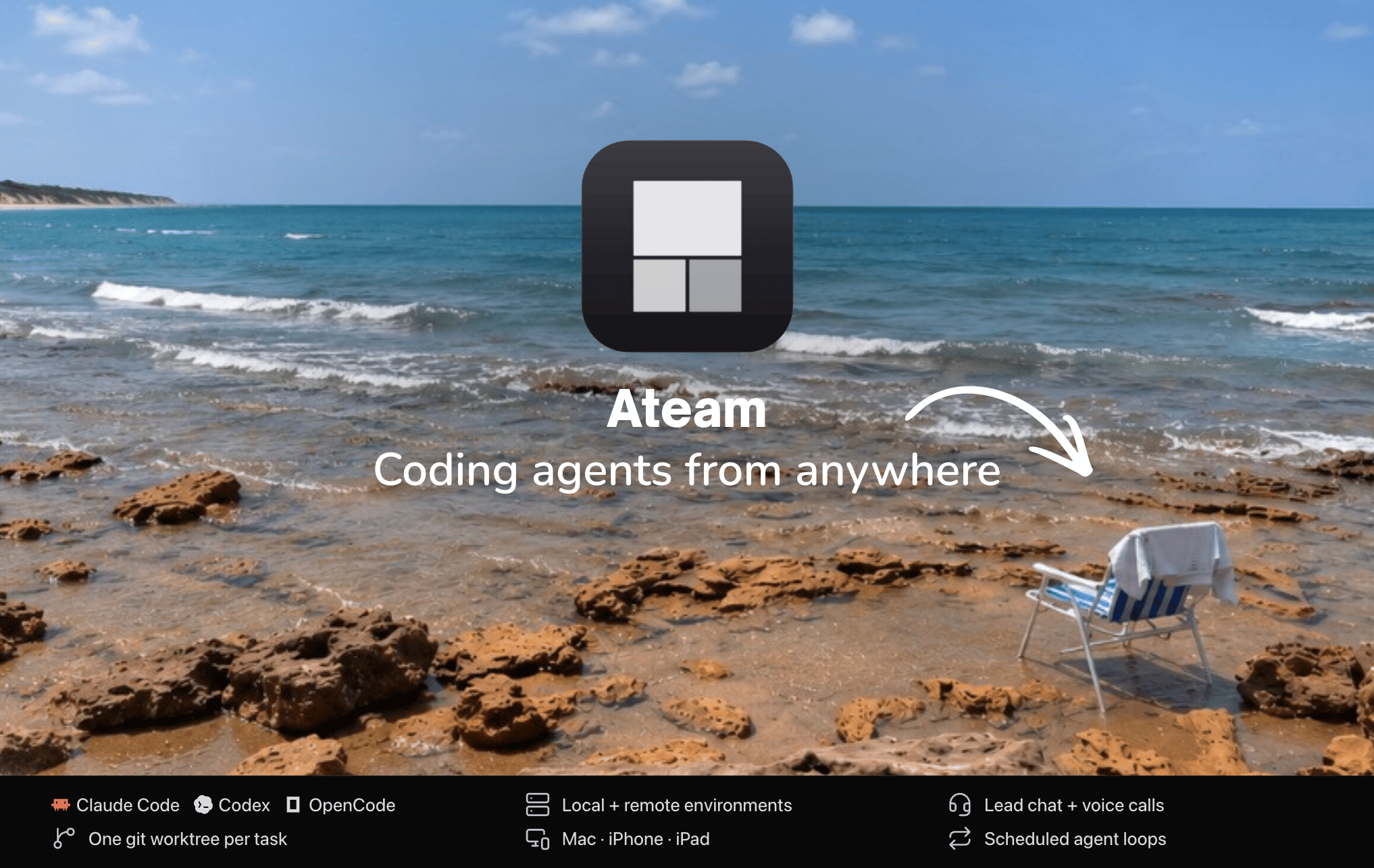
Orchestrate a crew of AI coding agents — Claude Code, OpenCode, and
Codex — each isolated in its own git worktree.


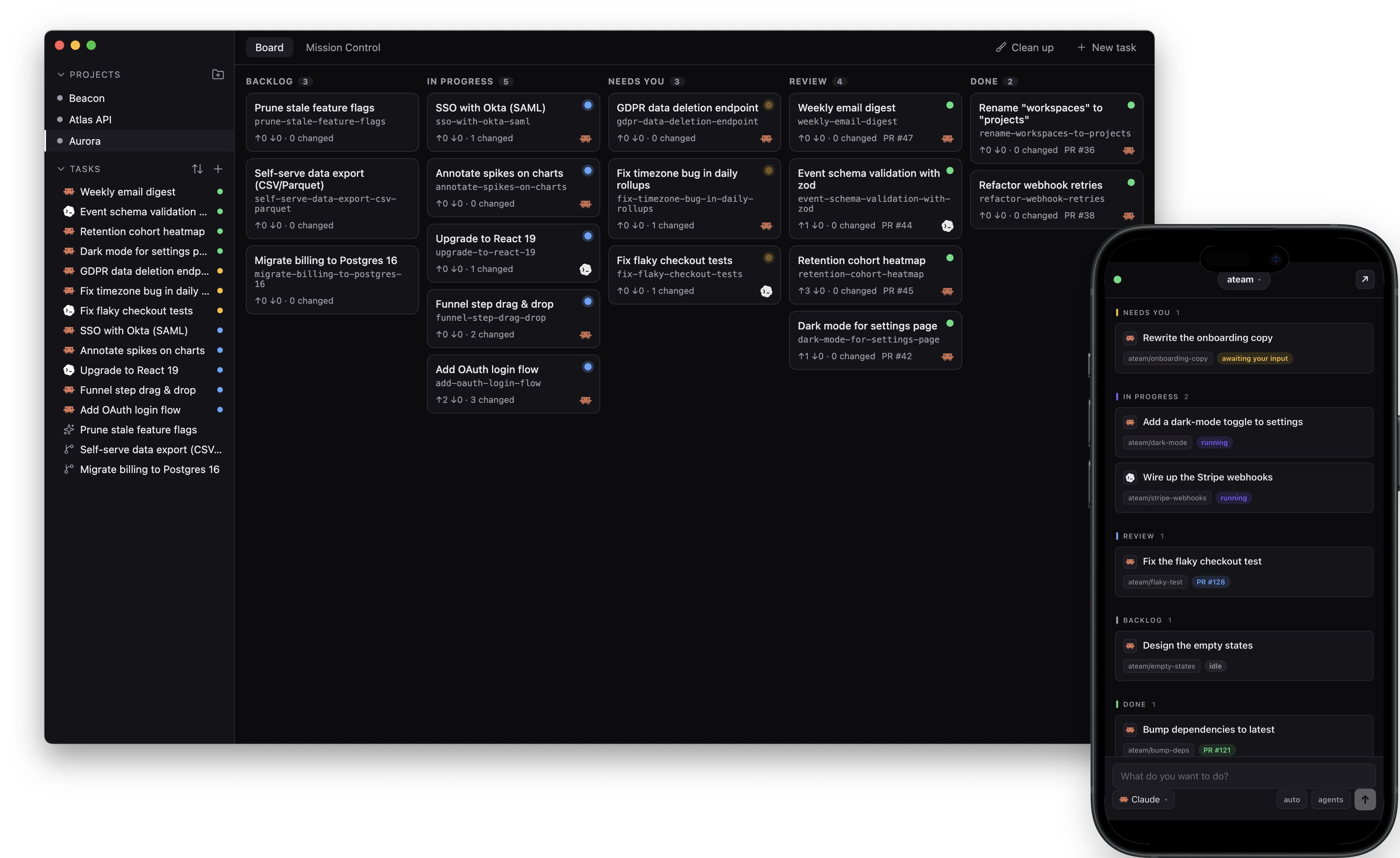
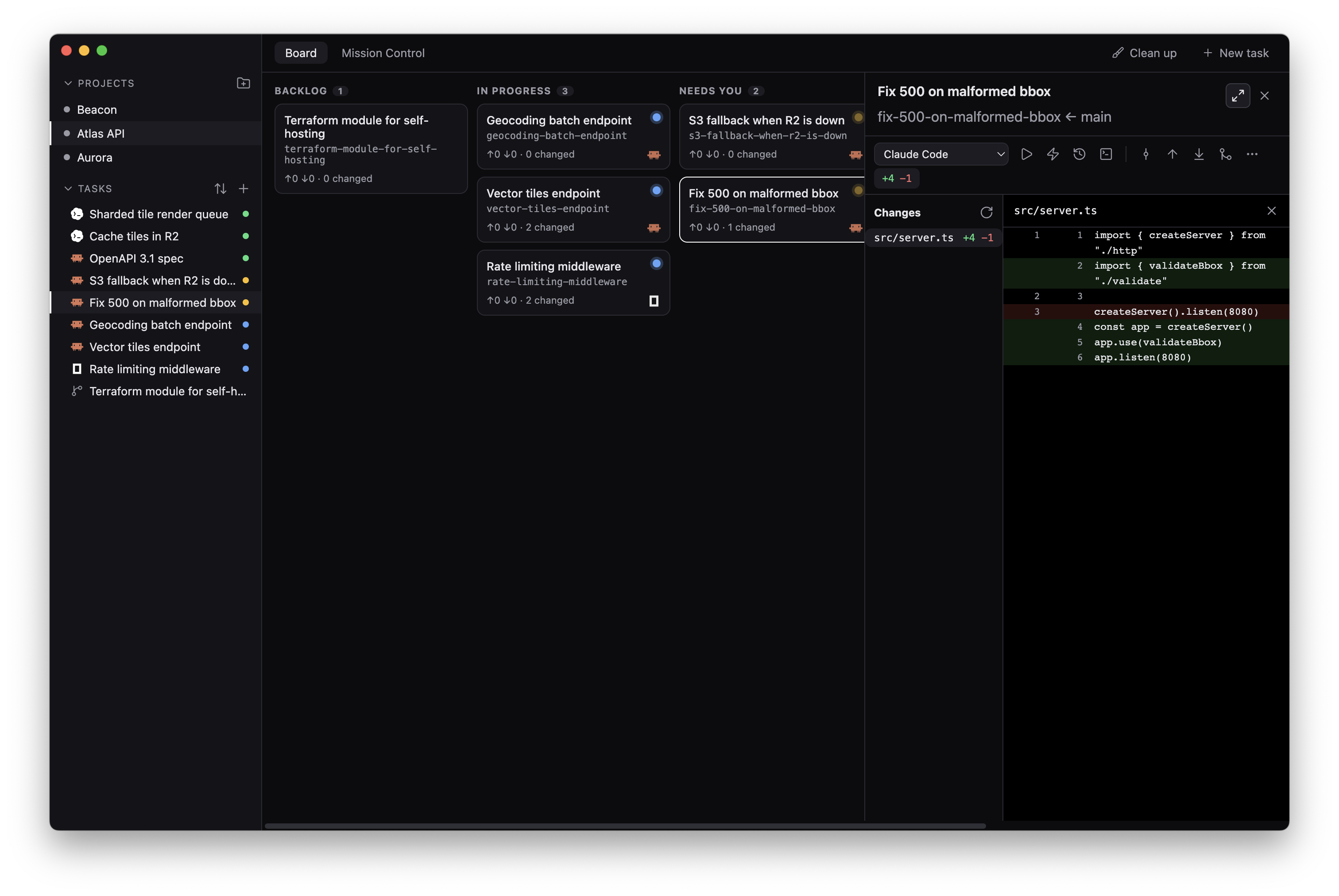
A lean desktop app to orchestrate a crew of AI coding agents
(Claude Code, OpenCode, Codex) in parallel — each isolated in its own **git
worktree**, organized by project, with built-in commit/push/pull/merge that
**never disturbs another worktree's checkout**, a Mission Control grid to
watch several agents work at once, and a Lead chat that drives them all from
one conversation.
Identity and all GitHub operations come from the `gh` CLI.
> **Install:** grab the signed & notarized DMG above (or any release from the
> [Releases](https://github.com/clawnify/ateam/releases) page), drag Ateam to
> Applications, and open it — no Gatekeeper warnings. Or run from source (see
> [Develop](#develop)).
## Requirements
- **Bun** ≥ 1.3 (`brew install oven-sh/bun/bun`)
- **git** ≥ 2.31, **gh** (authenticated: `gh auth status`)
- At least one agent CLI on PATH: `claude`, `opencode`, or `codex`
> Note: `bun install` rebuilds better-sqlite3 and node-pty for Electron on its
> own, via a `postinstall` hook in `apps/desktop`. You do not need a second
> command, and a fresh task worktree is runnable straight after installing.
>
> The hook is not optional bookkeeping. `bun install` fetches better-sqlite3 built
> for the host's Node ABI, which Electron cannot load; the rebuild replaces it with
> the arm64 Electron-ABI build.
>
> On Apple Silicon the hook also re-execs itself natively first. Bun runs lifecycle
> scripts with the first `bash` on `PATH`, and an x86_64-only bash (an Intel Homebrew
> in `/usr/local` is the usual source) makes the script and everything under it run
> under Rosetta, so `prebuild-install` resolves `process.arch` as x64 and fetches a
> `darwin-x64` binary. Worth fixing at the source too: macOS blames the app that owns
> the terminal for translated child processes, and Rosetta ends after macOS 27.
## Layout
```
packages/git-core Safe worktree + git engine (no Electron, fully unit-tested)
packages/db Local SQLite (Drizzle + better-sqlite3); bun:sqlite in tests
packages/agents Agent registry (claude/opencode/codex) + availability probe
packages/protocol Transport-agnostic RPC contract + client API (the shared wire)
packages/server Headless engine + daemon: run agents on a box over SSH / WebSocket
packages/panes Pane/split layout types
apps/desktop Electron + React app (main · preload · renderer)
apps/mobile iOS client (Expo / React Native) — drive a box from your phone
skills/ Claude Code skills for Ateam users (installable, see below)
```
## Bring your agent setup to a box
Use a dotfiles Git repository to carry your personal instructions and skills between
machines. The [agent dotfiles starter](examples/agent-dotfiles/) uses native Claude
Code, Codex, and OpenCode paths, with chezmoi handling repeatable installation and
conflicts. It also works outside Ateam.
In Ateam Go, open **Boxes → Settings → Dotfiles**. On desktop, open a box's
**Dotfiles** section. Enter your repository, preview the revision and install script,
then explicitly apply it to that box. Saving a default does not run an installer.
The starter includes a separate file-diff check; Ateam's Preview identifies the
revision and script, not every change an arbitrary script could make.
## Run your agents on a server
Ateam is local-first, but the same desktop app can point at a Linux box that runs the
agents while your Mac stays a thin UI — over SSH on your Tailscale network, with no
public ports. On the box:
```bash
curl -fsSL https://raw.githubusercontent.com/clawnify/ateam/main/packages/server/scripts/install.sh | bash
```
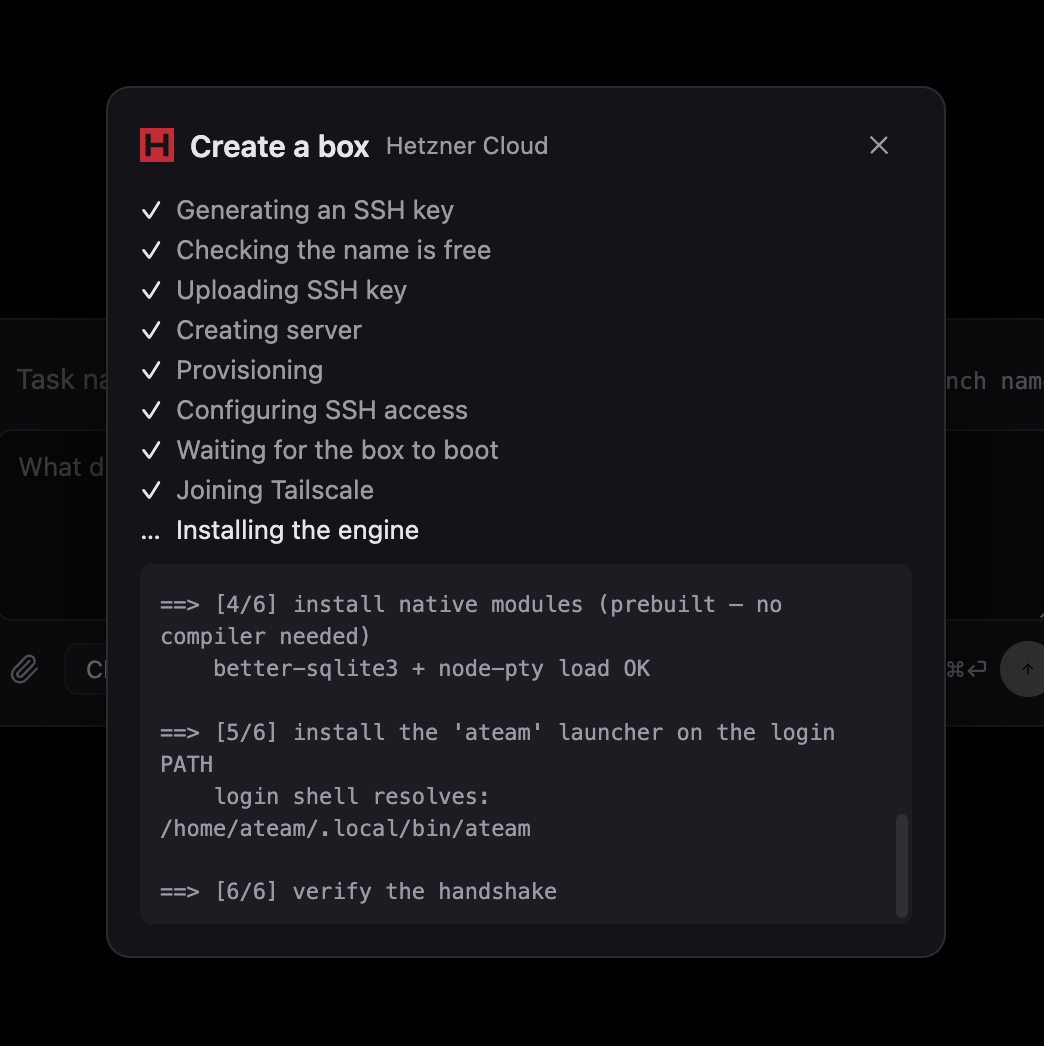
**No box yet?** Ateam can create one for you — pick a region and size, and it provisions
the VPS, generates the SSH key, joins Tailscale, and installs the engine, with no
provider console or terminal to touch. Or set the box up yourself with the recipes
below — via a **box provider** like [boxd](https://boxd.sh), or your own VPS.
Start to finish on a fresh Hetzner box
Create a **CX23** (x86) or **CAX11** (Arm64) — both 2 vCPU / 4 GB / 40 GB — on
Ubuntu, with your SSH key attached. Agents are what eat the RAM: roughly a gigabyte
per concurrent session, plus whatever your project's dev server and tests need.
**First, on your Mac:** install Tailscale ([tailscale.com/download](https://tailscale.com/download))
and sign in. The box and — if you use it — your phone sign into that same account;
that private network is what lets you close the server's public SSH port entirely.
**Then as `root` on the box,** make a user for the agents and join the same tailnet:
```bash
adduser --gecos "" you && usermod -aG sudo you
install -d -m 700 -o you -g you /home/you/.ssh
cp ~/.ssh/authorized_keys /home/you/.ssh/ && chown you:you /home/you/.ssh/authorized_keys
curl -fsSL https://tailscale.com/install.sh | sh && tailscale up # opens a sign-in URL
tailscale ip -4 # → 100.x.y.z
```
**Reconnect as that user over the tailnet** — `ssh you@100.x.y.z` — and only once
that works, close the public door. Allow the whole `tailscale0` interface, not just
port 22: `ufw`'s default input policy is DROP, so a port-22-only rule would block the
port the iOS app needs.
```bash
sudo ufw allow in on tailscale0 && sudo ufw deny 22 && sudo ufw enable
```
**Then set the box up for agents.** Ateam commits, pushes and opens PRs as this user,
so it needs a real git identity and a logged-in `gh`:
```bash
sudo apt install -y git gh
git config --global user.name "you" && git config --global user.email "you@example.com"
git config --global init.defaultBranch main
gh auth login # device code — works over SSH
curl -fsSL https://claude.ai/install.sh | bash # then run `claude` once to log in
curl -fsSL https://raw.githubusercontent.com/clawnify/ateam/main/packages/server/scripts/install.sh | bash
```
The installer ends with a readiness report — every line should be `[ok]`. Finally, on
your **Mac**, add the box to `~/.ssh/config` with `HostName 100.x.y.z` and pick it in
Ateam's connection switcher.
**Also using the iOS app?** The phone can't start a daemon the way the desktop does
over SSH, so install a service to keep one running:
```bash
export ATEAM_WS_ADDR=100.x.y.z:8787 # the box's OWN Tailscale IP
curl -fsSL https://raw.githubusercontent.com/clawnify/ateam/main/packages/server/scripts/install.sh | bash -s -- --service
```
Use a box provider — boxd (and services like it)
Some services create a box for you and write an SSH alias straight into your
`~/.ssh/config`. Ateam offers any alias it finds there, so a box provider needs **no
Ateam-side integration** — the recipe is always the same: create a box with the
provider's CLI, run Ateam's `install.sh` on it over that alias, sign into `gh` and your
agent, then pick the alias in the connection switcher.
Per-provider recipes live in [`docs/providers/`](docs/providers/) — what's
preinstalled, how git credentials work, whether the phone can reach it, and the
gotchas. **[boxd](https://boxd.sh)** is the first one
([recipe](docs/providers/boxd.md)); the same steps fit any service that registers an
ssh_config host, and [adding one](docs/providers/#adding-a-provider) is a docs-only PR.

Full walkthrough, from a freshly bought VPS to a connected board:
[`docs/online-ateam.md`](docs/online-ateam.md). If you use Claude Code, it can do the
whole setup with you:
```
/plugin marketplace add clawnify/ateam
/plugin install ateam@ateam
```
## Develop
```bash
bun install # also rebuilds natives for Electron
bun run --filter @ateam/desktop dev # launch the app (Electron + Vite HMR)
```
The renderer's dev port is derived from the worktree path (and bound to
`127.0.0.1`), so several worktrees can run `dev` side by side without serving
each other's code. The URL is printed on startup.
### Test the phone app on your own iPhone
Ateam Go has a native module, so it runs in a development build rather than
Expo Go. The dev build is a separate app, "Ateam Go Dev", that installs next to
the TestFlight / App Store one.
1. **Once, on a Mac** with the iPhone connected: `cd apps/mobile && npm run ios:dev`
builds and installs Ateam Go Dev with automatic signing.
2. **On the box where you edit**: `cd apps/mobile && npm run phone` starts Metro
and prints a URL. The URL only works over Tailscale, so put the phone on the
same tailnet as the box, then open Ateam Go Dev and enter that URL.
JavaScript changes reload in the app. Native changes (`apps/mobile/modules`, new
native packages, `app.json` plugins) need a new `npm run ios:dev` on the Mac.
## Test & typecheck
```bash
bun test # git-core + db
bun run typecheck # all packages
bun run --filter @ateam/desktop build # production bundle
```
## How the safe git model works
- One worktree per task, co-located at `/.ateam/worktrees/` (excluded
via `.git/info/exclude`, so it never pollutes the project's own status).
- **1 worktree : 1 branch** — we never `checkout`/`switch` a branch inside an
existing worktree. Every mutation is `git -C `-scoped.
- **Merge** goes through `gh pr merge` (remote-side, touches no local checkout),
then auto-updates local `main` safely: a direct ref fast-forward when `main`
isn't checked out anywhere, or `merge --ff-only` inside `main`'s own worktree
when it is — aborting rather than clobbering if `main` diverged.
## Status
Working: project registration (with optional `git init` for plain folders),
worktree-per-task lifecycle, commit/push/update/merge, a GitHub-style changes
view (aggregate diffstat → file list + side-by-side diffs; a change of 8 or
more files also reads by step, each with the agent's reason, and first the
changes its own account of the work never mentions), prompt-first task
composer (pick the agent and type the first instruction in one step; ⌘⏎ starts
the new task in the background and leaves you where you are, as does
long-pressing send on the phone, and ⇧⌘⏎ opens it) reused for extra sessions inside an
existing task, many terminals per task as tabs (agent
sessions or plain shells, side by side), agent spawning in PTYs (Claude Code,
OpenCode, Codex), hook-driven status → kanban columns with merged-PR detection
(each column lists its most recently active task first),
Mission Control grid (one tile per task, its sessions as read-only tabs; tiles
keep their own order, drag to swap them across pages, Sync to take the sidebar's;
an Auto layout that shapes each page to the grid's space, its tiles growing to
fill the page so no slot sits empty, and refits as they come and go or the
window resizes, so deleting a task closes its gap; each tile's +N -N opens its changes and diffs
in place of its terminal),
collapsible sidebar rail, image drag-drop & paste into
agent terminals, skills on each agent terminal's toolbar (a menu of every skill
that agent can invoke, read from its own skill folders on the machine it runs
on, plus pinned buttons seeded from the ones you type most, each marked with how
many times you already sent it in that terminal's conversation; a click puts
`/name`, or Codex's `$name`, in front of the prompt you are typing and leaves
Enter to you; "Add skill…" links a skill folder into `~/.claude/skills` and
`~/.agents/skills` so edits reach every agent), session search (the topbar box answers in a popover listing
matching tasks and the past sessions that discussed them, with an AI row that
finds a session from a description of the work, reading Claude Code / Codex /
OpenCode transcripts),
worktree cleanup (every worktree listed with the facts you decide on — age, PR
state, ahead/dirty counts — and the merged-clean-idle ones flagged as
recommended), idle-task archiving (an open task untouched for 30 days, set in
Settings, leaves the board, the phone and the agents' board tools but keeps its
worktree; any activity in it, or Unarchive in Clean up, brings it back), the
Lead chat (one conversation that reads the board on this Mac and every box,
briefs you on the latest tasks, proposes tasks and loops (the New task or New
loop dialog opens filled in, and nothing starts until you create it), messages
their agents and brings their replies back, with every task it names a chip
that opens it; it runs as
your own Claude Code, with your skills, plugins and MCP servers, and asks for
its permissions in the chat; it has its own tab, the first one and where Ateam
opens, or sits as a sidebar on the right beside the board; a project opened in its own window has a chat of its
own about that project, which can still read your other projects and asks you
before it messages one of their tasks; files you attach or paste there can go to a new task or
to a running one, copied to its box when it runs on one, up to 10 MB a file),
questions agents ask you with the `ask_user`
board tool (option cards with tradeoffs, or a checklist, answered from the
board, the task panel or the Lead chat), Claude Code's permission prompts
answered from Ateam (Allow, Always allow, Deny) as well as in the terminal
(tasks start with bypass permissions turned off, and any other default mode you
set still applies),
and so are its own questions (AskUserQuestion, one card per question),
agent pages (HTML an agent makes for you with `show_page`, such as a dashboard
or a comparison, drawn in a sandboxed frame; a question can carry one whose
buttons answer it), tasks and loops an agent proposes with `propose_task` and
`propose_loop` (the New task or New loop dialog opens filled in when you are in
that task, and its card waits in Needs You until you create or dismiss them;
the agent is not woken for your decision, but learns it when its next turn
starts, and can't propose a task you already created again),
task titles and summaries (a task you start without a name gets a short title
a few seconds in, once, so other agents never lose track of it; when its prompt
names nothing, such as a screenshot alone or "what's going on?", the title comes
from the agent's first reply instead, since that model never sees attached files; once a task's
agent has been quiet for a few minutes, a sentence or two on where it stands
shows under the open task's title, beside its full title when the pointer
rests on its sidebar row or board card for two seconds, and in the Lead's and
the agents' board tools; written by an OpenRouter or OpenAI model when you add that key in Settings, otherwise
by Claude Code, or turned off there),
board tools with nothing to install (every launch hands them to the agent, so
the Claude Code, Codex or OpenCode you already use gets them and its own config
is never touched; an agent that never loaded them, because an organization's
MCP policy dropped them, its CLI is too old, or it was started by hand in the
task's terminal, gets a note under the task's title saying why, and the Lead
says the same about itself in its chat),
and signed/notarized builds
with in-app auto-update. The git engine and db layer are unit-tested; the
Electron main process is boot-verified with native modules.
## Roadmap
- **Transcript → tasks** — paste a meeting transcript or a long task summary
and let Claude Code (headless, in the background) distribute it into tasks
automatically.
- Integrations (Linear / Slack / GitHub issues) with **no paywall** — exposed to
every agent via MCP, brokered through Composio/Arcade.
- Session-history continuity across worktrees ("fork session").
## Privacy
Local-first, no backend, no analytics: see **[PRIVACY.md](./PRIVACY.md)**.
## License
Dual-licensed: **[GPL-3.0-or-later](./LICENSE)** for open source use — or a
**commercial license** for organizations that can't comply with the GPL
(contact [Clawnify](https://github.com/clawnify)). © 2026 Clawnify