[](https://www.npmjs.com/package/dsh-taskboard)
[](https://github.com/cloader/dsh-taskboard/blob/main/LICENSE)
English | [简体中文](./README.md)
# dsh-taskboard
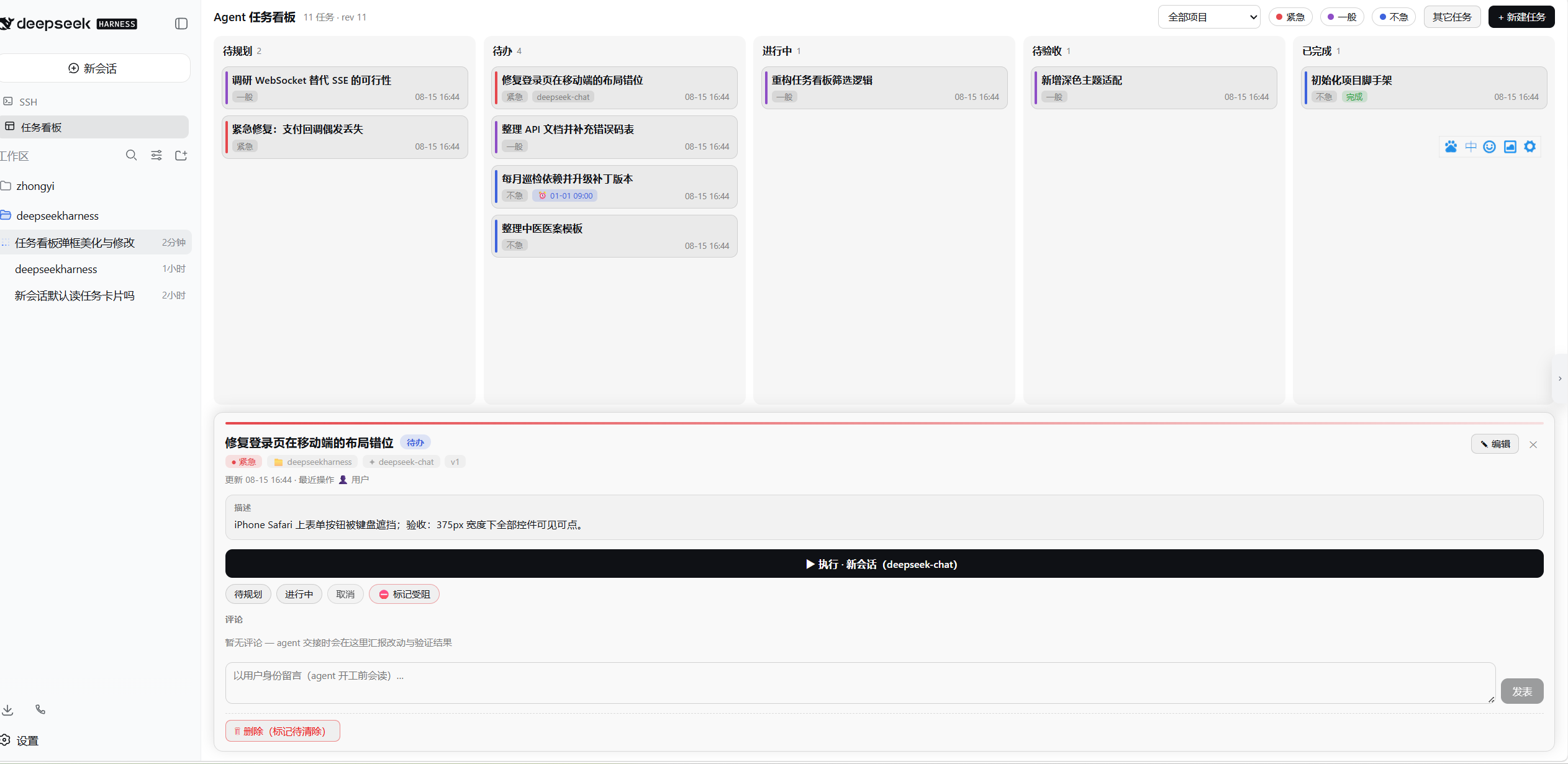
A **task board plugin for DeepSeek Harness**: humans create cards, agents claim and execute them, humans review and accept. Tasks live on projects (= workspaces), support per-task model & preset selection, and can run manually or on a cron schedule — full two-way collaboration from card to sign-off.
- **Closed loop**: human creates a card → agent claims & executes → structured hand-off report → human accepts (✓ done / ✗ send back with a reason)
- **10 `taskboard_*` agent tools** plus code-level protocol gates: agents can never move a task to *done*, held tasks cannot be snatched away, cross-project claims are rejected
- **Execution**: manual or cron-scheduled (host-side scheduling keeps firing with the browser closed); manual runs open a new session, scheduled runs reuse the same task's conversation, optionally pinned to a model and preset
- **Git worktree isolation**: each run works on its own worktree + dedicated task branch, one-click merge at acceptance; parallel multi-repo workspaces are mirrored whole (0.6.3); non-git projects fall back automatically
- **Efficient acceptance**: DoD acceptance checklists (agent checks items off with evidence), structured execution reports (summary / changed files / checks / artifacts / risks), in-board diff viewer
- **Live board**: SSE real-time refresh, five-column flow, persisted filters & sorting, JSON import/export, task templates
**Zero configuration**: install and it works — no tokens, no API keys, no extra services or databases.
## Screenshots
## Table of Contents
- [Prerequisites](#prerequisites)
- [Installation](#installation)
- [Quick Start](#quick-start)
- [Agent Tool Reference](#agent-tool-reference)
- [Features](#features)
- [Safety](#safety)
- [Configuration & Data](#configuration--data)
- [FAQ](#faq)
- [Development](#development)
- [Changelog](#changelog)
## Prerequisites
| Dependency | Requirement | Notes |
| --- | --- | --- |
| DeepSeek Harness | ≥ 0.1.1 | Requires the `dsh plugin` subcommand and the web profile |
| Node.js | ≥ 20 | Only needed when installing/building from the GitHub source |
| git | optional | Required for worktree isolation; falls back to running in place when missing |
## Installation
```bash
# One-command install from npm (prebuilt, no build approval — recommended)
dsh plugin --profile web add dsh-taskboard
# Or install from the GitHub source
dsh plugin --profile web add github:cloader/dsh-taskboard
```
After installing, **restart `dsh web` and refresh the page**: you should see a "Task Board" entry in the sidebar. No further configuration needed.
GitHub-source install stuck on prepare / allowBuilds?
Plugins installed from a git source go through a prepare script, and pnpm blocks it first — follow the error message and add the exact key to `allowBuilds` in your profile's `pnpm-workspace.yaml`, then retry. The npm package ships prebuilt artifacts and never hits this step.
Developer-mode install (edit code and see changes immediately)
```bash
git clone https://github.com/cloader/dsh-taskboard.git
cd dsh-taskboard
npm install && npm run build
dsh plugin --profile web add "link:/path/to/dsh-taskboard"
```
With a link install, rebuild via `npm run build` in the repo and refresh the page; host-side changes additionally require restarting `dsh web`.
Uninstall: `dsh plugin --profile web remove dsh-taskboard` (ledger data stays in the active data directory — see [Configuration & Data](#configuration--data)).
> Official `@deepseek-ai/dsh-*` packages belong in the profile's `bundles` list only — do not `plugin add` them into dependencies (avoids shadowed dual SDK instances).
## Quick Start
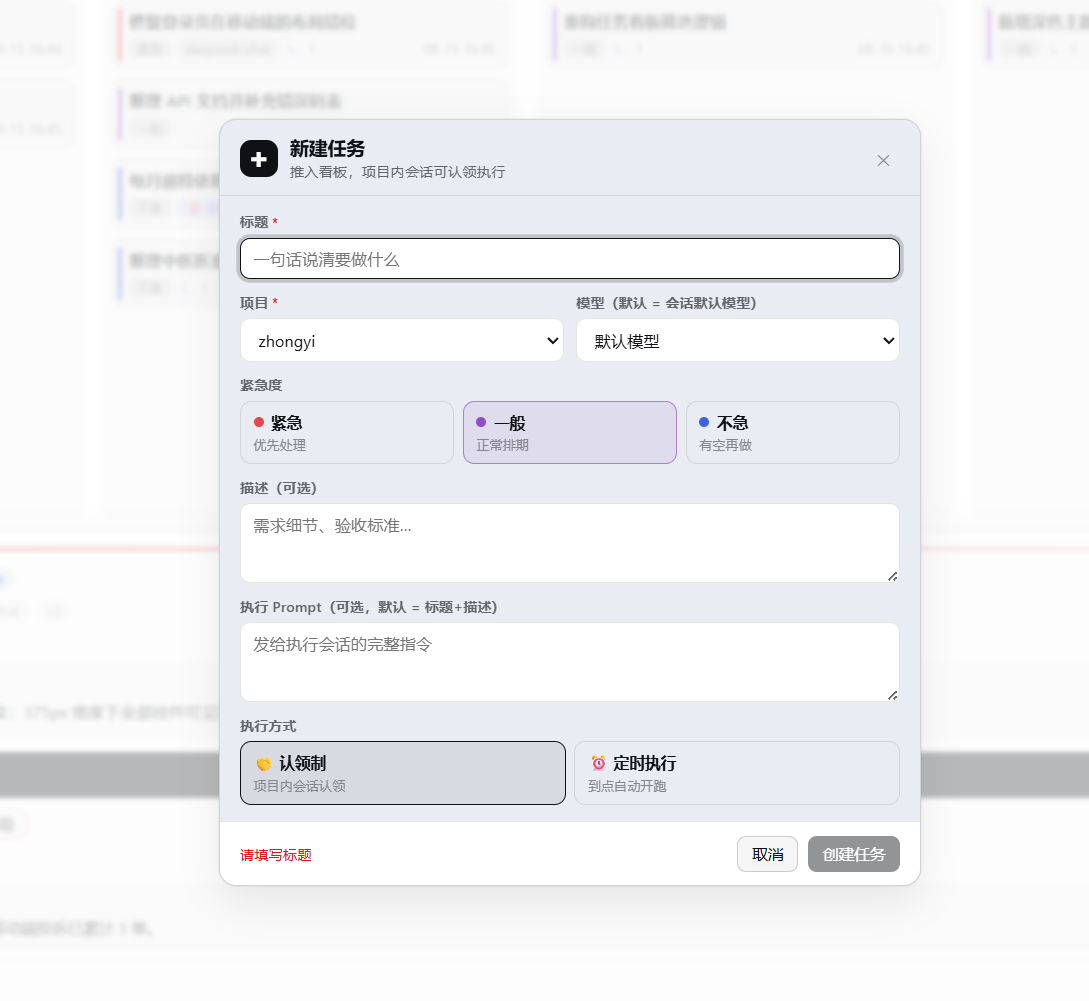
**Step 1 · Create a card**: click "+ New Task" in the board toolbar — pick a project, urgency, execution mode (claim / scheduled + cron), model and preset, Git isolation toggle, and an acceptance checklist; tick "⚡ Run now" to execute immediately.
**Step 2 · An agent executes it**, triggered any of three ways:
1. GUI "Run now" / "↻ Resume" buttons (detail panel or form)
2. Cron schedule (host-side — no browser required)
3. Ask any agent in any session to claim it with the `taskboard_*` tools: `pick up task t-xxxxx from the board and execute it`
**Step 3 · Human acceptance**: in the *In Review* column, "✓ Done" accepts in one click; "✗ Send back" returns it to *Todo* with an optional reason (agents read it before their next round).
A complete agent workflow (the protocol below is injected automatically by the plugin at execution start):
```text
You: execute board task t-ab12cd
agent:
taskboard_list # read the board: todo tasks in this project
taskboard_get t-ab12cd # requirements, comments, acceptance checklist
taskboard_move → in_progress # claim (code gate: rejects held / cross-project tasks)
……code & test……
taskboard_checklist check # tick checklist items one by one, with evidence notes
taskboard_execution_report # structured report: summary/files/checks/artifacts/risks
taskboard_comment_add # hand-off notes
taskboard_move → in_review # move to In Review
You: click ✓ Done in the In Review column # done belongs to humans only — agent calls are rejected by the code gate
```
## Agent Tool Reference
Available in any session. Project boundary: only sessions belonging to the task's project can claim or execute it.
| Tool | Purpose |
| --- | --- |
| `taskboard_list` | Read the board (filter by project / status / urgency; compact summaries) |
| `taskboard_get` | Full single-card read: description, prompt, comment thread, checklist, executions |
| `taskboard_comments` | List a task's comments (treated as the latest requirements — read before acting) |
| `taskboard_create` | Create a card (workspaceId, urgency, checklist, preset, isolation, schedule) |
| `taskboard_update` | Edit title / description / prompt / urgency / checklist (model & execution are read-only) |
| `taskboard_move` | Move a card: todo→in_progress→in_review (**done is unreachable**) |
| `taskboard_comment_add` | Append a comment (hand-offs, risks, progress) |
| `taskboard_delete` | Soft delete (purge available; running executions cannot be deleted) |
| `taskboard_checklist` | Acceptance checklist add / check (with evidence) / uncheck |
| `taskboard_execution_report` | Submit the structured execution report, attached to the current execution |
## Features
**Board collaboration**
- Five-column board (Backlog / Todo / In Progress / In Review / Done) + blocked markers, SSE real-time refresh
- Tasks belong to projects: claiming validates session ownership — no snatching across projects
- Three-color urgency (urgent red / normal purple / relaxed blue) with filtering and color bars; search (title / ID) and in-column sorting; filters and sorting persist
- Status-colored dots on column headers: backlog gray / todo blue / in-progress orange / in-review purple / done green / deleted red
- Create/edit modal: project, model (with reasoning effort), urgency, execution mode, cron with live validation & next-run preview, isolation toggle, checklist editor
- Detail panel: status transitions (*done* is human-only; completing with unchecked items asks for confirmation and shows the count), agent/user comment thread, execution history (newest first; session IDs open the execution session on click; deleted/archived targets get distinct notices), stop execution, worktree isolation block (branch / commits / change stats / merge & cleanup), execution report block, acceptance checklist block
- Quick actions on In Review cards: "✓ Done" one-click accept, "✗ Send back" returns to Todo with an optional reason agents read before starting
- **Image attachments (0.7.0)**: task descriptions and comments accept PNG/JPEG/GIF/WebP through file picker, paste, or drag and drop and insert Markdown automatically; task details show thumbnails with click-to-zoom lightbox previews. Images stay in the local data directory, capped at 5 MiB each
- **Two-column wide task form + slash completion (0.6.0)**: the create/edit modal goes two-column (core fields and execution config on the left, description and prompt on the right); typing `/` in the description/prompt pops command and skill completion (↑↓/Enter/Tab/Esc keyboard navigation; host-discovered items merge over the built-in list); Markdown images in description/prompt render as thumbnails with a click-to-zoom lightbox
- **Execution permission (0.6.0)**: per-task three-way execution permission (📁 workspace write / 🔒 read-only / ⚡ full access) picked in the form plus a default-permission board setting; permission badges on cards, the detail panel and the template list
- **Bilingual UI, zh/en (0.6.0)**: every piece of board copy follows DSH's "Settings - General - Language" switch live (no reload); the preference is stored by DSH itself (locale.preference in settings.yaml) and the plugin adds no settings of its own; environments without the DSH locale service fall back to the browser language
- **External session auto-sync (0.5.5)**: with "🔄 auto-capture sessions" enabled in board settings, sessions created directly in a workspace spawn task cards automatically — the project is resolved from the session's cwd and the first user message becomes the title/description; running sessions enter In Progress with the session bound (one-click jump works), successful turns settle into In Review, failures fall back to Todo; subagent sessions are filtered too since 0.6.0; off by default
- **One-click session jump (0.5.4)**: task cards get a "🤖 sessionId ↗" button, the detail panel a "🤖 Jump to session" button, and the holder chip is clickable too — straight to the running (or most recent) execution's session (the board collapses over it); archived / deleted / unavailable sessions each get a precise notice
- **Remember the last model (0.5.4)**: the new-task form brings back the last chosen model and reasoning effort (template prefill and editing are unaffected)
- **DoD acceptance checklists (0.4.0)**: define acceptance criteria at creation (≤30 items); agents add/tick items via `taskboard_checklist` (with evidence notes); users tick them directly in the detail panel; unchecked items glow red while In Review and the card shows a "☑ n/m" badge (red until all ticked); checklist editing manages the whole group in the form (tick states and evidence preserved)
- **Structured execution reports (0.4.0)**: agents finish with `taskboard_execution_report` (summary / changed files / checks / artifacts / remaining risks), auto-attached to the current execution; rendered side-by-side in the In Review detail panel; the opening protocol makes the order explicit (report → comment → move to In Review)
- **JSON import (0.4.0)**: "⬆ Import" in the toolbar picks a backup file → dry-run preview (added / overwritten / invalid breakdown) → merge (upsert by id) or full replace (auto-backup of the current ledger first + double confirmation); JSON exports restore directly in the same format
- **Task templates (0.4.0)**: "+ New Task ▼" dropdown (blank / built-in New feature · Bug fix · Release check · Routine inspection / manage templates) pre-fills the form (title / description / prompt / urgency / schedule / isolation / preset / checklist); "⌗ Save as template" in the task detail captures your own presets; templates live beside the ledger in the active data directory, rename/delete in the manager dialog
- **Diff viewer (0.4.0)**: clicking a commit row or an uncommitted modified-file row in the isolation block expands a diff in-board (`git show` for commits, `git diff` for files, capped at 128 KB / 2000 lines with truncation noted); falls back to the main repo when the worktree is gone (commits and baseline-range diffs only)
**Agent tools (`taskboard_*`)**
- 10 tools: board / create / edit / move / comments / soft delete / checklist / execution report — usable from any session
- Code-level protocol gates: agents can never reach *done* (not even with every checklist item ticked); held tasks cannot be preempted; model/execution fields are read-only to agents
**Execution**
- Manual runs open a new session. The first cron run creates a conversation; subsequent triggers reuse that task's previous scheduled session and context, restoring its persisted history after a DSH restart. Each run still has a separate result/report and receives the current task content and hand-off protocol. Manual runs do not replace the scheduled conversation. A deleted/archived session or changed project, model, preset, permission or isolation configuration starts a new conversation. Busy, locked or unrestorable sessions fall back to a brand-new conversation so the scheduled run still proceeds. Pre-upgrade records and imported tasks start a new conversation on their first scheduled run. Session reuse does not change Git worktree preparation; the current run's instructions define the working directory and state.
- **Per-task presets (0.3.3)**: an "execution mode (preset)" dropdown in the create/edit form — execution sessions are composed from that preset (tool sets and persona come from it, matching how the GUI composes new sessions); defaults to the deployment default preset, or pick "follow deployment default"; a broken preset fails the execution outright and records why in the execution history (no half-composed sessions); changeable anytime, effective next round
- **Git worktree isolated execution (0.3.0)**: per-task toggle (since 0.5.0 the default for newly created tasks comes from Board Settings; factory default runs in place). Every execution happens on a dedicated worktree at `/.dsh-worktrees/`, branch `task/+<taskId>` (fixed after first creation; renaming doesn't rename branches). The executing session stays rooted at the project directory (grouping, tools, and the file sandbox fully available — DSH requires session cwd === workspace root, fixed in 0.3.2), and the worktree path plus boundary rules are spelled out in the opening instructions. Settlement collects commit lists / uncommitted-changes warnings / change stats automatically. Non-git projects or missing git degrade gracefully to in-place execution (the reason is recorded; the ledger and execution flow never fail because of git). At acceptance: one-click `--no-ff` merge into the main working tree (dirty tree / conflicts reported verbatim, never auto-resolved), worktree deletion (refused with uncommitted changes), optional branch deletion. "↻ Resume" continues on the existing worktree/branch (previous commits and edits kept)
- **Multi-repo mirror isolation (0.6.3)**: when a workspace holds several parallel git repositories (a root repo plus nested independent ones), worktree mode upgrades into a whole-workspace task mirror — a bounded scan discovers every repo (depth ≤3, capped at 8, 60s cache; submodule / linked-worktree shapes are skipped), each repo gets its own worktree on the same task branch mounted at its relative path under `<project>/.dsh-worktrees/<taskId>/`; the session framing lists every repo's mirror path and branch and marks un-mirrored repos do-not-touch; commit evidence, diff viewing (`?repo=`) and merging (per-repo `--no-ff`, one conflict never blocking the others, per-repo summaries) all work per repo; mirror cleanup aggregates dirty checks across all repo worktrees and removes children before the root; the new `branches` / `repos` record fields are purely additive — single-repo behavior and old data are untouched; container workspaces whose root repo tracks sub-repos as gitlinks (embedded repos) are fully supported too — the structural noise nested child mirrors produce in the root mirror's status (untracked directories / gitlink drift) is exempted automatically from evidence collection, merge clean-checks, and mirror removal; the create-task form shows an "mirrors N repos" note on multi-repo workspaces, and pure-container workspaces (root not a repo, parallel sub-repos only) can pick worktree isolation too
- **Board settings (0.5.0)**: "🛠 Settings" in the toolbar — choose how new tasks execute by default (🌿 Worktree isolation / 📁 run in place; factory default is the latter). Saving applies to newly created tasks; later changes never affect existing ones
> Worktree isolation is a collaboration convention, not a sandbox: execution sessions hold full tool permissions, isolation rests on the branch convention, and it is not suitable for running untrusted code.
- Host-side scheduling: fires with the browser closed; missed windows are skipped, never replayed
- Optimistic concurrency (ifVersion) + full attribution (who changed what, which session executed)
- ⚙ Health diagnostics: ledger sanity checks + orphaned worktrees (present on disk but unowned in the ledger) with one-click cleanup
## Safety
- **Acceptance authority belongs to humans**: agent calls moving a task to *done* are rejected by the code-level protocol gate (a prompt suggestion, not); held tasks cannot be preempted; cross-project claims are rejected.
- **Worktree isolation is a convention, not a sandbox**: execution sessions have full tool permissions; isolation relies on the branch convention and is unsuitable for untrusted code.
- **Local data**: the ledger, templates, and image attachments remain local, and Board Settings can migrate their data directory; nothing is sent anywhere and no tokens / API keys are required.
## Configuration & Data
Works out of the box. The complete configuration surface:
| Environment variable | Default | Description |
| --- | --- | --- |
| `DSH_TASKBOARD_MAX_CONCURRENT` | `3` | Global cap on concurrently executing sessions |
| `DSH_HOME` | `~/.dsh` | DSH home, the default data directory and the fixed location-pointer directory |
| `ATB_TRACE` | unset | With `ATB_TRACE=1` the host prints tool-call traces (debugging) |
The data directory defaults to `DSH_HOME` and can be validated and migrated under "🛠 Settings → Data storage location". All three data items always move together; uninstalling the plugin keeps them.
| File | Contents |
| --- | --- |
| `dsh-taskboard.json` | Task ledger (all tasks / executions / comments) |
| `dsh-taskboard-templates.json` | Task templates |
| `dsh-taskboard-assets/` | Image attachments (deduplicated by content hash) |
| `dsh-taskboard.json.backup-<timestamp>` | Automatic backup taken before a full-replace import |
| `DSH_HOME/dsh-taskboard-storage.json` | Location pointer for a custom data directory; always remains under DSH home |
| `<project>/.dsh-worktrees/<taskId>/` | Per-task execution worktree (multi-repo workspaces: a whole-workspace mirror with one sub-worktree per repo) |
Use "⬇ JSON" in the toolbar to back up the ledger, or export the task list as CSV ("⬇ Export", BOM included, opens straight in Excel). Images are not embedded in JSON; for a complete backup, copy `dsh-taskboard-assets/` from the data directory shown in Settings.
## FAQ
**No "Task Board" entry in the sidebar?**
Refresh the page. Still nothing? Confirm the plugin is installed in the current profile and restart `dsh web` (the host half loads at process start). All three shell generations are supported: `data-pane` (dev), hashed class names (official layout, since 0.4.2), and the DSH Desktop non-compat extended frame (since 0.5.2).
**Where is task data stored? How do I back it up?**
See [Configuration & Data](#configuration--data). "⬇ JSON" exports and restores the ledger; image attachments also require a backup of the `dsh-taskboard-assets/` folder.
**Do scheduled tasks still fire when the browser is closed?**
Yes. Scheduling lives in the host process and is browser-independent; missed windows are skipped, not replayed.
**My project isn't a git repo — does it still work?**
Yes. Worktree isolation degrades automatically to in-place execution with the reason recorded in the execution history; everything else is unaffected.
**How do multiple projects cooperate?**
Tasks attach to projects (= DSH workspaces). Claiming validates session ownership: only sessions inside the task's project can claim/execute it — no cross-project snatching.
**Can an agent mark a task "Done" itself?**
No. That is a code-level protocol gate (not a prompt convention): `taskboard_move` calls targeting *done* are rejected outright; acceptance is always performed by a human on the board.
**GitHub-source install blocked at prepare?**
That's pnpm build authorization — add the key printed in the error to `allowBuilds` in the profile's `pnpm-workspace.yaml` and retry; or install from npm instead (prebuilt, no such step).
**Board toolbar's right-side buttons covered when dsh-better-sidebar is installed?**
Fixed since 0.6.5 with automatic yielding: while better-sidebar's right panel is collapsed, its persistent corner cluster ("expand bottom panel" / "expand sidebar") occupies the top-right 10-70px of the viewport; the active board now reserves that strip on the toolbar's right side (mirroring better-sidebar's own yield contract for DSH's native session header), so they never overlap at any window width. No effect when better-sidebar is absent or its panel is open ([#19](https://github.com/cloader/dsh-taskboard/issues/19)).
**Windows DSH Desktop caption controls overlap the board toolbar?**
The 0.6.6 fix reserves space below the native caption controls based on the board's actual position in the viewport. Layouts with a separate titlebar keep their normal spacing; window resizing and layout changes trigger recalculation. Verified on Windows Desktop ([#20 comment](https://github.com/cloader/dsh-taskboard/issues/20#issuecomment-5597498727)).
**DoD checkboxes take up the edit row and push the text input out?**
0.6.6 excludes checkboxes from the modal's full-width input styles, restoring the checkbox's 15px width and the text input area ([#20](https://github.com/cloader/dsh-taskboard/issues/20)).
## Development
```bash
git clone https://github.com/cloader/dsh-taskboard.git
cd dsh-taskboard
npm install && npm run build # dual build: host ESM + client CJS
npm test # full vitest suite (including real-git mirror integration tests)
node tests/manual-git-e2e.mjs # real-git end-to-end manual test (full worktree chain + resume + diff viewer)
node scripts/screenshot.mjs # regenerate img/ screenshots (needs local Edge)
```
## Changelog
### 0.7.2
**New features:**
- **Scheduled session reuse ([#26](https://github.com/cloader/dsh-taskboard/issues/26))**: the first cron run creates a conversation; subsequent triggers resume that task's previous scheduled session and context, restoring persisted history after a DSH restart instead of spawning new sessions daily. Manual runs still open fresh sessions. Changed project, model, preset, permission or isolation configuration starts a compatible new conversation; busy, locked, corrupt or unrestorable sessions fall back to a new one so the scheduled run still proceeds. Each run keeps separate records and reports.
**Fixes:**
- **Settlement and hand-off fixes for reused sessions**: failure settlement targets the exact execution by ID; hand-off comment detection filters by time so historical comments no longer count as the current hand-off; a cancel request wins over an uncommitted idle settlement.
### 0.7.1
**Fixes:**
- **Migration success feedback**: a successful data-directory migration now shows a green success notice (with the new path) in the storage section; old-data cleanup warnings render beneath it as warnings instead of occupying the global error banner.
### 0.7.0
**New features:**
- **Configurable data directory**: Board Settings can validate and migrate the storage directory. `dsh-taskboard.json`, `dsh-taskboard-templates.json`, and `dsh-taskboard-assets/` always move together; migration copies and verifies everything before switching, and failures leave the original data active.
- **Insert images in task descriptions and comments ([#25](https://github.com/cloader/dsh-taskboard/issues/25))**: choose, paste, or drag and drop PNG/JPEG/GIF/WebP; Markdown is inserted automatically and task details render thumbnails with lightbox previews. Images are deduplicated locally by content hash, while the ledger and SSE store short URLs only.
- DSH development dependencies move to the 0.1.5-rc.2 line (`@deepseek-ai/cordis` 4.0.2, `@deepseek-ai/schemastery` 3.18.2), verified against DSH 0.1.5-rc.1.
**Fixes:**
- **Model prefix-cache invalidation ([#24](https://github.com/cloader/dsh-taskboard/issues/24))** — fixed, improving cache hit rates: the protocol and all ten `taskboard_*` tools register synchronously during plugin mount, and later workspace/agent startup or reload no longer changes the tool definitions. Calls return `taskboard_not_ready` while dependencies are unavailable. Tool execution waits for the shared initial ledger load and tool cleanup is separated from runtime-service lifecycles.
> 📜 For the complete history of earlier versions, see [changelog.md](changelog.md).