Vue 2/3 一体通用 JSON 编辑 & 预览 & 格式化 & 校验工具
English | 简体中文













## 特性
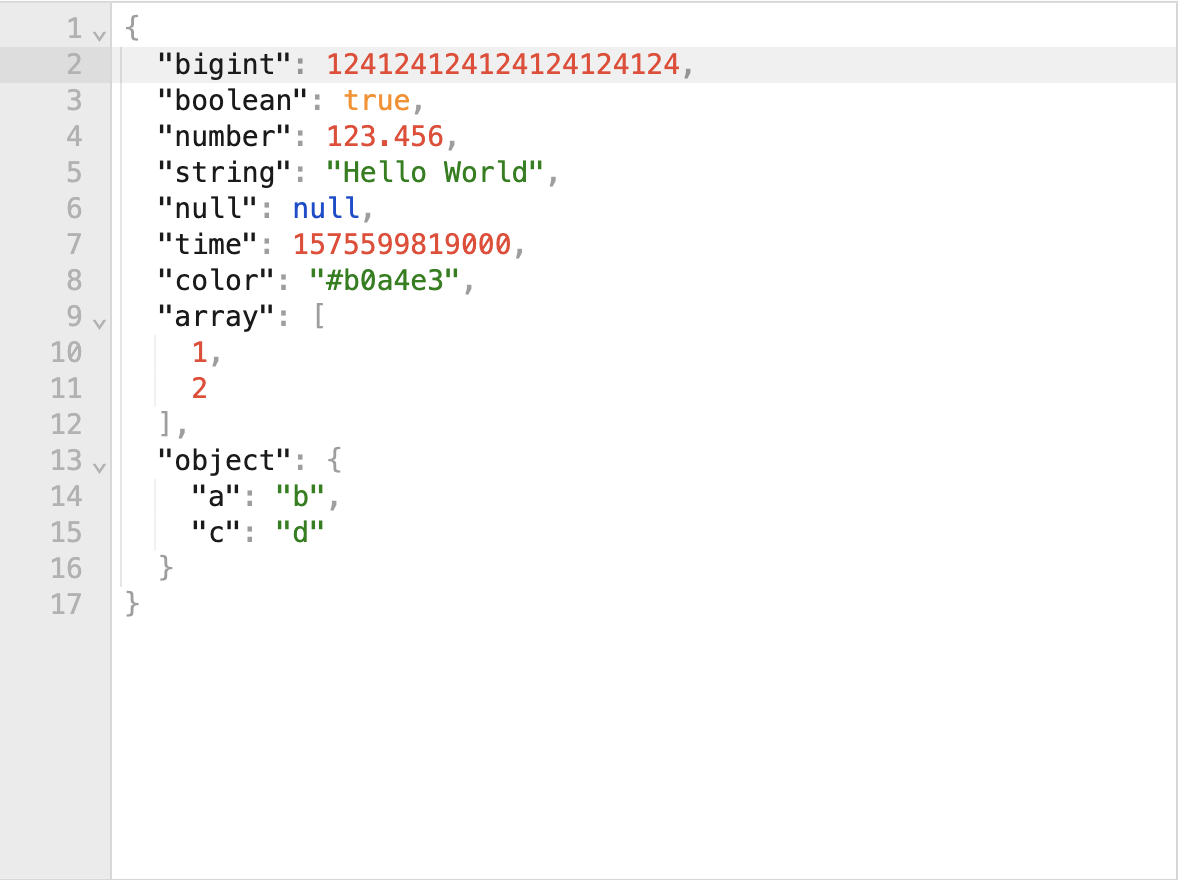
- 🚀 高性能
- 支持高达 512 MB 的大型 JSON 文档
- 反序列化默认使用 [destr](https://github.com/unjs/destr),比 `JSON.parse` 快达 35.96 倍
- 💪 强力
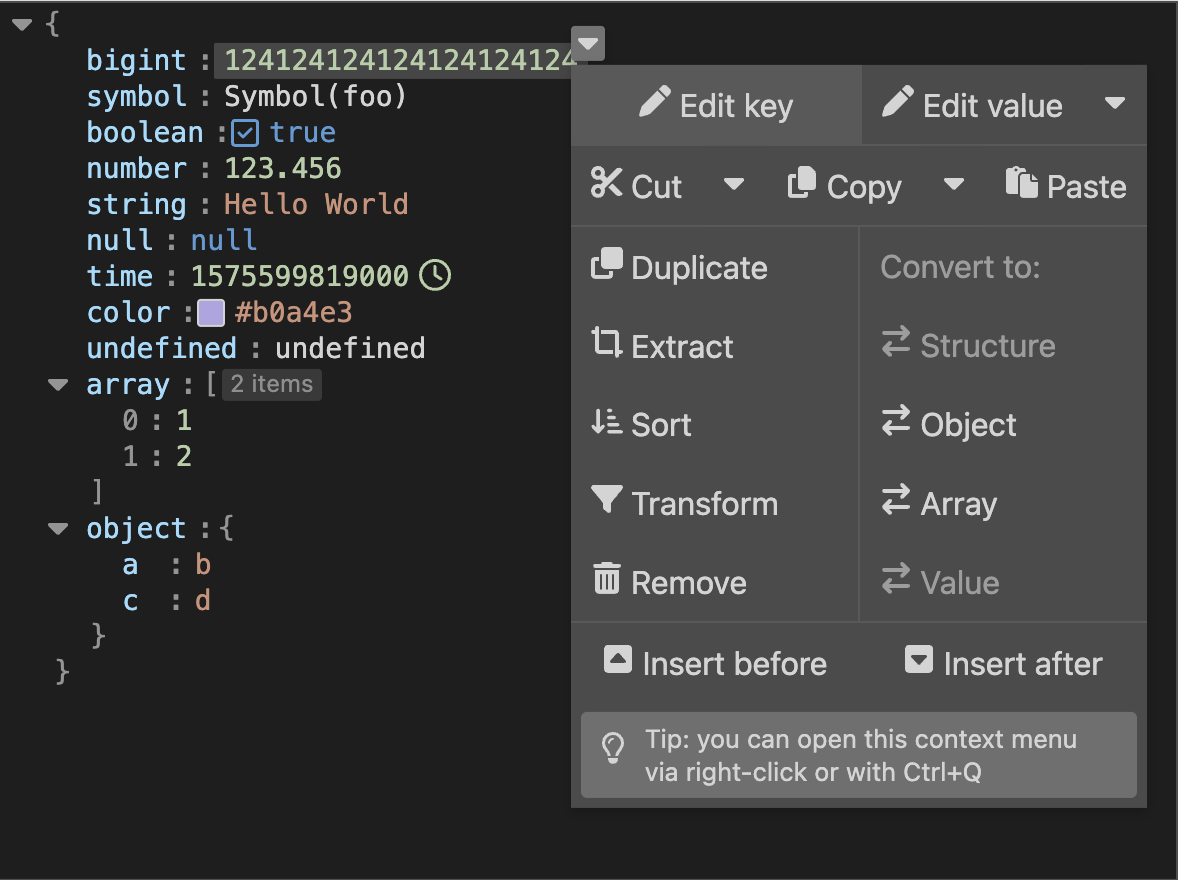
- 预览、编辑、格式化、校验、压缩、排序、查询、过滤、转换、修复、高亮 JSON
- 7 种原始数据类型包括 [BigInt](#bigint) 和 `Symbol`
- 3 种编辑模式:文本模式 & 树形模式 & 表格模式
- 2 种主题:浅色主题 & 深色主题
- 双向绑定:[parsed 或 stringified JSON](#parsed-json-vs-stringified-json)
- 🤸 灵活
- Vue 2.6/2.7/3 一体通用
- 支持 SSR,Nuxt 2/3/4 一体通用
- 支持 Vite,Vue CLI,webpack,CDN...
- 支持微前端
- 支持 PC 端 & 移动端
- 局部注册并传参,或全局注册并传参 ([vue-global-config](https://github.com/cloydlau/vue-global-config) 提供技术支持)
## 案例
> [!Important]
>
> json-editor-vue 已过[三百万下载](https://npm.chart.dev/json-editor-vue):
 >
> 与 Star 数量是天上地下的差别:
>
> 与 Star 数量是天上地下的差别: >
> 如有帮助,请考虑[点亮一下 ⭐](https://github.com/cloydlau/json-editor-vue) 或[买一杯咖啡](#捐赠)以支持我们的长期维护工作:
>
> 如有帮助,请考虑[点亮一下 ⭐](https://github.com/cloydlau/json-editor-vue) 或[买一杯咖啡](#捐赠)以支持我们的长期维护工作:
## 安装
### Vue 3
```shell
npm i json-editor-vue
```
#### 局部注册
```vue
```
#### 全局注册
```ts
import JsonEditorVue from 'json-editor-vue'
import { createApp } from 'vue'
createApp()
.use(JsonEditorVue, {
// 全局 props & attrs(单向数据流)
})
.mount('#app')
```
#### CDN + ESM
```html
```
#### CDN + IIFE
> [!Warning]
>
> 暂不支持 (vanilla-jsoneditor 不提供 IIFE 或 UMD 导出),
>
> 如有需要请在[这里](https://github.com/josdejong/svelte-jsoneditor/discussions/196)留言
```html
```
### Vue 2.7
```shell
npm i json-editor-vue
```
#### 局部注册
```vue
```
#### 全局注册
```ts
import JsonEditorVue from 'json-editor-vue'
import Vue from 'vue'
Vue.use(JsonEditorVue, {
// 全局 props & attrs(单向数据流)
})
```
#### CDN + ESM
```html
```
#### CDN + IIFE
> [!Warning]
>
> 暂不支持 (vanilla-jsoneditor 不提供 IIFE 或 UMD 导出),
>
> 如有需要请在[这里](https://github.com/josdejong/svelte-jsoneditor/discussions/196)留言
```html
```
### Vue 2.6 或更早版本
```shell
npm i @vue/composition-api json-editor-vue
```
#### 局部注册
```vue
```
#### 全局注册
```ts
import VCA from '@vue/composition-api'
import JsonEditorVue from 'json-editor-vue'
import Vue from 'vue'
Vue.use(VCA)
Vue.use(JsonEditorVue, {
// 全局 props & attrs(单向数据流)
})
```
#### CDN + ESM
```html
```
#### CDN + IIFE
> [!Warning]
>
> 暂不支持 (vanilla-jsoneditor 不提供 IIFE 或 UMD 导出),
>
> 如有需要请在[这里](https://github.com/josdejong/svelte-jsoneditor/discussions/196)留言
```html
```
### Nuxt 3
```shell
npm i json-editor-vue
```
#### 局部注册
```vue
```
```vue
```
#### 全局注册为 Module
```ts
// nuxt.config.ts
export default defineNuxtConfig({
modules: ['json-editor-vue/nuxt'],
})
```
```vue
```
#### 全局注册为 Plugin
```ts
// ~/plugins/JsonEditorVue.client.ts
import JsonEditorVue from 'json-editor-vue'
export default defineNuxtPlugin((nuxtApp) => {
nuxtApp.vueApp.use(JsonEditorVue, {
// 全局 props & attrs(单向数据流)
})
})
```
```vue
```
### Nuxt 2 + Vue 2.7
```shell
npm i json-editor-vue
```
#### 局部注册
```ts
// nuxt.config.js
export default {
build: {
// Vite ≥4 (Rollup ≥3) 默认的编译目标为 ES2020
// 所以在 webpack 4 中需要对 Vite ≥4 打包的依赖进行转译
transpile: ['json-editor-vue'],
extend(config) {
// 让 webpack 识别 `.mjs` 文件
config.module.rules.push({
test: /\.mjs$/,
include: /node_modules/,
type: 'javascript/auto',
})
},
},
}
```
```vue
```
#### 全局注册
```ts
// nuxt.config.js
export default {
plugins: ['~/plugins/JsonEditorVue.client'],
build: {
// Vite ≥4 (Rollup ≥3) 默认的编译目标为 ES2020
// 所以在 webpack 4 中需要对 Vite ≥4 打包的依赖进行转译
transpile: ['json-editor-vue'],
extend(config) {
// 让 webpack 识别 `.mjs` 文件
config.module.rules.push({
test: /\.mjs$/,
include: /node_modules/,
type: 'javascript/auto',
})
},
},
}
```
```ts
// ~/plugins/JsonEditorVue.client.js
import JsonEditorVue from 'json-editor-vue'
import Vue from 'vue'
Vue.use(JsonEditorVue, {
// 全局 props & attrs(单向数据流)
})
```
```vue
```
### Nuxt 2 + Vue 2.6 或更早版本
```shell
npm i @vue/composition-api json-editor-vue
```
#### 局部注册
```ts
// nuxt.config.js
export default {
build: {
// Vite ≥4 (Rollup ≥3) 默认的编译目标为 ES2020
// 所以在 webpack 4 中需要对 Vite ≥4 打包的依赖进行转译
transpile: ['json-editor-vue'],
extend(config) {
// 让 webpack 识别 `.mjs` 文件
config.module.rules.push({
test: /\.mjs$/,
include: /node_modules/,
type: 'javascript/auto',
})
},
},
}
```
```vue
```
#### 全局注册
```ts
// nuxt.config.js
export default {
plugins: ['~/plugins/JsonEditorVue.client'],
build: {
// Vite ≥4 (Rollup ≥3) 默认的编译目标为 ES2020
// 所以在 webpack 4 中需要对 Vite ≥4 打包的依赖进行转译
transpile: ['json-editor-vue'],
extend(config) {
// 让 webpack 识别 `.mjs` 文件
config.module.rules.push({
test: /\.mjs$/,
include: /node_modules/,
type: 'javascript/auto',
})
},
},
}
```
```ts
// ~/plugins/JsonEditorVue.client.js
import VCA from '@vue/composition-api'
import JsonEditorVue from 'json-editor-vue'
import Vue from 'vue'
Vue.use(VCA)
Vue.use(JsonEditorVue, {
// 全局 props & attrs(单向数据流)
})
```
```vue
```
### Vite
开箱即用
### Vue CLI 5 (webpack 5)
开箱即用
### Vue CLI 4 (webpack 4)
≥ v4.5.15
```js
// vue.config.js
module.exports = {
// Vite ≥4 (Rollup ≥3) 默认的编译目标为 ES2020
// 所以在 webpack 4 中需要对 Vite ≥4 打包的依赖进行转译
transpileDependencies: ['json-editor-vue'],
}
```
< v4.5.15
```js
// vue.config.js
module.exports = {
// Vite ≥4 (Rollup ≥3) 默认的编译目标为 ES2020
// 所以在 webpack 4 中需要对 Vite ≥4 打包的依赖进行转译
transpileDependencies: ['json-editor-vue'],
configureWebpack: {
module: {
rules: [
// 让 webpack 识别 `.mjs` 文件
{
test: /\.mjs$/,
include: /node_modules/,
type: 'javascript/auto',
},
],
},
},
}
```
### Vue CLI 3 (webpack 4)
```shell
npm i @babel/plugin-proposal-nullish-coalescing-operator @babel/plugin-proposal-optional-chaining -D
```
```js
// babel.config.js
module.exports = {
plugins: [
'@babel/plugin-proposal-nullish-coalescing-operator',
'@babel/plugin-proposal-optional-chaining',
],
}
```
```js
// vue.config.js
module.exports = {
// Vite ≥4 (Rollup ≥3) 默认的编译目标为 ES2020
// 所以在 webpack 4 中需要对 Vite ≥4 打包的依赖进行转译
transpileDependencies: ['json-editor-vue'],
chainWebpack(config) {
// 让 webpack 识别 `.mjs` 文件
config.module
.rule('mjs')
.include
.add(/node_modules/)
.type('javascript/auto')
.end()
},
}
```
### Vue CLI 2 & 1 (webpack 3)
Vue CLI 2 & 1 从 [vuejs-templates/webpack](https://github.com/vuejs-templates/webpack) 拉取模板
```shell
npm i @babel/core@latest @babel/preset-env@latest babel-loader@latest -D
```
```js
// babel.config.js
module.exports = {
presets: [
'@babel/preset-env',
],
}
```
```js
// webpack.base.conf.js
module.exports = {
module: {
rules: [
// 让 webpack 识别 `.mjs` 文件
{
test: /\.mjs$/,
loader: 'babel-loader',
include: [resolve('src'), resolve('test'), resolve('node_modules/json-editor-vue')],
},
],
},
}
```
### 更新依赖版本
```shell
npm rm json-editor-vue && npm i json-editor-vue
```
> [!Warning]
>
> 无法升级大版本号,你可以通过[指定依赖版本](#指定依赖版本)来升级大版本(如有必要)
### 指定依赖版本
```json5
// package.json
{
// npm/cnpm/bun
"overrides": {
"vanilla-jsoneditor": "***",
"vue-demi": "***"
},
// yarn/bun
"resolutions": {
"vanilla-jsoneditor": "***",
"vue-demi": "***"
},
// pnpm
"pnpm": {
"overrides": {
"vanilla-jsoneditor": "***",
"vue-demi": "***"
}
}
}
```
缩小作用范围:
```json5
// package.json
{
// npm/cnpm/bun
"overrides": {
"json-editor-vue": {
"vanilla-jsoneditor": "***",
"vue-demi": "***"
}
},
// yarn/bun
"resolutions": {
"json-editor-vue/vanilla-jsoneditor": "***",
"json-editor-vue/vue-demi": "***"
},
// pnpm
"pnpm": {
"overrides": {
"json-editor-vue>vanilla-jsoneditor": "***",
"json-editor-vue>vue-demi": "***"
}
}
}
```
## 属性
| 名称 | 说明 | 类型 | 默认值 |
| ------------------------------------------------------ | -------------------------------------------------------------------------------------- | ----------------------------------- | ----------- |
| v-model /
modelValue (Vue 3) /
value (Vue 2) | 绑定值 | any | |
| mode /
v-model:mode (Vue 3) /
:mode.sync (Vue 2) | 编辑模式 | `Mode` /
可以在 JS 中使用 string | `Mode.tree` |
| debounce | 在 text 模式下输入时更新绑定值的去抖延迟 (毫秒) | number | `300` |
| stringified | 在 text 模式下保持绑定值为 stringified JSON | boolean | `true` |
| ... | [svelte-jsoneditor](https://github.com/josdejong/svelte-jsoneditor/#properties) 的属性 | | |
### parsed JSON vs. stringified JSON
- parsed JSON: 就是我们平常所说的 JSON,可以是任何数据类型
- stringified JSON: 序列化后的 JSON,一定是 string 类型
### svelte-jsoneditor 与 json-editor-vue 中绑定值的差异
- svelte-jsoneditor:一个包含 parsed JSON 或 stringified JSON 的对象,当作为 stringified JSON 传入时,会经过 `JSON.parse` 解析
- json-editor-vue:JSON 本身,所见即所得
如果你更倾向于 svelte-jsoneditor 的行为:
```html
```
### 绑定值与模式的关系
> [!Important]
>
> 输入值与模式无关,**除了**:
>
> string 类型的输入值在 tree 模式下会被视作普通字符串,在 text 模式下默认会被视作 stringified JSON
>
> tree 模式下的输出值是 parsed JSON,text 模式下的输出值是 stringified JSON
>
> 但这个对应关系会被编程式输入或模式切换打破
>
> 详情见 https://github.com/josdejong/svelte-jsoneditor/pull/166
FAQ: 如何在 text 模式下保持绑定值是 parsed JSON?
> [!Caution]
>
> - 对于大型 JSON 文档性能不佳
> - 请根据你的 JSON 大小来调整 `debounce` 的值
> - 输入值无效时会输出 `undefined`
```vue
```
> [!Tip]
>
> 可以在 JavaScript 上下文中使用 `mode="text"` 而无需安装 vanilla-jsoneditor.
### 命名惯例
标签、属性名称支持驼峰命名和短横线命名
> [!Tip]
>
> 通过 CDN (HTML) 使用 json-editor-vue 或任何 Vue 组件时,由于 HTML 大小写不敏感,仅能使用短横线命名
### 布尔类型属性
仅写上 svelte-jsoneditor 的布尔类型属性如 `readOnly` 但不传值,会隐式转换为 `true`:
- ✓ ``
- ✓ ``
## 外部方法
| 名称 | 说明 | 类型 |
| ---------- | --------------- | ------ |
| jsonEditor | JSONEditor 实例 | object |
### 调用 svelte-jsoneditor 的方法
```vue
```
## BigInt
```shell
npm i lossless-json
```
```vue
```
## 暗色主题
```vue
```
## 更新日志
各版本详细改动请参考 [release notes](https://github.com/cloydlau/json-editor-vue/releases)
## 捐赠
可以通过微信支付帮维护团队买一杯咖啡 💗








 LangBot
 Mealie