# gtr - Git Worktree Runner
[](LICENSE.txt)
[](https://www.gnu.org/software/bash/)
[](https://git-scm.com/)
[](#platform-support)
> A portable Git worktree CLI for PR reviews, coding agents, and repeatable per-branch setup
## Table of Contents
- [What are git worktrees?](#what-are-git-worktrees)
- [Quick Start](#quick-start)
- [AI Agent Usage](#ai-agent-usage)
- [Why gtr?](#why-gtr)
- [Features](#features)
- [Requirements](#requirements)
- [Commands](#commands)
- [Configuration](#configuration)
- [Shell Completions](#shell-completions-optional)
- [Platform Support](#platform-support)
- [Contributing](#contributing)
- [Maintainers](#maintainers)
- [License](#license)
---
## What are git worktrees?
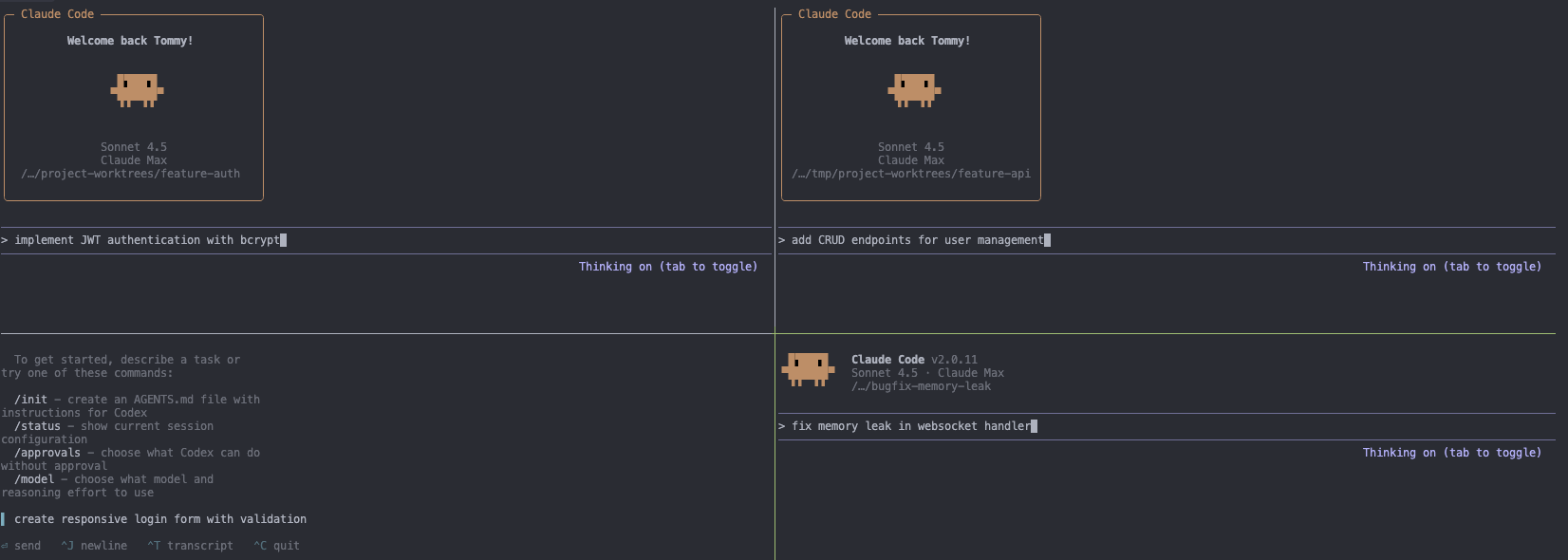
**ELI5:** Normally, you can only work on one git branch at a time in a folder. Want to fix a bug while working on a feature? You have to stash changes, switch branches, then switch back. Git worktrees let you have multiple branches checked out at once in different folders - like having multiple copies of your project, each on a different branch.
**The Problem:** Everyone's using git worktrees wrong (or not at all):
- Constantly stashing/switching branches disrupts flow
- Running tests on main while working on features requires manual copying
- Reviewing PRs means stopping current work
- **Parallel AI agents on different branches?** Nearly impossible without worktrees
**Why people sleep on worktrees:** The DX is terrible. `git worktree add ../my-project-feature feature` is verbose, manual, and error-prone.
**Enter gtr:** Simple commands, AI tool integration, automatic setup, and built for modern parallel development workflows.
## Quick Start
**Homebrew (macOS):**
```bash
brew tap coderabbitai/tap
brew install git-gtr
```
**Install from source (macOS / Linux):**
```bash
git clone https://github.com/coderabbitai/git-worktree-runner.git
cd git-worktree-runner
./install.sh
```
Other installation options
**macOS (Intel) / Linux:**
```bash
sudo mkdir -p /usr/local/bin
sudo ln -s "$(pwd)/bin/git-gtr" /usr/local/bin/git-gtr
```
**User-local (no sudo required):**
```bash
mkdir -p ~/.local/bin
ln -s "$(pwd)/bin/git-gtr" ~/.local/bin/git-gtr
# Add to ~/.zshrc or ~/.bashrc if ~/.local/bin is not in PATH:
# export PATH="$HOME/.local/bin:$PATH"
```
**Usage:**
```bash
# Navigate to your git repo
cd ~/GitHub/my-project
# One-time setup (per repository)
git gtr config set gtr.editor.default cursor
git gtr config set gtr.ai.default claude
# Daily workflow
git gtr new my-feature # Create worktree folder: my-feature
git gtr new my-feature --editor # Create and open in editor
git gtr new my-feature --ai # Create and start AI tool
git gtr new my-feature -e -a # Create, open editor, then start AI
git gtr pr 123 # Create worktree for pull request #123
git gtr editor my-feature # Open in cursor
git gtr ai my-feature # Start claude
# Run commands in worktree
git gtr run my-feature npm test # Run tests
# Navigate to worktree
gtr new my-feature --cd # Create and cd (requires shell integration)
gtr pr 123 --cd # Create a PR worktree and cd
gtr cd # Interactive picker (requires fzf + shell integration)
gtr cd my-feature # Requires shell integration (see below)
cd "$(git gtr go my-feature)" # Alternative without shell integration
# List all worktrees
git gtr list
# Remove when done
git gtr rm my-feature
# Or remove all worktrees with merged or closed PRs/MRs (requires gh or glab CLI)
git gtr clean --merged --closed
```
## AI Agent Usage
Shell-capable coding agents can use `git gtr` directly; a separate MCP server is
not required. Use `git gtr new --porcelain` to create a worktree and
reliably capture its path, then run the agent inside that directory. Built-in
adapters cover popular tools, while the safe `PATH` fallback works with other
agent CLIs without requiring a dedicated adapter.
See [docs/agent-usage.md](docs/agent-usage.md) for a copy-paste `AGENTS.md`
policy, output contract, and safe lifecycle examples.
## Why gtr?
While `git worktree` is powerful, it's verbose and manual. `git gtr` adds quality-of-life features for modern development:
| Task | With `git worktree` | With `git gtr` |
| ----------------- | ------------------------------------------ | ---------------------------------------- |
| Create worktree | `git worktree add ../repo-feature feature` | `git gtr new feature` |
| Create + open | `git worktree add ... && cursor .` | `git gtr new feature --editor` |
| Checkout PR | `gh pr checkout 123` | `git gtr pr 123` |
| Open in editor | `cd ../repo-feature && cursor .` | `git gtr editor feature` |
| Start AI tool | `cd ../repo-feature && claude` | `git gtr ai feature` |
| Copy config files | Manual copy/paste | Auto-copy via `gtr.copy.include` |
| Run build steps | Manual `npm install && npm run build` | Auto-run via `gtr.hook.postCreate` |
| List worktrees | `git worktree list` (shows paths) | `git gtr list` (shows branches + status) |
| Clean up | `git worktree remove ../repo-feature` | `git gtr rm feature` |
**TL;DR:** `git gtr` wraps `git worktree` with quality-of-life features for modern development workflows (AI tools, editors, automation).
## Features
- **Simple commands** - Create and manage worktrees with intuitive CLI
- **Repository-scoped** - Each repo has independent worktrees
- **Configuration over flags** - Set defaults once, use simple commands
- **Editor integration** - Open worktrees in Antigravity, Cursor, VS Code, Zed, and more
- **AI tool support** - Launch Claude Code, Codex, Gemini CLI, or any safe command in `PATH`
- **Smart file copying** - Selectively copy configs/env files to new worktrees
- **Hooks system** - Run custom commands after create/remove
- **Cross-platform** - Works on macOS, Linux, and Windows (Git Bash)
- **Shell completions** - Tab completion for Bash, Zsh, and Fish
## Requirements
- **Git** 2.17+ (for `git worktree move/remove` support)
- **Bash** 3.2+ (macOS ships 3.2; 4.0+ recommended for advanced features)
## Commands
Commands accept branch names to identify worktrees. Use `1` to reference the main repo.
Run `git gtr help` for full documentation.
### `git gtr new [options]`
Create a new git worktree. Folder is named after the branch.
```bash
git gtr new my-feature # Creates folder: my-feature
git gtr new hotfix --from v1.2.3 # Create from specific ref
git gtr new variant-1 --from-current # Create from current branch
git gtr new feature/auth # Creates folder: feature-auth
git gtr new feature/implement-user-authentication-with-oauth2-integration --folder auth # Custom folder name
git gtr new feature-auth --name backend --force # Same branch, custom name
git gtr new my-feature --name descriptive-variant # Optional: custom name without --force
git gtr new agent-task --porcelain # Stable output for automation
```
**Options:**
- `--from `: Create from specific ref
- `--from-current`: Create from current branch (useful for parallel variant work)
- `--remote `: Remote used for default base refs
- `--track `: Tracking mode (auto|remote|local|none)
- `--no-copy`: Skip file copying
- `--no-fetch`: Skip git fetch
- `--no-hooks`: Skip post-create hooks
- `--sparse`: Inherit sparse-checkout from the base worktree (Git 2.36+; overrides `gtr.sparse.inherit = false`)
- `--no-sparse`: Force a full checkout even when `gtr.sparse.inherit` is on
- `--force`: Allow same branch in multiple worktrees (**requires --name or --folder**)
- `--name `: Custom folder name suffix (optional, required with --force)
- `--folder `: Custom folder name (replaces default, useful for long branch names)
- `--editor`, `-e`: Open in editor after creation
- `--ai`, `-a`: Start AI tool after creation
- `--yes`: Non-interactive mode
- `--porcelain`: Emit stable `keyvalue` records (implies `--yes`; incompatible with `--editor` and `--ai`)
On success, `--porcelain` writes exactly three records to stdout: `path`,
`branch`, and `hook_status`. Progress messages and hook output are written to
stderr. If a post-create hook fails, the command exits non-zero and emits no
success records. See [AI agent usage](docs/agent-usage.md) for the format and
recommended safety boundaries.
### `git gtr pr [options]`
Create a worktree from a GitHub pull request. Requires GitHub CLI (`gh`) for PR lookup.
When supported, GTR delegates checkout to `gh pr checkout --worktree`; otherwise it
uses a compatibility path that preserves configured Git remotes and protocols.
The default local branch is the PR head branch so GitHub CLI can infer the PR from inside the worktree.
```bash
git gtr pr 123 # Branch/folder from PR head branch
git gtr pr 123 --branch review/fix # Custom local branch
git gtr pr 123 --folder review # Custom folder name
gtr pr 123 --cd # Create and cd with shell integration
```
**Options:**
- `--branch `, `-b`: Local branch name to use (default: PR head branch)
- `--repo `, `-R`: Repository for `gh pr view`
- `--remote `: Override remote/repository used to fetch `refs/pull//head`
- `--no-copy`: Skip file copying
- `--no-hooks`: Skip post-create hooks
- `--force`: Allow same branch in multiple worktrees (**requires --name or --folder**)
- `--name `: Custom folder name suffix
- `--folder `: Custom folder name
- `--editor`, `-e`: Open in editor after creation
- `--ai`, `-a`: Start AI tool after creation
- `--yes`: Non-interactive mode
### `git gtr editor [--editor ]`
Open worktree in editor (uses `gtr.editor.default` or `--editor` flag).
```bash
git gtr editor my-feature # Uses configured editor
git gtr editor my-feature --editor vscode # Override with vscode
```
### `git gtr ai [--ai ] [-- args...]`
Start AI coding tool (uses `gtr.ai.default` or `--ai` flag).
```bash
git gtr ai my-feature # Uses configured AI tool
git gtr ai my-feature --ai codex # Override with different tool
git gtr ai my-feature -- --verbose # Pass arguments to tool
git gtr ai 1 # Use AI in main repo
```
### `git gtr go `
Print worktree path for shell navigation.
```bash
cd "$(git gtr go my-feature)" # Navigate by branch name
cd "$(git gtr go 1)" # Navigate to main repo
```
**Tip:** For easier navigation, use `git gtr init` to enable `gtr cd`:
```bash
# Bash (add to ~/.bashrc)
_gtr_init="${XDG_CACHE_HOME:-$HOME/.cache}/gtr/init-gtr.bash"
[[ -f "$_gtr_init" ]] && head -n 1 "$_gtr_init" | grep -q ' init=7 ' || eval "$(git gtr init bash)" || true
source "$_gtr_init" 2>/dev/null || true; unset _gtr_init
# Zsh (add to ~/.zshrc)
_gtr_init="${XDG_CACHE_HOME:-$HOME/.cache}/gtr/init-gtr.zsh"
[[ -f "$_gtr_init" ]] && head -n 1 "$_gtr_init" | grep -q ' init=7 ' || eval "$(git gtr init zsh)" || true
source "$_gtr_init" 2>/dev/null || true; unset _gtr_init
# Fish (add to ~/.config/fish/config.fish)
set -l _gtr_init (test -n "$XDG_CACHE_HOME" && echo $XDG_CACHE_HOME || echo $HOME/.cache)/gtr/init-gtr.fish
test -f "$_gtr_init"; and head -n 1 "$_gtr_init" | string match -q '* init=7 *'; or git gtr init fish >/dev/null 2>&1
source "$_gtr_init" 2>/dev/null
# Then navigate with:
gtr new my-feature --cd # Create and land in the new worktree
gtr pr 123 --cd # Create PR worktree and land in it
gtr cd # Interactive worktree picker (requires fzf)
gtr cd my-feature
gtr cd 1
```
The cache generates on first run and refreshes the next time `git gtr init ` runs. To force-regenerate: `rm -rf ~/.cache/gtr`
With [fzf](https://github.com/junegunn/fzf) installed, `gtr cd` (no arguments) opens a command palette with git log preview and keybindings: `ctrl-e` editor, `ctrl-a` AI, `ctrl-d` delete, `ctrl-y` copy, `ctrl-r` refresh.
> **Note:** If `gtr` conflicts with another command (e.g., GNU `tr` from coreutils), use `--as` to pick a different name:
>
> ```bash
> eval "$(git gtr init zsh --as gwtr)"
> gwtr cd my-feature
> ```
### `git gtr run `
Execute command in worktree directory.
```bash
git gtr run my-feature npm test # Run tests
git gtr run my-feature npm run dev # Start dev server
git gtr run feature-auth git status # Run git commands
git gtr run 1 npm run build # Run in main repo
```
### `git gtr rm ... [options]`
Remove worktree(s) by branch name.
```bash
git gtr rm my-feature # Remove one
git gtr rm feature-a feature-b # Remove multiple
git gtr rm my-feature --delete-branch --force # Delete branch and force
```
**Options:** `--delete-branch`, `--force`, `--yes`
### `git gtr mv [--force] [--yes]`
Rename worktree directory and branch together. Aliases: `rename`
```bash
git gtr mv feature-wip feature-auth # Rename worktree and branch
git gtr mv old-name new-name --force # Force rename locked worktree
git gtr mv old-name new-name --yes # Skip confirmation
```
**Options:** `--force`, `--yes`
**Note:** Only renames the local branch. Remote branch remains unchanged.
### `git gtr copy ... [options] [-- ...]`
Copy files from main repo to existing worktree(s). Useful for syncing env files after worktree creation.
```bash
git gtr copy my-feature # Uses gtr.copy.include patterns
git gtr copy my-feature -- ".env*" # Explicit pattern
git gtr copy my-feature -- ".env*" "*.json" # Multiple patterns
git gtr copy -a -- ".env*" # Copy to all worktrees
git gtr copy my-feature -n -- "**/.env*" # Dry-run preview
```
**Options:**
- `-n, --dry-run`: Preview without copying
- `-a, --all`: Copy to all worktrees
- `--from `: Copy from different worktree (default: main repo)
### `git gtr list [--porcelain]`
List all worktrees. Use `--porcelain` for machine-readable output.
### `git gtr config {get|set|add|unset|list} [value] [--global]`
Manage configuration via git config.
```bash
git gtr config set gtr.editor.default cursor # Set locally
git gtr config set gtr.ai.default claude --global # Set globally
git gtr config get gtr.editor.default # Get value
git gtr config list # List all gtr config
```
### `git gtr clean [options]`
Remove worktrees: clean up empty directories, or remove those with merged or closed PRs/MRs.
```bash
git gtr clean # Remove empty worktree directories and prune
git gtr clean --merged # Remove worktrees for merged PRs/MRs
git gtr clean --closed # Remove worktrees for closed PRs/MRs
git gtr clean --merged --closed --to main # Remove worktrees for merged or closed PRs/MRs targeting main
git gtr clean --merged --dry-run # Preview which worktrees would be removed
git gtr clean --merged --yes # Remove without confirmation prompts
git gtr clean --merged --force # Force-clean PR cleanup, ignoring local changes
git gtr clean --merged --force --yes # Force-clean and auto-confirm
```
**Options:**
- `--merged`: Remove worktrees whose branches have merged PRs/MRs (also deletes the branch)
- `--closed`: Remove worktrees whose branches have closed PRs/MRs (also deletes the branch)
- `--to `: Limit PR/MR cleanup to PRs/MRs targeting the given base ref
- `--dry-run`, `-n`: Preview changes without removing
- `--yes`, `-y`: Non-interactive mode (skip confirmation prompts)
- `--force`, `-f`: Force removal even if worktree has uncommitted changes or untracked files
**Note:** The `--merged`/`--closed` mode auto-detects your hosting provider (GitHub or GitLab) from the `origin` remote URL and requires the corresponding CLI tool (`gh` or `glab`) to be installed and authenticated. For self-hosted instances, set the provider explicitly: `git gtr config set gtr.provider gitlab`.
**Note:** `clean` also detects registry entries that are locked but whose directories no longer exist (for example, a crashed agent session that deleted its worktree directory). `git worktree prune` skips locked entries by design, so these linger and keep their branches checked out. `clean` offers to unlock and prune them; `--force` or `--yes` confirms automatically.
### `git gtr trust`
Review and approve executable commands defined in the repository's `.gtrconfig` file. Hooks and editor/AI defaults from `.gtrconfig` are **not used** until explicitly trusted — this prevents malicious contributors from injecting arbitrary shell commands via shared config files.
```bash
git gtr trust # Review and approve .gtrconfig commands
```
Trust is bound to the repository path, the filesystem identity of its common Git directory, and executable command definitions. Replacing or recloning a repository at the same path, or changing hooks or editor/AI defaults, requires approval again. Older path-only approvals also require renewal. Hooks and defaults from your local git config (`.git/config`, `~/.gitconfig`) are always trusted.
Approval covers command definitions and the behavior they delegate to. It does not hash or pin scripts, dependencies, or tools: for example, approving `sh ./scripts/setup.sh` allows subsequent changes to that script within the same repository. Review delegated code and trust the repository's contributors before approving commands.
Trust requires a known filesystem birth time for the Git directory. If `stat` cannot provide it, `.gtrconfig` executable commands remain untrusted.
### Other Commands
- `git gtr doctor` - Health check (verify git, editors, AI tools)
- `git gtr adapter` - List available editor & AI adapters
- `git gtr version` - Show version
## Configuration
All configuration is stored via `git config`. For team settings, create a `.gtrconfig` file in your repository root.
### Quick Setup
```bash
# Set your editor (antigravity, cursor, vscode, zed)
git gtr config set gtr.editor.default cursor
# Set your AI tool (antigravity, aider, auggie, claude, codex, copilot, cursor, gemini, opencode)
git gtr config set gtr.ai.default claude
# Override-backed adapters may include flags
git gtr config set gtr.editor.default "nano -w"
git gtr config set gtr.ai.default "claude --continue"
# Generic fallbacks support other safe PATH commands without dedicated adapters
git gtr config set gtr.editor.default "code --wait"
git gtr config set gtr.ai.default goose
# Copy env files to new worktrees
git gtr config add gtr.copy.include "**/.env.example"
# Run setup after creating worktrees
git gtr config add gtr.hook.postCreate "npm install"
# Inherit sparse-checkout from the base worktree on Git 2.36+ (default: on)
git gtr config set gtr.sparse.inherit true
# Re-source environment after gtr cd, gtr new --cd, or gtr pr --cd (runs in current shell)
git gtr config add gtr.hook.postCd "source ./vars.sh"
# Disable color output (or use "always" to force it)
git gtr config set gtr.ui.color never
```
### Team Configuration (.gtrconfig)
```gitconfig
# .gtrconfig - commit this to share settings
[copy]
include = **/.env.example
exclude = **/.env
includeDirs = node_modules
includeDirs = packages/*/generated
excludeDirs = node_modules/.cache
[hooks]
postCreate = npm install
[defaults]
editor = cursor
ai = claude
remote = upstream
```
**Command trust:** Hooks and editor/AI defaults defined in `.gtrconfig` require explicit approval before they execute or select tools. Run `git gtr trust` after cloning a repository or when `.gtrconfig` command entries change. This protects against malicious command injection in shared repositories.
**Adapter safety:** Generic `gtr.editor.default` and `gtr.ai.default` values must resolve to safe PATH commands. Filesystem paths such as `./tool` and shell wrapper forms such as `sh -c ...` are rejected. Override-backed adapters like `claude`, `cursor`, and `nano` may include additional flags, for example `claude --continue` or `nano -w`.
**Configuration precedence** (highest to lowest):
1. `git config --local` (`.git/config`) - personal overrides
2. `.gtrconfig` (repo root) - team defaults (hooks and editor/AI defaults require `git gtr trust`)
3. `git config --global` (`~/.gitconfig`) - user defaults
4. `git config --system` (`/etc/gitconfig`) - system defaults
5. Environment variables
6. Built-in defaults
> For complete configuration reference including all settings, hooks, file copying patterns, and environment variables, see [docs/configuration.md](docs/configuration.md)
## Shell Completions (Optional)
Homebrew installs native Bash, Zsh, and Fish completion files automatically.
Use the commands below for manual setup when installing from source or when you
want to load completions explicitly.
```bash
# Bash (~/.bashrc)
source <(git gtr completion bash)
# Zsh (~/.zshrc) - must be before compinit
eval "$(git gtr completion zsh)"
# Fish
mkdir -p ~/.config/fish/completions
git gtr completion fish > ~/.config/fish/completions/git-gtr.fish
```
> For troubleshooting, see [docs/configuration.md#shell-completions](docs/configuration.md#shell-completions)
## Platform Support
| Platform | Status | Notes |
| ----------- | --------------- | ------------------------------- |
| **macOS** | Full support | Ventura+ recommended |
| **Linux** | Full support | Ubuntu, Fedora, Arch, etc. |
| **Windows** | Git Bash or WSL | Native PowerShell not supported |
Requires Git 2.17+ and Bash 3.2+.
> For troubleshooting, platform-specific notes, and architecture details, see [docs/troubleshooting.md](docs/troubleshooting.md)
## Advanced Usage
For advanced workflows including:
- **Multiple worktrees on same branch** (`--force` + `--name`)
- **Parallel AI agent development** patterns
- **Custom workflow scripts** (`.gtr-setup.sh`)
- **CI/CD automation** (non-interactive mode)
- **Working with multiple repositories**
See [docs/advanced-usage.md](docs/advanced-usage.md)
## Contributing
Contributions welcome! Areas where help is appreciated:
- **New editor adapters** - Editors that need behavior beyond the safe `PATH` fallback
- **New AI tool adapters** - Agent CLIs that need custom launch or discovery logic
- **Bug reports** - Platform-specific issues
- **Documentation** - Tutorials, examples, use cases
See [CONTRIBUTING.md](CONTRIBUTING.md) for guidelines and [CODE_OF_CONDUCT.md](CODE_OF_CONDUCT.md) for community standards.
## Maintainers
gtr was created and is maintained by [@helizaga](https://github.com/helizaga).
Much of what gtr supports today came from outside contributors - editor and AI tool adapters, platform
fixes, shell integrations, and documentation. See the
[contributor list](https://github.com/coderabbitai/git-worktree-runner/graphs/contributors) for everyone
who has shipped something here.
## License
This project is licensed under the [Apache License 2.0](LICENSE.txt).
---
Built to streamline parallel development workflows with git worktrees.
For questions or issues, [open an issue](https://github.com/coderabbitai/git-worktree-runner/issues).