
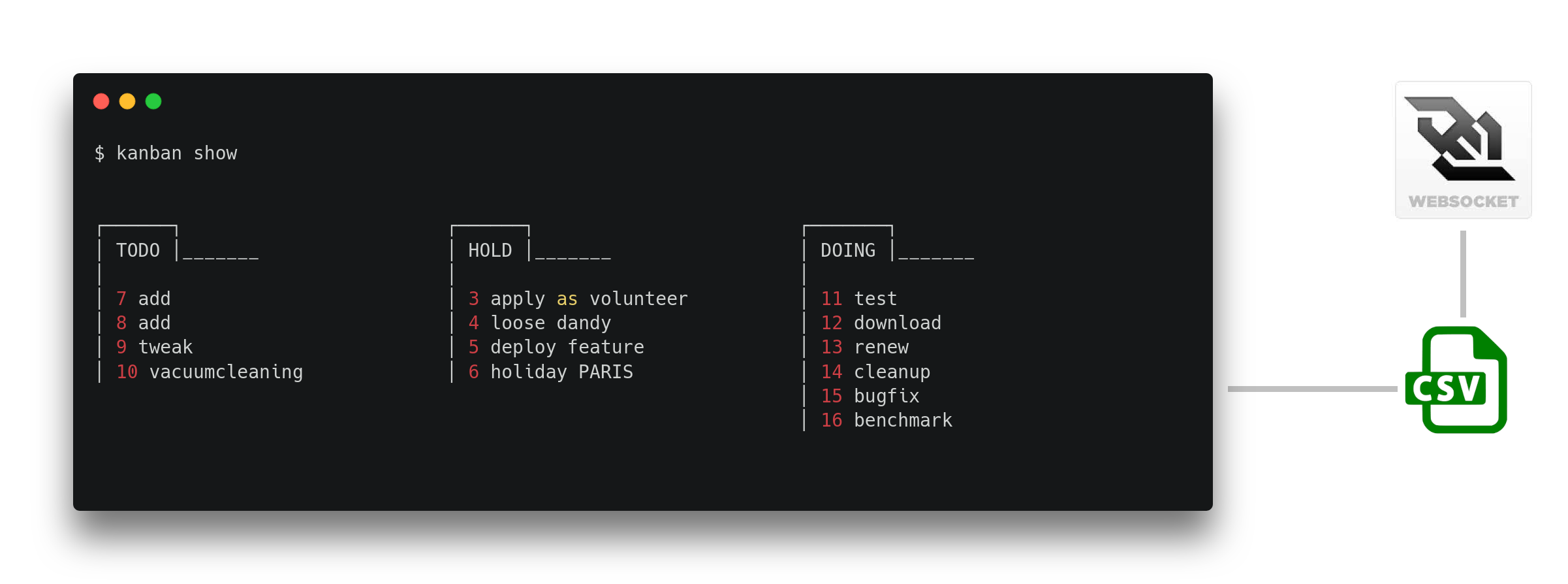
 commandline kanban #notetaking #todomanager #scriptable for teams AND personal CSV kanban for minimalist productivity hackers.
> **WHY?** online issuetrackers are great for teams, but how to manage (personal) todo's on a crossrepo-, macro-, or micro-level? This is a very simple **powerful** tool to do that **AND** measure productivity. Just store the
CSV-file(s) inside repos, clouddrives and local filesystems. #teamfriendly #symlinktheplanet #nestedkanbans
## Install
```bash
$ curl -LO "https://raw.githubusercontent.com/coderofsalvation/kanban.bash/master/kanban"
$ chmod 755 kanban
```
## Show me the kanban board!
```bash
$ ./kanban init
$ ./kanban add TODO PERSONAL "buy rose for girlfriend foo bar"
$ ./kanban show
```
commandline kanban #notetaking #todomanager #scriptable for teams AND personal CSV kanban for minimalist productivity hackers.
> **WHY?** online issuetrackers are great for teams, but how to manage (personal) todo's on a crossrepo-, macro-, or micro-level? This is a very simple **powerful** tool to do that **AND** measure productivity. Just store the
CSV-file(s) inside repos, clouddrives and local filesystems. #teamfriendly #symlinktheplanet #nestedkanbans
## Install
```bash
$ curl -LO "https://raw.githubusercontent.com/coderofsalvation/kanban.bash/master/kanban"
$ chmod 755 kanban
```
## Show me the kanban board!
```bash
$ ./kanban init
$ ./kanban add TODO PERSONAL "buy rose for girlfriend foo bar"
$ ./kanban show
```
 > NOTE: columns are configurable, and board resizes according to terminal width
## Usage
```bash
$ ./kanban
Usage:
kanban init # initialize kanban in current directory
kanban add # add item interactive (adviced)
kanban show [dir with .kanban] # show global [or nested] ascii kanbanboard
kanban # edit or update item
kanban # update status of todo id (uses $EDITOR as preferred editor)
kanban ..... # list only todo items with this status(es)
kanban sum [tag] # sum total of certain csvfield
kanban list # list all todos (heavy)
kanban tags # list all submitted tags
kanban add # add item (use quoted strings for args)
kanban stats status [tag]
kanban stats tag
kanban stats history
kanban csv # edit raw csv
NOTE #1: statuses can be managed in ~/.kanban/.kanban.conf
NOTE #2: the database csv can be found in ~/.kanban/.kanban.csv
Examples:
kanban add TODO projectX "do foo"
kanban TODO DOING HOLD
kanban stats status projectX
kanban stats tag projectX
# notekeeping by entering a filename as description:
echo hello > note.txt && kanban add DOING note.txt
# store in github repo
git clone https://../foo.git && cd foo.git && kanban init && git add .kanban
kanban sum hours DONE # sum total hours (if column exists in csv)
#
Environment:
X=120 kanban .... # set max line-width to 120
NOCOLOR=1 kanban .... # disable colors
PLAIN=1 kanban ... # plaintext, disable utf8 chars
Tips:
�[m�
```
## Change status
```bash
$ ./kanban show
.------. .------. .-------.
| TODO |_______ | HOLD |_______ | DOING |_______
| | |
| 1 foobar | 3 ipsum
| 2 lorem
$ ./kanban 2 DOING
TODO -> DOING
```
## Edit item
> NOTE: make sure you have your favorite editor set in ~/.bashrc (`export EDITOR=vim` e.g.)
```bash
$ ./kanban 2 # this executes ${EDITOR}
```
## Todo grep
```bash
$ ./kanban TODO DOING | grep projectfoo
```
Nice to get project-specific kanban overviews.
## Note-taking
> adding a filename as a description, will trigger kanban to launch `$EDITOR`:
```bash
$ echo -e "hello\nworld" > my_idea.txt
$ kanban add TODO note my_idea.txt
$ kanban list
id status tag description
- - - - -
4 TODO note my_idea.txt
$ k 4
```
> TIP: use symlinks to share notes across boards (`cd myproject && ln -s ~/.kanban/timelog.txt timelog.txt` e.g.)
## Simple listing of status
> NOTE: from here we use the k-alias, see the 'Attention Unix ninjas' on how to use it
```bash
$ k TODO
id status tag description history
- - - - -
185 TODO bly fooo bar flop BTBDHDHDHT
199 TODO bly meeting about techdesign BT
245 TODO lb checkout testsuite BT
246 TODO nus add field to db BT
242 TODO nus fix db lag BT
```
as you can see in the history, todo 185 is quite problematic.
It went from Backlog->Todo->Backlog->Doing->Hold->... and so on.
Obviously the person who assigned this todo should rethink it, and chop it up into seperate todos.
```bash
$ k TODO 2015-08
id status tag description history
- - - - -
246 TODO nus add field to db BT
242 TODO nus fix db lag BT
```
Here you can see all todo's which were 'touched' in august 2015
## Configuration
see `~/.kanban/.kanban.conf` (gets created automatically)
You can define the kanban statuses, and limit the maximum amount of todos per status.
> NOTE: columns are configurable, and board resizes according to terminal width
## Usage
```bash
$ ./kanban
Usage:
kanban init # initialize kanban in current directory
kanban add # add item interactive (adviced)
kanban show [dir with .kanban] # show global [or nested] ascii kanbanboard
kanban # edit or update item
kanban # update status of todo id (uses $EDITOR as preferred editor)
kanban ..... # list only todo items with this status(es)
kanban sum [tag] # sum total of certain csvfield
kanban list # list all todos (heavy)
kanban tags # list all submitted tags
kanban add # add item (use quoted strings for args)
kanban stats status [tag]
kanban stats tag
kanban stats history
kanban csv # edit raw csv
NOTE #1: statuses can be managed in ~/.kanban/.kanban.conf
NOTE #2: the database csv can be found in ~/.kanban/.kanban.csv
Examples:
kanban add TODO projectX "do foo"
kanban TODO DOING HOLD
kanban stats status projectX
kanban stats tag projectX
# notekeeping by entering a filename as description:
echo hello > note.txt && kanban add DOING note.txt
# store in github repo
git clone https://../foo.git && cd foo.git && kanban init && git add .kanban
kanban sum hours DONE # sum total hours (if column exists in csv)
#
Environment:
X=120 kanban .... # set max line-width to 120
NOCOLOR=1 kanban .... # disable colors
PLAIN=1 kanban ... # plaintext, disable utf8 chars
Tips:
�[m�
```
## Change status
```bash
$ ./kanban show
.------. .------. .-------.
| TODO |_______ | HOLD |_______ | DOING |_______
| | |
| 1 foobar | 3 ipsum
| 2 lorem
$ ./kanban 2 DOING
TODO -> DOING
```
## Edit item
> NOTE: make sure you have your favorite editor set in ~/.bashrc (`export EDITOR=vim` e.g.)
```bash
$ ./kanban 2 # this executes ${EDITOR}
```
## Todo grep
```bash
$ ./kanban TODO DOING | grep projectfoo
```
Nice to get project-specific kanban overviews.
## Note-taking
> adding a filename as a description, will trigger kanban to launch `$EDITOR`:
```bash
$ echo -e "hello\nworld" > my_idea.txt
$ kanban add TODO note my_idea.txt
$ kanban list
id status tag description
- - - - -
4 TODO note my_idea.txt
$ k 4
```
> TIP: use symlinks to share notes across boards (`cd myproject && ln -s ~/.kanban/timelog.txt timelog.txt` e.g.)
## Simple listing of status
> NOTE: from here we use the k-alias, see the 'Attention Unix ninjas' on how to use it
```bash
$ k TODO
id status tag description history
- - - - -
185 TODO bly fooo bar flop BTBDHDHDHT
199 TODO bly meeting about techdesign BT
245 TODO lb checkout testsuite BT
246 TODO nus add field to db BT
242 TODO nus fix db lag BT
```
as you can see in the history, todo 185 is quite problematic.
It went from Backlog->Todo->Backlog->Doing->Hold->... and so on.
Obviously the person who assigned this todo should rethink it, and chop it up into seperate todos.
```bash
$ k TODO 2015-08
id status tag description history
- - - - -
246 TODO nus add field to db BT
242 TODO nus fix db lag BT
```
Here you can see all todo's which were 'touched' in august 2015
## Configuration
see `~/.kanban/.kanban.conf` (gets created automatically)
You can define the kanban statuses, and limit the maximum amount of todos per status.
See `.kanban/kanban.conf` in case you initialized a board in your current dir (using `kanban init`)
## Idiotproof csv-editing
Safest way to keep the CSV sane:
```bash
$ ./kanban add
enter description:
> do laundry
enter one of statuses: BACKLOG TODO IN_PROGRESS HOLD DONE
> TODO
enter one of tags: projectA, projectB
> projectA
$
```
## Tracking hours (or any custom CSV-field)
This is delegated to manual csv-editing and `kanban sum` (or your good old spreadsheet editor).
First make sure your column (`hours` e.g.) is configured in `HEADER`:
```bash
$ grep HEADER ~/.kanban/kanban.conf
HEADER="id,status,tag,description,history,start,hours"
```
OK, we're good, now adds some hours in the csv
```bash
$ kanban csv
BACKLOG,"meeting","fridaymeeting","D","2026-06-26@11:00",3
DONE,"meeting","fridaymeeting","D","2026-06-26@11:00",4
^^^ enter hournumber here
```
Now we can sum it via your spreadsheet editor, or `kanban sum`:
```bash
$ kanban sum hours
7
$ kanban sum hours DONE
4
```
## Responsive kanban.
As mentioned earlier, the status/categorynames can be changed in `.kanban/.kanban.conf`.
No widescreen? Show a tag-less, simplified kanban board by hiding some categories:
```bash
XSMALL=119 # show simplified kanban for terminalwidth < 119 chars
SMALLSCREEN=('DOING' 'TODO' 'HOLD') # define simplified kanban board statuses
```
## Nested kanbans
Besides regular tickets, infinite nested kanbans are supported too, as well as adding a kanban as a ticket.
```bash
$ kanban init
$ mkdir v3
$ mkdir v3/v4
$ cd v3 && kanban init && kanban add a foo && cd -
$ cd v3/v4 && kanban init && kanban add b bar && cd -
$ kanban add TODO dev foobar
$ cd ..
$ kanban show
.____.
| TODO |_____
|
| 1 #dev foobar
kanbans:
├─ v3
├─ v3/v4
$ kanban v3 # shows v3 kanban
.____.
| TODO |_____
|
| 1 #a foo
```
Now lets add the `v3/v4` kanban as a ticket:
```bash
$ kanban add TODO foo v3/v4
$ kanban show
.____.
| TODO |_____
|
| 1 #dev foobar
| 2 #foo v3/v4
kanbans:
├─ v3
├─ v3/v4
$ kanban 2 # shows v3/v4 kanban
.____.
| TODO |_____
|
| 1 #b bar
```
# kanbans in your [dotfiles] GIT-repo + 1 in a projectrepo
```
$ cd ~ # go to homedir (where your dotfiles live)
$ kanban init # creates ~/.kanban
$ cd projects/foo
$ kanban init
$ mv .kanban ~/.kanban/foo
$ ln -s ~/.kanban/foo .kanban # link dotfiles-folder to here
$ cd ~
$ git add .kanban && git commit -m "dotfiles: updated kanbans"
$ cd projects/bar
$ kanban init
$ git add .kanban && git commit -m "added kanban to project repo"
```
## Scriptable / Kanban Bot
> kanban items are **SCRIPTABLE** using your favorite language. This allows dynamic statuses, tags & descriptions in the CSV-file:
```bash
"$(~/.kanban/bot status_day TODO '1 4')","script","database backup","T","2021-10-04@15:36"
```
this will call the following (executable) shellscript (`~/.kanban/bot`)
```bash
#!/bin/bash
status_day(){
[[ "$2" =~ $(date +%u) ]] && printf $1 || printf BACKLOG
}
"$@"
```
Profit!
The `database backup` item will have status **TODO** on mondays & fridays, otherwise **BACKLOG**
> TIP: use curl to generate dynamic descriptions, for example:
```bash
"$(curl https://api.github.com/repos/coderofsalvation/kanban.bash/issues | grep total_count | sed 's/[^0-9]//g') open issues"
```
## Blinking text
Just wrap a word with stars (`*iamblinking*` e.g.) in your csv to catch more attention.
## Attention UNIX ninjas
> type 'k' instead of './kanban'
```bash
$ cp kanban ~/bin
$ echo 'export PATH=$PATH:~/bin' >> ~/.bashrc
$ echo 'alias k=kanban' >> ~/.bashrc
$ source ~/.bashrc
```
(now all terminals will recognize 'k' as a command)
> Cleanup your kanban board with some bash-fu:
```bash
$ for i in {19,36,49}; do kanban $i BACKLOG; done
DONE -> BACKLOG
DONE -> BACKLOG
DONE -> BACKLOG
```
> mass-renames:
```bash
$ sed -i 's/FOO/BAR/g' ~/.kanban.csv
```
> Open a terminal on an extra monitor/screen/tmux:
```bash
$ NOCOLOR=1 watch kanban show
```
> Run ninja-commands like: 'k 23 DONE' and withness the update:
```bash
$ k 34 DONE
TODO -> DONE
$ k add TODO NINJW workout" "$(date --date='tomorrow' +'%Y-%m-%d') deadline"
```
## Automatically display boards
Put the following in `~/.bashrc` to display boards whenever you enter a directory with a kanban:
```
cd(){
builtin cd ${1:+"$@"} && [[ -d ./.kanban ]] && kanban show
}
```
## Statistics
With the power of grep you can get overviews:
```bash
$ k stats status
DONE 155 ▆▆▆▆▆▆▆▆▆▆▆▆▆▆▆▆▆▆▆▆
BACKLOG 73 ▆▆▆▆▆▆▆▆▆▆
HOLD 9 ▆▆
TODO 5 ▆
DOING 5 ▆
$ k status 2015-08
DONE 155 ▆▆▆▆▆▆▆▆▆▆▆▆▆▆▆▆▆▆▆▆
BACKLOG 73 ▆▆▆▆▆▆▆▆▆▆
HOLD 9 ▆▆
TODO 5 ▆
DOING 5 ▆
$ k stats status DONE 2015-08
projectfoo 62 ▆▆▆▆▆▆▆▆▆▆▆▆▆▆▆▆▆▆▆▆
opensource 43 ▆▆▆▆▆▆▆▆▆▆▆▆▆▆
projectX 3 ▆
admin 2 ▆
$ k stats status projectfoo
DONE 56 ▆▆▆▆▆▆▆▆
BACKLOG 33 ▆▆▆▆▆
HOLD 6 ▆
TODO 2 ▆
DOING 1 ▆
```
Lets see what the slacking / project ratio is :)
```bash
$ k stats tag 2015-08
slacking 76 ▆▆▆▆▆▆▆▆
projecfoo 36 ▆▆▆▆
```
What are are typical tasktransitions:
```bash
$ k stats history
T 129 ▆▆▆▆▆▆▆▆▆▆▆▆▆▆▆▆▆▆▆▆
BTDHDHD 16 ▆▆▆
T 129 ▆▆▆▆▆▆▆▆▆▆▆▆▆▆▆▆▆▆▆▆
BD 16 ▆▆▆ ```
View which projects were put on hold at least 2 times in 2014:
```bash
$ k stats history HDHD 2014
project30 6 ▆▆▆▆▆▆▆▆▆▆▆▆▆▆▆▆▆▆▆▆
project40 4 ▆▆▆▆▆▆▆▆▆▆▆▆▆▆
project20 4 ▆▆▆▆▆▆▆▆▆▆▆▆▆▆
project10 3 ▆▆▆▆▆▆▆▆▆▆
```
## Realtime Web-based kanban boards
Create the following `index.html`:
```html
```
And then serve it to the web:
```bash
$ sudo apt-get install websocketd
$ X=120 NOCOLOR=1 PLAIN=1 websocketd -passenv 'X,NOCOLOR,PLAIN' -port 8080 -staticdir . ./kanban show
Mon, 04 Oct 2021 18:23:08 +0200 | INFO | server | | Serving using application : ./kanban show
Mon, 04 Oct 2021 18:23:08 +0200 | INFO | server | | Serving static content from : .
Mon, 04 Oct 2021 18:23:08 +0200 | INFO | server | | Starting WebSocket server : ws://localhost:8080/
```
> Now surf to http://localhost:8080 and PROFIT!
## Tab completion
Somehow source `kanban.completion` in your `~/.bashrc` or just copy it to `/etc/bash_completion.d`
## Why
> *For developers, there's no such thing as the ultimate todo-utility*
KANBAN.bash brings the lean and mean kanban board to the console.
It uses csv as database backend, a very popular tabular format.
The commandline usage is very minimal so few keystrokes can do magic.
## Developer info
tests oneliners:
* run: `cd test; for test in test-*; do ./$test &>/dev/null; done && echo OK || echo ERROR`
* debug: `cd test; for test in test-*; do bash -x $test; done && echo OK || echo ERROR`
## Todo
* more testing
* easier way of adding todos