# :earth_africa: typesafe-i18n
**A fully type-safe and lightweight internationalization library for all your TypeScript and JavaScript projects.**
 [](https://www.npmjs.com/package/typesafe-i18n)

[](https://github.com/ivanhofer/typesafe-i18n#sizes)

[](https://github.com/ivanhofer/typesafe-i18n/actions/workflows/release.yml)
[](https://discord.gg/T27AHfaADK)
[](https://github.com/sponsors/ivanhofer)

Created by Ivan Hofer (1995-2023)
## Advantages
:baby_chick: [lightweight](#sizes) (~1kb)\
:ok_hand: [easy to use syntax](https://github.com/ivanhofer/typesafe-i18n/tree/main/packages/runtime#syntax)\
:running: [fast and efficient](#performance)\
:safety_vest: [prevents you from making mistakes](#typesafety) (also in [plain JavaScript projects](https://github.com/ivanhofer/typesafe-i18n/tree/main/packages/generator#jsdoc))\
:construction_worker: [creates boilerplate code](https://github.com/ivanhofer/typesafe-i18n/tree/main/packages/generator#folder-structure) for you\
:speech_balloon: [supports plural rules](https://github.com/ivanhofer/typesafe-i18n/tree/main/packages/runtime#plural)\
:date: allows [formatting of values](https://github.com/ivanhofer/typesafe-i18n/tree/main/packages/formatters) e.g. locale-dependent date or number formats\
:left_right_arrow: supports [switch-case statements](https://github.com/ivanhofer/typesafe-i18n/tree/main/packages/runtime#switch-case) e.g. for gender-specific output\
:arrow_down: option for [asynchronous loading of locales](https://github.com/ivanhofer/typesafe-i18n/tree/main/packages/generator#asynchronous-loading-of-locales)\
:books: supports multiple [namespaces](https://github.com/ivanhofer/typesafe-i18n/tree/main/packages/generator#namespaces)\
:stopwatch: supports SSR (Server-Side Rendering)\
:handshake: can be used for [frontend, backend and API](#usage) projects\
:mag: [locale-detection](https://github.com/ivanhofer/typesafe-i18n/tree/main/packages/detectors) for browser and server environments\
:arrows_counterclockwise: [import](https://github.com/ivanhofer/typesafe-i18n/tree/main/packages/importer) and [export](https://github.com/ivanhofer/typesafe-i18n/tree/main/packages/exporter) translations from/to files or services\
:no_entry: no external dependencies
### Interactive Live Demo
Click [here](https://codesandbox.io/s/typesafe-i18n-demo-qntgqy?file=/index.ts) to see an interactive demo of `typesafe-i18n` showing some key aspects of the type-checking capabilities of this internationalization library.
### Works with
## Table of Contents
- [**Get started**](#get-started) - how to add `typesafe-i18n` to your project
- [**Usage**](#usage) - how to implement different use-cases
- [**Typesafety**](#typesafety) - how to get the best typesafety features
- [**Syntax**](https://github.com/ivanhofer/typesafe-i18n/tree/main/packages/runtime#syntax) - how to use the translation functions
- [**Dictionary**](https://github.com/ivanhofer/typesafe-i18n/tree/main/packages/runtime#dictionary) - how to structure your translations
- [**Namespaces**](https://github.com/ivanhofer/typesafe-i18n/tree/main/packages/generator#namespaces) - how to optimize loading of your translations
- [**Formatters**](https://github.com/ivanhofer/typesafe-i18n/tree/main/packages/formatters) - how to format dates and numbers
- [**Switch-Case**](https://github.com/ivanhofer/typesafe-i18n/tree/main/packages/runtime#switch-case) - how to output different words depending on an argument
- [**Locale-detection**](https://github.com/ivanhofer/typesafe-i18n/tree/main/packages/detectors) - how to detect an user's locale
- [**Utility functions**](https://github.com/ivanhofer/typesafe-i18n/tree/main/packages/utils) - useful utility functions
- [**Integrations**](#integration-with-other-services) - how to integrate other i18n services
- [**Sizes**](#sizes) - how much does `typesafe-i18n` add to your bundle size
- [**Performance**](#performance) - how efficient is `typesafe-i18n` implemented
- [**Sponsors**](#sponsors) - how to help this project grow
- [**FAQs**](#faqs) - how to get your questions answered
## Get started
1. :keyboard: Run the setup process and **automatically detect** the config needed
```bash
npx typesafe-i18n --setup-auto
```
or **manually configure** `typesafe-i18n` by answering a few questions
```bash
npx typesafe-i18n --setup
```
> It didn't work? See [here](#installing-typesafe-i18n-fails) for possible troubleshooting.
2. :eyes: Take a look at the generated files and it's [folder-structure](https://github.com/ivanhofer/typesafe-i18n/tree/main/packages/generator#folder-structure) after running `npm run typesafe-i18n` (or `npx typesafe-i18n`)
3. :open_book: Explore the assets
> `typesafe-i18n` offers a lot. Just press `cmd + F` to search on this page or see the [table of contents](#table-of-contents) that will link you to more specific subpages with more details.
4. :star: Star this project on [GitHub](https://github.com/ivanhofer/typesafe-i18n)
> Thanks! This helps the project to grow.
\
*Having trouble setting up `typesafe-i18n`? Reach out to us via [Github Discussions](https://github.com/ivanhofer/typesafe-i18n/discussions) or on [Discord](https://discord.gg/T27AHfaADK).*
### manual installation
```bash
npm install typesafe-i18n
```
### changelog
The changelog of this project can be found [here](https://github.com/ivanhofer/typesafe-i18n/blob/main/CHANGELOG.md)
#### migrations
- to version `5.x.x`: see the [`release post`](https://github.com/ivanhofer/typesafe-i18n/discussions/227)
- to version `4.x.x`: see the [`release post`](https://github.com/ivanhofer/typesafe-i18n/discussions/169)
- to version `3.x.x`: see the [`release post`](https://github.com/ivanhofer/typesafe-i18n/discussions/163)
### Long-term goals
Curious about what comes next? See [this discussion](https://github.com/ivanhofer/typesafe-i18n/discussions/324) to learn more about the plans for the future of this project.
#### Contributions
If you would like to get involved within this project, take a look at this [discussion](https://github.com/ivanhofer/typesafe-i18n/discussions/323).
## Usage
> The package can be used inside JavaScript and TypeScript applications. You will get a lot of benefits by running the [generator](https://github.com/ivanhofer/typesafe-i18n/tree/main/packages/generator#generator) since it will create a few wrappers to provide you with full typesafety.
You can use `typesafe-i18n` in a variety of project-setups:
- [Angular](https://github.com/ivanhofer/typesafe-i18n/tree/main/packages/adapter-angular) applications
- [Node.js](https://github.com/ivanhofer/typesafe-i18n/tree/main/packages/adapter-node) apis, backends, scripts, ...
- [React / Next.js](https://github.com/ivanhofer/typesafe-i18n/tree/main/packages/adapter-react) applications
- [Solid.js](https://github.com/ivanhofer/typesafe-i18n/tree/main/packages/adapter-solid) applications
- [Svelte / SvelteKit / Sapper](https://github.com/ivanhofer/typesafe-i18n/tree/main/packages/adapter-svelte) applications
- [Vue.js / Nuxt.js](https://github.com/ivanhofer/typesafe-i18n/tree/main/packages/adapter-vue) applications
- [Browser (via CDN)](https://github.com/ivanhofer/typesafe-i18n/tree/main/packages/browser/example) projects
- [other frameworks](#other-frameworks)
### Other frameworks
All you need is inside the [generated](https://github.com/ivanhofer/typesafe-i18n/tree/main/packages/generator#folder-structure) file `i18n-util.ts`. You can use the functions in there to create a small wrapper for your application.
> Feel free to open a new [discussion](https://github.com/ivanhofer/typesafe-i18n/discussions) if you need a guide for a specific framework.
### Custom usage
See [here](https://github.com/ivanhofer/typesafe-i18n/tree/main/packages/runtime#usage) if you want to learn how you can use `typesafe-i18n` to implement your own specific use-case.
### Browser Support
The library should work in all **modern browsers**. It uses some functionality from the [`Intl` namespace](https://developer.mozilla.org/de/docs/Web/JavaScript/Reference/Global_Objects/Intl). You can see the list of supported browsers [here](https://caniuse.com/intl-pluralrules). If you want to support older browsers that don't include these functions, you would need to include a polyfill like [intl-pluralrules](https://formatjs.io/docs/polyfills/intl-pluralrules/).
## Typesafety
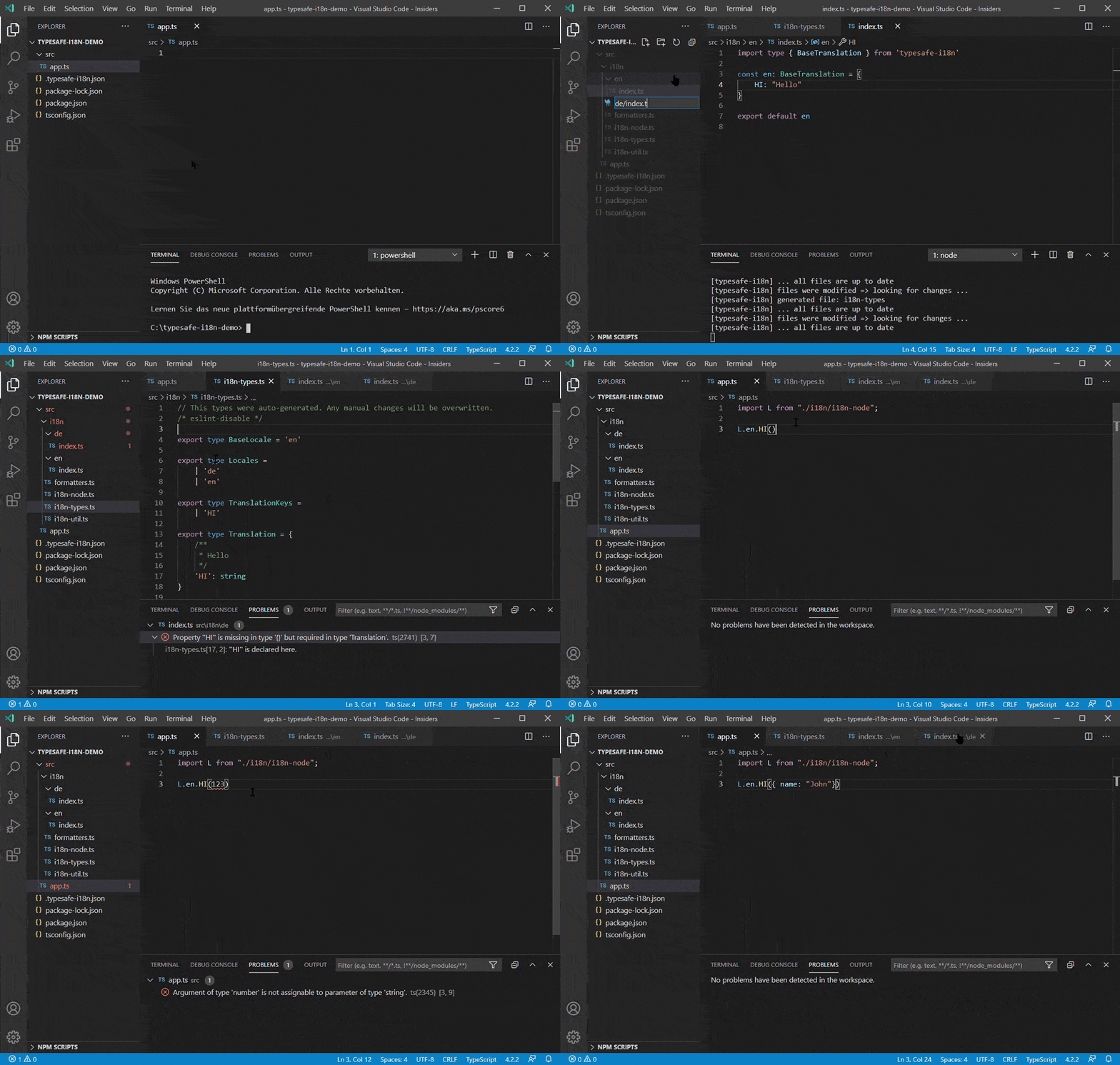
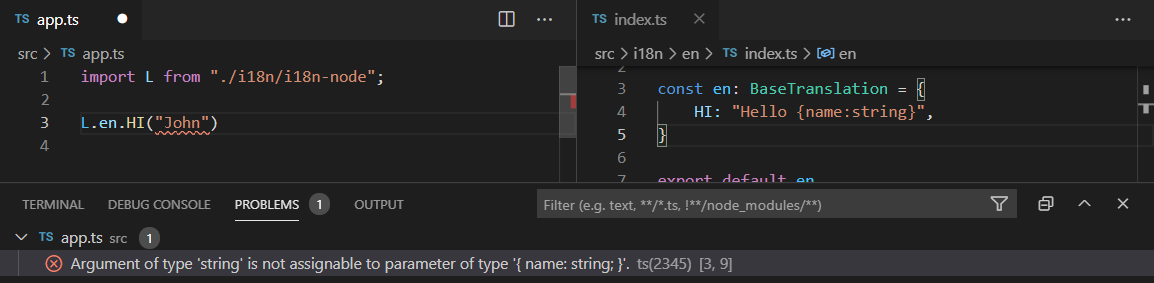
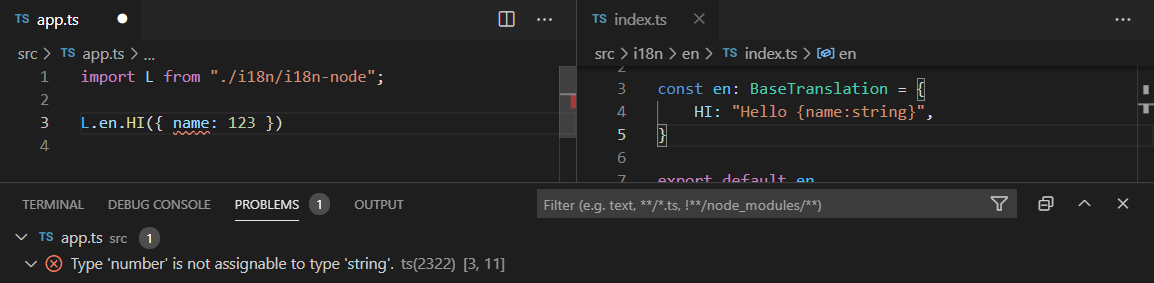
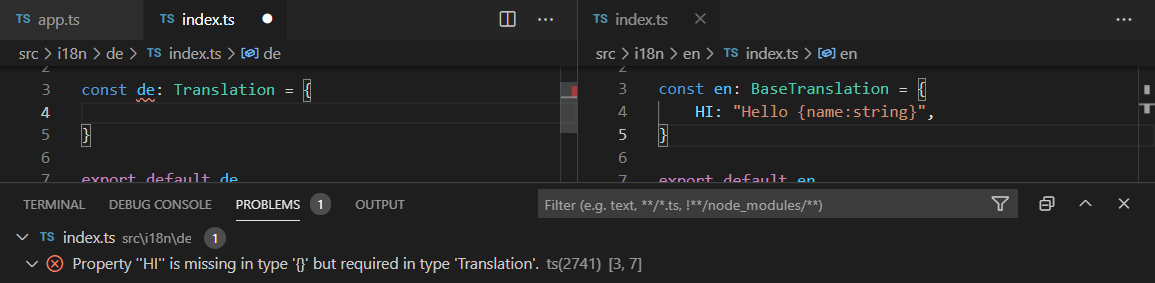
If you want to get the best typesafety features, you will need to use the [`generator`](https://github.com/ivanhofer/typesafe-i18n/tree/main/packages/generator#generator) in order to create types and boilerplate code for you
Here you can see some examples where `typesafe-i18n` can help you:
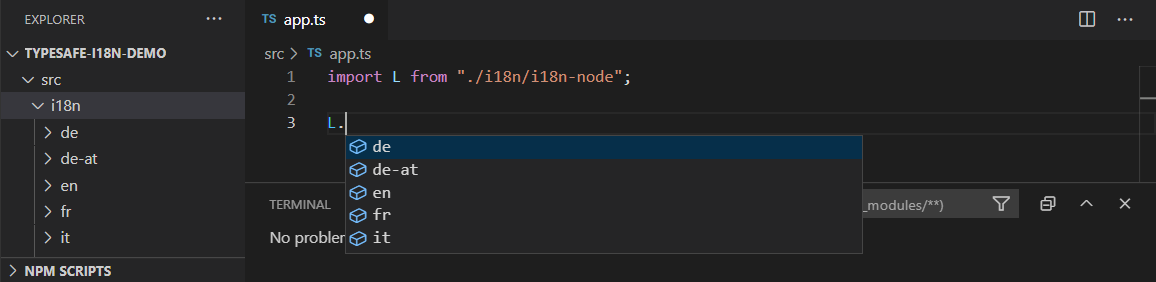
#### typesafe auto-completion for all your defined locales
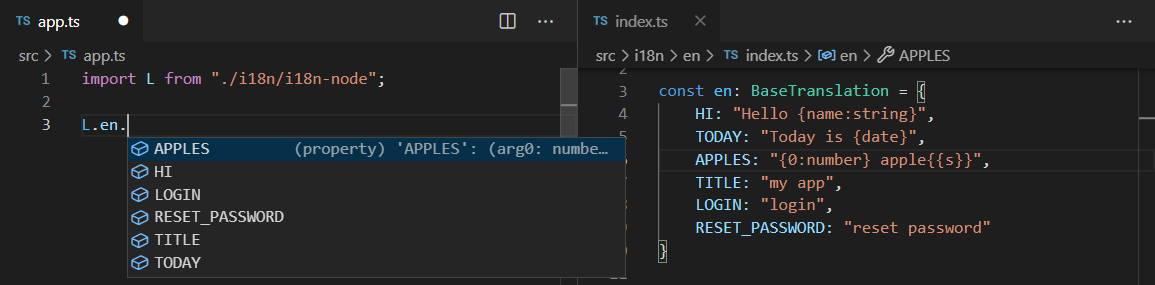
#### typesafe auto-completion for all available translations
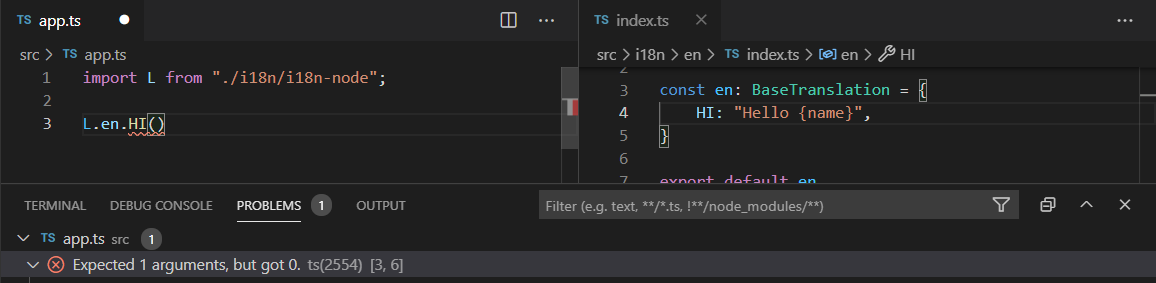
#### you will get an error if you forget to pass arguments
#### you will get an error if you pass the wrong type arguments
#### you will get an error if you forgot to add a translation in a locale
#### you will get an error when a translation is missing an argument
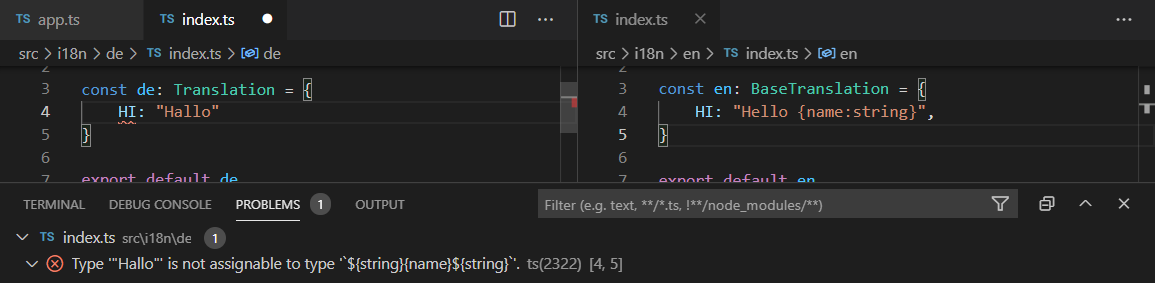
The `typesafe-i18n` package allows us to be 100% typesafe for our translation functions and even the translations for other locales itself. The [`generator`](https://github.com/ivanhofer/typesafe-i18n/tree/main/packages/generator#generator) outputs TypeScript definitions based on your base locale.
> You will also benefit from full typesafe JavaScript code via [JSDoc-annotations](https://github.com/ivanhofer/typesafe-i18n/tree/main/packages/generator#jsdoc).
## Integration with other services
`typesafe-i18n` comes with an API that allows other services to read and update translations. You can connect other services by using the [`importer`](https://github.com/ivanhofer/typesafe-i18n/tree/main/packages/importer) and [`exporter`](https://github.com/ivanhofer/typesafe-i18n/tree/main/packages/exporter) functionality.
There also exists an official plugin for [Inlang](https://inlang.com/). It allows you to use `typesafe-i18n` together with the tooling Inlang provides. You can find it [here](https://github.com/ivanhofer/inlang-plugin-typesafe-i18n).
## Sizes
The footprint of the `typesafe-i18n` package is smaller compared to other existing i18n packages. Most of the magic happens in development mode, where the generator creates TypeScript definitions for your translations. This means, you don't have to ship the whole package to your users. The only two parts, that are needed in production are:
- string-parser: detects variables, formatters and plural-rules in your localized strings
- translation function: injects arguments, formats them and finds the correct plural form for the given arguments
These parts are bundled into the [core functions](https://github.com/ivanhofer/typesafe-i18n/tree/main/packages/runtime#usage). The sizes of the core functionalities are:
- [i18nString](https://github.com/ivanhofer/typesafe-i18n/tree/main/packages/runtime#i18nString): 948 bytes gzipped
- [i18nObject](https://github.com/ivanhofer/typesafe-i18n/tree/main/packages/runtime#i18nObject): 1089 bytes gzipped
- [i18n](https://github.com/ivanhofer/typesafe-i18n/tree/main/packages/runtime#i18n): 1119 bytes gzipped
Apart from that there can be a small overhead depending on which utilities and wrappers you use.
There also exists a useful wrapper for some frameworks:
- [`typesafe-i18n` angular-service](https://github.com/ivanhofer/typesafe-i18n/tree/main/packages/adapter-angular): 1230 bytes gzipped
- [`typesafe-i18n` react-context](https://github.com/ivanhofer/typesafe-i18n/tree/main/packages/adapter-react): 1602 bytes gzipped
- [`typesafe-i18n` solid-context](https://github.com/ivanhofer/typesafe-i18n/tree/main/packages/adapter-solid): 1403 bytes gzipped
- [`typesafe-i18n` svelte-store](https://github.com/ivanhofer/typesafe-i18n/tree/main/packages/adapter-svelte): 1342 bytes gzipped
- [`typesafe-i18n` vue-plugin](https://github.com/ivanhofer/typesafe-i18n/tree/main/packages/adapter-vue): 1256 bytes gzipped
## Performance
The package was optimized for performance:
- **the amount of network traffic is kept small**\
The translation functions are [small](#sizes). Only the locales that are used are [loaded](https://github.com/ivanhofer/typesafe-i18n/tree/main/packages/generator#asynchronous-loading-of-locales)
- **no unnecessary workload**\
Parsing your translation file for variables and formatters will only be performed when you access a translation for the first time. The result of that parsing process will be stored in an optimized object and kept in memory.
- **fast translations**\
Passing variables to the [translation function](#usage) will be fast, because its treated like a simple string concatenation. For formatting values, a single function is called per [formatter](https://github.com/ivanhofer/typesafe-i18n/tree/main/packages/formatters).
If you use `typesafe-i18n` you will get a smaller bundle compared to other i18n solutions. But that doesn't mean, we should stop there. There are some possible optimizations planned to [decrease the bundle size even further](https://github.com/ivanhofer/typesafe-i18n/discussions/89).
## Sponsors
[Become a sponsor :heart:](https://github.com/sponsors/ivanhofer) if you want to support my open source contributions.

Thanks for sponsoring my open source work!
## FAQs
---
Dou you still have some questions? Reach out to us via [Github Discussions](https://github.com/ivanhofer/typesafe-i18n/discussions) or on [Discord](https://discord.gg/T27AHfaADK).
---
### Calling `LL.key()` renders an empty string
You probably forgot to [load the locale](https://github.com/ivanhofer/typesafe-i18n/tree/main/packages/generator#loading-locales) first before using it. Calling `loadLocaleAsync('en')` or `loadAllLocales()` will fix it.
---
### Installing `typesafe-i18n` fails
Running the `npx` command with a `npm` version `<7.0.0` will probably fail because it [**will not include** `peerDependencies`](https://github.blog/2020-10-13-presenting-v7-0-0-of-the-npm-cli).
You could try installing it locally via:
```bash
npm install typesafe-i18n
```
and then run the setup-command from within the `node_modules` folder via:
```bash
./node_modules/typesafe-i18n/cli/typesafe-i18n.mjs --setup-auto
```
> here is the original issue with some additional information: [#142](https://github.com/ivanhofer/typesafe-i18n/issues/142)
---
### I added a new translation to my locale file, but TypeScript gives me the Error `Property 'XYZ' does not exist on type 'TranslationFunctions'`
Make sure to run the [generator](https://github.com/ivanhofer/typesafe-i18n/tree/main/packages/generator#generator) after you make changes to your base translation file. The generator will [generate and update the types](https://github.com/ivanhofer/typesafe-i18n/tree/main/packages/generator#folder-structure) for you.
---
### I don't use TypeScript, can I also use `typesafe-i18n` inside JavaScript applications?
Yes, you can. See the [usage](https://github.com/ivanhofer/typesafe-i18n/tree/main/packages/runtime#usage) section for instructions. Even if you don't use TypeScript you can still improve from some typesafety features via [JSDoc-annotations](https://github.com/ivanhofer/typesafe-i18n/tree/main/packages/generator#jsdoc).
---
### I added a new translation to my locale file, but the generator will not create new types
The [generator](https://github.com/ivanhofer/typesafe-i18n/tree/main/packages/generator#generator) will only look for changes in your base locale file. Make sure to always update your base locale file first, in order to get the correct auto-generated types. If you want to [change your base locale file](https://github.com/ivanhofer/typesafe-i18n/tree/main/packages/generator#baselocale), make sure to give it the type of `BaseTranslation`. All other locales should have the type of `Translation`. E.g. if you set your base locale to italian, you would need to do it like this:
- set your base locale to italian (`it`) in ´.typesafe-i18n.json`:
```json
{
"baseLocale": "it"
}
```
- define the type of your base locale as `BaseTranslation`
```typescript
// file 'src/i18n/it/index.ts'
import type { BaseTranslation } from '../i18n-types'
const it: BaseTranslation = {
WELCOME: "Benvenuto!"
}
export default it
```
- define the type of your other locales as `Translation`
```typescript
// file 'src/i18n/en/index.ts'
import type { Translation } from '../i18n-types'
const en: Translation = {
WELCOME: "Welcome!"
}
export default en
```
---
### The generator keeps overriding my changes I make to the i18n-files
The [generator](https://github.com/ivanhofer/typesafe-i18n/tree/main/packages/generator#generator) creates some helpful wrappers for you. If you want to write your own wrappers, you can disable the generation of these files by setting the [`generateOnlyTypes`](https://github.com/ivanhofer/typesafe-i18n/tree/main/packages/generator#generateonlytypes) option to `true`.
---
### Is `typesafe-i18n` supported by `i18n-ally`?
Yes, you can configure `i18n-ally` like [this](https://github.com/lokalise/i18n-ally/issues/678#issuecomment-947338325). There is currently also an open [`PR`](https://github.com/lokalise/i18n-ally/pull/681) that will add official support for `typesafe-i18n`.
---
### How can I access a translation dynamically?
When you want to dynamically access a translation, you can use the usual JavaScript syntax to access a property via a variable (`myObject[myVariable]`).
1. define your translations
```ts
// i18n/en.ts
import type { BaseTranslation } from '../i18n-types'
const en: BaseTranslation = {
category: {
simple: {
title: 'Simple title',
description: 'I am a description for the "simple" category',
},
advanced: {
title: 'Advanced title',
description: 'I am a description for the "advanced" category',
}
}
}
export default en
```
2. use it in your components
```html
{$LL.category[category].title()}
{$LL.category[category].description()}
```
---
### How can I have translated validation messages?
Validation libraries like `zod`, `yup`, `joi` etc. usually provide a way to define custom error messages. You can use `typesafe-i18n` to translate these messages.
But you need to create the validation schema dynamically, after you have initialized the `LL` object ([]`i18nObject`](https://github.com/ivanhofer/typesafe-i18n/tree/main/packages/runtime#i18nObject)).
You can do that like this by passing the `LL` object to a function that returns the validation schema:
```ts
import { z } from 'zod'
import type { TranslationFunctions } from './i18n/i18n-types'
export const createLoginSchema = (LL: TranslationFunctions) => z.object({
email: z.string().min(1, LL.validation.emptyField()).email(LL.validation.invalidEmail()),
password: z.string().min(1, LL.validation.emptyField()),
})
```
---
### How do I render a component inside a Translation?
By default `typesafe-i18n` at this time does not provide such a functionality. Basically you will need to write a function that splits the translated message and renders a component between the parts. You can define your split characters yourself but you would always need to make sure you add them in any translation since `typesafe-i18n` doesn't provide any typesafety for these characters (yet).
- [example for `react`](https://github.com/ivanhofer/typesafe-i18n/tree/main/packages/adapter-react#how-do-i-render-a-component-inside-a-translation)
- [example for `svelte`](https://github.com/ivanhofer/typesafe-i18n/tree/main/packages/adapter-svelte#how-do-i-render-a-component-inside-a-translation)
---
### How can I use my base translation as a fallback for other locales?
With the strong typesafety features, you'll know if a locale is missing a translation. But in rare cases you might want to use your base translation as a fallback for other locales.
See the [next FAQ entry](#i-have-two-similar-locales-only-a-few-translations-are-different-but-i-dont-want-to-duplicate-my-translations). The same concept can be applied to prefill your translations with the base translation and then just override the parts that are translated.
> You'll loose the some sort of typesafety with that approach since you can't know which parts are translated and which are not. Using the base translation as a fallback is not recommended because your UI will contain two different locales which might confuse your users.
### I have two similar locales (only a few translations are different) but I don't want to duplicate my translations
Your locale translation files can be any kind of JavaScript object. So you can make object-transformations inside your translation file. The only restriction is: in the end it has to contain a default export with type `Translation`. You could do something like this:
- create your `BaseTranslation`
```typescript
// file 'src/i18n/en/index.ts'
import type { BaseTranslation } from '../i18n-types'
const en: BaseTranslation = {
WELCOME: "Welcome to XYZ",
// ... some other translations
COLOR: "colour"
}
export default en
```
- create your other translation that overrides specific translations
```typescript
// file 'src/i18n/en-US/index.ts'
import type { Translation } from '../i18n-types'
import en from '../en' // import translations from 'en' locale
const en_US: Translation = {
...en as Translation, // use destructuring to copy all translations from your 'en' locale
COLOR: "color" // override specific translations
}
export default en_US
```
> If you are using nested translations, you should use the provided `extendDictionary` function that uses [`just-extend`](https://github.com/angus-c/just#just-extend) under the hood.
> ```ts
> import { extendDictionary } from '../i18n-utils'
> import en from '../en' // import translations from 'en' locale
>
> const en_US = extendDictionary(en, {
> labels: {
> color: "color" // override specific translations
> }
> })
>
> export default en_US
> ```
---
### For certain locales I don't want to output a variable, but due to the strict typing I have to specify it in my translation
The generated types are really strict. It helps you from making unintentional mistakes. If you want to opt-out for certain translations, you can use the `any` keyword.
- create your `BaseTranslation` with a translation containing a parameter
```typescript
// file 'src/i18n/en/index.ts'
import type { BaseTranslation } from '../i18n-types'
const en: BaseTranslation = {
HELLO: "Hi {name}!",
}
export default en
```
- create another locale without that parameter by disabling the strict type checking with `as any`
```typescript
// file 'src/i18n/de/index.ts'
import type { Translation } from '../i18n-types'
const de: Translation = {
HELLO: "Hallo!" as any // we don't want to output the 'name' variable
}
export default de
```
> WARNING! the usage of 'any' can introduce unintentional mistakes in future. It should only be used when really necessary and you know what you are doing.
A better approach would be to create a custom formatter e.g.
- create your translation and add a formatter to your variable
```typescript
// file 'src/i18n/en/index.ts'
import type { BaseTranslation } from '../i18n-types'
const en: BaseTranslation = {
HELLO: "Hi {name|nameFormatter}!",
}
export default en
```
```typescript
// file 'src/i18n/de/index.ts'
import type { Translation } from '../i18n-types'
const de: Translation = {
HELLO: "Hallo {name|nameFormatter}!"
}
export default de
```
- create the formatter based on the locale
```typescript
// file 'src/i18n/formatters.ts'
import type { FormattersInitializer } from 'typesafe-i18n'
import type { Locales, Formatters } from './i18n-types'
import { identity, ignore } from 'typesafe-i18n/formatters'
export const initFormatters: FormattersInitializer = (locale: Locales) => {
const nameFormatter =
locale === 'de'
// return an empty string for locale 'de'
? ignore // same as: () => ''
// return the unmodified parameter
: identity // same as: (value) => value
const formatters: Formatters = {
nameFormatter: nameFormatter
}
return formatters
}
```
---
### Why does the translation function return a type of `LocalizedString` and not the type `string` itself?
With the help of `LocalizedString` you could enforce texts in your application to be translated. Lets take an Error message as example:
```typescript
const showErrorMessage(message: string) => alert(message)
const createUser = (name: string, password: string) => {
if (name.length === 0) {
showErrorMessage(LL.user.create.nameNotProvided())
return
}
if (isStrongPassword(password)) {
showErrorMessage('Password is too weak')
return
}
// ... create user in DB
}
```
In this example we can pass in any string, so it can also happen that some parts of your application are not translated. To improve your i18n experience a bit we can take advantage of the `LocalizedString` type:
```typescript
import type { LocalizedString } from 'typesafe-i18n'
const showErrorMessage(message: LocalizedString) => alert(message)
const createUser = (name: string, password: string) => {
if (name.length === 0) {
showErrorMessage(LL.user.create.nameNotProvided())
return
}
if (isStrongPassword(password)) {
showErrorMessage('Password is too weak') // => ERROR: Argument of type 'string' is not assignable to parameter of type 'LocalizedString'.
return
}
// ... create user in DB
}
```
With the type `LocalizedString` you can restrict your functions to only translated strings.
---
### Tests are not running with `Jest`
Unfortunately there are some open issues in the [`Jest`](https://jestjs.io/) repository regarding modern package export formats so `jest` doesn't know where to load files from.
You need to manually tell `jest` where these files should be loaded from, by defining [`moduleNameMapper`](https://jestjs.io/docs/configuration#modulenamemapper-objectstring-string--arraystring) inside your `jest.config.js`:
```js
// jest.config.js
module.exports = {
moduleNameMapper: {
"typesafe-i18n/angular": "typesafe-i18n/angular/index.cjs",
"typesafe-i18n/react": "typesafe-i18n/react/index.cjs",
"typesafe-i18n/solid": "typesafe-i18n/solid/index.cjs",
"typesafe-i18n/svelte": "typesafe-i18n/svelte/index.cjs",
"typesafe-i18n/vue": "typesafe-i18n/vue/index.cjs",
"typesafe-i18n/formatters": "typesafe-i18n/formatters/index.cjs",
"typesafe-i18n/detectors": "typesafe-i18n/detectors/index.cjs",
}
};
```
> here is the original issue with some additional information: [#140](https://github.com/ivanhofer/typesafe-i18n/issues/140)
---
### With Node.JS the `Intl` package does not work with locales other than 'en'
Node.JS, by default, does not come with the full [`intl`](https://nodejs.org/api/intl.html) support. To reduce the size of the node installment it will only include 'en' as locale. You would need to add it yourself. The easiest way is to install the `intl` package
```bash
> npm install intl
```
and then add following lines on top of your `src/i18n/formatters.ts` file:
```typescript
const intl = require('intl')
intl.__disableRegExpRestore()
globalThis.Intl.DateTimeFormat = intl.DateTimeFormat
```
Then you should be able to use formatters from the `Intl` namespace with all locales.
> Note: this is an older approach to the problem. You should not need this when using Node.js version > 16.
---
### "Cannot find module" in yarn monorepo setup
Yarn uses a strange way to install dependencies in a monorepo setup. The issue lays in the "hoisting" of packages (see [this issue](https://github.com/yarnpkg/yarn/issues/7572)). Therefore it might be that the `typesafe-i18n` dependencies cannot be found.
Changing the workspace config in package.json will fix the issue:
```diff
- "workspaces": [
- "apps/*",
- "packages/*"
- ],
+ "workspaces": {
+ "packages": [
+ "apps/*",
+ "packages/*"
+ ],
+ "nohoist": [
+ "**/typesafe-i18n",
+ "**/typesafe-i18n/**"
+ ]
+ },
```


